


Quick Picks: The best AI photo editors for photographers in 2026 are Adobe Lightroom and Photoshop for industry-standard masking and generative editing, and Luminar Neo for fast, AI-native creative adjustments. For professional-grade upscaling and detail reconstruction, Topaz Photo AI and Aiarty Image Enhancer are the top-tier specialists, while Imagen remains the leader for AI-driven batch editing and high-volume workflow automation.
For professional photographers in 2026, the bottleneck isn't the shoot—it’s the post-processing. With the sheer volume of high-resolution data and the increasing demand for "perfect" social-ready imagery, manual editing is no longer a badge of honor; it’s a time sink.
Artificial Intelligence has shifted from being a "gimmick" to a core productivity engine. We’ve moved past simple filters into the era of Generative Accuracy. Today’s AI tools don’t just smooth skin; they reconstruct lost textures, intelligently relight 3D scenes, and learn your unique editing style to automate 90% of your workflow.
Whether you are a wedding photographer needing to batch-edit 3,000 photos in minutes, or a landscape artist looking to rescue a low-light shot with professional-grade detail, there is a specialized AI tool for you. In this guide, we break down the 10 best AI photo editors that are defining the professional standard this year, focusing on performance, RAW-level control, and genuine time-saving value.
From the generative power of Adobe to the revolutionary detail reconstruction of Aiarty Image Enhancer, here is how the best in the business are editing in 2026.
Quick Comparison: Which AI Photo Editor Fits Your Workflow?
To help you quickly compare the tools, the table below summarizes the best AI photo editors for photographers in terms of workflow focus, AI capabilities, and pricing models.
Below, we break down each tool in detail, including its strengths, limitations, and the types of photographers it works best for.
The Best AI Photo Editors for Photographers (Detailed Review)
A. The Industry Standards (All-in-One Workflow)
Adobe Lightroom – Best AI Workflow for Professional Photographers
Adobe Lightroom remains the backbone of most professional photography workflows. Designed for managing large RAW libraries, it combines powerful catalog management with increasingly advanced AI tools that speed up repetitive editing tasks.
Recent updates have pushed Lightroom deeper into AI-assisted workflows. One of the most notable additions is Assisted Culling, which automatically detects out-of-focus shots, closed eyes, and duplicate frames. For high-volume shooters such as wedding or event photographers, this feature can dramatically reduce the time spent sorting through thousands of images.
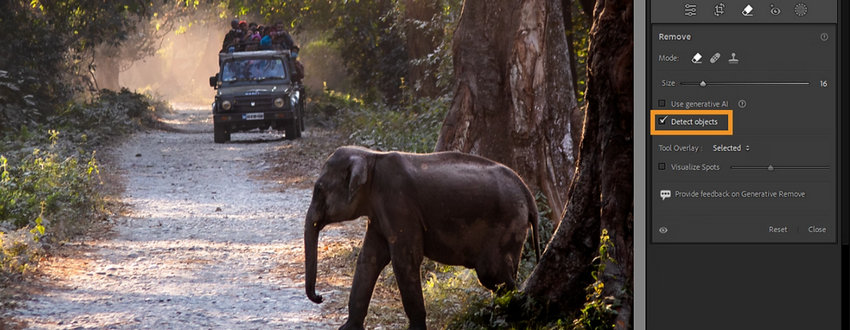
Another flagship capability is Generative Remove, an AI tool that intelligently removes unwanted objects while reconstructing realistic background details. Combined with Lightroom’s AI masking system and adaptive presets, the platform now handles much of the technical groundwork of photo editing.
Key AI Features
- AI Assisted Culling for identifying unusable photos
- AI subject, sky, and object masking
- Generative Remove for intelligent object removal
- AI Denoise for high-ISO RAW files
- Adaptive presets that automatically adjust tones
- Best-in-class RAW workflow management
- Powerful AI masking and automation tools
- Seamless integration with Photoshop
- Requires a subscription
- Limited advanced compositing tools
Pricing
Adobe Lightroom is only available through a subscription model (Creative Cloud), with no official lifetime or perpetual license option available for current versions. Subscription plans start around $9.99–$11.99/month, typically including Lightroom, Lightroom Classic, and cloud storage.
Adobe Photoshop – Best for Professional Retouching and Generative Editing
Photoshop remains the industry’s most powerful image editing tool, especially for detailed retouching, compositing, and commercial photography. With the integration of Adobe’s Firefly generative AI models, Photoshop has evolved from a pixel editor into a powerful creative AI platform.
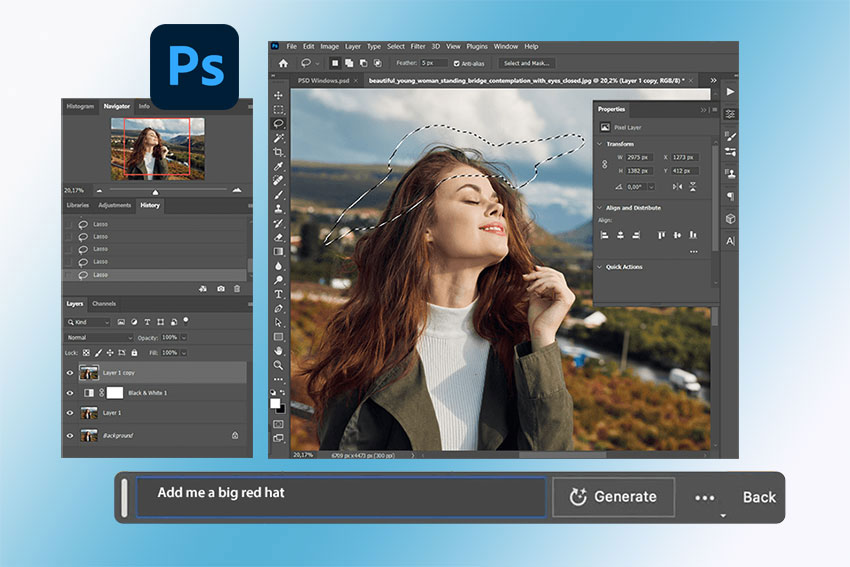
Photographers can now remove distractions, extend backgrounds, or generate missing elements directly inside an image using Generative Fill. For portrait photographers and advertising creatives, Photoshop offers unmatched control over fine details such as skin retouching, color grading, and layered editing.
While Lightroom excels at organizing and processing large batches of images, Photoshop remains the tool professionals turn to when they need precise manual control.
Key AI Features
- Generative Fill for scene expansion and object removal
- AI subject and background selection
- Neural Filters for portrait enhancements
- AI content-aware fill and retouching tools
- Industry-leading editing precision
- Advanced generative AI capabilities
- Massive plugin ecosystem
- Steeper learning curve
- Subscription required
Pricing
Photoshop is officially available only through a monthly or annual subscription (Creative Cloud), starting at roughly $22.99/month for the app alone or $19.99/month for the Photography Plan (includes Lightroom). There is no official "lifetime" (perpetual) license for current versions.
DxO PhotoLab – Best AI RAW Photo Editor for Image Quality
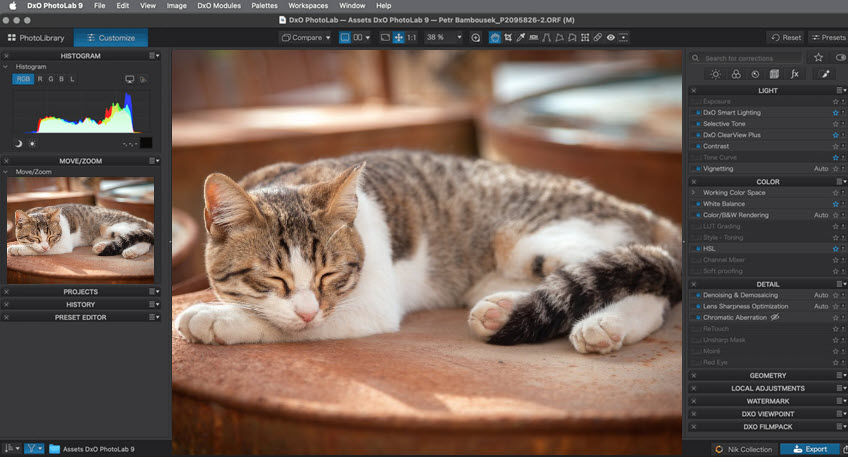
DxO PhotoLab is a RAW photo editor built around DxO’s image-processing technologies, camera and lens corrections, and AI-powered noise reduction. Its DeepPRIME processing is particularly useful for photographers working with high-ISO or otherwise challenging RAW files.
PhotoLab 10 expands its local editing capabilities with AI-powered Depth Masks, which can identify foreground, midground, and background areas based on depth. It also adds smarter people selection, facial feature recognition, and new U Point tools, giving photographers more precise ways to adjust specific parts of an image without relying on complex manual selections.
DeepPRIME XD3 provides advanced noise reduction and detail recovery for both Bayer and X-Trans RAW files. Combined with DxO's camera and lens modules, PhotoLab is especially well suited to photographers who prioritise RAW image quality, optical corrections, and detailed noise reduction.
For wildlife, landscape, portrait, and low-light photography, PhotoLab 10 offers a strong combination of RAW processing, AI-assisted local adjustments, and optical correction tools.
Key AI Features
- DeepPRIME XD3: Advanced AI-powered noise reduction and RAW processing for Bayer and X-Trans files
- Depth Masks: Automatically select foreground, midground, or background areas based on depth
- AI Masks: Select people and individual facial features for targeted adjustments
- AI Dust Removal: Automatically detect and remove sensor dust and small imperfections
- U Point and AI Masks: Refine selections based on colour and luminosity
- Camera and lens corrections: Apply corrections based on DxO's measured camera and lens profiles
- Excellent RAW processing and noise reduction
- Advanced camera and lens corrections
- Powerful AI-assisted local adjustments
- One-time perpetual license available
- Processing can be demanding on older hardware
- Less focused on catalog management than Lightroom
Pricing
DxO PhotoLab is available as a perpetual license with no subscription requirement. The current new-license price listed by DxO is $249.99 for PhotoLab 10 Elite in the US.
B. Image Recovery & Detail Enhancement
Aiarty Image Enhancer – Best AI Tool for Photo Upscaling and Detail Reconstruction
Aiarty Image Enhancer focuses specifically on improving image quality using advanced AI models. Instead of simply enlarging pixels like traditional upscalers, the software analyzes image structures and reconstructs missing textures using trained neural networks.
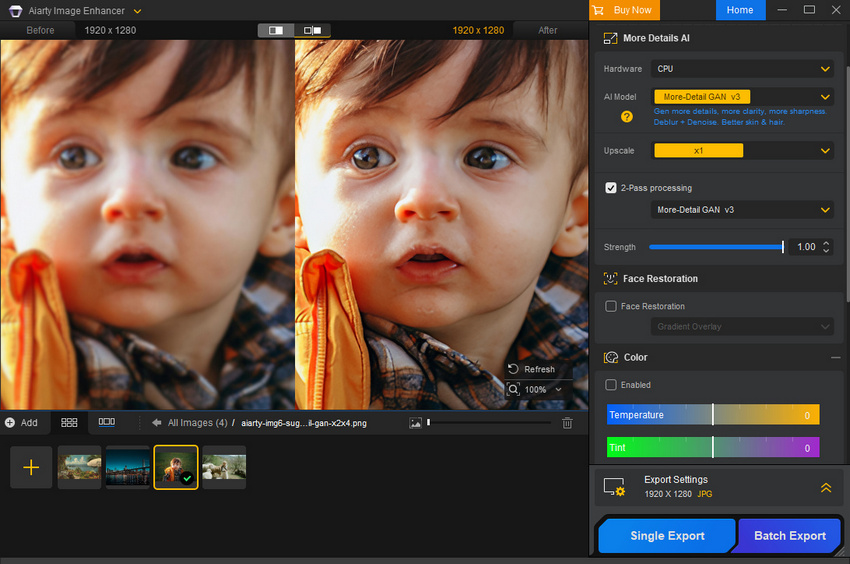
The tool includes dedicated models such as More-Detail GAN v3 and Real-Photo v3, which are designed to restore fine textures like skin pores, animal fur, and detailed edges. This makes it particularly useful when photographers need to rescue slightly soft images, restore compressed files, or prepare photos for large-format printing.
Another key advantage is its ability to output extremely large images, up to 32K resolution. This capability is especially valuable for photographers working with high-resolution displays, large commercial prints, or future-ready 8K production pipelines.
Because it focuses purely on image enhancement rather than full editing workflows, Aiarty is often used alongside tools like Lightroom or Photoshop as a specialized quality-recovery stage.
Key AI Features
- AI super-resolution upscaling
- AI noise reduction and sharpening
- AI eraser to remove unwanted objects
- Effective noise reduction and sharpening
- Fast processing
- Support batch processing
- While it includes essential tools like crop and color adjustment, it's not a full photo editing suite.
- Limited retouching tools
Pricing
Aiarty Image Enhancer offers both subscription and lifetime license. The lifetime license is $99, provides permanent access to all features, including future updates, for up to 3 PCs or Macs.
Topaz Photo AI – Best Automated AI Photo Repair
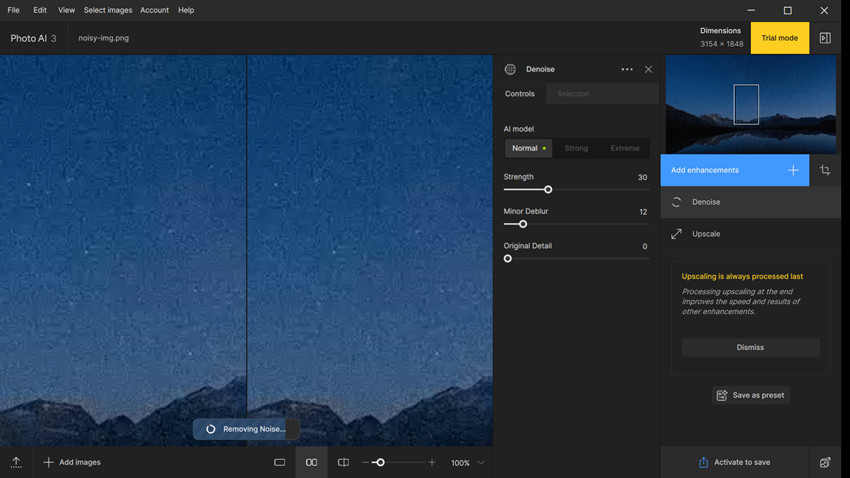
Topaz Photo AI combines several powerful enhancement tools into a single automated workflow. Instead of forcing users to manually decide which correction to apply, the software analyzes each image and recommends the best enhancement pipeline.
Its AI models can automatically apply denoise, sharpening, and upscaling adjustments depending on the problems detected in the image. This makes it particularly popular among wildlife, sports, and action photographers who often deal with motion blur or high-ISO noise.
Key AI Features
- AI denoise
- AI sharpening to correct motion blur
- AI super-resolution upscaling
- Very strong image recovery tools
- Automatic analysis saves time
- Relatively expensive
Pricing
Topaz Photo AI does not offer a lifetime license, opting instead for a subscription-only model. For those choosing an annual commitment, the service is billed monthly at $21/mo for the Personal plan and $58/mo for the Pro version.
C. Creative & Fast Editing
Luminar Neo – Best AI Editor for Creative Photography
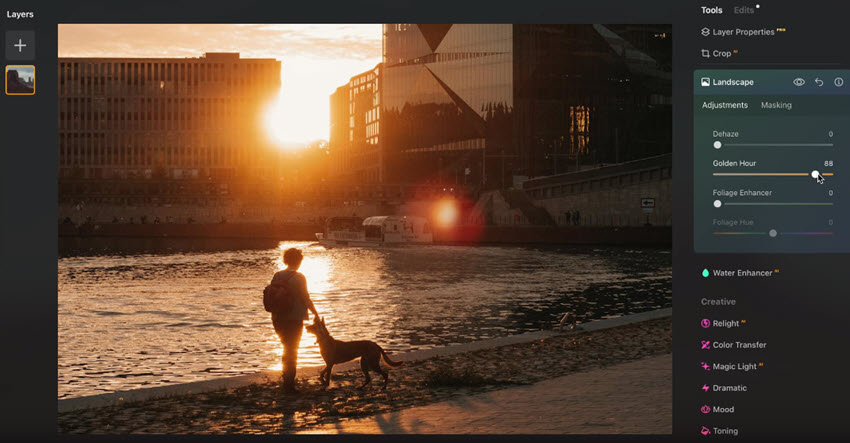
Luminar Neo has evolved far beyond its early reputation as a filter-based photo editor. In recent versions, the software has shifted toward a generative AI-driven workflow, allowing photographers to manipulate images in ways that previously required advanced Photoshop skills.
The newest generative tools, including GenErase, GenSwap, and GenExpand, allow users to remove complex objects, replace elements within a scene, or extend image borders with AI-generated content. These tools make it possible to reshape compositions quickly while maintaining realistic lighting and textures.
This creative flexibility has made Luminar Neo especially popular among landscape, travel, and social-media-focused photographers. However, its generative features can be hardware intensive. Processing large RAW files, particularly images above 45MP resolution, may result in noticeable delays unless the system has a powerful GPU and sufficient RAM.
Key AI Features
- GenErase for removing objects using generative AI
- GenSwap for replacing elements inside an image
- GenExpand for AI-powered canvas extension
- Sky Replacement and Relight AI
- Portrait enhancement tools
- Powerful generative editing tools
- Easy to learn compared to Photoshop
- Excellent for creative photography workflows
- Heavy GPU and RAM requirements
- Performance may slow with large RAW files
Pricing
Luminar Neo is available as a lifetime license ($119).
ON1 Photo RAW – Best Lightroom Alternative with Built-in AI Tools
ON1 Photo RAW is often mistaken for a simple editing program, but in reality it is one of the most complete Lightroom alternatives available. It combines asset management, RAW processing, and AI-powered editing tools within a single application.
One of its standout features is Keyword AI, which automatically analyzes images and assigns searchable tags such as “mountain,” “dog,” or “wedding.” For photographers managing tens of thousands of local photos, this dramatically improves searchability without relying on cloud storage.
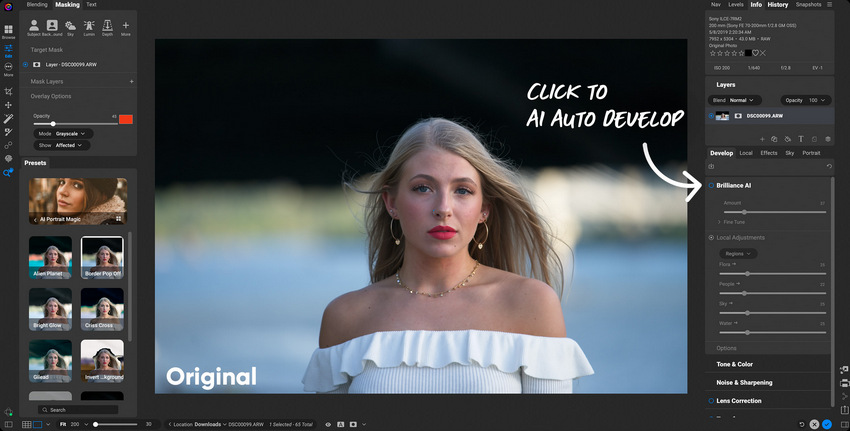
Another major capability is Brilliance AI, which automatically adjusts exposure, white balance, contrast, and noise reduction in a single step. Many photographers find the results more natural than Lightroom’s automatic adjustments.
Unlike many competitors, ON1 also integrates Resize AI (upscaling) and NoNoise AI (noise reduction) directly into the editing workflow, eliminating the need to export files to external tools.
Key AI Features
- Keyword AI for automatic image tagging
- Brilliance AI for intelligent one-click adjustments
- Resize AI for high-quality image upscaling
- NoNoise AI for advanced noise reduction
- AI masking and sky replacement
- Complete Lightroom alternative
- Powerful built-in AI enhancement tools
- One-time license available
- Interface can feel complex for beginners
- Performance may lag with very large catalogs
Pricing
ON1 Photo RAW offers a choice between a $49.99 one-time purchase (License to Own) for use on 2 computers, and a $79.99/year subscription (Photo RAW MAX) that unlocks plugin support, 200GB of cloud sync, and ongoing future upgrades.
Pixlr – Best Browser-Based AI Editor for Quick Creative Edits
Pixlr has evolved significantly in recent years. What started as a simple online photo editor now resembles a lightweight combination of Canva and Photoshop, running entirely in the browser.
Its most impressive feature is AI Generative Fill, which allows users to modify images through simple text prompts. Photographers can add objects, expand scenes, or alter backgrounds directly in the browser without installing software.
Pixlr also includes built-in templates and layout tools, making it particularly useful for photographers who frequently create content for social platforms such as Instagram, TikTok, or Xiaohongshu. The ability to instantly generate multiple aspect ratios, such as Story, Feed, or thumbnail formats, makes it a convenient tool for fast content production.

Key AI Features
- AI Generative Fill for text-based image editing
- AI background removal
- Browser-based editing workflow
- Built-in social media templates and layouts
- Runs entirely in the browser
- Very easy to use for quick edits
- Free version available
- Limited RAW editing capabilities
- Not suitable for high-end professional workflows
Pricing
Pixlr primarily operates on a monthly or annual subscription model ($2.49–$9.99/month), offering ad-free access, unlimited saves, and AI credits.
Learn: How to Edit RAW Photos in Sony Imaging Edge
D. Batch Workflow Assistants
Imagen AI – Best AI Batch Editing for High-Volume Photography
Imagen AI has become one of the most widely used tools in the wedding and event photography industry. Its core strength lies in automating large-scale editing workflows by learning a photographer’s personal editing style.
Instead of manually adjusting each image, users train Imagen using previously edited photos. The AI then applies the same aesthetic across thousands of images with remarkable consistency.
A key advantage is its cloud-based processing. Because the editing computation runs on remote servers, even modest computers can process large photo sets quickly.
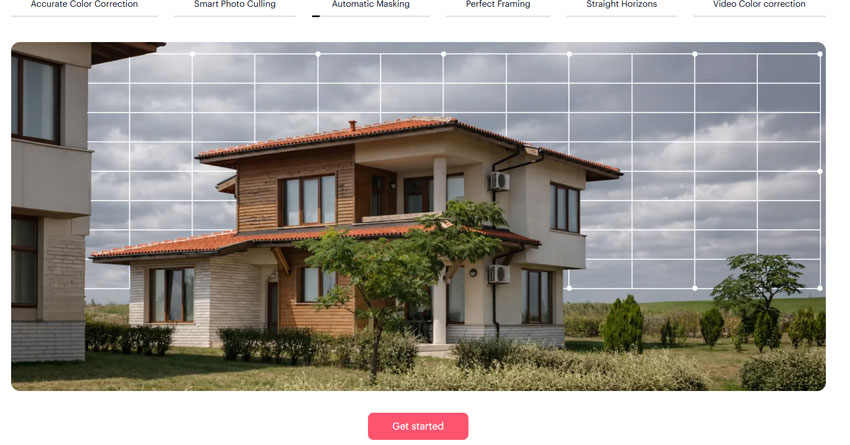
Another recent addition is Cull with Edited Previews, which allows photographers to see AI-edited previews while selecting images. This makes it much easier to judge a photo’s final potential compared to evaluating flat RAW files.
Key AI Features
- AI style learning based on previous edits
- Cloud-based batch processing
- Cull with Edited Previews
- Lightroom integration
- Huge time savings for large photo sets
- Consistent editing style across projects
- Works well even on low-powered computers
- Requires internet connection
Pricing
Imagen AI provides a flexible pay-as-you-go model at $0.05 per photo with no commitment, alongside annual plans starting at $67.50/month that offer discounted per-photo rates and expanded cloud storage for high-volume users.
Aftershoot – Best AI Culling and Offline Batch Editing
Aftershoot originally gained popularity as an AI-powered photo culling tool, but the platform has evolved into a more comprehensive workflow assistant. With the introduction of Aftershoot Edits, the software can now perform automated batch editing similar to Imagen.
Its AI system, called Personal Muse, learns a photographer’s editing style and applies it across entire photo collections. This allows users to automate both photo selection and editing within a single workflow.
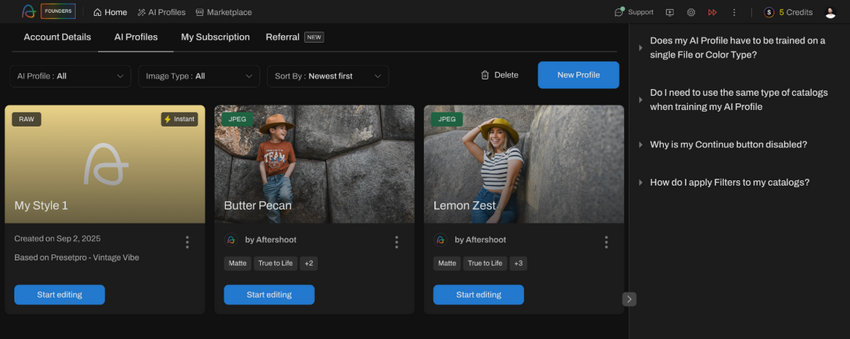
One of Aftershoot’s biggest advantages is its offline processing. Unlike many cloud-based tools, all calculations run locally on the user’s computer. This is particularly valuable for photographers working while traveling, in locations with slow internet, or those who prioritize strict control over client data and image privacy.
For photographers with extremely high annual shooting volumes, such as those covering dozens of weddings per year, the unlimited subscription model can also be more cost-effective than pay-per-image services.
Key AI Features
- AI photo culling and ranking
- Personal Muse AI editing model
- Automated duplicate detection
- Combines culling and editing automation
- Works without uploading images to the cloud
- Unlimited subscription pricing
- Requires a relatively powerful local computer
- Editing customization still evolving compared to Imagen
Pricing
Unlimited subscription plans starting around $9.99/month.
How We Tested and Evaluated These AI Photo Editors
To identify the best AI photo editors for photographers in 2026, we evaluated each tool based on how well it performs in real-world photography workflows. Instead of focusing only on feature lists, we tested how these tools handle common tasks photographers deal with daily—such as processing large RAW files, enhancing image quality, and managing high-volume photo libraries.
The following four criteria guided our evaluation.
Processing Speed
AI photo editing can involve heavy computations, especially when working with high-resolution RAW files. We compared how quickly each tool processed both single images and large batches, including tasks such as AI denoising, upscaling, and automated batch editing.
Tools that rely on local GPU acceleration were tested on large files (including 45MP RAW images), while cloud-based services were evaluated based on their ability to process large projects efficiently without requiring high-end hardware.
Natural Results
AI enhancements are only useful if they preserve the natural look of a photograph. During testing, we paid close attention to whether the AI produced realistic textures and lighting or introduced common artifacts such as overly smooth “plastic” skin, unnatural sharpening halos, or distorted details.
The best tools were those that could recover fine textures—such as skin pores, fabric, or animal fur—while keeping the image visually believable.
Ease of Use
Professional photographers need tools that fit naturally into their workflow. We evaluated how intuitive each interface felt, how easily users could locate key AI tools, and whether the software integrated smoothly with existing workflows such as Lightroom-based editing pipelines.
Editors that reduced repetitive steps and provided clear automation without sacrificing manual control scored the highest in this category.
Value for Money
Pricing models vary widely across AI photo editors, ranging from monthly subscriptions to one-time lifetime licenses or pay-per-image services. We considered not only the base price but also the long-term cost for photographers who process large numbers of images every year.
Tools that deliver strong AI performance while maintaining reasonable long-term costs—especially those offering perpetual licenses—scored particularly well in this category.
Together, these criteria help ensure that the tools recommended in this guide deliver not only impressive AI features, but also practical value for photographers working in demanding real-world environments.
 FAQs
FAQs
Most professional photographers rely on a combination of tools rather than a single AI editor. A common workflow includes Adobe Lightroom for RAW editing and photo organization, paired with Adobe Photoshop for advanced retouching and compositing.
For image quality improvements such as noise reduction, sharpening, or upscaling, photographers often add specialized enhancement tools like Topaz Photo AI or Aiarty Image Enhancer to their workflow.
For RAW photo processing, Adobe Lightroom and DxO PhotoLab are widely considered the best options.
Lightroom provides excellent catalog management and AI masking tools, while DxO PhotoLab is known for its advanced DeepPRIME AI noise reduction, which produces exceptionally clean results in high-ISO images.
Yes. Several AI photo editors still offer perpetual licenses (one-time purchase) instead of monthly subscriptions. Popular examples include Luminar Neo, ON1 Photo RAW, DxO PhotoLab, and Aiarty Image Enhancer.
These tools can be a good choice for photographers who prefer owning their software rather than paying recurring subscription fees.
For photographers who regularly process thousands of images, such as wedding or event photographers, AI batch editing tools can dramatically speed up workflows.
Platforms like Imagen AI automatically apply edits based on a photographer’s past editing style, while Aftershoot can handle both AI culling and automated editing using its Personal Muse technology.
These tools are designed specifically for high-volume workflows and can reduce editing time from hours to minutes.
You May Also Like


This post was written by Brenda Peng who is a seasoned editor at Digiarty Software who loves turning ordinary photos into extraordinary works of art. With AI assistance for brainstorming and drafting, the post is reviewed for accuracy by our expert Abby Poole for her expertise in this field.
