


For wildlife photographers and anyone shooting RAW, open-source or standalone RAW editing tools offer far more choices than staying locked into a subscription service these days.
We have tested RawTherapee, Capture One, Darktable, and DxO PureRAW previously, and noticed that many photographers also tend to compare them with PhotoLab. Before diving into a detailed review, it helps to take a quick look at DxO's broader product lineup.
- DxO Photolab: Advanced RAW photo editing and workflow software featuring camera-lens modules for optical corrections and noise reduction.
- DxO PureRAW: A batch processor designed to develop RAW images with noise reduction, lens corrections, and demosaicing. For photographers who already use other editing software, it integrates seamlessly into their workflow for pre-processing RAW files.
- Nik Collection: It offers a plugin suite for Lightroom, Photoshop, Affinity, and DxO PhotoLab. The collection includes a sharpener, Dfine for noise reduction, Efex for color correction, black-and-white effects, and analog simulation.
Other DxO apps and bundles include DxO FilmPack for film looks and DxO ViewPoint for geometry corrections.
First Impression
DxO PhotoLab offers a 30-day free trial, and it's recommended to install it during the holidays so you have uninterrupted days to fully test the software. It generally requires 30GB of disk space to install the app and download the necessary AI models, assets, and camera modules.
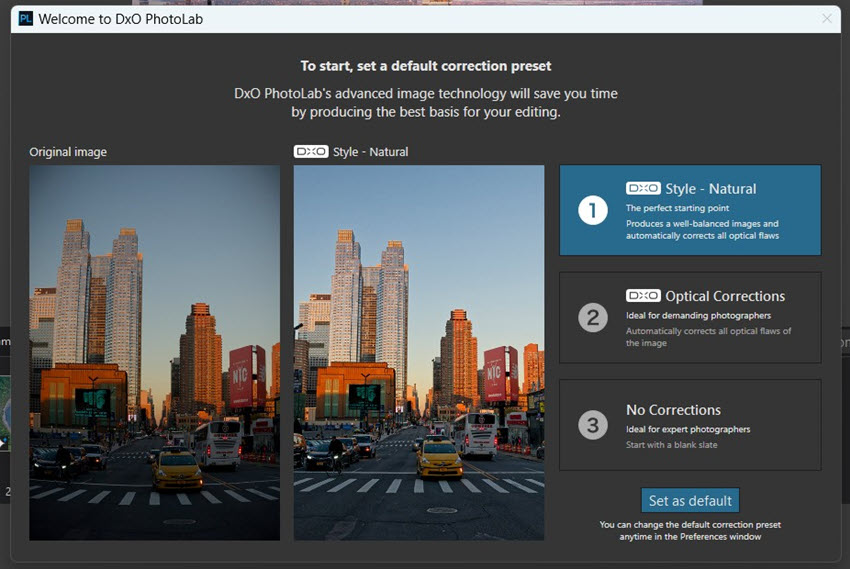
To get started, DxO PhotoLab offers presets for a default correction. You can apply 1-click natural style for balanced color and lighting, use optical corrections, or start without any pre-processing.
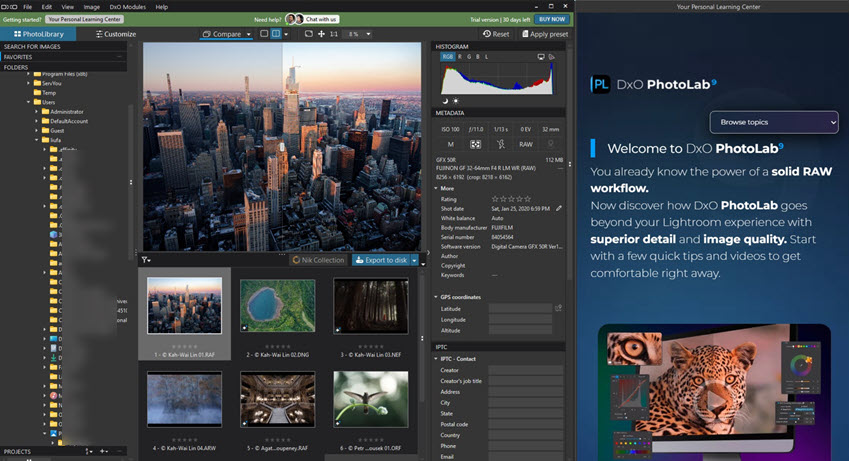
DxO PhotoLab is packed with essential features as a standalone RAW photo editor. Starting in the PhotoLibrary tab, the software acts as a file browser that s reads your computer's existing folder structure. It's straightforward for photo culling, star rating, color labeling, and organizing your shoots.
What Makes DxO PhotoLab Special
RAW Processing and DeepPRIME Noise Reduction
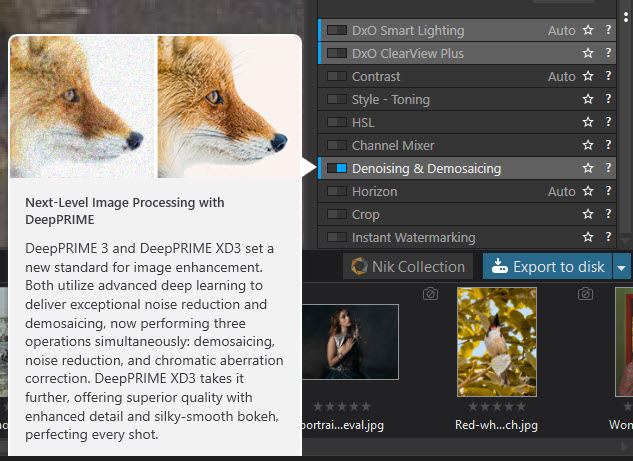
PhotoLab is engineered for developing RAW files into high-quality photos. Through its calibrated lens and camera correction modules and DeepPRIME noise reduction for Bayer and X-Trans files, DxO restores detail from high-ISO shots, making it ideal for wildlife photography, live performance shots, and night street photos.
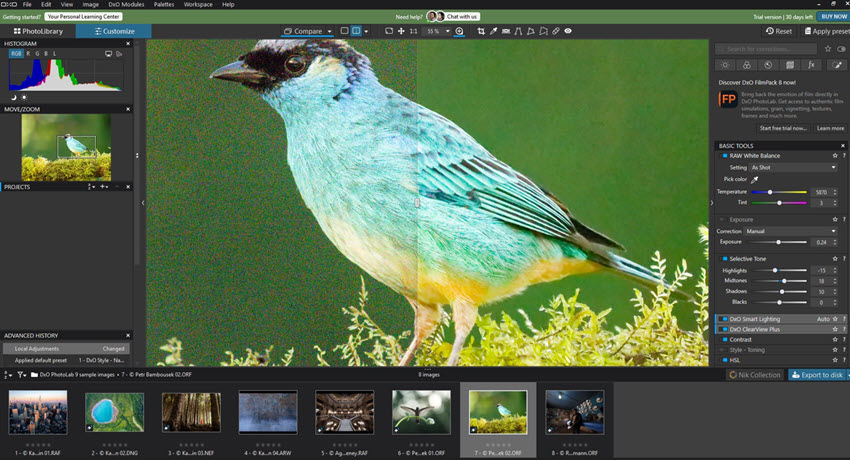
It also includes sample raw files of different types to help you quickly evaluate the software, from wildlife and landscape to dark indoor scenes and intricate architectural structures.
How about JPG and PNG files?
PhotoLab can open JPG and other delivery formats, though its advanced RAW-processing technologies, including DeepPRIME, are designed around RAW data. If you are dealing with old photos, mobile shots, or downloaded files in JPGs, you can adjust the HQ settings and drag the luminance and chrominance sliders.
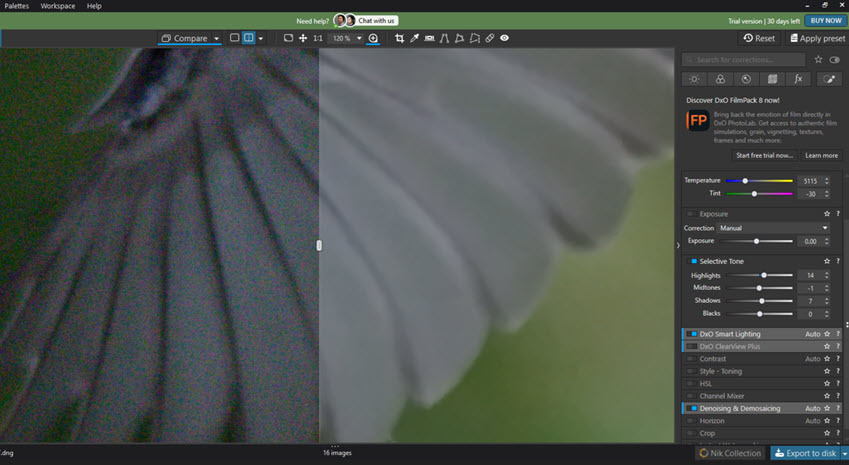
As a hobbyist birder, I go with Canon R7 and 100-400mm lens for a lightweight trip. In these setups, the ISO is frequently pushed to the limit, and birds hiding in tree shadows exhibit heavy noise. Running those files through DeepPRIME, those color speckles from sensor noise is removed. >> More for editing bird photos
Optical Corrections
DxO has a large optical correction database, with over 115,000 lens and camera combinations. It applies tailored corrections for vignetting, distortion, and chromatic aberration.
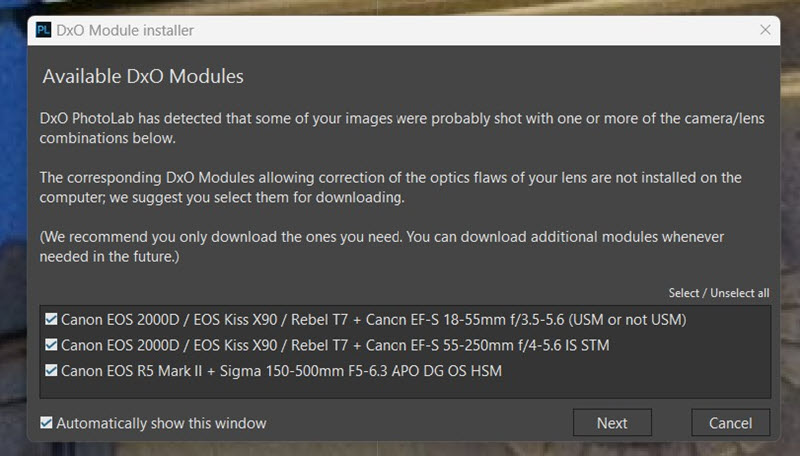
When I open photos, DxO PhotoLab will read the profile data and suggest the correction modules for specific camera bodies and lens combinations. To some degree, it can prevent artifacts on fine structures.
Masking with Control Points and Diffusion Slider
Inherited from the Nik Collection, DxO uses Control Points, where you click a point, and DxO automatically masks similar tones and colors in that radius. It is intuitive and faster than manual brushing.
To avoid the "cut-and-paste" result from over-sharpening in previous versions, where the subject edge looks unnaturally sharp against the background, you can now use the Diffusion Slider in DxO to smoothly feather the boundaries of AI masks over the subject.
Color and Smart Lighting
The software offers accurate color calibration, making it a favorite for photographers needing high-fidelity editing. The intuitive ColorWheel and advanced HSL controls allow for highly targeted manipulation, with direct local adjustments.
For landscape photos, I love the smart lighting of DxO. It automatically balances highlights and shadows as a strong starting point for the RAW file. Though it needs to be used carefully to avoid an over-processed look.
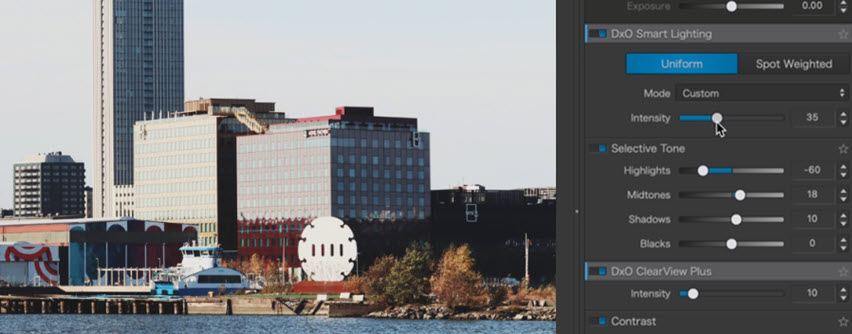
Image Management and Workflows
Catalog vs Folder-Based Photo Management
DxO PhotoLab utilizes a local, folder-based browser that allows you to navigate directly to your local drives and begin culling and editing. In contrast, Lightroom relies on a central catalog, which requires an import process before you can begin working.
Lightroom's approach is designed for high-volume photographers, like wedding or event shooters. They need to manage tens of thousands of images across multiple shoots and avoid import duplicates.
DxO appeals to occasional photo editing, or to users who already organize their files meticulously at the OS level and prefer not to be locked into a proprietary database structure. Even without an import catalog, it still offers rating, color labeling, keywording, and search tools.
Plug and Play with NAS
Since DxO is folder-based, it works exceptionally well with NAS (Network Attached Storage) or external drives. You can point directly to an archived folder and re-edit immediately.
Some photographers prefer DxO's localized approach, saying it feels more responsive for direct RAW viewing and editing, while Lightroom can feel laggy and resource-heavy. However, some users running DxO on older Macs report that it feels slower than Lightroom.
Since DxO offers a generous free trial, you can fully test it before making a purchase decision.
Integrating DxO with Other Photo Editors
While some users quit the Lightroom subscription to stay in the DxO system, there are other users integrating DxO with their existing workflows. It all depends on your specific projects, photo culling preferences, and the degree of control you want over your local storage and editing environment.
For DxO-only workflows, many photographers choose the routine of:
- Use DxO PuraRaw for initial noise reduction and raw editing
- Move to PhotoLab for exposure, color, and local adjustments with U-Point.
- Optionally, integrate creative color effects and filters from Nik Collection.
- Export photos from DxO PhotoLab.
DxO PhotoLab and Lightroom Workflow
For photographers who want DxO's processing power without abandoning their current catalog, a hybrid workflow is ideal:
- Batch import raw files into DxO PureRaw, apply DeepPRIME noise reduction, and export as DNGs.
- Round-trip to Lightroom for photo culling, color correction, and final export.
The advantage is, this workflow doesn't disrupt your existing cataloging habits. You are simply outsourcing batch noise reduction to DxO, while keeping your library management exactly as it is.
For Mac users, you can replace Lightroom with Photomator for the same workflow above. For dedicated image quality enhancement, use one of these best photo enhancers for Mac.
DxO PhotoLab and Affinity Workflow
With the PhotoLab 10.1 update, users can export directly to Affinity as a native .af document. Rather than exporting an intermediate file and opening it manually, you can send your developed image straight from PhotoLab to Affinity for further editing.
Upon this integrated workflow, you can optionally include the uncorrected original as a second layer. This helps you to compare the DxO Processed image with the original, or use masks in Affinity to blend the two versions.
Tips:
Previously, DxO bakes creative edits into exported DNG files, such as white balance, exposure sliders, smart lighting, or crops. After PhotoLab 10 updates, creative adjustments such as color, tone and exposure are not embedded in the DNG. If you prefer those creative adjustments to be carried to an external program, use the 16-bit TIFF file instead.
The current linear DNG export contains technical corrections, such as demosaicing, optical corrections, red-eye correction, etc.
The updates also apply a high-fidelity DNG compression, so that you won't meet the previous pains of an uncompressed DNG result in large file size.
Pricing and Add-Ons
DxO PhotoLab offers a 30-day free trial and a version-based perpetual license. For instance, if you own DxO PhotoLab 8, it remains yours to use.
If you prefer to upgrade to the next major version, you have to pay an additional upgrade fee.
Therefore, some existing users suggest that you can buy the current version of DxO PhotoLab and hold it for a few years without upgrading. Then, when a future version is released with more powerful features, you can upgrade around Black Friday.
- Version-based perpetual license: $249.99
- Upgrade from previous versions*: $129.99
*Note: this upgrading price is eligible for upgrading from DxO PhotoLab 9 or 8.
Add-Ons and Plug-Ins
The two primary native add-ons are DxO FilmPack and DxO ViewPoint. FilmPack brings analog film simulations and cinematic grain to your digital files, while ViewPoint provides advanced geometry and perspective corrections.
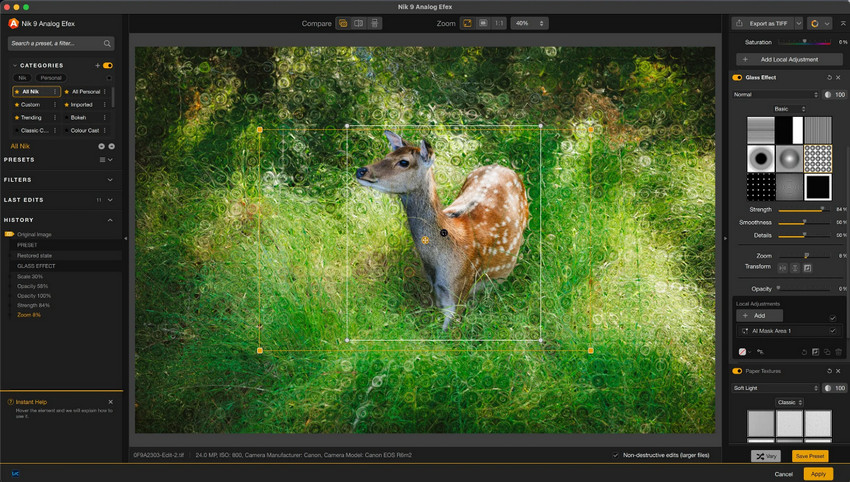
For Nik Collection, PhotoLab features a dedicated export button that smoothly hands your image over to the Nik plugin interface. Once your creative edits are applied, the file is effortlessly round-tripped back into your PhotoLab workflow.
Tips to Enhance Photo Quality
While DxO PhotoLab excels at RAW development and optical corrections, some photographers also use specialized AI enhancement tools for tasks such as image upscaling, detail recovery, face enhancement, restoring older photos, and noise reduction for both RAW and delivery formats like JPG/PNG.
In such scenarios, Software like Topaz Photo or Aiarty Image Enhancer can complement a photo enhancing workflow when additional enlargement or AI-based enhancement is needed.
Here is a quick test of Aiarty Image Enhancer for noise reduction and upscaling.
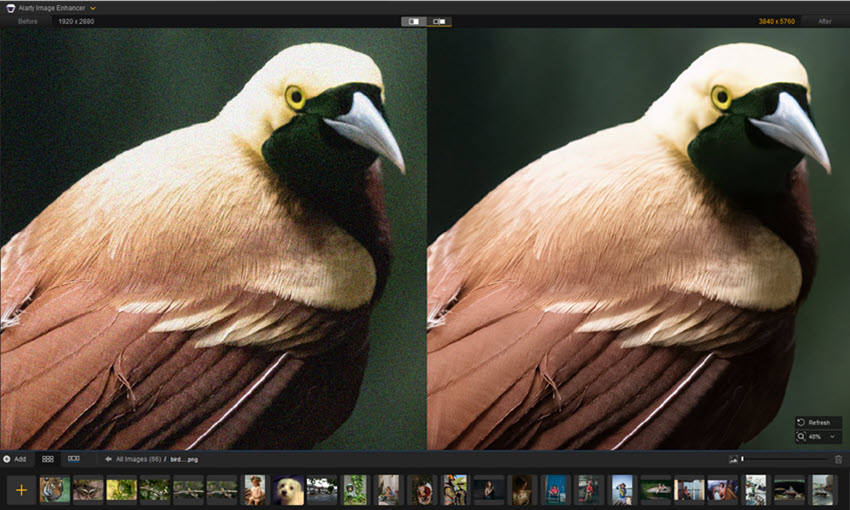
For both raw files, JPG/PNG, and other mainstream formats, you can apply noise reduction to clean up photos with Aiarty. With the strength slider, you can adjust how intensely the enhancement is applied, thus maintaining a balance for natural results, while restoring real details.
For compact camera photos, APS-C, M43 shots, and mobile photos suffering from sensor noise and softness, Aiarty Image Enhancer works as a dedicated photo quality enhancer for batch tasks, speeds up your workflow, and delivers clean, high-quality, and professionally developed photos.
- Powerful noise reduction in 3 models, for RAW/JPG/PNG, etc.
- Restore natural details in bird feathers, wildlife fur, portraits, skin, and fabrics.
- Enhance soft, dark, grainy photos to clearer 4K quality.
- Avoid over-sharpening and deliver a professional finish.
- Option to batch upscale by 2X, 4X, to 8K and higher.
- Work as an external editor, such as the Lightroom-Aiarty workflow.
Click the button below to test out Aiarty Image Enhancer, and see how handy it fits into your existing workflow. You can use it alone or as a batch quality enhancer for photo editing tools.
Wrap Up
If you're mainly editing RAW photos from a camera and don't already have a well-curated photo catalog, DxO PhotoLab is a strong choice. It is best suited for photographers who want high-quality RAW processing and industry-leading lens corrections.
Lightroom's advantage remains its seamless integration with Adobe apps, enhanced noise reduction, generative AI tools, and cloud syncing across devices. For a pure RAW processing and local-storage workflow, users without an Adobe subscription can choose between raw photo editors or invest in hybrid workflows.
For users needing image quality enhancement and noise reduction for both raw and delivery formats, like JPG/PNG, photo enhancer and upscaler tools, such as Aiarty Image Enhancer, are a handy inclusion.
You May Also Like


This post was written by Brenda Peng who is a seasoned editor at Digiarty Software who loves turning ordinary photos into extraordinary works of art. With AI assistance for brainstorming and drafting, the post is reviewed for accuracy by our expert Abby Poole for her expertise in this field.
