


RAW files preserve maximum image data from your camera, whether you shoot Sony ARW, Canon CR3, Nikon NEF, Fujifilm RAF, or Sigma X3F. But that flexibility comes at a cost: RAW files are flat, noisy, and unfinished by design.
That’s why choosing the right RAW processing software matters. Some tools focus on color science, others on noise reduction, while many free RAW photo editors trade usability for control.
This guide compares 10 of the most popular RAW photo editors, based on real user experience, pricing, supported RAW formats (CR3, NEF, ARW, RAF, DNG), workflow performance and more.
Lightroom Classic is widely considered the industry standard for RAW photo editing and workflow management. It offers powerful non-destructive editing, excellent color control, and seamless organization for large photo libraries. While it runs on a subscription model, it remains the most balanced choice for most photographers.
Powerful and completely free. It does everything Lightroom can do if you know where to click, but the interface takes some getting used to. Once you get it, you can tweak exposure, curves, and colors almost endlessly.
Aiarty Image Enhancer – Best for AI-powered RAW workflow enhancement. I usually export my edited RAW photos from Lightroom and run them through Aiarty for the final polish. It can recover impressive details, reduce noise, and improve sharpness without spending hours tweaking sliders. It’s especially useful for high ISO shots, older camera files, or images affected by slight lens softness.
RAW Editing Software Comparison Table
This quick comparison highlights the key differences in speed, ease of use, and AI capabilities across popular RAW editing tools.
Professional RAW Editing Software (Manual Control Focused)
Adobe Lightroom Classic
Adobe Lightroom Classic is the industry standard for RAW photo editing and library management. It combines non-destructive editing with advanced exposure, color, and tone curve controls. Lightroom excels at noise reduction, batch processing and organizing large photo libraries, making it a go-to choice for professional photographers who need both editing power and workflow efficiency.
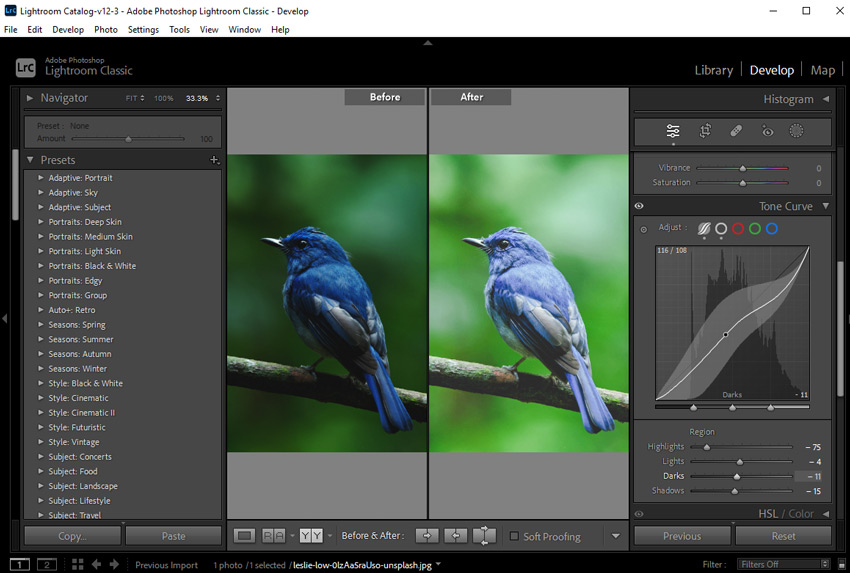
Why I picked it: Lightroom is perfect for photographers managing large photo collections. Many Reddit users mention it’s reliable for both studio and travel workflows, and it pairs seamlessly with Photoshop for advanced retouching when needed.
Key Features:
- Non-destructive RAW editing with advanced exposure and color controls
- Batch processing and presets for fast workflow
- AI-based masking and auto adjustments
- Excellent support for most camera RAW formats (CR3, NEF, ARW, RAF, DNG, TIFF)
- Library management and keyword tagging for large collections
Pricing: Subscription-based, starting at $19.99/month as part of the Photography Plan (includes Photoshop).
Tips: For batch culling large Raw files before making editing decisions in Lightroom, you can also resort to a dedicated Raw image viewer such as FastRawViewer for faster loading speeds and real Raw previews.
- Industry-standard workflow, widely used by professionals
- Excellent RAW support and catalog management
- Seamless integration with Photoshop
- Powerful batch editing with presets
- Subscription model can be costly over time
- Learning curve for new users
- Performance can slow on very large catalogs
Photoshop Camera Raw
Adobe Photoshop includes Adobe Camera Raw for RAW processing but excels at pixel-level retouching, compositing, and advanced manipulation. It is best suited for photographers who need precise control over every detail in their images and often pair it with Lightroom for full workflow flexibility.
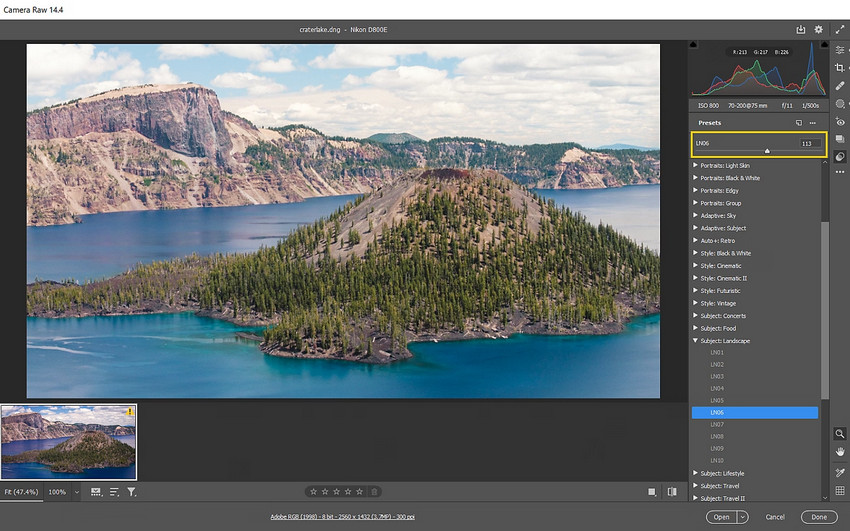
Why I picked it: Photoshop is perfect for detailed edits and creative compositing. Reddit users frequently mention that while it’s powerful, it’s not ideal for bulk RAW workflows, but irreplaceable for retouching and fine adjustments.
Key Features:
- Pixel-level retouching and compositing
- Adobe Camera Raw integration for RAW processing
- Advanced masking and selection tools
- Extensive plugin and brush support
- Supports most camera RAW formats (CR3, NEF, ARW, RAF, DNG, TIFF)
Pricing: Subscription-based, usually bundled with Lightroom, starting at $19.99/month.
- Unmatched editing flexibility
- Best for detailed retouching and compositing
- Supports almost all RAW formats
- Not optimized for bulk RAW workflows
- Steep learning curve for beginners
Related Search: How to Use Super Resolution in Photoshop to Upscale Images?
Capture One
Capture One is a professional-grade RAW processing software widely respected for its industry-leading color science and precise color control. Designed for demanding studio and commercial workflows, it supports tethered shooting, session-based organization, and advanced color tools, making it a favorite among professional and commercial photographers.
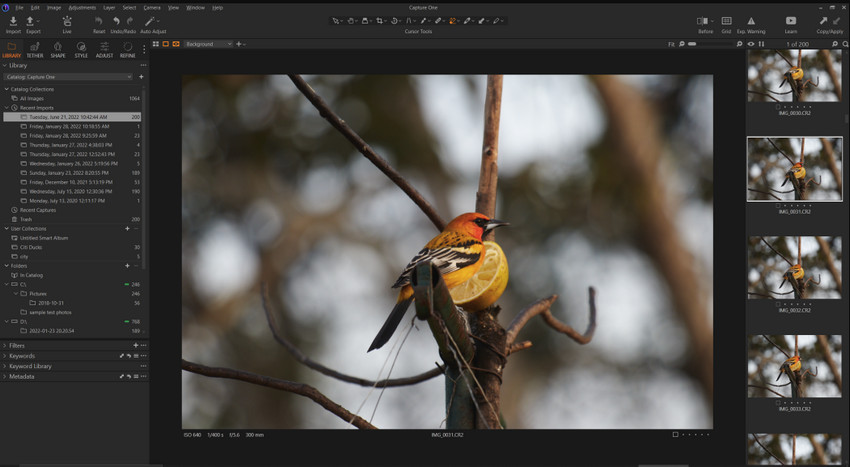
Why I picked it: Capture One is ideal for photographers who prioritize color accuracy and studio workflows. Many users highlight its amazing color adjustments, though the recent shift to subscriptions has drawn mixed reactions.
Key Features:
- Exceptional color grading tools and film simulations
- Session-based workflow for studio shoots
- Tethered shooting support
- Advanced layer-based adjustments
- Supports major camera RAW formats (CR3, NEF, ARW, RAF, DNG)
Pricing: Subscription: ~$15–$25/month depending on the specific plan.
Hot search: How to Edit Raw Photos for Best Quality >>
- Industry-leading color control
- Excellent RAW quality
- Professional workflow for studios
- Expensive for hobbyists
- Steeper learning curve for beginners
DxO PhotoLab
DxO PhotoLab is renowned for its automatic lens corrections and DeepPRIME AI noise reduction, making it excellent for low-light and high-ISO photography. It’s designed for photographers who want fast results without sacrificing image quality.
DxO PureRAW vs PhotoLab: DxO PureRAW is a lightweight, one-click pre-processing tool that handles denoising, demosaicing, and lens corrections before you continue editing in Lightroom or Photoshop. In contrast, PhotoLab is a full-featured RAW editor built on the same engine, offering complete manual control and an all-in-one editing workflow.
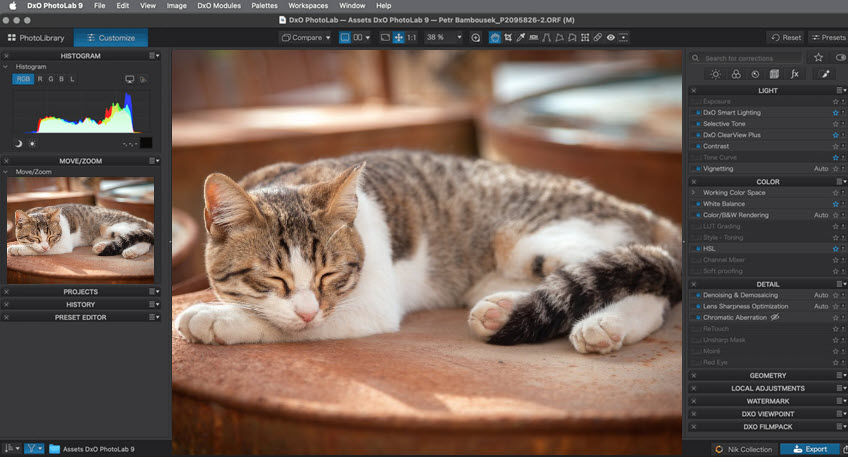
Why I picked it: Recommended for fast, high-quality edits, especially denoising low-light RAWs. DeepPRIME is widely praised for rescuing images that would otherwise be unusable. If you prefer a simpler workflow, PureRAW can handle the cleanup step automatically before editing elsewhere.
Key Features:
- DeepPRIME AI noise reduction for high-ISO images
- Automatic lens correction profiles
- Non-destructive RAW editing
- Local adjustments and repair tools
- Supports most camera RAW formats
Pricing: One-time purchase: ~$239
Learn: How to Edit RAW Photos in Sony Imaging Edge
- Outstanding denoising quality
- No subscription required
- Flexible workflow (full editor or pair with PureRAW)
- Limited photo management tools
Affinity Photo
Affinity Photo is a Photoshop alternative with full RAW editing support and broad file compatibility, especially including Sigma RAW formats. It’s aimed at photographers who want powerful editing tools without recurring costs.
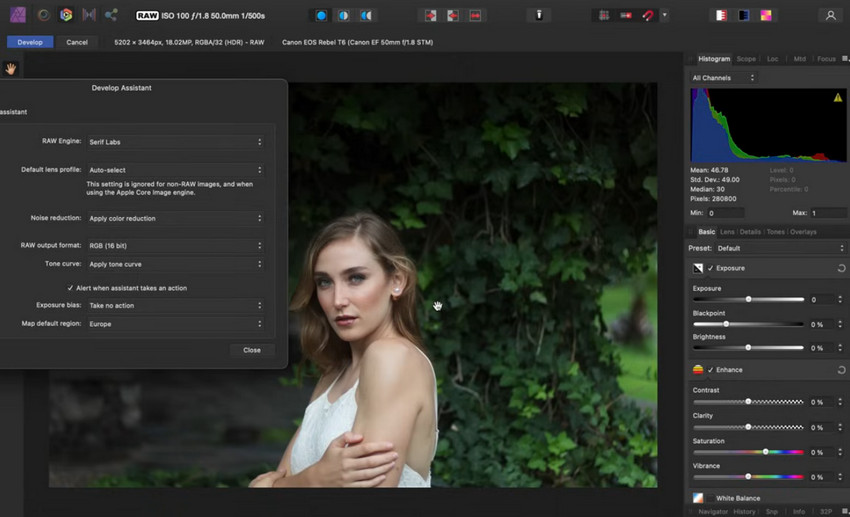
Why I picked it: Users love the one-time purchase model and wide format support. Reddit feedback often mentions it’s a solid Photoshop alternative for budget-conscious pros or hobbyists.
Key Features:
- Layer-based RAW editing and retouching
- Supports almost all major RAW formats, especially including Sigma X3F
- Advanced selection and masking tools
- Non-destructive editing workflow
- Extensive export options
Pricing: free to use in Affinity by Canva with basic photo editing, while requiring a Canva premium subscription for AI-driven features.
- Excellent value for the price
- Full layer-based editing
- Wide RAW format support
- Weak library management
Also See: Remove White Background from Image in Affinity Photo
ON1 Photo RAW
ON1 Photo RAW combines RAW editing, effects, and photo organization into a single all-in-one application. It’s suitable for photographers who want to manage and edit their workflow without switching software.
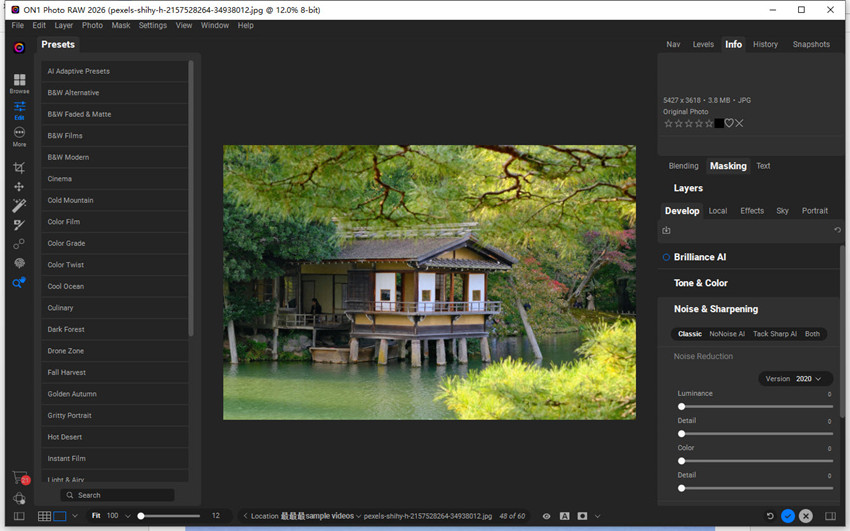
Why I picked it: Reddit users like ON1 for its all-in-one workflow and optional subscription. Great for those who want both RAW editing and effects without juggling multiple programs.
Key Features:
- RAW processing with advanced adjustments
- Layer-based editing and masking
- Effects, filters, and presets included
- Batch processing and file organization
- Supports major camera RAW formats
Pricing: One-time purchase: ~$99–$116 depending on the edition; subscription also available, around US $7.99/month (or $89.99/year) when billed annually.
- All-in-one workflow
- No subscription required (optional)
- Good for batch processing
- Performance may vary on large RAW files
- Complex UI with a learning curve
While professional RAW editors like Lightroom, Capture One, and DxO PhotoLab offer deep control over every aspect of editing, they also come with a learning curve and time investment. Many photographers still need to spend time adjusting exposure, noise reduction, and sharpness manually to get the final result they want.
This is where AI-based tools are starting to change the workflow. Instead of replacing traditional RAW editors, they can be used as a fast enhancement layer to improve image quality before or after detailed editing.
Best Free RAW Photo Editing Software
While professional RAW editors and AI tools like Aiarty offer advanced ways to improve image quality, some users may still consider free RAW editors as a basic fallback option.
Darktable
Darktable is a free, open-source RAW editor that provides a wide range of manual adjustment tools, including exposure control, tone curves, and color management. It is often used by photographers who want full control over RAW editing without paying for subscription software, although it typically requires more time and experience to achieve polished results.
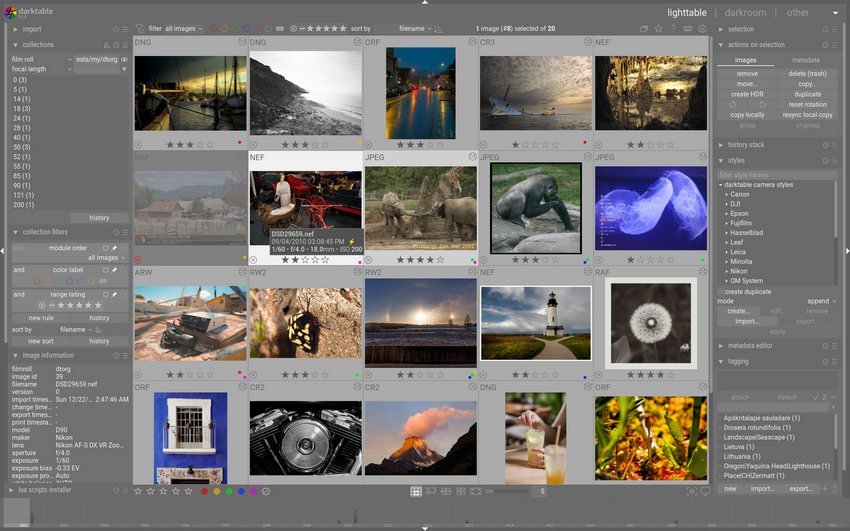
Why I picked it: Often recommended in open-source communities for its flexibility, Darktable is powerful but requires a learning curve and manual effort to reach consistent, professional-looking results.
Key Features:
- Basic RAW exposure and tone adjustments
- Manual color and contrast control
- Local editing tools with masking support
- Supports major RAW formats
- Free and open-source
- Offers advanced manual RAW editing controls
- Highly flexible for experienced users
- Steep learning curve and less intuitive interface
- Requires manual adjustments for high-quality results
- Slower workflow compared to modern AI-based tools
RawTherapee
RawTherapee is a free, open-source RAW processor that focuses on manual image adjustments and technical control. It offers a wide range of editing tools such as demosaicing, sharpening, and noise reduction, but requires significant time and experience to achieve consistent results.
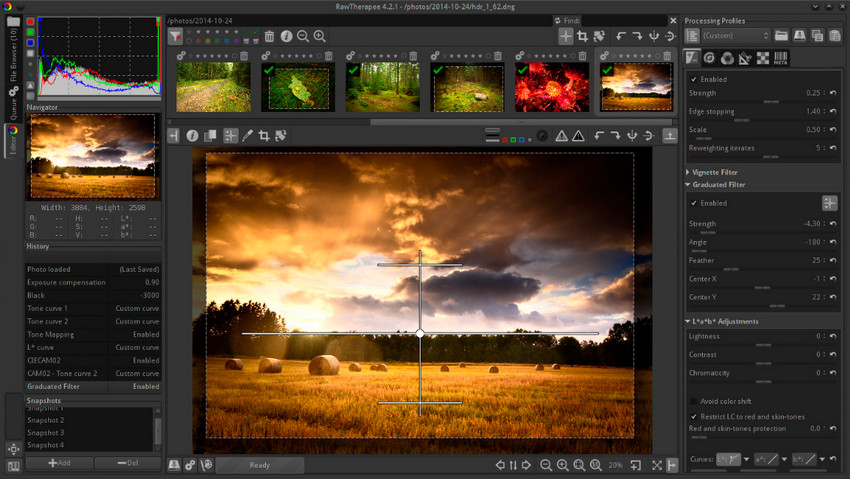
Why I picked it: Often recommended in photography communities for its depth, RawTherapee is powerful but primarily suited for users who are comfortable with complex manual workflows.
Key Features:
- Manual RAW adjustments with technical control
- Advanced demosaicing and noise reduction options
- Tone curve and color correction tools
- Supports major RAW formats
- No cost
- Highly detailed manual control
- Good image quality when properly tuned
- Steep learning curve
- Slow workflow for large batches
GIMP (with RAW Plugins)
GIMP is a free, open-source image editor that can handle RAW files through external plugins. However, RAW processing is not built into the software and requires additional setup before use.
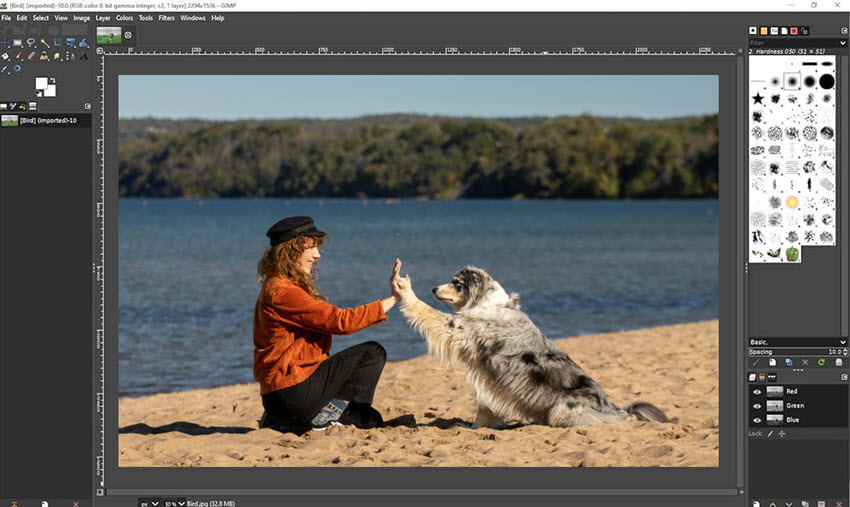
Why I picked it: Often used as a general-purpose editor, GIMP is more suitable for retouching and image manipulation than dedicated RAW processing.
Key Features:
- Requires external plugins for RAW support
- Layer-based editing system
- Supports multiple export formats
- Extensible via community plugins
- Free and highly customizable
- Strong image editing capabilities
- Large plugin ecosystem
- Not a native RAW editor
- Requires setup for RAW workflow
Limitations of Free RAW Editors
Free RAW editors are powerful options for photographers on a budget, but they may require more manual work compared with paid or AI-powered solutions.
- More manual adjustments are often needed for noise reduction, sharpening, and detail enhancement.
- Large photo batches can take more time to process efficiently.
- Automation features may be limited, requiring more editing experience to achieve consistent results.
For photographers who want to speed up the final enhancement stage, AI-powered tools can complement traditional RAW editors by improving details, reducing noise, and enhancing image quality with less manual effort.
Aiarty Image Enhancer: The AI Enhancement Tool for Professional RAW Workflows
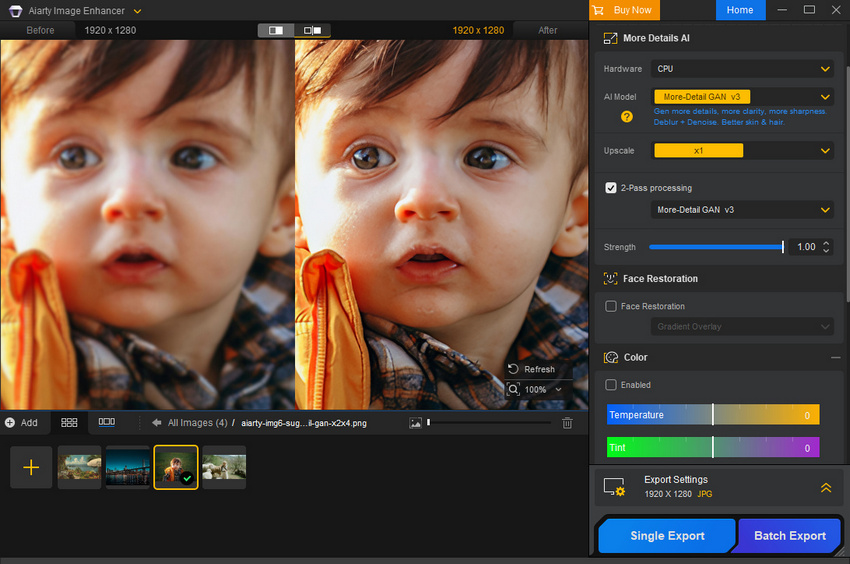
Aiarty Image Enhancer is designed to complement traditional RAW editing software rather than replace it. While Lightroom, Capture One, and other RAW editors excel at exposure adjustments, color correction, and creative editing, some image quality limitations cannot always be solved through manual adjustments alone.
As an AI-powered enhancement tool, Aiarty adds a final refinement step after RAW processing to recover fine details, reduce noise, improve sharpness, and upscale photos for high-resolution displays, printing, and professional use.
Why Photographers Add AI Enhancement to Their RAW Workflow
High ISO and low-light photos: RAW editors can reduce noise, but aggressive noise reduction may remove fine textures. Aiarty uses AI denoising to clean up noisy images while preserving important details, making it useful for night photography, events, and indoor shooting.
Slightly soft images: Photos affected by lens limitations, minor focus issues, or softness can be difficult to improve with traditional sharpening tools alone. Aiarty uses AI deblur and detail reconstruction to enhance clarity while maintaining a natural look.
Large print and high-resolution needs: RAW editing improves color and tone, but it cannot increase the original resolution of a camera file. Aiarty can upscale images up to 32K while enhancing details for prints, portfolios, and commercial applications.
Why I picked it: Aiarty is a useful final enhancement step for photographers who already process RAW files in Lightroom, Capture One, or other editors. Instead of spending hours fine-tuning sliders, I can use Aiarty to quickly improve details, reduce noise, and prepare images for final export.
Key features:
- AI-powered detail enhancement for edited RAW photos and high-resolution images, with support for upscaling up to 32K.
- AI denoise technology that reduces high-ISO noise while preserving textures and fine details.
- AI deblur and sharpening tools for mildly soft images caused by lens limitations, motion, or slight focus issues.
- Fast batch processing for photographers managing large photo collections, wedding shoots, and commercial workflows.
- Broad RAW and normal image format support, including CR3, NEF, ARW, RAF, DNG, TIFF, and HEIC.
Pricing: Free trial available. Choose between a 1-year subscription ($59/year) or a lifetime license ($119) with a one-time payment.
- Extremely easy to use with minimal manual adjustments
- Fast AI enhancement results
- Effective for noisy, low-resolution, or slightly soft images
- Not designed for manual color grading
- No built-in photo catalog or layered editing system
Final Thought
There is no single “best” RAW editing software for everyone. The right choice depends on whether you value speed, automation, deep manual control, or zero cost. Today’s RAW ecosystem offers excellent options for every type of photographer—from AI-assisted tools to free open-source powerhouses.
 FAQ: RAW Editing Software
The best RAW photo editing software depends on your editing needs, experience level, and workflow.
Adobe Lightroom Classic is a top choice for most photographers thanks to its complete RAW processing and photo management workflow. Capture One is popular among professionals for color grading, DxO PhotoLab excels in image quality and noise reduction, while free options like darktable provide powerful RAW editing tools without a subscription.
Darktable and RawTherapee are two of the best free RAW photo editors available today.
Darktable provides a complete RAW development workflow with advanced editing tools, while RawTherapee offers deep manual controls for photographers who want precise adjustments. However, both free tools usually require more learning compared with paid RAW editors like Lightroom.
The best program to edit RAW photos depends on your workflow and editing goals.
Lightroom Classic is widely used for organizing and developing RAW files, while Capture One is favored for professional color accuracy and studio workflows. DxO PhotoLab is known for advanced noise reduction and optical corrections. For photographers who want to further improve details, reduce noise, or upscale edited RAW photos, AI enhancement tools can be used as an additional step after traditional RAW editing.
AI tools and manual RAW editing serve different purposes rather than replacing each other.
Traditional RAW editors provide detailed control over exposure, colors, and creative adjustments, while AI enhancement tools can help recover details, reduce noise, improve sharpness, and upscale images with less manual work. Many photographers combine both approaches for a faster and more efficient workflow.
Lightroom is generally more suitable for photographers who need a complete professional workflow, while free RAW editors are better for users who want capable editing tools without subscription costs.
Free programs like darktable and RawTherapee offer powerful RAW processing features, but Lightroom provides a more polished experience with better photo organization, batch editing, and a smoother workflow for managing large image collections.
You May Also Like


This post was written by Brenda Peng who is a seasoned editor at Digiarty Software who loves turning ordinary photos into extraordinary works of art. With AI assistance for brainstorming and drafting, the post is reviewed for accuracy by our expert Abby Poole for her expertise in this field.
