


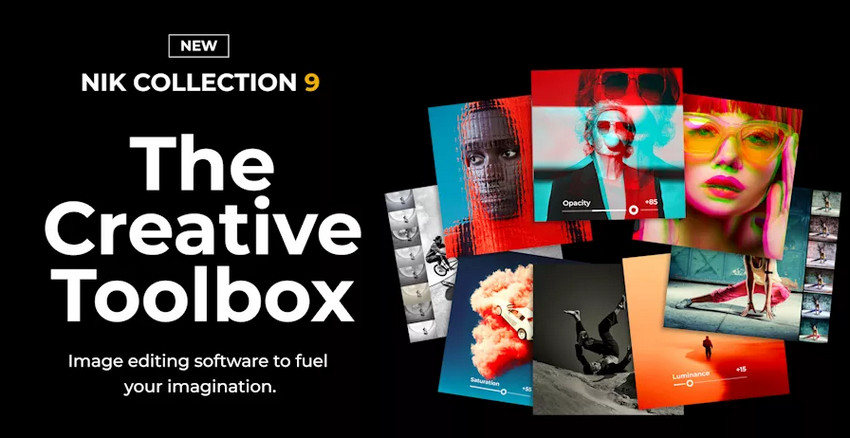
Released in April 2026, Nik Collection 9 is the biggest update DxO has made to its long-running creative plugin suite. The new version adds AI-powered masking, Depth Masks, a redesigned Color Grading tool, new creative filters, expanded blending modes, and workflow improvements while keeping the preset-driven editing style that has made Nik popular with Lightroom and Photoshop users.
That changes the question around Nik Collection in 2026. It is no longer accurate to describe the suite as purely traditional or non-AI. Instead, the more useful question is whether its new AI-assisted local editing tools and creative workflow are enough to justify a new purchase or an upgrade from Nik Collection 8.
In this Nik Collection 9 review, we look at what is new, what each of the seven plugins does best, current pricing, the value of upgrading from Nik 8, and where the suite still differs from dedicated AI-powered image enhancement tools designed for denoising, detail recovery, upscaling, and image restoration.
What Is Nik Collection 9 by DxO?
Nik Collection 9 is a suite of seven creative photo editing plugins and external editors for Adobe Photoshop, Photoshop Elements, Lightroom Classic, Affinity Photo, DxO PhotoLab, and compatible workflows. It focuses on color styling, black-and-white photography, analog effects, localized adjustments, sharpening, noise reduction, and HDR processing.
Nik is best known for combining presets with local control. Photographers can start from a ready-made look, refine the effect with sliders, and then limit adjustments to specific areas using U Point technology, control points, or the new AI-assisted masks in Nik Collection 9.
The History of Nik Software: From Nik to Google to DxO
Nik Collection was originally developed by Nik Software and became widely known for its creative plugins and U Point technology. Google later acquired Nik Software and made the collection free for a period, helping the plugins build a large user base. DxO eventually acquired Nik Collection, returned it to active paid development, and has continued updating the suite for modern photo editing workflows.
In 2026, Nik Collection 9 represents a more substantial change than a routine compatibility update because DxO has added AI-assisted selections, depth-aware local adjustments, new color tools, and additional creative effects while preserving the familiar seven-plugin structure.
What Is Nik Collection Used For?
Photographers typically use Nik Collection for:
- Creative color grading
- Black-and-white photography
- Film simulation and analog effects
- HDR processing
- Selective local adjustments
- Output sharpening
- Noise reduction
Its main appeal is still speed. Many looks that would require several adjustment layers or masks in a host editor can be built more quickly with Nik presets, filters, and local controls.
What’s New in Nik Collection 9?
Nik Collection 9 is a meaningful update rather than a simple version refresh. The biggest changes center on smarter local adjustments, stronger color grading, more creative filter options, and a faster editing experience.
AI Masks and Depth Masks
Nik Collection 9 introduces two AI-assisted masking options. AI Masks are designed to identify and select subjects or objects more quickly, reducing the amount of manual brushing needed for localized edits. Depth Masks analyze the image and create a depth map, allowing photographers to target areas based on their apparent distance from the camera even when the original file does not contain depth information.
This is an important change for Nik because AI is now being used directly inside its local adjustment workflow. U Point remains available, but AI Masks and Depth Masks give users additional ways to isolate subjects, backgrounds, and depth ranges.
New Color Grading in Nik Color Efex
Nik Color Efex receives one of the most important upgrades in the suite. The new Color Grading tool lets users control shadows, midtones, highlights, and global color within one streamlined interface. It is particularly useful for photographers who use Nik for mood, cinematic color, portrait styling, or consistent creative looks.
Halation, Chromatic Shift, Glass Effect, and Blending Modes
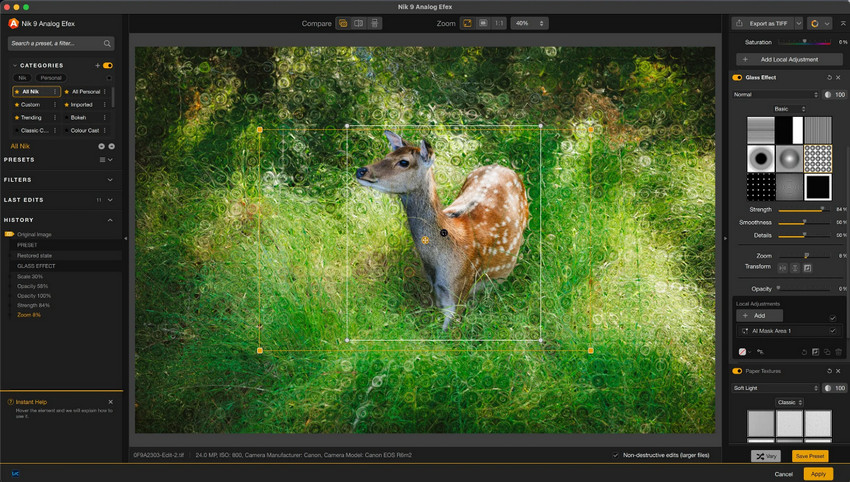
Nik Collection 9 also expands its creative toolkit with new filters including Halation, Chromatic Shift, and Glass Effect. Halation recreates the glow around bright areas associated with some analog film looks, while Chromatic Shift and Glass Effect are designed for more experimental image styling.
Nik Color Efex and Nik Analog Efex also gain 18 blending modes. This gives existing filters more flexibility because photographers can change how an effect interacts with the underlying image rather than relying only on filter strength and opacity.
Workflow Improvements
DxO has also refined everyday usability with features such as hover previews, clearer mask overlays, and faster reuse of local adjustments. These changes are less dramatic than the new AI tools, but they matter for photographers who regularly move through several Nik effects in a single edit.
What’s Included in DxO Nik Collection 9?
Nik Collection 9 still includes seven specialized plugins covering sharpening, noise reduction, creative color, black-and-white conversion, localized adjustment, analog effects, and HDR. The value of the suite depends heavily on which of these tools fit your workflow: Color Efex and Silver Efex remain the strongest reasons to buy Nik for many photographers, while Dfine and Sharpener now compete with a much broader range of modern AI-assisted image quality tools.
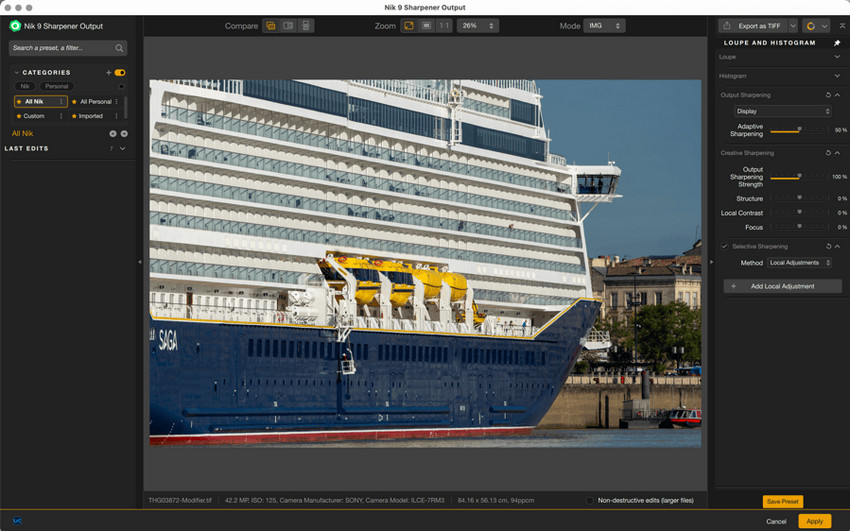
Sharpener Pro: Controlled Output Sharpening
Sharpener Pro is designed for output sharpening and detail enhancement across print and digital workflows. It includes tools for pre-sharpening, edge contrast enhancement, and output-specific optimization.
Photographers commonly use Sharpener Pro for:
- Portrait sharpening
- Print preparation
- Web image optimization
- RAW workflow sharpening
- Selective sharpening adjustments
Its strength is control rather than reconstruction. Sharpener Pro is useful when the original image already contains usable detail and you want to optimize perceived sharpness for a specific output. It is less suitable when the source is genuinely blurry, heavily compressed, or too small, because sharpening cannot recreate information that is no longer present.
Dfine: Traditional Noise Reduction with Local Control
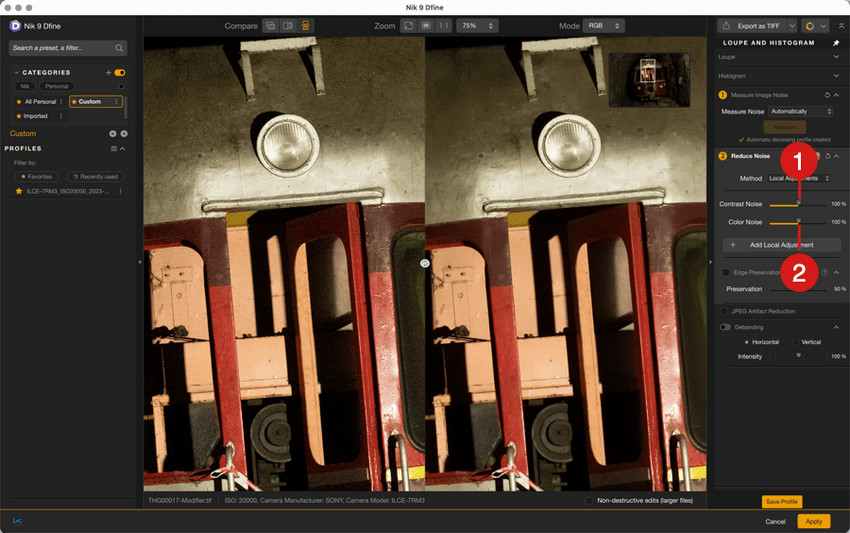
Dfine is Nik Collection’s dedicated noise reduction plugin for luminance and chroma noise. It combines automatic noise profiling with selective controls that let photographers reduce noise in targeted areas rather than applying the same strength across the entire image.
Dfine is commonly used for:
- Night photography
- Indoor event photography
- High ISO image cleanup
- Low-light portrait photography
- Selective noise reduction workflows
Dfine remains useful when you want predictable manual control inside a Nik workflow. However, it is not designed as an AI reconstruction engine, so heavily degraded images, small crops, compressed JPEGs, or files that need both denoising and texture recovery may benefit more from a dedicated AI enhancement step.
Color Efex Pro: The Strongest All-Round Creative Plugin
Color Efex Pro remains one of the main reasons to use Nik Collection. It combines a large filter library with presets, recipes, local adjustments, and now Nik 9’s new Color Grading tool, AI-assisted masking options, creative filters, and expanded blending modes.
Photographers frequently use Color Efex Pro for:
- Cinematic color grading
- Portrait enhancement
- Landscape color correction
- Contrast and tonal adjustments
- Stylized creative looks
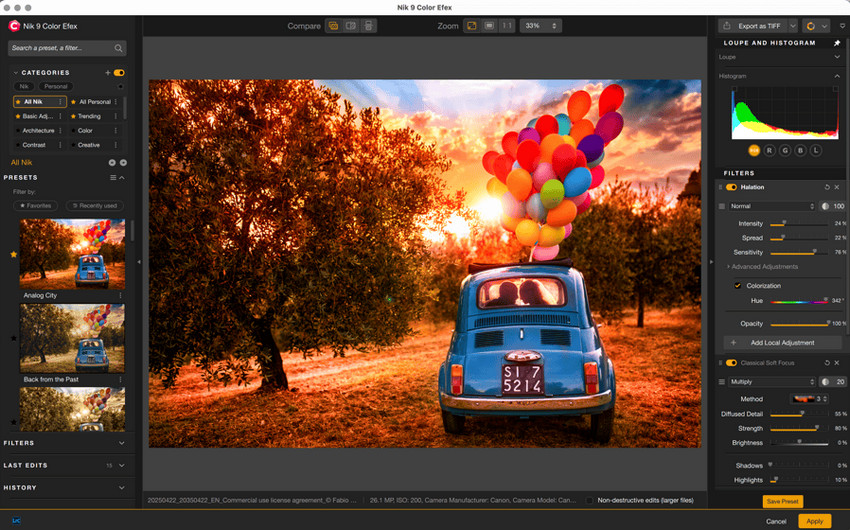
For Nik 8 users, Color Efex is also where the upgrade to version 9 is easiest to notice. Color Grading, Halation, Glass Effect, Chromatic Shift, AI masks, and blending modes add more creative range without changing the preset-first workflow that existing users already know.
Silver Efex Pro: Still a Standout for Black-and-White Photography
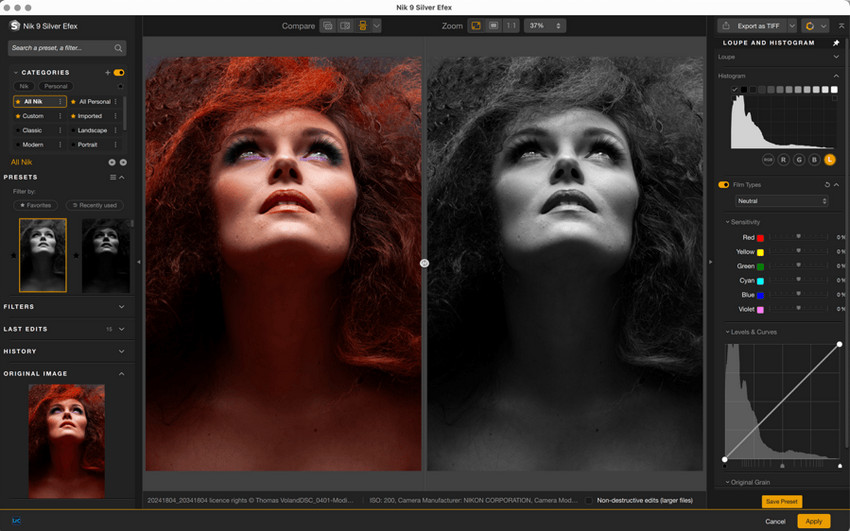
Silver Efex Pro remains one of Nik Collection’s strongest tools. It specializes in monochrome conversion, film-inspired rendering, tonal separation, contrast shaping, grain simulation, and localized black-and-white adjustments.
Silver Efex Pro includes:
- Classic monochrome presets
- Film grain simulation
- Dynamic contrast controls
- Fine tonal adjustments
- Analog black-and-white rendering
Nik 9’s AI Masks and Depth Masks also make localized dodging, burning, and subject-specific adjustments easier to build, which gives Silver Efex a more modern masking workflow without changing its core black-and-white character.
Viveza: Fast Local Color and Light Adjustments
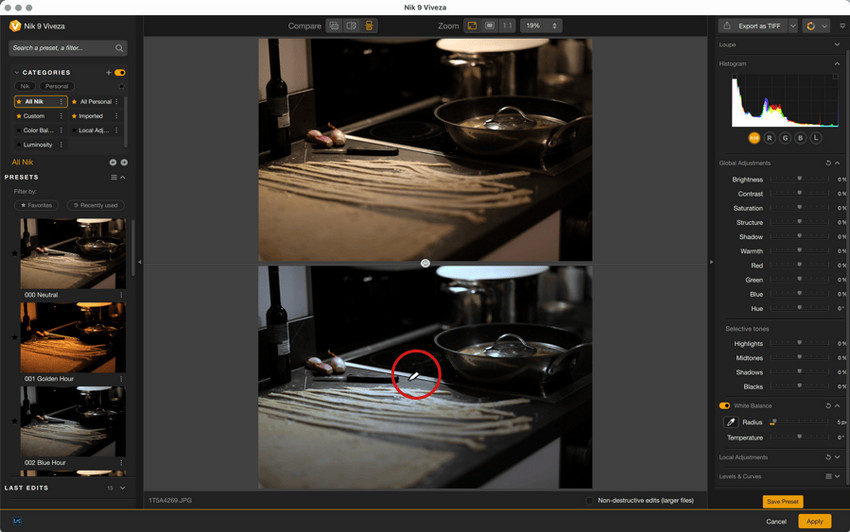
Viveza focuses on localized editing and remains closely associated with Nik’s U Point technology. It lets photographers adjust brightness, contrast, saturation, shadows, structure, and color in selected regions without building a complex Photoshop masking stack.
Viveza is commonly used for:
- Selective exposure correction
- Portrait retouching
- Landscape enhancement
- Localized color adjustments
- Light balancing workflows
Viveza is less about dramatic effects than speed. It makes the most sense for users who like Nik’s local editing interface and want targeted corrections without repeatedly switching back to more complex masking tools in the host editor.
Analog Efex Pro: More Flexible Film-Inspired Effects in Nik 9
Analog Efex Pro is designed for photographers who want to recreate vintage camera and film aesthetics digitally. It includes grain, dust and scratches, light leaks, lens effects, textures, and old-camera-inspired rendering.
Photographers often use Analog Efex Pro for:
- Retro portrait editing
- Film-inspired photography
- Cinematic creative work
- Vintage visual styles
- Experimental image effects
Nik Collection 9 makes Analog Efex more flexible by adding blending modes across many filters. Instead of treating each texture or effect as a fixed overlay, users have more control over how it interacts with the base image.
HDR Efex Pro: Dedicated HDR Processing
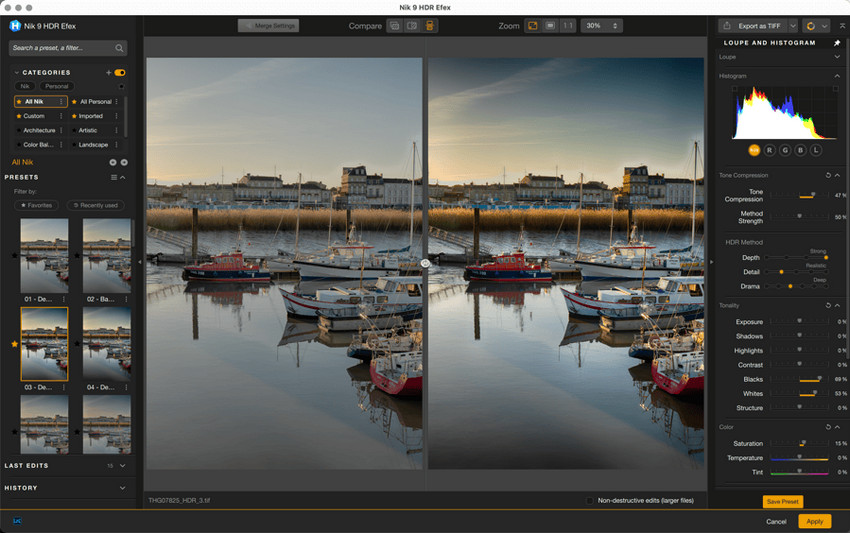
HDR Efex Pro focuses on high dynamic range imaging. It helps photographers merge exposures, recover highlights and shadows, and adjust tone mapping for either natural-looking or intentionally dramatic HDR results.
HDR Efex Pro is commonly used for:
- Landscape photography
- Architecture photography
- Sunrise and sunset scenes
- Interior photography
- High-contrast environments
HDR Efex remains useful for photographers who prefer a dedicated HDR plugin, although photographers already satisfied with HDR merging and tone controls in Lightroom, Photoshop, or another RAW editor may use it less often than Color Efex or Silver Efex.
Nik Collection 9 vs 8: Is It Worth the Upgrade?
Nik Collection 9 is a more compelling upgrade than a version focused only on compatibility or interface changes. The main differences from Nik Collection 8 are the new AI-assisted local adjustment tools and the expanded creative controls in Color Efex and Analog Efex.
Key reasons to upgrade from Nik Collection 8:
- AI Masks for faster subject and object selections
- Depth Masks for depth-based local adjustments
- New Color Grading controls in Color Efex
- Halation, Chromatic Shift, and Glass Effect filters
- 18 blending modes in Color Efex and Analog Efex
- Workflow improvements such as hover previews and clearer mask feedback
Who Should Upgrade?
The upgrade makes the most sense for photographers who regularly use Color Efex, Silver Efex, Analog Efex, or U Point-based local adjustments. AI Masks and Depth Masks reduce some of the manual work around selections, while the new color and blending tools meaningfully expand the creative side of the suite.
Who Can Stay on Nik Collection 8?
If you mainly open Nik for a small set of existing presets and rarely use local adjustments, the practical difference may be smaller. Nik 8 can still cover the familiar core workflow, so occasional users may prefer to try the Nik 9 trial first and upgrade only if the new masking and Color Efex features solve a real editing need.
Is Nik Collection Free?
Was Nik Collection Ever Free?
Yes. After Google acquired Nik Software, the company made Nik Collection free for several years, which dramatically increased its popularity among photographers. That free Google-era release is still the reason some users search for a permanent free version today.
Can You Still Download Nik Collection Free?
Older Google versions can still be found online, but they are outdated and may have compatibility problems with current operating systems and newer versions of Photoshop or Lightroom. They also do not include the features DxO has added in later releases, including the AI-assisted tools introduced in Nik Collection 9.
For most photographers, the official DxO release is the safer option if they want current compatibility and ongoing development.
Nik Collection 9 Pricing in 2026
As of September 2026, DxO sells Nik Collection 9 with a perpetual license and offers a 30-day free trial of the full suite.
DxO Nik Collection Pricing:
- Free Trial: 30-day full-featured trial
- New license: $179.99
- Upgrade for eligible Nik Collection 7 or 8 users: from $99.99
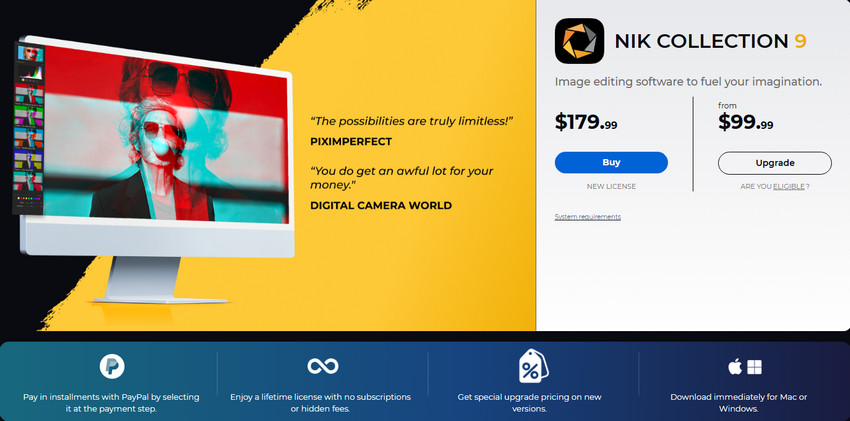
Pricing can change during seasonal promotions and regional campaigns. The perpetual-license model remains one of Nik Collection’s selling points for photographers who prefer paying once rather than adding another recurring subscription, although future major-version upgrades are priced separately.
Pros and Cons of DxO Nik Collection 9
Nik Collection 9 is strongest as a creative toolbox rather than an all-purpose RAW processor or image restoration application. Its value is highest when its presets, black-and-white tools, localized adjustments, and creative filters complement the editor you already use.
- Excellent black-and-white and creative color tools.
- AI Masks and Depth Masks speed up local adjustments.
- Strong preset-driven Lightroom and Photoshop workflow.
- New Color Grading and creative filters expand Color Efex.
- 18 blending modes add flexibility to Color Efex and Analog Efex.
- Perpetual license with a full 30-day trial.
- No dedicated AI image upscaling or super-resolution workflow.
- No AI reconstruction for severely blurry or heavily degraded photos.
- Dfine and Sharpener face stronger competition from modern AI image quality tools.
- Seven separate plugins can feel fragmented if you only need one or two functions.
- Major-version upgrades are paid separately.
- Less useful if your host editor already covers most of your creative and masking needs.
Is Nik Collection 9 Right for You?
Nik Collection 9 is best suited to photographers who want faster creative editing, strong black-and-white tools, film-inspired looks, and more flexible local adjustments without rebuilding every effect manually in Photoshop or Lightroom.
Best for:
- Lightroom and Photoshop users who prefer plugin-based workflows
- Black-and-white photographers using Silver Efex
- Portrait, wedding, landscape, and travel photographers who rely on reusable creative looks
- Creative editors who use Color Efex or Analog Efex regularly
- Nik 8 users who want AI-assisted masks and stronger Color Efex controls
Not ideal for:
- AI upscaling or image resolution enhancement
- Heavy photo restoration or damaged image recovery
- Severe blur correction
- Low-quality or heavily compressed image reconstruction
- Users who only need basic edits already covered by Lightroom or Photoshop
Nik Collection 9 vs Modern AI Image Enhancement: Different Tools for Different Jobs
Nik Collection 9 now uses AI, but mainly to make selections and local adjustments smarter. AI Masks help identify subjects or objects, while Depth Masks create editable depth-based selections. These features improve how effects are applied; they are not designed to reconstruct missing image detail, increase resolution, or restore heavily degraded source files.
That distinction is important when comparing Nik Collection with a dedicated AI enhancement tool such as Aiarty Image Enhancer. Nik is strongest after you already have a usable source image and want to shape its style, tone, contrast, black-and-white rendering, or local creative effects. Aiarty is designed for a different stage of the workflow: improving the technical quality of noisy, blurry, compressed, or low-resolution images.
Use Nik Collection 9 When You Need:
- Black-and-white conversion and film-inspired rendering
- Creative color grading and stylized effects
- Local adjustments with U Point, AI Masks, or Depth Masks
- Analog textures, halation, and experimental creative filters
- Output sharpening for an already usable image
Use an AI Image Enhancer When You Need:
- Image upscaling
- Noise reduction with detail recovery
- Blur and softness correction
- Compression artifact cleanup
- Texture and fine-detail reconstruction
A practical hybrid workflow is to repair or improve a weak source image first, then use Nik Collection for the creative finish. This avoids asking a creative plugin to solve a restoration problem, while still preserving the speed and character of Nik’s color and black-and-white tools.
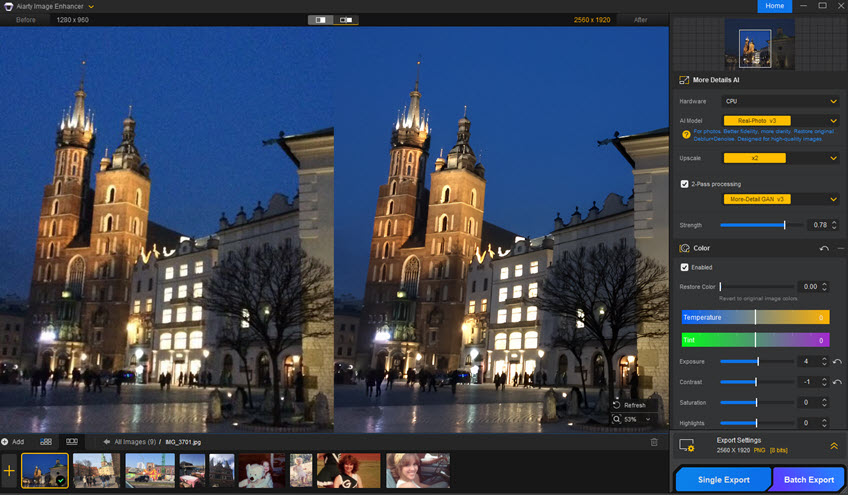
Grab Aiarty Image Enhancer to reduce noise, recover details, upscale images, and improve low-quality photos before creative editing in Nik Collection.
Final Verdict: Is DxO Nik Collection 9 Worth It in 2026?
Yes, Nik Collection 9 is still worth considering in 2026 if your priority is creative photo editing rather than technical image reconstruction. Color Efex and Silver Efex remain the strongest parts of the suite, and version 9 makes the overall package more relevant with AI Masks, Depth Masks, improved Color Grading, new filters, blending modes, and workflow refinements.
For new users, the $179.99 price makes the most sense if you expect to use several plugins rather than buying the suite for a single effect. For Nik Collection 8 users, the $99.99 upgrade is easier to justify if you regularly use Color Efex, Silver Efex, Analog Efex, or local adjustments. Occasional preset users can reasonably stay on Nik 8 and test the new version before upgrading.
Nik Collection 9 should not be treated as a replacement for dedicated AI upscaling, denoising, deblurring, or restoration software. Its AI features are focused mainly on smarter selections and depth-aware local editing. If your source image first needs technical cleanup, combining Nik with an AI enhancer can create a more complete workflow.
Try Aiarty Image Enhancer for AI denoising, sharpening, upscaling, and photo restoration before applying creative edits in Nik Collection.
 FAQ about Nik Collection 9
Yes, especially for photographers who regularly use creative color effects, black-and-white editing, analog looks, and localized plugin workflows. Nik Collection 9 is more compelling than Nik 8 for users who will benefit from AI Masks, Depth Masks, new Color Grading controls, and expanded creative filters.
No. Nik Collection 9 is a paid DxO product with a perpetual license, but DxO offers a 30-day free trial of the full suite. Older Google-era versions were once free but are outdated for current workflows.
Yes. Nik Collection 9 supports Adobe Lightroom Classic and also integrates with Photoshop, Photoshop Elements, Affinity Photo, and DxO PhotoLab.
Silver Efex Pro and Color Efex Pro are the strongest starting points for most photographers. Silver Efex specializes in black-and-white photography, while Color Efex offers the broadest range of color, tonal, and creative effects in the suite.
Yes. Nik Collection 9 includes AI Masks for subject and object selections and AI-powered Depth Masks for depth-based local adjustments. However, these AI features focus on masking and selective editing rather than image upscaling, missing-detail reconstruction, or heavy photo restoration.
It is most worthwhile for users who regularly use local adjustments, Color Efex, Silver Efex, or Analog Efex. AI Masks, Depth Masks, Color Grading, new filters, and blending modes make version 9 a meaningful upgrade. If you mainly use a few existing presets, trying the 30-day trial before upgrading is the safer choice.
Sharpener Pro can improve perceived sharpness and optimize an image for output, but it is not designed to reconstruct detail that is missing from a severely blurry, compressed, or low-resolution photo. Dedicated AI enhancement tools are better suited to that type of restoration task.
You May Also Like


This post was written by Brenda Peng who is a seasoned editor at Digiarty Software who loves turning ordinary photos into extraordinary works of art. With AI assistance for brainstorming and drafting, the post is reviewed for accuracy by our expert Abby Poole for her expertise in this field.
