


Whether you've heavily cropped a wildlife shot, want to print an old family photo, or simply need a higher-resolution image for sharing or large-format printing, enlarging a photo without sacrificing detail remains a common challenge for Canon users.
To address this, Canon introduced the Neural Network Upscaling Tool, an AI-powered application that uses deep learning to enlarge JPEG and TIFF images. It doubles both the width and height of a photo, resulting in 4× the total pixel count, while aiming to preserve natural details and image quality.
But how well does it work in real-world use? Is it the right choice for every Canon photographer, or are there situations where a dedicated AI image enhancer delivers better results? In this guide, we'll take a closer look at its features, strengths, limitations, and the best alternatives.
What Is Canon Neural Network Upscaling Tool?
Canon Neural Network Upscaling Tool (NNUT) is Canon's official AI-powered image upscaling software designed to enlarge photos while preserving as much detail as possible. Unlike conventional resizing methods that simply interpolate pixels, NNUT uses deep learning models trained on Canon's high-resolution image data to generate a higher-resolution version with more natural textures, edges, and fine details.
The tool is designed to upscale JPEG and TIFF images by doubling both the width and height of the original image, resulting in approximately 4× the total pixel count. According to Canon, its AI model is trained to maintain important image characteristics, including details, colors, brightness, and noise patterns, so enlarged photos look more natural than those resized with traditional interpolation algorithms such as bicubic interpolation.
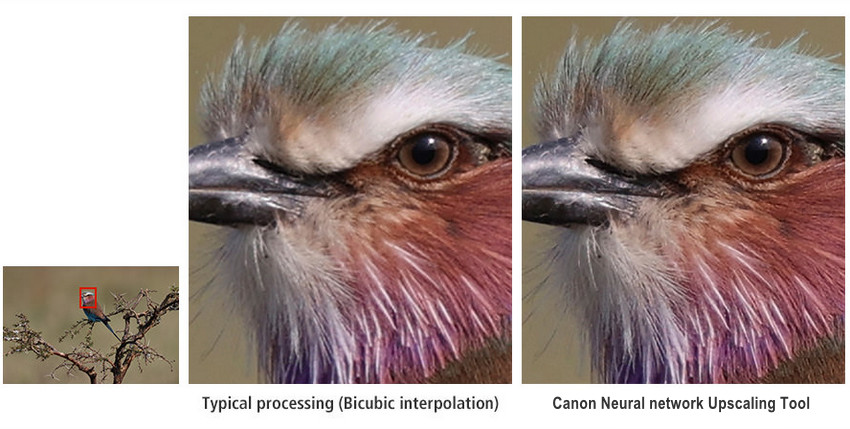
Rather than serving as a general-purpose photo enhancement or restoration tool, Canon Neural Network Upscaling Tool focuses specifically on increasing image resolution. It is intended for photographers who want to produce larger prints, recover resolution after heavy cropping, or prepare high-quality JPEG/TIFF images for large-format output while minimizing the quality loss typically associated with image enlargement.
How Does Canon Neural Network Upscaling Tool Work?
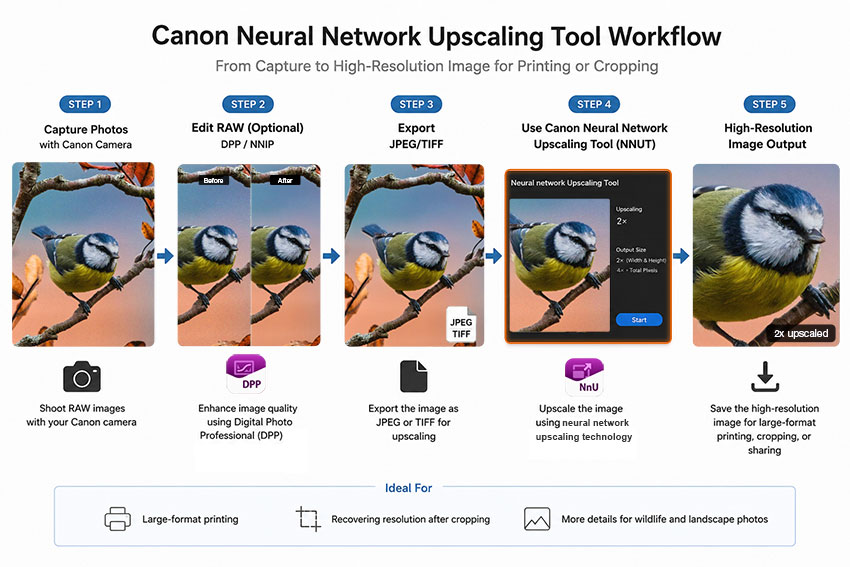
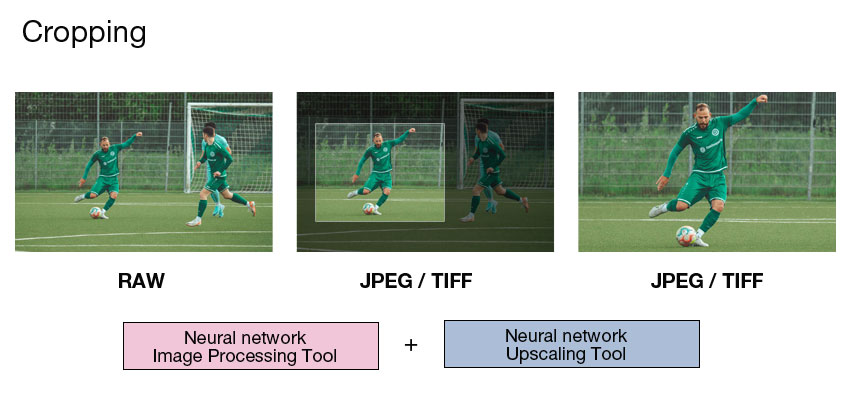
Canon Neural Network Upscaling Tool is designed to fit naturally into Canon's existing photo workflow. As shown below, photographers can first optimize their RAW files with Canon's Neural Network Image Processing Tool (NNIP) in Digital Photo Professional (DPP), export the image as a JPEG or TIFF, and then use Neural Network Upscaling Tool (NNUT) to create a higher-resolution version for printing or recovering resolution after cropping.
Key Features of Canon Neural Network Upscaling Tool
1. AI-Based Resolution Enhancement
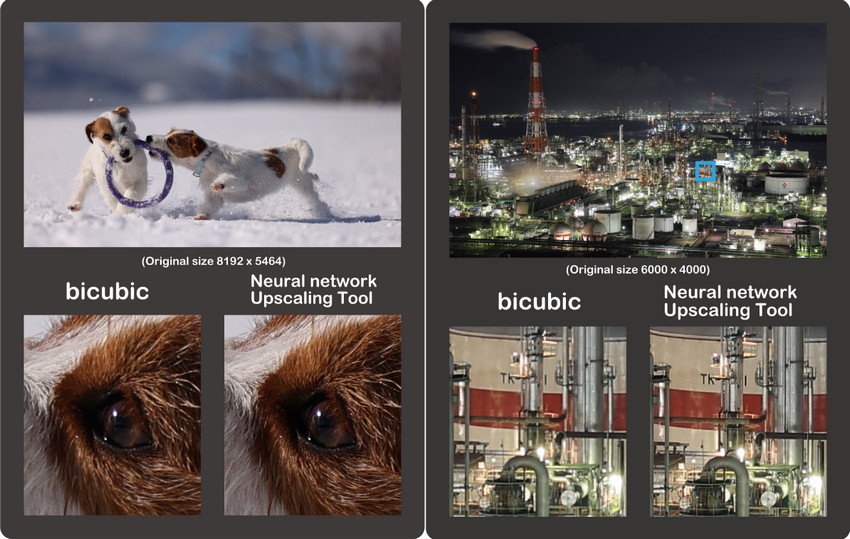
Unlike traditional resizing methods that simply stretch pixels, Canon’s Neural Network Upscaling Tool uses AI to analyze image patterns and enhance details. It helps maintain cleaner edges, reproduce more natural textures, and produce higher-resolution images with fewer artifacts.
2. Designed for Large Prints
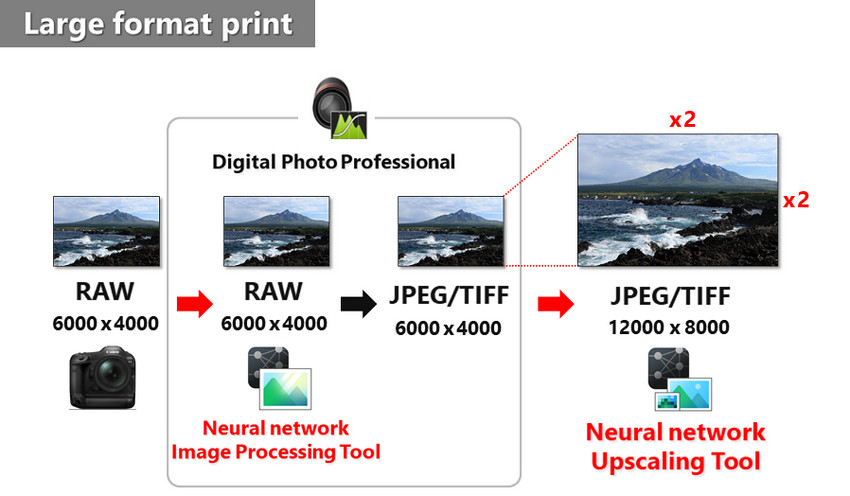
High-resolution files are essential when turning digital photos into physical artwork. The tool is designed to help photographers prepare images for:
- Posters
- Canvas prints
- Exhibition displays
By increasing image resolution while preserving details, it makes smaller files more suitable for large-format printing.
3. Helps Recover Resolution After Cropping
Cropping is common in photography, especially when capturing distant subjects. Canon Neural Network Upscaling Tool can help restore usable resolution after aggressive crops, such as:
- Wildlife: cropping a distant bird or animal
- Sports: enlarging a player from a wide-angle shot
- Travel: bringing distant scenery or subjects into focus
- Concert: enhancing a cropped performer from a distant stage shot
It gives photographers more flexibility when the original framing is not ideal.
What Canon NNUT Does Well — and Where It Falls Short
Canon Neural Network Upscaling Tool is a useful solution for photographers who want to enlarge images while staying within the Canon ecosystem. However, as user needs become more diverse — from restoring old photos to improving low-quality images — its capabilities also have some limitations.
What Canon Neural Network Upscaling Tool Does Well
Canon Neural Network Upscaling Tool focuses on producing natural-looking results rather than simply increasing image size. It is designed to preserve Canon’s signature image quality, including natural colors, realistic textures, and balanced details.
For Canon camera users, another advantage is the smooth workflow within the Canon ecosystem. Photographers can use it as part of their existing editing process, especially when preparing high-quality original images for larger prints.
However, NNUT works best when the original photo already contains sufficient detail. It is mainly an AI upscaler designed to increase resolution, not a complete tool for repairing heavily damaged, blurry, or low-quality images.
Limitations of Canon Neural Network Upscaling Tool (Based on Real User Needs)
While NNUT delivers impressive results for suitable images, some users may find it limited when dealing with more challenging enhancement tasks.
1. Limited 4× Total Pixel Increase
Canon Neural Network Upscaling Tool increases resolution by 2× in width and 2× in height, resulting in a 4× total pixel increase. For example, a 6000 × 4000 image can be enlarged to 12000 × 8000 pixels. This is sufficient for many printing needs, but users who need extreme enlargement, such as restoring small JPGs, old scans, or screenshots, may require stronger AI upscaling capabilities. >> Further solution to enlarge photos for printing
2. Limited Input Format Support
NNUT is designed for JPEG and TIFF images rather than RAW files. Canon photographers working with RAW images may need an additional step: converting RAW files through Canon’s software before using the upscaling tool. This can make the workflow less convenient for users who prefer a direct RAW-to-enhanced-image process.
3. Upscaling Is Not the Same as Complete Photo Restoration
Increasing resolution does not automatically fix every image quality problem. A blurry photo may need deblurring, a noisy night photo may require noise reduction, and an old damaged photo may need scratch removal or restoration. Canon Neural Network Upscaling Tool mainly focuses on resolution enhancement, while other AI photo enhancers combine multiple technologies to improve overall image quality.
4. Fewer Creative Enhancement Controls
Compared with modern AI photo enhancement tools, NNUT provides fewer adjustment options. Some users may look for additional features such as:
- Face restoration
- Noise reduction
- Sharpening controls
- Compression artifact removal
5. Subscription Requirement
Canon Neural Network Upscaling Tool requires a subscription plan to access the feature. For photographers who only occasionally need to enlarge images, the ongoing cost may be an important factor when choosing an AI enhancement solution.
For users who need more than upscaling, such as fixing blur, reducing noise, restoring details, or enhancing different types of images, a more comprehensive AI photo enhancer like Aiarty Image Enhancer may provide a more flexible workflow.
A More Versatile Alternative to Canon NNUT: Aiarty Image Enhancer
While Canon Neural Network Upscaling Tool fits well into a Canon-focused workflow, some photographers prefer a more flexible solution that can handle different image conditions in one place.
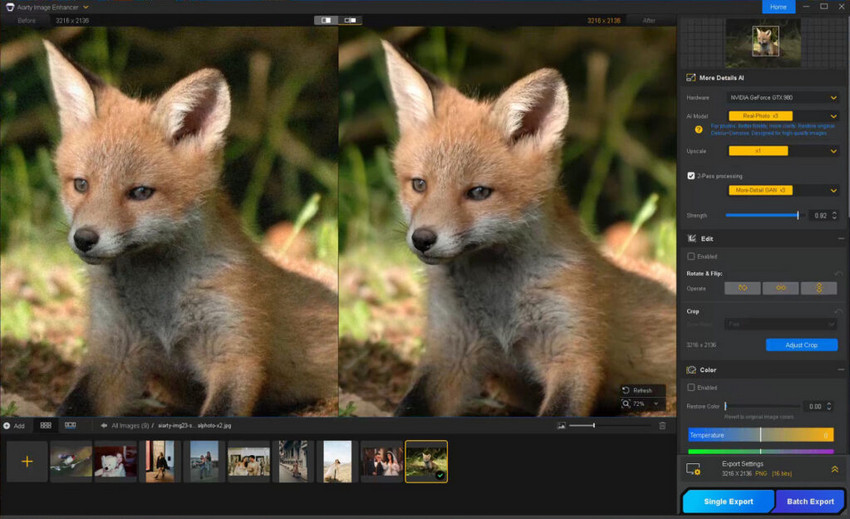
Aiarty Image Enhancer takes a broader AI enhancement approach. Instead of only increasing image resolution, it combines AI upscaling, denoising, deblurring, and detail enhancement to improve photos with different quality challenges.
A More Streamlined AI Enhancement Workflow
With Canon Neural Network Upscaling Tool, photographers may need to combine multiple steps when an image requires additional adjustments. Aiarty Image Enhancer simplifies this process by bringing several AI-powered enhancements together in a single workflow.
- AI Upscaling: enlarge images while generating more natural details.
- AI Denoising: reduce noise from low-light and high-ISO photos.
- AI Deblurring: improve clarity in soft or slightly blurry images.
- Detail Enhancement: refine textures while maintaining a natural appearance.
This makes Aiarty suitable for a wider range of images, including small JPEGs, compressed images, old photo scans, and photos that need more than resolution improvement.
Upscale, enhance, and restore your images with AI-powered tools in one simple workflow.
More Flexible Enhancement for Different Photo Challenges
Compared with Canon Neural Network Upscaling Tool, Aiarty Image Enhancer is designed around different image problems rather than only resolution increase.
Who Should Choose Canon NNUT — and Who Needs More?
Canon Neural Network Upscaling Tool can be a good fit for photographers who already have high-quality images and want a simple way to prepare them for larger output. It works especially well in the following situations:
- Canon photographers: users who prefer staying within the Canon ecosystem.
- High-quality original photos: images that already contain sufficient details.
- Large printing: preparing photos for posters, canvas prints, or exhibitions.
- Cropped images: recovering usable resolution after cropping distant subjects.
However, users may want to consider an AI image enhancer alternative when their photos have problems beyond resolution increase, such as:
- Blurry photos: images that need deblurring or sharper details.
- Noisy images: low-light or high-ISO photos requiring noise reduction.
- Old photos: images needing restoration and detail recovery.
- Low-resolution JPGs: small or compressed images requiring stronger enhancement.
- RAW files: photographers who want a more direct RAW enhancement workflow without extra conversion steps.
- Batch enhancement: users who need to process many images efficiently.
In short, Canon Neural Network Upscaling Tool is optimized for increasing the size of quality images, while AI image enhancers provide a broader workflow for improving different types of image imperfections.
Final Verdict: Is Canon Neural Network Upscaling Tool Worth It?
Canon Neural Network Upscaling Tool is worth considering for photographers who already work with high-quality images and need a dedicated way to increase resolution for larger prints, exhibitions, or cropped photos Its biggest strength is delivering natural-looking upscaling while fitting smoothly into the Canon ecosystem. For users who mainly need more pixels from well-captured images, it provides a focused and convenient solution.
However, resolution increase is only one part of image enhancement. Users working with blurry photos, noisy images, old photo scans, or low-resolution files may need a more comprehensive AI photo enhancement workflow that combines upscaling, denoising, deblurring, and detail restoration in one tool.
Take your photos further with Aiarty Image Enhancer — an AI-powered solution for upscaling, denoising, deblurring, and restoring image details in one workflow.
 FAQ about Canon Neural Network Upscaling Tool
No. Canon Neural Network Upscaling Tool requires a subscription plan to access the feature. Users who only occasionally need image enlargement may want to consider the ongoing cost before subscribing.
No. Canon Neural Network Upscaling Tool supports JPEG and TIFF images, but not RAW files directly. Photographers need to convert RAW files through compatible Canon software before using the upscaling tool.
It depends on your workflow. Canon Neural Network Upscaling Tool is designed for Canon users who want a simple AI upscaling solution within the Canon ecosystem. Photoshop Super Resolution offers broader compatibility and integrates with Adobe’s editing workflow, making it more suitable for users who already work in Photoshop or Lightroom.
No. Canon Neural Network Upscaling Tool mainly focuses on increasing image resolution and preserving details during enlargement. It is not designed for fixing motion blur, heavy blur, or restoring missing image information.
NNUT (Neural Network Upscaling Tool) is designed to enlarge images by increasing resolution, while NNIP (Neural Network Image Processing) is a broader AI image processing technology used for improving image quality during processing. In simple terms, NNUT focuses on upscaling, while NNIP covers a wider range of image enhancement tasks.
You May Also Like


This post was written by Brenda Peng who is a seasoned editor at Digiarty Software who loves turning ordinary photos into extraordinary works of art. With AI assistance for brainstorming and drafting, the post is reviewed for accuracy by our expert Abby Poole for her expertise in this field.
