Aiarty Image Enhancer AI Photo Restoration – Restore and Fix Old Photos with Realistic Details
Automatically remove noise, blur, pixelation artifacts, repair damage, and recover lost details while preserving natural textures and authentic tones. Bring faded memories back to life in just a few clicks – enhance clarity, fix scratches, and upscale resolution without overprocessing or artificial effects, no editing skills required.


-
6.78million
Images training dataset
-
3000images
Batch processing per hour
-
32K Max
Resolution for upscaling
-
GPU
NVIDIA/AMD/Intel/CPU
Restore Old Portraits with High-Fidelity Details
Old photos often lose clarity over time—especially in facial areas where details become soft or blurred. Aiarty’s Face Restoration focuses on refining and reconstructing key facial features such as eyes, skin texture, and hair while keeping a natural, realistic look. It avoids over-smoothing or artificial effects, helping restore faces in a way that still feels true to the original subject. This feature works best when facial details are still visible but degraded, such as in old prints or low-quality scans. For more details on face restoration, check Face Enhancer here >>
-
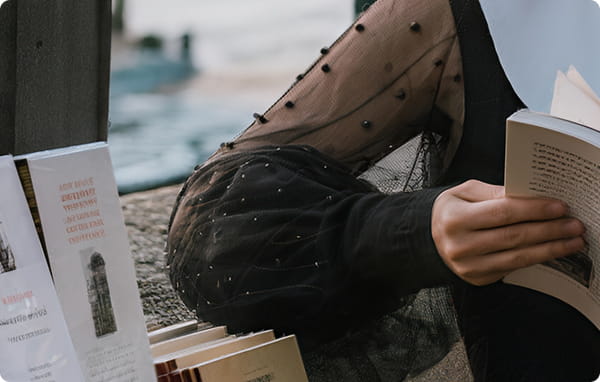
Restore fine details in every strand.
-
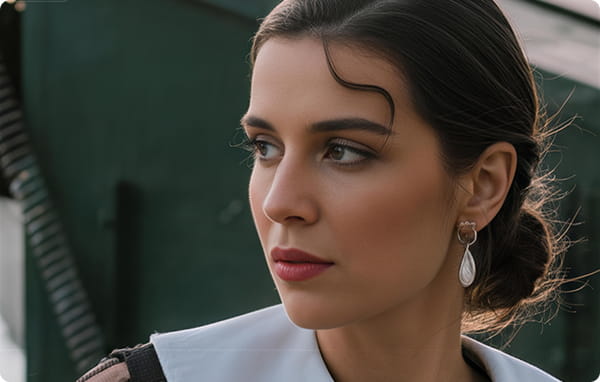
Enhance for crisp eyes and detailed skin textures.
-
Improve organic textures, no plastic smoothing.


"Details in faces are often a critical point in old photos. Aiarty Image Enhancer has an AI Face Restoration tool that works wonders. It recovers lost details and sharpens the photograph."


Fix All Common Old Photo Issues with One Tool
Fix all common old photo issues in one place with Aiarty Image Enhancer. Reduce noise and grain, sharpen blurry details, upscale low-resolution images,
and restore faded colors with balanced, natural-looking results. Restore overall image quality in just a few clicks.





-
Upscale Low-res Images
from early sensors and limited resolution.
Al ModelMore-Detail GAN v3Upscalex4 -
Remove Noise & Artifacts
caused by high ISO, compression, or aging.
 Face RestorationAl ModelReal-Photo v3Upscalex2
 -
Sharpen Soft, Blurry Photos
restore sharpness with clearer details.
Al ModelMore-Detail GAN v3Upscalex4 -
Restore Unclear Faces
recover natural facial clarity and realistic texture.
Face RestorationAl ModelReal-Photo v3Upscalex2
Restore Different Types of Old Photos with AI
Aiarty Image Enhancer restores every type of old photo in one seamless workflow, from digital shots to scanned prints and historical archives, bringing diverse formats back to life with consistent, high-quality results.


Old 10–12MP photos often suffer from noise, blur, and compression artifacts, but still retain the unique character of classic CCD/CMOS color science and lenses. Aiarty Image Enhancer uses generative upscaling to remove noise and JPEG artifacts, overcome older sensor limitations, and preserve natural textures and original lens rendering—retaining the authentic “classic camera look” while upgrading them to modern standards without an over-processed appearance.
 Download Test Image


Many personal or everyday photos are scanned to preserve memories or digitize prints for easy sharing. These scans often show faded colors, low contrast, or minor loss of detail. AI restoration enhances clarity, revives natural color tones, and brings out facial and texture details, and reduces light dust or small scratches. The result is sharper, more vivid scanned photos that maintain their original character.
Download Test Image


Historical photos, documents, and archival materials are often decades or even centuries old, showing severe fading, missing details, or physical damage. AI restoration can recover critical visual information—especially facial and object details—bringing historical moments into sharper focus. This allows important historical and cultural images to be preserved, studied, and appreciated with clarity while maintaining their authenticity.
Download Test Image
Old Photo Quick Cleanup & Color Restoration


AI Eraser for Old Photo Cleanup & Damage Removal
Aiarty’s AI Eraser helps clean up imperfections commonly found in old photos and scanned prints. Simply brush over unwanted areas, and the AI will intelligently analyze and remove distractions while keeping surrounding details natural and intact.
It is especially useful for restoring old photos with dust spots, blemishes, subtle scratches, and small unwanted objects—helping you achieve a cleaner, more restored look without affecting the original photo texture.
Old Photo Tone Restoration & Natural Color Recovery
Easily restore faded or imbalanced colors in old photos with precise control over white balance, brightness, exposure, contrast, and saturation, etc. Whether correcting discoloration from aging prints or improving poorly scanned images, the color panel helps bring back a natural, authentic look while maintaining the original photo’s character.
- Restore faded or color-shifted old photos
- Fix exposure and lighting in scans
- Recover natural skin tones and colors
- Balance contrast without over-processing
- Preserve original photo atmosphere
- Fine-tune for natural restoration results


Best Way to Restore Old Photos: Why Aiarty Stands Out
Restoring old photos with online tools or manual editing often involves trade-offs—either limited quality control or time-consuming, skill-heavy workflows. Aiarty Image Enhancer provides a more efficient solution by combining AI-powered noise reduction, detail recovery, color correction, and upscaling in one streamlined process, delivering high-quality, natural results while preserving the original photo’s authenticity.
 Aiarty Aiarty AI Enhancement BEST PICK |
Manual Restoration | Online Tools | |
|---|---|---|---|
| Ease of Use | Easy to use – One-click enhancement, no technical skills required | Good detail control – Allows precise adjustments when done correctly | Simple to use – Easy and accessible, no installation needed |
| Restoration Results | High-quality results – Delivers high-fidelity restoration with natural details | Safe workflow – Files are handled locally without privacy concerns | Limited quality – Often struggles with fine details and realistic results |
| Processing Speed | Fast processing – Quickly enhances photos, with support for batch processing | Steep learning curve – Requires editing skills and experience | Fast but basic – Quick processing with fewer customization options |
| Detail Preservation | Strong detail preservation – Maintains textures and facial details without over-processing | Flexible but skill-dependent – Results can be excellent, but vary by user expertise | Detail loss risk – May over-smooth or fail to recover important details |
| Batch Processing | Supports bulk workflows – Ideal for handling multiple photos at once | Time-consuming – Each photo must be edited manually | Limited batch support – Bulk processing is often unavailable or restricted |
| Privacy | Privacy-friendly – Processes images locally or securely without risky uploads | Not scalable – No efficient way to process large batches | Privacy concerns – Requires uploading images, which may pose data risks |
Why Choose Aiarty for Photo Restoration

High-Fidelity, Realistic Detail Restoration
Aiarty enhances old photos while preserving natural textures and authentic details. It avoids the over-smoothed or “plastic” look, ensuring fine details remain true to the original image.

No Editing Skills Required
One-click AI enhancement makes it easy for beginners to restore and upscale photos without Photoshop experience.

Data Safety & Privacy Guarantee
All image processing is secure and offline. Your photos are not used for training or shared with third parties.

Batch Processing for Bulk Enhancement
Easily restore entire photo collections at once - whether it's family albums, scanned prints, or archived images - saving time compared to restoring photos one by one.
How to Restore Old Photos with Aiarty
Step 1. Import Your Photo
Import your old, blurry, or damaged photos into Aiarty Image Enhancer.
Free Download Free Download Free DownloadStep 2. Choose Enhancement Model
· Enable Face Restoration and the AI intelligently recovers facial features, skin texture, and expressions.
· Enable AI Eraser if you also want to remove blemishes, sports, and subtle scratches from the photo.
· Select More-Detail V3 or Real-Photo V3 for most old photos. Then choose to enhance at the original size (x1) or upscale to x2, x4, or a custom resolution if you want to increase the image size. It will automatically remove noise, sharpen details, and fix blur. Check best practices >>
· Enable Color to adjust saturation, brightness, and contrast to restore faded colors in old photos.
Step 3. Export Restored Photos
Compare before/after results and tweak settings for the most natural outcome. Save your restored images in high-quality formats like PNG or TIFF. Then choose Export Current for a single image or Batch Export for multiple photos.


New AI Models with Overhauled Features
More-detail GAN v3
Architecture: GAN
Generate more details, more clarity and sharpness. Better skin, hair, and overall perceptual quality.
Best for: Images with skin, hair, pore, and other intricate patterns.
Upscale: 1x2x4x8x1K2K4K8K
-
Overall Clarity
-
Denoise
-
Deblur
-
Sharpen/Detail
-
Smoothness
AIGCsmooth v3
Architecture: GAN
Improved support for AI-generated images. More clarity, smoother and better quality.
Best for: AI art, anime, line art, images with smooth textures.
Upscale: 1x2x4x8x1K2K4K8K
-
Overall Clarity
-
Denoise
-
Deblur
-
Sharpen/Detail
-
Smoothness
Real-Photo
Architecture: Diffusion
Enhance real photo and restore original. Better fidelity, photorealistic details. For high-resolution photos.
Best for: Family portrait, product shot, and scenic landscape.
Upscale: 1x2x
-
Overall Clarity
-
Denoise
-
Deblur
-
Sharpen/Detail
-
Smoothness
Face Restoration
Architecture: GAN
Bonus option to restore low-resolution faces besides the general quality enhancement process.
Enable when: Restoring low-quality, grainy, blurry portraits.
Upscale: 1x2x4x8x1K2K4K8K
-
Overall Clarity
For low-res portraits
-
Denoise
Depend on images and model
-
Deblur
-
Sharpen/Detail
Depend on images and model
-
Smoothness
Don’t Just Take Our Word For It
-
For photographers restoring legacy files, improving family archives, or refining old album downloads, Aiarty Image Enhancer is a practical addition to a modern workflow.
-By Nikon Rumors -
I tried on one terrible night photo of the Egyptian pyramids and it did bring out detail and eliminate most facial problems. It does a slightly better job than both Topaz Photo AI and Topaz Gigapixel AI.
-By DPReview -
Aiarty includes a Face Restoration feature that can improve old or blurry portraits. It can clarify eye shapes, restore skin smoothness, revive lost facial structure, and generally bring a faded portrait back into view.
-By The Phoblographer
Popular Questions
Aiarty uses AI-based enhancement to reduce noise, repair blur, remove artifacts, restore faces, and upscale low-resolution old photos in a single workflow while preserving natural textures. Options are also available to correct colors and remove minor scratches in old photos.
Yes. Aiarty supports different types of old photos, including scanned prints, printed photographs, and early digital shots. It is designed to handle common issues in these images, such as noise, fading, blur, low resolution, and compression artifacts, restoring clarity and improving overall image quality while keeping results natural.
Yes. Aiarty can fix blurry or low-resolution old photos using AI-based sharpening and upscaling. It restores clarity, enhances fine details, and improves resolution while avoiding over-processing, so the results remain natural and faithful to the original image.
You should use Face Restoration when key facial features are still visible but degraded—such as in low-resolution, blurry, or faded old photos where the face can still be recognized. In these cases, it helps restore clarity, sharpen facial details, and bring back a more natural appearance.
For high-resolution images with only slight softness, the default AI enhancement is usually enough. If the face is heavily blurred, too small, or missing important detail, results may be less accurate since the AI reconstructs based on learned patterns rather than recognizing identity—so it may be better to keep Face Restoration off if preserving exact likeness is important.
Yes. Aiarty is designed to enhance old photos while keeping results natural. It uses AI to avoid over-sharpening, recover real details, and reduce artifacts, ensuring the restored image does not look artificial or over-processed.
For most users, Aiarty is faster and easier because it automates noise reduction, face restoration, and upscaling while still delivering high-quality results. However, Photoshop may be preferred when you need precise manual control or detailed, layer-based editing for complex restorations.