


Whether you are a professional wedding photographer or a hobbyist looking to polish your social media headshots, the landscape of portrait editing has shifted dramatically. Manual cloning and healing are being replaced by generative AI that understands facial anatomy. In this guide, we break down the best portrait software options to help you choose the right tool for your specific workflow.
1. Best for Studio Retouching: Evoto AI
Evoto AI has rapidly become a favorite for portrait photographers who need to move from "good" to "magazine-ready" without spending hours on a single frame. It functions as a complete post-production ecosystem, handling everything from initial culling to complex beauty work. Its true strength lies in its all-in-one efficiency, where sophisticated retouching tasks—like cleaning up skin or removing glare from glasses—are reduced to simple, intelligent sliders.
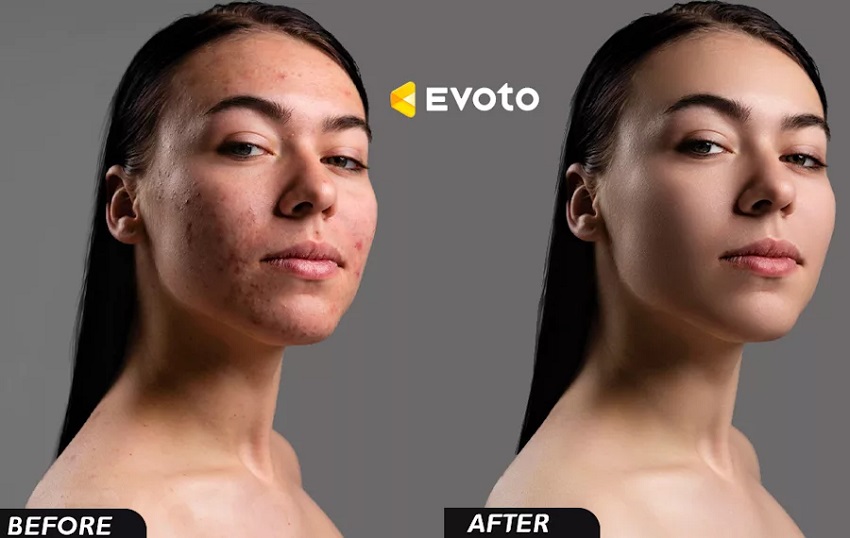
For those who need to clean up skin, remove stray hairs, and even adjust body proportions in seconds, Evoto AI is a powerhouse. It specializes in high-end retouching that maintains a natural look, making it a favorite for studio photographers who need to deliver consistent results across hundreds of images.
Also learn: How to Fix Blurry Face in A Photo >>
Key and Unique Features for Portrait Editing
The most impressive part of Evoto's toolkit is its targeted AI retouching. It doesn't just apply a global blur; instead, it identifies specific distractions like stray hairs, wrinkles in clothing, and even tattoos, allowing you to remove them with a single click. For fashion and beauty work, its AI Makeup Editor and Face Slimming tools offer a level of digital "styling" that is incredibly precise. Additionally, its AI Culling Studio can automatically group duplicate shots and flag photos with closed eyes, which is a massive time-saver before you even begin the editing process.
Pros
- Workflow Velocity: It can churn through hours of meticulous retouching in seconds, making it the fastest pro-grade tool for high-volume shoots like weddings or corporate headshots.
- Precision Masking: The AI creates highly accurate masks for skin, hair, and backgrounds automatically, so you can adjust the subject without affecting the rest of the image.
- Advanced Fixes: Unique features like Glasses Glare Removal and Clothing De-wrinkling solve specific, difficult problems that usually require advanced Photoshop skills.
- Cinematic Color Matching: You can upload a reference image, and Evoto will intelligently match the color grade of your photo to that "look."
Cons
- Pay-Per-Export Model: Unlike Aiarty's one-time purchase, Evoto uses a credit-based system. You pay for each photo you export, which can become expensive for photographers with a very high output.
- Always Online: It requires an active internet connection for its AI algorithms to function, which might be a dealbreaker for those who prefer to edit while traveling or in remote locations.
- Missing Layer Support: It lacks the traditional layer-based system of Photoshop, meaning for extremely complex "composite" work, you'll still need to round-trip your images into another editor.
2. Best for Detail Reconstruction: Aiarty Image Enhancer
If you have a photo that is slightly out of focus or low-resolution, Aiarty Image Enhancer is the gold standard for restoration. Rather than just smoothing pixels, its More-Detail GAN model "re-imagines" lost textures, rebuilding skin pores and individual hair strands with startling accuracy. It is an ideal choice for turning a casual snapshot into a professional-grade portrait.
Aiarty Image Enhancer distinguishes itself as the gold standard for restoration by moving beyond simple pixel manipulation. While most software attempts to hide imperfections by smoothing them over, Aiarty utilizes a generative AI approach that actively "re-imagines" lost textures. This makes it an indispensable tool for photographers dealing with images that are slightly out of focus, heavily compressed, or low-resolution.
Key and Unique Features for Portrait Editing
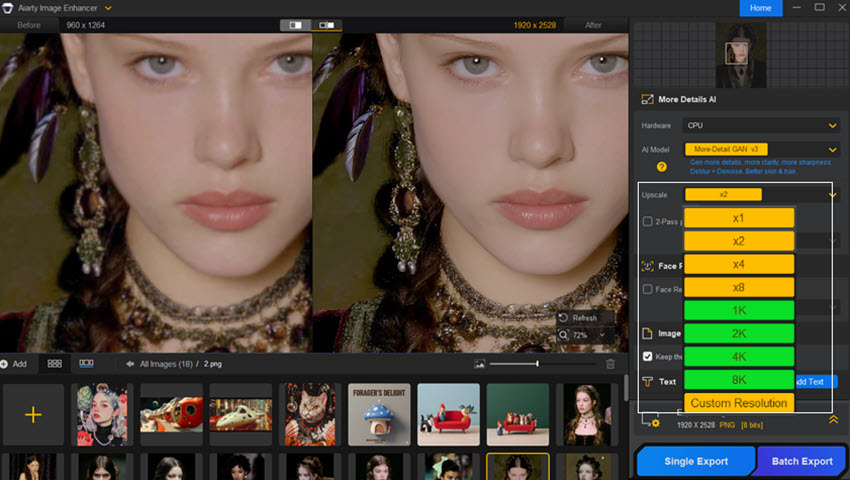
The backbone of its portrait capabilities is the More-Detail GAN v3 model. Trained specifically on human anatomy, it can reconstruct fine textures, hair strands, and facial details while maintaining a natural photographic look. Unlike traditional beautification tools that often create plastic-looking results, Aiarty focuses on realistic reconstruction rather than simple smoothing.
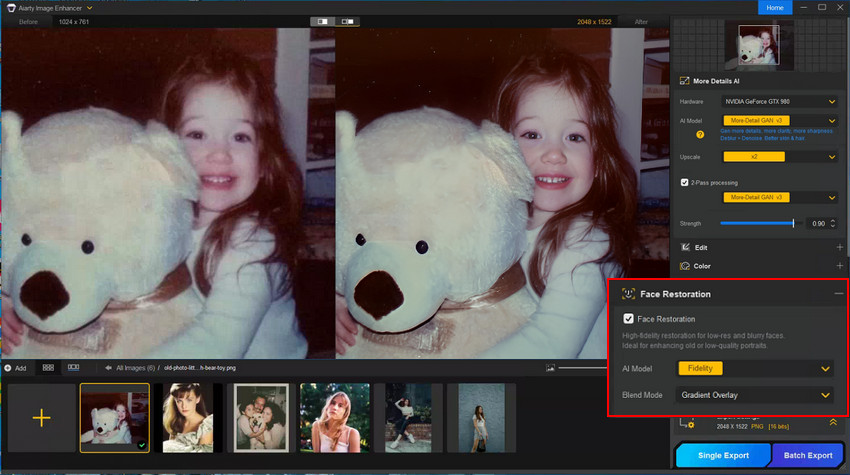
For portraits with blurry or unclear faces, Aiarty Image Enhancer also offers advanced Face Restoration. Users can adjust restoration strength, select individual faces for processing, and use the new 2-Pass mode to further refine facial details. Its Alpha and Gradient blending modes provide more control over results, with Alpha better preserving original colors and Gradient enhancing reconstruction for lower-resolution faces. Combined with up to 32K upscaling, Aiarty helps transform low-quality snapshots into detailed portraits suitable for larger displays and prints.
Pros
- True Reconstruction: It is one of the few tools that can actually generate missing detail in eyes and hair rather than just sharpening existing blur.
- Privacy and Performance: Because it runs 100% offline on your local GPU, your client photos never leave your machine, and processing is exceptionally fast.
- Authentic Texture: It avoids the "uncanny valley" by maintaining a realistic grain and skin texture that looks like it was captured by a high-end sensor.
- Ownership Model: The availability of a lifetime license makes it a more sustainable investment for those who want to avoid monthly subscriptions.
Cons
- Heavy Hardware Demands: To see that "startling accuracy" in a reasonable timeframe, you really need a dedicated graphics card (NVIDIA RTX or similar).
- Niche Focus: It lacks the virtual makeup, teeth whitening, or body sculpting tools found in "all-in-one" portrait suites like PortraitPro.
- Potential for Over-Processing: If the reconstruction settings are pushed too high on an extremely low-quality photo, the AI can sometimes create details that weren't there, slightly altering the subject's likeness.
3. Best for Creative Effects: Luminar Neo
If Aiarty is your expert for rebuilding lost details and Evoto is your speed-focused studio assistant, Luminar Neo is the creative powerhouse of the group. It is designed for photographers who want to infuse their portraits with an artistic, "dreamy" vibe that traditionally requires expensive lenses or hours of complex masking in Photoshop.
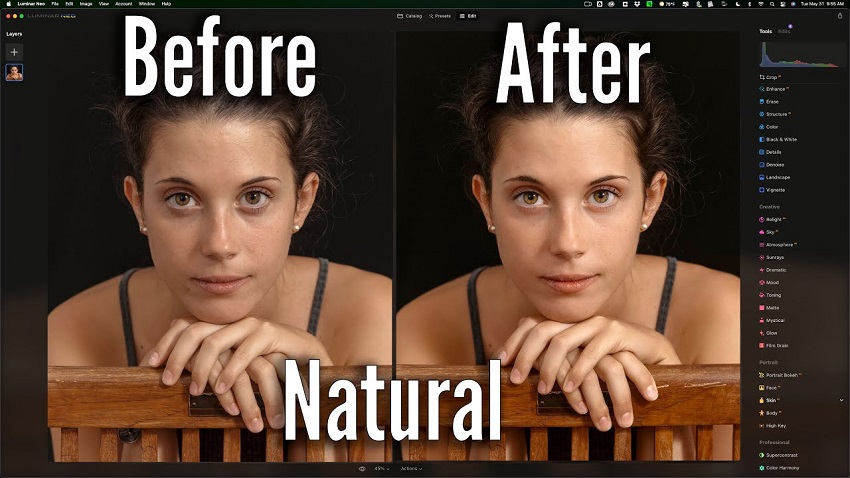
Luminar Neo excels at changing the "vibe" of a photo. Its Relight AI allows you to move light sources in a 3D space after the shot is taken, while its background removal tools make it easy to create depth. It's the perfect tool for creators who want to add a stylized, artistic flair to their portraits.
Key and Unique Features for Portrait Editing
The standout feature of Luminar Neo is its Relight AI, which uses 3D depth mapping to analyze your photo. It allows you to selectively adjust the lighting of the foreground and background independently, effectively letting you re-light your subject after the shoot is over. For those who crave that professional "blurred background" look, Portrait Bokeh AI simulates the creamy depth-of-field of an f/1.4 lens on any photo, regardless of what camera was used. Additionally, its Face AI and Skin AI suites provide one-click solutions for brightening eyes, whitening teeth, and smoothing skin while intelligently preserving natural pores.
Pros
- Infinite Creativity: Beyond standard retouching, it offers tools like Atmosphere AI (to add fog or mist) and Sky AI, allowing you to completely transform the environment around your subject.
- User-Friendly Interface: Its modern, clean design is highly intuitive, making professional-level AI tools accessible even to those with no prior editing experience.
- Advanced Masking: The Mask AI feature can automatically identify and select humans, hair, or clothing, saving you from the tedious task of manual brushing.
- Flexible Integration: It works seamlessly as a standalone app or as a plugin for Adobe Lightroom and Photoshop, fitting easily into any existing workflow.
Cons
- Performance Variability: Because it handles complex 3D mapping and generative tasks, it can be resource-hungry and may run slower on older computers compared to leaner tools like Aiarty.
- Occasional "AI Over-Styling": If you aren't careful with the sliders, the effects—especially the bokeh and relighting—can occasionally look artificial or "digital" rather than optical.
- Limited Cataloging: While it does have a library feature, it is not a full replacement for Lightroom's robust asset management and keywording systems.
4. Best for Beauty & Fashion: PortraitPro 24
If Aiarty is your specialist for restoring details and Luminar Neo is your creative director, PortraitPro 24 is your digital "makeup artist and lighting technician." It is a veteran tool that has evolved into a sophisticated suite specifically trained on the nuances of human facial anatomy, offering a level of surgical precision that general editors simply cannot match.
PortraitPro is a veteran tool designed specifically for the human face. It offers granular control over digital makeup, facial sculpting, and lighting. If your goal is a magazine-ready finish with specific "beauty" adjustments, this software provides the most specialized toolset on the market.
Key and Unique Features for Portrait Editing
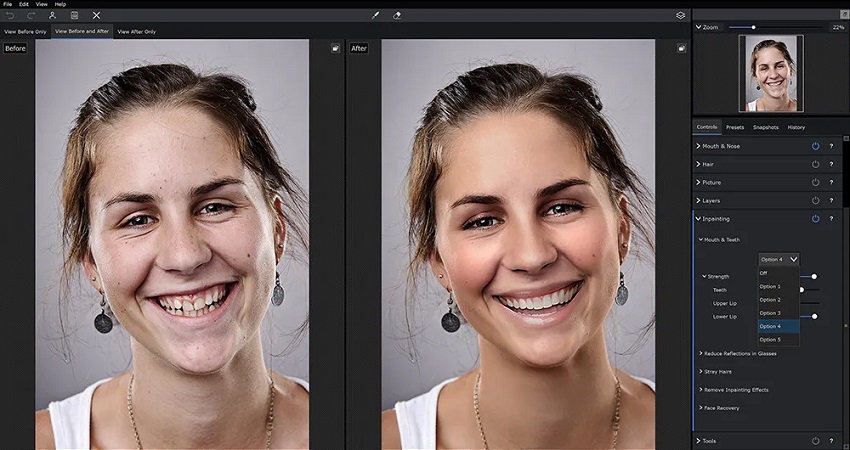
The defining strength of PortraitPro is its anatomical awareness. Upon opening a photo, the AI automatically maps out the eyes, nose, mouth, and face shape, allowing for targeted feature sculpting. Unique to version 24 is the Mouth Inpainting & Teeth Replacer, which uses generative AI to fix chapped lips or even replace discolored teeth with a natural-looking smile.
Another standout is the Glasses Reflection Remover, a feature that solves one of the most notoriously difficult problems in portrait photography. Furthermore, its Image Relighting technology allows you to virtually change the light source on your subject's face—moving from flat lighting to a dramatic "Rembrandt" style—after the shoot is already finished.
Pros
- Specialized Beauty Tools: It offers an incredible range of digital makeup and skin-toning features, from applying eyeliner to adding bronzer and highlighter for facial contouring.
- Unmatched Facial Sculpting: It provides deep control over face shape, neck length, and shoulder position, allowing for subtle refinements that look like they were achieved through posing rather than editing.
- Intelligent Hair Editing: The software allows you to increase hair volume, add shine, and even recolor hair with a few slider movements, making it a favorite for beauty and headshot photographers.
- No-Subscription Value: Like Aiarty, it is available as a one-time purchase, offering great value for photographers who want professional tools without the monthly fee of the Adobe Creative Cloud.
Cons
- The "Uncanny Valley" Risk: Because the sculpting and skin-smoothing tools are so powerful, it is very easy to "over-edit" a subject, leaving them looking like a porcelain doll if you aren't disciplined with the sliders.
- Hit-and-Miss Inpainting: While the new generative tools (like reflection removal) are revolutionary, users report they can occasionally produce unpredictable results on complex images.
- Limited to Portraits: Unlike Luminar or Photoshop, this is a single-purpose tool. It isn't designed for landscape work or complex composite editing—it is strictly for people.
5. Best for High-Volume Workflow: Imagen AI
While the other tools in this guide focus on how you edit a single face, Imagen AI focuses on how you edit thousands of them. It is a "workflow automation" specialist designed to solve the biggest headache for event and wedding photographers: spending weeks in front of a computer trying to make a massive gallery look consistent.
When you have thousands of photos from a wedding or event, Imagen AI is the ultimate time-saver. It learns your personal editing style and applies it across your entire catalog, ensuring your skin tones and color grading remain perfectly consistent without hours of manual labor.
Key and Unique Features for Portrait Editing
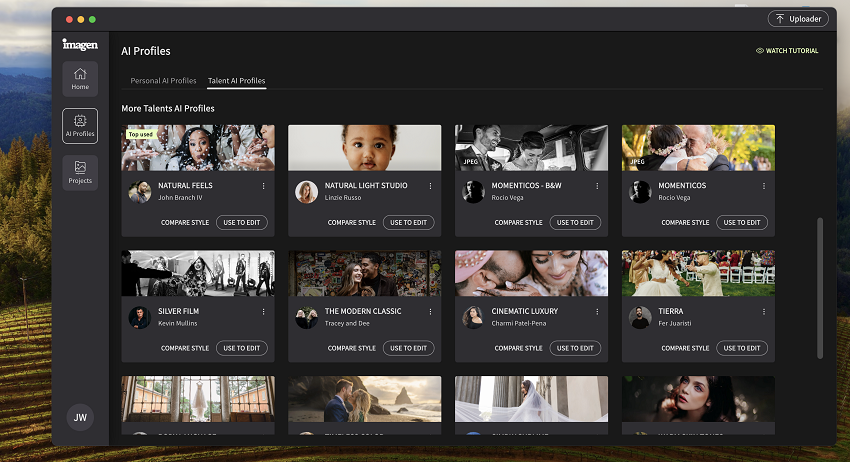
The defining feature of Imagen AI is its Personal AI Profiles. Instead of using generic filters, the software analyzes your previous Lightroom catalogs to learn your specific "DNA"—how you adjust white balance, exposure, and skin tones. Once it understands your style, it can apply those exact preferences to a new set of photos at a rate of about one second per image.
It also features AI Crop and AI Horizon, which automatically fixes framing and tilted shots, ensuring that every portrait in a gallery is perfectly composed without manual intervention.
Pros
- Unrivaled Consistency: It ensures that the skin tones in the first photo of a wedding match the last, regardless of changing light conditions throughout the day.
- Massive Time Savings: It can reduce a 10-hour editing session to less than 10 minutes, making it the ultimate tool for high-volume professionals.
- Seamless Lightroom Integration: It functions as a cloud-based assistant for Adobe Lightroom, allowing you to keep using the tools you are already comfortable with.
- Continuous Learning: Your AI profile isn't static; it continues to evolve and get "smarter" the more you use it and provide feedback on its edits.
Cons
- Not a Fine-Tuning Tool: It handles "global" edits (color, light, crop) perfectly, but it won't remove individual blemishes or stray hairs like Aiarty or Evoto.
- Requires a "History": To build a truly accurate Personal AI Profile, you need to upload several thousand previously edited photos, which might be a hurdle for newer photographers.
- Subscription and Per-Image Costs: It uses a recurring subscription model plus a fee for every image processed, which can add up for those who aren't shooting professionally every week.
Final Verdict: Choosing Your Perfect Portrait Partner
Selecting the right software depends entirely on where you are in your photography journey and what "problem" you are trying to solve. In 2026, the best workflow often involves a combination of these tools—for example, using Aiarty to fix a blurry shot before sending it to Evoto for final retouching.
The Quick Decision Guide
- The "Rescue" Choice: If your favorite shot is blurry, noisy, or low-resolution, Aiarty Image Enhancer is the undisputed champion. It doesn't just edit; it reconstructs detail that wasn't there.
- The "Studio" Choice: If you have high-quality files but need to remove stray hairs, blemish skin, or de-wrinkle clothes for a client, Evoto AI provides the most professional, high-speed results.
- The "Artistic" Choice: If you want to change the lighting, add a soft background blur, or create a moody atmosphere, Luminar Neo is the most intuitive creative playground.
- The "Beauty" Choice: If your work revolves around fashion or headshots where digital makeup and facial sculpting are required, PortraitPro 24 offers the most granular anatomical control.
- The "Volume" Choice: If you are a wedding or event photographer drowning in thousands of raw files, Imagen AI is the only tool that will give you your life back by automating your personal style.
You May Also Like


This post was written by Brenda Peng who is a seasoned editor at Digiarty Software who loves turning ordinary photos into extraordinary works of art. With AI assistance for brainstorming and drafting, the post is reviewed for accuracy by our expert Abby Poole for her expertise in this field.
