


While AI-powered photo editing is moving photographers away from manual image developing, RawTherapee rewards photographers who enjoy hands-on raw editing and want maximum control over the final image.
After extensive testing, RawTherapee feels less like a free alternative to Lightroom, and more like a dedicated raw photo editor for manual raw file processing.
What Is RawTherapee?
RawTherapee is a free, open-source RAW image processor available for Windows, macOS, and Linux. Originally started in 2005 by Gábor Horváth and open-sourced in 2010, the program has evolved into a mature RAW development app.
The latest stable version released in July 2026 brings selective editing, denoising, sharpening, more camera support, and enhanced color management.
Hot search: How to Edit Raw Photos for Best Quality >>
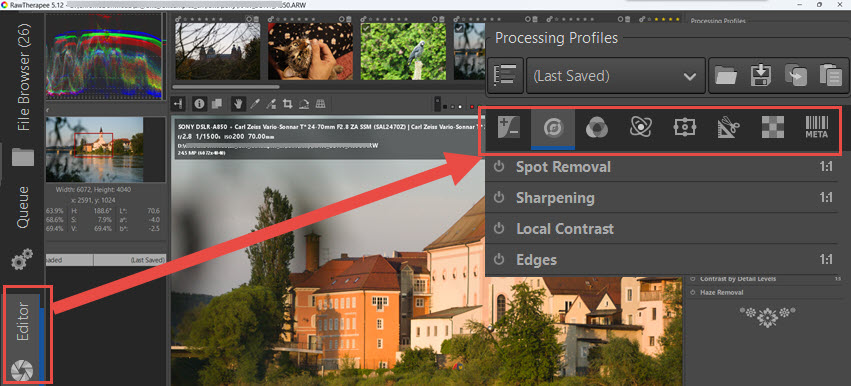
Unlike mainstream editors that hide complex math behind simple sliders, RawTherapee puts the technical mechanics on the right-side panel for non-desctructive editing. You can navigate through these tabs: exposure, detail, color, advanced settings, selective editing, transform, and raw processing (see screenshot above).
Under each tab, there are tools and parameters for fine tuning. For instance, under the detail tab, you can edit and adjust for sharpening, noise reduction, defringe, haze removal, etc. For beginners, hundreds of parameters can appear intimidating, while for experienced photographers, it can be incredibly liberating.
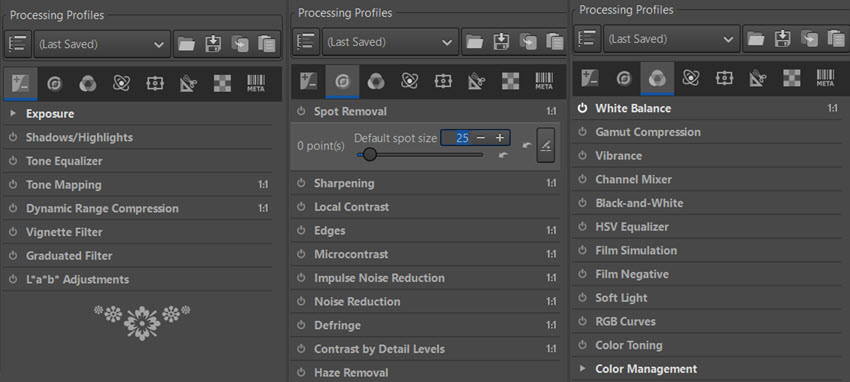
Before diving into detailed reviews, here is a quick glance of its strengths and trade-offs. Yet, comparing its free price tag with the feature set, there's nothing to complain about.
What I like about RawTherapee:
- Completely free and open-source, with abundant tutorials on YouTube and active community.
- Supports most raw files from major camera brands, and it loads raw in fast speed.
- Highly intuitive layout compared to other free open-source options.
- Fine-tuning tools for raw developing, including denoisaicing, manual denoising, color, and other advanced adjustments.
Trade-offs:
- Lacks advanced digital asset management (DAM) tools.
- Lacks AI-powered upscaling, noise reduction, and detail restoration features.
Interface and Workflow
For non-geeky users, open-source photo editors often get a reputation for being confusing. Yet if you are coming from software like Lightroom, RawTherapee is easy to understand, and you can pick up the basics in about ten minutes.
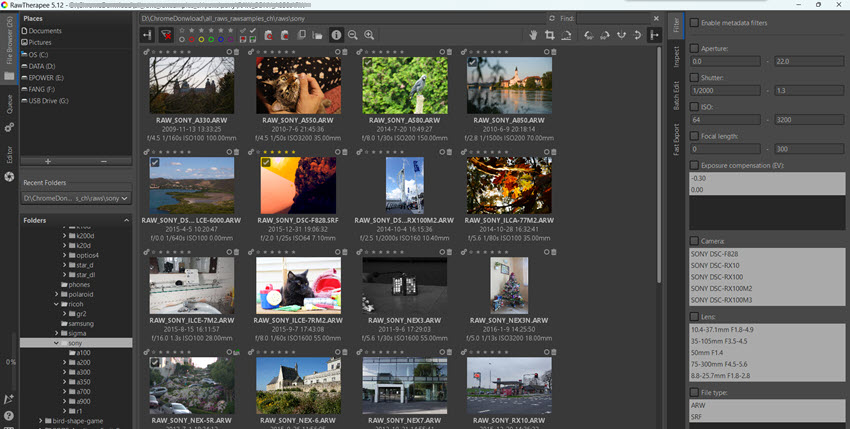
It uses a straightforward tabbed interface. On the left panel, you begin in the File Browser to locate your photos, and hit the Editor tab to start editing and raw developing. Unlike catalog-based applications, RawTherapee works directly with folders rather than requiring you to import your photos into a database as with Lightroom.
The layout features collapsible sidebars alongside a top gallery view, allowing you to maximize working space.
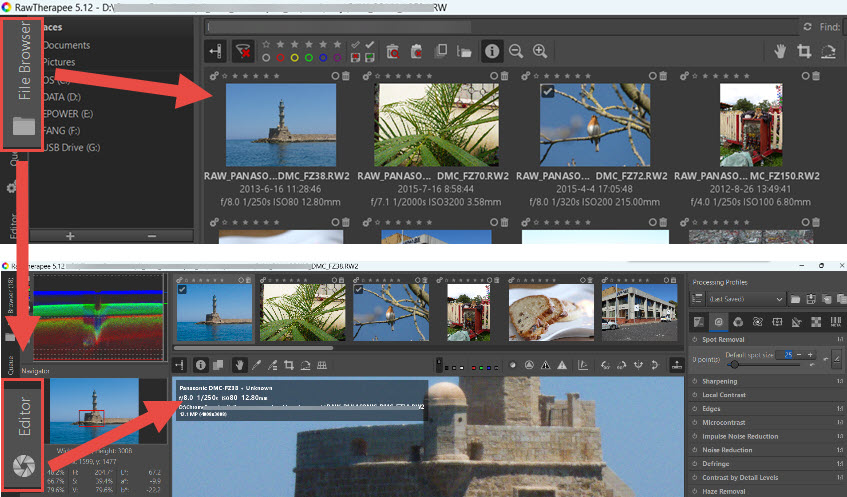
While there are many tabs and sliders, the organization is logical and in a sequence of typical raw developing workflow. The sheer number of controls can initially feel overwhelming for beginners.
Still, compared to some open-source competitors such as Darktable, RawTherapee often feels easier to navigate. Most photographers can become comfortable with the core workflow within a single editing session.
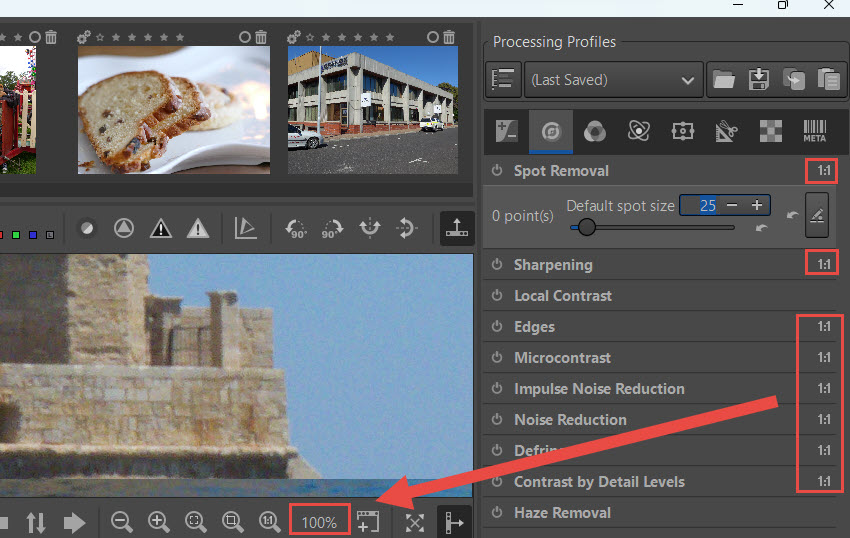
No difference after editing? Make sure to preview in 100%
Inside rawtherapee, certain settings require you to view the image at 1:1 (100%) scale to see the real results. Their effects cannot be accurately represented in a small, zoomed-out preview. For instance, resource-intense processing such as sharpening and noise reduction are such examples.
It is an intended design to speed up software performance by not rendering the complex processing on the fit-to-screen view.
Image Quality and Editing Tools
The RAW processing engine in Rawtherapee consistently extracts excellent detail, color, and dynamic range from camera files. Rather than relying on AI enhancement, RawTherapee's strength comes from the depth of manual control it offers over image processing.
Recovering Difficult Exposure
In some basic photo editors, a Highlights slider is rigid, it only affects the brightest 10% to 20% of your image. This becomes a problem when you have a bright sky that bleeds down into the midtones.
RawTherapee solves this with the Tonal Width slider, allowing you to redefine what the software considers a highlight. By dragging it down, you expand the "highlight" bracket to encompass brighter midtones, allowing you to pull down an overexposed sky seamlessly without leaving harsh transition lines.
The latest version also added a new Michaelis-Menten tone mapping method to its Selective Editing workflow, along with further improvements to the Generalized Hyperbolic Stretch and other tone-processing tools.
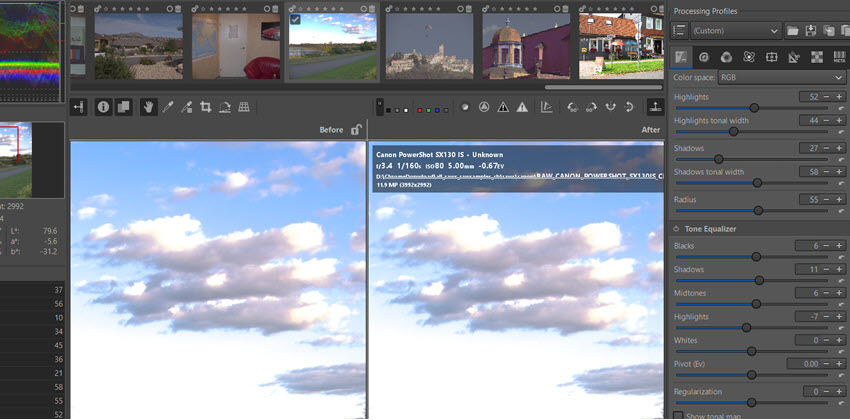
If your photo is dark and muddy, almost all your image data is crammed into the shadows region. In these cases, turning on the Tone Mapping feature allows you to map to the specific bands of light and dark in your poorly exposed image to rescue detail.
Detail and Sharpening
For bird photography:
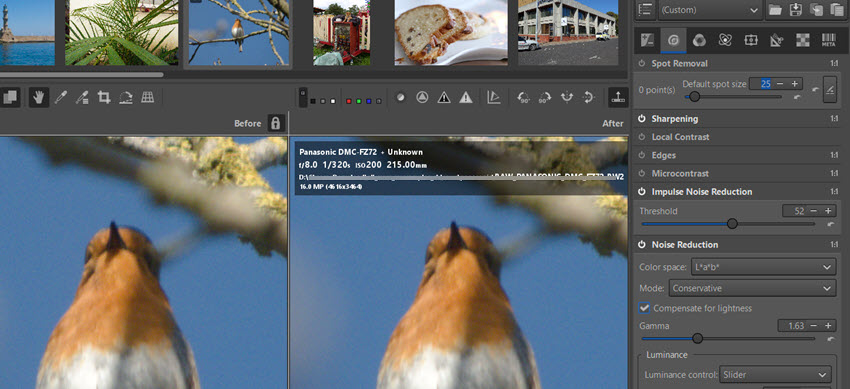
When editing bird photos, if you try to retain the razor-sharp barbules of a robin's feather against a smooth, blurred background, standard sharpening will ruin your bokeh. RawTherapee's Contrast Threshold slider is brilliant here.
By increasing it, you tell the software to only sharpen areas of high contrast, such as the body of the bird, while leaving the smooth background alone, avoiding artificial enhancement of noise.
For family and travel photos:
Those wide shots from travel images that are generally well-lit and just need a quick pop before sharing, the standard Unsharp Mask is highly effective.
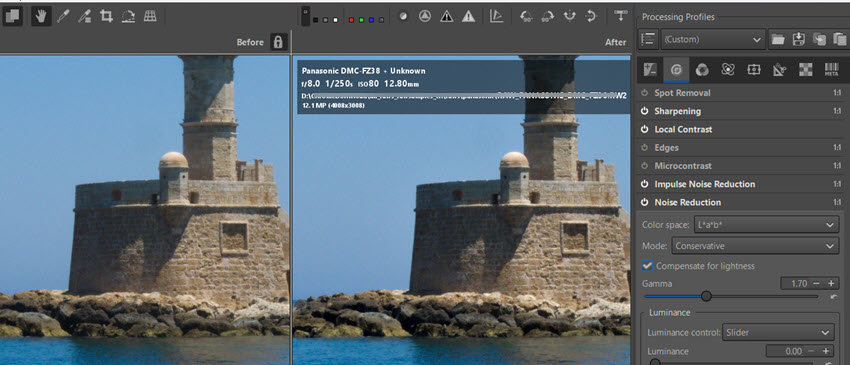
When it comes to heavy noise reduction, you will not find the AI-powered denoising tools common in AI photo enhancer apps. You can clean up an image, manually adjusting sliders to remove chroma noise and impulse noise. Yet the detail and texture will slightly be removed alongside noise reduction.
The wavelet tool is a handy alternative for global detail adjustments, letting you adjust micro-contrast across different detail layers rather than applying a basic global fix.
Color Control
The Color tab handles everything from neutral gray color picking to Black and White conversions. The standout feature is the Vibrance module. Unlike a blunt saturation slider, you can uncheck "link pastel and saturated tones".
This allows you to specifically boost the saturation of weaker pastel colors without overcooking the already-vibrant areas, giving you highly nuanced color control.
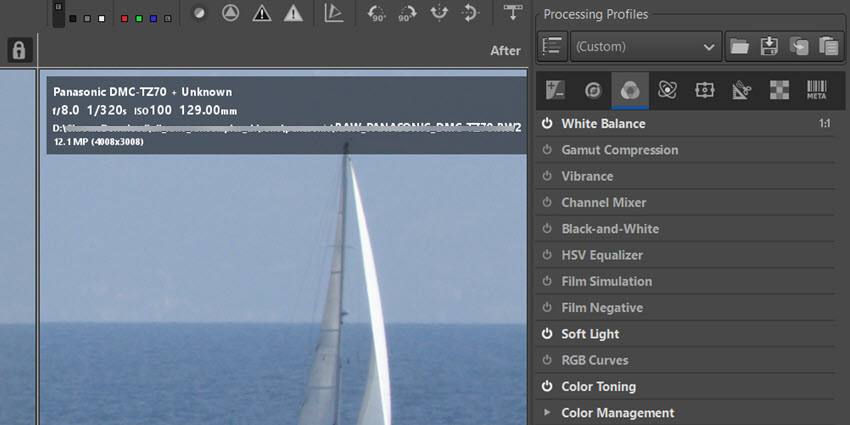
Image Resize and Quality Upscaling
RawTherapee features a highly capable standard Resize module under the Transform tab, utilizing traditional interpolation algorithms like Lanczos. However, it does not feature AI-based upscaling that restores details and textures.
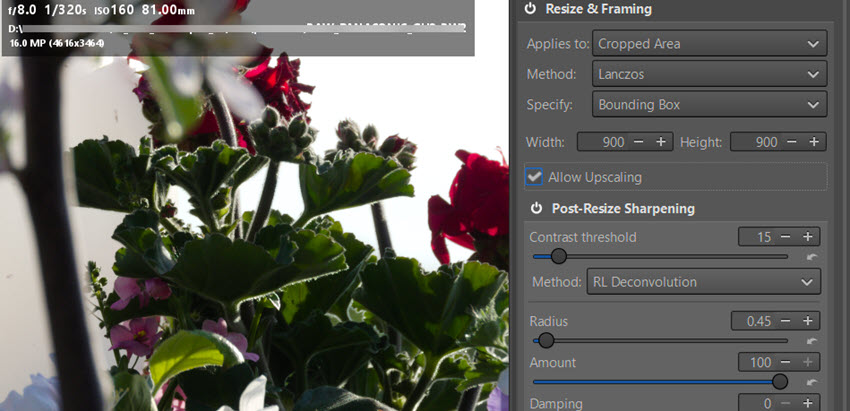
RawTherapee is strictly built for non-destructive raw processing and standard pixel resizing. If you need to upscale an image while keeping natural textures and details, you can process base raw file in RawTherapee first, export it and then run it through a dedicated local AI image upscaler like Aiarty Image Enhancer or Upscayl.
RawTherapee vs Lightroom
Shall I stay with Lightroom or switch to Rawtherapee? Are skills transferable between the two? The foundational concepts of reading histograms, managing exposure, and manipulating curves remain identical.
Asset Management
Lightroom is a complete digital asset manager (DAM) that ingests, keywords, rates, and searches your photos, with fully-fledged image editing.
RawTherapee is more for raw editing. It uses a native file browser instead of a database catalog. While this is faster initially because there is no import process, it lacks advanced organization tools for professional photographers. Some users often pair it with local software like digiKam for proper asset management.
Masking and Local Edits
This is the main area where RawTherapee struggles. The masking tools are very basic, with no brush mask available. You are mostly limited to a circular gradient. While adjusting global exposure is easy, cutting out a sky or editing a specific person is frustrating.
Here is a quick look at how RawTherapee compares to other common options based on core features.
Who Should Use RawTherapee?
RawTherapee proves that you don't need to master 100% of a software's tools to get exceptional results. You can focus on essential features: such as Exposure, Details, Color, and Geometry tabs to turn flat raw files into polished photos.
Switch to RawTherapee if: If you reject subscription software models, prefer processing your files locally, appreciate absolute control over demosaicing algorithms.
Stick with Lightroom if: You are a high-volume event or commercial photographer who needs to cull, batch-edit, and export hundreds of photos on a tight deadline.
For photographers, it's not always an either-or choice, as we have all these free raw editors in the market, offering flexibly options for different workflow and tool combinations.
If you mostly shot in raw and prefer a budget friendly option without subscription, you can pick one of these photo culling software, some of which also includes editing and raw developing.
Bonus Tips:
Since most raw editors are optimized for camera raw files for noise reduction and color correction, they don't have dedicated modules to enhance JPG quality or other delivery formats such as PNG, BMP, WebP, etc.
For both RAW and general image enhancement, upscaling, and noise reduction, you can integrate dedicated image enhancers into your toolkit. Popular options are Topaz Photo, Aiarty Image Enhancer, and some open-source models.
Here is a hands-on test with Aiarty Image Enhancer to enhance low-quality photos. Its deep-learning models will analyze the image, detect noise and compression artifacts, and apply quality enhancement accordingly.
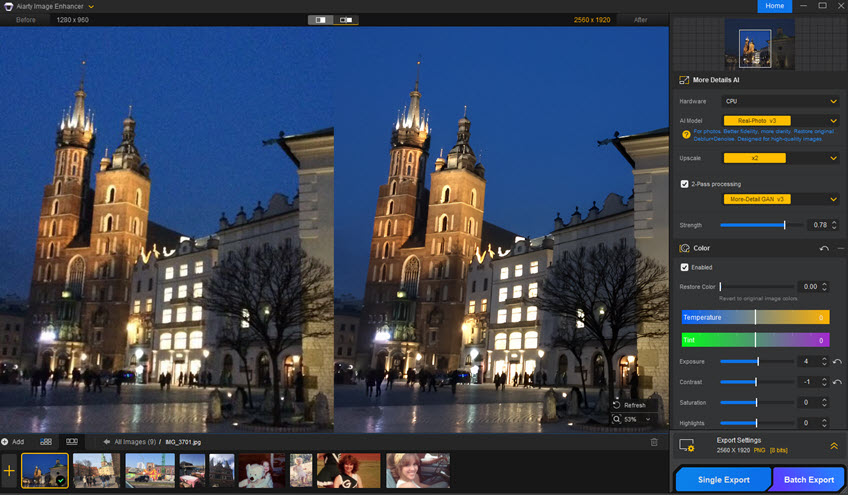
You can adjust the enhancement strength with this camera photo enhancer. It will keep the output photo natural, restore details and textures, and enhance clarity, while avoiding a plastic look.
Aiarty also supports seamless workflow with other photo editors, where you can manage and edit photos in your existing tool such as in Lightroom Classic, open that photo directly in Aiarty for deep-learning noise reduction and quality restoration, and the results will show up in real time in your photo editor.
Click the buttons below to download Aiarty Image Enhancer for Windows or Mac, and see how it enhances your workflow as a standalone app or as a batch pre-processing tool before further tweaking in your photo editors.
Final Verdict
RawTherapee is a highly capable raw developer for base editing. It works well if you want to shape your images manually from the raw data and do not rely heavily on local adjustments. It is completely free and has no hidden subscription fees.
If you enjoy having complete control over your photo editing and do not mind reading the documentation, it is a solid choice. However, if you require precise masking, AI upscaling, or automated noise reduction, you will likely find the workflow too slow for modern, high-volume everyday use.
You May Also Like


This post was written by Brenda Peng who is a seasoned editor at Digiarty Software who loves turning ordinary photos into extraordinary works of art. With AI assistance for brainstorming and drafting, the post is reviewed for accuracy by our expert Abby Poole for her expertise in this field.
