


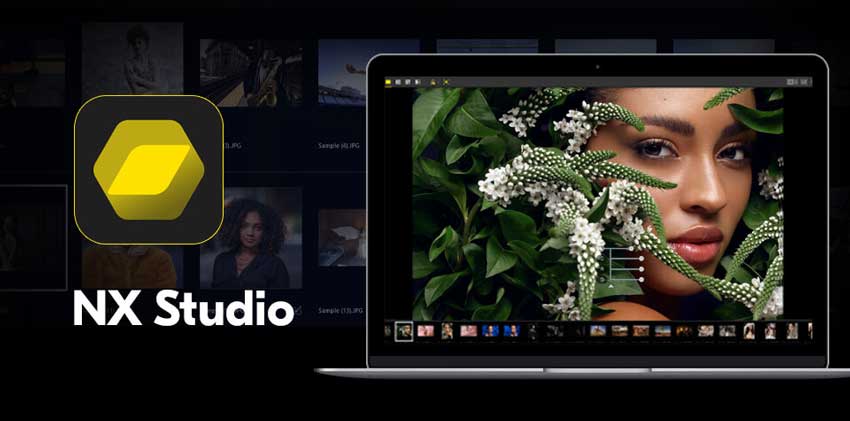
For Nikon camera enthusiasts, Nikon NX Studio offers an all-in-one solution for both photo editing and video processing. Designed to provide seamless integration with Nikon cameras, this free software brings together the best features of Nikon Capture NX-D and Nikon ViewNX-i, offering photographers and videographers a robust tool for organizing, editing, and refining their content.
But with so many editing software options out there, how does Nikon NX Studio stand out? In this review, we'll explore its key features, performance, and usability, comparing it to other popular alternatives in the market. If you're a professional photographer or an enthusiast seeking an affordable solution to enhance your Nikon images and videos, this review will help you determine if Nikon NX Studio is the right tool for your creative workflow.
What is Nikon NX Studio?
Nikon NX Studio is a comprehensive, free software solution designed specifically for Nikon photographers and videographers. By merging the capabilities of Nikon Capture NX-D (a powerful RAW image processing tool) and Nikon ViewNX-i (an intuitive file management and viewing application), Nikon NX Studio provides a unified platform for editing and organizing both photos and videos.
Released as a successor to these two programs, Nikon NX Studio offers a robust suite of tools to fully leverage Nikon’s proprietary image processing technology, making it an essential choice for Nikon camera users who want to get the most out of their RAW files.
One of the standout features of Nikon NX Studio is its ability to handle RAW image files with precision, providing photographers with detailed control over exposure, white balance, sharpness, and noise reduction. In addition to its photo editing capabilities, the software also includes basic video editing tools, allowing users to adjust color grading, exposure, and sharpness in their video clips.
Hot search: How to Edit Raw Photos for Best Quality >>
Beyond editing, Nikon NX Studio excels in file organization and management. It helps users organize large collections of images and videos through tagging, rating, and filtering options, ensuring that even the most extensive media libraries remain manageable.
Overall, Nikon NX Studio is aimed at photographers and videographers who want an affordable, easy-to-use tool that integrates seamlessly with their Nikon camera system while providing a high level of editing control and efficiency. Whether you’re editing RAW files or managing your media, this software offers everything Nikon users need in one package - and all at no cost.
This emphasis on manual control is a key reason Affinity Photo maintains its professional reputation. However, as modern photo editing workflows increasingly prioritize speed, automation, and AI-assisted tasks, it raises an important question for today’s users: how far does Affinity Photo go when it comes to AI?
Key Features of Nikon NX Studio
Nikon NX Studio is packed with powerful features designed to streamline the workflow of photographers and videographers, especially those using Nikon cameras. With its combination of advanced editing tools, robust RAW processing capabilities, and intuitive file management system, it offers a comprehensive solution for users seeking precision and control over their images and videos. Below, we’ll dive into the standout features of this software.
RAW Image Processing
Nikon NX Studio shines when it comes to RAW image processing, a critical feature for photographers who want the highest quality edits from their camera’s original files. The software supports Nikon’s NEF (Nikon Electronic Format) files, ensuring that every detail captured by your camera sensor can be preserved and enhanced. With RAW files, photographers can make non-destructive edits to exposure, white balance, colors, and more, with the flexibility to reverse or adjust edits at any time.

Key RAW processing tools include:
- Highlight and Shadow Adjustments: Recover lost details in both bright and dark areas without introducing noise or degrading image quality.
- Advanced Noise Reduction: The noise reduction tool helps in reducing grain, especially in high-ISO images or low-light conditions, allowing you to enhance details without compromising clarity.
- Dynamic Range Control: Increase or decrease the dynamic range to create more vibrant or subdued images, depending on the desired look.
- White Balance and Color Control: Nikon NX Studio offers granular control over white balance, allowing you to adjust the warmth or coolness of your images to match your creative vision. It also includes color tuning for precise adjustments to specific color ranges within the image.
- Fine Detail Enhancements: The software’s sharpness tool allows for meticulous control, ensuring that fine textures (like hair or intricate patterns) are rendered in crystal clear detail.
This combination of advanced RAW editing tools makes Nikon NX Studio an excellent choice for photographers who need professional-grade processing with minimal quality loss.
Advanced Photo Editing Tools
While Nikon NX Studio offers an intuitive interface for beginners, it doesn't skimp on advanced tools for professional photographers. The software provides a suite of editing options that give users full control over their images, from basic corrections to more complex manipulations.
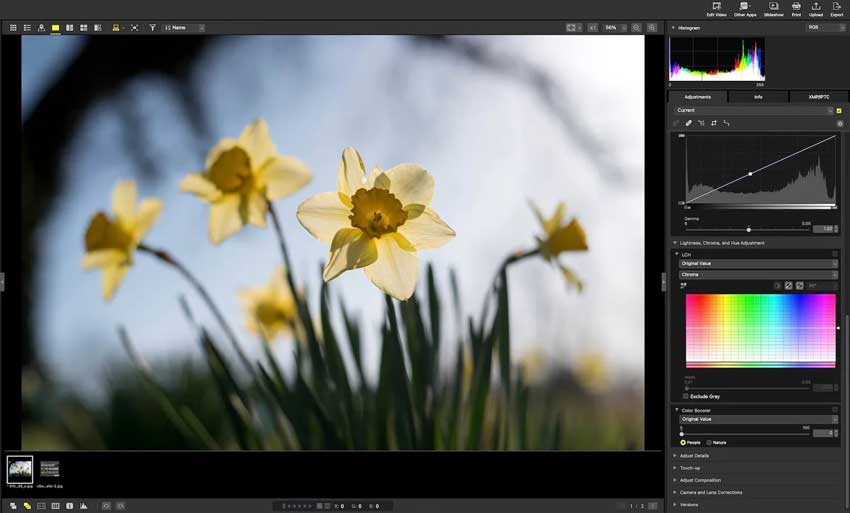
- Control Points: One of the standout features of Nikon’s software, Control Points allows you to apply selective adjustments to specific areas of an image. For example, you can lighten just the subject's face while leaving the background untouched, all with remarkable precision.
- Lens Correction: Automatically corrects lens distortions, chromatic aberrations, and vignetting, which can often appear when shooting with certain lenses.
- Tone Curves: Allows for precise control over the tonal range of your images, enabling you to adjust highlights, midtones, and shadows independently for an ideal contrast balance.
- Retouching and Healing Tools: Whether you need to remove blemishes, correct imperfections, or fix unwanted objects, Nikon NX Studio includes healing brushes and cloning tools for seamless retouching. The skin smoothing feature also provides a quick way to refine portraits and reduce the appearance of blemishes.
- Batch Editing: If you’re working with a large number of photos, batch processing can be a lifesaver. Nikon NX Studio lets you apply settings across multiple images, which speeds up your workflow significantly without losing the ability to fine-tune each one.
A Quick Way to Go Beyond What Nikon NX Studio Can Do
Nikon NX Studio does a solid job for RAW editing and color correction, but there’s one area where it naturally reaches its limit: image upscaling and detail recovery in low-quality files.
If you’ve ever tried working with older shots, heavily compressed images, or photos that just don’t have enough resolution for printing, you’ll know how quickly traditional editing tools hit a wall.
This is where Aiarty Image Enhancer becomes a powerful add-on in your workflow. Instead of just sharpening or adjusting tones, it uses AI-driven enhancement models to intelligently rebuild detail, upscale resolution, and clean up noise in a way traditional tools simply can’t match. In practical use, it’s especially effective for:
- Bringing old or soft images back to life
- Upscaling photos for large prints or social media
- Enhancing detail without the “over-sharpened” look
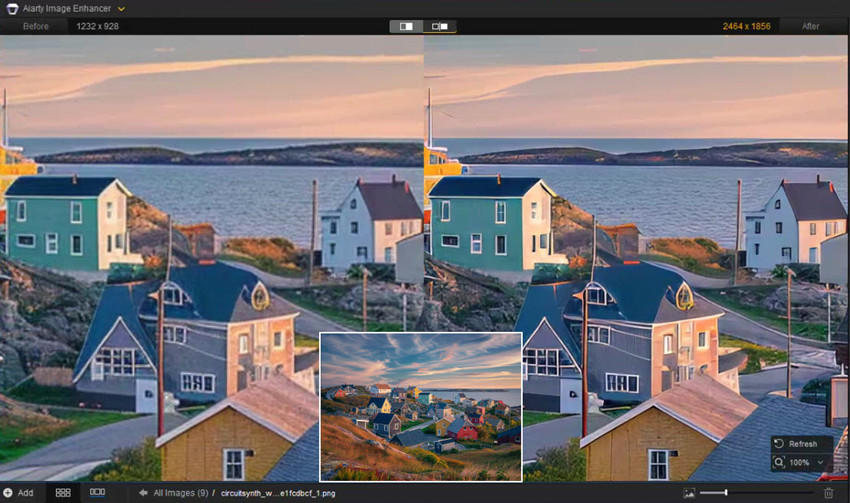
What works well is combining both tools:
Nikon NX Studio handles precise RAW editing and color accuracy, while Aiarty Image Enhancer takes care of final-stage AI enhancement when you need that extra level of clarity.
For anyone who regularly works with images that need more than basic edits, this combination can noticeably expand what your workflow is capable of.
Video Editing Capabilities
While Nikon NX Studio is primarily designed for photo editing, its video editing tools are surprisingly capable, making it a useful option for photographers who also work with video footage. The software supports 4K video files and offers basic editing capabilities to adjust exposure, color, and clarity in your clips. Here’s what Nikon NX Studio offers for video:
- Exposure and Color Grading: Just like in photo editing, you can adjust the exposure, brightness, contrast, and color saturation of video clips. This allows you to achieve cinematic looks, adjust for lighting conditions, or enhance the mood of your footage.
- Sharpness and Detail Enhancements: Enhance the sharpness of video clips while maintaining smooth textures, helping to bring out more fine details, especially in low-res or blurry footage.
- Noise Reduction: A handy tool for reducing grainy or pixelated video, particularly for videos shot in low light.
- Trimming and Cutting: While not a fully-featured video editor, Nikon NX Studio allows you to trim sections of your video, removing unwanted parts while preserving the key content.
- Frame-by-Frame Adjustments: This feature ensures that your video maintains consistent exposure, color, and sharpness, even when dealing with fast-moving subjects or complex lighting changes.
Though not a replacement for professional video editing software, Nikon NX Studio's video tools are more than sufficient for photographers looking to make quick edits to their video content.
File Management and Organization
For photographers working with large collections of images and videos, file management is essential. Nikon NX Studio provides a well-designed, easy-to-use system to help you stay organized. The software enables users to efficiently sort, search, and categorize their media, ensuring that finding the right file is never a hassle. Key file management features include:
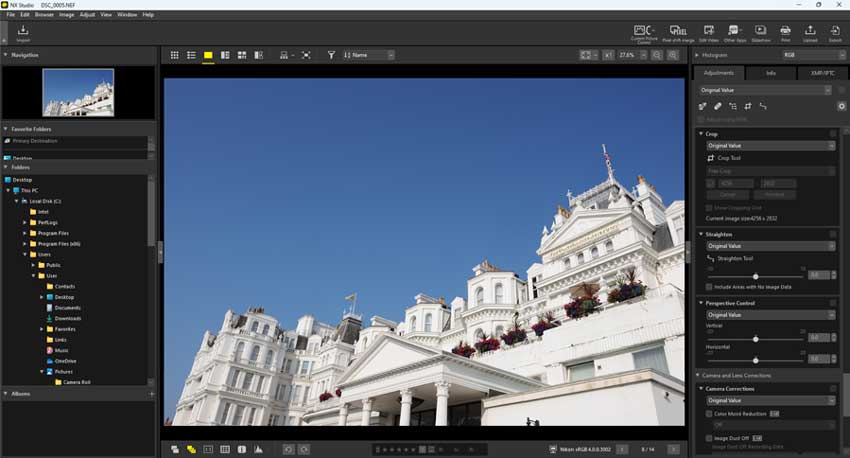
- Image Tagging and Rating: Add custom tags or keywords to your images, making it easier to search and locate specific photos later. You can also assign star ratings and color labels to categorize images based on their quality, importance, or editing progress.
- Folder Management: Organize your media into folders with customizable structures. This is especially useful when working with large numbers of photos or videos from different shoots or projects.
- Metadata Editing: Nikon NX Studio allows you to view and edit EXIF metadata (such as camera settings, location, and time) directly within the software. This is useful for organizing photos by specific criteria or for metadata-based searches.
This robust organizational system helps users maintain a smooth workflow, no matter how large their collection grows.
File Management and Organization
Nikon NX Studio is designed with ease of use in mind. The software offers a clean, simple interface that is easy to navigate, even for beginners. With customizable tool panels and intuitive controls, users can quickly access the features they need, making the editing process more efficient.
- Customizable Workspaces: Nikon NX Studio allows you to rearrange the interface to suit your workflow. You can set up different panels for editing, file browsing, and metadata for a personalized experience.
- Touchscreen Support: If you’re using a touchscreen device, Nikon NX Studio supports intuitive gesture-based controls, making it easier to zoom, rotate, and adjust images with a swipe or tap.
- Quick Access to Common Tools: Most of the essential tools and features are readily accessible from the toolbar, minimizing the need to navigate through multiple menus.
This easy-to-navigate interface helps users at all experience levels get the most out of the software without feeling overwhelmed.
Pros and Cons of Nikon NX Studio
- Completely Free: No subscription or licensing fees, making it accessible for everyone.
- Optimized for Nikon Cameras: Seamless integration with Nikon cameras and RAW files for better performance and control.
- Comprehensive Photo Editing Tools: A range of editing features, from basic adjustments to advanced tools like Control Points and tone curves.
- RAW Processing with Minimal Quality Loss: Offers powerful RAW editing capabilities, maintaining high-quality output with minimal degradation.
- Basic Video Editing Features: Includes video exposure adjustments, color grading, trimming, and basic editing tools for quick video edits.
- User-Friendly Interface: Intuitive design with customizable workspaces, ideal for both beginners and experienced users.
- File Organization and Metadata Support: Tagging, rating, categorization, and metadata editing features help organize large photo and video libraries efficiently.
- Limited Advanced Features for Professionals: Lacks some high-end features found in professional software like layers or extensive plugin support.
- No Advanced Batch Processing: Batch processing capabilities are basic compared to other software, limiting workflow speed for larger image sets.
- No Cloud Integration: No built-in cloud syncing or storage, making it difficult to access files across devices.
- Limited Support for Non-Nikon Files: Primarily designed for Nikon files; compatibility with files from other camera brands is limited.
- Lacks Some Advanced Video Editing Features: No multi-track editing or motion graphics, making it unsuitable for more complex video projects.
- Occasional Performance Issues: Can experience performance issues when working with large files or high-resolution images, especially on older hardware.
Nikon NX Studio vs Competitors
While Nikon NX Studio offers a robust set of features tailored specifically for Nikon users, it's important to understand how it compares to other industry-standard photo and video editing software. To help you make an informed decision, we’ve put Nikon NX Studio head-to-head with some of the most popular alternatives in the market, including Adobe Lightroom, Capture One, DxO PhotoLab, PureRaw, and Luminar Neo. Each of these programs has its strengths and weaknesses, so let's break down how they stack up against Nikon NX Studio in key areas like RAW processing, editing tools, and overall value.
Is Nikon NX Studio Worth It?
Nikon NX Studio offers a strong set of features at no cost, making it an appealing option for Nikon photographers. However, its value depends on your editing needs and workflow.
For Nikon users, one of the main advantages is that the software is completely free, which makes it a great choice for those who are budget-conscious or new to photo editing. It’s also optimized for Nikon cameras, offering seamless integration with NEF (Nikon Electronic Format) files and other Nikon gear. The software includes a solid set of RAW processing, advanced photo editing tools, and even basic video editing features, providing an all-in-one solution for many photographers. Additionally, Nikon NX Studio is regularly updated to ensure compatibility with the latest Nikon cameras and lenses.

However, Nikon NX Studio does have its limitations. It lacks advanced features like layer-based editing and plugin support, which are essential for more complex workflows. The software also doesn’t support cloud integration, so if you rely on cloud storage or syncing across devices, this could be a drawback. Some users have also reported performance issues when working with large files or older hardware. Furthermore, while it excels with Nikon cameras, Nikon NX Studio is not ideal for photographers using other brands, as it’s specifically tailored to Nikon equipment.
Our Verdict
Overall, Nikon NX Studio is a great choice for Nikon users who need a free, powerful, and easy-to-use editing tool. It provides excellent RAW processing and editing features, along with strong file management capabilities. However, for professionals who need more advanced editing options or those working with non-Nikon cameras, alternatives like Adobe Lightroom or Capture One may be better suited to their needs. If you’re a Nikon photographer looking for a reliable, no-cost solution, Nikon NX Studio is definitely worth considering.
 FAQ about Affinity Photo
Yes, Nikon NX Studio is completely free. There are no subscription fees or hidden costs, making it an affordable option for Nikon users who need powerful editing tools without the financial commitment.
Nikon NX Studio is optimized for Nikon cameras and supports NEF (Nikon Electronic Format) files from most Nikon DSLR and mirrorless cameras. However, the software works best with newer models, and older camera models might not have all the advanced features or lens profiles available.
Yes, Nikon NX Studio includes basic video editing tools, such as exposure adjustments, color grading, and trimming. While it's not as robust as dedicated video editing software, it provides essential features for photographers who want to quickly edit video clips.
No, Nikon NX Studio does not have built-in cloud integration. If you require cloud syncing or storage, you'll need to use an external service like Google Drive or Dropbox for backup and access across devices.
While Nikon NX Studio is designed primarily for Nikon cameras, it can still handle JPEG, TIFF, and other common image formats. However, it doesn't offer the same level of support for non-Nikon RAW files, and you may not get the same level of lens correction or camera-specific optimization.
Nikon NX Studio is free and optimized for Nikon users, while Adobe Lightroom is a subscription-based service with more advanced features, such as cloud integration, plugin support, and a broader set of editing tools. Lightroom is generally preferred by professionals, but Nikon NX Studio offers excellent value for Nikon photographers who don't need all the advanced features of Lightroom.
Yes, Nikon NX Studio includes basic batch processing capabilities. You can apply adjustments to multiple images at once, which helps speed up workflows when dealing with large collections of photos. However, its batch processing features are not as advanced as some other professional software.
You May Also Like


This post was written by Brenda Peng who is a seasoned editor at Digiarty Software who loves turning ordinary photos into extraordinary works of art. With AI assistance for brainstorming and drafting, the post is reviewed for accuracy by our expert Abby Poole for her expertise in this field.
