


Lightroom vs Photoshop is not just a question of which Adobe app is more powerful. It is really about workflow. Lightroom is built for photographers who need fast RAW editing, photo organization, batch processing, and consistent color work. Photoshop is built for detailed retouching, layers, object removal, compositing, design, and more advanced AI-powered image editing.
If you are trying to decide which one to learn, buy, or use for your own photos, this guide breaks down the real differences between Lightroom and Photoshop, including ease of use, RAW editing, AI features, pricing, and the best workflow for beginners, photographers, and creators.
Lightroom vs Photoshop: Quick Answer
- Choose Lightroom if you mainly edit RAW photos, organize large photo libraries, apply presets, batch edit images, or want a beginner-friendly photo workflow.
- Choose Photoshop if you need advanced retouching, layers, background replacement, object removal, compositing, graphic design, or generative AI editing.
- Choose both if you are serious about photography. Many photographers use Lightroom for organizing and global edits, then Photoshop for detailed retouching and final polish.
What Is Adobe Lightroom?
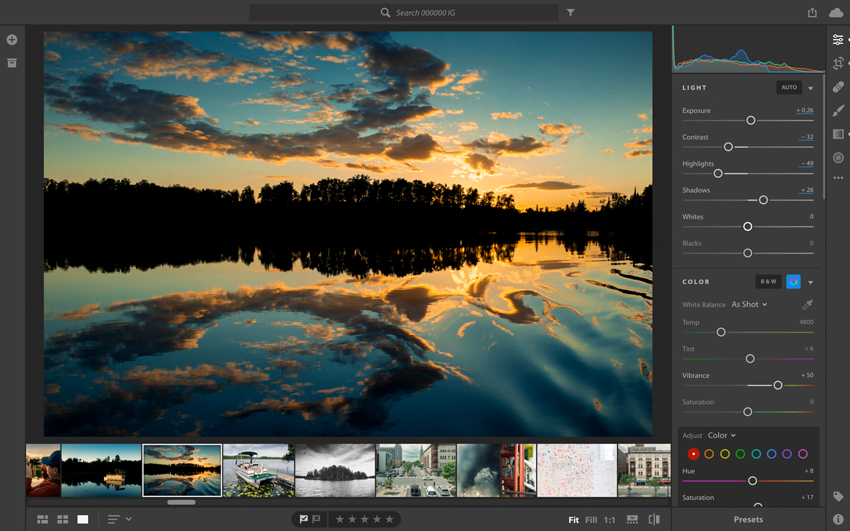
Adobe Lightroom is a photo editing and management program designed mainly for photographers. Its biggest strength is helping you import, organize, edit, and export many photos in one clean workflow.
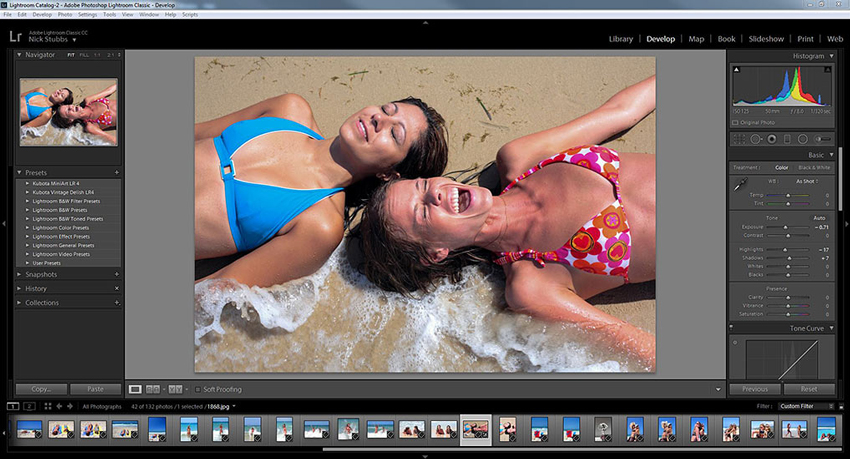
Lightroom is especially useful for RAW editing. You can adjust exposure, white balance, highlights, shadows, contrast, tone curves, color, lens corrections, and noise reduction without permanently changing the original file. This is called non-destructive editing, and it makes Lightroom very safe and flexible for both beginners and professionals.
Another major advantage of Lightroom is organization. You can sort photos by folders, collections, ratings, flags, keywords, dates, and metadata. For wedding, travel, portrait, product, or event photographers, this makes Lightroom much faster than Photoshop when dealing with hundreds or thousands of images.

Lightroom is best for improving the overall look of photos quickly. It works well for color correction, exposure adjustment, batch editing, applying presets, and creating a consistent style across an entire shoot. If your main goal is to make photos look cleaner, brighter, sharper, or more consistent, Lightroom is usually the easier place to start.
What Is Adobe Photoshop?
Adobe Photoshop is a professional image editing program built for detailed, pixel-level control. While Lightroom focuses on fast photo enhancement and organization, Photoshop gives you deeper control over individual images.
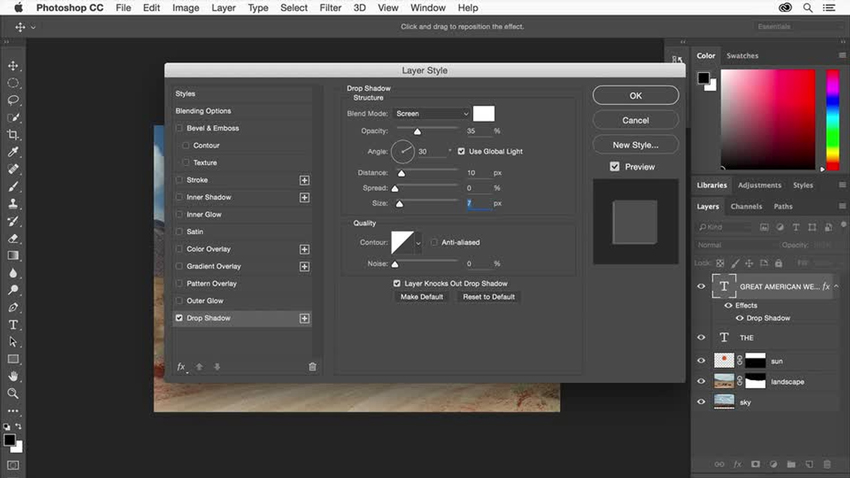
Photoshop is used by photographers, retouchers, designers, digital artists, and content creators. It supports layers, masks, selections, brushes, text, filters, smart objects, blending modes, and many advanced tools that Lightroom does not offer.
This makes Photoshop much better for complex edits, such as removing difficult objects, replacing backgrounds, retouching skin, combining multiple images, creating posters, editing product photos, or making surreal composites.
Photoshop has also become much more powerful with AI features such as Generative Fill, Generative Expand, neural filters, improved selections, and content-aware editing. These tools make Photoshop especially useful when you want to add, remove, or transform parts of an image instead of simply improving the original photo.
Lightroom vs Photoshop: Key Differences
The simplest way to understand Lightroom vs Photoshop is this: Lightroom is for photo workflow, while Photoshop is for image manipulation. Lightroom helps you process many images efficiently. Photoshop helps you edit one image deeply.
1. Editing Style
Lightroom is built around non-destructive editing. Your original photo stays untouched, and every adjustment is saved as editable instructions. This is perfect for photographers who want to experiment freely and keep a clean workflow.
Photoshop is built around detailed image editing. You can work with layers, masks, selections, and individual pixels. It gives you more control, but it also requires more learning.
2. Speed and Efficiency
Lightroom is much faster when you need to edit many photos. You can apply a preset to one image, sync the settings to hundreds of images, and export them together. This is why Lightroom is popular among wedding, event, travel, and lifestyle photographers.
Photoshop is slower for large photo sets because it is usually used one image at a time. However, for a hero image, portrait, product shot, or commercial edit, Photoshop gives you much more precision.
3. Organization
Lightroom includes a full photo management system. You can organize photos with ratings, flags, collections, keywords, folders, and metadata. This is one of the biggest reasons many photographers keep Lightroom in their workflow.
Photoshop does not organize photo libraries in the same way. It is mainly an editor, not a complete photo management tool.
4. Creative Control
Lightroom is excellent for improving photos naturally. It is great for exposure, color grading, tone correction, presets, lens corrections, and local masks.
Photoshop is better when you want to change the image itself. You can remove complex objects, replace skies or backgrounds, blend multiple photos, reshape elements, add text, create graphics, and use generative AI tools for more creative edits.
💡 Enhance, upscale, and perfect your photos instantly with Aiarty Image Enhancer
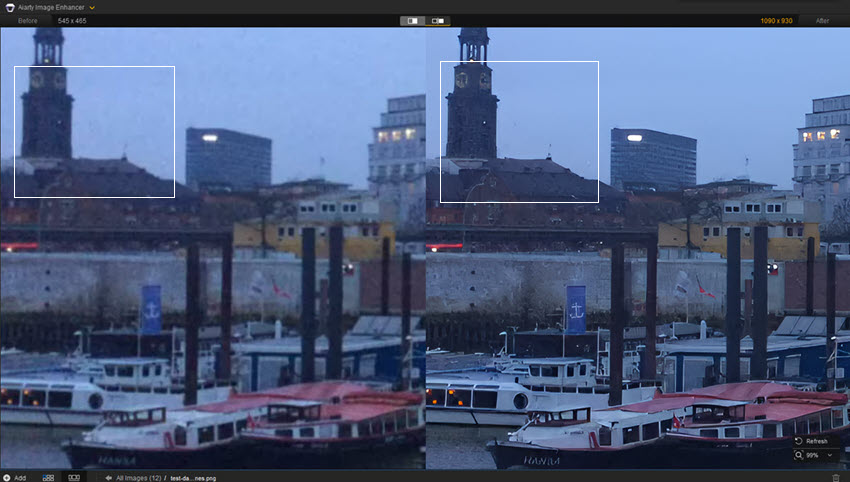
If your photo looks soft, noisy, compressed, or too low-resolution before editing, Aiarty Image Enhancer can work as a helpful companion to both Lightroom and Photoshop. You can use Lightroom for color and batch workflow, Photoshop for detailed retouching, and Aiarty for AI-powered upscaling, denoising, detail recovery, and face restoration.
This is especially useful when working with old photos, cropped images, AI-generated images, social media downloads, or low-resolution files that need to be enlarged before final editing.
Can Lightroom Replace Photoshop?
Lightroom can replace Photoshop for many photographers, but not for every type of image editing. If your work is mainly about improving photos rather than changing them heavily, Lightroom may be enough.
Lightroom Can Replace Photoshop If You Need:
- RAW photo editing
- Exposure and color correction
- Batch editing for many photos
- Presets and consistent photo styles
- Basic object removal and cleanup
- Photo organization and export workflow
- Travel, landscape, wedding, event, or lifestyle photo editing
Lightroom Cannot Fully Replace Photoshop If You Need:
- Advanced layers and masks
- Professional portrait retouching
- Complex object removal
- Background replacement
- Image compositing
- Graphic design or text layout
- Generative Fill and Generative Expand
- Product photo retouching for commercial use
For most casual photographers and many content creators, Lightroom alone is enough. For professional retouching, design, composites, and advanced AI edits, Photoshop is still necessary.
Photoshop AI vs Lightroom AI
AI is now one of the biggest differences between Lightroom and Photoshop. Both apps include AI-powered features, but they are used in different ways.
Lightroom AI focuses on speeding up normal photo editing tasks. Photoshop AI focuses more on changing, generating, extending, or transforming image content.
If you only need AI to speed up photo cleanup, masking, and noise reduction, Lightroom is very capable. If you want to add new objects, extend backgrounds, replace areas, or create more dramatic image changes, Photoshop is the stronger AI editor.
Lightroom vs Photoshop: Feature-by-Feature Comparison
Here is a deeper look at the features that matter most when choosing between Lightroom and Photoshop.
Hot search: ON1 Resize vs Topaz Gigapixel vs Photoshop Tests and Comparison
1. RAW Editing
Lightroom is one of the best tools for RAW photo editing. It gives you quick access to exposure, contrast, highlights, shadows, white balance, color grading, lens correction, sharpening, and noise reduction. Since edits are non-destructive, you can always return to the original RAW file.

Photoshop can also edit RAW files through Adobe Camera Raw, but it is less convenient for organizing and processing large photo sets. Lightroom is usually better for photographers who shoot RAW regularly.
Also see: Lightroom Super Resolution Explained
2. Presets and Styles
Lightroom makes presets simple. You can create your own presets or use ready-made styles to apply the same look across many photos. This is useful for social media creators, wedding photographers, bloggers, and anyone who wants a consistent visual style.
Photoshop has actions, adjustment layers, LUTs, and templates, but they are less beginner-friendly than Lightroom presets for everyday photo editing.
3. Layers and Masks
Lightroom has powerful masking tools, but it does not use a traditional layer-based workflow. This makes Lightroom easier, but also more limited for complex edits.
Photoshop is built around layers and masks. You can keep edits separate, blend multiple images, isolate details, and control exactly where each effect appears.

4. Retouching
Lightroom is good for quick cleanup, small blemish removal, and basic distractions. It is enough for many casual edits.
Photoshop is much better for professional retouching. Tools like Healing Brush, Clone Stamp, Patch Tool, Liquify, frequency separation workflows, selections, and layers give you much more control over skin, hair, clothing, backgrounds, and product details.
5. Color Grading
Lightroom is excellent for overall color correction and grading. Tone Curve, Color Mixer, Color Grading, Calibration, profiles, and presets make it easy to create a polished look across many photos.
Photoshop gives more advanced local control. You can use adjustment layers, masks, gradients, blending modes, and selective color tools to create more complex color effects.
6. Batch Editing
Lightroom wins clearly for batch editing. You can edit one image, sync the same settings to the rest of the set, and export everything together.
Photoshop can automate repetitive tasks with actions and scripts, but it is not as smooth as Lightroom for normal photography workflows.
7. Export Options
Lightroom makes exporting simple. You can resize images, add watermarks, choose file formats, adjust quality, and export many photos at once.
Photoshop gives more control over individual file output, especially for layered PSD files, web graphics, print assets, and design work.
8. Alternatives and Related Tools
If you are comparing Lightroom and Photoshop because you are not sure whether Adobe is the right choice, you may also want to compare Capture One vs Lightroom, Photoshop Elements vs Photoshop, and Canva vs Photoshop.
Lightroom vs Photoshop: Pros and Cons
Both tools are strong, but they are strong in different ways. Here is a practical breakdown.
Adobe Lightroom Pros and Cons
- Excellent for organizing large photo libraries with folders, collections, ratings, flags, and keywords.
- Non-destructive editing keeps the original image safe.
- Fast RAW editing workflow for exposure, color, tone, lens correction, and noise reduction.
- Great for batch editing and applying presets across many photos.
- Cleaner interface and easier learning curve for beginners.
- Useful for photographers who need consistent edits across a full shoot.
- No full layer-based editing workflow.
- Limited for advanced retouching and image manipulation.
- Not ideal for graphic design, compositing, or complex product edits.
- AI tools are useful, but less creative than Photoshop's generative AI features.
Adobe Photoshop Pros and Cons
- Best for detailed retouching, object removal, background editing, and compositing.
- Full layer and mask control for precise edits.
- Powerful tools for portrait, product, commercial, and creative image editing.
- Strong AI features including Generative Fill, Generative Expand, neural filters, and advanced selections.
- Useful beyond photography for design, posters, thumbnails, ads, digital art, and social media graphics.
- Steeper learning curve than Lightroom.
- Less efficient for editing hundreds of photos.
- No built-in photo library system like Lightroom.
- Can feel overwhelming for beginners who only need basic photo enhancement.
Lightroom vs Photoshop: Which One Should You Start With?
The best choice depends on what kind of images you edit and how deep you want to go.
Also see: Lightroom vs Topaz Denoise AI
Best Choice for Beginners
Start with Lightroom. It is easier to learn, more organized, and more forgiving. You can learn exposure, color, contrast, cropping, masking, and presets without dealing with layers and complex tools right away.

Best Choice for Photographers
Start with Lightroom if you shoot RAW files or manage many photos. It is faster for importing, rating, editing, syncing, and exporting full photo sets. Later, add Photoshop for the best individual images that need extra retouching.
Best Choice for Retouching
Choose Photoshop if your main goal is detailed portrait retouching, skin cleanup, background removal, object removal, or product photo editing. Lightroom can handle basic cleanup, but Photoshop gives far more precision.
Best Choice for Designers and Content Creators
Choose Photoshop if you make thumbnails, posters, ads, banners, social graphics, composites, or creative edits. Lightroom is mainly a photo editor, while Photoshop is also a design and image creation tool.
Quick Recommendation
- Use Lightroom if you want fast photo editing and organization.
- Use Photoshop if you need detailed edits, layers, and creative control.
- Use both if you want the most complete photography workflow.
Lightroom vs Photoshop Pricing
Adobe pricing can vary by country, plan, billing method, and promotions, so it is always worth checking Adobe's official pricing page before purchasing. In general, most photographers compare three options: Lightroom only, Photoshop only, and the Photography Plan that includes both Lightroom and Photoshop.
Lightroom Only Plan
The Lightroom plan is designed for users who want photo editing, cloud storage, and photo organization without needing Photoshop. Adobe lists Lightroom with 1TB storage starting at US$11.99/month on an annual billed monthly plan, or US$119.88/year when prepaid annually.
Photoshop Single App Plan
The Photoshop single app plan is better for users who specifically need Photoshop for retouching, compositing, design, or creative AI editing. It usually costs more than Lightroom alone and does not include Lightroom's full photo organization workflow.
Photography Plan
For most photographers, the Photography Plan is usually the best value because it includes Lightroom, Lightroom Classic, and Photoshop together. Adobe lists the Photography Plan with 1TB storage at US$19.99/month on an annual billed monthly plan.
Cost Comparison Summary
Best value: If you only edit photos casually, Lightroom alone may be enough. If you are serious about photography, the Photography Plan is usually the smarter choice because it gives you both Lightroom and Photoshop in one workflow.
Best Lightroom and Photoshop Workflow
Many photographers do not choose Lightroom or Photoshop as an either-or decision. They use both together.
A Practical Workflow
- Step 1: Import RAW photos into Lightroom.
- Step 2: Rate, flag, and organize the best shots.
- Step 3: Apply exposure, color, lens correction, and noise reduction in Lightroom.
- Step 4: Sync edits across similar photos for consistency.
- Step 5: Open selected hero images in Photoshop for retouching, cleanup, or compositing.
- Step 6: Return the final image to Lightroom for export and delivery.
This workflow gives you the speed of Lightroom and the precision of Photoshop. It is one of the most common workflows for professional photographers.
Lightroom vs Photoshop: Conclusion
Lightroom and Photoshop are both powerful, but they solve different problems.
Lightroom is the better choice if you want an easy, efficient, and organized photography workflow. It is ideal for RAW editing, batch processing, presets, color correction, and managing large photo libraries.
Photoshop is the better choice if you need advanced retouching, layers, image manipulation, compositing, graphic design, or stronger generative AI editing.
For beginners and most photographers, Lightroom is the better place to start. For serious editing, commercial work, or creative image manipulation, Photoshop is worth learning. For the best overall workflow, use Lightroom and Photoshop together.
 FAQs
FAQs
Yes. Lightroom is easier for most beginners because it has a cleaner interface and focuses on common photo editing tasks such as exposure, color, cropping, presets, and organization. Photoshop is more powerful, but it takes longer to learn.
Lightroom can replace Photoshop for basic and everyday photo editing, especially RAW editing, color correction, batch editing, and photo organization. It cannot fully replace Photoshop for layers, compositing, advanced retouching, graphic design, or generative AI edits.
Many professional photographers use both. Lightroom is often used for importing, organizing, batch editing, and color work. Photoshop is used for final retouching, object removal, background edits, composites, and detailed image cleanup.
Yes, Photoshop is still worth learning if you need advanced image editing. Its layer system, retouching tools, selections, and AI features such as Generative Fill and Generative Expand make it far more flexible than Lightroom for complex creative work.
Lightroom is usually better for RAW workflow because it combines RAW editing, photo organization, presets, batch editing, and export tools in one place. Photoshop can edit RAW files through Adobe Camera Raw, but Lightroom is more efficient for managing many RAW photos.
Lightroom is good for simple object removal and quick cleanup. Photoshop is better for difficult object removal, complex backgrounds, professional retouching, and edits that require layers, selections, or generative AI tools.
Choose Lightroom if you mainly edit and organize photos. Choose Photoshop if you need advanced retouching, design, or creative image manipulation. Choose both if you want a complete photography workflow from RAW editing to final retouching.
For most photographers, Adobe's Photography Plan is usually the best value because it includes Lightroom, Lightroom Classic, and Photoshop together. Pricing can change by region and billing method, so check Adobe's official plan page before purchasing.

This post was written by Brenda Peng, a seasoned editor at Digiarty Software who loves turning ordinary photos into extraordinary works of art. With AI assistance for brainstorming and drafting, the post is reviewed for accuracy by our expert Abby Poole for her expertise in this field.
