


Fujifilm cameras are loved for their beautiful colors straight out of camera. With unique film simulations and customizable settings, photographers can create different JPEG styles known as Fujifilm recipes. From Kodak-inspired looks to cinematic color styles, thousands of recipes have been created for different Fujifilm cameras and shooting scenarios. For photographers working with RAW files, Fujifilm X RAW Studio provides a way to apply Fujifilm’s authentic color processing using the camera’s own processor.
Creating a great Fujifilm recipe, however, requires more than choosing a film simulation. Fine-tuning settings such as white balance, highlight, shadow, and color adjustments is often needed to achieve a consistent look. This is why many photographers are exploring whether ChatGPT can create Fujifilm recipes and help customize film simulation styles.
The answer is yes, with limitations. ChatGPT can generate recipe ideas, analyze existing recipes, and suggest adjustments based on different shooting styles. However, AI-generated recipes should be treated as a creative starting point rather than a replacement for real-world testing. This guide explores how to use ChatGPT for Fujifilm recipes and how AI tools can support a complete Fujifilm photography workflow.
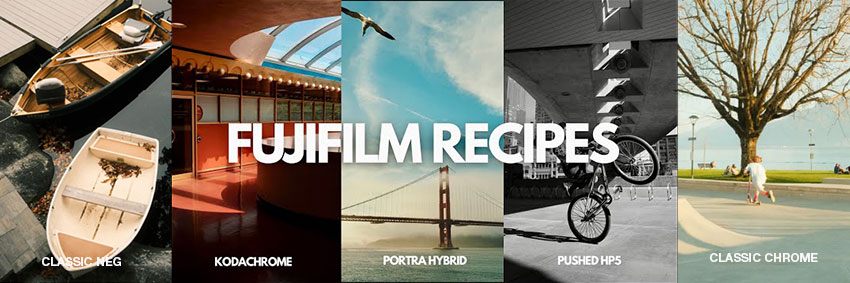
What Are Fujifilm Recipes?
A Fujifilm recipe is a customized combination of camera settings designed to create a specific JPEG look directly from a Fujifilm camera. Unlike Lightroom presets, which are applied after shooting, Fujifilm recipes affect how the camera processes the image when you take the photo.
A typical Fujifilm recipe includes settings such as:
- Film Simulation: Defines the overall color rendering
- Dynamic Range: Controls highlight protection
- Highlight Tone: Adjusts bright areas
- Shadow Tone: Controls contrast in darker areas
- Color: Changes saturation
- White Balance Shift: Creates color mood
- Grain Effect: Adds film-like texture
- Color Chrome Effect: Enhances specific colors
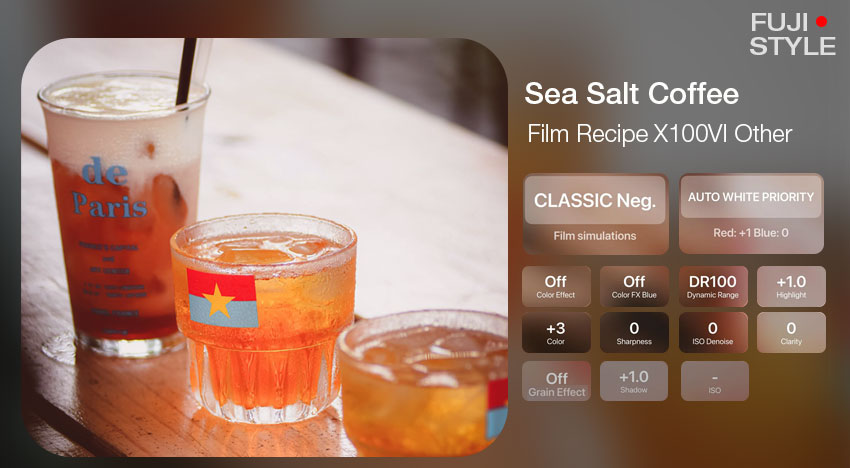
For example, Classic Chrome is often used for documentary-style photography, Acros is popular for black-and-white images, and Nostalgic Neg is widely used for warm vintage looks.
However, the popularity of a Fujifilm recipe does not come only from the final settings. Many well-known recipes are created through repeated testing with different subjects, lighting conditions, and Fujifilm camera generations. This is why creating a convincing recipe with ChatGPT is more complicated than simply asking AI to “make a Kodak film look.”
Can ChatGPT Really Create Fujifilm Recipes?
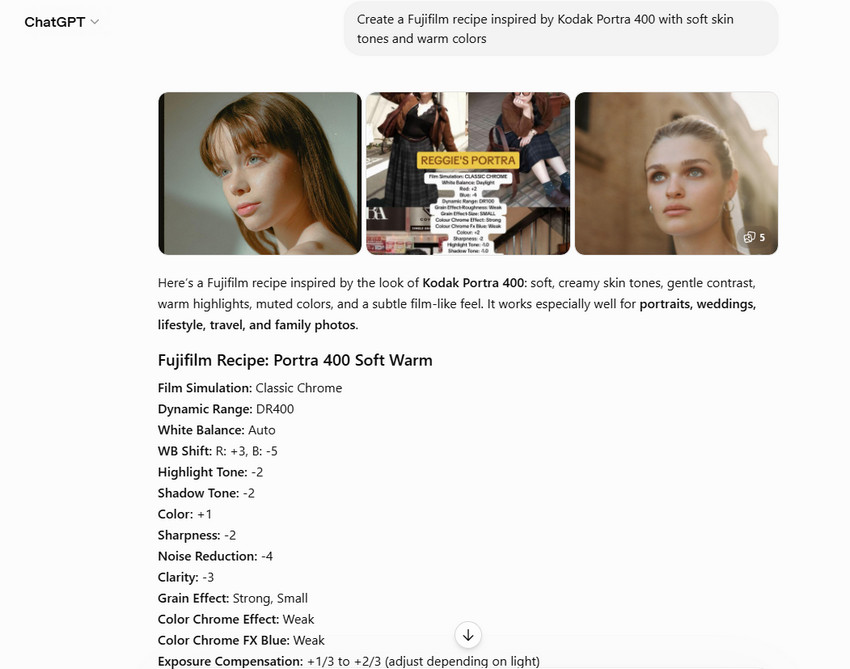
ChatGPT can understand visual descriptions. For example, if you ask with a prompt: "Create a Fujifilm recipe inspired by Kodak Portra 400 with soft skin tones and warm colors". AI understands concepts such as warm tones, soft contrast, nostalgic feeling, and film-like colors. It can then suggest a combination of film simulation and camera settings.
However, matching an existing Fujifilm recipe is much harder. Professional recipe creators usually refine their settings through real-world testing. Small changes in white balance shift, highlight tone, or shadow tone can significantly change the final JPEG. A recipe that looks good for portraits under natural light may produce a completely different result during night photography. Therefore, ChatGPT is best used as a creative assistant:
- helping you explore film styles;
- explaining why certain settings create a look;
- modifying existing recipes for different situations.
Learn More: How to Edit Photos in ChatGPT (with Trending Prompts)
Case Study: Using ChatGPT to Create Fujifilm Recipes
Creating a Kodak Portra 400 Fujifilm Recipe with ChatGPT
Kodak Portra 400 is one of the most popular film-inspired looks among Fujifilm photographers. Its appeal comes from soft skin tones, warm highlights, and natural colors. Many Fujifilm photographers have created Portra-inspired recipes, including versions shared by Fuji X Weekly.
To see how ChatGPT approaches this style, we can ask AI to create a similar recipe.
ChatGPT prompt:
Create a Fujifilm recipe inspired by Kodak Portra 400.
Camera: Fujifilm X100V
Style:
soft skin tones,
warm highlights,
gentle contrast,
natural film colors
Please include:
Film Simulation,
Dynamic Range,
Highlight Tone,
Shadow Tone,
Color,
White Balance Shift,
and Grain Effect.
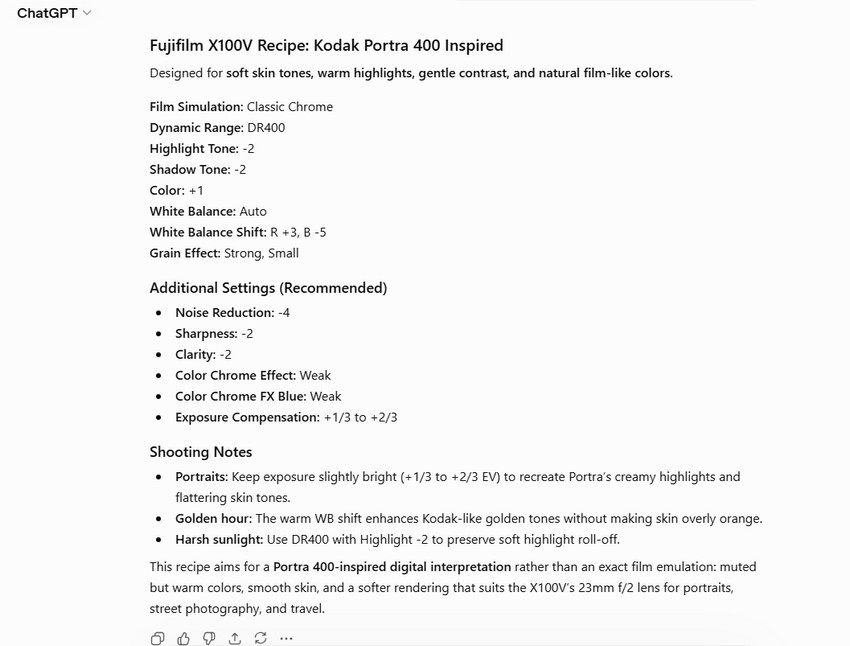
Example ChatGPT-Generated Recipe:
Comparing AI Recipe With a Real Fujifilm Recipe
A recipe from Fuji X Weekly is created through camera testing and refinement. ChatGPT, on the other hand, generates settings based on its understanding of the visual characteristics associated with Kodak Portra.
| Settings | ChatGPT Fujifilm Recipe | Real Fujifilm Recipe |
|---|---|---|
| Film Simulation Dynamic Range Highlight Shadow Color White Balance Shift Grain Effect Noise Reduction Sharpness Clarity Color Chrome Effect Color Chrome Effect Blue Exposure Compensation |
Classic Chrome DR400 -2 -2 +1 R +3, B -5 Strong, Small -4 -2 -2 Weak Weak N/A |
Classic Chrome DR-Auto -1 -2 +2 Daylight, +3 Red & -5 Blue Strong, Small -4 -2 +2 Strong Weak +1/3 to +2/3 |
ChatGPT can correctly identify the general direction of the look. It understands that Kodak Portra requires softer contrast, warmer tones, and natural skin colors. However, it does not have the same experience as a photographer who has tested hundreds of JPEG samples and adjusted the recipe based on real images.
The result: ChatGPT can create a useful Portra-inspired recipe, but it should be refined and tested rather than copied blindly.
Creating a Kodak Gold Style Recipe with ChatGPT
Kodak Gold 200 is another popular film-inspired look among Fujifilm users. Compared with Portra, Kodak Gold is usually associated with warmer colors, stronger saturation, and a nostalgic summer feeling.
A simple prompt such as "Create a Fujifilm recipe inspired by Kodak Gold 200." may generate settings that include warmer white balance and increased color. However, a true Kodak Gold-inspired look is not created by simply increasing warmth or saturation. The balance between highlights, shadows, contrast, and color response is what creates the final feeling.
A better approach is to ask ChatGPT to analyze and adjust an existing recipe:
Analyze this Kodak Gold Fujifilm recipe.
Explain:
1. Why these settings create a nostalgic look.
2. How to adjust it for travel photography.
3. How to make skin tones more natural.
This type of prompt gives ChatGPT more context and usually produces more practical suggestions.
How to Create Better Fujifilm Recipes with ChatGPT
If you want better AI-generated Fujifilm recipes, the key is not simply asking ChatGPT for settings. The quality of the result depends heavily on the information you provide.
1. Include Your Fujifilm Camera Model
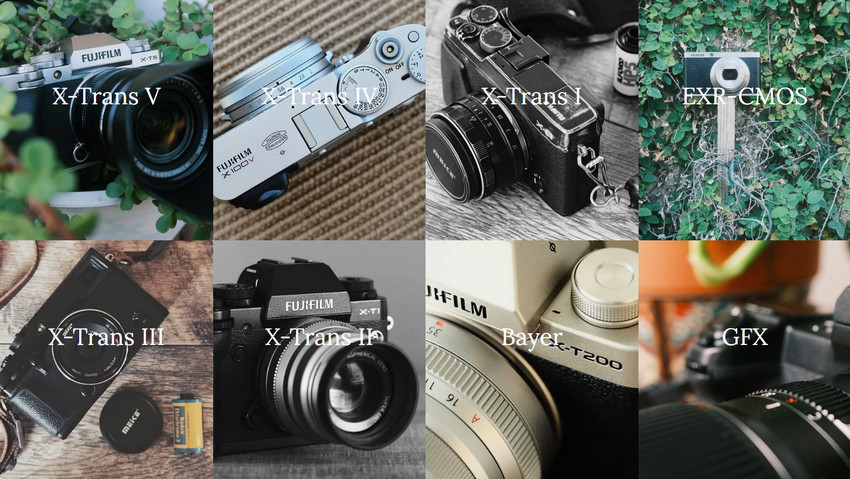
Different Fujifilm cameras support different film simulations and settings. A recipe designed for Fujifilm X100VI may not work exactly the same on an older X-T model. A simple prompt like “Create a Fujifilm recipe” usually gives ChatGPT too little context and may result in a generic suggestion. For better results, provide your camera model and describe the visual style you want to achieve. For example:
“Create a Fujifilm recipe for Fujifilm X100VI. I want a nostalgic travel photography look with warm colors, soft contrast, and slightly faded highlights.”
2. Describe the Shooting Situation
The same color style may look different in different shooting conditions. A recipe designed for portraits may not work well for street scenes or landscapes because each environment has different lighting, colors, and visual goals.
To get more accurate results, describe both the shooting scenario and the mood you want. For example:
“Create a Fujifilm recipe for rainy night street photography. I want cinematic shadows, muted colors, neon highlights, and a moody atmosphere.”
3. Ask ChatGPT to Modify Existing Recipes
This is often one of the most effective ways to create a personalized Fujifilm recipe. Instead of asking AI to generate a recipe entirely from scratch, start with an existing recipe you already like and ask ChatGPT to fine-tune it based on your shooting style and preferences.
For example:
“I like this Classic Chrome recipe. Please modify it to make it warmer for portraits, softer in the highlights, and closer to Kodak Portra colors.”
Complete AI Photography Workflow: From Fujifilm Recipe to Final Image
A Fujifilm recipe solves one important part of photography: the visual style. It helps you achieve a certain mood, color palette, or film-inspired appearance.
However, it cannot improve every technical aspect of an image. For example, a beautiful Fujifilm JPEG may still suffer from high ISO noise, limited resolution, loss of detail after cropping, and soft details caused by difficult shooting conditions.
This is where AI image enhancement becomes the next step in the photography workflow.
Instead of replacing the Fujifilm look, Aiarty Image Enhancer works alongside Fujifilm recipes by improving the technical quality of the final image while preserving the original creative style. It can help enhance resolution, reduce noise, recover details, and prepare photos for sharing, printing, or long-term archiving.
A complete AI-assisted Fujifilm workflow can look like this:
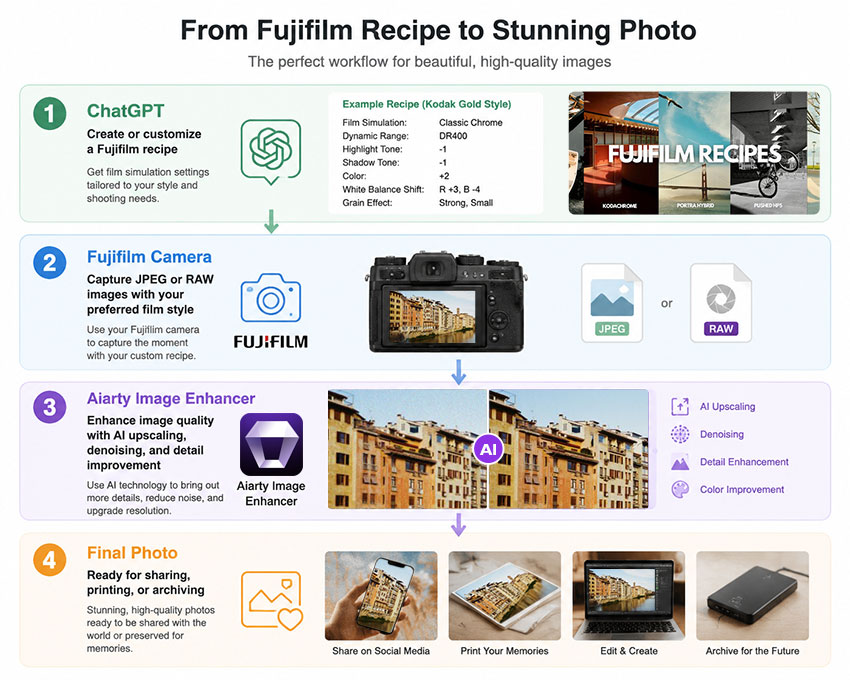
For example, a Fujifilm photographer shooting rainy night street scenes may use a cinematic recipe to create deep shadows, muted colors, and neon tones in camera. After shooting, Aiarty Image Enhancer can help reduce high ISO noise, improve fine details, and enhance the image quality without changing the intended atmosphere.
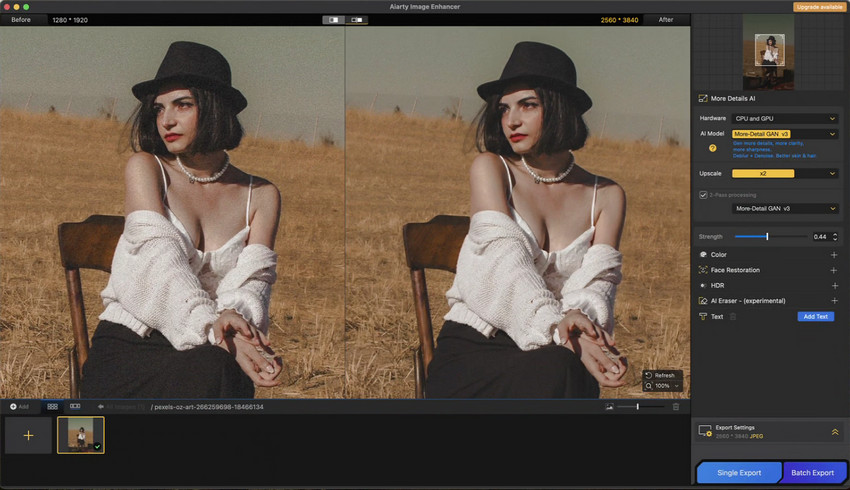
Fujifilm recipes create the visual identity. Aiarty Image Enhancer helps refine the final image quality. Together, they create a more complete photography workflow—from creative style to polished final output.
Enhance your Fujifilm photos with AI detail recovery, denoising, and upscaling. Try Aiarty Image Enhancer today!
Final Thoughts: ChatGPT Is a Fujifilm Recipe Assistant, Not a Replacement
ChatGPT makes experimenting with Fujifilm recipes faster and easier. It can help photographers understand film simulations, customize existing recipes, and explore new creative directions. However, the best Fujifilm recipes still come from real-world testing and refinement. Photographers need to adjust settings based on their cameras, lenses, lighting conditions, and personal preferences to create a look that truly fits their style.
The most effective workflow is to combine different AI tools for different purposes. ChatGPT helps generate ideas and shape the creative direction, Fujifilm recipes capture the desired mood and color style in camera, and Aiarty Image Enhancer improves the final image quality through AI-powered enhancement.
Together, they create a complete photography workflow, from creative inspiration and in-camera style creation to a polished final image ready for sharing, printing, or archiving.
 FAQs About ChatGPT Fujifilm Recipes
Yes. ChatGPT can generate Fujifilm recipe ideas based on your camera model, preferred film style, shooting environment, and color preferences. However, AI-generated recipes should be treated as a creative starting point rather than a final professional recipe, as photographers still need to test and fine-tune settings in real shooting conditions.
Fujifilm recipes are customized camera settings applied before shooting, directly affecting the JPEG output from the camera. Lightroom presets are post-processing adjustments applied after capturing the image. Recipes focus on in-camera color creation, while presets offer more flexibility during editing.
A good prompt should include your Fujifilm camera model, desired film style, shooting scenario, and specific color or mood preferences. For example, you can describe whether you want warm tones, soft contrast, cinematic shadows, or a Kodak-inspired look to help ChatGPT create a more targeted recipe.
No. Fujifilm recipes and Lightroom presets serve different purposes. Recipes are created inside the camera using Fujifilm film simulations and settings, while Lightroom presets are applied during post-processing to adjust the look of existing photos.
You May Also Like


This post was written by Brenda Peng who is a seasoned editor at Digiarty Software who loves turning ordinary photos into extraordinary works of art. With AI assistance for brainstorming and drafting, the post is reviewed for accuracy by our expert Abby Poole for her expertise in this field.
