


RAW photos often require additional processing before they truly look their best. Noise from low-light shooting, lens distortion, and slight softness are common issues that photographers need to correct during editing.
While tools like Adobe Lightroom and Adobe Photoshop provide powerful editing capabilities, manually fixing noise and optical imperfections can be time-consuming, especially when working with large batches of RAW images.
This is where AI-powered preprocessing tools come in. One of the most popular options is DxO PureRAW, a dedicated tool designed to enhance RAW images before you start editing them.
In this DxO PureRAW review, we’ll take a closer look at its features, performance, pricing, pros and cons, and whether it’s worth adding to your photography workflow.
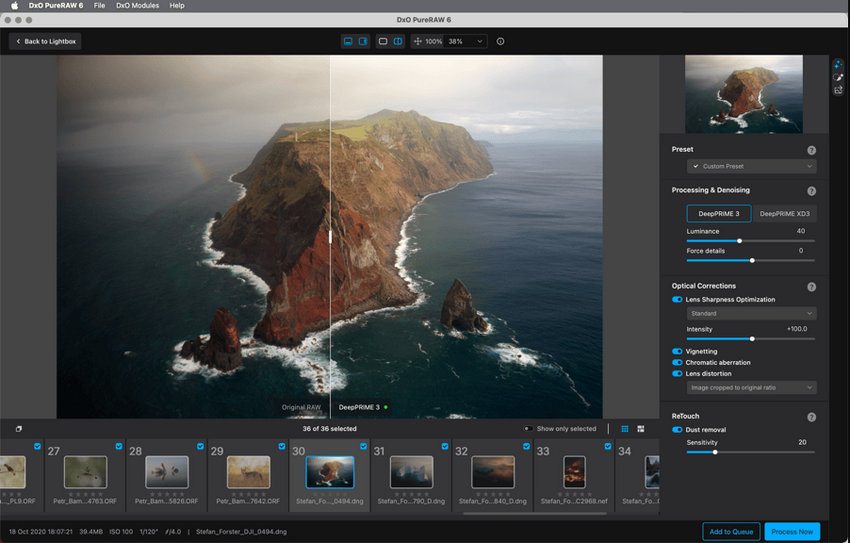
What Is DxO PureRAW?
DxO PureRAW is a specialized RAW preprocessing tool developed by DxO Labs. Instead of acting as a full photo editor, it focuses on improving RAW files at the very beginning of the editing process.
The software uses advanced AI models to automatically correct common issues found in RAW images, including noise, lens distortion, chromatic aberration, and lack of detail. Its most notable technology is the DeepPRIME AI denoising engine, which analyzes image data to remove noise while preserving fine textures and details.
A typical workflow with DxO PureRAW involves importing RAW photos, applying AI-based corrections, and exporting the processed files as high-quality DNG images. These files can then be further edited in software such as Adobe Lightroom or Adobe Photoshop.
Because of this preprocessing approach, DxO PureRAW is often used by photographers who want cleaner, more detailed images before starting their main editing process.
Hot search: How to Edit Raw Photos for Best Quality >>
What Is DxO PureRAW Used for?
AI Noise Reduction with DeepPRIME
The most important feature of DxO PureRAW is its AI-powered noise reduction technology called DeepPRIME.
Unlike traditional noise reduction tools that operate after RAW conversion, DeepPRIME performs demosaicing and denoising simultaneously using deep learning models trained on millions of images. By working directly with RAW sensor data, it can remove noise while preserving fine textures and color accuracy.
Recent versions of the software also include DeepPRIME XD, an enhanced model designed to recover even more detail in extremely high-ISO images. This makes the tool particularly useful for photographers shooting in low-light environments such as night photography, events, or wildlife photography.
Because the processing happens at the RAW stage, the results often appear cleaner and more natural compared with many standard noise reduction tools.
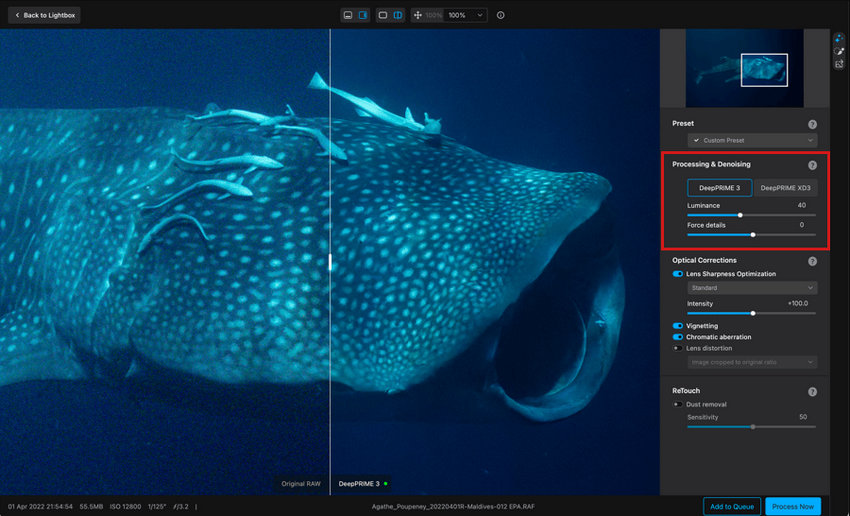
Automatic Optical Corrections with DxO Modules
Another major strength of DxO PureRAW is its automatic optical correction system, powered by DxO’s extensive camera and lens database.
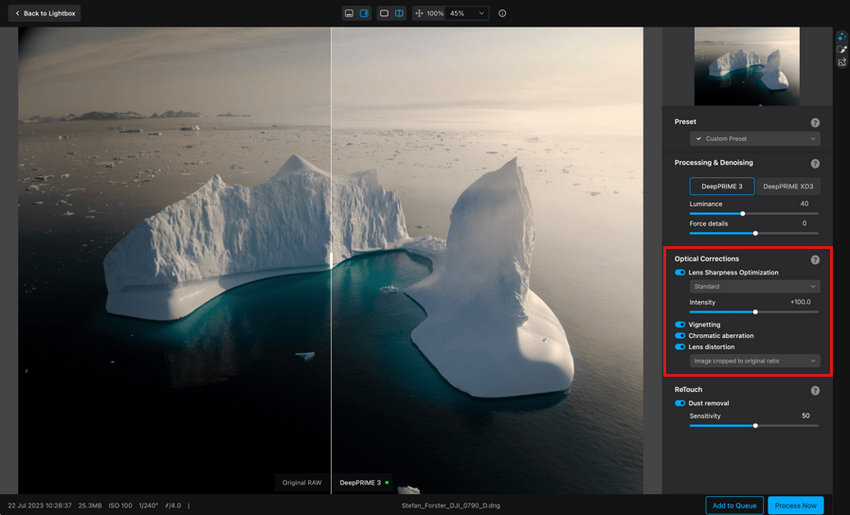
The software relies on measurement-based profiles developed by DxO Labs. These profiles are created through laboratory testing of thousands of camera and lens combinations.
When you import an image, the software automatically downloads the appropriate DxO Module for the camera and lens used in the photo. Based on this data, PureRAW can automatically correct several common optical issues, including:
- Lens distortion
- Chromatic aberration
- Vignetting
- Edge softness
Because these corrections are calibrated specifically for each camera-lens pair, they are often more precise than the generic lens corrections found in many photo editing programs.
Lens Sharpness Optimization
In addition to correcting optical defects, DxO PureRAW also improves lens sharpness across the frame.
Many lenses produce images that are sharper in the center than at the edges. Using its optical measurement database, PureRAW applies targeted sharpening to compensate for these variations. This helps create more consistent sharpness from the center of the image to the corners.
The sharpening process is designed to work alongside the DeepPRIME noise reduction engine, ensuring that fine detail is enhanced without introducing excessive artifacts or noise.
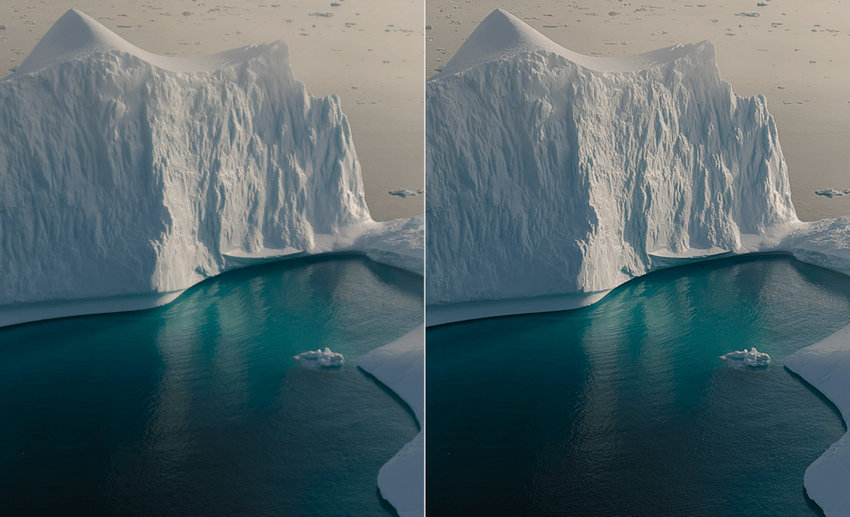
RAW Preprocessing and Linear DNG Export
Unlike traditional photo editors, DxO PureRAW is designed primarily as a RAW preprocessing tool.
Instead of performing full photo editing, the software focuses on improving RAW images before they enter the main editing workflow. After applying AI denoising and optical corrections, PureRAW exports the processed files as Linear DNG images.
These DNG files retain most of the flexibility of RAW images while incorporating DxO’s corrections. Photographers can then continue editing the images in software such as Adobe Lightroom or Adobe Photoshop.
This workflow allows users to start their editing process with cleaner, sharper files that already have many technical issues corrected.
Batch Processing for Large Photo Libraries
DxO PureRAW also supports batch processing, allowing photographers to enhance multiple RAW images at once.
Users can import entire folders of photos and apply the same processing settings across all files. The software manages tasks through a processing queue, enabling you to monitor progress while the images are being processed.
This feature is especially helpful for photographers who regularly work with large volumes of images, such as wedding, event, or wildlife photographers.
Flexible Export and Workflow Integration
DxO PureRAW is designed to integrate smoothly into existing photo editing workflows.
The software can operate as a standalone application, but it also works well alongside other editing tools. After processing, users can export images in several formats, including:
- Linear DNG
- TIFF
- JPEG
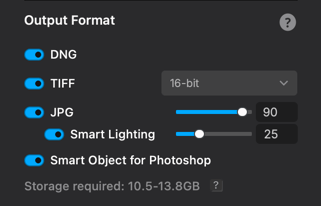
Processed images can then be imported directly into editing programs such as Adobe Lightroom or Adobe Photoshop for further adjustments like color grading, retouching, or compositing.
Because of this flexible workflow integration, many photographers use PureRAW as the first step in their photo editing pipeline.
Pros and Cons of DxO PureRAW
Pros
- Excellent RAW noise reduction quality, especially for high-ISO images
- Accurate lens corrections based on DxO’s large camera-lens database
- Simple workflow integration with tools like Adobe Lightroom and Adobe Photoshop
- Batch processing support for handling multiple RAW files
- One-time purchase instead of a subscription
Cons
- Not a full photo editor, so additional editing software is still required
- AI processing can be relatively slow when handling large RAW files
- Hardware requirements can be demanding for older computers
How Much Does DxO PureRaw Cost?
DxO PureRAW is available as a one-time purchase rather than a subscription.
Typical pricing for recent versions is:
- New license: $139.99
- Upgrade price: $89.99 for existing users upgrading from previous versions
- Free trial: 14-day trial available
The license is perpetual, meaning you can continue using the version you purchase indefinitely without paying recurring fees. However, major version upgrades usually require a paid upgrade.
Compared with subscription-based editing tools such as Adobe Lightroom, this pricing model may appeal to photographers who prefer paying once rather than committing to a monthly plan.
Is DxO PureRAW Worth It?
Whether DxO PureRAW is worth buying largely depends on your photography workflow.
For photographers who frequently shoot high-ISO images, low-light scenes, or large RAW photo libraries, the software can significantly improve image quality before editing. Its AI-based noise reduction and lens corrections can save time and produce cleaner files for further editing.
However, PureRAW is not designed to replace a full photo editor. If you already rely on tools like Adobe Lightroom or Adobe Photoshop, PureRAW works best as an additional preprocessing step rather than a standalone editing solution.
In short:
- Worth it for: photographers who want the best possible RAW image quality before editing
- Less necessary for: casual users or those who mainly edit JPEG images
If your workflow already involves RAW editing and you often deal with noise or lens imperfections, DxO PureRAW can be a useful addition to your photography toolkit.
What If Your Photos Still Need More Enhancement After RAW Processing?
DxO PureRAW is designed to improve a photo at the RAW preprocessing stage. Its AI denoising, demosaicing, and camera- and lens-specific optical corrections can produce a cleaner, better-corrected image before it moves into Lightroom, Photoshop, or another editing application.
However, RAW preprocessing does not necessarily solve every image-quality problem.
A high-ISO photo may still contain some residual noise. A slightly soft subject may need additional sharpening or detail recovery. A heavily cropped wildlife photo may not have enough pixels for a large print or high-resolution display. In other cases, an older or compressed JPEG may need enhancement even though it never went through a RAW workflow in the first place.
These are different image-enhancement needs from those addressed by dedicated RAW preprocessing software.
Complementing DxO PureRAW with AI Image Enhancement
For photographers who need more than RAW preprocessing, a dedicated AI image enhancer can provide an additional layer of enhancement.
Aiarty Image Enhancer is designed to complement rather than replace dedicated RAW-processing software. Instead of focusing on camera- and lens-specific optical corrections, it focuses on AI-powered image enhancement, including denoising, sharpening, detail recovery, deblurring, and upscaling.
It supports a much broader range of image formats. Alongside professional RAW formats such as DNG, CR2, CR3, NEF, ARW, RAF, and RW2, Aiarty can process common formats including JPG, PNG, TIFF, WebP, AVIF, and HEIC. This means it can be used not only for camera RAW files, but also for JPEGs, older photos, compressed images, scanned pictures, and other images that need a quality boost.
What Can Aiarty Image Enhancer Do?
- AI image upscaling up to 2×, 4×, and 8×, with support for resolutions as high as 32K.
- AI denoising and deblurring, which removes grain and compression artifacts while preserving natural textures.
- Face restoration technology that enhances portraits and improves facial details in old or low-quality photos.
- Multiple AI models optimized for real photos, portraits, and AI-generated images.
- Batch processing, allowing users to enhance multiple images in a single workflow.
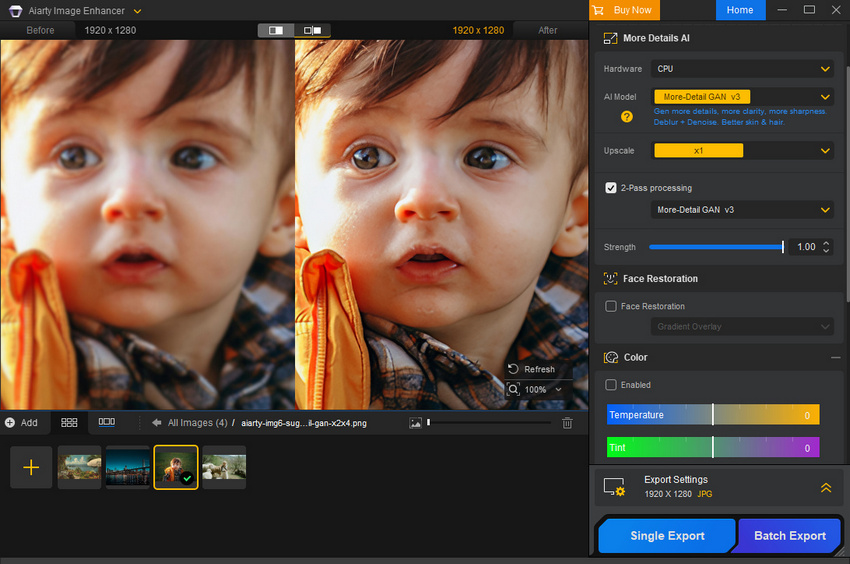
This makes Aiarty particularly useful when the goal goes beyond RAW preprocessing. For example, a wildlife photographer may use DxO PureRAW to clean up and optically correct a RAW file, then use Aiarty to further recover detail from a soft or heavily cropped subject and enlarge the image for printing or high-resolution display. The same tool can also be used later for JPEGs or older photos that were never captured as RAW files.
A Practical RAW Enhancement Workflow
Using Aiarty does not mean replacing Lightroom or DxO PureRAW. The tools can serve different stages of the same workflow:
RAW file → Lightroom / DxO PureRAW → Aiarty Image Enhancer → Lightroom / DNG → Final output
A photographer can first use Lightroom for foundational RAW adjustments such as exposure, white balance, colour, and lens corrections, or use DxO PureRAW for dedicated RAW preprocessing and optical corrections. The resulting image can then be brought into Aiarty when it still needs additional denoising, sharpening, detail recovery, deblurring, or enlargement.
This workflow is especially useful for images where standard RAW processing has already produced a solid starting point, but the final image still falls short because of noise, softness, cropping, or limited resolution.
DxO PureRAW handles the specialised RAW-processing stage, while Aiarty can complement the workflow when an image needs further AI enhancement.
For photographers who primarily need RAW preprocessing and camera- and lens-specific corrections, DxO PureRAW remains the more specialised solution. For those who also work with JPEGs, heavily cropped images, older photos, or images that need additional detail recovery and upscaling, adding an AI image enhancer such as Aiarty can provide another layer of enhancement.
 FAQ about DxO PureRAW
Not necessarily. DxO PureRAW and Adobe Lightroom serve different purposes in a photography workflow. DxO PureRAW focuses on RAW preprocessing tasks such as AI noise reduction and optical corrections, while Lightroom is a full-featured photo editor used for organizing, color grading, and adjusting images.
Many photographers actually use both tools together: they first process RAW files in DxO PureRAW to improve noise and lens issues, then continue editing the enhanced images in Lightroom.
DxO PureRAW can be worth it for photographers who frequently shoot RAW images and want cleaner files before editing. Its AI-powered DeepPRIME noise reduction and lens corrections can significantly improve image quality, especially for high-ISO photos.
However, it is not a complete photo editing program. If you only need basic image adjustments or mainly edit JPEG files, a full photo editor may be more practical.
DeepPRIME is DxO’s AI-based noise reduction technology used in DxO PureRAW. It combines demosaicing and denoising into a single process, analyzing RAW sensor data with deep learning models.
This approach helps remove noise while preserving fine details and textures, making it particularly effective for photos taken at high ISO levels or in low-light conditions.
No, DxO PureRAW cannot replace Adobe Photoshop. PureRAW is designed specifically for improving RAW image quality through AI noise reduction and optical corrections.
Photoshop, on the other hand, is a complete image editing program used for tasks such as retouching, compositing, graphic design, and advanced adjustments. Many users process images in PureRAW first and then edit them further in Photoshop.
Both tools offer AI-powered image enhancement but focus on slightly different areas. DxO PureRAW specializes in RAW preprocessing, including noise reduction and optical corrections based on DxO’s camera and lens database.
Topaz Photo AI provides a broader set of enhancement tools such as sharpening, upscaling, and noise reduction for various image formats. The better option depends on your workflow and the type of images you typically edit.
Yes. DxO PureRAW is available as a one-time purchase rather than a subscription. After purchasing a license, you can continue using that version indefinitely.
However, major version upgrades released later may require an additional upgrade fee if you choose to update.
No, DxO PureRAW is a separate product and is not included with DxO PhotoLab by default.
That said, DxO PhotoLab includes similar technologies such as DeepPRIME noise reduction, as shown in this in-depth review. The difference is that PhotoLab is a complete photo editing software, while PureRAW is focused specifically on RAW preprocessing.
You May Also Like


This post was written by Brenda Peng who is a seasoned editor at Digiarty Software who loves turning ordinary photos into extraordinary works of art. With AI assistance for brainstorming and drafting, the post is reviewed for accuracy by our expert Abby Poole for her expertise in this field.
