


In today’s fast-moving creative landscape, subscription fatigue is real. While Adobe Photoshop continues to dominate the professional space, many users are actively searching for a powerful, one-time purchase alternative. That’s where Corel PaintShop Pro (PSP) comes in.

But in 2026, the real question isn’t just about pricing anymore: Can traditional photo editing software keep up with the rise of AI-powered image enhancement? Based on hands-on testing across RAW files, low-light images, and compressed web photos, PaintShop Pro remains reliable for editing, but shows clear limitations in advanced AI reconstruction.
Corel PaintShop Pro is a Windows photo editor that combines RAW processing, layers, retouching, graphic design, and AI-assisted editing tools. Its one-time purchase model makes it an alternative to subscription-based editors such as Photoshop, while its broad feature set covers most everyday photo editing and creative work.
For 2026, PaintShop Pro is worth considering if you want a desktop editor without a recurring subscription and mainly work on Windows. Its limitations become more noticeable for users who need macOS support, advanced professional workflows, or dedicated AI image enhancement for tasks such as high-resolution upscaling and detail reconstruction.
What Is Corel PaintShop Pro?
Corel PaintShop Pro is a Windows-only photo editing and graphic design software developed by Corel. It provides tools for editing and retouching photos, working with layers and masks, processing RAW files, creating graphic designs, and applying creative effects.
PaintShop Pro follows a perpetual-license model rather than a monthly subscription. The software is available in Standard and Ultimate editions, with Ultimate adding extra creative content and tools. Its interface and feature set are designed to cover both everyday photo editing and more advanced creative projects.
Is PaintShop Pro Still Updated in 2026? What’s New?
As of 2026, the latest official release is still PaintShop Pro 2023[1]. Corel has not launched a 2024–2026 version, but the 2023 edition continues to receive updates, bug fixes, and feature improvements, keeping it relevant for current Windows users.
Corel PaintShop Pro Key Features
PaintShop Pro combines traditional photo editing capabilities with AI-assisted enhancements, making it suitable for a wide range of users, from hobbyists to semi-professional photographers. While it doesn’t match the AI reconstruction power of newer standalone AI enhancers, PSP’s integrated features provide a balanced workflow for editing, retouching, and creative design.
AI-Powered Editing
PaintShop Pro comes with several AI-assisted tools designed to make photo editing faster and more convenient. These features are particularly useful for quick corrections, but each tool serves a different purpose and performs differently in real-world scenarios.
AI Upsampling is designed to enlarge images while maintaining as much clarity as possible. It works well for moderate scaling (such as preparing images for social media or small prints). However, when pushed to higher resolutions, it tends to produce softer edges and lacks the ability to reconstruct fine details, especially in textures like hair, fabric, or foliage.
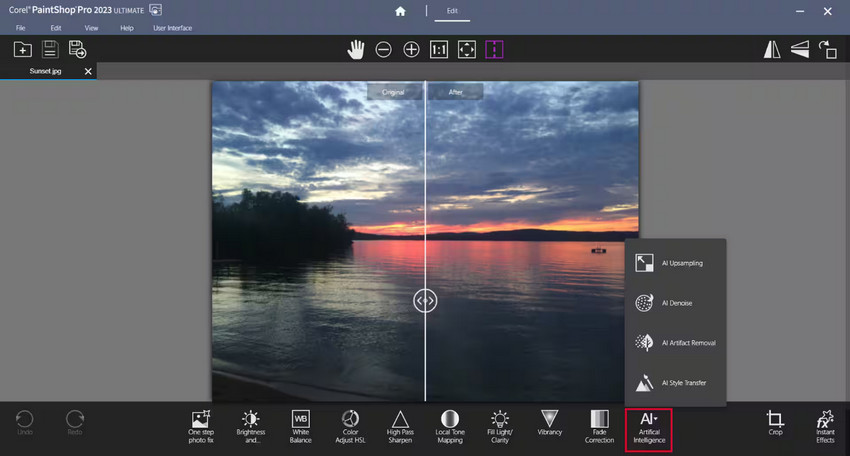
AI Denoise helps reduce noise in low-light or high-ISO photos. It effectively cleans up grain and improves overall image smoothness, making photos more usable. That said, the process often comes at the cost of detail, as subtle textures can be blurred or over-smoothed, particularly in skin tones and background elements.
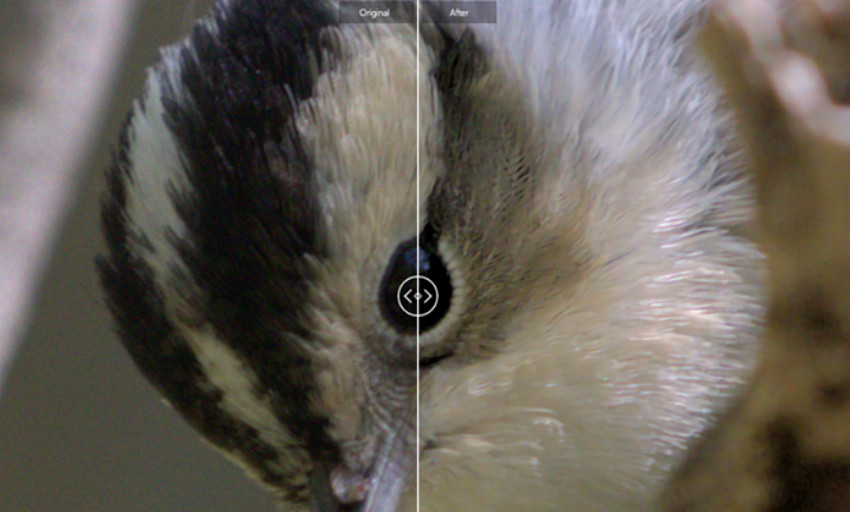
Artifact Removal targets compression issues such as JPEG artifacts, banding, and blockiness. It can noticeably improve heavily compressed images, especially those downloaded from the web. However, similar to denoising, it focuses more on smoothing imperfections rather than restoring original detail.
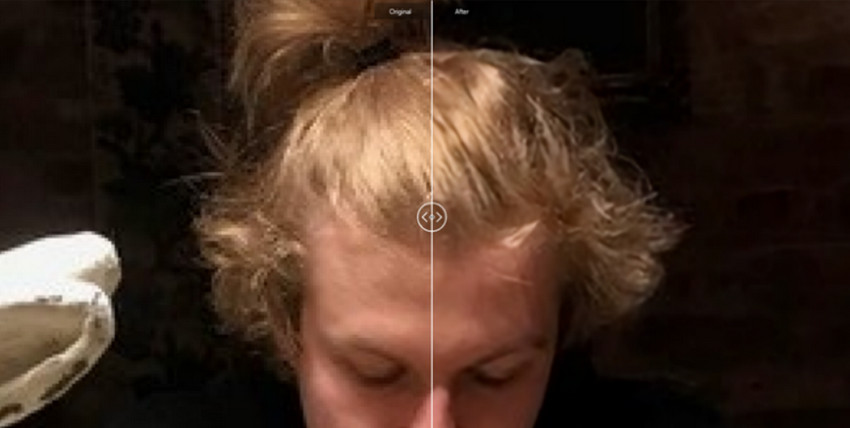
Overall, these tools are effective for quick improvements and general cleanup. However, they share some common limitations: fine textures are often smoothed out, detail reconstruction remains limited, and results can sometimes appear slightly artificial when viewed at 100% zoom.
Unlike newer AI models trained for reconstruction, PSP’s AI focuses more on adjustment rather than regeneration, making it useful for general edits but less ideal for pixel-perfect restoration.
Vision FX
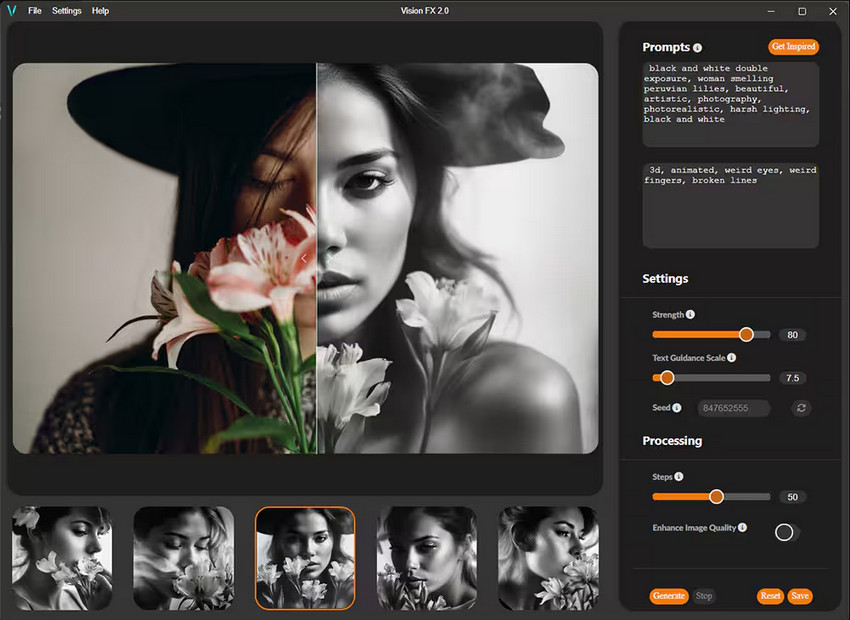
Vision FX is one of PaintShop Pro’s standout creative features, designed for users who want to go beyond traditional photo editing. It allows you to apply a wide range of artistic filters, transforming standard photos into stylized visuals inspired by painting techniques and artistic movements. Whether you're aiming for a watercolor effect, an oil painting look, or more experimental styles, Vision FX provides a quick way to achieve visually striking results without manual brushwork.
This makes it especially appealing for content creators, designers, and social media users who want to create eye-catching visuals with minimal effort. While it’s not a replacement for professional digital painting tools, it offers a fun and efficient way to explore creative transformations directly within the editing workflow.
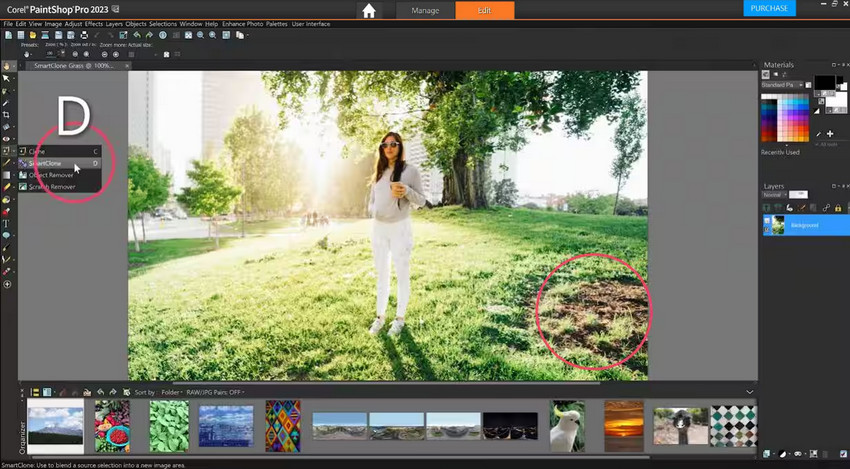
SmartClone
SmartClone simplifies object removal by using content-aware technology to intelligently fill in selected areas. It’s particularly useful for removing unwanted elements such as people, blemishes, or background distractions. In most cases, the tool delivers clean and believable results with minimal effort, making it beginner-friendly while still capable enough for more precise edits. However, like many built-in cloning tools, it can struggle with complex backgrounds or repeating patterns, where manual refinement may still be needed.
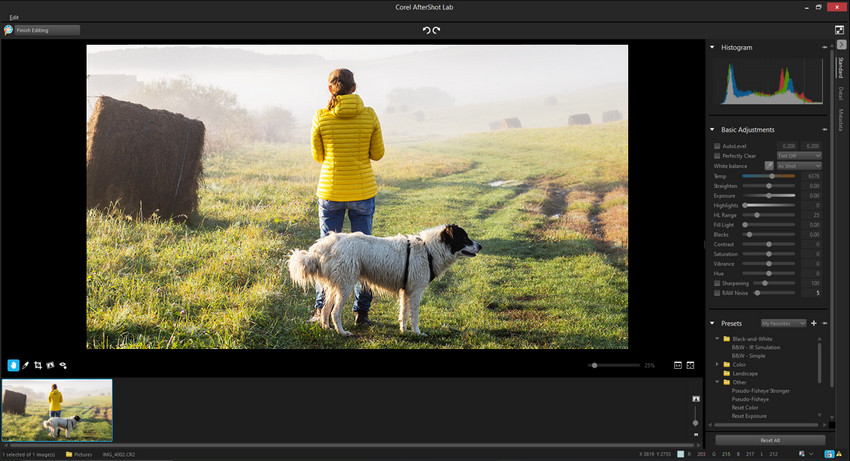
AfterShot Lab
AfterShot Lab provides a dedicated environment for non-destructive RAW editing, allowing users to adjust exposure, color, white balance, and tonal details without altering the original file. This makes it a solid option for photographers who need flexibility during post-processing. The workflow is smooth and integrates well within PaintShop Pro, although it may feel less advanced compared to specialized RAW editors in terms of speed, precision, and batch processing capabilities.
More for Paintshop Pro supported formats >>
PaintShop Pro vs Photoshop: Which One Should You Choose?
When comparing PaintShop Pro and Adobe Photoshop, the decision often comes down to workflow preferences, budget, and how much you rely on AI-powered tools. While both are capable photo editors, they are built with different types of users in mind: one prioritizing affordability and simplicity, the other offering a more advanced ecosystem and cutting-edge features.
The table below highlights the key differences:
From the table, you can see PaintShop Pro offers affordability and control, while Photoshop offers cutting-edge AI and a powerful ecosystem. However, both still rely heavily on manual workflows when it comes to high-end image enhancement and detail reconstruction.
Pros and Cons for PaintShop Pro
Before deciding if PaintShop Pro is right for you, it helps to quickly review its main strengths and weaknesses:
- One-time purchase (no subscription)
- Powerful editing tools
- Beginner-friendly compared to Photoshop
- AI enhancement is relatively limited
- Upscaling lacks fine detail reconstruction
- No native Mac support
- Requires manual adjustments for best results
PaintShop Pro Pricing, Free Trial & Coupon Codes
For anyone considering PaintShop Pro, it helps to understand the purchase options and available editions before buying. PaintShop Pro uses a one-time purchase model, with Standard and Ultimate editions, plus trial and promotional offers:
- One-time purchase – PaintShop Pro does not require a recurring subscription.
- Standard vs. Ultimate – Standard includes the core PaintShop Pro features, while Ultimate adds extra creative content and third-party tools.
- Free trial – A trial option is available for users who want to test the software before purchasing.
- Special offers – Pricing and discounts can vary, so check Corel’s official promotions for the latest deal.
If you’re specifically searching for Paint Shop Pro free, start with the official trial rather than downloading an unofficial copy. For a PaintShop Pro coupon code or current discount, check Corel’s official Special Offers page before purchasing.
Where PaintShop Pro Falls Short in 2026
While PaintShop Pro covers everyday photo editing and includes AI-assisted tools, it may be less suitable for demanding image-enhancement tasks that require extensive detail reconstruction or high-resolution output. Some limitations may include:
- Fine details can become softer when enlarging low-resolution images
- Strong AI denoising may reduce some fine textures when pushed too far
- Challenging image restoration can require more manual adjustments
These limitations are more noticeable in scenarios such as:
- Preparing heavily cropped images for large-format printing
- Restoring old, damaged, or heavily degraded photos
- Enhancing heavily compressed or very low-resolution files
For these workflows, a dedicated AI image enhancer may be worth considering alongside a general-purpose editor. Such tools can focus specifically on tasks such as upscaling, denoising, deblurring, and detail reconstruction, while PaintShop Pro remains useful for broader photo editing and creative work.
Best AI Alternative for Image Enhancement
If your main goal is image enhancement rather than full photo editing, a dedicated AI image enhancer can complement PaintShop Pro’s broader editing workflow. Aiarty Image Enhancer focuses on tasks such as upscaling, denoising, deblurring, and detail enhancement. It does not replace PaintShop Pro’s layers, masks, graphic design tools, or creative effects, but can be used alongside it when image quality enhancement is the main priority.
Key Features of Aiarty Image Enhancer:
- AI Upscaling: Enlarge images up to 4K or 8K and enhance fine details and textures.
- AI Denoise: Reduce noise in low-light and high-ISO photos while retaining natural-looking textures.
- Deblur & Artifact Removal: Reduce mild blur and remove common artifacts such as JPEG compression issues.
- Color Control: Manually adjust temperature, tint, exposure, contrast, saturation, highlights, shadows, and other color settings.
- Batch Processing: Process multiple images in one workflow, which can be useful for large photo collections.
Recommended Workflow for Photo Editing
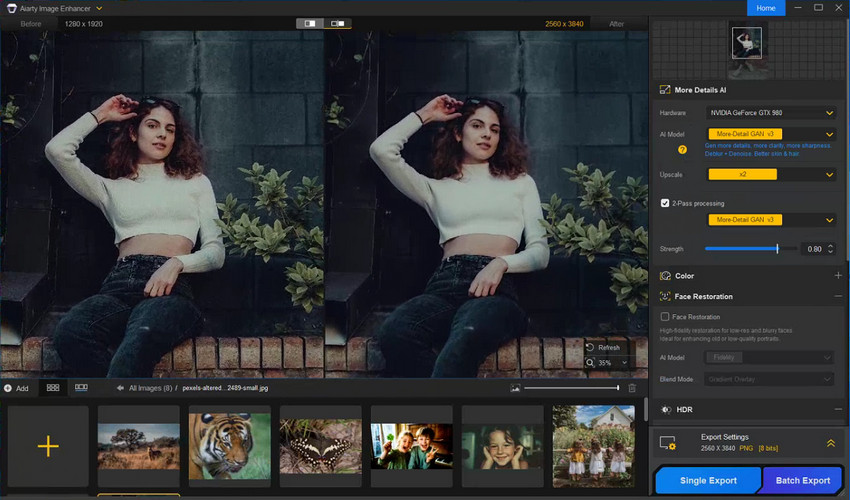
#1. AI Enhancement with Aiarty Image Enhancer
Use Aiarty Image Enhancer first when the image needs upscaling, denoising, deblurring, or other image-quality improvements before creative editing:
- Import your image into Aiarty.
- Select an AI model based on the image and the desired result, such as More-Detail for fine textures, AIGCsmooth for smoother results, or Real-Photo for more natural-looking detail.
- Choose the target resolution or scale. For large-format printing or other high-resolution output, select an appropriate output size. AI denoising and deblurring can be applied during the inference process.
- Preview the result at 100% zoom to check fine details and textures.
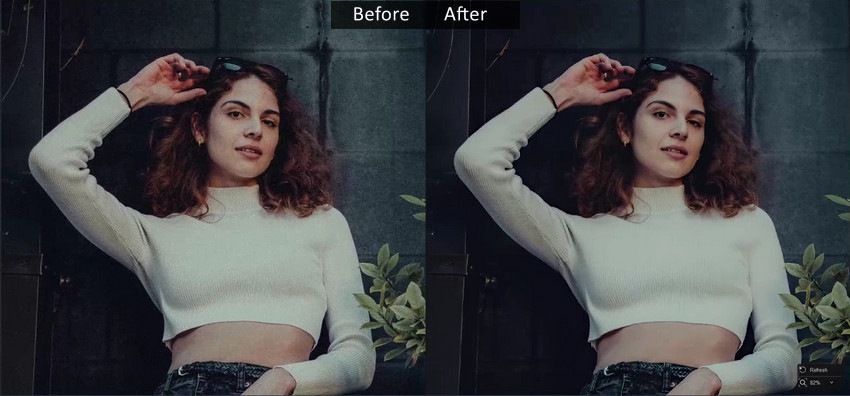
- If needed, adjust the color settings or use Face Restoration for portraits. See more tips for enhancing photos with Aiarty Image Enhancer >>
- Export the enhanced photo individually or in batch as needed.
#2. Editing in PaintShop Pro
After enhancing the image, open it in PaintShop Pro for creative and compositing work:
- Use layers and masks for further editing and adjustments.
- Apply Vision FX or other effects when you want to change the image's style or mood.
- Add text, graphics, or overlays for design projects.
- Finalize the image for web publishing, printing, or other output.
This workflow separates image-quality enhancement from creative editing. Aiarty can handle tasks such as upscaling, denoising, and deblurring, while PaintShop Pro provides tools for layers, masks, effects, and graphic design. Using them together is optional and makes the most sense when an image needs both dedicated enhancement and broader creative editing.
Final Verdict: Is PaintShop Pro Worth It in 2026?
PaintShop Pro makes sense for Windows users who want a photo editor with a one-time license, traditional editing tools, RAW support, and AI-assisted features. It covers everyday photo editing, retouching, layers, effects, and graphic design without requiring a recurring subscription.
Its suitability depends on the type of work you do:
- Use PaintShop Pro for photo editing, retouching, layers, effects, and graphic design.
- Consider a dedicated AI image enhancer when you need more specialized upscaling, denoising, deblurring, or detail enhancement.
If your workflow centers on editing and design, PaintShop Pro provides the tools needed for these tasks. If you also work with low-resolution, noisy, blurry, or heavily degraded images, a dedicated AI enhancement tool can complement PaintShop Pro's editing capabilities.
Need dedicated AI image enhancement? Try Aiarty Image Enhancer for free.
 PaintShop Pro FAQs
No. Corel PaintShop Pro is not natively available for macOS. Mac users can consider alternatives like Affinity Photo or Pixelmator Pro for similar functionality.
No, PaintShop Pro is a paid software, but it offers a 30-day free trial that lets you explore its full features before purchasing.
PaintShop Pro and Photoshop cover many of the same core editing tasks, but they differ in pricing, platform support, AI features, and workflow:
- Pricing: PaintShop Pro uses a one-time purchase model, while Photoshop requires a subscription.
- Operating system: PaintShop Pro is Windows-only, while Photoshop is available on Windows, macOS, and iPad.
- Photo editing: Both support RAW editing, layers, masks, retouching, and other core editing functions.
- AI features: Both offer AI-assisted tools, but their specific AI features and workflows differ.
- Ecosystem: Photoshop is part of Adobe’s broader Creative Cloud ecosystem, while PaintShop Pro is a standalone desktop application.
Which one fits your workflow depends on the features, platform, pricing model, and creative tools you need.
Yes. Dedicated AI tools like Aiarty Image Enhancer outperform traditional editors in several areas:
- Upscaling images to high resolutions
- Denoising low-light or high-ISO photos
- Reconstructing fine details for pixel-perfect clarity
PaintShop comes in two editions:
- Standard: Includes all core photo editing and graphic design tools, AI Upscaling, Denoise, Vision FX, SmartClone, and AfterShot Lab.
- Ultimate: Adds premium bonus content, advanced plugins, and additional creative tools such as AI presets, extra artistic filters, and some advanced third-party utilities.
Choose Standard if you primarily need the editing essentials. Opt for Ultimate if you want extra creative effects, plugins, and a more complete out-of-the-box package.
Check Corel's official PaintShop Pro product page for the latest release and edition available in 2026. The official product page and current promotions are the best sources for confirming the current version, pricing, and included features or extras.
You May Also Like


This post was written by Brenda Peng who is a seasoned editor at Digiarty Software who loves turning ordinary photos into extraordinary works of art. With AI assistance for brainstorming and drafting, the post is reviewed for accuracy by our expert Abby Poole for her expertise in this field.
