


The best AI video editing tool is not necessarily the one with the most AI features. A filmmaker working in a complex timeline needs different controls from a podcaster trimming an interview or a creator turning a livestream into TikTok clips. AI can make each workflow faster, but the right software depends on what you need to edit, how much control you want, and what the final video must look like.
Adobe Premiere Pro and DaVinci Resolve remain full professional editors with AI-assisted workflows; Descript makes spoken-video editing feel closer to editing a document; CapCut, Filmora, and VEED emphasize accessible production; OpusClip automates long-to-short repurposing; and Runway handles generative visual changes. These products overlap, but they are not interchangeable.
Below, we compare eight AI video editing tools for real production needs, with particular attention to editing strengths, free-plan limitations, AI credits, export restrictions, and the trade-offs that matter after the demo is over. You will also find practical ways to judge each tool using your own footage.
Editorial note (updated October 14, 2026): Pricing and key plan restrictions below were reviewed against product makers' published information. This is a workflow-based feature comparison, not a controlled hands-on speed or accuracy test; we do not assign fabricated scores to caption accuracy, mask tracking, or render time. Availability, local pricing, AI credits, and export rights can change, so confirm the current checkout and feature list before purchasing.
Best AI Video Editors at a Glance
Quick picks: Use this list to shortlist tools, then check the free-plan restrictions before starting a client or publishing project.
- Best for professional editing: Adobe Premiere Pro
- Best free professional editor: DaVinci Resolve
- Best for podcasts and transcript editing: Descript
- Best for TikTok, Reels, and Shorts: CapCut
- Best for beginners: Filmora
- Best online AI video editor: VEED
- Best for turning long videos into Shorts: OpusClip
- Best for generative editing: Runway
Price note: Prices above are indicative US list prices where available, not guaranteed checkout quotes. "Free" may mean a limited editor, a trial, or credits that run out. In particular, check watermarks, export resolution, AI usage allowances, and billing terms.
What Counts as an AI Video Editor in 2026?
The phrase AI video editor now covers several different types of software. Understanding the difference makes it much easier to choose the right tool.
AI-Assisted Traditional Video Editors
These are full nonlinear editors where AI speeds up existing editing tasks rather than replacing the timeline. Examples include Adobe Premiere Pro, DaVinci Resolve, and Filmora.
You still control cuts, tracks, audio, effects, color, transitions, and exports manually, while AI helps with tasks such as transcription, media search, masking, tracking, speech cleanup, reframing, object removal, and scene detection.
AI-Native Editors
AI-native editors put language or automation at the center of the workflow. Descript is the clearest example: you can edit spoken video by editing its transcript, while its Underlord AI co-editor can assist with repetitive editing tasks.
AI Repurposing Tools
Tools such as OpusClip are built around a narrower job: turning podcasts, interviews, webinars, and other long-form videos into short clips for TikTok, Reels, and YouTube Shorts.
Generative AI Video Editors
Runway represents another category. Instead of only cutting existing footage, generative video editors can remove, replace, relight, restyle, or generate visual elements through prompts. This is useful for creative transformations and VFX, but it is not a replacement for a complete professional timeline. It also should not be confused with AI video enhancement, where the main objective is improving the clarity of footage that already exists.
How We Evaluated These AI Video Editors
A single performance score would be misleading here. Premiere Pro and Resolve are general-purpose nonlinear editors; Descript is designed around speech; OpusClip extracts short clips; Runway generates or changes visual content. We therefore assess documented capabilities, meaningful limitations, and the production workflow each product is meant to support, rather than claiming that one synthetic benchmark fits all eight.
These five criteria matter more than a long list of AI features:
- Editing Existing Footage: Timeline control, trimming, transcript editing, captions, audio cleanup, masking, tracking, reframing, color, and effects.
- Useful AI Automation: Whether AI genuinely reduces repetitive work such as transcription, filler-word removal, media search, clipping, captioning, object masking, or background removal.
- Creative Control: Whether the user can correct or refine AI-generated decisions instead of being locked into a one-click result.
- Workflow Fit: Desktop vs browser, cloud requirements, collaboration, export restrictions, platform support, and learning curve.
- Price & AI Limits: Subscription cost, AI credits, cloud usage, export limits, and whether the free plan is practical for real projects.
How to read the recommendations: The verdicts below describe which workflows each product is designed to serve, based on its documented features and restrictions. They are not claimed measurements from a shared lab test. For any shortlist, confirm the result with the same source clip, export settings, and account tier you plan to use.
Three Practical Checks Before You Buy
Different use cases call for different test clips. Instead of testing every product on an irrelevant task, run one or more of these checks in the free plan or trial and inspect the exported file, not just the editor preview.
- Talking-head video: Import a five-minute interview. Check transcript edits, filler-word removal, subtitle timing, speaker changes, and how easily you can fix an incorrect cut. This is most relevant to Descript, VEED, and CapCut.
- Professional timeline: Try footage with a moving subject, mixed audio, and several tracks. Check object masks, tracking corrections, color tools, responsiveness, and export options. This is more relevant to Premiere Pro, Resolve, and Filmora.
- Social or generative workflow: Repurpose a longer clip into vertical highlights or try a short prompt-based visual change. Review framing, missed context, visual consistency, credits consumed, and whether the final result needs substantial manual cleanup. This applies to OpusClip, Runway, and social-first editors.
Record what required manual repair, the export resolution and watermark status, and any credits spent. A short test using your own material is more informative than a generic claim that one editor is universally "faster."
8 Best AI Video Editing Tools in 2026
1. Adobe Premiere Pro - Best for Professional AI-Assisted Editing
Best for: Professional editors, agencies, YouTubers, documentary work, commercial production, and complex timeline editing.
Compatibility: Windows and macOS.
Pricing: From $22.99/month for the US individual annual plan, billed monthly; a 7-day free trial is available. Adobe lists monthly generative credits separately from standard editing features.
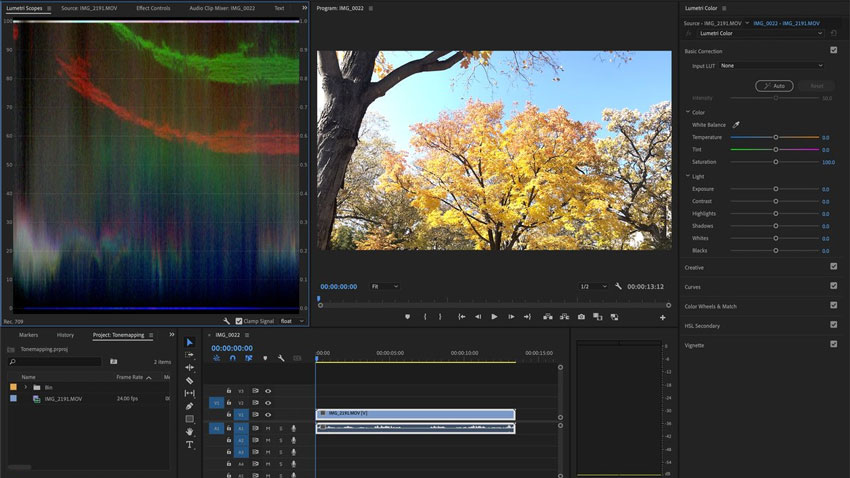
Our Verdict: Premiere Pro is the strongest choice when you want AI to remove repetitive work without giving up detailed timeline, audio, color, masking, effects, and collaboration control.
Adobe Premiere Pro remains one of the most complete professional editing environments on this list. The difference in 2026 is how deeply AI now assists conventional editing rather than sitting in a separate experimental panel.
One of the most useful additions is the AI-powered Object Mask. Instead of drawing a complicated mask around a moving person or object frame by frame, Premiere can identify the subject and generate a mask with a click, then track it through the shot. Adobe has also improved Shape Mask tracking, making selective color work, blur, relighting, and compositing faster.
Generative Extend can create additional frames or audio to bridge a small timing gap, while Text-Based Editing allows dialogue-heavy sequences to be assembled through transcripts. Media Intelligence also helps editors find relevant footage through descriptive searches rather than manually scanning every clip.
Practical fit: An editor building an interview-heavy documentary can search a large media library, make a transcript-based assembly, then use Object Mask for selective adjustments. The trade-off is time spent learning the interface, plus subscription and generative-credit costs. For more specialized workflows, see our guide to AI plugins for Premiere Pro.
- Full professional timeline, audio, color, effects, and keyframing workflow.
- AI-powered object masking and faster tracking reduce repetitive rotoscoping work.
- Text-Based Editing speeds up interviews, podcasts, and dialogue-heavy videos.
- Strong integration with After Effects, Photoshop, Audition, and Frame.io.
- Generative Extend can solve small timing gaps without reshooting.
- Steeper learning curve than creator-focused editors.
- Subscription only.
- Some generative AI workflows depend on credits or cloud services.
2. DaVinci Resolve 21 - Best Free Professional AI Video Editor
Best for: Professional editing, color grading, filmmakers, audio post-production, and users who want a powerful free editor.
Compatibility: Windows, macOS, and Linux.
Pricing: The standard DaVinci Resolve 21 editor is free; DaVinci Resolve Studio 21 costs $295 as a one-time purchase.
Our Verdict: DaVinci Resolve is the best choice for users who want professional editing, color, audio, VFX, and increasingly powerful AI tools without starting with a subscription.
DaVinci Resolve combines editing, color correction, visual effects, motion graphics, and Fairlight audio in one application. The free version supports substantial professional work, including up to Ultra HD 3840 x 2160 at 60 fps for supported formats. Studio adds features including the DaVinci AI Neural Engine, Magic Mask, advanced noise reduction, and broader high-resolution and format support. Do not assume every AI feature mentioned in a Resolve tutorial is available in the free edition.
Resolve 21 expands its AI workflow with tools such as AI IntelliSearch, which can help locate people, objects, faces, or spoken content inside large media libraries. The DaVinci AI Neural Engine also powers features for tracking, restoration, voice processing, and other repetitive post-production tasks.
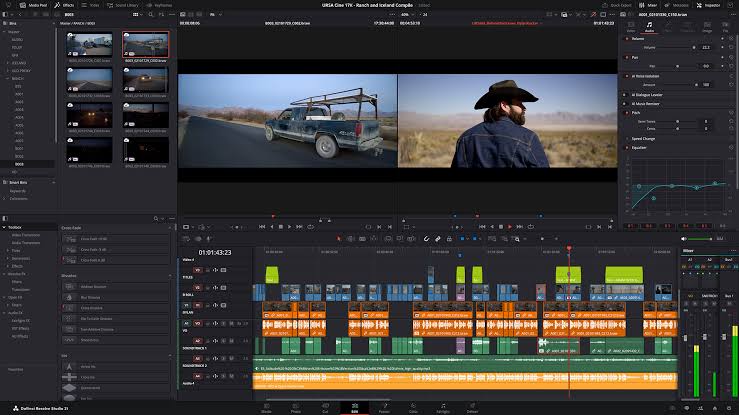
Practical fit: For a multi-camera documentary or color-heavy commercial, the combination of editing, grading, and Fairlight audio is often more important than automatic social templates. Resolve is also a credible free AI video editing software starting point, provided you check which Neural Engine features are Studio-only before committing to a workflow.
- Extremely capable free version.
- Professional editing, color, audio, and VFX in one application.
- AI IntelliSearch and Neural Engine tools improve large-project workflows.
- Available on Windows, macOS, and Linux.
- $295 one-time Studio license.
- Significant learning curve.
- Many advanced AI features require the Studio version.
- Can be demanding on older hardware.
Also see: CapCut vs DaVinci Resolve.
3. Descript - Best for Podcasts and Text-Based Video Editing
Best for: Podcasts, interviews, courses, webinars, tutorials, and talking-head YouTube content.
Pricing: Free plan available; Hobbyist starts at $16/month billed annually and Creator at $24/month billed annually. The free plan includes one media hour per month, limited AI credits, and 720p watermarked exports; Hobbyist allows 1080p watermark-free exports.
Our Verdict: Descript is one of the fastest ways to edit dialogue-heavy video because it treats the transcript as the primary editing interface rather than forcing every decision through a traditional timeline.
If most of your editing decisions revolve around what people are saying, Descript is a much better fit than a conventional NLE.
Delete a sentence from the transcript and the corresponding audio and video are removed. This makes rough-cutting interviews, podcasts, educational content, and talking-head videos unusually fast.
Descript's Underlord AI co-editor can also assist with removing filler words, improving speech, adjusting eye contact, and creating clips. Its limits are worth checking carefully: the free plan offers one media hour per month and a one-time pool of AI credits, while Hobbyist includes 10 media hours and 400 monthly AI credits. Creator adds higher export resolution and larger allowances. Transcription time and AI generation are not unlimited simply because you can open a free account.
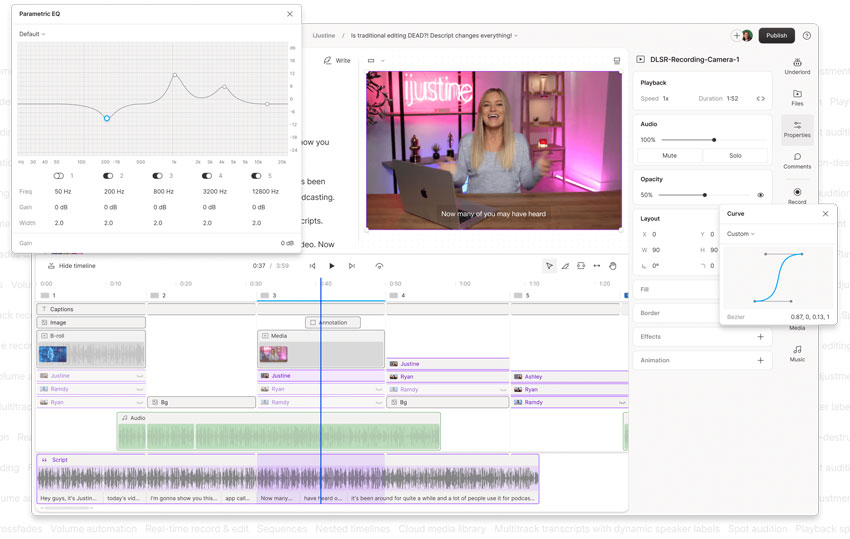
Practical fit: Start with a recorded interview, edit the transcript to remove off-topic answers, inspect the resulting cuts, and then correct captions and pacing manually. This makes Descript efficient for spoken content, but far less compelling if your project depends on detailed compositing, sophisticated grading, or complex visual effects.
- Excellent transcript-based editing.
- Fast for podcasts, interviews, and educational content.
- Filler-word and retake removal can save significant cleanup time.
- Studio Sound and AI-assisted audio cleanup are useful for spoken content.
- Collaboration-friendly workflow.
- Less suitable for cinematic visual editing.
- Limited advanced color and VFX compared with Premiere or Resolve.
- AI credits can become a constraint for high-volume workflows.
4. CapCut - Best AI Video Editing Tool for Social Media
Best for: TikTok, Instagram Reels, YouTube Shorts, ecommerce videos, and fast-turnaround social content.
Compatibility: Windows, macOS, web, iOS, and Android.
Pricing: Free basic plan; the US pricing page lists Pro at $19.99/month, including 1,200 monthly AI credits and 1 TB of storage. Pricing, available tools, and AI benefits may differ by region and platform.
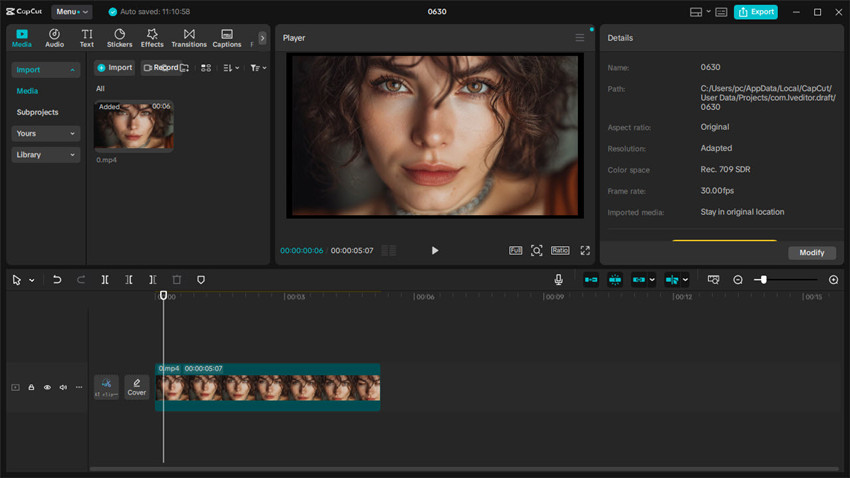
Our Verdict: CapCut is still one of the most practical choices for social-first creators who prioritize publishing speed, captions, templates, reframing, and cross-device editing over deep professional control.
CapCut succeeds because it is designed around a simple goal: create something quickly and publish it.
The editor combines a beginner-friendly timeline with auto captions, background removal, reframing, templates, text effects, generative tools, and a large library of social assets. This makes it especially efficient for vertical video and fast-turnaround creator workflows.
Practical fit: CapCut suits creators assembling a vertical product video with rapid cuts, captions, music, and platform-specific framing. Its convenience comes with a caveat: some templates, advanced AI actions, and export options are gated by plan or credits. Test your intended effects and export settings before treating the free version as a complete no-cost production workflow.
- Easy to learn.
- Strong TikTok, Reels, and Shorts workflow.
- Useful captions, text effects, templates, and background tools.
- Mobile, web, and desktop availability.
- Cross-device workflow is convenient for creators.
- More advanced AI features increasingly depend on paid access or credits.
- Less precise color, audio, and timeline control than professional NLEs.
- Pricing and plan benefits can vary by platform and region.
Also see: 12 Best Open Source Video Editors.
5. Wondershare Filmora - Best AI Video Editor for Beginners
Best for: Beginners, casual YouTubers, small businesses, educational creators, and users moving up from simple mobile editors.
Compatibility: Windows and macOS.
Pricing: Basic starts at $49.99/year and Advanced at $59.99/year on the US pricing page. A $79.99 perpetual option covers its licensed major version, not all future major upgrades. Free editing is available, but watermark-free exports require a paid plan.
Our Verdict: Filmora is a strong middle ground between a simple social editor and a professional NLE. It teaches conventional timeline editing while using AI to simplify repetitive tasks.
Filmora fills an important gap between CapCut and Premiere. It provides a recognizable multi-track timeline but presents it in a much less intimidating interface than most professional editors.
Filmora's AI toolkit includes Smart Short Clips, Smart Scene Cut, smart search, speech-to-text, AI Video Enhancer, AI Music, and AI Object Remover. Many advanced actions consume credits. The Advanced subscription lists 1,000 Filmora AI credits per month, while the perpetual option lists 1,000 credits as a one-time allowance. These are different from having unlimited access to every AI feature.
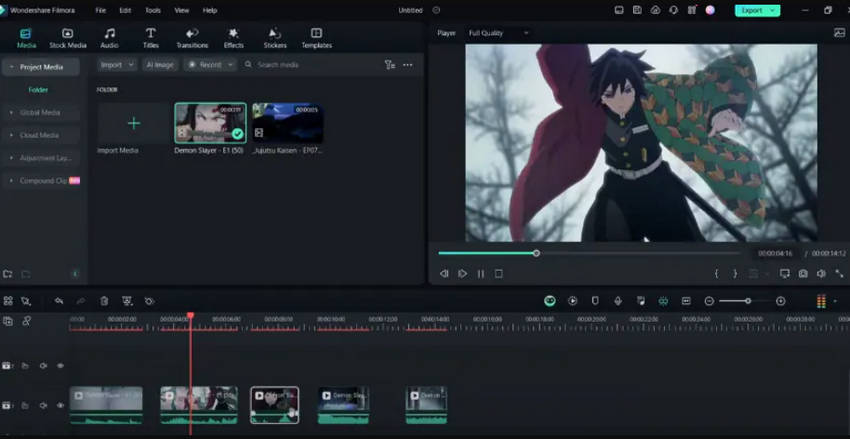
Practical fit: Filmora is a sensible bridge for someone who has outgrown phone templates but does not need a full professional NLE. Try a short YouTube project that combines titles, B-roll, captions, and music, then check both the watermark status and the credit cost of any AI enhancement. The perpetual plan is attractive only if you are comfortable staying on its licensed major version.
- Beginner-friendly multi-track timeline.
- Broad AI feature set for everyday editing.
- Smart Short Clips and Smart Scene Cut speed up content repurposing.
- AI object removal and smart search reduce manual cleanup work.
- Annual and perpetual purchase options.
- Many AI features consume credits.
- Advanced editors may eventually outgrow its controls.
- Some creative assets and services are separate from the base editor.
6. VEED - Best Online AI Video Editor
Best for: Browser-based editing, marketing teams, social video, subtitles, translation, internal communications, and collaborative content.
Compatibility: Browser.
Pricing: Free plan available with 720p watermarked exports. Paid plans unlock higher export resolutions and additional AI and branding allowances; check current plan-specific limits.
Our Verdict: VEED is one of the best choices when your priority is editing, captioning, translating, recording, and collaborating entirely in the browser.
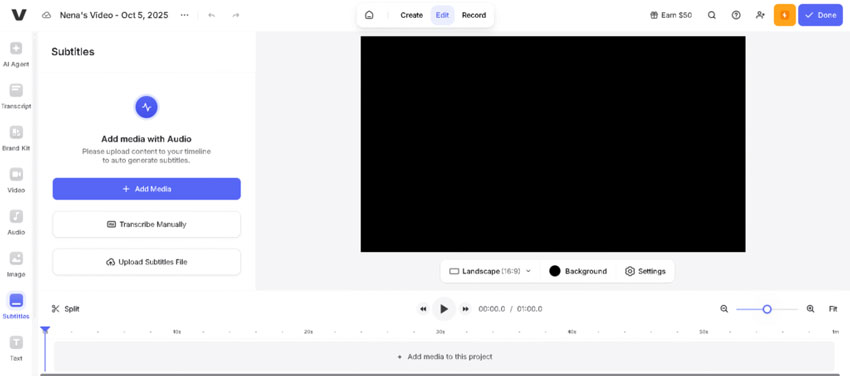
VEED combines a browser editor with AI-assisted editing, subtitle generation, transcription, dubbing, translation, background cleanup, screen recording, teleprompter tools, and publishing workflows. Practical fit: A small marketing team can record a demo, clean dialogue, generate subtitles, and export variants without installing a desktop NLE. The main costs are cloud dependence and free-plan watermark and resolution limits.
Its AI Agent workflow also lets users issue text instructions for tasks such as adding subtitles, resizing for social platforms, changing caption styles, and cleaning background noise. That makes VEED relevant to editing videos with text prompts, although complex visual edits still require inspection and manual refinement. VEED's help center lists 720p exports on Free, up to 1080p on Creator, and up to 4K on higher plans.
- No desktop installation required.
- Strong subtitles, transcription, translation, and dubbing tools.
- Text-command editing lowers the learning curve.
- Useful for marketing and team workflows.
- Recording, editing, and publishing can stay in one browser workspace.
- Requires a stable internet connection.
- Large uploads can slow down the workflow.
- Less timeline depth than Premiere or Resolve.
- High-volume AI use may require higher-tier plans.
7. OpusClip - Best for Turning Long Videos into Shorts
Best for: Podcasts, webinars, interviews, livestreams, long YouTube videos, and social repurposing.
Compatibility: Web.
Pricing: Free plan includes 60 credits per month, watermarked clips, and no editing; free clips stop being exportable after three days. Pro is listed at $14.50/month billed annually or $29/month billed monthly.
Our Verdict: OpusClip is not a Premiere replacement. It is a specialized workflow tool that becomes extremely useful when the bottleneck is finding and formatting short clips inside hours of existing long-form content.
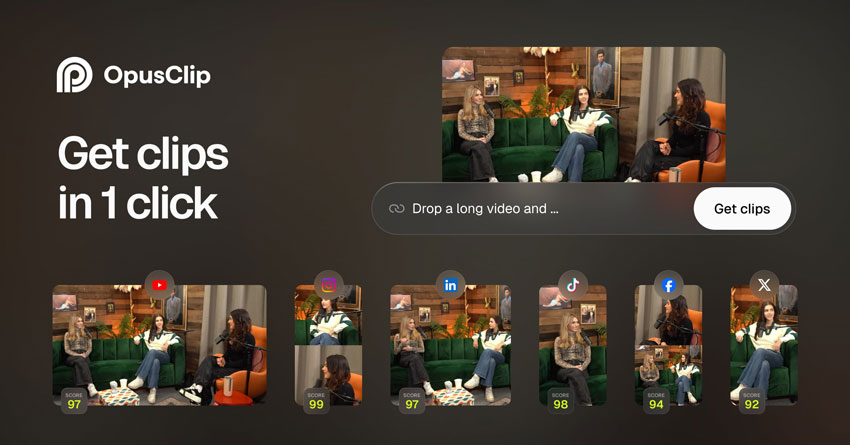
OpusClip is built around one clear job: take long-form video and turn it into multiple short clips.
Creators can import podcasts, interviews, webinars, and other long-form recordings, then let the system identify potential short-form segments and prepare them for vertical publishing. This is where specialized automation can save more time than a traditional editor.
Practical fit: Feed OpusClip an interview or webinar, review its suggested hooks, and correct the crop around active speakers before scheduling anything. Automated highlights can miss context, subtle jokes, or a brand's most important message. The free version is useful for judging the suggestions, but its watermark, lack of editing, and three-day export window make it a poor final-delivery plan.
- Excellent long-to-short workflow.
- Automatic clip selection and social-ready reframing.
- Useful for podcast and webinar repurposing.
- Free plan available for testing.
- Not a complete professional NLE.
- Automated clip selection still benefits from human review.
- Less useful if your footage was already created specifically for short-form content.
8. Runway - Best for Generative Video Editing
Best for: Generative VFX, object replacement, background changes, concept work, creative advertising, and AI-assisted filmmaking.
Compatibility: Web.
Pricing: Free includes 125 one-time credits; Standard starts at $12/month billed annually with 625 monthly credits, and Pro at $28/month billed annually with 2,250 monthly credits.
Our Verdict: Runway is the strongest choice here when your editing problem is not "where should I cut this clip?" but "how do I change something inside this shot that was never filmed?"
Runway has moved far beyond the older Gen-3 Alpha positioning. Its current platform includes Gen-4.5 and a broader model ecosystem for video generation and transformation, alongside Aleph-based editing workflows.
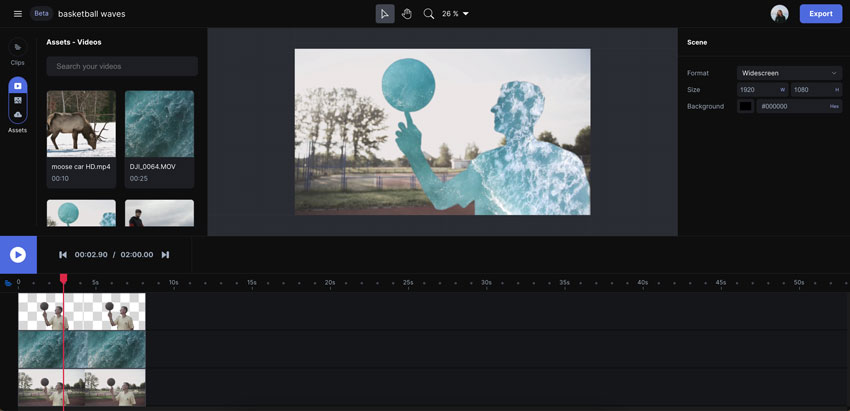
That makes Runway useful for visual tasks that are difficult or expensive in a conventional editor: changing backgrounds, removing or replacing elements, altering a subject's appearance, modifying lighting, or generating new material from text and images.
Practical fit: Runway is better suited to altering a specific shot, generating a missing visual, or producing a concept sequence than assembling an hour-long program. Inspect temporal consistency, hands, faces, and any brand-critical detail across multiple frames. Its free credits are a one-time allocation; retries and longer generations consume paid credits quickly. A conventional editor remains the better home for a complete long-form timeline.
- Advanced generative video editing and transformation.
- Useful for object, background, lighting, and style changes.
- Strong ecosystem of current video models.
- Free credits allow limited testing.
- Credit usage can become expensive during iteration.
- Not a replacement for a full professional timeline.
- Generative outputs still require quality control.
- Cloud-based workflow.
Best AI Video Editor by Use Case
1. Best AI Video Editor for YouTube
For complex long-form YouTube production, Adobe Premiere Pro is the strongest choice when you need complete timeline, audio, effects, graphics, and collaboration control. For interview, podcast, tutorial, and talking-head channels, Descript can be faster because the transcript becomes the rough-cut interface. Filmora is a more accessible option for beginners.
2. Best AI Video Editor for YouTube Shorts, TikTok, and Reels
Choose CapCut when you are creating short-form content from scratch and want captions, templates, effects, and vertical editing in one place. Choose OpusClip when the Shorts already exist inside a longer podcast, interview, webinar, or YouTube video.
3. Best AI Video Editor for Podcasts
Descript is the best overall fit for full podcast editing because transcription sits at the center of the workflow. OpusClip becomes useful after the episode is finished and needs to be repurposed into social clips.
A practical workflow is:
Record → Edit in Descript → Repurpose in OpusClip
4. Best AI Video Editor for Beginners
Filmora is a strong choice for beginners who want to learn conventional timeline editing without immediately facing Premiere or Resolve's complexity. CapCut is easier when speed and social publishing matter more than learning a traditional NLE.
5. Best Free AI Video Editor
DaVinci Resolve is the strongest free choice if you need a serious timeline, color tools, audio, and VFX without a watermark on standard exports. CapCut is easier for social-first creation, but its advanced features and templates can be paid. Descript, VEED, Filmora, and OpusClip all have notable free-plan export or watermark restrictions, so "free to try" should not be confused with "free to publish."
6. Best Free AI Video Editor Without a Watermark
DaVinci Resolve is the clearest fit here for conventional editing. Its free version supports substantial professional exports, although many of its advanced Neural Engine features are reserved for Studio. If you need a browser-based or automated short-form editor, confirm its watermark policy separately rather than assuming every free tier produces clean deliverables.
7. Best Offline AI Video Editor
DaVinci Resolve, Premiere Pro, and Filmora are desktop-first choices for local timeline work. Some AI functions still require online authentication, model downloads, cloud services, or credits, so "desktop app" does not mean every AI feature runs fully offline. Browser-focused products such as VEED, OpusClip, and Runway require an internet connection.
8. Best Online AI Video Editor
VEED is the more conventional browser editor. Runway is better when "online editing" means generative visual modification rather than standard cuts, captions, and layout changes.
9. Best AI Video Editor for Professional Work
The main choice is between Premiere Pro and DaVinci Resolve. Premiere is particularly strong if your workflow already depends on Adobe Creative Cloud, After Effects, Photoshop, or Frame.io. Resolve is especially attractive for color-heavy post-production, Fairlight audio, Linux users, and editors who prefer a one-time Studio license.
10. Best AI Video Editor You Can Control with Text
Descript lets you edit spoken content through text and an AI co-editor. VEED increasingly supports direct text-command editing in the browser, while Runway uses prompts to transform visual content. These workflows show how natural-language editing is becoming a major part of AI-assisted post-production.
How to Choose the Right AI Video Editing Tool
- Start with your actual bottleneck: Decide whether you need professional timeline editing, faster rough cuts, subtitles, long-to-short repurposing, browser collaboration, social templates, or generative visual editing.
- Choose automation that removes repetitive work: AI is most valuable when it saves time on transcription, silence removal, clip searching, captioning, masking, reframing, or repetitive exports.
- Do not sacrifice manual control you actually need: A one-click tool is convenient until it makes the wrong decision and gives you no practical way to correct it.
- Separate editing from generation: If you mainly need to edit footage you already recorded, prioritize an editor. If you mainly need to create new scenes, avatars, or visuals from prompts, prioritize a generator.
- Read free-plan terms beyond the "Free" badge: Check whether export carries a watermark, whether the maximum resolution is 720p or 1080p, whether edits can be revised, and when exported clips expire. Descript, VEED, OpusClip, and Filmora have materially different free access from Resolve.
- Calculate AI usage separately: Look at monthly versus one-time credits, allowed media hours, the cost of retries, and whether key functions sit behind a higher tier. A low starting price may not reflect your production volume.
- Consider desktop vs cloud carefully: Local timelines are often preferable for large or sensitive projects; browser tools are convenient for remote teams. Many desktop editors still require internet access for some generative AI functions.
- Judge the exported footage, not the preview: Test subtitle errors, cuts, masks, motion, credits, watermarking, and output quality with one representative project. If source footage remains blurry or noisy, distinguish a timeline-editing problem from a video enhancement problem.
How to Improve Video Quality After AI Editing
AI editing and AI enhancement solve different problems. Premiere Pro, Resolve, CapCut, and similar editors determine what appears in a video and when. But an otherwise finished edit may still contain low-resolution source clips, low-light noise, compression artifacts, or motion blur. Upscaling a sequence in the export panel does not automatically restore detail that was never captured.
For example, you might cut a 720p interview into a 1080p YouTube video, or mix older smartphone B-roll with sharper camera footage. In those cases, consider whether a dedicated enhancement pass is worthwhile. For particularly weak source clips, enhancing them before editing can be more efficient than processing an entire finished sequence; for a short completed edit, a final enhancement pass may be simpler.
When a Dedicated Video Enhancer Makes Sense
Aiarty Video Enhancer is designed for video-quality work including AI upscaling, denoising, deblurring, and frame interpolation, rather than transcript editing, cuts, or captions. It can be useful when footage needs cleanup before being brought into Premiere Pro or CapCut, or when a finished master needs a separate quality pass. Results depend on source quality, processing settings, and motion; enhancement cannot guarantee recovery of authentic detail in severely damaged material.
Workflow A, for weak source clips: Select the noisy or low-resolution clips → enhance in Aiarty → import the processed clips into your editor → edit and export.
Workflow B, for a nearly finished project: Finish the edit → export a high-quality master rather than a heavily compressed social copy → enhance if needed → review the output → create the final delivery file.
The key distinction is simple: an AI video editor handles structure, timing, and effects; an enhancer addresses image quality. To see how the two relate in a real editing workflow, read our guide to upscaling video for Premiere Pro or video upscaling with CapCut.
 FAQs
FAQs
There is no single best AI video editor for every workflow. Adobe Premiere Pro is one of the strongest choices for professional editing, DaVinci Resolve is the best free professional option, Descript is ideal for transcript-based podcast and interview editing, CapCut is excellent for social video, and Runway is better suited to generative visual editing.
DaVinci Resolve is the strongest free option if you need professional timeline editing, color grading, audio, and visual effects. CapCut is easier for social creators who prioritize captions, templates, vertical video, and fast publishing.
Adobe Premiere Pro is a strong fit for complex long-form YouTube production. Descript is particularly useful for interviews, podcasts, educational videos, and talking-head channels, while Filmora is easier for beginners.
CapCut is one of the most practical editors for creating TikTok, Reels, and YouTube Shorts. If you already have long-form content and want AI to identify potential short clips automatically, OpusClip is usually the better fit.
AI can automate transcription, rough cutting, subtitles, silence removal, reframing, clip selection, and other repetitive tasks, but important projects still benefit from human review for pacing, context, storytelling, factual accuracy, branding, and visual continuity.
Yes. Descript lets you edit dialogue-driven content through transcripts and an AI co-editor. VEED increasingly supports text-command editing, while Runway uses prompts to transform visual content.
Runway is now both, but it remains more generative than conventional. It combines video generation with tools for transforming, removing, replacing, and restyling visual elements, but it does not replace a full professional timeline for traditional long-form post-production.
No. An AI video editor changes the structure, timing, captions, audio, effects, and other production elements. An AI video enhancer focuses on footage quality, such as reducing noise, improving clarity, upscaling, or adjusting frame rate. A project may benefit from both, but they do different jobs.
DaVinci Resolve is a strong choice for standard watermark-free editing and export. Other free tiers may be limited: Descript and VEED place watermarks on free exports, Filmora's free editor is not intended for watermark-free delivery, and OpusClip's free clips are watermarked. Always check the exact export terms for the plan you use.
Desktop editors such as DaVinci Resolve, Premiere Pro, and Filmora support local timeline workflows, but some AI tools require cloud processing, credits, or online access. VEED, OpusClip, and Runway are primarily browser-based and require an internet connection. Verify the specific AI feature if offline operation is essential.
Final Verdict: Which AI Video Editing Tool Is Right for You?
For most buyers, the decision comes down to three questions: Do you need a full professional timeline, faster editing of spoken or social content, or generative changes to the shot itself? Premiere Pro and DaVinci Resolve handle deep post-production; Descript, CapCut, Filmora, and VEED simplify different creator workflows; OpusClip specializes in repurposing; and Runway is best viewed as a generative complement.
If budget is the deciding factor, start with Resolve's free editor and check which Studio-only tools you actually need. For transcript-led work, compare Descript's media hours and credits. For social production, evaluate CapCut's premium features against your publishing volume. And before you subscribe to any AI service, export a representative project to check watermarks, resolution, and the amount of manual correction required.
The best AI video editor is the one that fits your footage, workflow, and delivery requirements—not simply the product with the longest feature list.
You May Also Like


This post was written by Ashley Brown, a videographer and associate writer at Digiarty Software who focuses on AI-assisted video editing, post-production workflows, and video enhancement tools. She evaluates how new AI features affect practical editing tasks such as rough cuts, captions, masking, content repurposing, generative editing, and final delivery. Accuracy is reviewed by Abby Poole.
