


When I was on the video editor team in 2018, I remember how Adobe Sensei AI gradually introducing some AI-powered features into Premiere Pro. Auto Reframe, speech-to-text, auto captions, scene edit detection are released between 2020 and 2023. Then there's the major leap with Firefly in 2024-2025, with Generative Extend, Object Addition, and Object Removal integrated.
While Premiere Pro is powered by AI tools with Firefly, AI plugins remain valuable for specialized, higher-quality, or faster workflows. For instance, podcasters, sports editors, wedding videographers, and short-form content creators need different features for narrower tasks.
In this post, we tested best AI plugins for Premiere Pro, ranging from automatic editing, auto subtitles, local video upscaling, video quality restoration, to generative AI tools.
Built-in AI Tools in Adobe Premiere Pro
If you are have updated to the latest version of Premiere Pro, there are already many handy native AI features.
- Text-Based Editing
- Scene Edit Detection
- Object Mask
- Auto Reframe
- Enhance Speech
- Remix Tool
- Generative Extend
I know some professionals prefer to stay on older versions of Premiere Pro, for reasons such as maintaining stability for ongoing client projects and ensuring a standardized team workflow. For hobbyists with older computers, some AI features run slowly. Or there are users rely on the Adobe Premiere Pro CS6 as they own a perpetual license.
If you don't have access to these native AI features, or you're looking for more specialized capabilities, check the best AI plugins for Premiere Pro below.
Choosing the Best AI Plugins for Premiere Pro
Mocha Pro
When capturing dog video during camping, pet as such running around and can be out of center of the frame. For less challenging scenes, I use the auto reframe feature in Premiere Pro, and auto adjust the tracking with keyframes.
To enhance workflow and save time, Mocha Pro is widely recognized in the Industry as the AI plugin for Premiere. It Planar Tracking with precise AI object selection makes the editing more efficient.
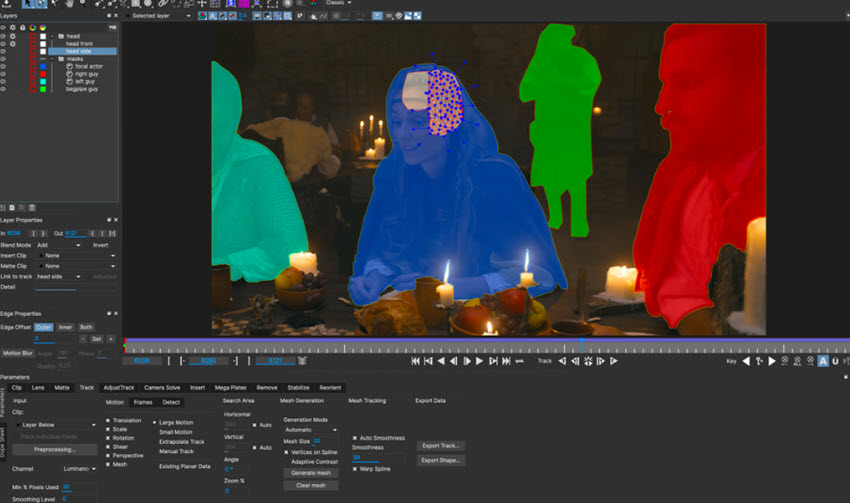
With a single click, Mocha Pro helps to keep track of cars, people, animal, and other moving objects. It is also efficient even with a long shot. During my test, it still works if object is briefly blocked or the camera moves quickly.
Combined with object removal and masks, it allows users to create VFX and screen replacement. For the dog video, I can add animated text and graphics when it's playing around.
- Pricing: 14-day free trial, starting at $27.08/mo for Premiere and AE.
- Platform: Windows 10/11, macOS 12
- Skill level: ★★★★★
Sammie Roto for Matting
Sammie Roto is an open-source AI tool for Premiere Pro. This rotoscoping software can generate precise masks and detect tricky edges around fur, feathers, and soft clothing.
For bird videos, you can click to track it, then export the PNG sequence or alpha matte, and import into Premiere Pro for further editing. If the birds are hiding around the foliage, then you can adjust -/+ value before tracking. For advanced users, instead of relying on Sammie Roto, you can with with SAM3 by Meta, which supports using text prompts such as dog, bird, or other objects to mask them out.
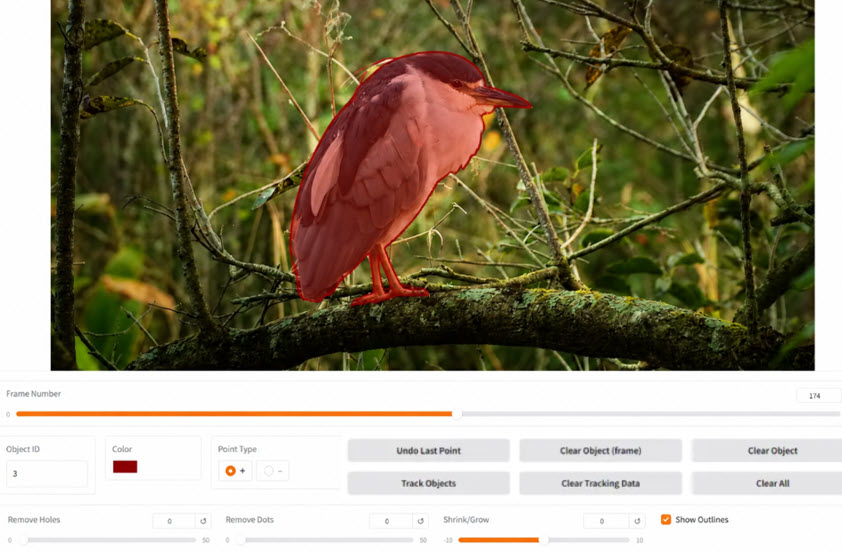
Admittedly, the workflow is not as seamless as using an AI plugin, but given its feature set and being completely free, Sammie Roto is worthing trying for serious editors.
- Pricing: free, open source.
- Platform: Windows, macOS, and Linux.
- Skill level: ★★★★☆
Higgsfield
When editing creative projects, it's time consuming to assembly B-rolls and main clips, while making the whole content impactful. Higgsfield bring the generative AI power into video editing and VFX. It helps preparing assets for scenes, characters, overlays, and title cards. For cinematic visuals, this AI-plugins also supports changing camera angles and movements.
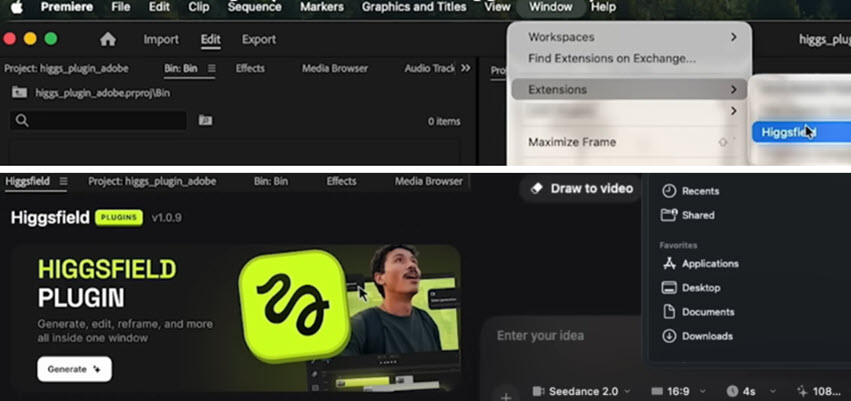
To enhance efficiency, you can use the AI-plugin from Higgsfield to remove objects or background, add persons and elements into the scene, replace objects such as clothing, sky, color styles in the footage. The prompts-based method makes it easy for beginners and intermediate editors.
It's pro plans support Seedance 2.0 full access and unlimited Nano Banana Pro 2K, Kling 3.0, Flux.2 Pro, GPT Image and other models.
Note: Higgsfield plugin works for Premiere Pro v24.0 and newer.
- Pricing: $9-$65/mo depending on credits.
- Platform: Windows, macOS.
- Skill level: ★★★☆☆
Topaz Video AI
Before Adobe Premiere announcing the purchasing of Topaz labs on June 25, 2026, Topaz Video AI already released a dedicate panel in Premiere Pro. As one of the best AI video enhancers, its models such as Proteus, Nyx, Iris, and the generative Astra are available in Premiere.
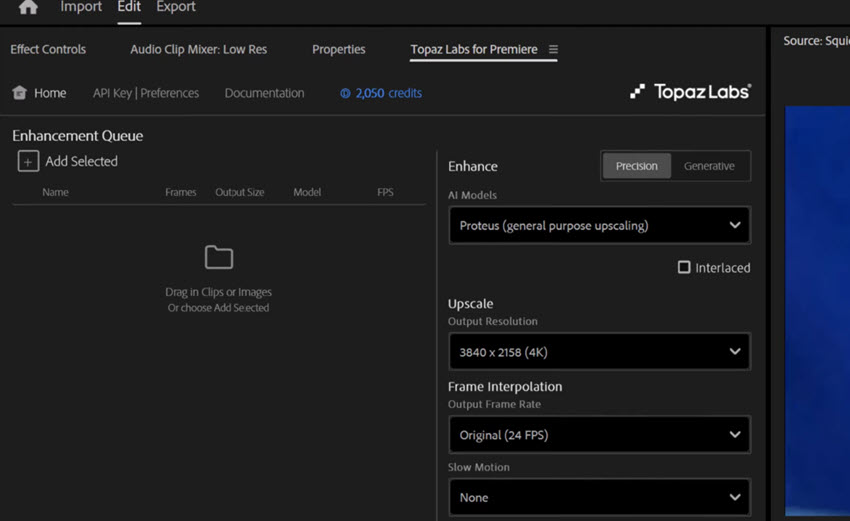
Just as how you edit with the native Effect Controls, Topaz Labs for Premiere is a dedicated panel as shown in the screenshot above. You can upscale the footage directly from the timeline, change frame rate, or optionally create a slow motion effect.
Note: dedicated Topaz cloud credits are needed for certain processing.
- Pricing: Purchasing cloud credits: $19/mo, $99/mo, $299/mo.
- Platform: Windows, macOS.
- Skill level: ★★☆☆☆
Aiarty Video Enhancer
If you love the features of Topaz Video plugin for Premiere Pro, while preferring a standalone solution that work independently, Aiarty Video Enhancer becomes a decent choice to upscale video quality, reduce video noise, restore natural details, and prepare high-quality footage for Premiere Pro and other video editing software.
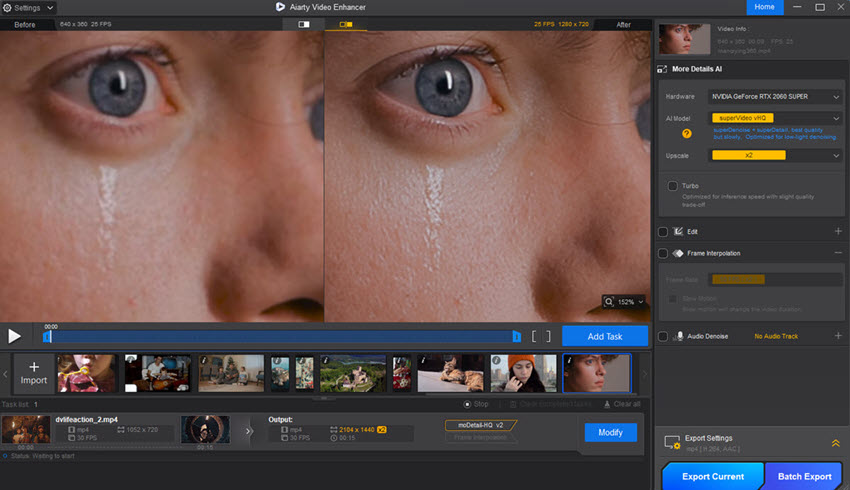
As shown in the test above, before importing assets into Premiere Pro, Aiarty Video Enhancer helps with 4K video upscaling and realistic detail restoration. The skin and face details are naturally enhanced at a higher resolution.
For projects with mixed resolution, low-quality resources, or grainy footage, the deep-learning models in Aiarty will auto analyze and fix the quality issues. Its batch processing with GPU acceleration saves your hours of waiting.
Free download Aiarty Video Enhancer for Windows or Mac:
- Pricing: Free trials available. $165 lifetime license, free unlimited updates.
- Platform: Windows 10/11, macOS 13.0 or higher.
- Skill level: ★★☆☆☆
FireCut
FireCut is one of the frequently mentioned AI plugins for Premiere Pro and the Adobe ecosystem. With optimized features for the editing workflow, it is popular among YouTubers and general content creators. FireCut helps to delete repetitive scenes, cut out silence parts, remove stuttering sections or vocal fillers like "umms".
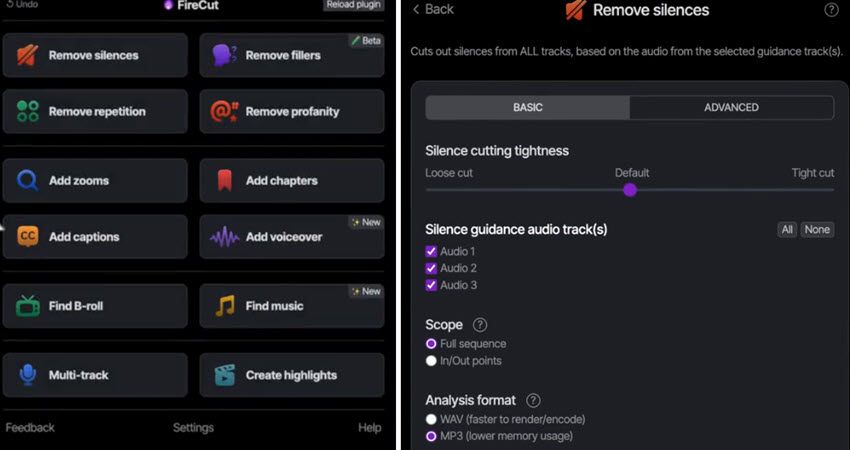
In fact, as FireCut is co-developed by Suhail Idrees and Ali Abdaal, they know about the pain points happening in the editing. With this AI plugin, you can handle many of the tedious tasks to automation, saving time in the rough-cut phase. It also supports creating animated captions, chapters, b-rolls, etc.
- Pricing: 7-day free trial, $19/mo Starter.
- Platform: Windows 10/11, macOS 13.0 or higher.
- Skill level: ★★★☆☆
AutoCut
AutoCut shares many similar features with FireCut, such as filter words or silence removal, auto captions, multi-camera editing, and zooming effects. If you prefer to speed up the editing on Instagram Reels, YouTube Shorts, and TikToks, AutoCut has enough features to get your covered.
If you need controls and granular settings for silence detection, AI chapter creations, or repeated scenes removal, you can compare how FireCut or AutoCut fulfill your needs before sticking to one.
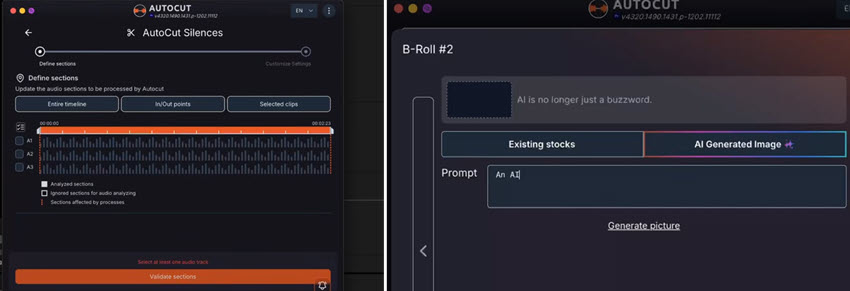
Tip: AutoCut is fully integrated Pexels and Storyblocks. If you have valid subscriptions, this will help you preparing B-rolls in a faster speed. It also supports prompting to prepare more assets.
- Pricing: 14-day free trial, $14.9/mo AI plan.
- Platform: Windows, macOS.
- Skill level: ★★★☆☆
TimeBolt
TimeBolt is made for talking-head videos, podcasts, and online courses. It finds silent sections, marks them, or removes them automatically. Then you can export the timeline to Premiere Pro for more editing.
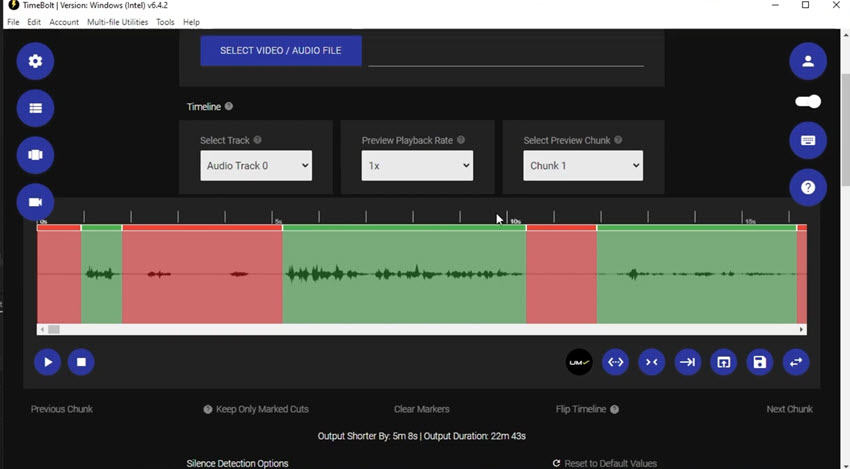
It does not have as many features as some other AI plugins, but that is also its advantage. If your goal is simply to speed up rough cuts, TimeBolt is enough for most projects. For YouTubers who publish long videos every week, it can save a lot of editing time.
- Pricing: $97/year on 2 machines
- Platform: Windows, macOS
- Skill level: ★★★☆☆
StyleX
StyleX mainly works as the style transfer AI-plugin for Premiere Pro. It helps you create anime, painting, oil paint, or comic looks from real world videos. When you are brain storming or preparing visual assets for Lo-Fi videos, synthwave aesthetic, concept projects, or gaming, style transfer helps to experiment the look on the limited budget.

For technically skilled users, free alternatives such as EbSynth or the node-based workflow in comfyUI also work. They can map the anime transfer to your entire source footage.
- Pricing: $79.99
- Platform: Windows, macOS. GPUs newer than 2012.
- Skill level: ★★☆☆☆
Beauty Box Video
Beauty Box Video is a well-known portrait retouching plugin for Premiere Pro. It is often used for interviews, business videos, wedding videos, and beauty content. It automatically detects skin areas and smooths blemishes, wrinkles, and skin texture while keeping the eyes, hair, and face details looking natural.
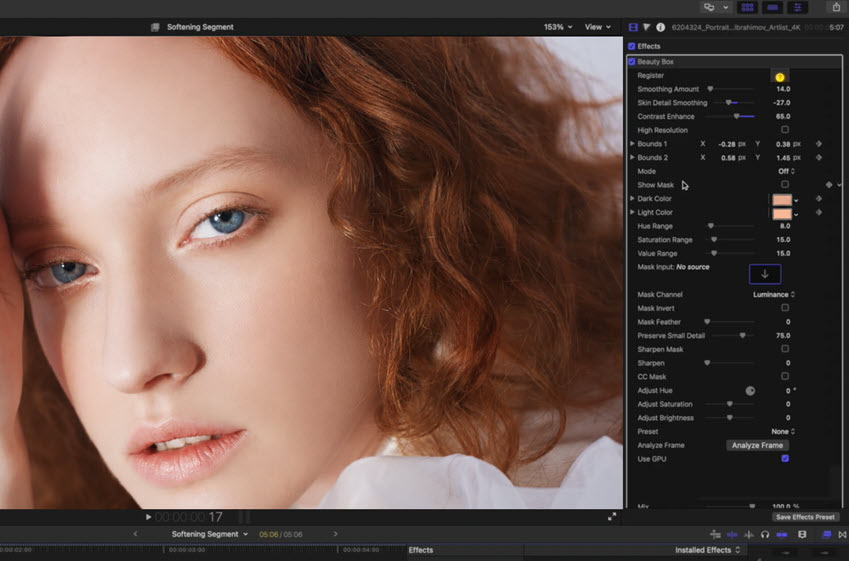
Tip: More skin smoothing does not always give better results. Many editors keep the effect at a low level to make people look cleaner and fresher. Too much smoothing can remove details, especially in 4K or high-resolution videos.
- Pricing: $199.00 for Premiere and After Effects.
- Platform: Windows 10/11, macOS 10.14 or higher.
- Skill level: ★★★★☆
Key Takeways
AI plugins and companion tools for Premiere Pro are improving very quickly, and new products appear every few months. Most of them focus on editing faster, creating subtitles, improving audio, enhancing video quality, or generative AI.
I hope this guide helps you find the right tools for your workflow. You can also save this list and come back later when you want to add new tools to your editing setup.
You May Also Like


This post was written by Ashley Brown, a videographer turned AI explorer. As an associate writer at Digiarty Software, she dives into the latest AI-powered tools for video enhancement and content creation, offering practical insights and unbiased commentary. Accuracy confirmed by Abby Poole.
