


Capturing breathtaking aerial footage with your DJI Mavic, Air, or FPV drone is only half the battle. The real magic happens on your computer or mobile device. Drone footage presents unique post-processing challenges: dealing with high-contrast dynamic ranges, fixing lens distortion, managing massive 4K/5.4K files, and taming the inevitable digital noise that creeps into low-light flights.
To help you find the absolute best drone video editing software, we didn't just look at feature lists. We analyzed real user discussions across top pilot communities. So no matter you need a quick, AI-driven mobile edit, an advanced color grading suite for D-Log/D-Log M footage, or a powerful AI tool to rescue blurry and noisy clips, here is the ultimate guide to the best paid/free drone video editors available today.
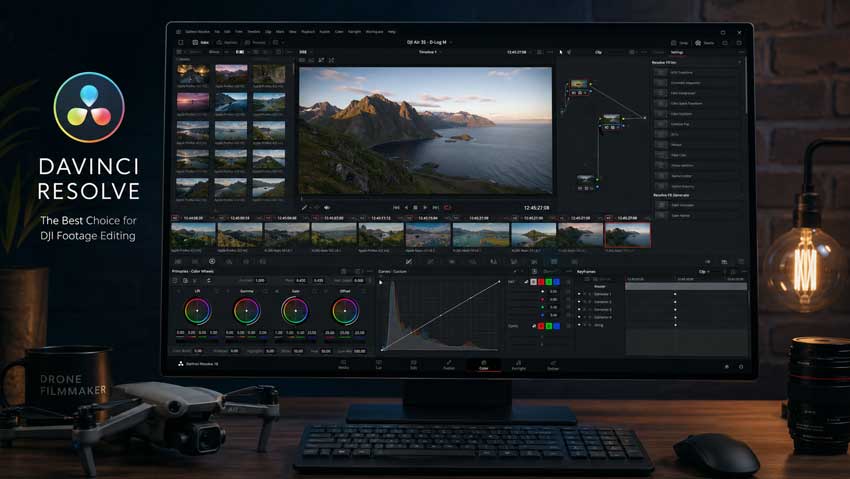
DaVinci Resolve is the ultimate best software for drone video editing, blending Hollywood-level timeline tools with industry-standard color grading. It is the community's top choice for balancing harsh aerial highlights and recovering flat DJI D-Log footage.
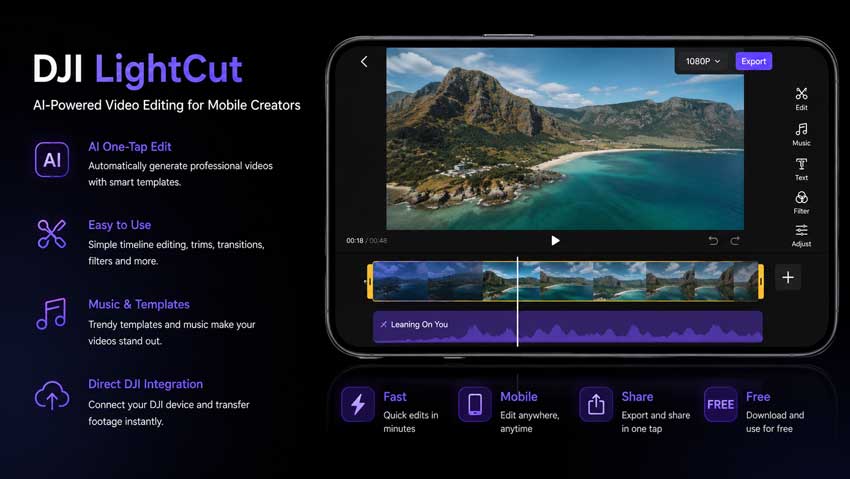
LightCut is the ultimate drone video editing app optimized for modern on-the-go workflows. It allows pilots to preview and edit massive 4K files via Wi-Fi directly from the drone, requiring zero smartphone storage space. Best for hobbyists and travelers who need a fast, easy AI-driven drone video editor for social media.
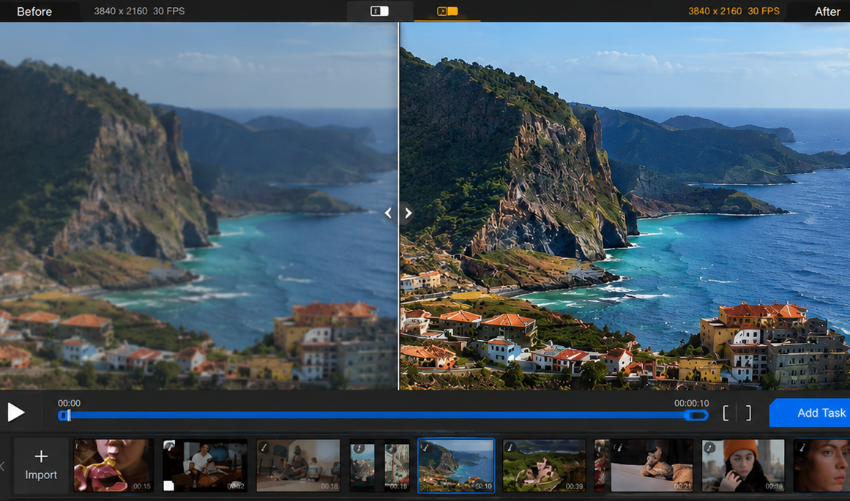
Aiarty Video Enhancer focuses on improving footage quality. It's especially useful for upscaling older drone videos, sharpening soft aerial footage, reducing noise, and restoring details in landscapes. If your drone footage looks blurry, compressed, or outdated, Aiarty can help you get more out of it before or after editing.
Drone Footage Has Different Editing Needs Than Regular Video
Editing drone footage isn't quite the same as editing footage from a phone or action camera.
Drone pilots often work with:
- D-Log and D-Log M footage
- High-resolution 4K/5.1K recordings
- Wind-induced micro-shake
- Overexposed skies
- Flat color profiles
- Long panoramic shots
- Digital zoom footage that lacks detail
As a result, the best drone video editing software isn't necessarily the most powerful video editor overall. The right choice depends on whether you need advanced color grading, quick social media edits, AI enhancement, or a lightweight workflow for editing on the go.
This guide focuses on the software that drone pilots actually use, based on discussions across DJI communities, drone forums, YouTube creator groups, and aerial photography workflows.
Best Software for Drone Video Editing
To help you find the exact match for your hardware and flight goals, this cross-comparison table filters the best video editing software for drones by their specialized aerial utility.
DaVinci Resolve - Best Free Drone Video Editor for Cinematic D-Log Color Grading
When a pilot asks for desktop recommendations online, the community consensus is almost unanimous: DaVinci Resolve. It stands out as the ultimate free drone video editing software capable of handling Hollywood-level cinematic color pipelines without cost.
"Don't bother paying for subscription software if you just want to grade drone footage. Resolve's free version gives you full access to node color wheels that can save overexposed skies in D-Log M flawlessly." — r/dji Member
The Drone-Specific Advantage:
Small drone sensors naturally struggle with high-contrast scenes—like a bright sunset over a dark forest. To preserve details, advanced pilots shoot in flat profiles like D-Log or D-Log M. Resolve’s node-based color grading system lets you isolate the sky and the ground independently, pulling incredible detail out of overexposed highlights without crushing your shadow data. Its optimized playback engine also handles modern camera streams exceptionally well, cementing it as the best drone video editing software for desktop enthusiasts.
- Pros: Unrivaled color wheels; robust free version without export watermarks; hyper-efficient stabilization algorithms for wind-induced micro-shake.
- Cons: Steep learning curve for absolute beginners; demands heavy GPU resources.
DJI LightCut - Best Drone Video Editing App for DJI Users
If you want to share your flights to social platforms instantly without dealing with computer desk sessions, DJI LightCut is the officially best drone video editing app that community members prize for light-speed production.
Also see: Best DJI drone video editing software
The Drone-Specific Advantage:
LightCut fundamentally solves the biggest headache of mobile editing: smartphone storage limitations. Instead of transferring gigabytes of massive 4K video files over to your phone's camera roll, this specialized drone video editor app connects directly to your drone (like the Mavic 3, Air 3S, Avata 2, or Mini 4 Pro) via a local Wi-Fi link. You can preview, trim, and stitch your files directly from the drone's MicroSD card in real-time. Its AI-driven One-Tap Editing mode can automatically analyze your aerial movements, pick the smoothest pans, and set them to rhythm-matched music.
- Pros: Entirely free with no watermarks; requires zero local phone storage space for raw footage; features tailored aerial templates that recognize orbits and reveals.
- Cons: Limited to basic mobile outputs; lacks manual primary color wheels for advanced log grading.
Aiarty Video Enhancer - Best Software for Improving Drone Footage Quality
Most drone video editing software focuses on cutting clips, adding effects, and color grading. Aiarty Video Enhancer takes a different approach by focusing on footage quality itself.
Many drone pilots still work with older aerial footage, digital zoom recordings, or low-light videos that appear soft, noisy, or lacking in detail. While traditional drone video editors can improve colors and exposure, they typically can't recover lost detail. Aiarty is designed to fill that gap through AI-powered upscaling, denoising, and detail enhancement.
During testing, it performed particularly well on helping improve the clarity of tree lines, mountain textures, roads, and buildings. It was also effective at reducing noise in sunrise, sunset, and low-light aerial recordings where smaller drone sensors often struggle.
For creators looking to upscale older 1080p drone footage to 4K or improve the quality of archived DJI videos, Aiarty can be a useful addition to an editing workflow. Rather than replacing a traditional drone video editor, it works alongside tools like DaVinci Resolve or Premiere Pro to help produce cleaner and sharper aerial footage.
- Pros: Rescues otherwise unusable or grainy low-light flights; sharpens organic textures without artificial edge artifacting; lightning-fast processing speeds on modern GPUs.
- Cons: Built exclusively for quality optimization and upscaling rather than multi-clip timeline drone video editing.
Premiere Pro – Best Drone Video Editing Software for Commercial Projects
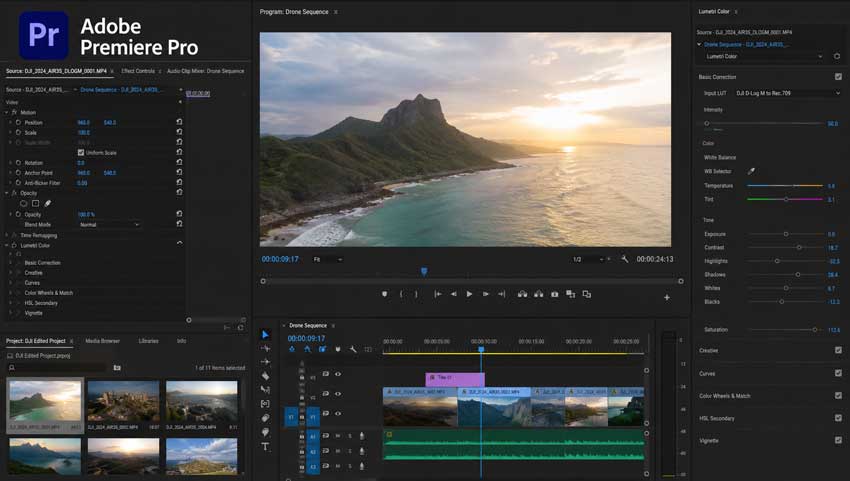
For professional commercial pilots whose aerial clips must integrate seamlessly into commercial projects, real estate tours, or multi-camera client brand deals, Adobe Premiere Pro remains a dominant choice in the best drone editing software landscape.
The Drone-Specific Advantage:
Drone videographers frequently face a major technical bottleneck: laggy timelines caused by highly compressed 4K, 5.1K, or 5.4K H.265 files. Premiere Pro tackles this via its seamless Proxy Workflow. It automatically generates lightweight, low-resolution duplicates of your massive aerial files so you can edit smoothly on a lightweight laptop in the field. When you hit export, it swaps the high-res files back in. Additionally, its Warp Stabilizer tool is highly regarded for smoothing out minor wind vibrations on long panoramic pans, making it arguably the best software for drone video editing when professional collaboration is required.
- Pros: Unmatched integration with After Effects; flawless multi-cam synchronization; massive third-party transition and LUT plugin ecosystem; supports complex multi-camera editing and collaboration.
- Cons: Ongoing subscription-only pricing model; can feel complex for beginners doing simple drone edits.
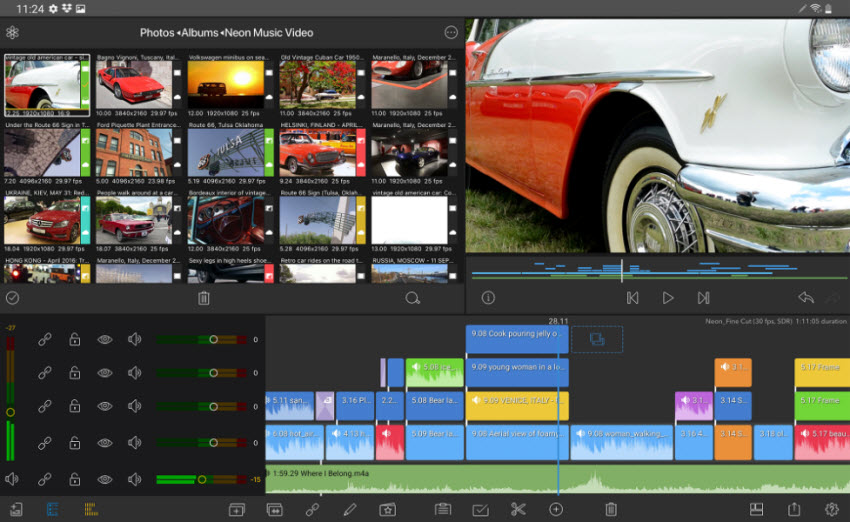
LumaFusion – Best Drone Video Editing App for iPad Creators
For traveling filmmakers who want to leave their heavy laptops behind but still require professional-grade, multi-track video editing software for drones, LumaFusion stands completely unmatched in the mobile space.
The Drone-Specific Advantage:
LumaFusion brings a true desktop-class editing topology straight to your iPad or mobile tablet. It supports up to six separate video tracks and allows you to import custom 3D LUTs (Look-Up Tables). This means you can download your drone manufacturer's specific D-Log-to-Rec.709 conversion profiles, load them into your tablet via a USB-C drive or SSD, and execute professional color corrections while sitting in your car right at the flight location.
It performs well editing 4K drone footage on modern iPads, keeping playback smooth and exports relatively fast for travel workflows. While it doesn't match DaVinci Resolve in advanced color grading, it provides a strong balance between portability and control.
- Pros: Professional multi-track media layout on mobile; full support for external SSD editing; robust keyframing; smooth performance with 4K drone footage.
- Cons: Paid application with an upfront purchase cost; user interface can feel cramped on smaller smartphone screens.
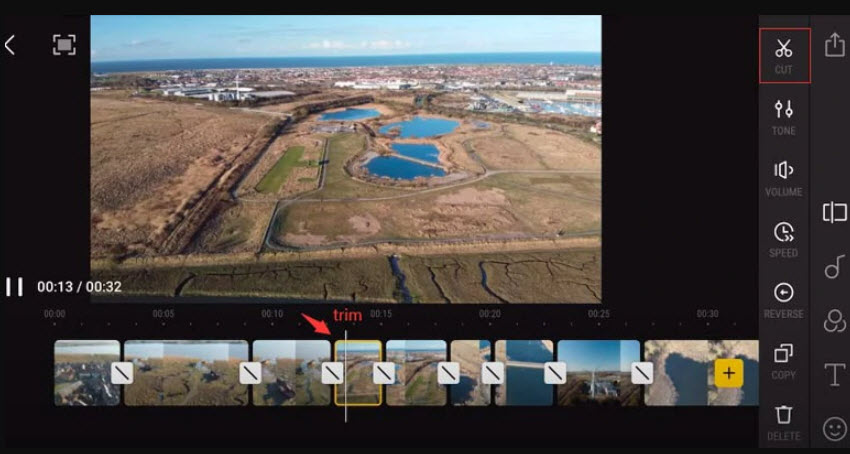
DJI Fly – Best for Quick Drone Video Sharing
DJI Fly is the companion app you already use to pilot your drone, but its built-in creation center deserves a closer look for quick, low-barrier edits before moving on to advanced drone video editing software.
The Drone-Specific Advantage:
While it doesn't offer the deep feature sets of standalone apps, the DJI Fly built-in interface is ideal for immediate field confirmation. Unlike DJI LightCut, which serves as a dedicated drone video editing app for creating complete, stylized stories with templates, DJI Fly is built directly into your flight control system. If you just performed an FPV dive or a complex cinematic orbit and want to instantly trim a raw clip down to its best 10 seconds to text to a client before even packing up your gear, you can do it right inside the primary piloting interface without switching applications.
- Pros: Built directly into your primary piloting app; zero configuration required; simple layout.
- Cons: Very basic feature set; not suitable suitable for advanced or cinematic drone video editing.
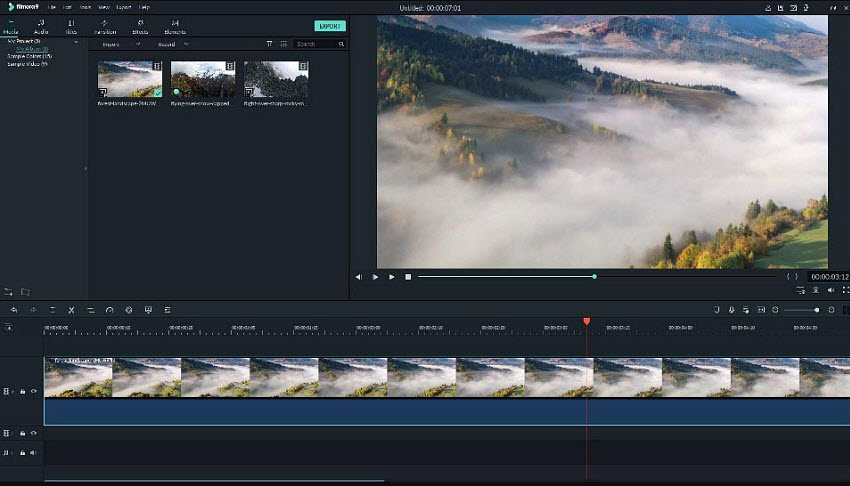
Filmora – Best Drone Editing Software for Beginners
Filmora bridges the gap for users who have outgrown basic mobile applications but find the intricate node spaces of professional suites too complex, offering a balanced best drone editing software entry point.
The Drone-Specific Advantage:
Wide-angle drone lenses—especially on older models or budget action cameras mounted to custom quadcopters—frequently suffer from heavy fisheye barrel distortion. Filmora includes an explicit, drop-down Lens Correction database pre-configured for major drone models. With a single click, it flattens curved horizon lines. It also includes intuitive audio ducking features to cleanly lower drone prop-wash noise beneath background music tracks.
- Pros: Highly accessible user interface; great built-in motion tracking tools; simple lens correction presets.
- Cons: Too many ads for its additional asset pack add-ons; limited advanced color grading tools; less control than professional drone video editors.
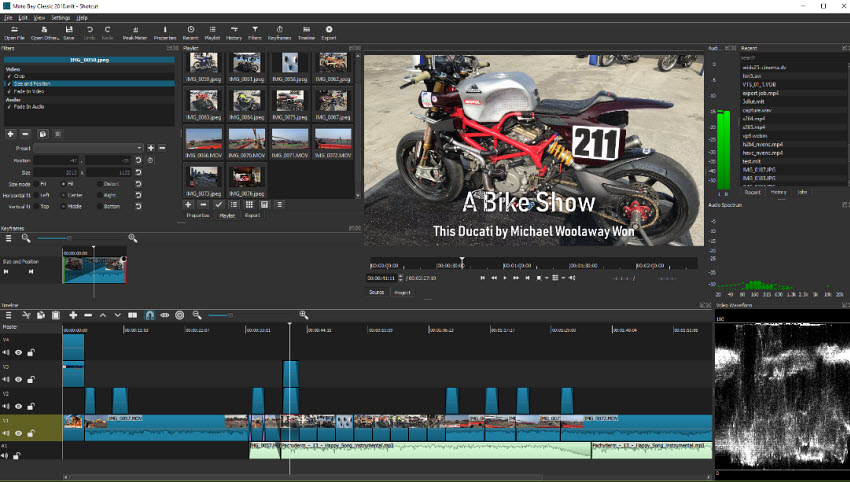
Shotcut – Best Free Open-Source Drone Video Editor
If you are operating on an older computer or a budget laptop that lacks a high-end dedicated GPU, heavy modern suites will frequently crash when loading uncompressed drone files. Shotcut offers a lightweight, open-source remedy for those looking for capable free drone video editing software.
The Drone-Specific Advantage:
Shotcut is a completely free, open-source editor that does not require a complex installation or heavy system background processes. Because it utilizes the robust FFmpeg media backend, it can natively open and convert almost any direct drone video format without requiring pre-transcoding. It provides simple, hardware-friendly timeline trimming, transitions, filters, and exporting high-resolution drone videos without exhausting your computer’s RAM.
- Pros: Completely open-source and free; incredibly lightweight on system resources; lightweight and cross-platform support.
- Cons: Interface looks outdated; lacks advanced automated tracking or modern AI features.
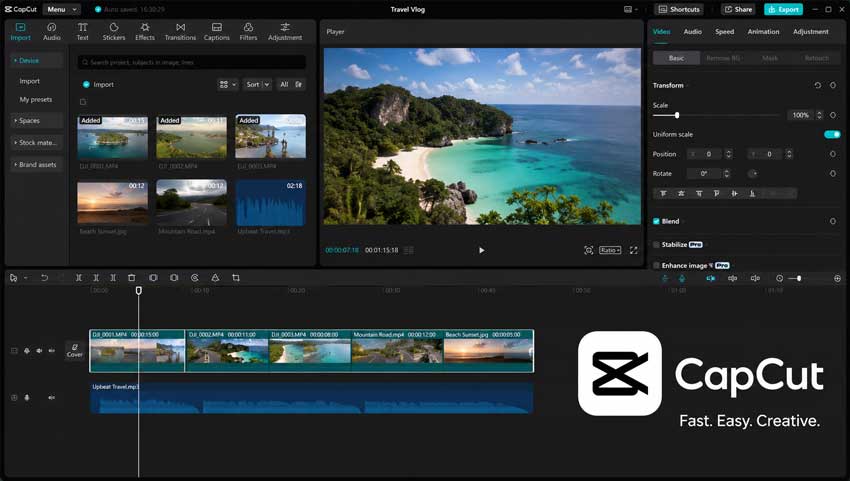
CapCut – Best Drone Video Editing Software for Social Media Creators
While historically dismissed by traditional desktop purists, CapCut has taken the amateur drone community by storm. It is frequently recommended across forums for content creators who want a more dynamic drone video editor for rapid TikTok, Instagram Reels, and YouTube Shorts exports.
The Drone-Specific Advantage:
The most popular creative technique in modern aerial cinematography is Speed Ramping—speeding up an approach over an open field, slowing down to a crawl as the drone passes an obstacle, and accelerating away. CapCut features highly visual, customizable Speed Curves that make mastering this technique drag-and-drop simple. Available across desktop and mobile, it stands as an incredibly accessible option for creators looking for the best video editing software for drones tailored to vertical media layouts.
- Pros: Excellent for short-form drone videos; excellent trending audio integration; massive collection of built-in text styles and filters.
- Cons: Premium features are locked behind a Pro paywall; lacks precise control over professional log color spaces.
Clipchamp – Best Lightweight Drone Video Editor for Windows Users
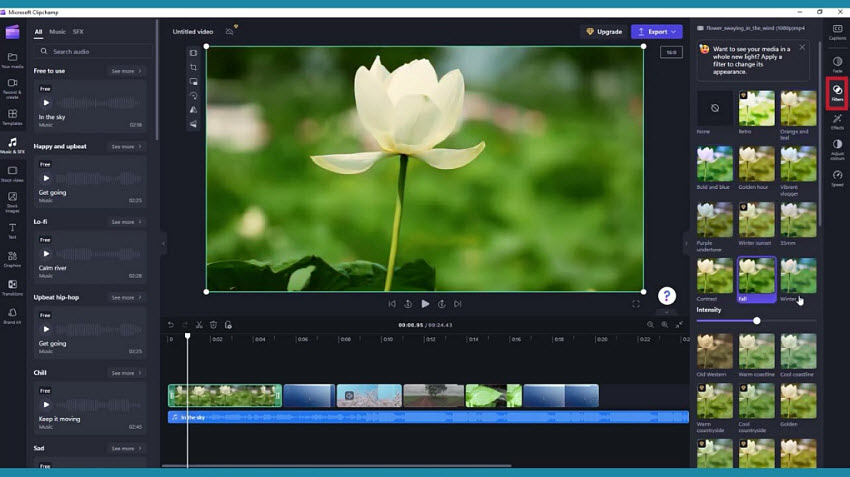
For Windows 11 users who need to perform basic structural cuts on their aerial files without installing a massive drone video editing software footprint, Microsoft's native Clipchamp provides a simple, direct solution.
The Drone-Specific Advantage:
Clipchamp allows you to drop drone clips directly onto an online timeline or basic desktop app for quick compilation. It's ideal if you just need to sequence four or five landscape clips back-to-back, add a clean title card, and export a quick review draft for a colleague without setting up complex project folders. Because it is integrated into Windows, setup is minimal and the workflow is straightforward. However, it is not designed for cinematic drone editing or advanced color grading workflows.
- Pros: Pre-installed on modern Windows machines; clean interface; straightforward web-based assembly; good for quick drone video editing.
- Cons: Limited professional editing tools; completely inadequate for handling advanced log color workflows.
Conclusion
The best drone video editing software ultimately depends on how you create and share your aerial footage.
If you're looking for a powerful free solution with professional color grading and editing tools, DaVinci Resolve remains one of the strongest choices available. DJI users who prioritize speed and convenience may find LightCut more practical for creating videos directly from their phones. For commercial projects and client work, Premiere Pro continues to be a reliable industry standard.
It's also worth remembering that editing and enhancement serve different purposes. While traditional drone video editors focus on cutting clips, color grading, and storytelling, tools like Aiarty Video Enhancer can help improve footage quality by upscaling older recordings, reducing noise, and restoring details before or after editing.
Whether you're producing cinematic travel films, real estate videos, social media content, or simply sharing footage from your latest flight, choosing the right software can make a significant difference in both workflow and final results. Start with the tool that best matches your experience level and editing goals, and you can always expand your workflow as your skills grow.
 FAQs
FAQs
This is the most common issue drone pilots face. To save space on tiny MicroSD cards, modern drones (like the DJI Mavic, Air, or Mini series) compress footage into highly dense H.264 or H.265 codecs. These formats are designed for efficient storage, not smooth editing, meaning your computer’s CPU has to work incredibly hard just to decode the video in real-time.
Standard Profile applies contrast, sharpness, and color saturation directly inside the drone. The footage looks vibrant right out of the camera, making it perfect for rapid editing apps like DJI LightCut or CapCut where you want to export directly to social media without extra steps.
D-Log / D-Log M records a flat, desaturated image that looks washed out initially, but preserves a massive amount of dynamic range in the highlights (bright skies) and shadows (ground terrain). You must color grade this footage later. It is highly recommended if you are using advanced drone video editing software like DaVinci Resolve to recover overexposed horizons and achieve a cinematic look.
Yes. DaVinci Resolve is particularly well suited for DJI footage because it supports D-Log and D-Log M color profiles used by drones such as the DJI Mini 4 Pro, Air 3S, and Mavic series. It is often recommended for recovering highlights, improving dynamic range, and creating cinematic aerial footage.
LightCut is one of the most recommended drone video editing apps for DJI users. Developed in partnership with DJI, it can automatically identify highlights, generate edits, and create social-ready videos directly from your phone with minimal effort.
Absolutely. Many drone pilots edit footage entirely on mobile devices using apps such as LightCut, CapCut, DJI Fly, and LumaFusion. Mobile editing is especially popular for travel videos, social media content, and quick sharing after flights.
You May Also Like


This post was written by Ashley Brown, a videographer turned AI explorer. As an associate writer at Digiarty Software, she dives into the latest AI-powered tools for video enhancement and content creation, offering practical insights and unbiased commentary. Accuracy confirmed by Abby Poole.
