


If you've spent any time shooting with a DJI drone, you've probably asked the same question I did: what's actually the best DJI editing software?
At first, I assumed DJI had its own all-in-one video editor. Technically, it does. DJI offers LightCut for quick mobile edits and DJI Studio for 360-degree footage. But after testing footage from DJI drones, action cameras, and pocket cameras, I quickly realized most creators still end up using third-party software sooner or later.
The reason is simple. DJI cameras can capture beautiful footage, but editing it is not always as easy as dragging clips into a timeline. Modern DJI devices often shoot in H.265, support D-Log or D-Log M, and record in 4K or higher. That is great for image quality, but it can be demanding on both your computer and your editing software.
For this guide, I tested several popular DJI video editing tools using the same drone footage, action camera clips, low-light shots, and compressed exports. Some tools were better for color grading. Some were faster for social media. Others were more useful for improving video quality after editing. Here is what actually stood out.
What Software Does DJI Use for Video Editing?
DJI currently offers two official editing tools: DJI LightCut and DJI Studio. They are useful, but they are built for very different workflows.
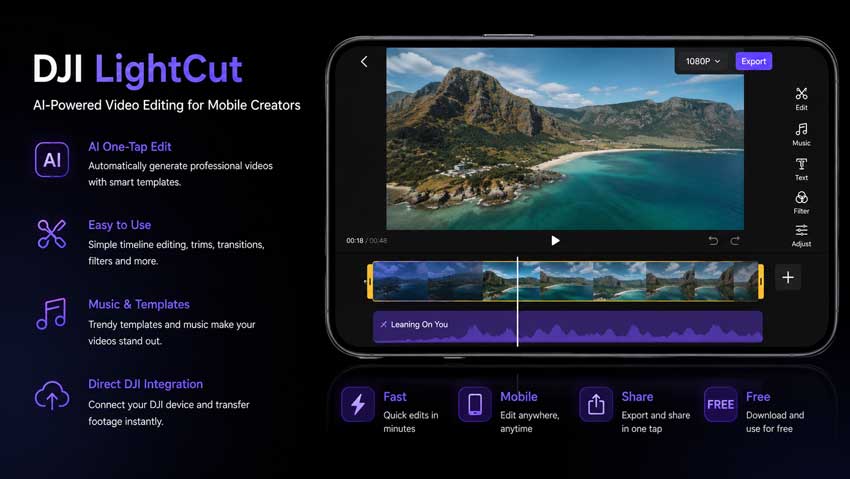
LightCut is the one most DJI users will notice first. It is a mobile editing app made for quick edits, templates, music, transitions, and one-tap social videos. If you just want to make a short travel video from your drone clips, it is a very easy place to start.
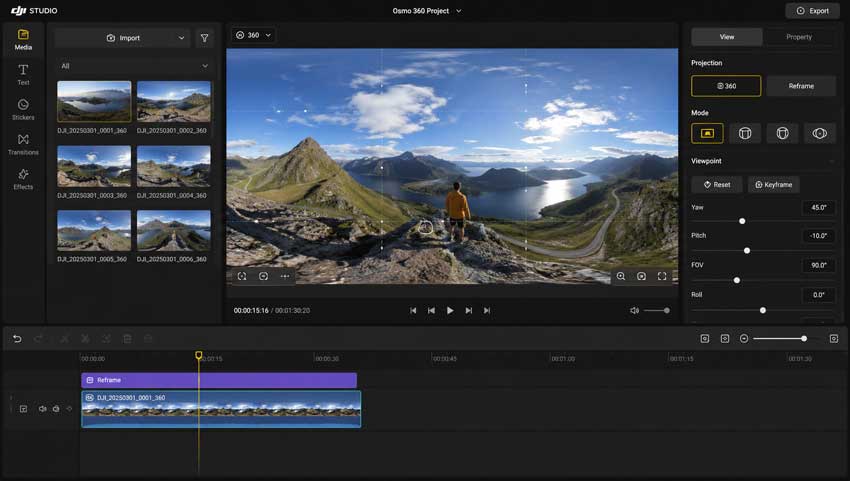
DJI Studio is more specific. It is mainly designed for DJI 360 footage, especially reframing, previewing, and exporting immersive video. It is not really a full replacement for a traditional desktop editor, but it makes sense if you shoot with DJI's 360 camera ecosystem.
So yes, DJI does have its own editing software. But if you are working with D-Log footage, H.265 files, longer drone edits, color grading, or video enhancement, you will probably still need something more capable.
Why DJI Footage Requires Special Editing Software
DJI footage looks great when everything goes right, but it can be surprisingly demanding once you start editing seriously.
- D-Log and D-Log M: These flat color profiles preserve more dynamic range, but they need proper color correction before the footage looks finished.
- H.265 / HEVC files: Most newer DJI cameras use efficient compression, which keeps file sizes manageable but can be harder for some editors to play smoothly.
- 4K and higher-resolution footage: Even casual drone clips can become heavy when you shoot in 4K 60fps or higher.
- Low-light noise: Sunrise, sunset, cloudy weather, and night footage often show grain in shadows.
- Cropped or compressed clips: Drone videos often get cropped, exported, uploaded, downloaded, and compressed again. That can make details look soft or muddy.
That is why I do not think there is one perfect DJI video editor for everyone. Some users need color grading. Some need speed. Some need AI video enhancement. The best choice depends on what is wrong with your footage and what kind of final video you want.
7 Best DJI Editing Software for Drone Footage
1. DaVinci Resolve - Best Overall DJI Editing Software for Color Grading
Best for: drone cinematography, travel films, YouTube videos, commercial drone work, and anyone who cares about color.
If I could only choose one editor specifically for DJI drone footage, DaVinci Resolve would probably be it.
The biggest reason is color grading. DJI's D-Log and D-Log M profiles can look flat straight out of the camera, but they hold a lot of information. Resolve makes it easier to bring back contrast, recover highlights, balance shadows, and create a clean cinematic look without fighting the software.
I also found playback performance better than expected when working with 4K H.265 footage. It still depends on your hardware, but Resolve handled DJI clips more confidently than many beginner editors I tested.
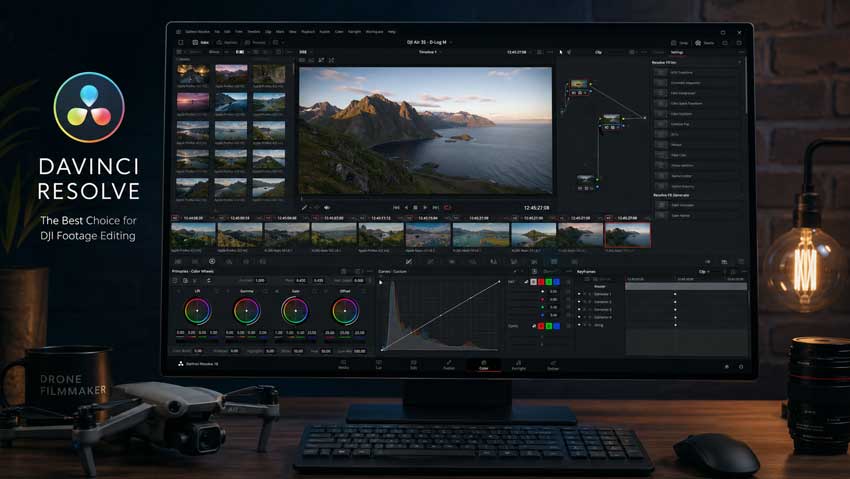
- Excellent color tools: Resolve is still one of the best options for grading DJI D-Log and D-Log M footage.
- Strong free version: The free version is powerful enough for most DJI creators.
- Good stabilization: Useful for smoothing out drone shots that still have small shakes or movement.
- Professional workflow: It can handle short clips, long projects, and commercial edits.
- Learning curve: The interface can feel intimidating if you are coming from mobile apps.
- Hardware matters: Heavy 4K or higher-resolution DJI files still need a decent machine.
- Some features require Studio: Advanced tools are locked behind the paid version.
Our Verdict: DaVinci Resolve is the strongest overall choice for DJI drone footage, especially if color grading is part of your workflow.
2. Adobe Premiere Pro - Best for Professional DJI Editing Workflows
Best for: YouTube channels, commercial projects, multi-camera edits, documentary work, and creators already using Adobe apps.
Adobe Premiere Pro remains one of the safest choices for DJI users who need a flexible professional workflow.
Where Resolve feels strongest in color grading, Premiere Pro feels strongest in project flexibility. If you edit DJI drone footage alongside talking-head videos, music, graphics, screen recordings, sound design, and After Effects work, Premiere fits naturally into that kind of setup.
In my test, Premiere handled DJI Mini 4 Pro and Air 3S footage well, including D-Log M clips. Playback was mostly smooth, though H.265 files felt heavier than they did in Resolve on the same machine.
Learn: Best video editing software for different drones
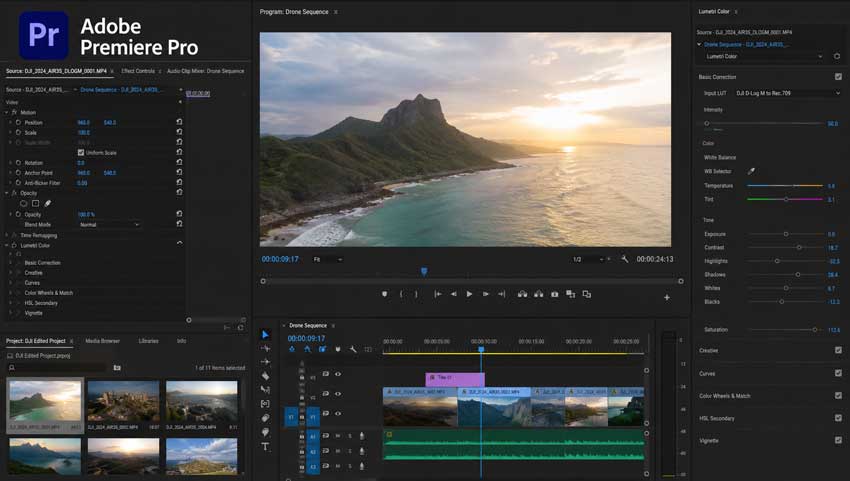
- Flexible timeline: Great for larger edits with multiple footage types.
- Adobe ecosystem: Works smoothly with After Effects, Photoshop, Audition, and Media Encoder.
- Strong plugin support: Easy to expand with LUTs, transitions, effects, and workflow tools.
- Subscription pricing: There is no lifetime license.
- Can feel heavy: DJI H.265 playback may require proxies on older computers.
- Not beginner-first: New users may need time to get comfortable with the workflow.
Our Verdict: Premiere Pro is still one of the best DJI video editing software options for professional projects, especially if your workflow already depends on Adobe tools.
3. Aiarty Video Enhancer - Best for Improving DJI Video Quality
Best for: upscaling DJI footage, reducing noise, recovering detail, improving old drone videos, and preparing clips for YouTube or large-screen viewing.
Aiarty Video Enhancer is different from most tools on this list. It is not trying to replace a timeline editor like Resolve or Premiere. Instead, it focuses on improving video quality after or before the editing stage.
That became surprisingly useful during testing. Some of my DJI clips looked great straight from the camera, but others had visible noise, softness, compression artifacts, or lost detail after cropping. Traditional editors could improve the footage a little, but they were not really designed to rebuild details or upscale older clips.
This is where Aiarty Video Enhancer made the most sense. It worked best on older 1080p drone footage, low-light clips, and social-media-compressed videos that needed a cleaner, more detailed final look.
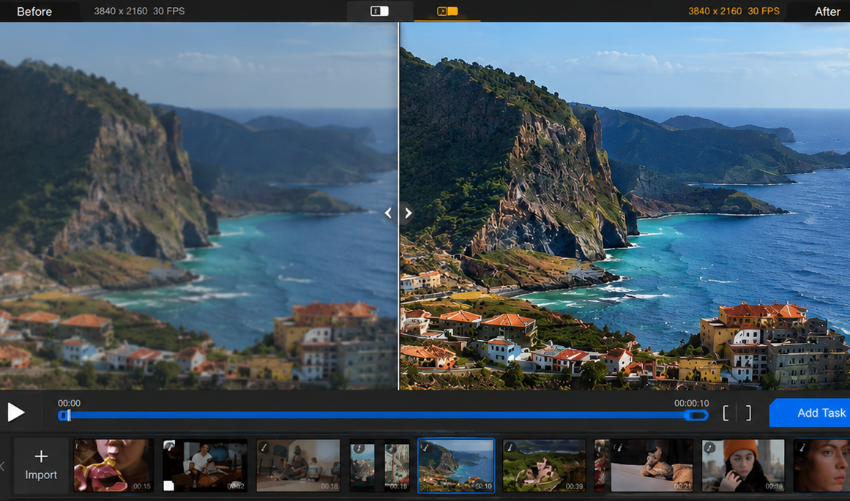
- AI upscaling: Useful for enhancing older 1080p DJI clips to a sharper 4K-looking result.
- Noise reduction: Helps clean up sunrise, sunset, cloudy-day, and low-light drone footage.
- Detail recovery: Can bring back more texture in landscapes, rooftops, trees, water, and distant objects.
- H.265 support: Works with common DJI footage formats without forcing a complicated conversion workflow.
- Hardware acceleration: Takes advantage of GPU processing to speed up enhancement tasks.
- Not a full editor: You still need software like Resolve, Premiere, Final Cut, or CapCut for timeline editing.
- Best used selectively: The biggest improvements appear on older, noisy, compressed, or soft footage.
Our Verdict: Aiarty Video Enhancer is the best choice in this list if your main problem is not editing, but making DJI footage look cleaner, sharper, and more detailed.
💡 Pro Tip: Use Aiarty After Your Main Edit
For DJI footage, I would not use Aiarty Video Enhancer as a replacement for a traditional editor. A better workflow is to cut and grade your footage first in software like DaVinci Resolve, Premiere Pro, or Final Cut Pro, then use Aiarty when the final clip still needs denoising, upscaling, or detail recovery.
This is especially helpful for older drone footage, cropped clips, low-light flights, or videos that have already been compressed by social platforms. Instead of only sharpening pixels, Aiarty focuses on rebuilding visual detail so the final result looks cleaner without becoming overly harsh.
4. Final Cut Pro - Best DJI Editing Software for Mac Users
Best for: Mac users, travel creators, drone filmmakers, and creators who want a fast one-time-purchase editor.
If you edit on a Mac, Final Cut Pro deserves serious consideration.
I have used both Premiere Pro and Final Cut Pro for DJI footage, and the biggest difference is performance. Because Final Cut is optimized for Apple hardware, playback feels extremely smooth, especially on Apple Silicon Macs.
During testing, I imported several 4K H.265 clips and could scrub through the timeline without creating proxies first. That alone makes Final Cut Pro one of the easiest recommendations for MacBook users who edit DJI footage regularly.
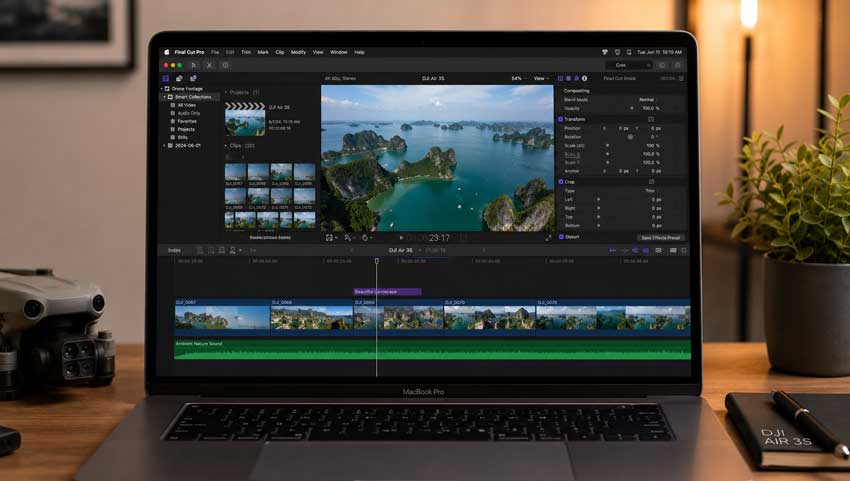
- Excellent Mac performance: Smooth playback and fast exports on Apple Silicon.
- Clean interface: Easier to learn than many professional editors.
- Good color tools: Enough control for most DJI D-Log and D-Log M workflows.
- One-time purchase: No monthly subscription.
- Mac only: Windows users need another option.
- Smaller plugin ecosystem: Premiere still has broader third-party support.
- Collaboration is limited: Not as strong for larger team workflows.
Our Verdict: Final Cut Pro is one of the best DJI video editors for Mac users who want speed, stability, and a cleaner editing experience.
5. CapCut - Best DJI Editing App for Social Media
Best for: beginners, travel vloggers, TikTok creators, YouTube Shorts creators, and fast social media edits.
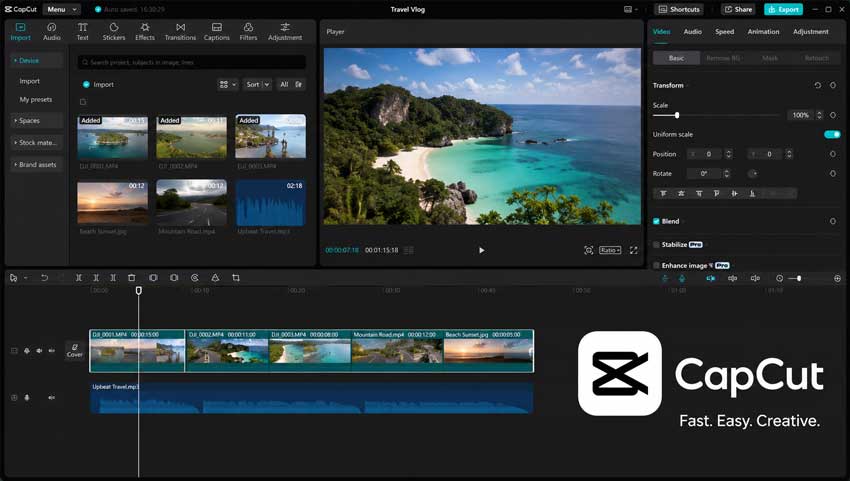
CapCut surprised me more than expected. A few years ago, I would not have considered it a serious option for DJI footage. Now, it is one of the fastest ways to turn drone clips into social-ready videos.
If your goal is YouTube Shorts, Instagram Reels, TikTok, or quick travel videos, CapCut makes a lot of sense. It is fast, easy, and packed with templates, captions, music, effects, and vertical video tools.
It is not the best tool for serious color grading, but that is not really what CapCut is built for. It is built for speed.
- Very easy to use: Great for beginners who do not want a complex timeline.
- Fast social workflow: Templates, captions, effects, and music are built in.
- Desktop and mobile versions: Useful if you edit across devices.
- Good for vertical videos: Better suited for short-form content than many traditional editors.
- Limited color grading: Not ideal for serious D-Log work.
- Less control: Complex projects can feel restrictive.
- Template look: Some effects and captions can feel overused if you rely on defaults.
Our Verdict: CapCut is the best DJI editing software for quick social media content, especially if you care more about speed than advanced grading.
6. DJI LightCut - Best Official DJI Editing App for Beginners
Best for: new DJI users, casual travel videos, mobile editing, and fast one-tap edits.
If you just bought your first DJI drone, LightCut is probably the first editing app you will notice.
LightCut is DJI's mobile editing app, and it is clearly designed for beginners. Instead of building a complicated timeline, you can import footage, pick a style, let the app generate a rough edit, tweak a few details, and export.
For quick vacation videos or social posts, that workflow is genuinely convenient. I could see myself using it while traveling when I did not want to bring a laptop.
- Official DJI workflow: Works naturally with DJI footage and mobile editing habits.
- AI templates: Good for quickly turning clips into a finished video.
- Beginner-friendly: No editing experience required.
- Great for travel: Useful when you want to edit without opening a desktop app.
- Limited manual control: Not suitable for detailed editing.
- Basic color tools: Not the best choice for D-Log footage.
- Mobile-first: It cannot replace a serious desktop workflow.
Our Verdict: DJI LightCut is the easiest official DJI editing app for beginners, but advanced users will probably outgrow it quickly.
7. DJI Studio - Best for DJI 360 Video Editing
Best for: DJI 360 users, reframing workflows, VR-style footage, and creators working with immersive video.
DJI Studio serves a very different purpose from the other software on this list.
It is not trying to compete with Premiere Pro, Resolve, or Final Cut Pro as a full editing suite. Instead, DJI Studio is mainly built for DJI 360-degree footage, especially reframing, horizon correction, and exporting immersive clips.
If you are editing regular drone footage, you probably will not use DJI Studio often. But if you work with DJI 360 content, it gives you a much cleaner starting point than trying to force everything into a traditional editor from the beginning.
- Designed for DJI 360 footage: Easier than building a 360 workflow from scratch.
- Simple reframing: Useful for turning immersive footage into regular videos.
- Clean workflow: Less intimidating than professional desktop editors.
- Limited traditional editing: Not built for full video projects.
- Not useful for most drone clips: Better for 360 footage than standard DJI drone footage.
- Basic creative controls: You may still need another editor for finishing work.
Our Verdict: DJI Studio is the best choice for DJI 360 footage, but it should not be treated as a full replacement for a traditional video editor.
Best DJI Editing Software Compared
My practical recommendation:
If you want one free editor for serious DJI drone footage, start with DaVinci Resolve. If you already pay for Adobe apps, Premiere Pro is still a safe choice. If you edit on Mac, Final Cut Pro may give you the smoothest experience. For quick social posts, CapCut and LightCut are easier. For DJI 360 footage, use DJI Studio.
And if your footage already looks soft, noisy, compressed, or lower-resolution than you want, add Aiarty Video Enhancer to the workflow instead of expecting a regular editor to fix everything.
- Best free DJI editor: DaVinci Resolve.
- Best DJI editor for professionals: Adobe Premiere Pro.
- Best DJI video enhancer: Aiarty Video Enhancer.
- Best DJI editor for Mac: Final Cut Pro.
- Best DJI editing app: DJI LightCut.
- Best DJI editor for social media: CapCut.
- Best DJI 360 editor: DJI Studio.
How We Tested DJI Editing Software
To keep this comparison practical, I tested each editor with the same set of DJI-style footage instead of only comparing feature pages. I looked at how each tool behaved in a real workflow: import, preview, edit, grade, enhance, export, and review.
- Test devices: DJI Mini series footage, DJI Air series-style drone clips, action camera footage, pocket camera footage, and 360-style test clips.
- Test formats: 4K video, H.265 / HEVC files, D-Log M clips, low-light footage, fast-motion clips, and compressed exports.
- What I checked: Import stability, playback smoothness, color grading control, export quality, stabilization, denoise, upscaling, and overall ease of use.
- What mattered most: Whether the software actually made DJI footage easier to finish, not just whether it had the longest feature list.
Some tools were clearly better for traditional editing. Others were more useful for social media or video enhancement. That is why the final ranking is based on workflow fit, not just raw editing power.
 FAQs
FAQs
Yes. DJI offers LightCut for mobile editing and DJI Studio for 360-degree footage. LightCut is best for quick social edits, while DJI Studio is mainly useful for DJI 360 video workflows.
For most creators, DaVinci Resolve is the best overall choice because it handles DJI footage well and offers excellent color grading tools for D-Log and D-Log M footage.
Yes. DJI LightCut is free to download and use. It is designed for quick mobile editing, automatic templates, music, transitions, and simple social media exports.
Yes. Adobe Premiere Pro can edit DJI D-Log and D-Log M footage. It also supports LUT-based workflows, manual color correction, and professional export settings.
If you want to improve video quality rather than just edit clips, Aiarty Video Enhancer is a strong option. It can help upscale older DJI footage, reduce noise, recover detail, and clean up compression artifacts.
CapCut and DJI LightCut are the easiest choices for beginners. CapCut gives you more editing flexibility, while LightCut is better for fast one-tap DJI mobile edits.
Final Cut Pro is one of the best DJI video editors for Mac users because it is highly optimized for Apple hardware and handles 4K footage smoothly.
Yes, AI video enhancement can help in some cases. It is especially useful for older DJI clips, low-light drone footage, cropped videos, and footage that has lost quality after repeated compression.
You May Also Like


This post was written by Ashley Brown, a videographer turned AI explorer. As an associate writer at Digiarty Software, she dives into the latest AI-powered tools for video enhancement and content creation, offering practical insights and unbiased commentary. Accuracy confirmed by Abby Poole.
