

10 Best Lightroom Alternatives in 2026: Free, Paid & No Subscription

Updated on
The best Lightroom alternative depends on which part of Lightroom you actually need to replace. Capture One Pro is one of the strongest choices for professional RAW editing, color work, tethered shooting, and catalog-based workflows. ON1 Photo RAW 2026.5 is a compelling all-in-one option for photographers who want organizing, RAW development, layers, masks, and AI tools without a mandatory subscription. DxO PhotoLab 10 stands out for RAW image quality, optical corrections, and noise reduction, while darktable 5.6.1 remains one of the most complete free and open-source desktop alternatives.
No single app replaces every Lightroom feature equally well. Some alternatives are stronger at RAW processing, some at digital asset management, and others at AI-assisted editing or pixel-level retouching. This guide separates full Lightroom replacements from specialist and mobile editors so you can choose based on your actual workflow rather than feature count alone.
- Best for professional photographers: Capture One Pro
- Best all-in-one alternative without a mandatory subscription: ON1 Photo RAW 2026.5
- Best for RAW quality and noise reduction: DxO PhotoLab 10
- Best for easy AI editing: Luminar
- Best free full desktop workflow: darktable 5.6.1
- Best Windows-focused photo manager and editor: ACDSee Photo Studio Ultimate 2026
- Best free RAW processor: RawTherapee 5.13
- Best free layer-based editor: Affinity
- Best for Mac, iPhone, and iPad: Photomator
Pricing note: Software prices and promotions can vary by region and change over time. Pricing and product status below were checked on September 10, 2026.
Part 1. 10 Best Lightroom Alternatives in 2026
1. Capture One Pro – Best for Professional RAW Workflows and Tethering
Best for: Studio, fashion, commercial, and professional photographers who prioritize RAW rendering, color control, tethered capture, and structured file management.
Price: Subscription or one-time Pro license; pricing varies by region and plan.
Platforms: Windows and macOS.
Lightroom replacement level: High.
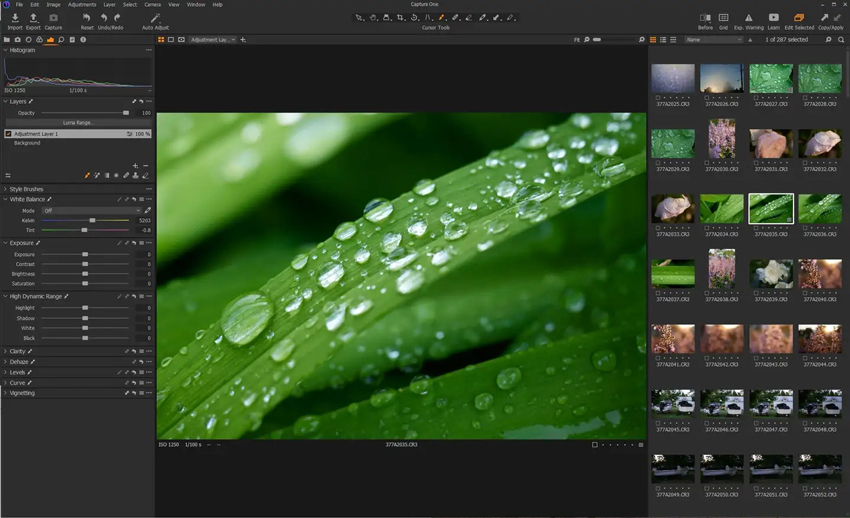
Capture One Pro is one of the most direct Lightroom alternatives for photographers who need a professional desktop workflow rather than a lightweight editor. It combines high-quality RAW conversion, advanced color tools, layers and masks, catalog and Session workflows, and industry-leading tethered capture. Capture One currently supports more than 550 cameras and is especially strong when precise color rendering and live studio workflows matter.
For Lightroom Classic users, Capture One also offers a practical migration route: Lightroom catalogs can be imported into a Capture One Catalog, including Collections, Collection Sets, star ratings, color labels, flat keywords, IPTC metadata, and selected basic adjustments such as crop, white balance, exposure, contrast, and saturation. More complex Lightroom edits do not transfer one-to-one, so a switch still requires some workflow planning.
- Excellent RAW conversion, color grading, and camera profiles.
- Industry-leading tethered shooting for studio workflows.
- Catalogs and Sessions support different ways of organizing projects.
- Advanced masking, layers, and customizable workspaces.
- Can import key parts of a Lightroom Classic catalog.
- Premium pricing and a steeper learning curve than simpler editors.
- A perpetual license does not include every future major update or new hardware support indefinitely.
- Lightroom-specific masks, healing work, and many Develop adjustments cannot be migrated directly.
2. ON1 Photo RAW 2026.5 – Best All-in-One Alternative Without a Mandatory Subscription
Best for: Photographers who want photo management, RAW editing, retouching, layers, masks, and AI tools in one desktop app without being locked into a subscription.
Price: Perpetual license available; ON1 also offers subscription-based plans and promotional bundles.
Platforms: Windows and macOS.
Lightroom replacement level: High.
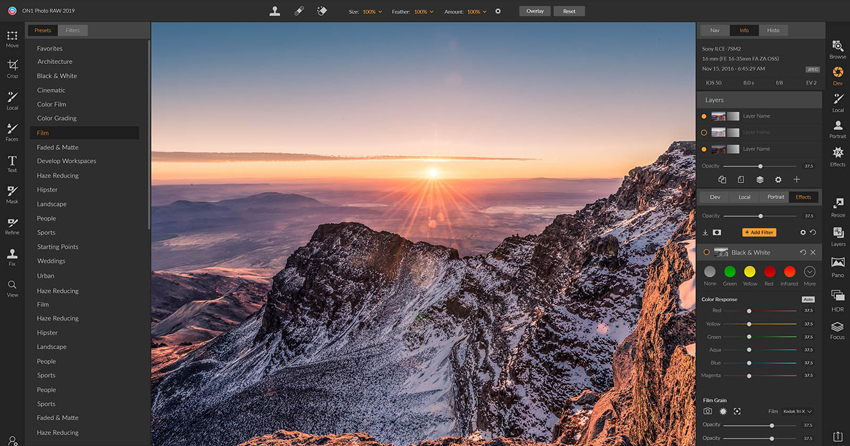
ON1 Photo RAW 2026.5 is one of the closest all-in-one alternatives for users who want to leave Adobe without splitting their workflow across several programs. The current 2026.5 release combines photo organization, non-destructive RAW development, retouching, layers, masks, presets, and AI-assisted tools in a single application. ON1 emphasizes a pay-once option for Photo RAW 2026.5, so a subscription is not required to keep using the purchased version.
Its biggest advantage over specialist RAW processors is breadth. You can browse and organize a library, make local and global edits, work with layers, and use built-in tools such as AI masking and image restoration without moving to a separate pixel editor. ON1 also provides a Lightroom Migration Assistant that can bring over photos, star ratings, color labels, keywords, and basic metadata, although Lightroom Develop edits themselves do not transfer.
- Organizing, RAW development, retouching, layers, and masks in one app.
- Perpetual license option; subscription is not mandatory for Photo RAW 2026.5.
- Strong set of AI-assisted editing and masking tools.
- Good option for photographers who want a Lightroom-and-Photoshop-style workflow in one program.
- Dedicated Lightroom migration workflow for metadata and organization.
- The interface can feel dense because many tools are packed into one application.
- Lightroom Develop edits are not transferred by ON1's migration assistant.
- Performance can depend heavily on GPU and system configuration when using AI features.
3. DxO PhotoLab 10 – Best for RAW Quality, Noise Reduction, and Lens Corrections
Best for: Photographers who care most about extracting clean detail from RAW files, correcting lens flaws, and improving high-ISO images.
Price: $249.99 for a new perpetual license; upgrade pricing is available for eligible previous versions.
Platforms: Windows and macOS.
Lightroom replacement level: Medium to high.
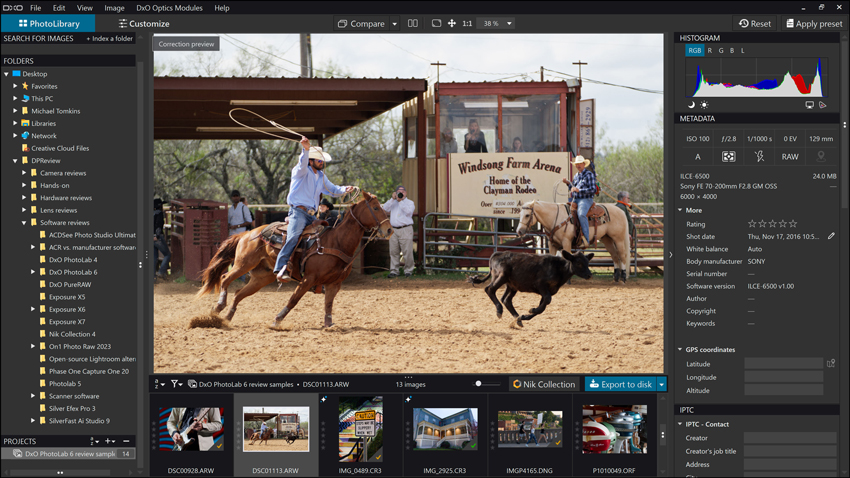
DxO PhotoLab 10, released on September 1, 2026, is one of the strongest Lightroom alternatives when image quality matters more than cloud features. Its RAW pipeline combines DxO's camera-and-lens correction modules with DeepPRIME noise reduction and detail recovery. PhotoLab 10 also expands local editing with tools such as Depth Masks, advanced color grading, improved AI-assisted people and facial-feature selections, and enhanced U Point controls.
PhotoLab is sold with a perpetual license rather than a subscription, and the purchased version continues to work even if you do not upgrade later. Its weakness compared with Lightroom Classic is not RAW quality but workflow breadth: PhotoLibrary offers organizing, projects, metadata, and file browsing, but photographers who depend on Lightroom's deep catalog ecosystem, cloud syncing, or mobile workflow may find it less comprehensive.
Learn more: DxO PhotoLab Review >>
- Excellent RAW conversion, optical corrections, and detail preservation.
- DeepPRIME technology is particularly useful for high-ISO and low-light RAW files.
- PhotoLab 10 adds more precise masking and color-grading controls.
- Perpetual license with no recurring subscription required.
- Photo organization is less catalog-centric than Lightroom Classic.
- No Lightroom-style cloud and mobile ecosystem.
- Higher upfront cost than free or entry-level alternatives.
4. Luminar – Best for Easy AI-Powered Photo Editing
Best for: Photographers who want quick creative edits and AI-assisted tools with less manual masking and a gentler learning curve.
Price: From $129 for the current Desktop perpetual license; promotional pricing can vary. The desktop app is yours to keep, while access to listed generative AI tools is included for one year and can be renewed.
Platforms: Windows and macOS; additional mobile and cross-device options are available on higher plans.
Lightroom replacement level: Medium.
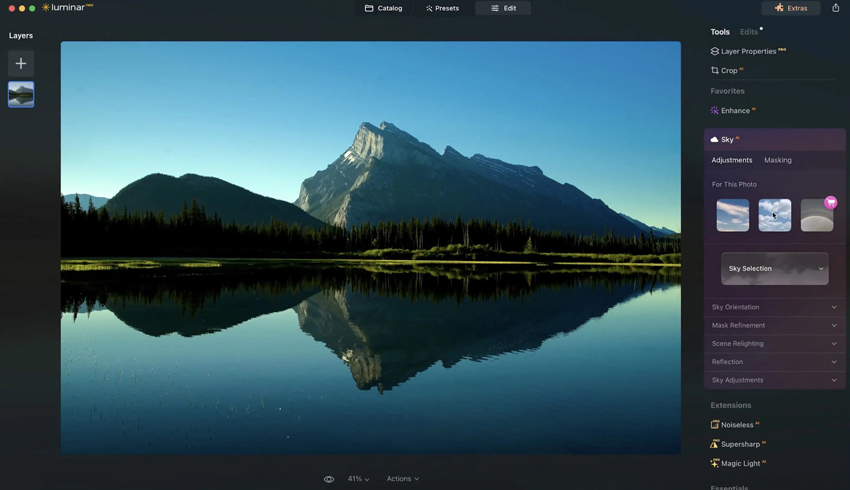
Luminar is a strong alternative for photographers who want to get from RAW file to finished image quickly. Its appeal is less about replacing every part of Lightroom Classic and more about making common creative tasks easier through AI-assisted tools, presets, masking, sky editing, portrait tools, and non-destructive adjustments. The current desktop perpetual license is a one-time purchase, although major future upgrades may require additional payment.
One detail is important when comparing pricing: Skylum currently includes one year of access to generative AI tools such as Restoration, GenErase, GenSwap, GenExpand, and AI Assistant with the desktop license, and continued access to those AI services can be renewed later. That makes Luminar different from a simple “pay once and every future AI feature stays free forever” model.
Detailed comparison: Luminar Neo vs Lightroom Performance: Real-World Editing Experience
- Accessible AI-assisted editing for portraits, landscapes, cleanup, and creative effects.
- Non-destructive desktop editing and RAW support.
- Perpetual desktop license option.
- Faster learning curve than many professional RAW editors.
- Library management is less advanced than Lightroom Classic's catalog system.
- Generative AI access included with the perpetual plan is time-limited and renewable after 365 days.
- High-volume professional workflows may still favor Capture One, Lightroom, or ON1.
5. darktable 5.6.1 – Best Free Open-Source Lightroom Replacement
Best for: Photographers who want a free desktop RAW workflow with non-destructive editing, photo management, batch processing, and deep manual control.
Price: Free and open-source.
Platforms: Windows, macOS, and Linux.
Lightroom replacement level: High among free alternatives.
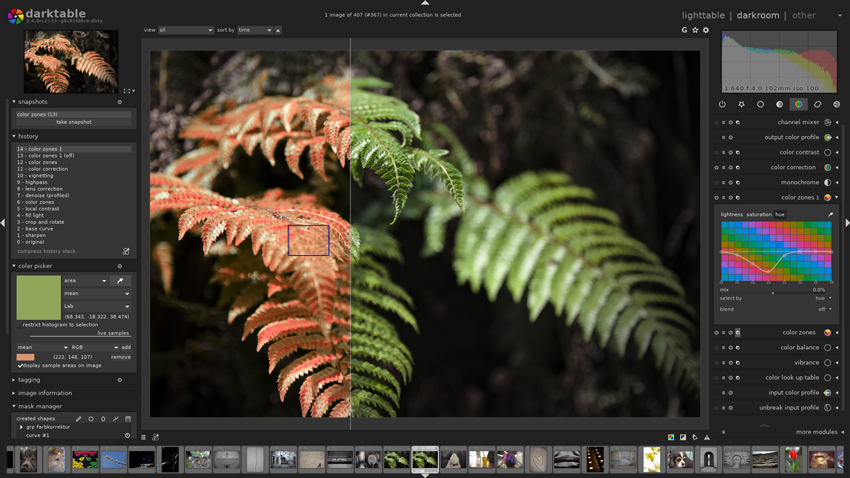
darktable is one of the closest free alternatives to Lightroom Classic because it covers both major sides of the workflow: organizing images in its lighttable view and developing RAW files non-destructively in the darkroom. The current stable bug-fix release, darktable 5.6.1, was released on August 27, 2026.
Its editing model is powerful, with advanced color tools, masking, modules, tethered shooting support, and batch-oriented workflows. The trade-off is usability: darktable is not simply a free visual clone of Lightroom, and users often need time to understand its module-based editing approach and color-management concepts.
Learn More: How to Use Darktable for Beginners >>
- Free and open-source with active development.
- Strong non-destructive RAW processing and color tools.
- Includes image organization, filtering, tagging, and batch-oriented workflow tools.
- Available on Windows, macOS, and Linux.
- Steeper learning curve than Lightroom for many new users.
- Interface and terminology can feel technical.
- Lightroom catalogs and edits do not migrate as seamlessly as they do to Capture One.
Also read: Darktable vs Lightroom: Is Darktable Really a Good Free Alternative?
6. ACDSee Photo Studio Ultimate 2026 – Best Windows-Focused DAM and RAW Workflow
Best for: Windows photographers who want digital asset management, RAW development, and layered editing in one application.
Price: Paid software with perpetual-license options; pricing and promotions vary. Photo Studio Ultimate 2027 is currently in presale and is scheduled for release in late September 2026, so Ultimate 2026 remains the current released version as of this update.
Platforms: Windows. A separate ACDSee Photo Studio for Mac product is available, but it is not the same as Ultimate.
Lightroom replacement level: High for Windows users.
ACDSee Photo Studio Ultimate 2026 is worth considering if your priority is keeping photo management and editing under one roof. The released 2026 edition combines a digital asset manager, non-destructive RAW editor, layered editor, AI-assisted organization and editing, batch tools, and support for a broad range of camera RAW files. This makes it substantially closer to a Lightroom Classic replacement than a simple photo editor.
Its main limitation is platform fit. Photo Studio Ultimate is Windows-focused, so Mac users should look at Capture One, ON1, DxO, darktable, Photomator, or the separate ACDSee Photo Studio for Mac instead. Also note that ACDSee is already advertising Ultimate 2027, but that version is still a preorder until late September 2026.
- Strong digital asset management for large photo libraries.
- Combines RAW development and layered image editing.
- Useful AI-assisted organization, search, masking, and portrait tools.
- Perpetual-license purchase options.
- Photo Studio Ultimate is Windows-only.
- The breadth of tools can make the interface feel busy.
- The next major version has already been announced, which can complicate purchase timing.
7. RawTherapee 5.13 – Best Free RAW Processor for Fine Control
Best for: Photographers who want a free, technically deep RAW processor and care more about image development than catalog management.
Price: Free and open-source.
Platforms: Windows, macOS, and Linux.
Lightroom replacement level: Medium.
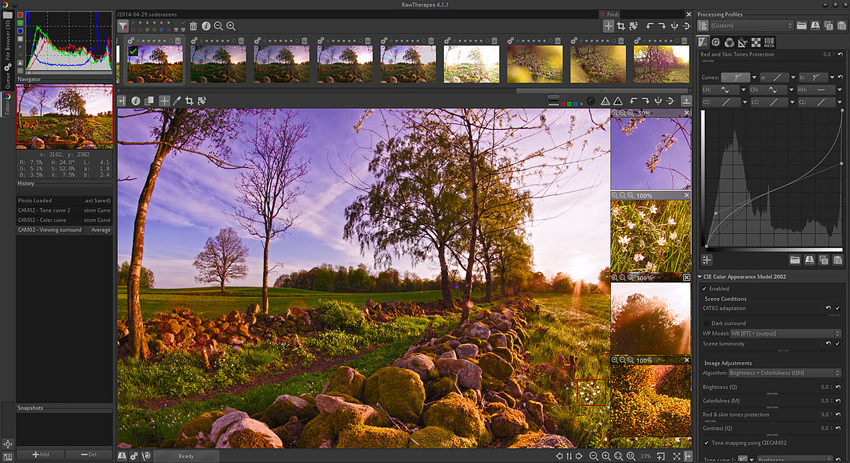
RawTherapee 5.13, released on July 26, 2026, is a powerful free RAW processor built for users who want detailed control over tone, color, sharpening, noise reduction, demosaicing, and color management. Version 5.13 continues to expand its color-management capabilities, including improvements to Gamut Compression and the Abstract Profile tool.
RawTherapee can be a better fit than Lightroom for users who enjoy carefully tuning individual RAW files without paying for software. However, it is not a full Lightroom Classic replacement for photographers whose workflow depends heavily on a central catalog, sophisticated asset management, cloud syncing, or mobile editing.
Learn more: RawTherapee Review >>
- Advanced RAW processing and color-management controls.
- Free and open-source.
- Batch processing and processing queues for repeated workflows.
- Cross-platform support.
- No Lightroom-style catalog or full digital asset management system.
- Interface is less beginner-friendly than Lightroom or Luminar.
- Best suited to RAW development rather than an end-to-end cloud workflow.
8. Affinity – Best Free Layer-Based Photo Editor
Best for: Photographers and designers who need RAW development, retouching, compositing, layers, HDR, macros, and batch processing without paying for the core editor.
Price: Free for individuals. Canva premium is only required if you want to unlock Canva AI tools inside Affinity.
Platforms: Windows and macOS; an iPad version is listed as coming soon.
Lightroom replacement level: Low for library management; high as a free pixel and layer-based editor.
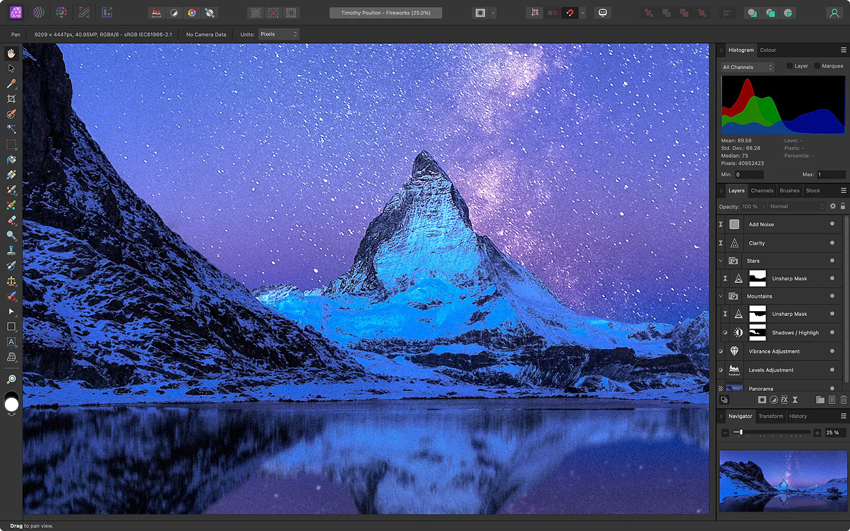
The current Affinity is very different from the older paid Affinity Photo model. Since the all-new Affinity launched under Canva in October 2025, its vector, layout, and pixel-editing tools have been combined into one application that is free for individuals. Its photo toolkit includes non-destructive RAW development, retouching, HDR, batch processing, macros, unlimited layers, filters, masks, and PSD import.
That makes Affinity a strong free alternative to Photoshop-style editing, but it should not be described as a complete Lightroom replacement. It does not provide the same catalog-centric photo management workflow as Lightroom Classic. A free Canva account is required to access Affinity, while Canva AI Studio features inside the app require a premium Canva plan.
- Core Pixel, Vector, and Layout tools are free for individuals.
- Professional RAW development, retouching, layers, masks, HDR, macros, and batch tools.
- Non-destructive editing and strong PSD compatibility.
- Useful complement to a RAW catalog application.
- No Lightroom-style catalog or full digital asset management workflow.
- A Canva account is required.
- Canva AI features inside Affinity require a premium Canva plan.
9. Photomator – Best Lightroom Alternative for Apple Users
Best for: Mac, iPhone, and iPad users who want a streamlined non-destructive RAW editor with batch editing and tight integration with Apple Photos and iCloud.
Price: Monthly or yearly subscription, or a lifetime license through the App Store.
Platforms: macOS, iOS, iPadOS, and visionOS.
Lightroom replacement level: Medium, especially for Apple-centric personal workflows.
Photomator, now published by Apple, is a strong option for photographers who live inside the Apple ecosystem. It supports more than 750 RAW formats, non-destructive color adjustments, AI-powered subject, sky, and background selections, batch editing, Repair and Clone tools, Denoise, Super Resolution, presets, and direct integration with Photos and iCloud Drive.
Photomator is especially attractive when you want a fast Mac-to-iPhone-or-iPad workflow without the complexity of Lightroom Classic. Its limitation is scale and ecosystem depth: professional studios that rely on tethering, extensive catalog structures, or cross-platform Windows support will be better served by Capture One, Lightroom, or ON1.
- Strong native integration with Apple Photos, Files, and iCloud Drive.
- Supports more than 750 RAW formats and non-destructive editing.
- Batch editing and useful AI-powered selections and enhancement tools.
- Available as a lifetime license as well as subscription options.
- Apple platforms only.
- Not designed around studio tethering or Lightroom Classic-style enterprise catalog workflows.
10. LightZone 5.0.2 – Best Free Zone-Based Editor
Best for: Photographers who like tonal editing based on zones and want a free, open-source desktop editor without subscription fees.
Price: Free and open-source.
Platforms: Windows, macOS, and Linux packages are available.
Lightroom replacement level: Low to medium.
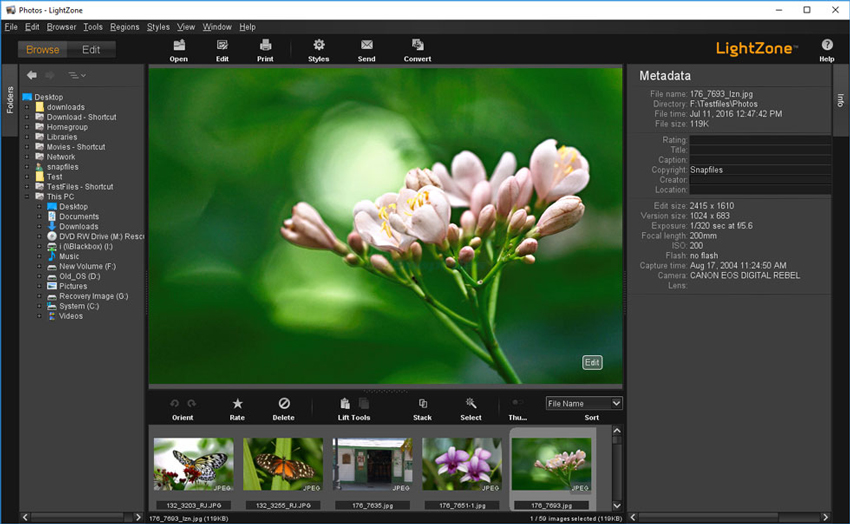
LightZone remains actively maintained and reached version 5.0.2 in August 2026. Its distinctive strength is zone-based tonal editing, inspired by photographic zone-system concepts, which gives users a visual way to target brightness ranges and shape contrast. The 5.0 branch also added LibRaw decoding for cameras not handled by its older RAW decoder and improved ZoneFinder performance.
LightZone is useful for photographers who enjoy its editing philosophy, but it is a more specialized recommendation than darktable. Its asset management, automation, AI tooling, and broader workflow ecosystem are not as extensive as Lightroom's, so it works best as a free editor rather than a one-for-one replacement for every Lightroom Classic function.
- Free and open-source.
- Distinctive zone-based controls for tonal editing.
- Current 5.0 releases improve camera compatibility through LibRaw.
- Available across major desktop operating systems.
- Less comprehensive digital asset management than Lightroom or darktable.
- Smaller ecosystem and fewer modern AI-assisted features.
- Not the strongest choice for large professional catalogs.
Part 2. Lightroom Alternatives for Mobile and Quick Edits
Some popular “Lightroom alternatives” are useful editors but do not replace Lightroom Classic's desktop catalog, RAW workflow, or batch-management features. They are better considered lightweight alternatives for mobile editing, social content, or quick corrections.
Photoshop Express – Best for Quick Adobe-Friendly Edits
Price: Free to download and use, with optional Premium features.
Platforms: iOS, Android, Windows, and supported Chromebooks.
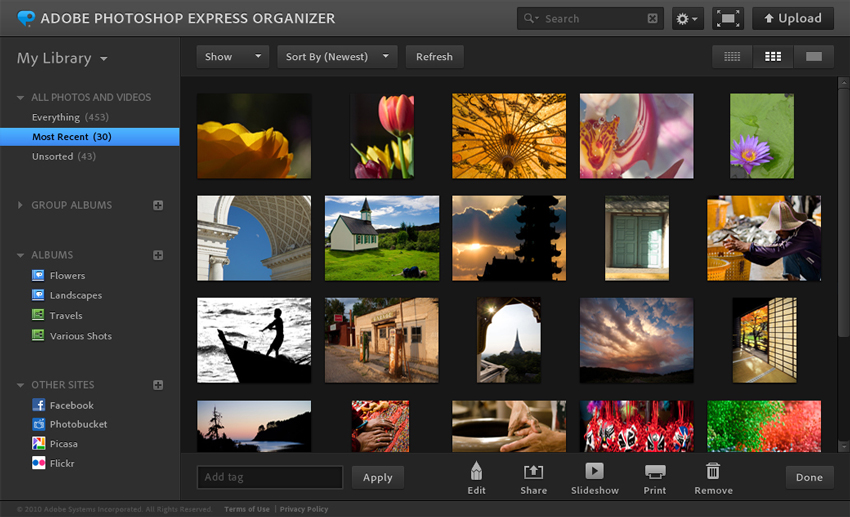
Photoshop Express is designed for fast edits rather than a full Lightroom replacement. It handles core adjustments, retouching, effects, collage and social-oriented workflows, and Adobe officially lists support for a range of RAW file types including ARW, CR2, CRW, DNG, RAF, NEF/NRW, ORF, RW2, PEF, and SRW, with some model-specific limitations.
The key limitation is workflow depth. Photoshop Express does not provide Lightroom Classic's catalog-centric library management, extensive desktop masking workflow, or large-scale professional organization. It is best for users who want quick Adobe editing tools on mobile or Windows without committing to Lightroom.
- Beginner-friendly and quick to use.
- Supports a range of RAW formats as well as JPEG, PNG, and TIFF.
- Useful for mobile edits and social content.
- Not a Lightroom Classic-style digital asset manager.
- RAW compatibility is not universal across every camera format or model.
- Fewer professional batch and local-editing controls than full desktop RAW editors.
Snapseed – Best Free Mobile Alternative for Manual Photo Editing
Price: Free.
Platforms: iOS and Android.
Snapseed, developed by Google, remains a capable free mobile editor for exposure, color, selective adjustments, healing, curves, perspective, sharpening, and creative effects. Unlike the previous version of this article stated, Snapseed does support RAW editing. Google documents a dedicated Develop workflow that opens when a supported RAW file is loaded.
Snapseed is still not a desktop Lightroom substitute. It has no Lightroom-style catalog, tethered workflow, or large-scale desktop batch management. Its value is that it gives mobile photographers unusually deep manual control without a subscription.

- Free with a broad set of manual editing tools.
- Supports RAW development for compatible RAW files.
- Good selective editing and non-destructive edit-stack workflow.
- Available on both iOS and Android.
- Mobile only.
- No desktop catalog or large-library management.
- Not designed for large professional batch workflows.
Part 3. How to Choose the Right Lightroom Alternative
The most important question is not which app has the longest feature list. It is which parts of Lightroom are essential to your workflow.
1. If You Need RAW Editing and Photo Management in One App
Start with Capture One Pro, ON1 Photo RAW, darktable, or ACDSee Photo Studio Ultimate. These are the closest options in this list to Lightroom Classic's combination of organizing and non-destructive editing. Capture One is strongest for professional color and tethering, ON1 offers a broad all-in-one editing suite, darktable is the strongest free choice, and ACDSee is particularly competitive for Windows-based DAM workflows.
2. If RAW Quality and Noise Reduction Matter More Than Catalog Features
DxO PhotoLab 10 is the most specialized choice here. Its optical modules and DeepPRIME pipeline make it especially suitable for high-ISO wildlife, sports, event, and low-light photography where noise, lens softness, and fine detail are major concerns. RawTherapee is the free option for users who prefer granular RAW controls.
3. If You Want AI Editing With Less Manual Work
Luminar is easier to approach than many professional RAW editors and emphasizes AI-assisted creative tools. ON1 Photo RAW also includes extensive AI functionality while retaining stronger photo-management features. If you mainly need enhancement, restoration, denoising, deblurring, or upscaling rather than a full photo catalog, a specialist enhancement tool may be more efficient than replacing Lightroom entirely.
4. If You Want a Lightroom Alternative Without a Mandatory Subscription
There are several options. DxO PhotoLab 10 uses a perpetual license. ON1 Photo RAW 2026.5 can be purchased outright. Capture One Pro offers both subscriptions and a one-time Pro license. Luminar offers a perpetual desktop license, although some AI services are renewable after the included access period. Affinity, darktable, RawTherapee, and LightZone are free for their core desktop editing workflows.
5. If You Need a Free Lightroom Alternative
Choose based on workflow rather than simply choosing the first free app. darktable is the closest free all-around Lightroom alternative; RawTherapee is better if you mainly need a RAW processor; Affinity is stronger for layers, retouching, and compositing; LightZone offers a distinctive zone-based editing model; and Snapseed is the most practical free option for mobile editing.
Part 4. Need Better AI Enhancement Rather Than a Full Lightroom Replacement?
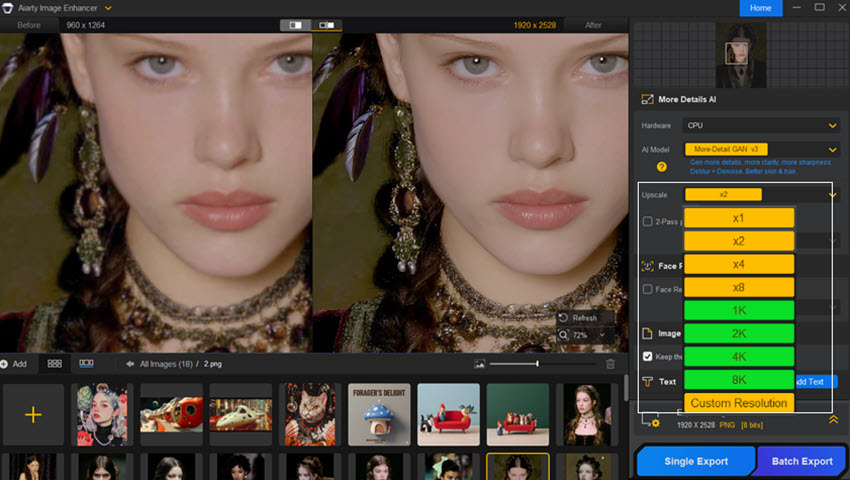
Not everyone searching for a Lightroom alternative needs to replace Lightroom's catalog, RAW development, or color-management workflow. If your main problem is image quality after a heavy crop, noise, softness, blur, low resolution, or weak fine detail, a dedicated image-enhancement tool can make more sense alongside Lightroom or another RAW editor.
Aiarty Image Enhancer is not intended to replace Lightroom's catalog or full RAW-management workflow. Instead, Aiarty Image Enhancer focuses on AI-based image enhancement tasks such as denoising, deblurring, detail restoration, and upscaling. This can be useful when the edit itself is already right but the file still needs cleaner detail or more usable resolution.
For photographers who already like Lightroom, Capture One, DxO, or another RAW editor, this specialist approach can be more practical than changing the entire workflow just to solve an enhancement problem.
Part 5. How We Compared These Lightroom Alternatives
Rather than treating every photo editor as an equal Lightroom replacement, we compared the current products by the parts of the Lightroom workflow they can realistically replace. Product versions, licensing models, platform availability, and key feature information were checked against current official product pages and documentation on September 10, 2026.
- RAW workflow: RAW format support, non-destructive adjustments, masking, color control, noise reduction, lens correction, and batch processing.
- Photo management: Catalogs or folders, ratings, keywords, metadata, search, filtering, and the ability to handle large libraries.
- Workflow depth: Tethered capture, layers, local edits, presets, export tools, printing, and integration with other applications.
- Migration: Whether a Lightroom Classic catalog, metadata, ratings, collections, or selected adjustments can be carried into the new software.
- Pricing and ownership: Subscription requirements, perpetual-license options, free/open-source availability, and whether certain cloud or AI features require ongoing payment.
- Platform fit: Availability on Windows, macOS, Linux, and mobile platforms, because a strong Lightroom alternative on one operating system may not be available on another.
We do not present unshown benchmark numbers for import speed, export speed, or system-resource usage. Those results vary substantially with camera files, catalog size, CPU, GPU, memory, storage, and software version, and should only be compared when the same test files and hardware are documented.
You May Also Like


Brenda Peng is a seasoned editor at Digiarty Software who loves turning ordinary photos into extraordinary works of art. With years of experience behind the lens and in front of the computer, Brenda shares her passion for photography, image enhancement, and editing through easy-to-follow tutorials.
