


Many photographers are rethinking their reliance on Adobe Lightroom. Subscription pricing, performance concerns, and the desire for more control have pushed users to look for alternatives—especially free ones. Among the options available, Darktable is often cited as one of the most powerful open-source photo editing tools.
At first glance, Darktable appears to be a compelling replacement: it supports non-destructive RAW editing, offers deep control over image processing, and runs on Windows, macOS, and Linux. But power doesn’t always equal usability. New users frequently describe Darktable as complex, unintuitive, and difficult to master compared to Lightroom.
So how good is Darktable in real-world photo editing? Can it truly replace Lightroom, or does it serve a different type of photographer altogether?
In this post, we’ll take a practical look at the strengths and weaknesses of Darktable, compare it directly with Lightroom, and explore which tool makes more sense depending on your workflow and editing needs.
What Is Darktable?
Darktable is a free, open-source photo editing application designed primarily for RAW image processing. It is often described as a Lightroom alternative because it follows a similar non-destructive editing workflow, where adjustments are applied without permanently altering the original image files.
At its core, Darktable acts as both a digital asset manager and a photo editor. Users can import, organize, and edit large photo libraries while working with RAW formats from most major camera brands. All edits are stored as metadata, allowing photographers to revisit and fine-tune their adjustments at any time.
One of Darktable’s defining characteristics is its module-based editing system. Instead of a simplified, guided interface, Darktable exposes a wide range of processing modules—covering exposure, color correction, tone mapping, sharpening, noise reduction, and more. This design offers a high degree of flexibility and control, but it also means users are often faced with a steeper learning curve.
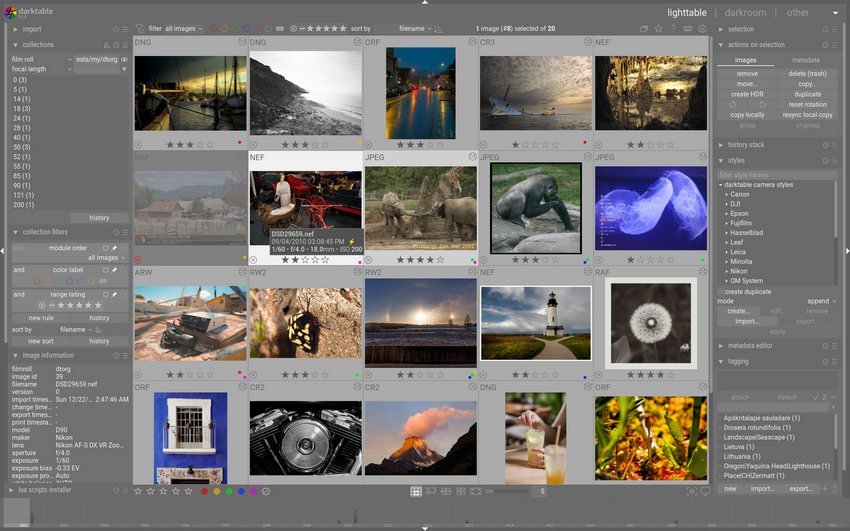
Darktable is available on Windows, macOS, and Linux, and because it is open-source, it benefits from ongoing contributions by a global community of developers and photographers. However, unlike commercial tools such as Lightroom, Darktable focuses more on traditional image processing techniques and provides limited built-in AI-assisted features.
Darktable vs Lightroom: Key Differences
Darktable and Adobe Lightroom are often mentioned together, but despite serving similar purposes, they are built around very different philosophies. Understanding these differences is essential before deciding which one fits your workflow better.
Pricing and Licensing
The most obvious difference lies in pricing.
Darktable is completely free and open source, with no subscriptions or feature limitations. Lightroom, on the other hand, is only available through Adobe’s subscription plans, which can be a deal-breaker for photographers who prefer one-time purchases or free tools.
For budget-conscious users, this alone makes Darktable an attractive alternative.
Ease of Use and Learning Curve
Lightroom is widely regarded as beginner-friendly. Its interface is streamlined, terminology is clear, and common editing tasks are easy to find. Many photographers can start producing good results within hours.
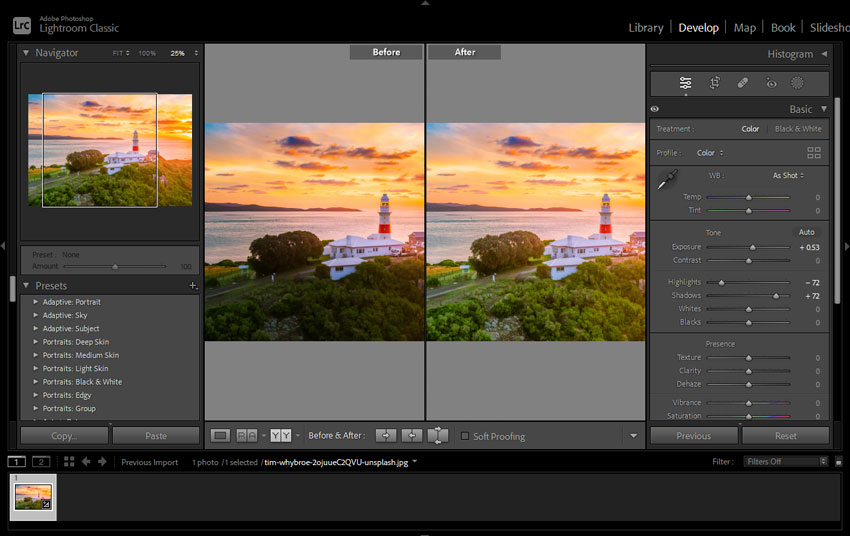
Darktable takes the opposite approach. It exposes a large number of technical controls through its module-based system. While this provides flexibility, it also makes the software harder to learn. New users often need significant time—and external tutorials—to become comfortable.
In short:
- Lightroom prioritizes usability and speed
- Darktable prioritizes control and transparency
Editing Workflow and Interface
Both tools use non-destructive editing, but the workflows feel very different.
Lightroom offers a more guided, curated experience, where tools are presented in a logical order and optimized for common use cases. Darktable gives users access to multiple processing pipelines and modules, which can be powerful but also confusing if you’re unsure which tools to use and when.
This difference becomes especially noticeable for photographers who value efficiency over experimentation.
Performance and Optimization
Lightroom generally benefits from Adobe’s optimization and hardware acceleration, delivering consistent performance across most modern systems.
Darktable’s performance can vary more widely depending on hardware, image size, and module usage. While it performs well in many scenarios, complex edits or large batches may feel slower compared to Lightroom.
AI and Modern Editing Features
In recent years, Lightroom has increasingly integrated AI-powered features such as enhanced denoising, Super Resolution, subject detection, and intelligent adjustments.
Darktable, by contrast, relies mostly on traditional image processing techniques. While this appeals to photographers who prefer manual control, it can be limiting when working with:
- low-resolution images
- heavily noisy photos
- images that require detail reconstruction rather than adjustment
This gap in AI-assisted capabilities is one of the most significant practical differences between the two tools.
Darktable vs Lightroom: Which One Should You Choose?
Choosing between Darktable and Lightroom depends less on which tool is “better” and more on how you actually edit photos.
Choose Darktable if:
- You want a free, open-source photo editor with no subscriptions
- You primarily work with RAW files and value detailed manual control
- You’re comfortable learning complex tools or adjusting to a technical interface
- You use Linux or prefer open-source software ecosystems
Darktable is well-suited for photographers who enjoy understanding how image processing works under the hood and don’t mind investing time to master the software.
Choose Lightroom if:
- You prefer a faster, more intuitive workflow
- You want strong AI-assisted features for denoising, masking, and enhancements
- You manage large photo libraries and value a polished user experience
- You’re already invested in the Adobe ecosystem
Lightroom is often the better choice for photographers who prioritize efficiency, consistency, and modern automation over deep manual control.
When Darktable or Lightroom Is Not Enough
Darktable and Lightroom are both powerful photo editors, but they are ultimately designed around traditional image adjustment rather than image reconstruction. When the source image lacks sufficient detail, even the best sliders and curves have limited impact.
This becomes especially noticeable in scenarios such as:
- Upscaling low-resolution photos for print or large displays
- Restoring old or compressed images
- Recovering detail from noisy or slightly blurry shots
In these cases, adjusting exposure, contrast, or color alone is often not enough. What’s needed is a different approach—one that focuses on AI-based enhancement rather than manual correction, such as Aiarty Image Enhancer.
Instead of replacing tools like Darktable or Lightroom, Aiarty Image Enhancer is designed to complement them. It focuses on AI-powered upscaling, denoising, and detail enhancement—areas where traditional editors tend to struggle.
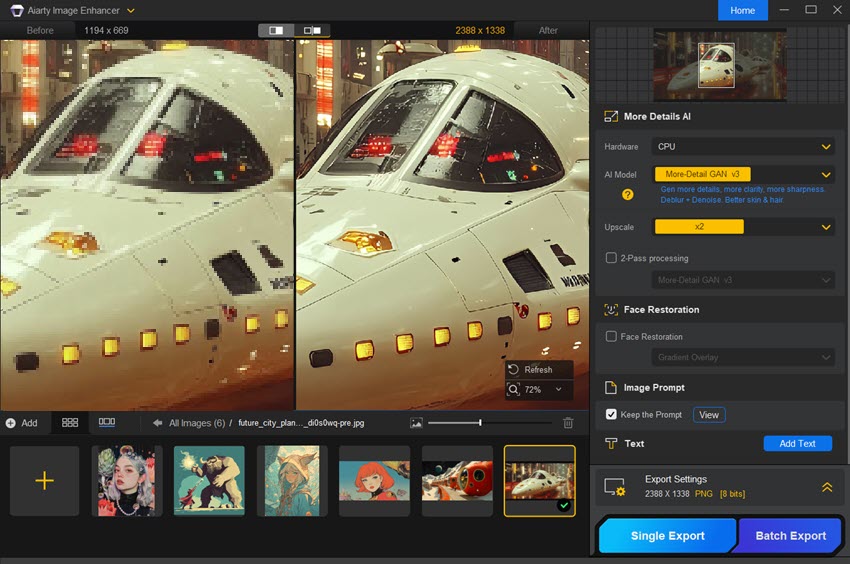
The workflow is straightforward: enhance the image with Aiarty first, then import the improved result into Darktable or Lightroom for final color grading and adjustments. This approach allows photographers to combine AI-driven reconstruction with precise manual editing.
You May Also Like


This post was written by Brenda Peng who is a seasoned editor at Digiarty Software who loves turning ordinary photos into extraordinary works of art. With AI assistance for brainstorming and drafting, the post is reviewed for accuracy by our expert Abby Poole for her expertise in this field.
