
5 Best Open Source Lightroom Alternatives - No More Paying

Updated on
Summary: Discover five open-source Adobe Lightroom alternatives: Darktable for RAW editing, RawTherapee for precision, LightZone for tonal control, digiKam for organization, and GIMP for creative retouching. Each offers unique strengths for photographers on a budget. And elevate your workflow with Aiarty Image Enhancer, an AI tool for upscaling, denoising, and deblurring images up to 32K.
Adobe Lightroom has long been a go-to for photographers, offering powerful RAW editing and seamless photo organization. But its subscription model can be a dealbreaker for hobbyists, students, or professionals on a budget. Fortunately, the open-source community has stepped up with free, high-quality alternatives that rival Lightroom's capabilities without the recurring cost. Whether you're a pro needing advanced RAW processing or a beginner looking to organize and enhance your photos, these tools offer something for everyone.
In this post, we'll explore five open-source gems—each with a unique flair - and compare their features to help you find the perfect fit for your photography workflow. From non-destructive editing to robust cataloging, let's dive into the best free alternatives available!
1. Darktable: The Precision RAW Alchemist
Darktable is a robust open-source photography workflow application designed to handle RAW image processing and organization, making it a strong contender for those seeking a free alternative to Adobe Lightroom. It's built with photographers in mind, offering a non-destructive editing environment where original images remain untouched, and all adjustments are stored as a set of instructions that can be revisited or modified at any time.
Available for Windows, macOS, and Linux, it's a cross-platform tool that's been actively developed by a dedicated community, with regular updates ensuring compatibility with modern camera formats and user needs.
The core strength of darktable lies in its RAW processing capabilities. It supports over 400 camera models, handling formats like CR2, NEF, and ARW with precision. Its processing pipeline uses a 32-bit floating-point engine, which allows for high dynamic range editing, ensuring that details in shadows and highlights are preserved during adjustments. The editing interface is module-based, offering a wide array of tools for exposure correction, white balance, tone curves, color grading, noise reduction, lens correction, and even advanced features like chromatic aberration fixes and haze removal.
For those familiar with Lightroom, darktable's modules are analogous to Lightroom's Develop module, with sliders and controls that feel intuitive once you get past the initial learning curve. It also supports tethered shooting, allowing photographers to connect their cameras directly for real-time previews, a feature particularly useful for studio work.
Beyond editing, darktable excels in photo management, though its approach differs slightly from Lightroom's catalog system. It uses a database to organize images, letting you import photos from your filesystem or directly from a camera. You can tag images, assign star ratings, add color labels, and filter them based on metadata like aperture, ISO, or lens type. The library view supports side-by-side comparisons and slideshows, making it easier to curate collections. However, the organization tools can feel less polished than Lightroom's, especially for users managing tens of thousands of images, as the interface can become sluggish with very large libraries.
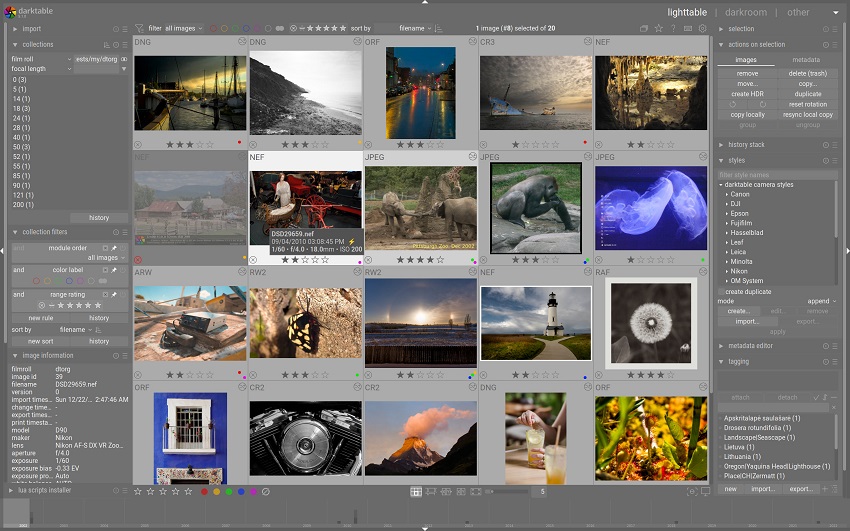
One standout feature is darktable's flexibility. It's highly customizable, allowing you to create custom workflows or "styles" (similar to Lightroom presets) that can be applied to multiple images for consistent looks. It also supports Lua scripting for automation, which is a boon for power users who want to streamline repetitive tasks. For example, you can script batch exports with specific watermarks or resize settings. The software also integrates geospatial features, letting you map photos with GPS data, which is great for travel photographers.
That said, darktable isn't without its challenges. The interface, while functional, can feel overwhelming due to the sheer number of modules and technical terminology, which might intimidate beginners accustomed to Lightroom's streamlined design. Performance can also be an issue on older hardware, as darktable is resource-intensive, especially when applying complex edits like noise reduction or high-resolution exports. Documentation is thorough but sometimes dense, and while the community is active on forums and platforms like GitHub, it lacks the polish of commercial support.
Also read: Darktable vs Lightroom: Is Darktable Really a Good Free Alternative?
2. RawTherapee: The Precision RAW Alchemist
RawTherapee is a powerful open-source RAW image processing software that serves as a compelling alternative to Adobe Lightroom, particularly for photographers who prioritize precise, high-quality edits over extensive library management.
Available for Windows, macOS, and Linux, it's actively maintained by a dedicated community, with updates ensuring compatibility with a wide range of modern camera formats. Its focus is on delivering professional-grade RAW development tools, making it ideal for users who want granular control over their images without the cost of a subscription-based tool.
At its core, RawTherapee is built around a 32-bit floating-point processing engine, which ensures exceptional dynamic range and fidelity when editing RAW files from formats like CR2, NEF, DNG, and more, supporting hundreds of camera models. The editing workflow is non-destructive, meaning all adjustments are saved as a sidecar file (in PP3 format), leaving the original image untouched. This mirrors Lightroom's approach, allowing you to experiment freely with settings like exposure, white balance, contrast, and highlights without fear of permanent changes.
RawTherapee's toolset is extensive, offering advanced features such as demosaicing algorithms (e.g., AMaZE, DCB, or IGV for different sharpness and noise trade-offs), tone mapping, lens corrections (for distortion, vignetting, and chromatic aberration), and noise reduction with wavelet-based methods. It also includes sophisticated color management tools, like CIECAM02 for accurate color rendering under different lighting conditions, which is a boon for professionals working on color-critical projects.
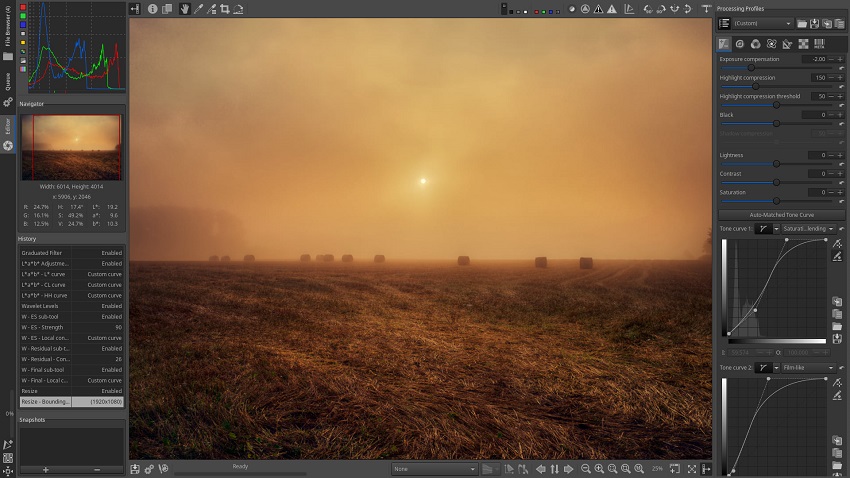
The interface is functional but dense, with a panel-heavy layout that organizes tools into tabs like Exposure, Detail, Color, and Advanced. Each tab contains sliders and options that give you precise control, such as per-channel tone curves, Lab color adjustments, or local contrast enhancement. For users familiar with Lightroom, the editing experience feels similar in spirit but more technical, as RawTherapee exposes low-level controls that Lightroom often abstracts. For example, you can fine-tune demosaicing parameters or apply multiple noise reduction methods in a single workflow, which is great for perfectionists but can be daunting for beginners.
The software also supports batch processing, letting you apply edits to multiple images at once, which is handy for event or landscape photographers with large shoots.
Compared to Lightroom, RawTherapee's photo organization capabilities are minimal. It doesn't maintain a full-fledged catalog system like darktable or Lightroom, instead relying on a file-browser approach where you navigate your filesystem to select images. You can tag, rate, and filter images within a session, but there's no persistent database for long-term organization. This makes RawTherapee less suited for users who need robust library management, though it pairs well with tools like digiKam for cataloging.
Another unique feature is its "Processing Profiles," which are akin to Lightroom presets, allowing you to save and apply custom edit settings across images for consistent looks, such as vintage film emulations or high-contrast black-and-white styles.
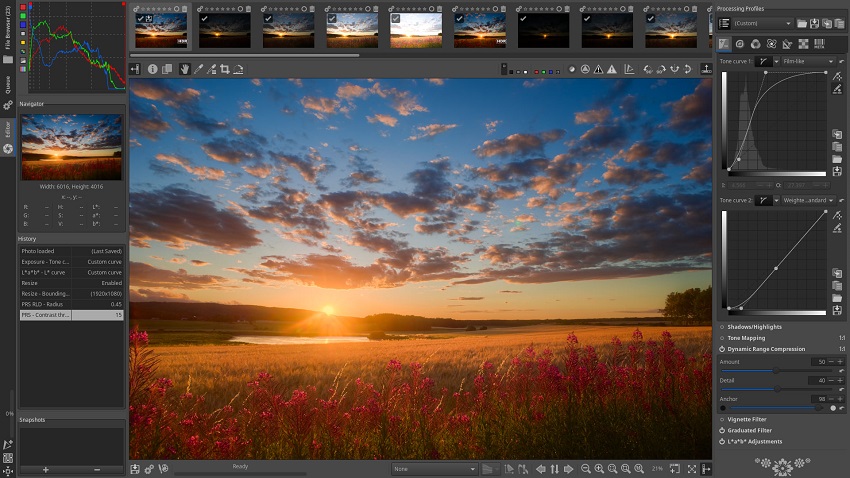
RawTherapee shines in its flexibility and performance. It's optimized to run efficiently, even on modest hardware, and supports GPU acceleration for faster processing of complex edits like noise reduction. It also offers advanced features like film simulation (via HaldCLUT files) and support for floating-point HDR DNG files, which appeal to enthusiasts pushing technical boundaries. However, the learning curve can be steep due to the technical nature of its tools and the lack of a polished, beginner-friendly interface. Documentation is comprehensive but assumes some familiarity with photo editing concepts, and community support is available through forums and wikis rather than official channels.
3. LightZone: The Tonal Zone Trailblazer
LightZone is an open-source photo editing software that offers a unique approach to non-destructive RAW and JPEG/TIFF processing, making it a noteworthy alternative to Adobe Lightroom for photographers seeking a free, straightforward tool. Originally a commercial product developed by Light Crafts, it was released as open source under the BSD license in 2011 after the company ceased operations. Since then, a small but dedicated community has maintained and updated it, with recent forks ensuring compatibility with modern systems.
Available for Windows, macOS, and Linux, LightZone is particularly appealing for users who want an intuitive interface with powerful editing capabilities but don't need the extensive cataloging features of Lightroom.
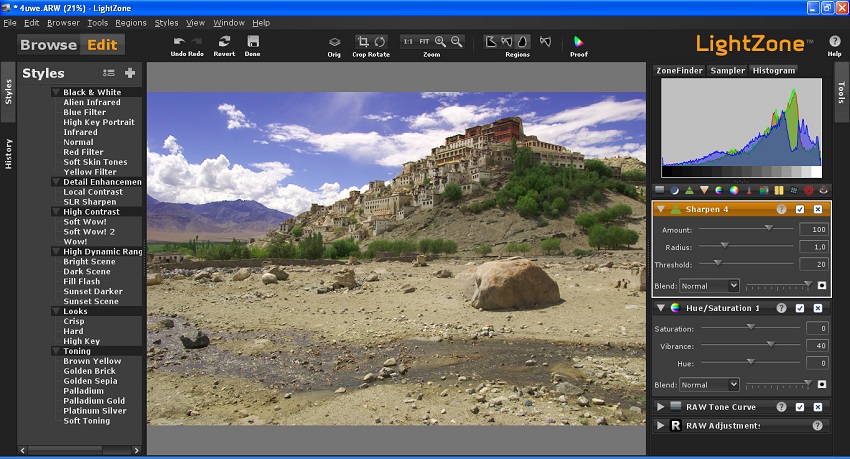
The standout feature of LightZone is its zone-based editing system, inspired by Ansel Adams' Zone System for controlling tonal ranges. Instead of relying solely on sliders for global adjustments like exposure or contrast, LightZone lets you map and manipulate specific tonal regions of an image (from deep shadows to bright highlights) using a visual histogram-like interface. This makes it easier to target precise areas, such as boosting midtones or recovering highlights, without affecting the entire image. The editing process is non-destructive, with adjustments stored as a stack of "styles" (similar to Lightroom's presets) that can be reordered, modified, or removed at any time.
LightZone supports RAW files from many cameras, though its RAW processing isn't as comprehensive as darktable or RawTherapee, and it also handles JPEG and TIFF formats well. Its toolset includes exposure correction, white balance, color grading, sharpening, noise reduction, and specialized tools like relighting (for simulating different lighting conditions) and cloning/healing for retouching.
LightZone's interface is one of its strengths, offering a cleaner and more approachable design than darktable or RawTherapee. The layout is divided into browsing, editing, and metadata views, with a focus on simplicity that makes it accessible to beginners while still offering depth for intermediate users. You can apply pre-built styles for quick edits (e.g., black-and-white conversions or vintage looks) or create your own for consistent workflows. The software also supports batch processing, allowing you to apply styles to multiple images, which is useful for photographers working on cohesive sets, like wedding or event photos.
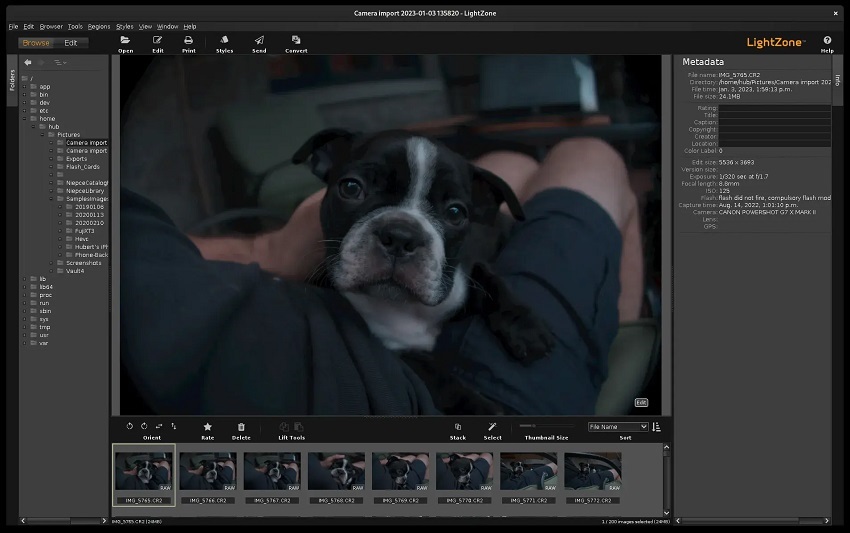
For organization, LightZone provides basic metadata editing (EXIF, IPTC) and allows you to tag, rate, and group images into folders within its browser. However, it lacks a robust cataloging system like Lightroom or digiKam, relying on your filesystem for long-term organization. This makes it less ideal for managing large photo libraries but sufficient for smaller projects or users who prefer manual folder management. It also supports direct printing with customizable layouts, a feature not always found in open-source editors.
LightZone's development pace is slower than darktable or RawTherapee, as it relies on a smaller community, but recent forks have kept it functional on modern hardware. It's lightweight and performs well even on older systems, making it a good choice for users with modest computers. However, it has limitations: its RAW support isn't as extensive as competitors, occasionally struggling with newer camera models, and some advanced features (like lens corrections or tethered shooting) are either basic or absent. The documentation is decent but not as comprehensive as other projects, though community forums and tutorials provide some support.
4. digiKam: The Photo Library Architect
digiKam is a powerful open-source digital photo management application that doubles as a capable editing tool, making it a strong alternative to Adobe Lightroom for photographers who prioritize organization and cataloging while still needing solid editing capabilities.
Available for Windows, macOS, and Linux, digiKam is actively maintained by a dedicated community, with regular updates ensuring compatibility with modern camera formats and workflows. Its strength lies in its comprehensive approach to photo management, offering a robust database-driven system for organizing large collections, paired with non-destructive editing tools that integrate well with other open-source software like RawTherapee.
At its core, digiKam is designed to manage and organize photo libraries efficiently. It supports importing images from cameras, USB drives, or folders, and organizes them into albums with a flexible, folder-based structure. You can tag photos manually or automatically, assign ratings, add keywords, and use advanced metadata handling (EXIF, IPTC, XMP) to search and filter images.
One of its standout features is face recognition, which uses machine learning to detect and tag people across your library, making it ideal for event photographers or anyone managing portraits. digiKam also supports geolocation, allowing you to map photos with GPS data or manually assign coordinates, which is great for travel photography. Its database (SQLite or MySQL) ensures fast searches even with tens of thousands of images, offering a smoother experience than Lightroom for very large collections when properly configured.
For editing, digiKam provides a built-in editor for non-destructive adjustments to RAW, JPEG, and other formats, with tools for exposure, white balance, curves, cropping, sharpening, and noise reduction. While its editing capabilities are not as advanced as darktable or RawTherapee, they're sufficient for most common tasks, like color correction or basic retouching. For more complex edits, digiKam integrates seamlessly with external editors like RawTherapee or GIMP, allowing you to process RAW files in those tools while keeping your library organized within digiKam. It also supports batch processing, letting you apply edits, rename files, or export images with watermarks across entire albums, which streamlines workflows for high-volume shoots.
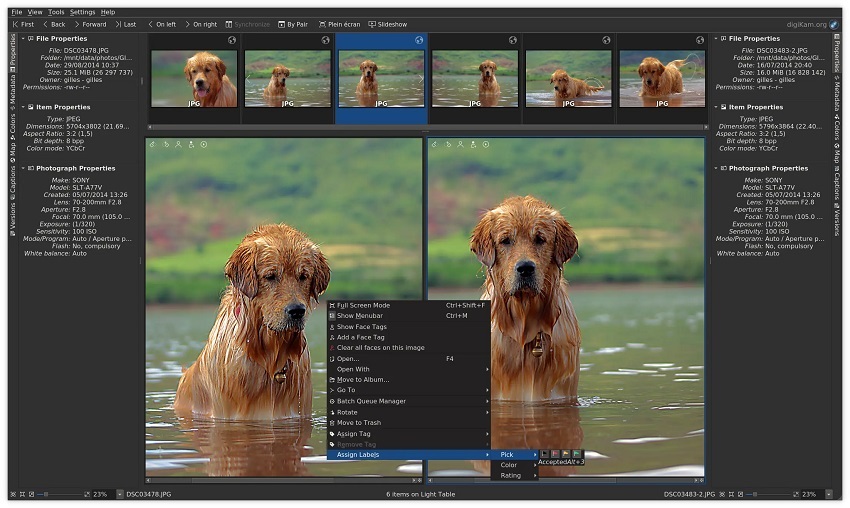
The interface is feature-rich but can feel cluttered due to the sheer number of options, especially for new users. It's divided into views for albums, tags, maps, and editing, with customizable layouts to suit different workflows. Compared to Lightroom's sleek design, digiKam's interface is less polished but highly functional once you learn its structure. It also offers unique tools like duplicate detection (based on image content) and a light table for side-by-side comparisons, which are handy for culling similar shots. For advanced users, digiKam supports scripting and plugins to extend functionality, such as automated tagging or integration with cloud services.
Performance is generally strong, though large libraries with complex tagging can slow down on older hardware if using SQLite instead of MySQL. The software supports a wide range of RAW formats, though its RAW processing relies on external libraries like LibRaw, which may not always support the very latest camera models immediately. Community support is robust, with active forums, wikis, and detailed documentation, though it lacks the commercial polish of Lightroom's support. Installation on Linux is straightforward, but Windows and macOS users may need to navigate occasional setup quirks, like dependency issues.
5. GIMP: The Creative Canvas Virtuoso
GIMP (GNU Image Manipulation Program) is a powerful open-source raster graphics editor that serves as a versatile alternative to Adobe Lightroom, though it's more closely aligned with Photoshop in its focus on detailed image manipulation.
Available for Windows, macOS, and Linux, GIMP is actively maintained by a dedicated community, with regular updates ensuring compatibility with modern systems and workflows. While not a direct replacement for Lightroom's RAW-focused, non-destructive workflow or cataloging system, GIMP excels in precise retouching, creative edits, and layer-based processing, making it a compelling option for photographers who need a free tool for advanced editing tasks and are willing to pair it with other software for organization or RAW processing.

GIMP's strength lies in its flexibility for detailed image editing. It supports a wide range of formats, including JPEG, PNG, TIFF, and, with plugins like UFRaw or darktable integration, RAW files from most cameras. Unlike Lightroom's streamlined, non-destructive sliders, GIMP uses a layer-based, pixel-level editing approach, allowing for complex tasks like compositing, cloning, healing, and selective adjustments via masks.
Its toolset includes exposure correction, curves, levels, color balance, hue-saturation, and filters for effects like sharpening or blurring. For photographers, this makes GIMP ideal for tasks that go beyond Lightroom's scope, such as creating intricate edits, removing objects, or designing graphics-heavy outputs like posters or album covers. Non-destructive editing is possible through layers and adjustment layers, though it requires more manual setup than Lightroom's automatic sidecar files.
To handle RAW files, GIMP relies on external plugins or preprocessing with tools like darktable or RawTherapee, as its native RAW support is limited. For example, you can develop a RAW file in darktable, export it as a TIFF, and then refine it in GIMP for detailed retouching. This workflow suits photographers who need both RAW development and fine-grained control but requires familiarity with multiple tools. GIMP also supports batch processing through scripts (via Script-Fu or Python-Fu), allowing you to automate repetitive tasks like resizing or applying filters across multiple images, though this is less intuitive than Lightroom's batch export.
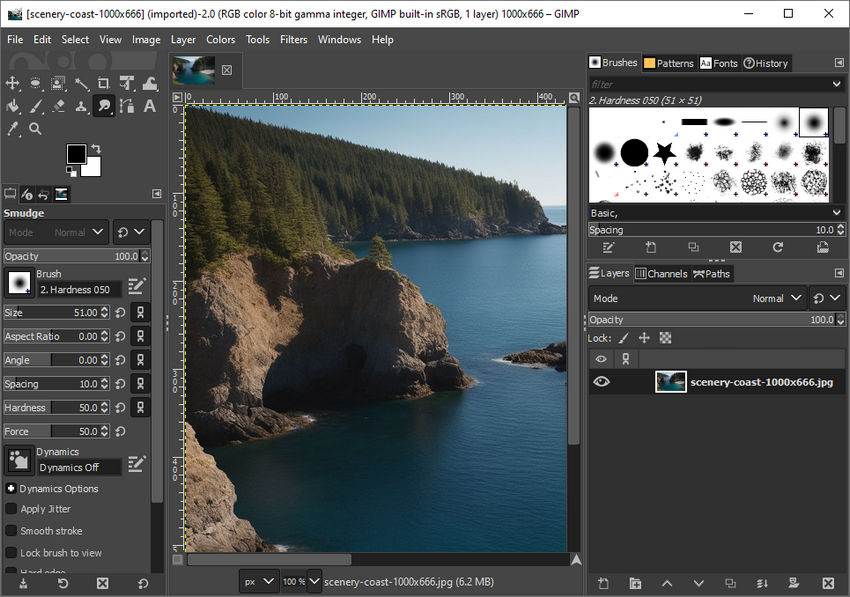
Organizationally, GIMP is not designed for photo management. It lacks a cataloging system or database, relying instead on your filesystem for browsing images. This makes it a poor standalone replacement for Lightroom's library module, but pairing it with digiKam or even a manual folder system can fill this gap. Its interface is highly customizable, with dockable panels for tools, layers, and brushes, but it can feel cluttered or dated compared to Lightroom's sleek design. Recent updates, like GIMP 2.10 and beyond, have improved usability with features like a dark theme, better color management, and support for high-bit-depth editing, making it more appealing for professional photo work.
GIMP's performance is solid, even on modest hardware, and it supports advanced features like 32-bit floating-point processing for high dynamic range edits. It also offers extensive plugin support, letting you extend functionality with tools like G'MIC for additional filters or Resynthesizer for content-aware fills. However, the learning curve is steep, especially for users accustomed to Lightroom's simplicity, as GIMP's tools require more manual control and understanding of concepts like layers and masks. Documentation is thorough, and the community is active on forums and platforms like GitLab, but support lacks the polish of commercial software.
Comparison of Open-Source Lightroom Alternatives
| Feature | Darktable | RawTherapee | LightZone | digiKam | GIMP |
|---|---|---|---|---|---|
| Primary Focus | Non-destructive RAW editing and organization | Precision RAW processing with technical controls | Zone-based, non-destructive editing | Photo management with editing capabilities | Layer-based image manipulation and retouching |
| RAW Support | Extensive (400+ cameras, 32-bit floating-point) | Extensive (most formats, advanced demosaicing) | Moderate (many cameras, less comprehensive) | Good (via LibRaw, integrates with editors) | Limited (requires plugins like UFRaw) |
| Editing Capabilities | Comprehensive: exposure, color grading, noise reduction, lens correction, tethered shooting | Advanced: demosaicing, tone mapping, color management, noise reduction | Moderate: exposure, color, relighting, cloning, styles | Basic: exposure, curves, sharpening, batch processing | Advanced: layers, masks, curves, filters, retouching |
| Non-Destructive Editing | Yes (sidecar files, module-based) | Yes (PP3 sidecar files) | Yes (stacked styles) | Yes (metadata-based) | Yes (via layers, manual setup) |
| Photo Organization | Strong: database with tags, ratings, GPS, slideshows | Basic: file-browser, tags, ratings | Basic: file-browser, tags, metadata | Excellent: albums, tags, face recognition, GPS, database | None: filesystem-based, no cataloging |
| Ease of Use | Moderate (steep learning curve, complex UI) | Moderate (technical interface, less beginner-friendly) | High (intuitive, clean UI) | Moderate (cluttered but functional UI) | Low (steep learning curve, layer-based) |
| Unique Features | Lua scripting, tethered shooting, geospatial mapping | Film simulation, CIECAM02 color management, HDR DNG | Zone-based editing, relighting tool | Face recognition, duplicate detection, MySQL support | Layer-based compositing, extensive plugins (e.g., G'MIC) |
| Performance | Resource-intensive, needs decent hardware | Efficient, supports GPU acceleration | Lightweight, runs well on older systems | Strong, but slows with large libraries (SQLite) | Efficient, good for modest hardware |
| Batch Processing | Yes (styles, export automation) | Yes (processing profiles) | Yes (styles application) | Yes (rename, edit, export) | Yes (via scripts, less intuitive) |
| Best For | Professionals needing advanced RAW editing and organization | Detail-oriented editors focused on RAW precision | Hobbyists wanting intuitive tonal edits | Photographers prioritizing library management | Creative editors needing retouching and compositing |
| Community Support | Active (forums, GitHub, detailed docs) | Active (forums, wikis, good docs) | Moderate (smaller community, forums) | Strong (forums, wikis, detailed docs) | Strong (forums, GitLab, extensive docs) |
| Integration | Standalone, pairs with digiKam for larger libraries | Pairs with digiKam for organization | Standalone, basic file management | Integrates with RawTherapee, GIMP | Pairs with darktable/RawTherapee for RAW |
Bonus: Elevate Your Workflow with Aiarty Image Enhancer
While the open-source alternatives above provide a solid foundation for RAW editing and organization, adding a specialized AI tool like Aiarty Image Enhancer can supercharge your results.
This desktop app uses advanced generative AI to upscale images up to 32K resolution, remove noise from high-ISO shots (great after digiKam batch edits), deblur details, and restore faces with natural textures - ideal for polishing outputs from RawTherapee or GIMP.
Unlike fully manual open-source options, Aiarty's three specialized models (e.g., Real-Photo for landscapes) handle complex enhancements in one click, with batch support for 1000+ images. It's cross-platform (Windows/Mac), GPU-optimized for fast processing, and offers a free trial to test on your Lightroom alternatives' exports.
Download the free trial here and discover how it bridges the gap to pro-level quality.
Conclusion
Choosing the right open-source alternative to Adobe Lightroom depends on your photography needs and workflow preferences.
- If you're a professional seeking advanced RAW editing, Darktable and RawTherapee offer unparalleled precision and power, though they demand time to master.
- For hobbyists or those with older hardware, LightZone provides an intuitive, lightweight option with its unique zone-based editing.
- If organization is your priority, digiKam stands out as a robust library manager that rivals Lightroom's cataloging, with enough editing tools for most tasks.
- For creative edits like retouching or compositing, GIMP is a versatile powerhouse, best paired with other tools for RAW processing.
Each of these free, open-source programs brings something special to the table, and many can be combined for a tailored workflow - try pairing digiKam with RawTherapee or GIMP with darktable for a complete solution. Dive in, experiment, and discover which tool (or combination) sparks your creativity without breaking the bank.
You May Also Like


Brenda Peng is a seasoned editor at Digiarty Software who loves turning ordinary photos into extraordinary works of art. With years of experience behind the lens and in front of the computer, Brenda shares her passion for photography, image enhancement, and editing through easy-to-follow tutorials.
