


Choosing between Luminar Neo vs Lightroom can be genuinely frustrating, even though both are popular image editors. For photographers, Lightroom is undeniably powerful, but it often feels overwhelming, locked behind an endless subscription, and slower when handling large photo catalogs. Luminar Neo, on the other hand, promises one-click AI magic, yet users question its stability, editing precision, and whether it can support a reliable long-term workflow. This debate isn’t about which software looks better on paper, it’s about which one truly fits how real people edit photos day after day. That’s exactly what this Luminar Neo vs Lightroom comparison aims to clarify.
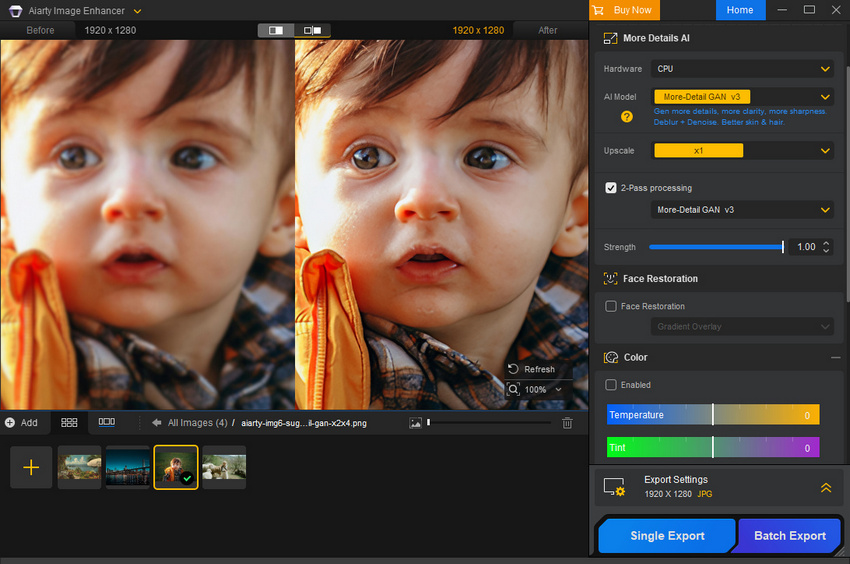
If your goal is to improve image quality rather than manage a full editing workflow, Aiarty Image Enhancer offers a more straightforward option than Lightroom or Luminar Neo. It focuses on core tasks like denoising, deblurring, color improvement, clarity enhancement, face restoration, and objects removal, with results delivered in just a few clicks.
Designed specifically for image enhancement, Aiarty can upscale photos up to 4K, 8K, 32K resolution while preserving fine details, without catalogs, layers, or preset management. For users who want clean, usable images quickly, the simplicity is the key advantage.

What Are Luminar Neo and Lightroom?
Luminar Neo is an AI‑driven photo editor from Skylum that emphasizes easy, creative automation. It uses smart tools like AI sky replacement, background removal, and portrait enhancements so most edits can be done quickly with minimal manual tweaking.
Adobe Lightroom, part of the Adobe Creative Cloud ecosystem, is a professional‑grade photo editor and digital asset manager. It’s designed for detailed RAW editing, powerful cataloging, cross‑device workflows, and integration with Photoshop and other Adobe apps.
Luminar Neo vs Lightroom Pricing: One‑Time vs Subscription
One of the biggest differences between Luminar Neo vs Lightroom is cost:
- Luminar Neo offers one‑time purchase options and optional subscription plans. Users can own the software outright without recurring fees, with the lifetime license starting at $159, which includes one year of free updates..
- Lightroom is subscription‑based, typically starting around $11.99/mo for cloud storage and ongoing updates.
Many users searching Luminar Neo vs Lightroom price are sensitive to the idea of own‑outright software vs ongoing subscription costs. A perpetual license can be appealing, especially for hobbyists and beginners.
Feature Comparison: Where Luminar Neo and Lightroom Truly Differ
While Luminar Neo and Lightroom both offer comprehensive photo editing capabilities, their feature sets are built around fundamentally different design philosophies. In practice, this means that similar tools can lead to very different editing experiences depending on how they are implemented and used over time.
Luminar Neo vs Lightroom: Feature Comparison
Luminar Neo Strength Features
Luminar Neo shines with modern AI creativity tools that drastically simplify complex edits:
- Sky Replacement & Atmosphere AI
- Portrait Bokeh AI and Skin Enhancer
- GenErase for removing unwanted objects
- Upscale AI for enlarging images
These features allow dramatic changes with just a few clicks, ideal for social media creators and beginners who want fast results.

Lightroom Strength Features
Lightroom focuses on precision and control:
- Industry‑standard RAW editing tools
- Advanced tone curves, color grading, and HSL tools
- Presets and batch edits for workflow efficiency
- Supports professional printing and export workflows
Experienced photographers appreciate Lightroom’s detailed control and consistency, especially for large jobs or commercial workflows.
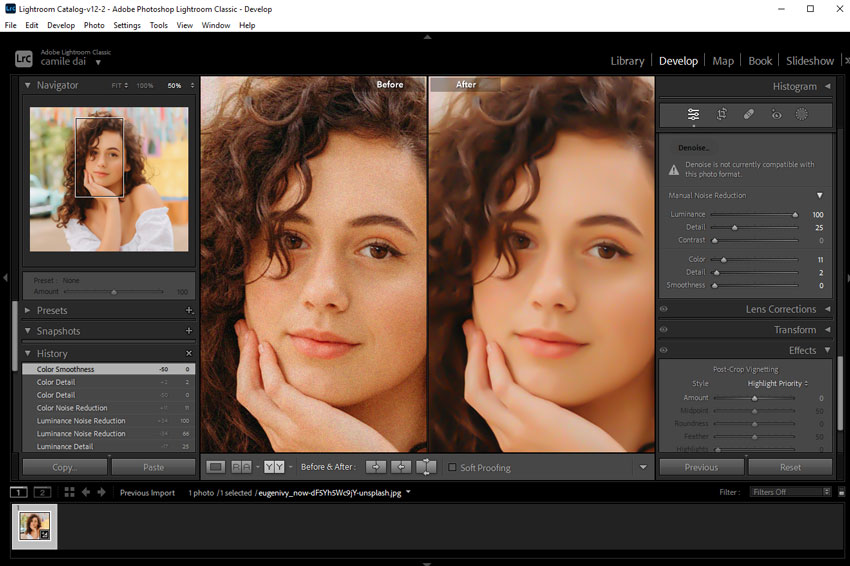
Feature Takeaway
In the Luminar Neo vs Lightroom comparison, the difference isn’t about which app has “more” features, it’s about which features align with how you actually edit photos day after day:
- Luminar Neo’s best features help you finish photos faster
- Lightroom’s best features help you manage photos better over time
Luminar Neo vs Lightroom Real-World Tests
To see how Luminar Neo vs Lightroom performs in everyday editing, I focused on three essential tasks: color adjustment, deblurring, and denoising. These are common pain points for many photographers, and testing them provides a practical sense of each software’s strengths and workflow.
It’s important to note that results may vary depending on the user’s skill level. To keep the comparison clear, this test highlights these three representative areas rather than every possible feature.
Color Adjustment
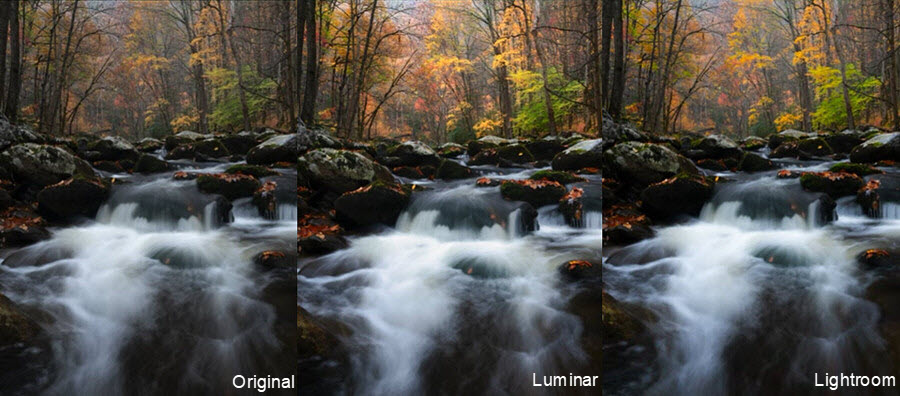
AI Enhance and HSL adjustments in Luminar Neo quickly make colors vibrant with minimal effort. Skin tones, skies, and foliage are enhanced automatically. The interface is intuitive, with responsive sliders and real-time previews. Slight color shifts can occur in high-contrast scenes if relying solely on AI.
In contrast, Lightroom offers precise control via tone curves, HSL panels, and color grading. Manual adjustments take longer but produce consistent, accurate results, ideal for professional color-critical workflows.
In conclusion, Luminar Neo is faster for general enhancements; Lightroom is better when color precision matters.
Noise Reduction
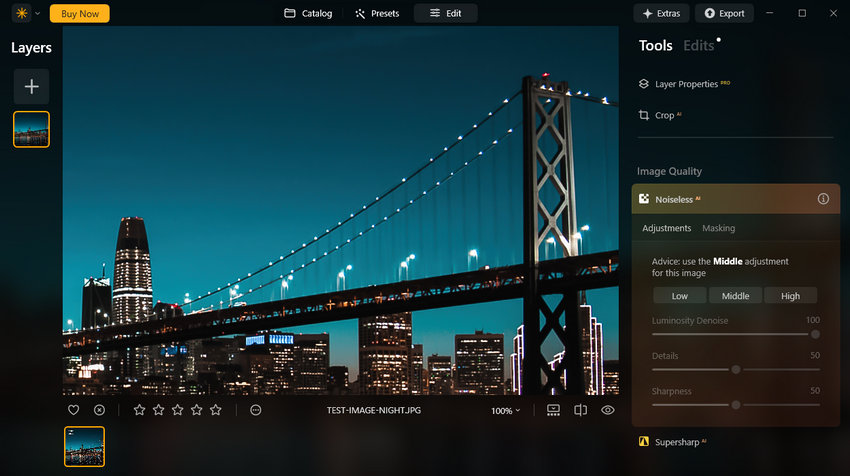
Luminar Neo's AI Denoise removes ISO noise effectively with one click, preserving most details. Fine textures can be slightly smoothed.
Luminance and color noise sliders in Lightroom allow tailored noise reduction. More manual effort is required, but textures and details are better preserved.
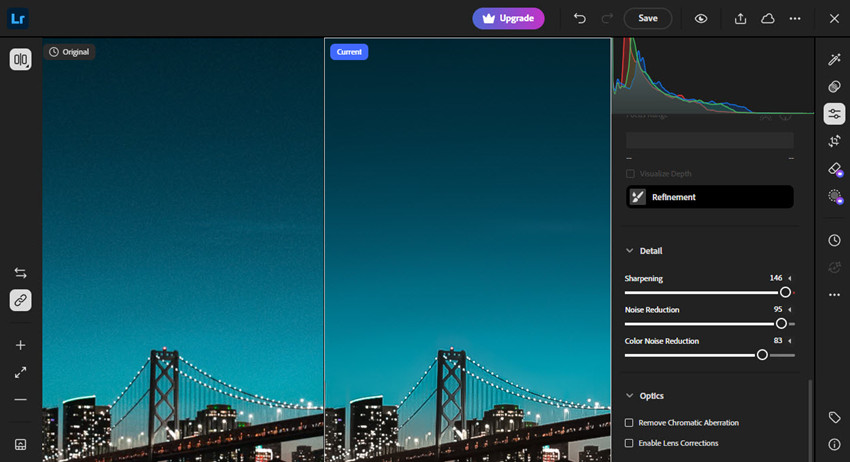
Therefore, Neo is great for fast, visually pleasing results; Lightroom excels when ultimate detail and accuracy are needed.
Deblur
Luminar Neo's AI Structure enhances detail and reduces blur automatically. Quick and effective for landscapes or portraits, though overuse can create slightly exaggerated textures.

Manual sharpening and masking are required in Lightroom to provide fine control over edges and details. Slower to apply but delivers cleaner results, especially for print or high-resolution output.
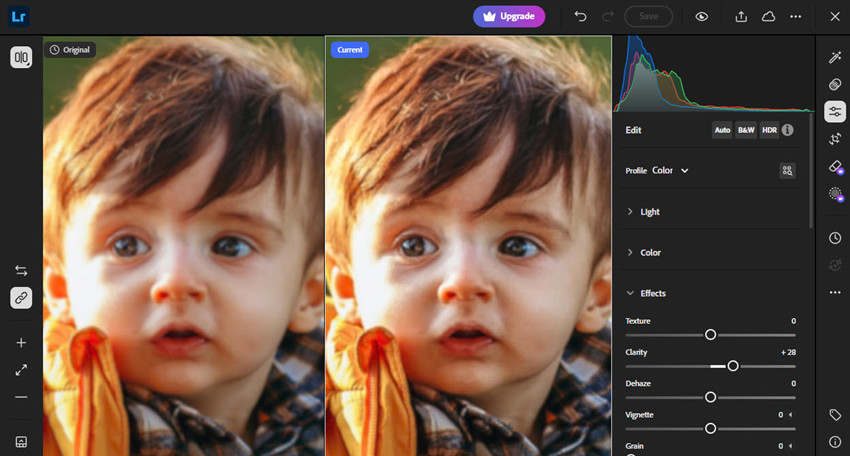
TIf your test images start with heavy noise, blur, or low resolution, Aiarty Image Enhancer can help improve image quality before or after editing in Luminar Neo or Lightroom. It uses AI to denoise photos, reduce blur, upscale images to higher resolutions, correct colors, and remove unwanted objects in just a few clicks.
Luminar Neo vs Lightroom Performance and Experience
Luminar Neo offers a modern, visually appealing interface. Menus are color-coded for intuitive navigation, and sliders respond smoothly, making fine-tuning edits feel natural. GPU-accelerated AI allows certain tasks to complete rapidly. For example, the AI-powered GenErase tool can remove unwanted objects like power lines with a single click. On my test, it cleared about 95% of a complex shot in under 40 seconds, something that would take much longer manually. After recent updates, performance feels snappy even on mid-range machines, though using multiple AI tools simultaneously can occasionally slow the program or trigger minor crashes on older hardware.
Lightroom, by contrast, has a more utilitarian interface, less flashy, but extremely functional. File management, image rating, and batch exporting are straightforward. The Recent Edits and History panels are especially useful for tracking changes across multiple sessions. Editing precision is outstanding, particularly with curves, HSL adjustments, and color grading tools, though its built-in presets are less impressive than third-party options. For large catalogs and extensive batch edits, Lightroom maintains stability better than Luminar Neo, though it can feel sluggish during massive imports or on older systems.
On mobile and cross-device use, Lightroom stands out. Syncing between desktop and mobile devices is near-instantaneous, allowing seamless editing on the go. Luminar Neo currently lacks comparable mobile integration, limiting its use to desktop workflows.
Bottom line: In daily practice, Luminar Neo excels for fast, creative edits with an intuitive interface, while Lightroom delivers consistent, precise control and reliable performance across large projects, including mobile workflows. Choosing between them depends on whether you prioritize speed and creativity or precision and scalability.
Luminar Neo vs Lightroom: Pros and Cons
The following pros and cons summary highlights the most important aspects of Luminar Neo and Lightroom in real-world editing scenarios, helping you understand which tool aligns better with your daily workflow.
Luminar Neo:
- AI-driven tools make it easy to get noticeable improvements quickly.
- The interface is more approachable for beginners or casual photographers.
- One-time purchase options are available.
- Offers more flexibility than Lightroom when combining effects.
- Advanced color grading and masking are still not as refined as Lightroom’s tools.
- AI-heavy features may slow down or become unstable on some systems.
- Library and catalog tools are basic compared to Lightroom.
- Not ideal for large batch workflows.
Ligthroom:
- Industry-leading RAW processing, color tools, curves, and masking.
- Handles large catalogs and batch edits reliably.
- Advanced cataloging, rating, keywording, and search features streamline long-term workflows.
- Edits sync smoothly between desktop, mobile, and cloud.
- Subscription-only pricing.
- Steeper learning curve compared to Luminar Neo.
- Presets feel generic out of the box.
- Compared to Luminar Neo, more manual input is often required.
Verdict: Luminar Neo vs Lightroom Which is Better?
After evaluating real-world performance, interface, AI enhancements, and workflow efficiency, it’s clear that there’s no one-size-fits-all answer. Both Luminar Neo and Lightroom excel in different areas: Neo is fast, beginner-friendly, and ideal for creative AI-powered edits, while Lightroom offers unmatched precision, robust cataloging, and long-term workflow reliability.
So how do you choose? Consider these points:
- Choose Luminar Neo if you value speed, simplicity, and AI-assisted enhancements for small batches or social media-ready edits. It’s perfect for beginners or anyone who prefers minimal manual adjustments.
- Choose Lightroom if you need precise control over color, exposure, and local adjustments, or if you work with large photo libraries and require cross-device sync. Professionals, wedding photographers, and print-oriented workflows will benefit most from its stability and depth.
- Combine with tools like Aiarty Image Enhancer if your images need denoising, deblurring, upscaling, or object removal before you even start editing — this ensures both editors work from the best possible starting point.
You May Also Like


This post was written by Brenda Peng who is a seasoned editor at Digiarty Software who loves turning ordinary photos into extraordinary works of art. With AI assistance for brainstorming and drafting, the post is reviewed for accuracy by our expert Abby Poole for her expertise in this field.
