



DaVinci Resolve Photo vs Lightroom: Can Resolve Replace Lightroom?



Adobe Lightroom has been the go-to photo editing software for many photographers, offering a complete workflow for RAW development, organization, and image enhancement. DaVinci Resolve, while best known for professional video editing, also provides powerful tools for photographers who want to edit and enhance still images with advanced color and AI features.
But which one is better for photography? In this guide, we compare DaVinci Resolve Photo vs Lightroom in terms of editing workflow, AI features, RAW file support, photo management, pricing, and everyday use.
Quick Takeaways
For hybrid creators working with both video and photography, DaVinci Resolve 21 Photo is now one of the most interesting Lightroom competitors released in years.
- Choose Lightroom if you want the easiest photo workflow, mature catalog management, reliable HDR/export handling, cloud syncing, and the most polished ecosystem for photographers.
- Choose DaVinci Resolve Photo if you want advanced cinematic color grading, unified photo + video editing, node-based workflows, and a subscription-free alternative built for hybrid creators. While still less mature than Lightroom in some photography workflows, Resolve offers a uniquely powerful all-in-one post-production environment.
DaVinci Resolve Photo vs Lightroom: Quick Comparison
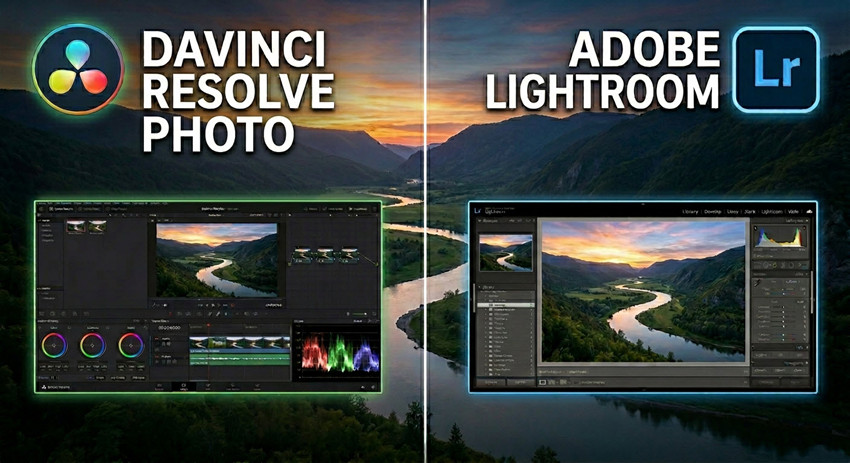
Here’s a quick overview of how DaVinci Resolve Photo and Adobe Lightroom differ in real-world workflows. While both support RAW editing and AI-powered tools, their core strengths target different types of creators — with Lightroom focusing on streamlined photography workflows and DaVinci Resolve emphasizing cinematic color grading and hybrid photo-video production.
| Feature | DaVinci Resolve Photo (Resolve 21) | Adobe Lightroom |
|---|---|---|
| RAW Editing | Yes | Yes |
| AI Masking | AI Magic Mask / Depth Map | AI subject, sky, background, objects, people, or landscapes masking |
| Catalog Import | Supports Lightroom catalogs | Native |
| Tethered Shooting | New feature | Mature support |
| Color Grading | Hollywood-level node grading | Traditional sliders |
| AI Upscaling | AI SuperScale | AI Super Resolution |
| AI Denoising | UltraNR Noise Reduction | AI-powered Denoise tool |
| Photo Organization | Albums + LightBox | Mature catalog system |
| Cloud Workflow | Blackmagic Cloud | Adobe Cloud |
| Pricing | Free + one-time Studio license | Subscription |
| Learning Curve | Steeper | Easier |
1. RAW Photo Editing: Lightroom Is Easier, Resolve Is More Advanced
Both Adobe Lightroom and DaVinci Resolve Photo support professional RAW photo editing, but their editing philosophies are fundamentally different.
Adobe Lightroom: The High-Volume Standard
Lightroom is built for speed and batch processing. Its Linear Workflow is designed to move thousands of images from capture to delivery with minimal friction.
- Slider-Based Logic: Centralized panels for exposure, HSL, and HDR recovery allow for rapid, intuitive adjustments.
- Optical Intelligence: Features the industry’s most extensive database for automatic lens corrections and camera-specific RAW profiles
- AI-Driven Efficiency: Adaptive presets and "Select Subject" masking allow for high-quality batch syncing across entire photoshoots.
DaVinci Resolve Photo: The Cinematic RAW Powerhouse
With the introduction of the Photo Page, Resolve 21 brings Hollywood-grade color science to still photography through a Node-Based Workflow.
- Non-Destructive Nodes: Unlike sliders, nodes allow for complex, parallel grading where each adjustment (Curves, LUTs, or PowerGrades) exists in its own independent space.
- Advanced Color Science: Native support for ACES 1.3 and DaVinci Wide Gamut provides superior highlight rolloff and tonal depth compared to traditional photo editors.
- AI Neural Engine: Employs UltraSharpen for RAW detail recovery and Magic Mask for object-specific isolation that far exceeds standard masking precision.
- Unified Pipeline: Allows creators to apply the exact same professional LUTs and "Film Looks" to both RAW stills and 8K video for perfect visual consistency.
Sum: For photographers used to Lightroom, Resolve can initially feel much more technical. But for creators working on cinematic visuals, Resolve offers significantly deeper color control. In terms of RAW compatibility, Lightroom still supports more camera profiles and lens corrections overall.
2. AI Masking: Resolve’s Magic Mask vs Lightroom AI Masking
As AI masking becomes the backbone of modern local adjustments, the choice between Adobe Lightroom and DaVinci Resolve Photo depends on whether you prioritize volume or depth.
Adobe Lightroom: The King of Workflow Efficiency
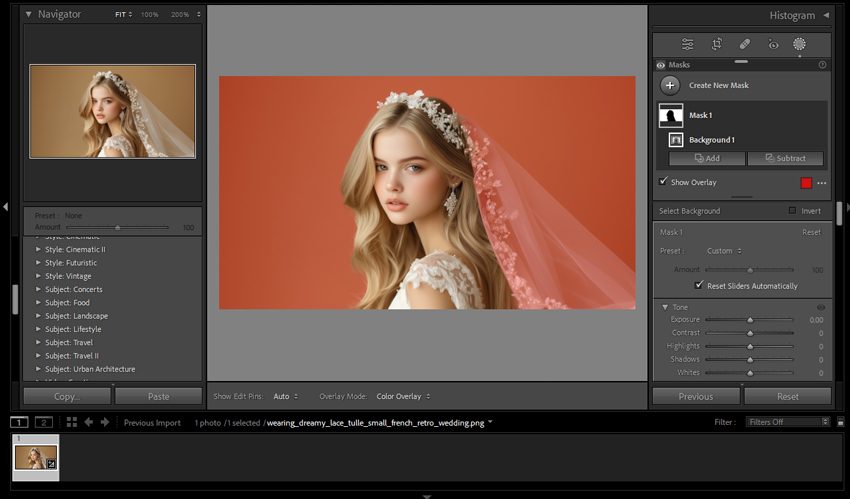
Lightroom’s AI masking is designed for photographers who need to process large batches quickly. It excels at semantic recognition, knowing what an object is.
- One-Click Presets: Instantly generate masks for Subject, Sky, Background, or Objects.
- Portrait Intelligence: Automatically detects facial features, eyes, teeth, hair, and even clothing for rapid retouching.
- Seamless Batching: Masks can be easily synced across hundreds of photos, with the AI re-calculating the selection for each frame automatically.
- Best For: Wedding, event, and commercial photographers who need "good enough" precision at maximum speed.
DaVinci Resolve Photo: The Precision Powerhouse
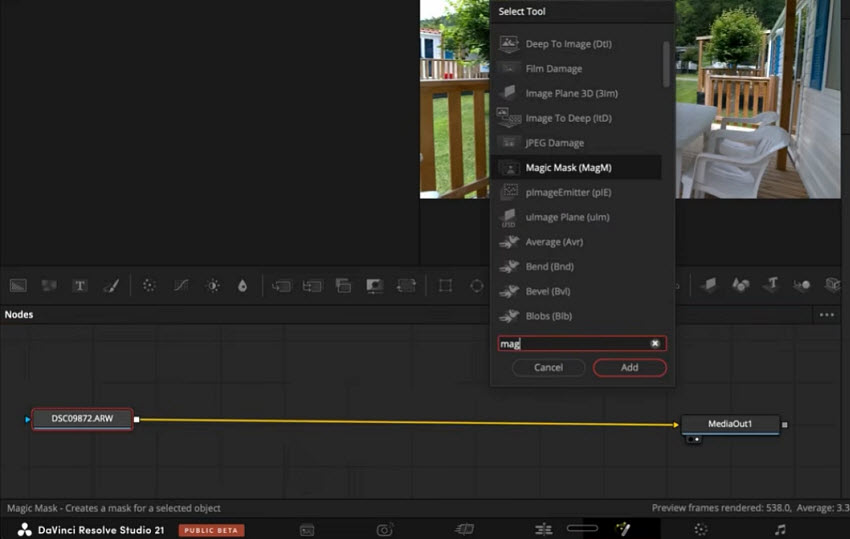
Derived from high-end visual effects (VFX) technology, Resolve’s Magic Mask focuses on pixel-perfect isolation. It doesn't just recognize a subject; it tracks its form with surgical accuracy.
- Superior Edge Fidelity: Outperforms Lightroom in complex areas like translucent hair, fine textures, and intricate foreground elements.
- Node-Based Flexibility: Masks exist as independent nodes. You can pipe a mask from one adjustment to another, or combine multiple "Magic Masks" for sophisticated layering that Lightroom’s linear stack cannot match.
- Hybrid Consistency: For creators shooting both RAW stills and video, the Magic Mask allows for identical grading masks across both mediums, ensuring a unified visual "look."
- Depth Estimation: Leveraging the DaVinci Neural Engine, it handles overlapping elements and depth-of-field transitions with significantly more realism.
- Best For: Fine-art photographers, hybrid creators, and cinematic retouchers who require absolute control over every local adjustment.
3. Lightroom vs Resolve Photo AI Enhancement
AI image enhancement is one of the clearest areas where both Lightroom and DaVinci Resolve Photo are evolving quickly, but their priorities are very different. Lightroom focuses on fast and reliable photo cleanup for photographers, while Resolve leans more toward cinematic-grade restoration and advanced manual control.
Adobe Lightroom’s enhancement system is built around several AI-powered tools tightly integrated into its RAW workflow, including:
- Lightroom's AI Noise Reduction for removing high ISO noise while preserving detail
- Raw Details for improving fine texture and demosaicing accuracy in RAW files
- Super Resolution for upscaling images while maintaining clarity and edge sharpness

These tools are designed to be fast, automatic, and easy to use. In practice, Lightroom prioritizes consistency and efficiency, making it especially effective for wedding, portrait, and event photographers handling large image libraries.
DaVinci Resolve Photo, on the other hand, approaches enhancement with tools originally developed from video restoration and cinematic post-production pipelines. Its new AI-driven system includes:
For image enlargement and detail reconstruction, AI SuperScale lets Resolve Photo intelligently upscale low-resolution images while preserving texture and edge clarity. This makes it especially useful for creators working with cropped shots or older assets.
Resolve also introduces AI UltraSharpen, designed to recover micro-detail and improve edge definition without producing overly artificial sharpening artifacts.
For low-light and high ISO images, Resolve’s UltraNR Noise Reduction provides more advanced denoising controls with better texture retention and finer tuning compared to traditional noise reduction workflows.
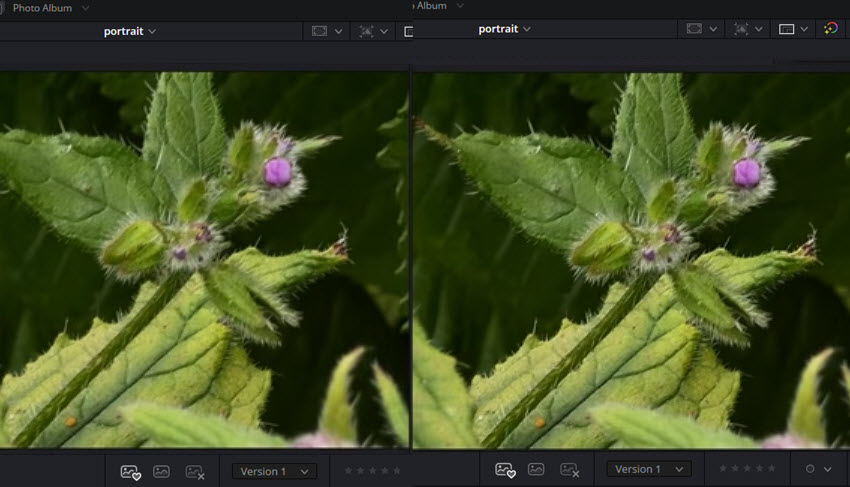
Compared to Lightroom, Resolve gives users more control over how detail, texture, and noise are balanced. This makes it particularly useful for more demanding scenarios such as cinematic stills, wildlife photography, or heavily cropped images where detail recovery matters more than speed.
However, this added flexibility also makes Resolve slightly more complex to fine-tune, while Lightroom remains the faster and more predictable option for everyday photo workflows.
Sum: In short, Lightroom focuses on fast, automated enhancement for photographers, while DaVinci Resolve Photo provides deeper, more configurable AI restoration tools for creators who want maximum control over image quality.
AI Enhancement Alternative for Faster Photo Restoration
While DaVinci Resolve Photo and Lightroom both include AI enhancement features inside broader editing workflows, some users may prefer a more dedicated and automated AI enhancement tool for quick image restoration and upscaling.
Aiarty Image Enhancer is designed specifically for AI enhancemetn. Compared to Lightroom’s streamlined photo workflow and Resolve’s node-based enhancement pipeline, Aiarty focuses more on fast, one-click enhancement with minimal manual adjustments.
- Upscale low-resolution images up to 32K
- Remove noise, blur, and JPEG compression artifacts simultaneously
- Restore facial details and textures naturally
- Improve clarity for old, compressed, or AI-generated images
- Batch process large numbers of photos efficiently
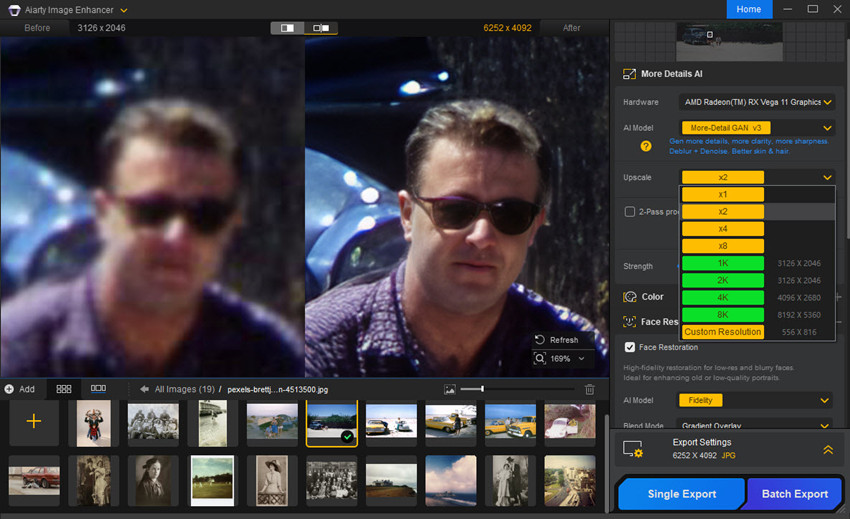
For users comparing DaVinci Resolve Photo vs Lightroom primarily for AI enhancement quality, Aiarty can work well as a complementary tool — especially when dealing with heavily compressed images, old photos, social media assets, or low-quality source files that require stronger automated restoration before further editing.
Also see: DaVinci Resolve Photo vs Aiarty Image Enhancer for Photo Enhancement

4. Photo Organization: Lightroom Still Wins (for now)
One of the clearest areas where Adobe Lightroom still maintains a strong lead is photo organization and digital asset management. While DaVinci Resolve Photo has introduced a surprisingly complete set of library features, Lightroom’s ecosystem has been refined for over a decade, making it significantly more mature in real-world workflows.
Blackmagic has clearly positioned Resolve Photo as a direct competitor to Lightroom by adding modern organization tools, including:
- Albums for structured project grouping
- Star ratings for quick culling workflows
- Flags (pick/reject system) for selection management
- LightBox view for visual browsing of large photo sets
- Metadata support for sorting and filtering
- AI IntelliSearch for content-based image search
- Lightroom catalog import for migration from Adobe workflows
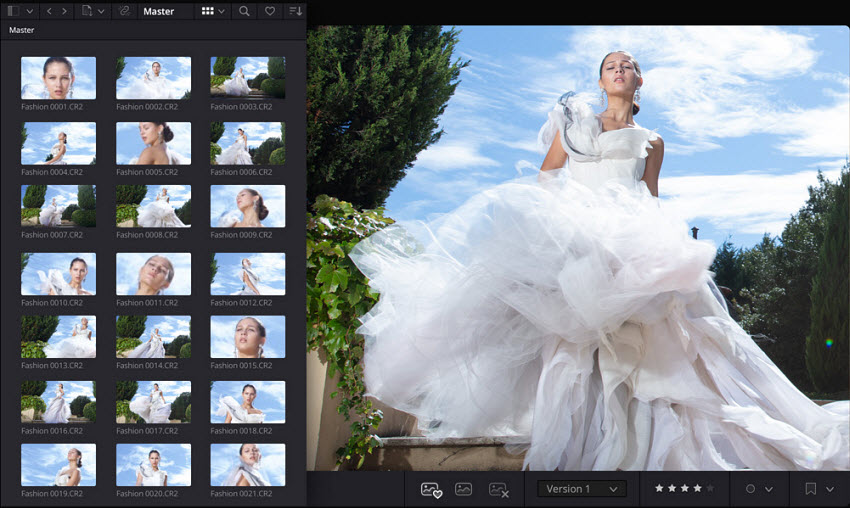
However, despite these improvements, Lightroom still has a major advantage in long-term photo management and professional catalog handling. Compared to Resolve, Lightroom offers a far more mature asset management system, including:
- Smarter and more flexible collection systems (smart collections, nested folders, dynamic filters)
- More advanced keyword tagging and filtering workflows
- Highly reliable metadata handling across large archives
- Face recognition and person-based grouping
- Strong cloud syncing across desktop and mobile devices
- Deep integration with Lightroom Mobile for on-the-go editing
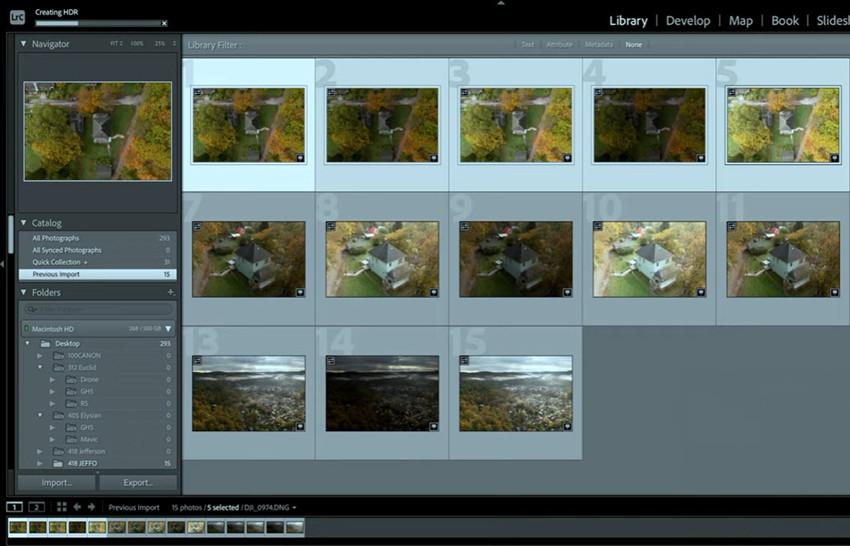
In practical use, this means Lightroom is still significantly better for photographers managing large libraries, especially those dealing with tens of thousands or even hundreds of thousands of images. Resolve’s organization tools are functional and improving quickly, but they currently feel more like a “new system catching up” rather than a fully mature catalog ecosystem. It works well for project-based editing and hybrid photo/video workflows, but it is not yet as robust or optimized for long-term archival management.
Sum: DaVinci Resolve Photo is closing the gap in organization features, but Lightroom still remains the industry standard for photo cataloging, metadata management, and large-scale image organization workflows.
5. Color Grading: Resolve Is on Another Level
Color grading is the area where the difference between Lightroom and DaVinci Resolve Photo becomes most dramatic.
Lightroom’s color tools are engineered for "Photographic Accuracy." Its primary goal is to help you achieve a clean, professional look across a large set of images in minutes. It uses a slider-based interface (HSL, Point Color, Tone Curves) that mimics traditional darkroom and digital photography logic.
DaVinci Resolve, on the other hand, is built on the same professional color science used in Hollywood film and television production. This foundation gives Resolve a fundamentally different level of control over image color and tone. Compared to Lightroom, Resolve offers a more advanced grading environment, including:
- Film Look Creator that simulates photorealistic film stock traits
- Node-based color grading workflows
- Film emulation pipelines and LUT-driven looks
- ACES color management for professional-grade consistency
- Advanced HDR grading controls
- Professional video scopes (waveform, vectorscope, histogram)
- Shared PowerGrades for reusable looks across projects
- Highly granular selective corrections using layered nodes
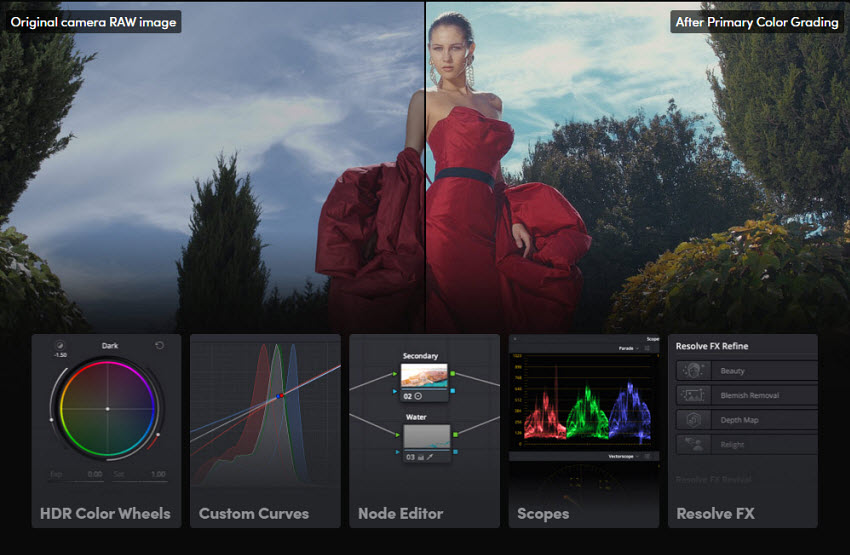
This allows creators to build extremely complex and stylized visual looks that go beyond typical photography editing. For example, skin tones, highlights, shadows, and background color separation can all be controlled independently within a structured grading system. Lightroom, while powerful, is still fundamentally slider-based and optimized for speed rather than deep cinematic manipulation.
In practical terms:
- If your goal is clean, natural, and fast photo editing, Lightroom is usually the better tool.
- If your goal is cinematic, stylized, or film-like color design, DaVinci Resolve is significantly more powerful.
This is also why Resolve Photo is increasingly being adopted by YouTubers, filmmakers, and hybrid creators who need consistent visual styles across both photos and video content.
6. Tethered Shooting: Resolve Finally Competes
A major new addition in DaVinci Resolve 21 is tethered shooting support in the Photo Page, which brings it closer than ever to Lightroom’s long-standing studio workflow capabilities.
With tethered shooting, photographers can connect supported cameras directly to the software and instantly import images during a shoot. This is especially useful in studio environments where real-time feedback is critical.
Adobe Lightroom has had a clear advantage here for years. Lightroom supports almost every modern camera from Nikon, Canon, Sony, and Fujifilm with a robust plug-and-play experience. It's designed to handle 10-hour shoot days with thousands of triggers without crashing, maintaining a simple and clean "Capture Bar." In addition, features like Auto-Advance and Live Folders make it easy for clients and art directors to review shots on a separate monitor instantly.
However, DaVinci Resolve Photo introduces a different kind of value that Lightroom does not fully match. Instead of focusing only on capture and review, Resolve integrates tethered shooting directly into its broader cinematic pipeline:
- Immediate cinematic grading during capture
- Real-time LUT application and preview
- Seamless transition from photo to video workflows
- Unified color pipeline across stills and motion content
- Node-based adjustments applied instantly to incoming shots
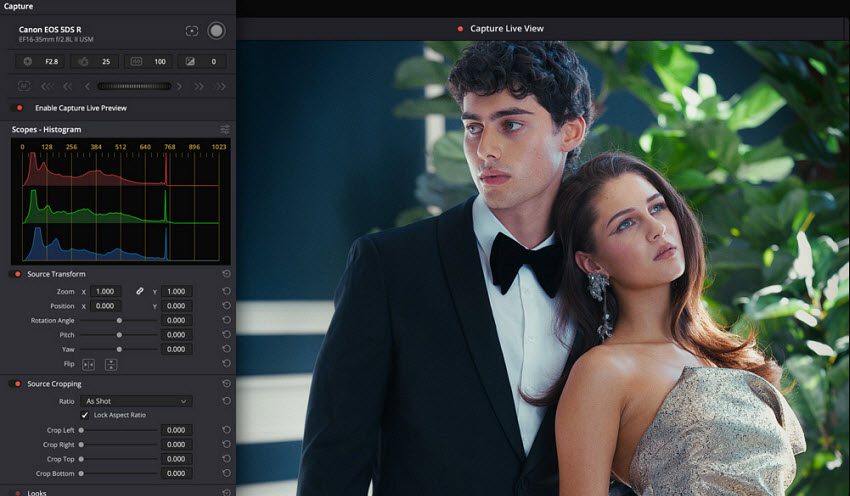
Sum: Ultimately, the choice comes down to the nature of your production. Lightroom is the reliable workhorse that ensures every shot is captured and organized with surgical efficiency. Resolve 21 is the creative powerhouse that bridges the gap between the raw capture and the final artistic vision, turning the tethered workstation into a real-time digital darkroom.
7. Video + Photo Workflow: Lightroom Cannot Match This
The biggest advantage of DaVinci Resolve 21 is its unified photo and video workflow. While Lightroom remains primarily focused on still photography, Resolve treats RAW photos and high-resolution video within the same post-production pipeline, reducing the need to switch between apps like Lightroom and Premiere Pro.
This allows creators to maintain consistent visual styles across both media types. A cinematic grade, LUT, or node-based color workflow can be applied seamlessly to RAW photos and video footage alike, making Resolve especially valuable for YouTubers, commercial creators, and hybrid production teams.
With centralized media management, AI-powered photo tools, advanced color grading, and professional video delivery built into one platform, DaVinci Resolve 21 is becoming more than a Lightroom alternative — it is a complete post-production hub for modern hybrid creators.
8. Pricing: Subscription vs One-Time Purchase
Pricing structure is another major factor influencing the Lightroom vs DaVinci Resolve decision, especially for freelancers and independent creators.
- Adobe Lightroom: Perpetual Subscription: Requires an ongoing commitment starting at $9.99/month (Photography Plan). While it offers seamless cloud syncing and regular AI updates, the costs accumulate indefinitely, and you lose access to the software's editing capabilities if you cancel.
- DaVinci Resolve Photo: Lifetime Ownership: Offers a highly capable Free Version with no expiration. The full Studio version is a one-time purchase of $295, granting you a lifetime license with all future major updates included—making it the more cost-effective choice for long-term professional use.
The Final Verdict: Is DaVinci Resolve Photo Better Than Lightroom?
The decision between Lightroom and DaVinci Resolve Photo is no longer about which software has more features, but rather where your work ends up and how you prefer to get there.
Choose Adobe Lightroom if:
You are primarily a photographer who values speed, stability, and workflow efficiency above all else. Lightroom remains the industry standard for high-volume RAW editing, catalog management, cloud syncing, and mobile workflows. Its UI is familiar, streamlined, and optimized specifically for photography, making it easier for most users to learn and use daily.
Lightroom also currently provides a more mature overall experience for:
- HDR photo handling
- Export consistency
- Large-scale photo organization
- One-click editing workflows
- Cross-device editing and syncing
For wedding, portrait, travel, and event photographers processing thousands of images, Lightroom is still the safer and more production-ready solution.
Choose DaVinci Resolve Photo if:
You are a hybrid creator, filmmaker, or visual artist who wants photography and video production inside a single post-production pipeline.
Resolve 21 brings Hollywood-grade color science, node-based grading, AI tools like Magic Mask and UltraSharpen, and unified photo/video workflows into one platform. For creators already familiar with Resolve, this can dramatically simplify cross-media production and visual consistency.
That said, Resolve Photo still has growing pains. Some photographers find the UI less intuitive than Lightroom, while others report that HDR workflows, export options, and certain photography-specific features still need refinement.
Even so, Resolve Photo already offers something Lightroom cannot fully match: a seamless cinematic workflow where RAW photos and video footage can share the same grading pipeline, LUTs, and creative environment.
In its current state, DaVinci Resolve Photo may not fully replace Lightroom for every photographer yet — but for hybrid creators working across both video and stills, it is already becoming one of the most compelling alternatives in the market.
 FAQ
FAQ
DaVinci Resolve Photo is becoming a serious Lightroom alternative, especially for hybrid creators working with both video and photography. However, Lightroom still offers a more mature photography workflow, better catalog management, and stronger mobile/cloud integration.
For traditional photography workflows such as weddings, portraits, and event photography, Lightroom is usually faster and easier to use. DaVinci Resolve Photo is better suited for creators who prioritize cinematic color grading and integrated photo-video production.
Generally, yes. Lightroom has a more beginner-friendly interface and simpler workflow, while DaVinci Resolve Photo uses a more advanced node-based editing system with a steeper learning curve.
Yes. DaVinci Resolve Photo now supports Lightroom catalog import, making it easier for existing Lightroom users to migrate photo libraries into Resolve workflows.
You May Also Like


This post was written by Brenda Peng who is a seasoned editor at Digiarty Software who loves turning ordinary photos into extraordinary works of art. With AI assistance for brainstorming and drafting, the post is reviewed for accuracy by our expert Abby Poole for her expertise in this field.
