



DaVinci Resolve Photo vs Aiarty Image Enhancer: Which Is Better for Photo Enhancement?



Not all AI image enhancement tools are built the same. Some focus on fast, automated results, while others integrate enhancement into a broader professional editing workflow. DaVinci Resolve Photo and Aiarty Image Enhancer represent these two approaches.
If you're deciding between them, the key question isn’t just which tool is "better," but which one fits your workflow and image quality needs. This DaVinci Resolve Photo vs Aiarty Image Enhance comparison below covers AI upscaling, sharpening, noise reduction, workflow differences, and practical use cases to help you choose the right tool.
Quick Takeaways
Before checking the detailed comparisons, here’s the key difference in simple terms:
- DaVinci Resolve Photo is a professional editing system. Its photo tools are built around color grading, tonal control, and node-based workflows, making it ideal for precise adjustments and consistent visual styling across projects. AI features like SuperScale, UltraSharpen, and UltraNR support the workflow, but they are not the core focus.
- Aiarty Image Enhancer is a dedicated AI enhancement tool. It focuses on upscaling, deblurring, denoising, face restoration, and reconstructing image details automatically, delivering fast and noticeable quality improvements with minimal manual work. While Aiarty also includes basic editing features such as color adjustment, HDR enhancement, and object removal, its strength lies in automated enhancement rather than manual editing control.
DaVinci Resolve Photo vs Aiarty Image Enhancer Breakdown
To better understand how DaVinci Resolve Photo vs Aiarty Image Enhancer differ in real-world use, this section provides a feature-by-feature comparison to highlight how each tool approaches AI image enhancement, workflow design, and overall usability, helping you quickly identify which solution better fits your needs.
What are DaVinci Resolve Photo and Aiarty Image Enhancer?
Although both DaVinci Resolve and Aiarty Image Enhancer can enhance images, they are built with fundamentally different goals.
Aiarty Image Enhancer (Dedicated AI Enhancement Tool)
Aiarty Image Enhancer is a dedicated AI image enhancer built with a much more focused mission: to improve image quality quickly and automatically using AI, especially when working with low-resolution, compressed, or imperfect photos, while supporting both RAW formats and standard image files for flexible use across different photography workflows.
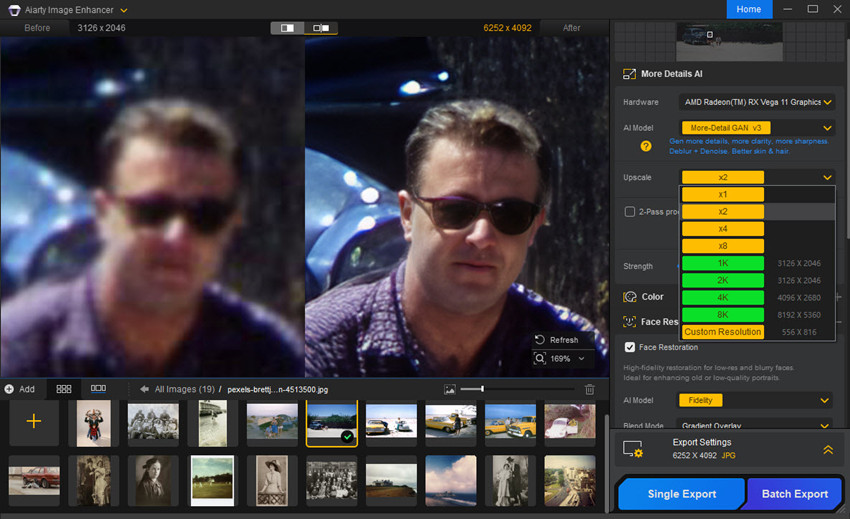
It is designed around a streamlined enhancement pipeline that includes:
- Upscale images using AI models (commonly 2×–8×, with higher output options up to 32K)
- Improve clarity, texture, and fine details such as skin, fabric, and edges for more natural and refined visual output
- Remove noise, blur, and JPEG compression artifacts in a single process without over-sharpening
- Restore face details with natural-looking facial structure and improved skin texture preservation
- Correct faded color with adjustable color settings for balanced tones and improved visual consistency
- Remove unwanted objects from images with precise and non-destructive editing tools
- Simple, one-click enhancement workflow with batch processing support for efficient large-scale image processing
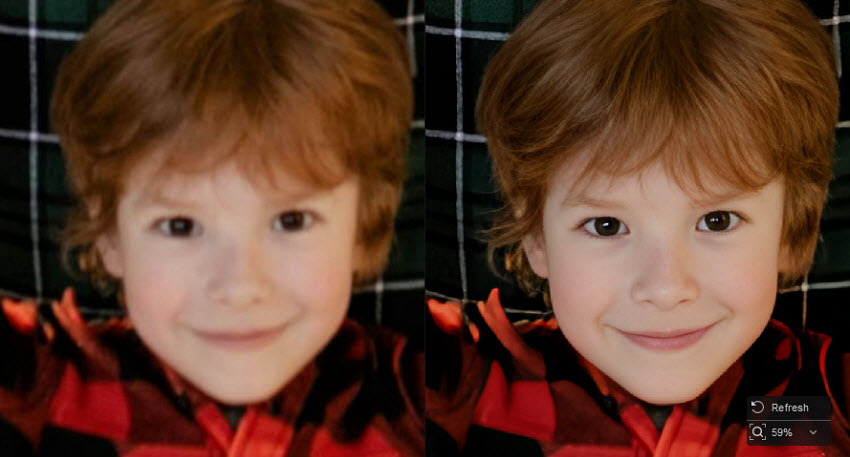
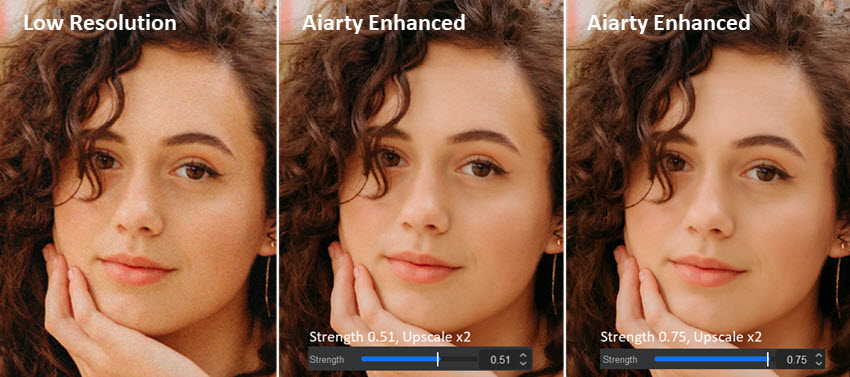
Compared to DaVinci Resolve Photo, Aiarty Image Enhancer focuses less on manual adjustments and more on automated image reconstruction. Its AI models are trained to analyze and rebuild missing information, easily producing a noticeably cleaner, sharper, and more detailed result with minimal effort. While Aiarty also includes basic editing tool, these are designed to complement the enhancement process rather than replace a full editing workflow.
Overall, Aiarty Image Enhancer is optimized for speed, automation, and large-scale image enhancement, making it especially suitable for users who prioritize efficiency over manual control.
DaVinci Resolve Photo (2026 Photo Page + AI Tools)
DaVinci Resolve Photo is not just an image enhancer, it is a full professional post-production ecosystem that integrates advanced AI tools into a structured, color-managed workflow.
Key photo AI and editing features include:
- AI SuperScale upscaling engine for resolution enhancement
- AI UltraSharpen for precise, edge-aware sharpening and detail refinement
- Face Refinement and Beauty Tools that allow subtle, professional-level adjustments to portrait details
- UltraNR Noise Reduction to clean high ISO and low-light images
- Patch Replacer for intelligent object removal and replacement
- Magic Mask for accurate subject isolation using AI tracking and segmentation
- Node-based RAW photo editing system, offering granular control over exposure, contrast, and color
- Advanced color grading tools, based on DaVinci’s industry-standard film pipeline
Unlike Aiarty Image Enhancer, every adjustment in DaVinci Resolve is part of a node-based, non-destructive workflow, where edits can be layered, refined, and combined with precise control. This makes it particularly powerful for workflows that require consistency across multiple images, integration with video projects, or cinematic color grading.
In essence, DaVinci Resolve Photo is designed for precision, scalability, and professional control, rather than one-click automation or aggressive AI reconstruction.
DaVinci Resolve Photo vs Aiarty Upscaling
Upscaling is one of the most important differences between DaVinci Resolve Photo and Aiarty Image Enhancer.
Aiarty Image Enhancer – AI Detail Reconstruction Upscaling
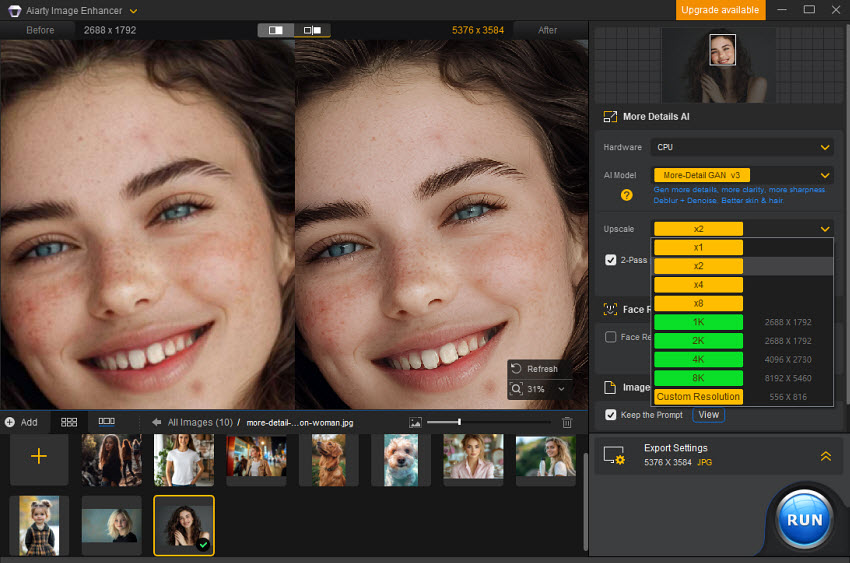
When compared to DaVinci Resolve Photo, Aiarty Image Enhancer takes the opposite approach: it rebuilds missing image information using AI models while upscaling. Therefore, it improves photos more aggressively through reconstruction of textures and fine details that are not clearly visible in the original file.
This makes Aiarty Image Enhancer particularly strong for AI upscaling and enlargement of old and low-resolution images, delivering strong improvements on compressed images, old photos, and social media visuals. The output often appears more visually “crisp” and enhanced compared to conservative upscaling methods.
It's able to:
- Use deep learning (GAN-like models) to reconstruct textures
- Enhance fine details such as hair, fabric, and skin pores
- Support aggressive scaling (2×, 4×, 8×, up to 32K)
- Improve clarity even from heavily compressed images
DaVinci Resolve Photo – AI SuperScale (Conservative Upscaling)
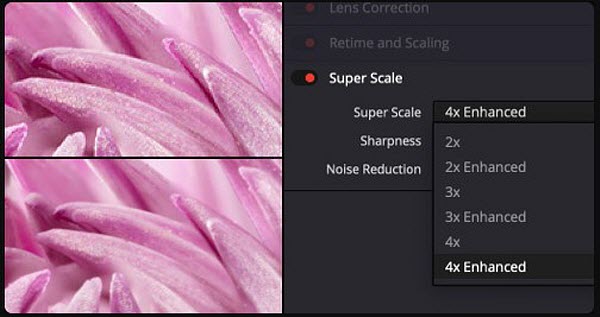
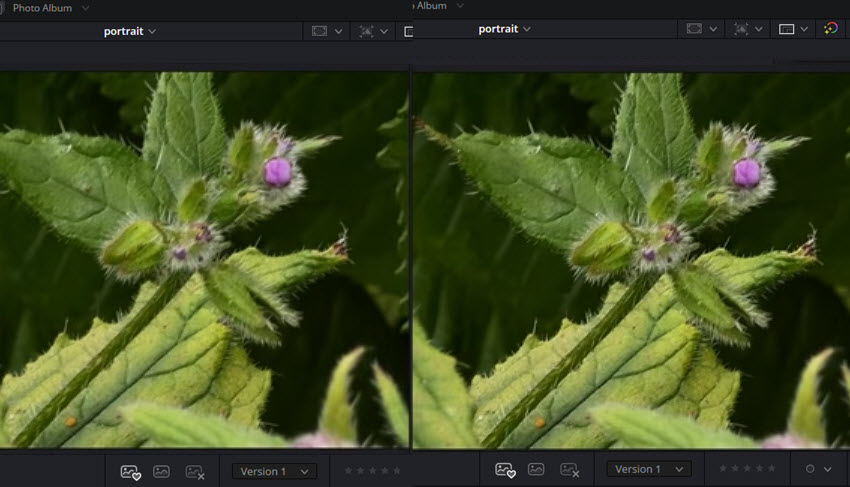
DaVinci’s SuperScale uses the DaVinci AI Neural Engine to upscale low-resolution images with high-quality reconstruction. The enhanced mode is specifically designed to reduce compression artifacts and improve overall image fidelity, allowing images to be scaled up to 4× their original resolution.
At the same time, SuperScale is designed to prioritize image integrity and natural appearance, meaning it tends to preserve original structure and avoid overly aggressive texture generation. This results in clean, stable, and visually consistent outputs, especially when working with high-quality or moderately compressed source images.
It typically:
- Uses AI-based upscaling to improve low-resolution images
- Reduces compression artifacts for cleaner results
- Maintains edge structure and color consistency
- Supports up to 4× resolution enhancement
- Works best with moderately compressed or RAW-based source material
DaVinci Resolve Photo vs Aiarty Sharpening
Sharpening is another area where DaVinci Resolve Photo vs Aiarty Image Enhancer takes very different approaches, reflecting their core design philosophy of precision versus automation.
Also see: DaVinci Resolve Photo vs Lightroom
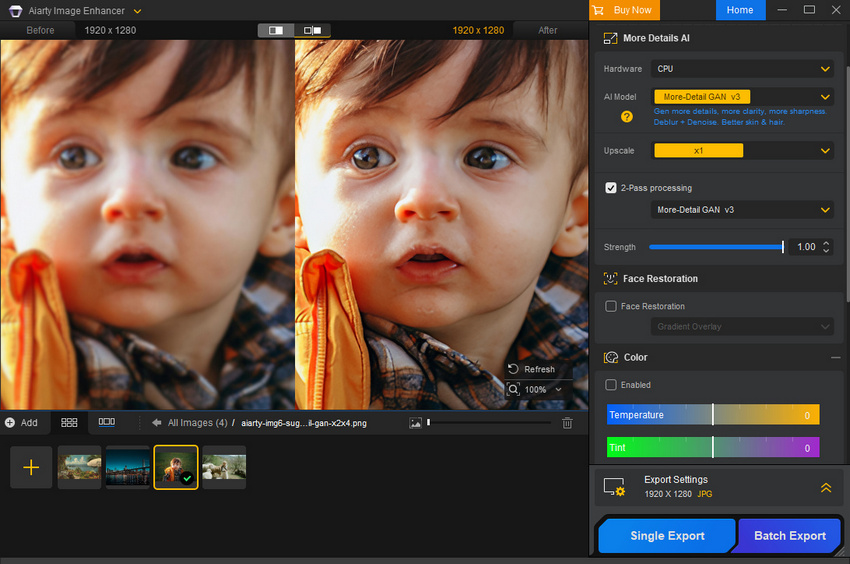
Aiarty Image Enhancer – AI Deblur and Automatic Sharpening
In contrast, Aiarty Image Enhancer simplifies sharpening into a fully automated AI-driven process. Instead of requiring manual adjustments, it detects blur automatically and enhances edges, textures, and fine details in a single pass.
This approach also combines sharpening with noise reduction, allowing the tool to improve clarity and clean up image imperfections simultaneously. As a result, it is especially effective for batch processing, low-resolution images, and everyday photo enhancement tasks, where speed and simplicity matter more than manual control.
The sharpening is primarily driven by AI models with user-adjustable strength controls rather than fully manual, node-based editing, it offers less granular precision compared to DaVinci Resolve.
DaVinci Resolve Photo – AI UltraSharpen (Precision-Controlled Sharpening)
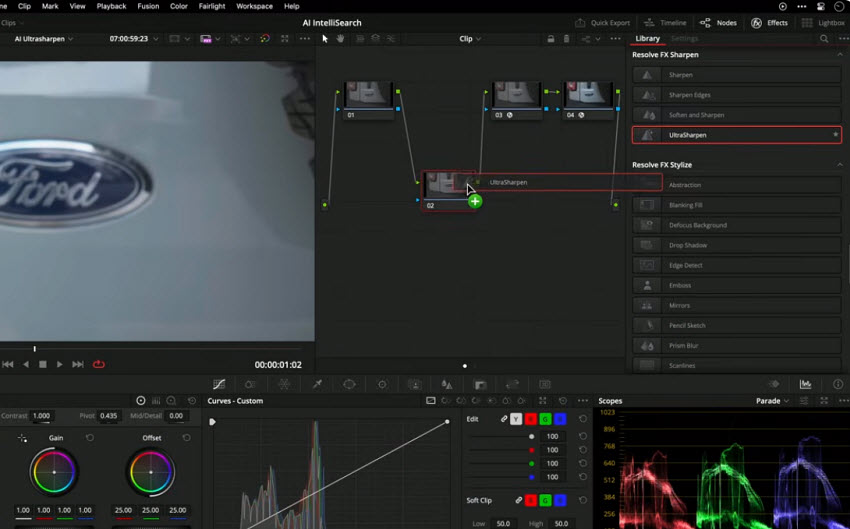
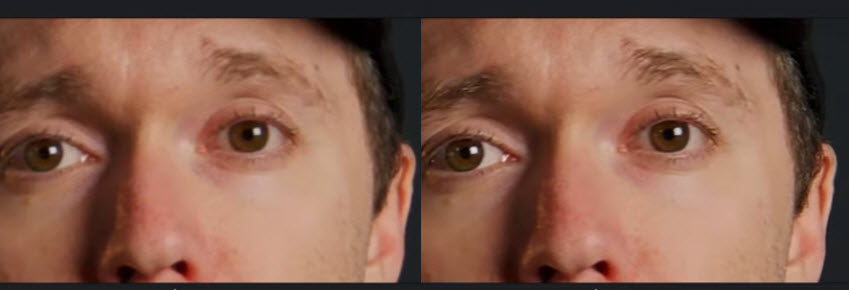
DaVinci Resolve Photo’s UltraSharpen is designed for selective, professional-grade sharpening rather than global image enhancement. It is typically used within a node-based workflow, allowing users to apply sharpening only to specific areas such as eyes, subjects, or product details, rather than affecting the entire image.
Because it is integrated into DaVinci’s color grading system, sharpening can be combined with other adjustments like contrast and tonal control, giving users extremely fine-grained control over the final output. This makes it particularly effective in commercial photography and portrait retouching, where precision is more important than speed.
At the same time, this level of control requires a certain level of technical understanding, especially of the node-based workflow, and it is not designed for quick or one-click enhancement tasks.
DaVinci Resolve Photo vs Aiarty Noise Reduction
Noise reduction further highlights the philosophical difference between DaVinci Resolve Photo vs Aiarty Image Enhancer, particularly in how each tool balances cleanliness and texture preservation.
Aiarty Image Enhancer – AI-Driven Noise Removal and Reconstruction
Aiarty Image Enhancer takes a more aggressive, AI-based approach to image noise reduction. It not only removes high ISO grain but also actively reconstructs missing image detail at the same time, rather than simply smoothing out noise.
This makes it highly effective for low-light photography, wildlife images, and heavily compressed or damaged photos, where traditional noise reduction tools may struggle to recover clarity.
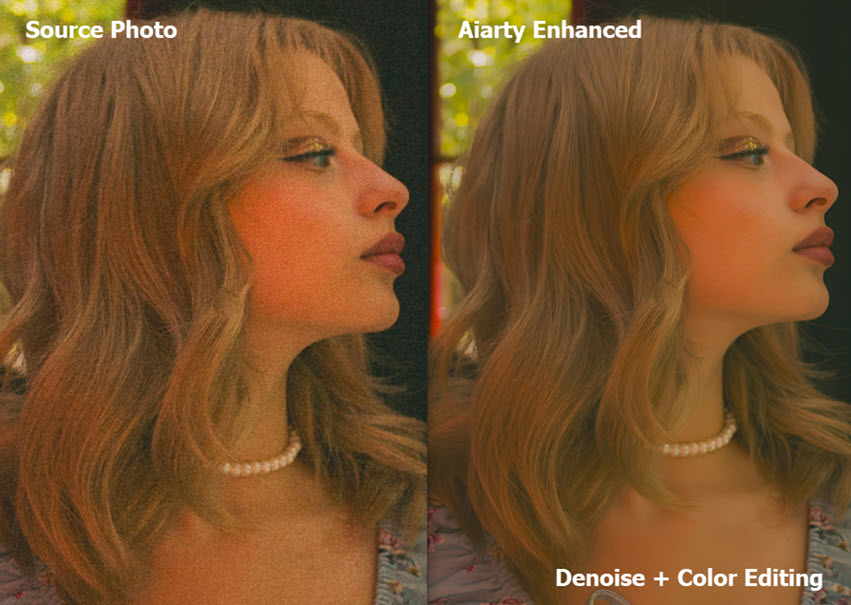
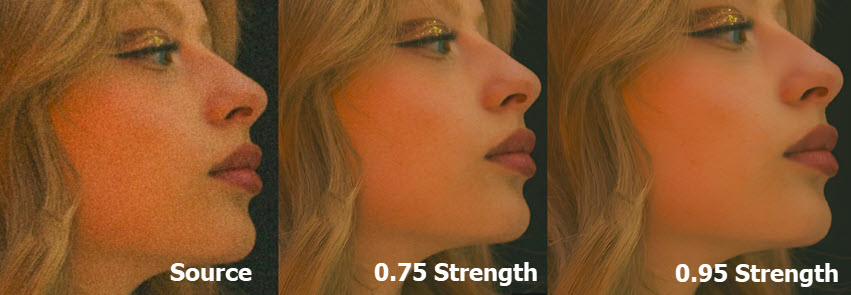
The strength slider allows users to preserve natural photographic texture or achieve a cleaner, sharper, and more polished visual output depending on their preference.
DaVinci Resolve Photo – Natural, Conservative Noise Reduction
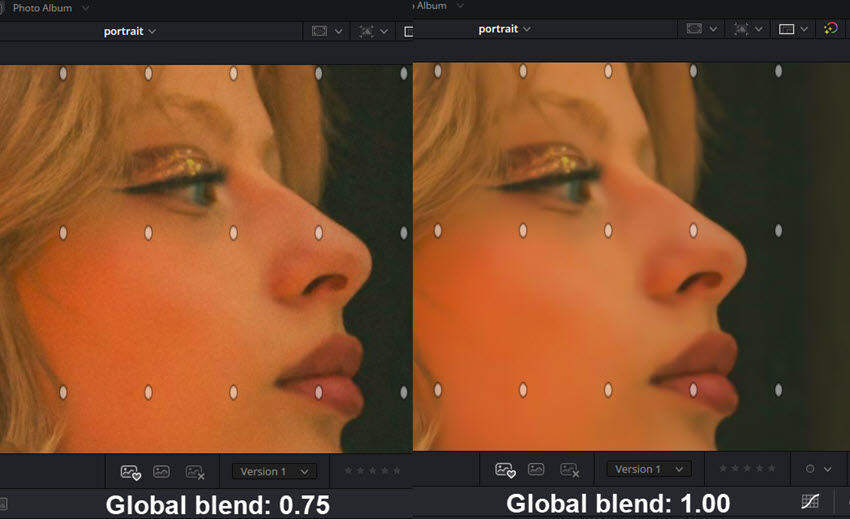
DaVinci Resolve uses a hybrid noise reduction system that combines traditional filtering with AI-assisted smoothing. Its main goal is to produce clean images while maintaining a natural, film-like appearance.
Rather than aggressively removing all noise, it focuses on preserving texture integrity and color consistency across the image, especially in RAW photography workflows. This makes it particularly suitable for professional environments where visual realism is more important than extreme smoothness.
In some cases, this conservative approach may leave a small amount of grain or slightly reduce ultra-fine texture detail, but this is often preferred in professional editing because it avoids an overly processed look.
DaVinci Resolve Photo vs Aiarty Pricing
When comparing DaVinci Resolve Photo vs Aiarty Image Enhancer, pricing is a major factor, especially for individual creators versus professional users.
Aiarty Image Enhancer is priced at $109 for a lifetime license, which includes lifetime free updates and support for up to 3 devices. The license also comes with additional tools such as a video enhancement toolkit and background removal features
DaVinci Resolve Photo follows a dual pricing structure:
- Free version: Includes powerful editing tools and limited AI features
- Studio version ($295 one-time): Unlocks full AI capabilities such as SuperScale, UltraSharpen, and UltraNR noise reduction tools
DaVinci Resolve Photo vs Aiarty System Requirements
Some users may purchase or install DaVinci Resolve, only to find that it runs slowly, struggles with AI features, or even fails to launch properly on their system. Unlike lightweight AI tools, DaVinci Resolve is built for professional post-production workflows and relies heavily on GPU performance, memory, and overall system capability. Understanding these requirements is essential before deciding which tool will actually work smoothly on your setup.
Aiarty Image Enhancer is designed to run efficiently on a wide range of hardware, making it more accessible for general users. It typically requires:
- Moderate CPU performance (modern multi-core recommended)
- 4/8GB RAM for smooth processing
- Mid-range GPU for faster AI acceleration (optional but recommended)
- Optimized for both single image and batch processing tasks
Because it is focused on AI enhancement rather than full editing workflows, it is generally less resource-intensive and easier to run on consumer-grade computers.
DaVinci Resolve Photo is significantly more demanding due to its integration with a full editing and color grading engine. You need to get:
- Strong multi-core CPU for real-time processing
- 16GB RAM minimum (32GB or more recommended for smooth workflows)
- Dedicated GPU with sufficient VRAM for AI tools and rendering
- SSD storage for handling high-resolution image and media files
Because of its node-based workflow, color grading system, and AI features like SuperScale and UltraNR, DaVinci Resolve Photo is much more hardware-intensive than Aiarty.
DaVinci Resolve Photo vs Aiarty Side-by-Side Feature Comparison
To better understand the practical differences between DaVinci Resolve Photo vs Aiarty Image Enhancer, it helps to compare them side by side across key aspects such as AI upscaling quality, noise reduction, workflow complexity, pricing, and system requirements.
| Feature | DaVinci Resolve Photo | Aiarty Image Enhancer |
|---|---|---|
| AI Upscaling | Natural, conservative (SuperScale up to 4×) | Aggressive AI reconstruction (up to 32K output) |
| Detail Enhancement | Controlled, manual refinement via nodes | Fully automatic AI detail recovery |
| Sharpening | UltraSharpen (precision, selective control) | AI deblur (one-click enhancement) |
| Noise Reduction | Balanced professional denoising (UltraNR) | Strong AI restoration + texture rebuilding |
| Workflow Type | Full editing + color grading system | Dedicated AI enhancement tool |
| Batch Processing | Moderate (workflow-dependent) | Strong, optimized for bulk images |
| Ease of Use | Advanced / professional workflow | Very simple, one-click |
| Pricing | Free version + Studio $295 one-time | $109 lifetime license (3-device support) |
| System Requirements | High-end GPU (RTX-class), 16–32GB RAM recommended | Mid-range PC, 8–16GB RAM, lighter GPU load |
| Performance Focus | Stability, accuracy, color consistency | Speed, automation, visual enhancement |
| Best For | Professional editing, RAW workflows, film-grade color work | Fast AI enhancement, low-quality image restoration, batch processing |
Final Verdict: Which One Should You Choose?
The choice between DaVinci Resolve Photo vs Aiarty Image Enhancer ultimately depends on how and where you plan to use them in real-world workflows.
DaVinci Resolve Photo is the stronger choice when your work requires professional-grade control, color accuracy, and consistent visual output. It is widely used in scenarios such as studio portrait retouching, RAW photography editing, advertising and branding visuals, and film-style color grading workflows, where precision and consistency are more important than speed or automation. It is also well-suited for projects that demand strict visual standards across multiple images or production pipelines.
In contrast, Aiarty Image Enhancer is better suited for fast, automated image improvement tasks, especially when working with large volumes of images or lower-quality sources. It performs particularly well in old photo restoration, low-resolution image enhancement, e-commerce product image optimization, social media content improvement, and large-scale batch processing workflows, where speed and AI-driven enhancement matter more than manual control.
In summary, DaVinci Resolve Photo is built for precision and professional creative control, while Aiarty Image Enhancer is designed for speed, automation, and practical AI-powered image enhancement at scale.
 FAQ
FAQ
DaVinci Resolve Photo is better for professional photo editing, especially when you need precise control over color grading, RAW processing, and node-based adjustments. Aiarty Image Enhancer, on the other hand, is better for fast AI-powered image enhancement and restoration with minimal manual effort.
Not entirely. While DaVinci Resolve includes AI tools such as SuperScale, UltraSharpen, and UltraNR, it is primarily a professional editing system. It lacks the fully automated, one-click enhancement workflow that dedicated AI tools like Aiarty Image Enhancer provide.
Aiarty Image Enhancer generally delivers stronger results for AI upscaling, especially on low-resolution or compressed images, thanks to its reconstruction-based AI models. DaVinci Resolve Photo’s SuperScale focuses more on maintaining natural detail and image integrity rather than aggressively enhancing textures.
Yes. DaVinci Resolve Photo is a resource-intensive application that typically requires a strong GPU, sufficient RAM (16GB or more), and fast storage for smooth performance. In contrast, Aiarty Image Enhancer can run on more moderate hardware.
You May Also Like


This post was written by Brenda Peng who is a seasoned editor at Digiarty Software who loves turning ordinary photos into extraordinary works of art. With AI assistance for brainstorming and drafting, the post is reviewed for accuracy by our expert Abby Poole for her expertise in this field.
