


Imagine spending hours sorting through hundreds of photos, manually adjusting exposure, color, and sharpness, only to realize your best shots are buried in the middle of the pile. Sounds exhausting, right? Managing hundreds of photos is time-consuming. Imagen AI speeds up editing, smartly culls shots, and enhances images automatically, saving time while keeping professional-quality results.
In this review, we’ll explore how Imagen AI performs in real-world scenarios, covering ease of use, editing quality, batch processing efficiency, pricing, and workflow integration. We’ll also explore how Aiarty Image Enhancer can complement Imagen AI for users who want even finer control over details, colors, and batch optimization. By the end, you’ll know whether Imagen AI is worth adding to your photo-editing toolkit, and for whom it delivers the most value.
What Is Imagen AI?
Imagen AI is an AI-powered photo editing and culling tool designed to streamline the workflow for photographers, content creators, and e-commerce sellers. It combines:
- Automatic photo enhancement: Adjusts exposure, color, sharpness, and noise reduction with one click.
- Smart culling: Ranks and selects the best photos from large batches, saving hours of manual sorting.
- Batch processing: Applies consistent edits across multiple images at once, ideal for high-volume workflows.
- RAW and JPEG compatibility: Works with professional files and everyday shots alike.
In short, Imagen AI is built to save time, simplify photo management, and deliver professional-looking results, whether you’re managing a small portfolio or hundreds of images at once.
Is Imagen AI Easy to Use?
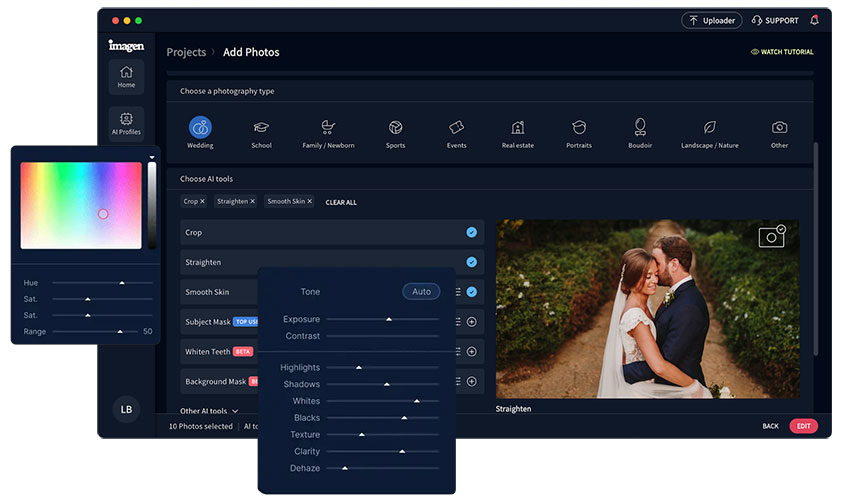
One of the standout features of Imagen AI is how approachable it is for users of all experience levels. Installing and setting up the software is quick, and the interface is clean and intuitive, guiding you seamlessly from importing photos to applying edits and exporting final images.
Upon importing your images, the AI automatically analyzes exposure, color, and sharpness, then suggests enhancements that can be applied with just one click, significantly reducing the time and effort required. Even beginners can achieve professional-looking results without a steep learning curve.
How Does Imagen AI Perform on Photo Editing?
Can Imagen AI truly match, or even surpass hours of manual editing in Lightroom or Photoshop? In practice, it delivers professional-quality results across a range of critical photo editing features. From accurate color correction to intelligent batch adjustments, Imagen AI combines speed and precision, helping photographers, content creators, and e-commerce sellers achieve consistent, polished images with minimal effort.
Accurate Color Correction
Imagen AI automatically balances highlights, shadows, and midtones to produce natural, true-to-life colors. This ensures skin tones, landscapes, and product colors remain realistic without oversaturation. Compared with manual adjustments in Lightroom, the AI provides consistent results across multiple images, reducing the risk of uneven color grading.

Noise Removal
Imagen AI intelligently reduces noise while preserving fine details, making low-light and high-ISO photos look cleaner and sharper. Unlike standard denoising filters that can blur textures, the AI distinguishes between noise and actual image detail, keeping edges, hair, and intricate patterns intact. This ensures a professional, high-quality result even in challenging lighting conditions.

Object Removal
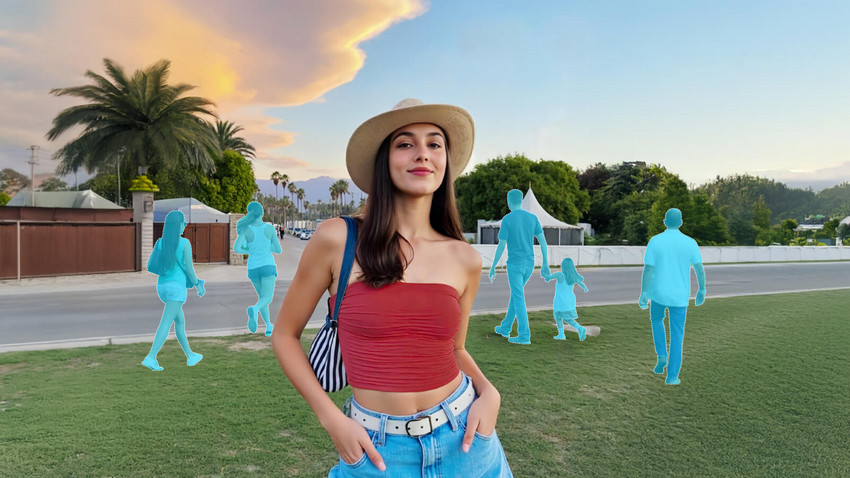
Imagen AI can automatically detect and remove unwanted objects or distractions from photos, helping create a cleaner and more focused composition. The AI analyzes surrounding textures, colors, and patterns to fill in the removed area naturally, ensuring the background looks seamless rather than artificially patched. This is especially useful for removing small distractions like background clutter, stray objects, or photobombers.
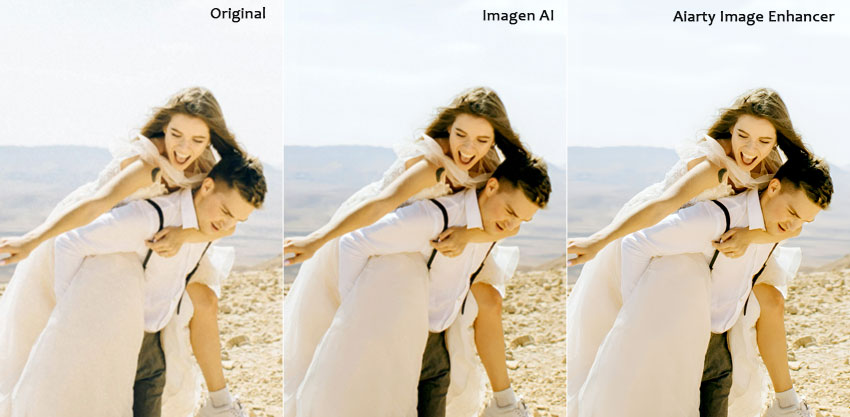
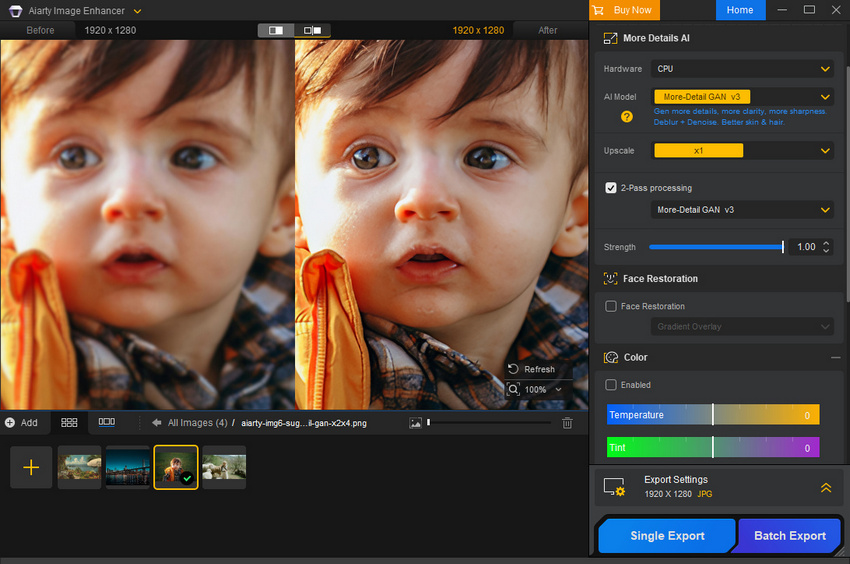
To take your edits to the next level, Aiarty Image Enhancer can complement Imagen AI perfectly. It offers precise color correction, intelligent noise reduction, print-ready AI upscaling, and advanced sharpening to bring out even more detail, plus effective features like SDR to HDR, object removal etc. Whether you're working on product photography, fine art, or high-resolution landscapes, Aiarty helps highlight subtle textures and ensures your images look polished and professional.
Try Aiarty Image Enhancer alongside Imagen AI to see the difference firsthand.
Smart Photo Culling
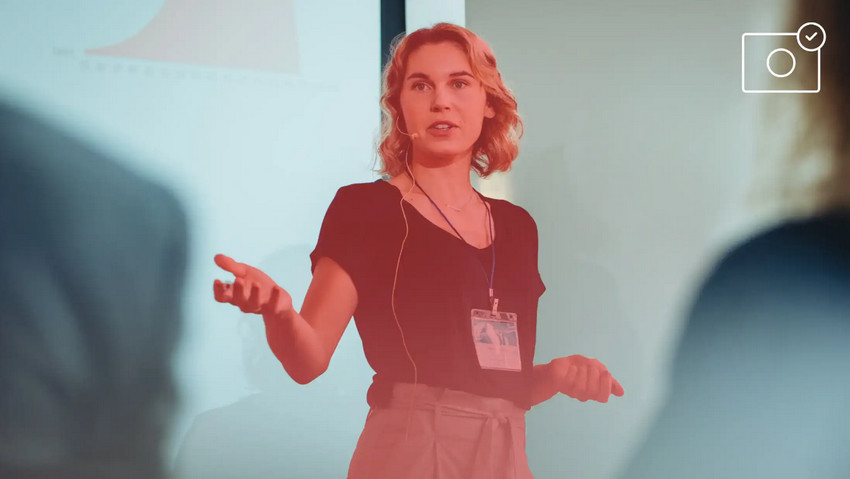
Sorting hundreds of photos manually can be time-consuming. Imagen AI is a popular photo culling software that automatically ranks images based on sharpness, composition, and overall quality, highlighting the best shots instantly. This saves significant time while ensuring you only work with the strongest images.

Subject Mask
Imagen AI can automatically detect subjects in your photos and create masks for selective edits. This allows for precise adjustments to specific areas, like brightening a subject while preserving the background’s natural look, without manually painting masks in Photoshop.
Crop for Perfect Framing
The AI analyzes composition and suggests optimal cropping or framing to enhance the image’s visual balance. Whether it’s aligning a product perfectly in the frame or centering a subject in a landscape shot, this feature helps save time on meticulous manual cropping.
Straighten Horizons
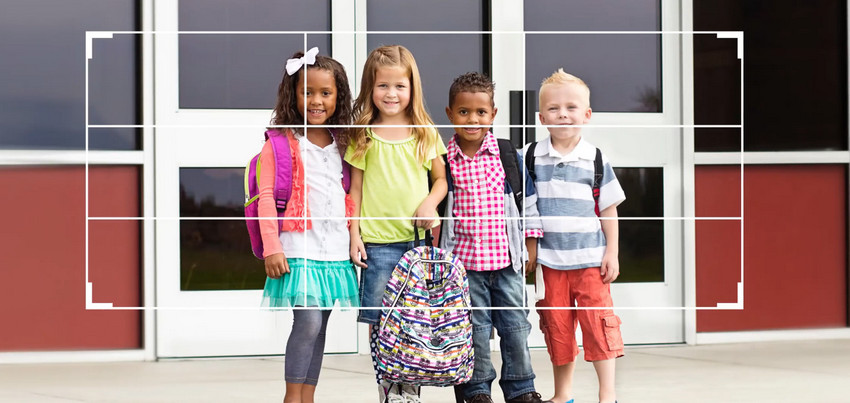
Tilting horizons can ruin otherwise perfect photos. Imagen AI detects and corrects horizon lines automatically, ensuring landscapes and architectural shots appear level and professional without manual adjustments.

Batch Processing for Maximum Efficiency
Handling dozens or hundreds of images manually can be exhausting and time-consuming. Imagen AI’s batch processing feature allows you to apply consistent edits across large photo libraries in just a few clicks. Exposure, color, noise reduction, and sharpening are automatically applied to every image, ensuring uniform quality while drastically reducing workflow time.
How Does the Pricing Stack Up?
Is saving hours of tedious editing worth the subscription cost? Imagen AI offers flexible plans to suit different user needs, from hobbyists to high-volume professionals.
- Pay-as-you-go: $0.05 per photo, minimum $7/month. Ideal for occasional editing or smaller portfolios.
- Annual Plans: Starting at US$67.5/month for 18,000 photos per year, with higher tiers for 36,000 or 72,000 photos. Best for creators managing hundreds of images weekly.
- Enterprise: Custom plan for 100,000+ photos per year. Tailored for large teams or high-volume workflows.

Overall, whether you choose pay-as-you-go, annual, or enterprise, the time saved through automated editing and batch processing often outweighs the subscription cost, especially for users handling large volumes of images.
Imagen AI Workflow: How to Edit Photos Using Imagen AI [Step-by-Step]
How does Imagen AI fit into a creator’s workflow? Here’s a detailed breakdown showing how it streamlines photo editing from start to finish.
Step 1: Import & Auto-Analysis
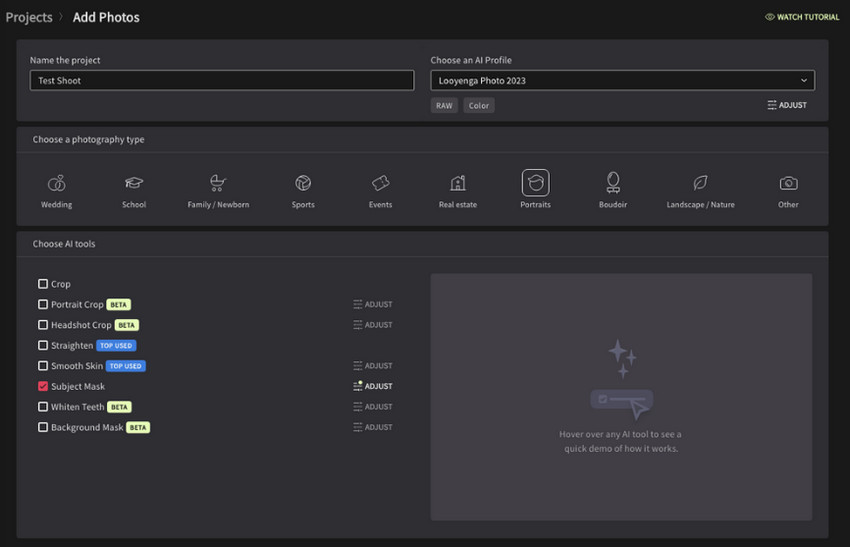
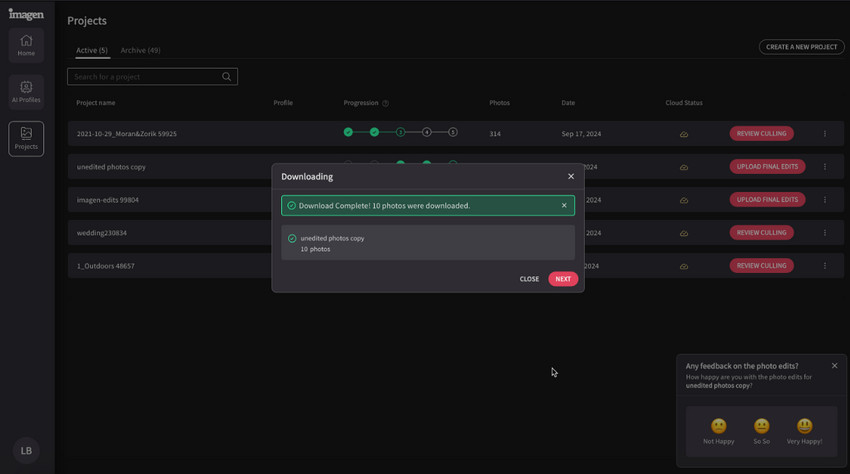
Create a project, and upload your RAW or JPEG images, then Imagen AI automatically evaluates key aspects such as exposure, color balance, sharpness, and composition. It generates suggested edits for each photo and ranks them by quality, helping you identify your best shots immediately.
Step 2: Batch Enhancements
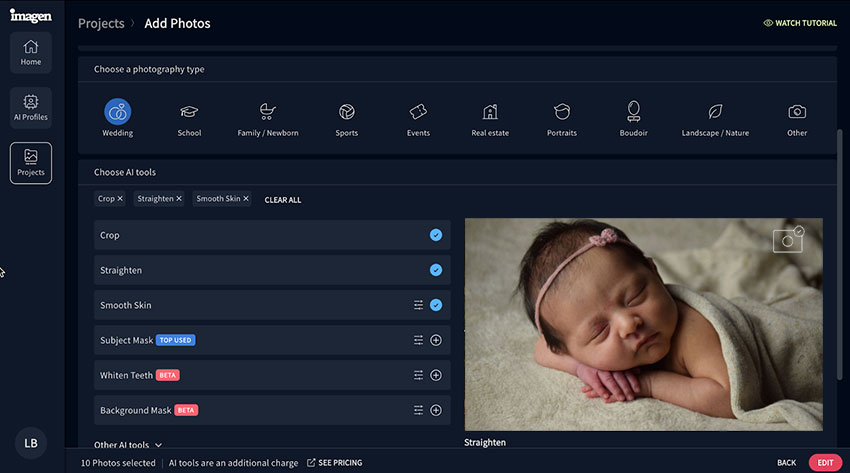
Select multiple images to apply automated corrections across the batch. Imagen AI adjusts lighting, color, noise, and sharpness consistently, saving hours of manual tweaking while maintaining a natural look for every photo.
Step 3: Smart Culling
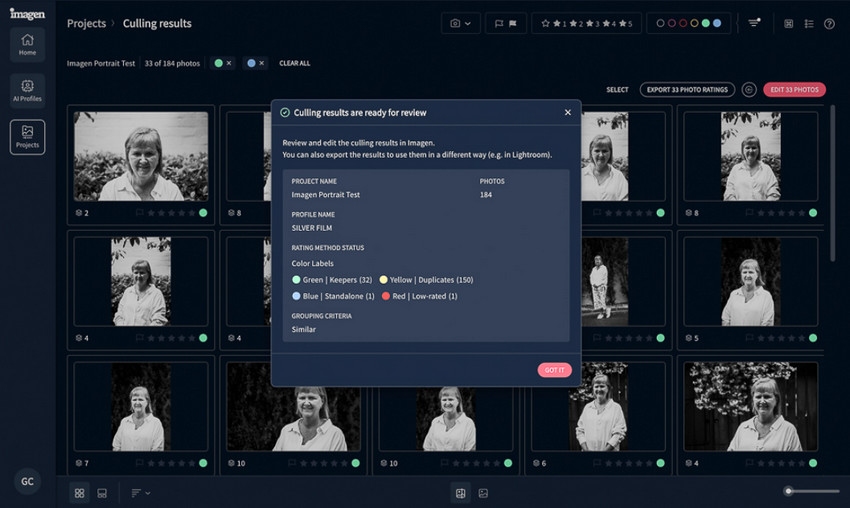
The AI ranks photos based on sharpness, composition, and overall quality. You can review top-ranked shots, discard duplicates or blurry images, and make minor manual tweaks if desired. This step significantly reduces the time spent on selecting the best images for editing.
Step 4: Export & Fine-Tune
Once edits are applied, export optimized images in your preferred resolution and format.
For users seeking extra refinement, Aiarty Image Enhancer can be used to enhance details, HDR, or color precision, giving your images a final professional polish.
Comparison with Photoshop + Lightroom
To understand how Imagen AI fits into modern workflows, it’s helpful to compare it with the traditional editing approach using Photoshop and Lightroom. While manual tools give full creative control, they often require significant time and effort, especially when working with large image libraries.
- Traditional Workflow:
- Imagen AI Workflow:
Manual editing involves selective adjustments, layers, masking, and careful color correction. While this offers high control, it is time-intensive, especially for large photo libraries.
Automates repetitive tasks such as color correction, exposure balancing, and batch enhancements. Ideal for creators handling large volumes of images, it drastically reduces editing time while maintaining professional-quality results. When combined with Aiarty Image Enhancer, you get precise fine-tuning without losing speed or consistency.
Pros and Cons
Before deciding whether Imagen AI is the right tool for you, it’s helpful to weigh its advantages and limitations. Here’s a clear overview of what works well and where you might need to supplement with other tools like Aiarty Image Enhancer.
- Intuitive interface and minimal learning curve
- High-quality, natural-looking automatic edits
- Efficient batch processing and smart culling
- Streamlines workflow for e-commerce, social media, and personal photography
- Less manual control for extreme edits
- Fine-tuning sometimes requires complementary tools like Aiarty Image Enhancer
Conclusion
After reviewing Imagen AI’s features, workflow, and performance, it’s clear that this tool is designed to save creators time while delivering professional-quality results. By automating repetitive tasks, intelligently culling images, and providing consistent edits, it allows photographers and content creators to focus more on creativity and less on tedious post-production.
For those who want to take their results even further, combining Imagen AI with Aiarty Image Enhancer can enhance textures, fine-tune colors, and optimize batch processing for ultimate image quality.
Imagen AI is particularly ideal for:
- Photographers managing large libraries
- E-commerce sellers needing consistent product shots
- Social media creators seeking speed and quality
- Travel and home users simplifying personal photo management
Overall, Imagen AI delivers impressive value for anyone prioritizing efficiency, consistency, and professional results. When paired with Aiarty Image Enhancer, it can create a hybrid workflow that rivals traditional Photoshop + Lightroom, combining speed with fine-tuned precision.
 FAQs About Imagen AI
Yes, Imagen AI carefully adjusts exposure, color, and detail to enhance your photos while keeping a natural appearance. Unlike some automated editors that may over-saturate or flatten tones, it preserves realistic colors and textures, making your images look professional yet authentic.
Imagen AI’s batch processing and smart culling can cut editing time by 50–70%, depending on the size of your photo library. Exposure correction, noise reduction, and color balancing are applied automatically across multiple images, saving hours compared to manual adjustments in traditional software.
Imagen AI supports RAW and JPEG files and all standard export formats on desktop. This ensures compatibility with most cameras and professional workflows. A stable internet connection is recommended for cloud-based processing to ensure smooth performance.
Imagen AI is designed to handle the majority of editing tasks automatically. It offers enough flexibility for most users to achieve high-quality results without needing additional tools. Its AI-driven workflow balances speed and quality, making complex edits simple and efficient.
You May Also Like


This post was written by Brenda Peng who is a seasoned editor at Digiarty Software who loves turning ordinary photos into extraordinary works of art. With AI assistance for brainstorming and drafting, the post is reviewed for accuracy by our expert Abby Poole for her expertise in this field.
