



Best AI Photo Enhancers for Mac: 6 Tools Compared



Before deep-learning photo quality enhancement, there are mathematical algorithms to sharpen photos, enhance contrast, upscale resolution, and bring back a better perceptual quality. With neural network models and AI-assisted editing, Mac users have no shortage of apps in 2026, and the best tool depends on what you are trying to improve.
To help you find the best fit, I tested the most popular photo enhancers and editing apps for macOS, while some dedicated to photo restoration and quality upscaling, others focusing on full-featured photo editing with enhancer integrations, or raw file processing.
In this guide, I will compare their strengths, limitations, pricing, and real-world use cases, with screenshots for comparisons.
Topaz Photo
- Pricing: $39/month personal plan (limited commercial use), or Topaz Studio: $69/month.
- Best For: Pros and studios to fix blurry, grainy, low-resolution photos, or generate details when faithful restoration isn't a concern.
Before it shifts to subscription-only model, Topaz Photo were one of the most popular AI photo enhancers for Mac. With the powerful diffusion models and generative upscaling, it worths the on-going subscription for creators with repeating projects and team works.
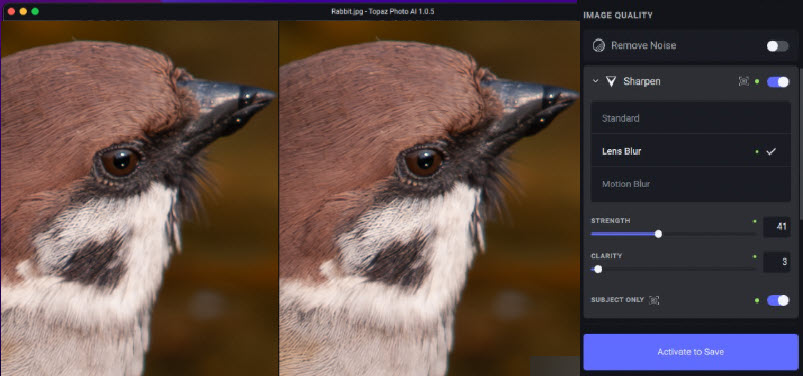
At its core, Topaz Photo helps to upscale photo resolution, fix blurry, degraded images, restore faces in portrait, as use Starlight models to generate new details for creative works. Personally, I love its auto copilot mode which analyzes the image problems and suggests targeted restoration.
The photo enhancer will apply targeted sharpening, noise reduction, and face recovery, with granular control to add grains and restore details. During my test, the focus feature that fix blurry photos require a powerful hardware, with 16GB RAM or higher to avoid app freezing or memory failure.
Sidenote: Topaz Photo works as a subscription-based app or as a plugin within Mac Photos, Photoshop, Lightroom, Affinity Photo, and Capture One. It is being purchased by Adobe, and the deal is set to finish later in 2026.
- New Wonder model for general upscaling, sharpening, and denoising.
- Starlight cloud rendering to generate new details and textures.
- 16GB Mac Mini 4 and low-specs MacBook struggles with batch tasks, such as 16K upscaling and strong focus fix.
- Limited sliders to adjust colors, highlights, shadows, etc.
Aiarty Image Enhancer
- Pricing: Free License in special offers. Lifetime License at $109, with free updates to future versions.
- Best For: Photographers, content creators, e-commerce sellers and home users needing standalone app to upscale images and restore photo quality with natural results.
Offering all the serious features as the dedicated photo quality enhancer for Mac and PC, Aiarty Image Enhancer is the best Topaz alternative for noise reduction, 4K/8K/16K upscaling, and detail restoration.
If you shoot with Sony, Canon, Nikon, Fujifilm, Olympus, etc, Aiarty helps to enhance the photo quality in low-light scenes, for cropped bird shots, and restore portrait faces. While in-camera JPGs can smear out details, Aiarty Image Enhancer can extract details from raw files, reduce high ISO noise, and restore the proper sharpness with a natural output.
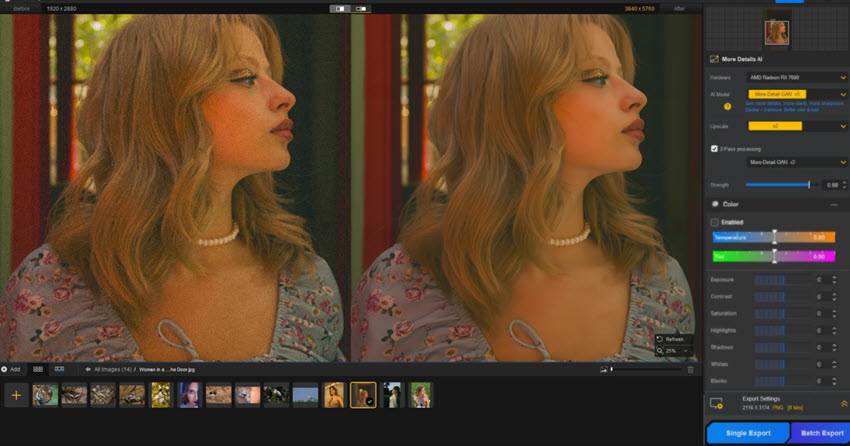
For designers, archivists, and general home users, Aiarty works to enlarge web assets, restore old photos, fix compression artifacts, and batch prepare images for high quality large prints. It uses local neural processing that takes advantage of Apple Silicon M-series, with dedicated models for different scenarios.
- Deep-learning models for low-light scenes, detail restoration, and faithful upscaling.
- Strength slider for granular manual controls, balancing the quality with a natural look.
- Seamless editing with color panels, face restoration, AI eraser, HDR, etc.
- Currently, Aiarty works as standalone offline app, without cloud rendering or online team work.
Pixelmator Pro
- Pricing: 1 month free. $12.99/month or $129/year or for students and educators: $2.99 per month or $29.99 per year. One-time purchase: $49.99.
- Best For: Designers and hobbyists needing a photo editor with AI image enhancements, layer-based graphic design, and vector editing, with option for one-time purchase.
Pixelmator Pro is Mac's equivalent to Photoshop that blends machine-learning AI enhancement into photo editing. Founded in 2007 by Lithuanian brothers Saulius and Aidas Dailide, the independent Pixelmator team has been in the market for 17 years before it was acquired by Apple in 2024.
It combines photo editing, vector illustration, digital painting, retouching, and photo enhancement in one program, powered by Apple's Metal graphics engine and Core ML for efficient processing. The edits are non-destructive so that you can adjust masks, layers, and effects.
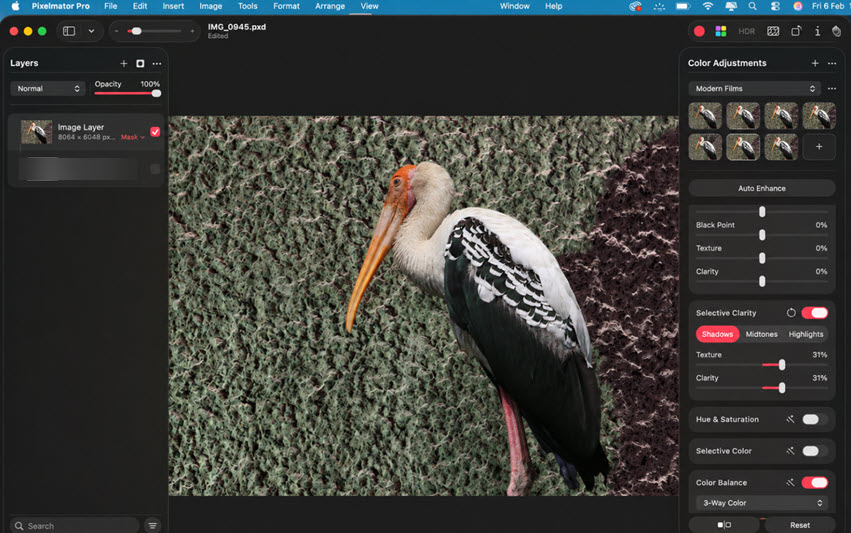
Below are some of the core features for photo enhancement and editing:
-Design tools for fonts, graphics, vectors, color grading, gradients, brushes, etc.
-Repair and erase tool to reduce blemishes and remove unwanted objects.
-AI Super Resolution to upscale low-resolution images and fix aliasing and blurriness.
-AI Background Removal to separate elements from backgrounds and replace content.
If you outgrow the default Photos app to edit photos on Mac and prefer to avoid the pricey and more complex Photoshop, Pixelmator sits in the best place for social media assets and photo retouching. It offers all the essential editing capabilities without the steep learning curve.
- Budget-friendly with all serious editing features and PSD file support.
- Intuitive interface with color panels, editing, clone, and repair tools.
- It lacks specialized AI restoration features as offered in Topaz and Aiarty.
- It is less robust when processing RAW, complex 3D-style, or using generative AI as in Photoshop.
Upscayl
- Best for: Image resizing, digital illustration upscaling, and anime enhancement.
- Pricing: Free trial, $9.99 (50 credit), $24.99/month (300 credits). 512px upscaling cost 3 credits each.
Upscayl gains popularity as the best free image enhancer for Mac and PC. It supports resolution upscaling by 2x, 4x, 8x, with quick delivering in png, jpg, and webp format. Depending on your image types and quality problems, there are several models to choose from. Picking a less suitable model may result in "not quality difference" upscaling as noted by Reddit users.
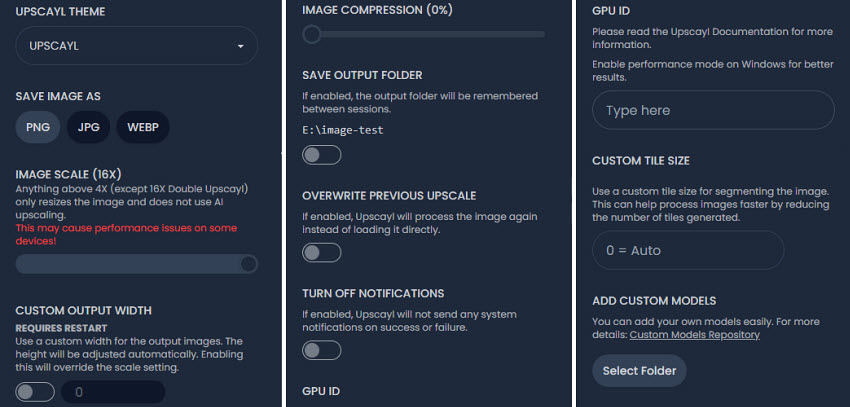
In typical workflows, I use these 4 models: Standard model for general images, Real Resolution model for a soft and smooth look, Quick Clear model for fast speed processing, Crystal Plus for noise reduction.
After a few iterations, the developers now also published an online app of Upscayl, with more AI models and photo editing tools. It also includes Face refinement and detail recovery options in paid version. It's image editing features allows for prompt-based processing, such as removing the tourists from a travel photo, adding sunset, changing the shirt color, or extending images.
- Free version for quick image resizing.
- AI anime models to smooth out lines and enhance dimensions.
- No integrated RAW workflow for camera users.
- Lacks the diffusion-based detail restoration in free version.
Affinity Photo
- Best for: Serious learners needing image editing app and enhancement features.
- Pricing: Core features are $0 with a Standard Canva account; More AI features in Premium plans, starting from $144/year Canva Pro.
If you are look for a free Photoshop alternative as the best image enhancer for Mac, look no further than Affinity Photo. Developed by Serif and purchased by Canva, it offers professional photo editing with AI-driven enhancement tools for macOS, iPad, and Windows.
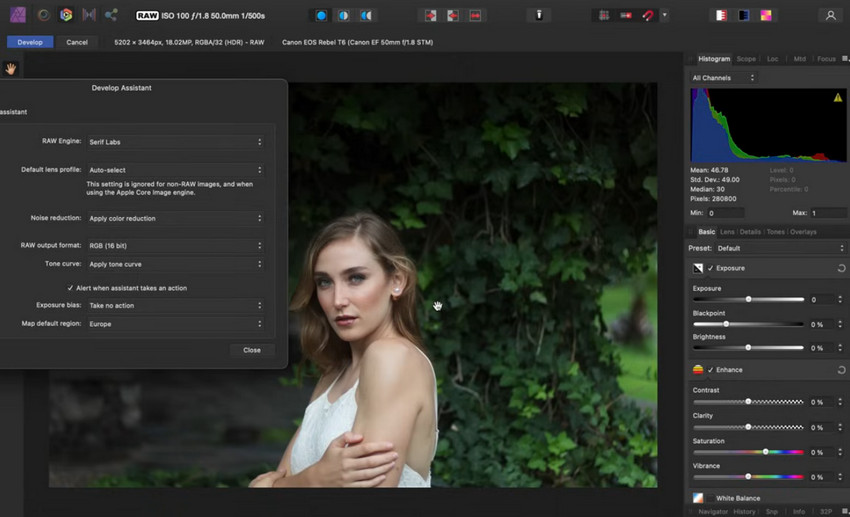
Compared to Photoshop, Affinity Photo offers photo editing, RAW processing, focus stacking, page layout, and vector design for free. AI-driven features are offered through premium Canva plans, including generative fill, expand, text prompt to images, background removal, AI image upscaling, and colorizers.
While Affinity Photo isn't a dedicated AI image enhancer in the same sense as Topaz and Aiarty, it includes AI-assisted photo enhancement into the photo editing workflow, as showcased in my in-depth review. For users already familiar with Photoshop, it's easy to navigate in Affinity for advanced editing and raw processing.; alternatively, you can resort to a native workflow with Pixelmator Pro for Mac.
- Free with core features for users interested in learning photo editing.
- Supports Claude desktop with Affinity's MCP Server.
- The iPad version stays at V2, which won't sync newer V3 projects from Mac.
DxO PhotoLab
- Best for: Photographers shooting in RAW and needing AI noise reduction, sharpening, and lens corrections.
- Pricing: 30-day free trial, $239.99 new license, $119.99 upgrading from older versions.
DxO PhotoLab is one of the best image enhancers for Mac if you mainly shoot in RAW with a DSLR or mirrorless camera. Unlike generative AI tools from Topaz that adds new detail, PhotoLab focuses on extracting sensor data and developing RAW to deliverable jpgs and pngs.
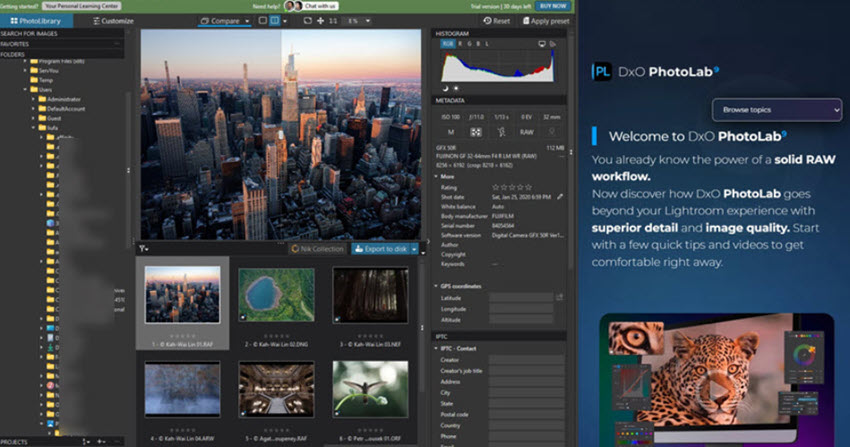
Widely acknowledged in the photographers communities, its DeepPRIME models helps to reduce the softness of RAW files, remove sensor noise and chroma aberration, and bring back clarity to the photos. Combined with DxO's extensive optical module database, it offers you options for lens correction, focus improvement, and image sharpening.
Besides RAW file and photo enhancement, DxO PhotoLab includes smart lighting, haze reduction color calibration, masking, and batch edits. In my testing, it helps produce cleaner wildlife photos, though it needs a large storage space for the lens and camera database and AI models.
- Industry-leading DeepPRIME AI noise reduction for RAW images.
- Large camera profiles for lens corrections, focus improvement, and calibration.
- Limited layer-based editing and no graphic design or compositing tools, compared to Pixelmator or Affinity.
- Mainly for Raw files. JPEG/PNG enhancement is less compelling than Aiarty and Topaz.
Key Takeaways
If your priority is restoring old, blurry, or low-resolution photos with AI, dedicated enhancement tools such as Topaz Photo AI and Aiarty Image Enhancer deliver the most noticeable improvements.
For photographers who primarily work with RAW files, DxO PhotoLab stands out for its industry-leading noise reduction and lens corrections, while Pixelmator Pro and Affinity Photo strike a great balance between image editing and AI-assisted enhancements for everyday creative work.
If your projects mainly focusing on photo editing on Mac, and the default Photos app is less capable, you can take a look at these free photo editors for Mac, before investing in Photoshop or Lightroom subscriptions.
You May Also Like


This post was written by Brenda Peng who is a seasoned editor at Digiarty Software who loves turning ordinary photos into extraordinary works of art. With AI assistance for brainstorming and drafting, the post is reviewed for accuracy by our expert Abby Poole for her expertise in this field.
