

Best Remini Alternatives in 2026: Free, Online, Mobile & PC Options

Updated on
Quick answer: For a Remini alternative, choose Aiarty Image Enhancer for PC, Topaz Image Web for online enhancement, PhotoGrid for free online editing, YouCam Enhance for faces, MyHeritage for old photos, or Upscayl for free local upscaling.
Remini is a popular AI photo enhancer widely used to sharpen blurry photos, enhance faces, and restore low-quality images with AI. But the best alternative depends on what you actually want to do. You may be looking for a free Remini alternative, an online photo enhancer, a Remini-like mobile app, or a PC tool that gives you more control over the final result.
In 2026, there are more options across each of these categories. Some focus on face enhancement and selfies, while others are better suited to old photo restoration, high-resolution upscaling, or local desktop processing. This guide compares the most useful Remini alternatives by what they do best, so you can find an option that fits your photos, workflow, and budget.
Which Remini Alternative Should I Choose?
| Tool | Best for | Platform | Free Option |
|---|---|---|---|
| Aiarty Image Enhancer | PC & natural enhancement | Windows, Mac | Limited |
| Topaz Photo | Professional Photo Enhancement | Windows, Mac | No |
| PhotoGrid | Free online enhancement | Web, Mobile | ✓ |
| Fotor | Online editing & enhancement | Web, Desktop, Mobile | ✓ |
| YouCam Enhance | Face & selfie enhancement | Web, Mobile | ✓ |
| MyHeritage | Old photo restoration | Web, Mobile | Limited |
| Upscayl | Free local upscaling | Windows, Mac, Linux | ✓ |
| PhotoDirector | All-in-one photo editing | Windows, Mac, Mobile | Limited |
| Vance AI | Online upscaling & restoration | Web, Desktop | Limited |
Why Look for a Remini Alternative?
Remini is particularly strong at quick AI photo enhancement, especially when the goal is to restore faces, sharpen blurry portraits, or improve older photos with minimal editing. Its simple, mobile-first workflow also makes it convenient for users who want to enhance a photo in just a few taps.
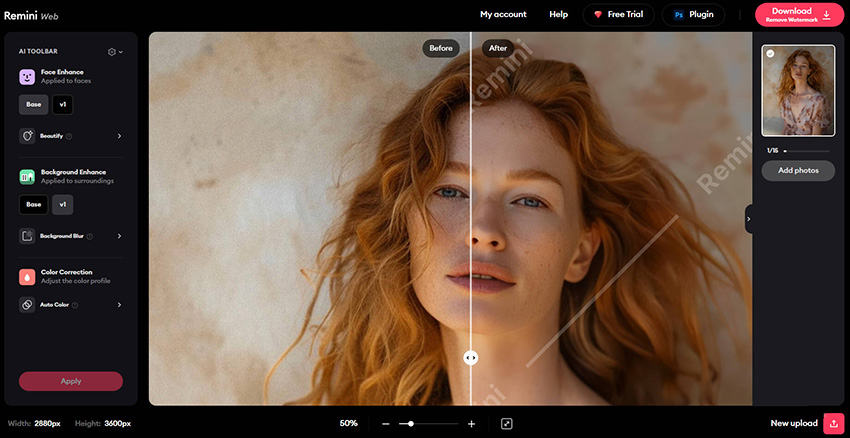
But not every photo enhancement task calls for the same approach. Some users want a desktop tool with more control over the enhancement process, while others prefer a free online editor, local processing, higher-resolution upscaling, or tools designed specifically for old photos and facial restoration.
That is where Remini alternatives become useful. Rather than looking for a single app that does everything better than Remini, it makes more sense to choose a tool based on the type of photos you work with and how you want to enhance them.
For example, you might look for an alternative if you want:
- More control over enhancement – adjust sharpening, denoising, face restoration, or other settings instead of relying mainly on automatic enhancement.
- Desktop or local processing – work with photos on Windows or Mac without relying on a mobile-first workflow.
- Higher-resolution upscaling – enlarge images for printing, cropping, or large-screen viewing.
- Specialized restoration – focus on old, damaged, or heavily degraded photos.
- Free or online options – enhance photos directly in a browser or without committing to a paid plan.
- Batch processing – enhance multiple images as part of a larger photo workflow.
So, the right Remini alternative depends less on finding a universally better app and more on finding the tool that matches your particular use case. The options below cover different needs, from mobile face enhancement and free online editing to desktop processing, photo restoration, and high-resolution upscaling.
While Remini is mainly used for photo enhancement, some users also explore Remini video enhancement alternatives when working with low-resolution or compressed video content.
Best Remini Alternatives for Different Photo Enhancement Needs
The alternatives below are not all designed to replace Remini in exactly the same way. Some focus on facial enhancement and selfies, while others are better suited to desktop workflows, online editing, old photo restoration, or high-resolution upscaling.
We’ve grouped them by their main strengths so you can focus on the options that best match how you actually use Remini. Each one includes a closer look at its enhancement capabilities, workflow, and the situations where it makes the most sense.
Aiarty Image Enhancer: Best for PC and Natural Detail Enhancement
If what you like about Remini is its ability to bring soft faces and low-resolution photos back into focus, but you want a desktop workflow and more control over the result, Aiarty Image Enhancer is worth considering. It works locally on Windows and Mac, with tools for upscaling, denoising, deblurring, face restoration, and manual color adjustment.
Unlike a mobile-first enhancement app, Aiarty is designed for working with larger image files and more detailed enhancement tasks. You can upscale images by 2x, 4x, or 8x, or choose output sizes such as 4K, 8K, and up to 32K on Windows. Face Restoration can help recover facial details, while the Strength control lets you reduce the effect when a stronger enhancement starts to look too processed.
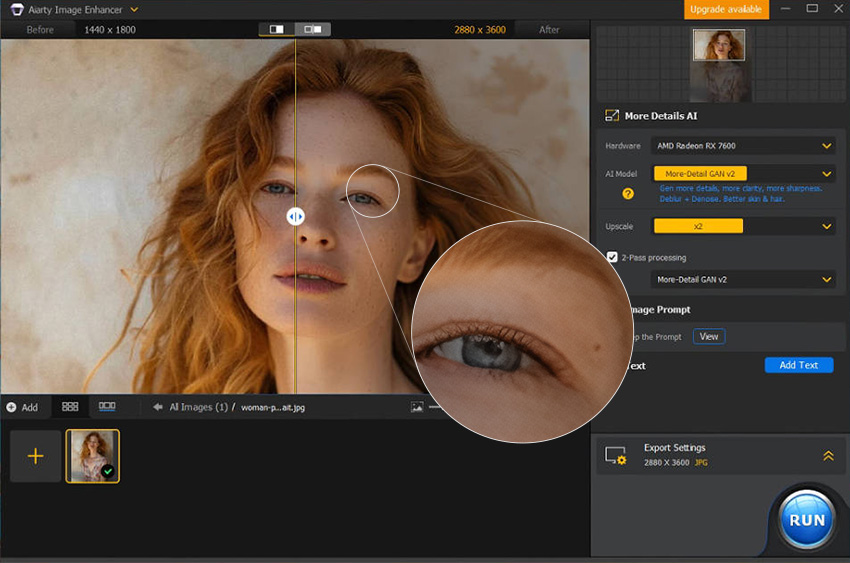
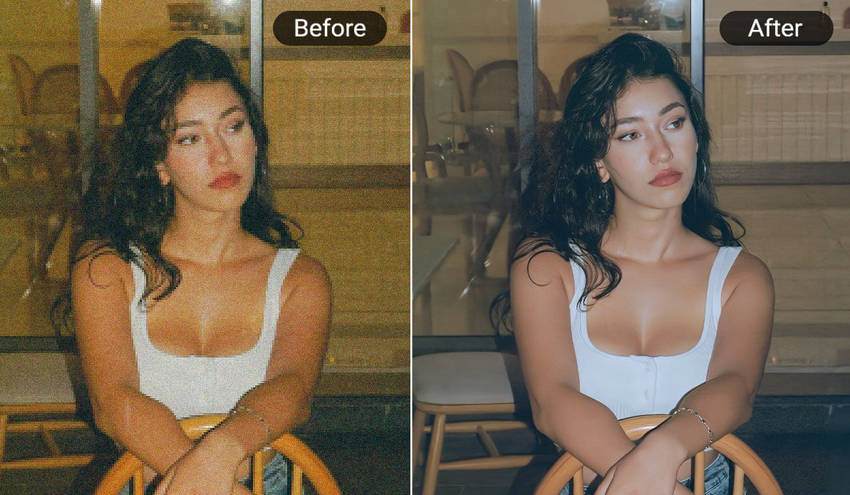
Before & After: In this example, the original portrait has soft facial features, visible noise, and weak texture. After enhancement, the eyes, hair, and facial contours become more defined, while the skin retains a more natural texture instead of looking overly smooth. The result is particularly useful when a portrait needs more detail after cropping or when the original image is noisy.

Aiarty also supports batch processing and local/offline enhancement, which can be useful when working through a larger collection of photos or when you prefer not to upload images to a cloud service. The trade-off is that it is more focused on image enhancement than on being a full photo editor, so users looking for extensive layer-based editing or creative effects may need another tool alongside it.
Price: $109 for a lifetime license covering 3 PCs/Macs with free updates, or $59 for a 1-year license with one seat access.
- Local processing on Windows and Mac without requiring cloud uploads.
- 2x, 4x, and 8x upscaling, with output options up to 32K on Windows.
- Face Restoration, denoising, deblurring, and manual color controls in one workflow.
- Adjustable Strength helps control how strongly details and faces are enhanced.
- Batch processing is useful for enhancing multiple photos at once.
- It focuses on image enhancement rather than full-scale photo editing.
- More advanced editing workflows may still require Lightroom, Photoshop, or another photo editor.
Topaz Photo: Best for Professional Photo Enhancement
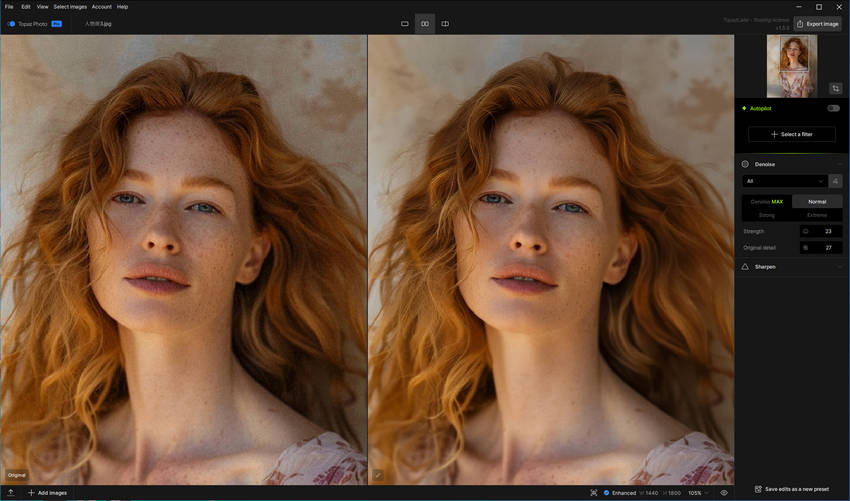
If you want a more professional desktop alternative to Remini, Topaz Photo focuses on detailed image enhancement rather than quick, mobile-style edits. It is designed for photographers and advanced users who need tools for denoising, sharpening, deblurring, face recovery, and upscaling, with more control over the final result.
Topaz Photo is particularly useful for noisy or slightly soft photos where preserving fine details matters. It also supports batch processing, making it a better fit for larger photo workflows than a typical mobile enhancement app.
Learn more about Topaz Photo vs Aiarty Image Enhancer.
- Strong tools for denoising, sharpening, deblurring, face recovery, and image upscaling.
- Offers more control over enhancement than a simple one-click mobile app.
- Designed with professional photography and detailed image processing in mind.
- Batch processing helps handle multiple images in a larger workflow.
- Its broader controls and professional-oriented workflow may feel more complex than Remini for casual users.
- It is better suited to users who prioritize image quality and control over a simple one-tap experience.
Before & After: In this example, the original image contains heavy noise and smoothed-out textures. After enhancement, noise is significantly reduced while fine details become more defined, resulting in a cleaner and more polished image.

If you prefer a browser-based workflow rather than a desktop application, Topaz also offers Topaz Image Web, which brings its image enhancement tools into the browser.
PhotoGrid: Best for Free Online Photo Enhancement
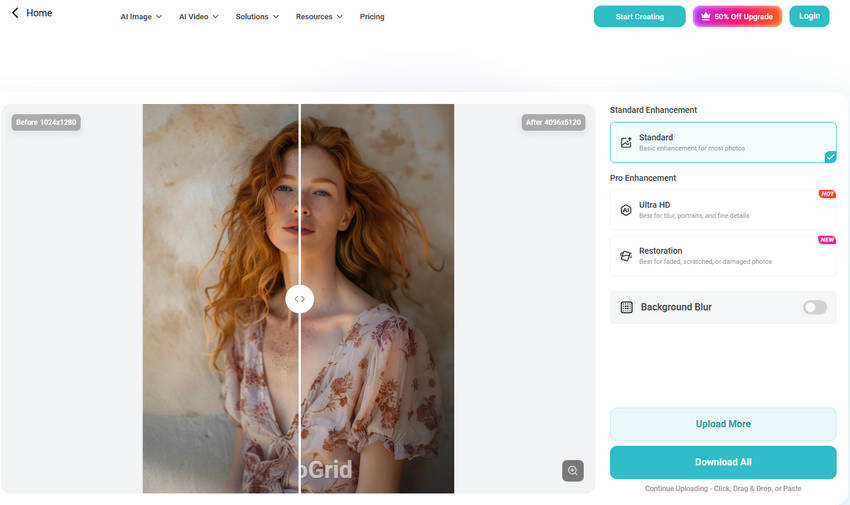
If you want a free Remini alternative that works directly in your browser, PhotoGrid is a convenient option. Its AI Image Enhancer can improve blurry, dark, grainy, and low-resolution photos with a one-click workflow, without requiring a desktop app or advanced editing skills.
PhotoGrid can enhance images to 4K, reduce noise, improve clarity, and enhance faces while keeping the workflow simple. It also supports batch enhancement, making it useful when you need to process several photos quickly. The tool is particularly suitable for selfies, social media images, everyday snapshots, and other photos that need a quick quality boost rather than detailed manual editing.
- Free online image enhancement with no desktop installation required.
- One-click enhancement for blurry, dark, grainy, and low-resolution photos.
- Supports 4K enhancement, face enhancement, and noise reduction.
- Batch enhancement helps process multiple images more quickly.
- Works well for selfies, social media photos, and everyday images.
- It offers less control over the enhancement process than dedicated desktop software.
- Users looking for advanced photo editing or more precise AI enhancement settings may prefer a professional desktop tool.
Fotor: Best for Online Editing and Photo Enhancement
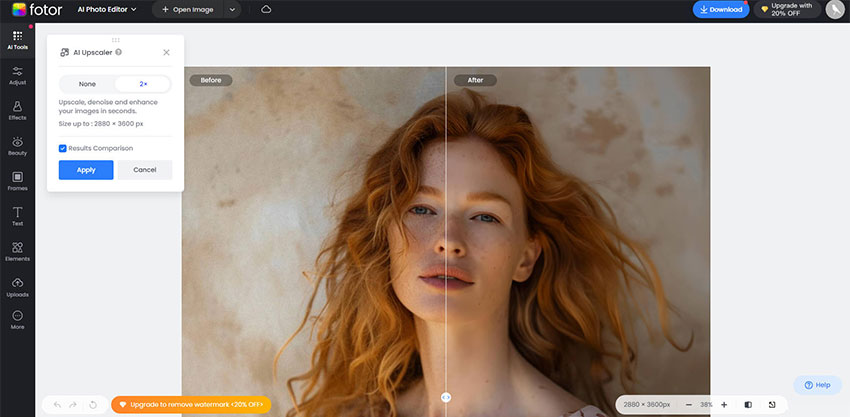
If you want a Remini alternative online that combines AI enhancement with broader photo editing tools, Fotor is worth considering. It offers image upscaling, sharpening, noise reduction, color adjustment, and AI-powered enhancement alongside filters, effects, collage tools, and graphic design features.
Fotor is designed for quick, browser-based editing, making it a convenient choice for casual users who want to enhance a photo without installing dedicated desktop software. Compared with a more specialized AI enhancer, its main advantage is the ability to continue editing the image after enhancement within the same platform.
- Combines AI photo enhancement with a broader set of online editing tools.
- Supports image upscaling, sharpening, restoration, color adjustment, filters, and effects.
- Its browser-based workflow is convenient for quick edits without desktop software.
- Useful for users who want to enhance, edit, and design with the same tool.
- Its wider range of editing features may be more than needed for users who only want one-click enhancement.
- Advanced photo editing and enhancement may require a more specialized desktop tool.
Try Fotor Image Enhancer Now >>
YouCam Enhance: Best for Faces and One-Tap Enhancement
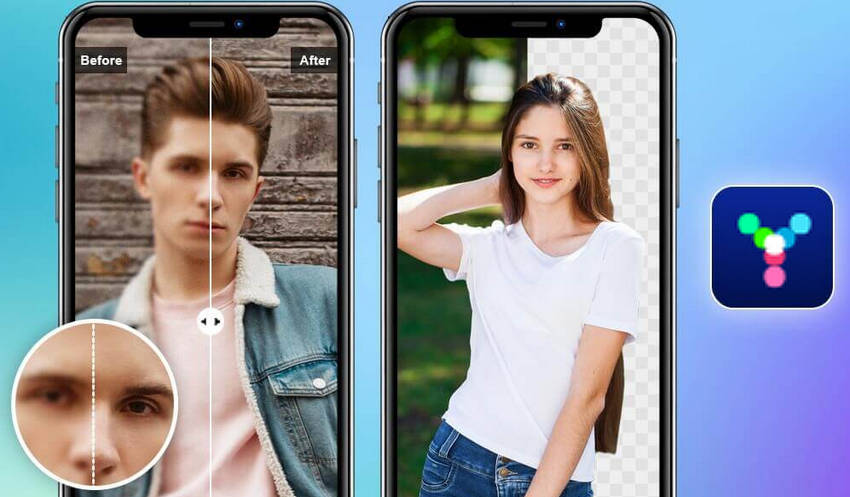
If you mainly use Remini to sharpen portraits, restore facial details, or improve blurry photos, YouCam Enhance is a close alternative. It combines one-tap AI enhancement with face restoration, denoising, upscaling, lighting correction, and old photo restoration, making it useful for both everyday portraits and lower-quality images.
YouCam Enhance is available as a mobile app and online tool, with AI enhancement that can upscale photos to 4K and improve details such as hair, eyes, and skin. It also includes dedicated tools for colorizing old photos and repairing scratches or other damage, giving it broader restoration capabilities than a basic portrait enhancer.
- One-tap enhancement for blurry, noisy, and low-resolution photos.
- Strong focus on faces, portraits, and facial detail enhancement.
- Supports upscaling to 4K, AI lighting, and color correction.
- Includes tools for repairing and colorizing old photos.
- Available on mobile and through an online browser-based workflow.
- Its automatic enhancement approach leaves less room for detailed manual control.
- Some advanced features and higher-quality output require a Premium subscription.
Before & After: In this example, the original portrait has soft facial details and visible image noise. After enhancement, the face appears sharper and clearer, with improved definition around the eyes, hair, and other facial features. The result fits users who want a quick portrait enhancement without a complicated editing workflow.
MyHeritage: Best for Old Family Photo Restoration
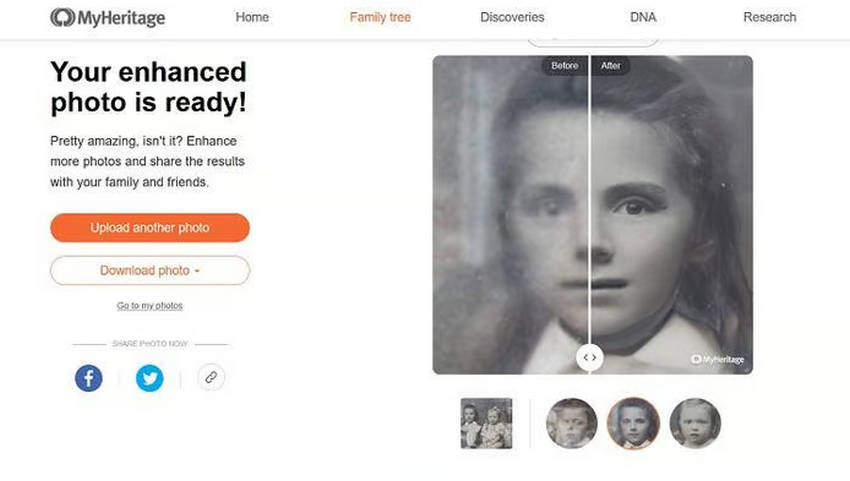
If your main reason for using Remini is to restore old, blurry, or low-resolution family photos, MyHeritage is a strong alternative to consider. Its Photo Enhancer is specifically designed to bring small or blurry faces in historical photos into sharper focus, making it particularly useful for family portraits, group photos, and scanned prints.
Beyond enhancement, MyHeritage offers tools for colorizing black-and-white photos and repairing scratches, tears, stains, and other damage. The platform also keeps the original photo intact when applying enhancements, which is useful when preserving historical images.
- Designed particularly well for old and historical family photos.
- Automatically detects and enhances individual faces, including faces in group photos.
- Combines photo enhancement with colorization and damage repair.
- Keeps the original photo intact instead of replacing it with the enhanced version.
- Available on the web and through the MyHeritage mobile app.
- It is more focused on family and historical photo restoration than general-purpose photo editing.
- Some photo features are included with a Photo Subscription, while limited use of certain tools is available for free.
Before & After: In this example, the original historical photo contains small, soft faces with limited visible detail. After enhancement, individual faces become clearer and easier to examine, making subtle facial features more visible without altering the original photo.

Try MyHeritage Photo Enhancer Now >>
Upscayl: Best for Free Local Image Upscaling
If you want a free Remini alternative for enlarging images locally, Upscayl is a strong option. It is an open-source AI image upscaler for Windows, Mac, and Linux that uses AI models to increase image resolution while improving edges and visible details.
Unlike Remini, which focuses more on automatic enhancement and facial restoration, Upscayl is primarily built for image upscaling. You can choose from different AI models and adjust the upscaling process based on the type of image and the result you want. Because it runs locally, it is also a practical choice for users who prefer free desktop software and do not want to upload photos to an online service.
Also Check: Full Upscayl Review: Features, Guide, and Test Examples
- Free and open-source, with no subscription required.
- Runs locally on Windows, Mac, and Linux without cloud uploads.
- Offers multiple AI models for different image types and upscaling needs.
- Can enlarge low-resolution images while improving edges and recovering visible details.
- Provides more control over the upscaling process than a typical one-click online enhancer.
- It is primarily an image upscaler rather than a full photo enhancement and editing suite.
- Choosing models and settings may require some experimentation to get the best result for different images.
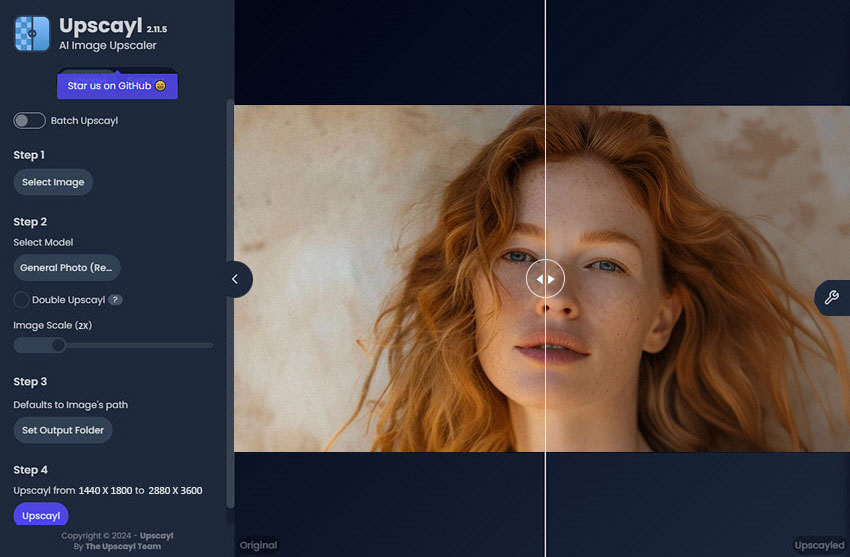
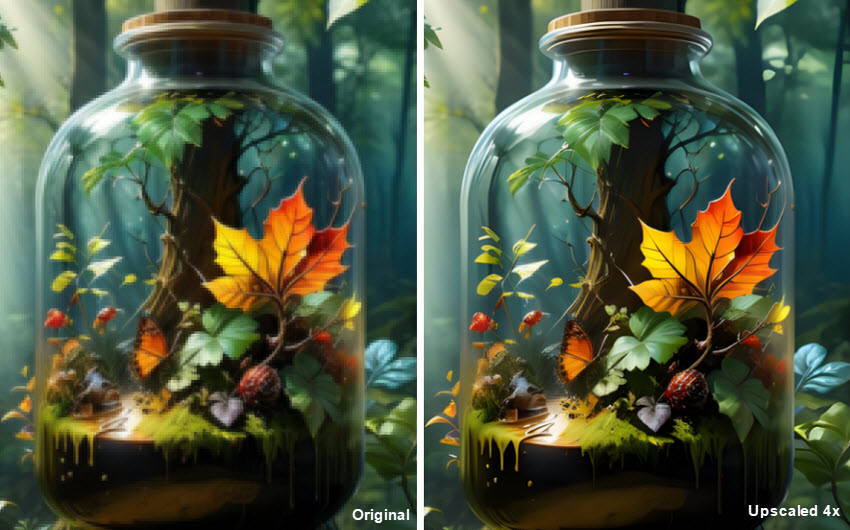
Before & After: In this example, the original image has low resolution, soft edges, and limited visible detail. After upscaling, the image appears larger and cleaner, with smoother edges and moderately improved details. The result shows where Upscayl works best: increasing the resolution of smaller images while keeping the enhancement process local and free.
PhotoDirector: Best for All-in-One Photo Editing
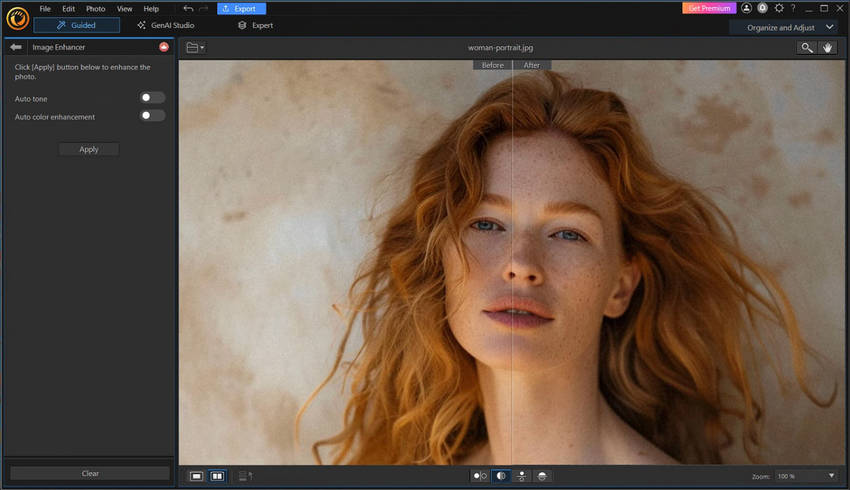
If you want a Remini alternative that combines AI enhancement with full photo editing, PhotoDirector is worth considering. It goes beyond automatic photo enhancement with tools for RAW editing, layer-based adjustments, photo organization, AI-powered retouching, and creative effects.
PhotoDirector is a better fit when you want to enhance a photo and continue refining it in the same application. Compared with a simple AI enhancer such as Remini, it provides more control over the editing process and supports a broader range of photography and creative workflows.
- Combines AI enhancement with a full set of photo editing tools.
- Supports RAW files and non-destructive, layer-based editing.
- Includes AI-powered tools for retouching, enhancement, and creative effects.
- Built-in photo organization helps manage larger image collections.
- Suitable for users who want editing and enhancement in one application.
- Its broader editing workflow can feel more complex than a one-tap enhancement app.
- Users who only need quick AI enhancement may not need its full range of editing features.
Vance AI: Best for Online AI Enhancement
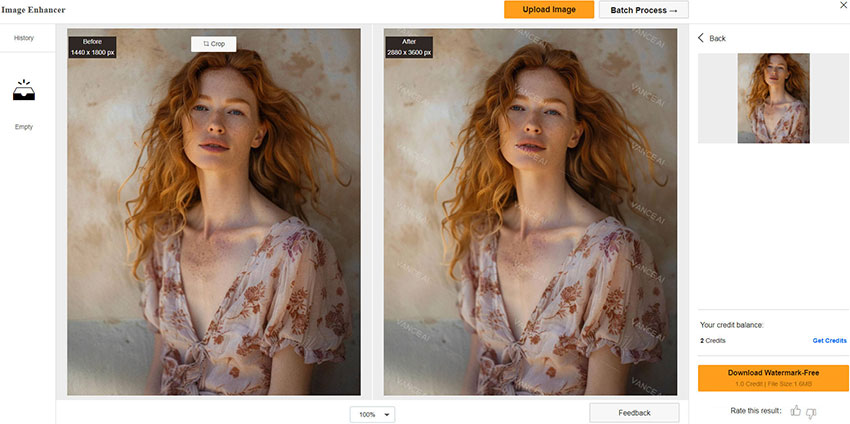
If you prefer a browser-based Remini alternative, Vance AI offers a range of AI tools for enhancing and upscaling images online. Its tools cover image enlargement, sharpening, denoising, portrait restoration, colorization, and other AI-powered effects, making it useful for quick fixes without installing desktop software.
Vance AI is particularly convenient when you want to upload an image, choose an enhancement tool, and process it online. Its broader selection of AI tools also makes it useful for experimenting with different types of image enhancement, although users who prefer local processing or more detailed control may find a desktop enhancer more suitable.
- Works online without requiring desktop software installation.
- Offers AI tools for image upscaling, sharpening, denoising, and portrait restoration.
- Also provides specialized tools such as colorization and creative image effects.
- Simple browser-based workflow is convenient for quick image enhancement.
- Online processing requires an internet connection and uploading images to the service.
- Free use may have limits on credits, image size, or available features.
Which Remini Alternative Is Right for You?
The best Remini alternative depends on how you want to enhance your photos. Consider whether you need a Remini-like mobile experience, free online enhancement, desktop processing, natural-looking results, or specialized photo restoration.
- Want a Remini-like app with easy face enhancement? → YouCam Enhance
- Want a free online alternative for quick photo enhancement? → PhotoGrid
- Want Remini for PC with natural enhancement, face restoration, and more control? → Aiarty Image Enhancer
- Want professional photo enhancement with advanced sharpening and denoising? → Topaz Photo
- Want to restore old family photos and enhance faces? → MyHeritage
- Want free local processing without cloud uploads? → Upscayl
- Want an all-in-one photo editor with AI tools? → PhotoDirector
Conclusion
The best Remini alternative depends on how you want to enhance your photos. For quick online edits, PhotoGrid, Fotor, and Vance AI are convenient choices, while YouCam Enhance is well suited to face enhancement. If you need to restore old family photos, MyHeritage offers more specialized restoration tools, and Upscayl is a useful free option for local image upscaling.
For users looking for Remini for PC, Aiarty Image Enhancer offers a more complete desktop workflow with local processing, face restoration, denoising, deblurring, and upscaling. Its adjustable enhancement strength also gives you more control over how much detail is added, which can help keep portraits and other photos looking natural.
Want to try a Remini alternative on your PC? Download Aiarty Image Enhancer for free and see how it handles your own photos.
 FAQ about Remini Alternatives
The best Remini alternative depends on your needs. YouCam Enhance is a good fit for quick face enhancement, PhotoGrid is useful for free online enhancement, MyHeritage is designed for old photo restoration, and Upscayl offers free local image upscaling. For PC users who want local processing, face restoration, upscaling, and more control over enhancement, Aiarty Image Enhancer is a strong option.
Yes. Several Remini alternatives offer free or limited free enhancement. PhotoGrid provides free online AI image enhancement, while Upscayl is a free and open-source desktop upscaler for Windows, Mac, and Linux. Other tools may offer free credits or limited features before requiring a subscription.
Yes. Aiarty Image Enhancer and Topaz Photo are desktop alternatives for Windows and Mac. Aiarty focuses on local photo enhancement with upscaling, denoising, deblurring, face restoration, and adjustable enhancement strength, making it suitable for users who want more control than a typical mobile enhancement app.
Yes. PhotoGrid offers free online AI image enhancement directly in a browser, with tools for improving blurry, noisy, dark, and low-resolution photos. Fotor and Vance AI also provide browser-based image enhancement, although free usage and available features may vary.
Yes. Many Remini alternatives can improve blurry or low-resolution images through AI upscaling, sharpening, denoising, or face restoration. The results vary depending on the original image and the type of blur or detail loss, so heavily blurred or severely degraded photos may still have limited recoverable detail.
Over-sharpening, excessive smoothing, or aggressive face reconstruction can make skin and facial features look artificial. Tools with adjustable enhancement strength can give you more control over the result and help preserve natural-looking skin texture and facial details.
You May Also Like


Brenda Peng is a seasoned editor at Digiarty Software who loves turning ordinary photos into extraordinary works of art. With years of experience behind the lens and in front of the computer, Brenda shares her passion for photography, image enhancement, and editing through easy-to-follow tutorials.
