


7 Best Video Denoisers in 2026: Tested for Low-Light, Grainy & Compressed Footage



Video noise can make otherwise good footage look soft, dirty, or unprofessional. It often appears as grain, colored speckles, blocky compression artifacts, or flickering texture in low-light clips, old home videos, mobile videos, and heavily compressed social media footage. The right video denoiser should clean the frame without turning faces into plastic, wiping away texture, or creating ghosting between frames.
For this updated guide, we compare 7 video denoising tools for different real-world needs: quick AI cleanup, low-light video noise reduction, old video restoration, batch processing, free/open-source workflows, online fixes, and mobile enhancement. Instead of only listing features, this guide explains what each tool is best for, where it struggles, and how to choose the best video denoiser for your own footage.
What Causes Video Noise and How AI Video Denoising Works
Video noise is unwanted visual information that appears across a frame. It can come from high ISO settings, weak lighting, small camera sensors, old analog tapes, aggressive compression, or repeated exporting. In practice, users usually describe the problem as grainy video, noisy low-light footage, pixel noise, colored speckles, or video artifacts.
Before choosing a video denoiser, it helps to understand the type of noise you are trying to remove. A tool that works well for low-light phone footage may not be the best choice for VHS restoration or professional color grading.
How We Tested These Video Denoisers
To make the comparison more useful, we evaluated each tool based on common footage types rather than ideal demo clips. The test scenarios included low-light street footage, compressed social video, old home video samples, noisy mobile footage, and low-resolution clips that needed both denoising and upscaling.
- Noise reduction quality: how much visible grain, colored noise, and compression noise were reduced.
- Detail preservation: whether faces, hair, fabric, text, and background texture stayed natural.
- Temporal stability: whether the result flickered, ghosted, or changed texture between frames.
- Ease of use: whether beginners can get clean results without complex settings.
- Workflow fit: whether the tool works better as a desktop app, plugin, web tool, or mobile app.
AI Video Denoising vs Traditional Noise Reduction
Traditional video noise reduction usually relies on spatial or temporal filtering. It can work very well when the user understands the footage and knows how to fine-tune the settings, but heavy filtering may soften details or create a waxy look. AI video denoising uses trained models to identify noise patterns and reconstruct cleaner frames. This can be especially helpful for compressed videos, old low-resolution clips, and footage where noise reduction and detail recovery are both needed.
Quick Comparison of the Best Video Denoisers
7 Best Video Denoisers Tested for Noise Reduction
The best video denoiser depends on the footage. If you want a simple AI workflow, Aiarty is the most balanced choice. If you need maximum AI reconstruction quality and have strong hardware, Topaz Video AI is a strong option. If you work inside Premiere Pro, Final Cut Pro, or DaVinci Resolve, Neat Video offers deeper manual control. For online or mobile-only work, Clideo and Remini are more convenient, but they are better for light fixes than serious restoration.
1. Aiarty Video Enhancer
Best for: users who want an easy AI video denoiser that can reduce noise, recover detail, upscale footage, and improve old or compressed videos in one workflow.
Compatibility: Windows & MacOS
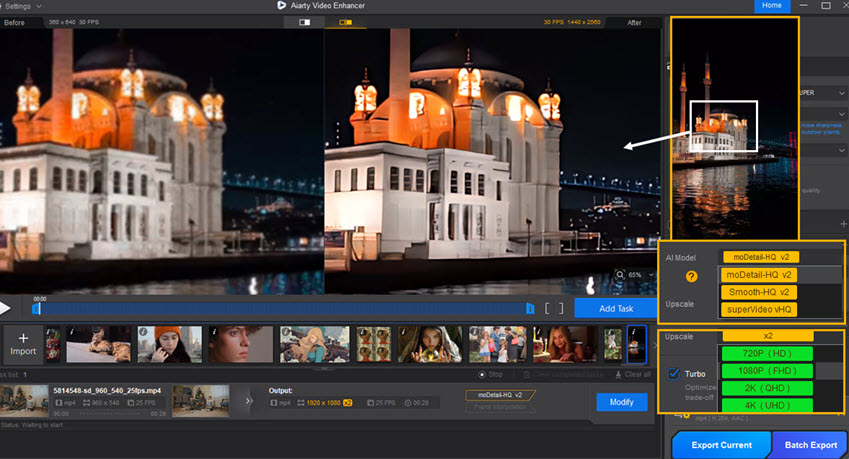
Aiarty Video Enhancer is the best overall option for most users because it balances denoising quality, ease of use, and restoration features. It is especially useful when the footage has more than one problem, such as low-light noise, compression artifacts, soft details, and low resolution. Instead of applying a simple blur filter, Aiarty uses AI enhancement models to clean noise while improving perceived clarity.
In real-world use, Aiarty is strongest on everyday creator footage: noisy phone clips, old family videos, downloaded social videos, low-resolution recordings, and clips that need both denoise and upscale. It is also more beginner-friendly than professional plugins because the workflow does not require building a custom noise profile or manually adjusting many temporal/spatial settings.
Test notes: On compressed low-light footage, Aiarty produced a cleaner image while keeping faces and edges more natural than basic online tools. The best results came from using denoise and enhancement conservatively instead of pushing the effect too far.
- Easy AI workflow for beginners and content creators.
- Works well for low-light noise, compression artifacts, soft footage, and old videos.
- Can combine AI denoising with detail recovery and AI video upscaling.
- Batch processing helps clean multiple clips in one workflow.
- Professional colorists may still prefer plugin-based tools for manual noise profiling and frame-by-frame control.
2. Topaz Video AI
Best for: advanced users who want high-quality AI denoising, upscaling, and video enhancement, and who have enough hardware power for longer processing jobs.
Compatibility: Windows and macOS.
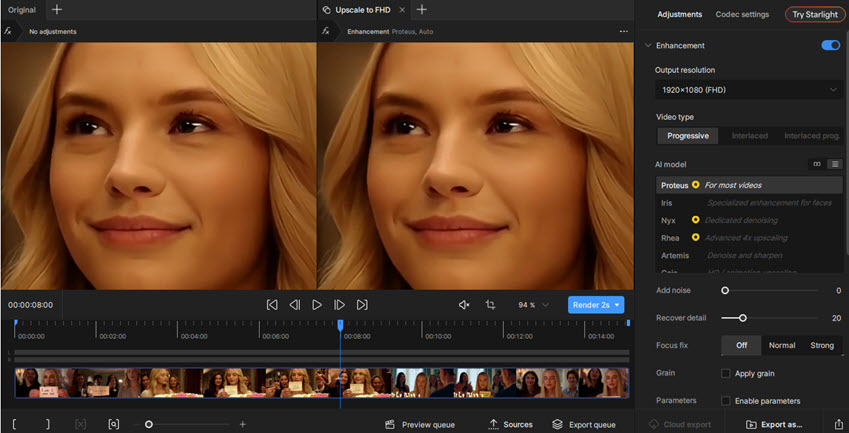
Topaz Video AI is one of the best-known AI video enhancement tools. It is not only a denoiser; it can also upscale, sharpen, stabilize, and improve damaged or low-resolution footage. For noisy videos, Topaz is useful when you want a strong AI reconstruction workflow and are willing to test different models and settings.
Topaz can produce impressive results on old or low-resolution footage, but it is more demanding than simple denoising tools. Processing can be slow on large files, and the best settings depend heavily on the source clip. It is a better fit for users who care about maximum output quality than users who only need a quick cleanup.
Test notes: Topaz worked well on footage that needed both denoising and upscaling. On very noisy clips, conservative settings helped avoid artificial texture or over-sharpened edges.
- Strong AI models for denoising, upscaling, and restoration.
- Useful for old videos, low-resolution footage, and high-quality enhancement projects.
- Good detail recovery when the model is matched well to the source.
- Batch processing is helpful for larger projects.
- Requires a powerful computer for smooth processing.
- Can be expensive for casual users.
- Results depend on model choice and settings; overprocessing can create artificial details.
3. UniFab Denoise AI
Best for: users who want a straightforward AI video denoiser with batch processing and a simple learning curve.
Compatibility: Windows & MacOS
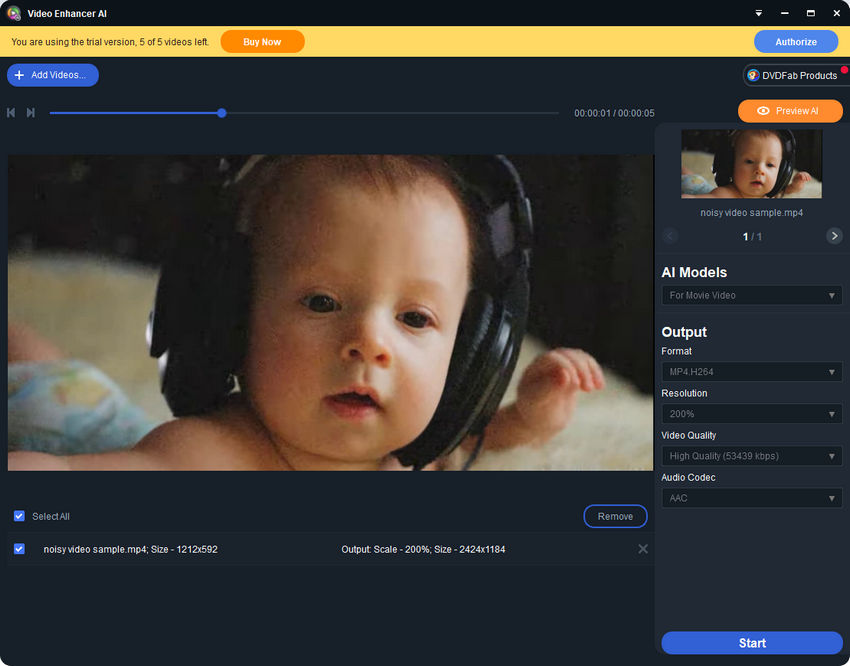
UniFab Denoise AI is a practical choice for users who need to clean several videos quickly without building a professional editing workflow. Its biggest advantage is convenience: import the footage, choose the enhancement option, and process the file with GPU acceleration.
Compared with more advanced tools, UniFab is less focused on manual control. That makes it easier for beginners, but it also means users have less room to fine-tune difficult clips. It is best for general noise reduction rather than complex restoration work where every frame needs precise treatment.
Test notes: UniFab handled general grain and compression noise well enough for casual content, but it was less flexible when the footage had mixed problems such as motion blur, heavy noise, and poor detail at the same time.
- Simple workflow for quick AI video denoising.
- Batch processing is useful for creators handling many clips.
- GPU acceleration helps reduce processing time.
- Beginner-friendly interface.
- Less precise than professional noise reduction plugins.
- Limited advanced customization for difficult footage.
- Not the best choice for high-end restoration or color grading workflows.
4. Real-ESRGAN
Best for: technical users who want a free, open-source AI restoration option and do not mind command-line setup.
Compatibility: Windows, MacOS and Linux (Requires Python and CUDA for GPU acceleration)
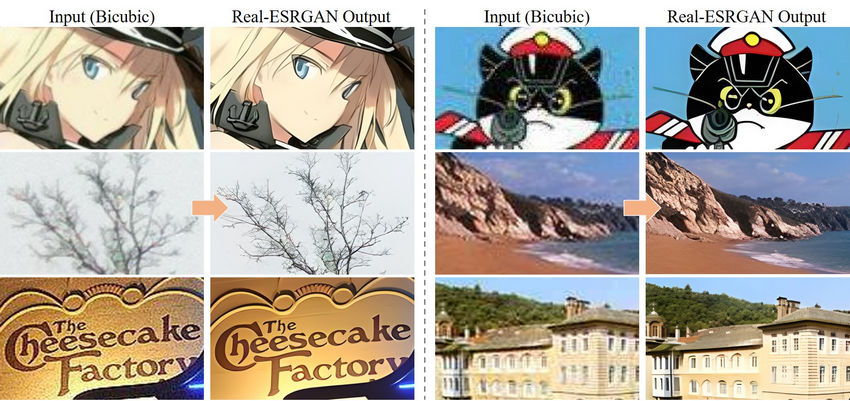
Real-ESRGAN is an open-source AI restoration model originally known for image and video upscaling, but it can also help reduce visible artifacts and improve low-quality footage when used in a video frame workflow. It is attractive because it is free, flexible, and supported by a large open-source community.
The trade-off is usability. Real-ESRGAN is not a polished one-click video denoiser for beginners. To use it on video, users often need to extract frames, process them, and reassemble the video, or use a third-party interface. For users comfortable with technical workflows, it can be a powerful free option. For casual users, a desktop AI video enhancer is usually much easier.
Test notes: Real-ESRGAN was most useful for low-resolution and compressed footage where upscaling was part of the goal. It is less convenient for users who only want to remove noise from a finished video file quickly.
- Free and open-source.
- Useful for AI upscaling and restoration workflows.
- Can improve low-resolution or compressed footage when used properly.
- Flexible for technical users who want control over the pipeline.
- Requires technical setup and may involve command-line tools.
- Not a simple one-click video denoiser.
- May require additional tools to process full video files.
5. Neat Video
Best for: video editors who need professional noise reduction control inside editing software.
Compatibility: Windows and macOS.
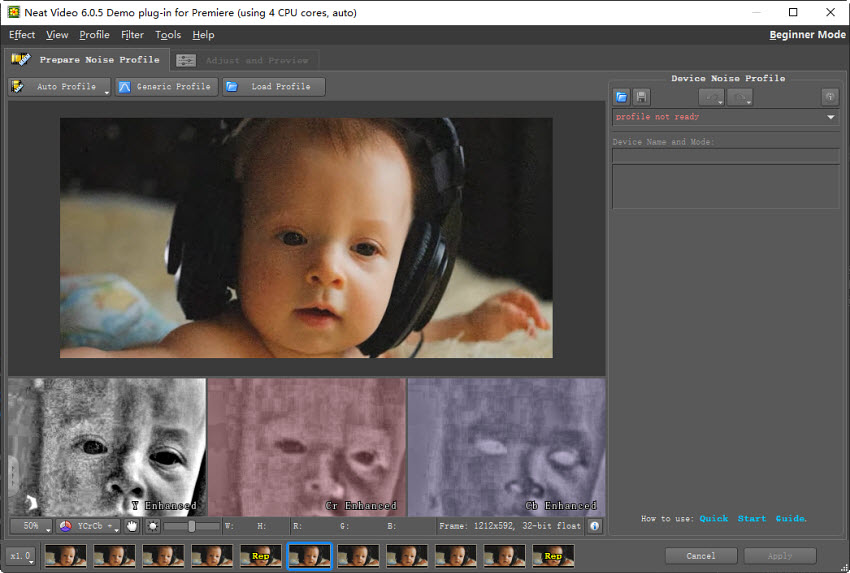
Neat Video is a long-standing professional denoising plugin. Unlike one-click AI enhancers, it is built around noise analysis and manual control. This makes it especially useful for editors working with low-light camera footage, digitized film, old camcorder video, drone footage, or clips where preserving natural texture matters.
The main advantage of Neat Video is control. Editors can build a noise profile, adjust how much noise is removed, and balance smoothing against detail retention. The downside is that it takes more time and experience than beginner AI tools. It also works as a plugin, so users need compatible editing software.
See also: Neat Video vs Topaz Video AI: Which Video Denoiser Performs Better?
Test notes: Neat Video remains a strong choice when the goal is controlled noise reduction rather than broad AI enhancement. It is particularly useful when you want to reduce noise without changing the natural look of the footage too much.
- Professional-grade noise reduction with detailed control.
- Good for low-light camera footage, film grain, VHS, and difficult noise patterns.
- Lets experienced editors balance noise removal and texture preservation.
- Works inside major video editing workflows.
- Steeper learning curve than one-click AI tools.
- Requires compatible editing software.
- Manual setup can be time-consuming for quick social clips.
6. Clideo Video Denoiser
Best for: casual users who need a quick online video denoiser for short clips and light cleanup.
Compatibility: Web-based.
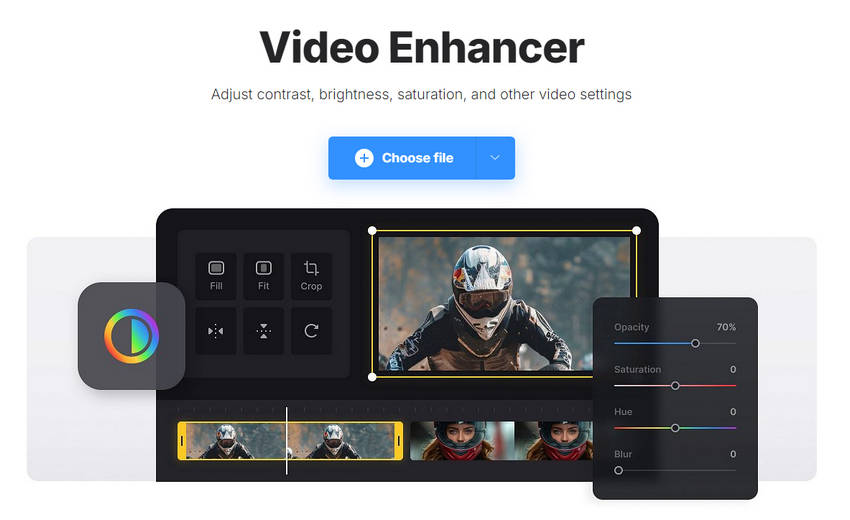
Clideo Video Denoiser is useful when convenience matters more than advanced quality. Because it runs in a browser, it is a practical option for users who do not want to install software or learn a desktop editor. It can help with simple noise reduction tasks, especially for small clips intended for casual sharing.
However, online denoisers usually have limits around file size, export quality, upload time, privacy, and advanced controls. Clideo is not the best choice for large 4K files, old video restoration, or professional projects. It works better as a quick fix than a serious video enhancement workflow.
Test notes: Clideo is convenient for fast cleanup, but desktop AI tools produced cleaner and more detailed results on heavily compressed or low-light footage.
- No installation required.
- Very simple for beginners.
- Good for short clips and quick online fixes.
- Works from a browser on most devices.
- Limited control compared with desktop denoising software.
- Not ideal for large files, 4K footage, or serious restoration.
- Upload and export limits may affect workflow.
7. Remini
Best for: mobile users who want a quick AI enhancement option for short videos.
Compatibility: Web-based, Android, and iOS
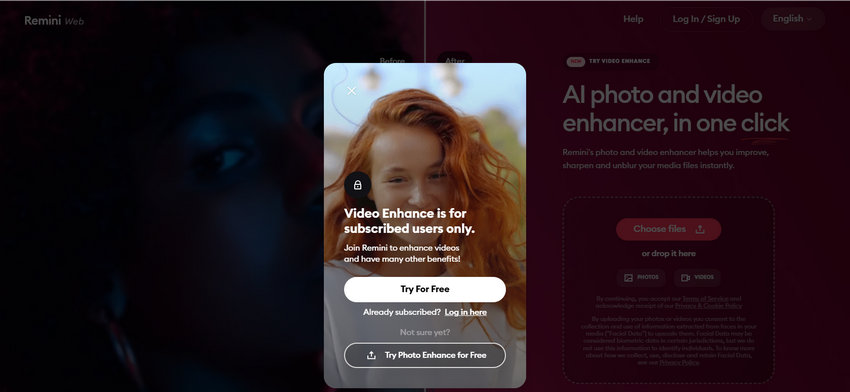
Remini is better known for AI photo enhancement, but it can also help mobile users improve short videos without desktop software. Its biggest advantage is accessibility. For creators who work mostly from a phone, Remini offers a fast way to clean up and enhance clips before posting.
As a video denoiser, Remini is best for simple mobile workflows rather than high-end projects. It does not offer the same level of control as Neat Video, nor the broader desktop restoration workflow of Aiarty or Topaz. Still, for quick social videos, it is convenient and easy to understand.
Test notes: Remini is useful for fast mobile enhancement, especially when the clip is short. For longer, heavily compressed, or old footage, a desktop denoiser gives more stable quality and control.
- Convenient for mobile creators.
- Simple interface with minimal setup.
- Useful for quick enhancement before posting.
- Works on mobile and web.
- Limited customization options for advanced users.
- Not ideal for long videos or professional restoration.
- Quality may not match desktop AI video denoisers on difficult footage.
How to Choose the Right Video Denoiser for Your Needs
The best video denoiser depends less on the brand name and more on the type of noise you are trying to remove. A clip recorded in low light needs a different workflow from an old VHS transfer, a compressed social media video, or a short mobile clip. Before choosing a tool, look at your footage closely: is the problem grain, colored speckles, blocky compression artifacts, flicker, softness, or a mix of several issues?
1. Choose based on the type of noise
- Low-light and grainy footage: Choose Aiarty Video Enhancer, Topaz Video AI, or Neat Video. These tools are better suited for noisy shadows, high ISO clips, and footage where you still need to preserve facial details, fabric texture, and background structure.
- Compression artifacts: Choose an AI-based tool such as Aiarty Video Enhancer or Real-ESRGAN, especially when the video also needs detail recovery, sharpening, or upscaling. This is common with clips downloaded from social platforms, old exports, or heavily compressed H.264/HEVC files.
- Old home videos or VHS footage: Use a restoration-style workflow rather than simple noise reduction. Aiarty Video Enhancer is easier for beginners who want denoising, deblurring, and upscaling in one place, while Neat Video gives experienced editors more manual control over grain, flicker, and noise profiles.
- Short online clips: Clideo can work for a quick browser-based fix when the noise is mild and the file is short. However, it is not ideal for heavy noise, large projects, high-resolution exports, or footage that needs careful detail preservation.
2. Choose based on your skill level
- Beginners: Choose Aiarty Video Enhancer, UniFab Denoise AI, Clideo, or Remini if you want fewer manual settings and a faster learning curve. These tools are better for users who want to import a clip, preview the result, and export without building a complicated editing workflow.
- Advanced users: Choose Topaz Video AI or Neat Video if you are willing to tune settings for each clip. They are better suited for editors who want more control over denoise strength, detail recovery, sharpening, temporal consistency, or plugin-based workflows.
3. Choose based on your workflow
- Desktop AI workflow: Aiarty Video Enhancer and Topaz Video AI are better for users who want denoising, upscaling, sharpening, and restoration in one desktop program.
- Editing plugin workflow: Neat Video is better for editors who prefer to work inside Premiere Pro, Final Cut Pro, DaVinci Resolve, After Effects, or similar editing software.
- Free or open-source workflow: Real-ESRGAN is a strong option if you are comfortable with technical setup, command-line tools, or community-built workflows.
- Mobile workflow: Remini is convenient for quick phone-based enhancement, especially for casual users who need a fast result rather than advanced control.
Best Video Denoiser by Use Case
By matching the denoiser to the footage type, you can get a cleaner result without destroying the original texture. For most noisy videos, start with a conservative AI denoise setting, check facial details and edges, and only increase intensity if the footage still looks visibly grainy.
 FAQs
FAQs
For most users, Aiarty Video Enhancer is the best overall choice because it combines AI denoising, detail recovery, video upscaling, and old video enhancement in a beginner-friendly workflow. Professional editors who need more manual control may prefer Neat Video, while advanced AI users may prefer Topaz Video AI.
To remove grain from a video, import the clip into a video denoiser, preview a noisy section, apply moderate noise reduction, and check whether faces, hair, text, and background details still look natural. Avoid using the strongest setting immediately, because heavy denoising can make the image look blurry or waxy.
Yes. Real-ESRGAN is a free open-source option for technical users, and some online tools such as Clideo offer limited browser-based cleanup. Free tools can be useful, but they may require technical setup, have file size limits, or provide fewer controls than paid desktop denoisers.
AI can reduce noise while preserving more detail than basic blur-based filters, but the result still depends on the source video and settings. For best results, use a high-quality source file, apply denoise moderately, preview motion areas, and avoid over-sharpening after noise reduction.
Aiarty Video Enhancer, Topaz Video AI, and Neat Video are strong choices for low-light video noise. Aiarty is easier for beginners, Topaz is useful when you also need AI upscaling and enhancement, and Neat Video is better for editors who want manual noise profiling.
Neat Video is usually better for controlled noise reduction inside an editing workflow, especially when you want manual settings and a natural image. Topaz Video AI is better when you also want AI upscaling, restoration, sharpening, or broader enhancement beyond denoising.
Denoising itself does not truly increase resolution, but many AI video denoisers also include upscaling or detail recovery. Tools such as Aiarty Video Enhancer and Topaz Video AI can reduce noise and upscale low-resolution footage in the same workflow.
You May Also Like


This post was written by Brenda Peng who is a seasoned editor at Digiarty Software who loves turning ordinary photos into extraordinary works of art. With AI assistance for brainstorming and drafting, the post is reviewed for accuracy by our expert Abby Poole for her expertise in this field.
