


When it comes to cleaning noisy or low-light footage, two names appear in some discussions: Neat Video and Topaz Video AI. Both are capable denoising solutions, but they work in very different ways. Neat Video focuses on manual, profile-based control, while Topaz uses an automated AI engine that attempts to restore details and reduce noise simultaneously.
Because every video clip responds differently to each approach, many editors compare the two tools to figure out which one handles their specific footage best. This article takes a clear look at how Neat Video and Topaz differ in quality, workflow, and cost, and what to do if neither option gives you the results you want.
Before diving into the full comparison, it's worth noting that Neat Video and Topaz Video AI are not your only options and neither tool performs perfectly on every type of footage.
If you find Neat Video too technical or Topaz too expensive, or if both struggle with your particular noise pattern, you may want to try a third approach - Aiarty Video Enhancer.
Aiarty Video Enhancer offers an easier, more affordable, all-in-one solution with AI denoising, sharpening, deblurring, upscaling, and more, making it a strong alternative or a reliable backup during your comparison.
Why Aiarty is Worth Trying
- Beginner-friendly workflow with straightforward controls
- Fast processing powered by full GPU acceleration
- More affordable — lifetime license is only $165 and covers 3 devices
- Specialized low-light denoising models for cleaner details and reduced grain
- Adjustable enhancement strength to balance clarity and natural texture
You can try Aiarty first to see if it already solves your footage issues or keep it as a backup option while evaluating Neat Video and Topaz Video AI.
Neat Video vs. Topaz Video AI: A Practical, Real-World Comparison
Noise Reduction Quality
Neat Video relies on a more traditional, profile-based approach. You teach it what noise looks like by sampling a uniform patch of your footage, and the tool builds a noise profile around that information. When the profile is accurate, Neat Video produces exceptionally clean, controlled results without introducing AI-style hallucinations or unexpected artifacts. Many editors who shoot in controlled environments still prefer Neat Video because of how predictable its output is.
Topaz Video AI, on the other hand, treats denoising as a pattern-recognition problem. Instead of asking you to define what noise looks like, it uses trained AI models to recognize and remove noise automatically. This works remarkably well for messy, mixed-light, high-ISO, or low-light footage where noise has more complex structure. However, because AI is making decisions for you, the results can vary. Some clips come out beautifully clean, while others may look slightly over-smoothed or lose fine texture. As many users on forums point out, "the model either nails it or goes a bit too far".
Control vs. Automation
This is where the two tools feel completely different.
Neat Video is a tool for the perfectionist. It doesn't just guess the noise; it relies on Device Noise Profiles to mathematically map the specific noise characteristics of your camera sensor. It gives you deep access to the engine room: you can fine-tune temporal filtration (radius and threshold), adjust spatial filter settings across different frequency ranges (High, Mid, Low), and independently handle luminance (Y) and chrominance (CrCb) channels.
If you are the type of editor who needs to surgically remove noise while preserving a specific film grain structure, Neat Video rewards that obsession. However, this precision comes at a cost: the interface is dense, technical, and can be intimidating for anyone who doesn't understand the physics of digital noise.
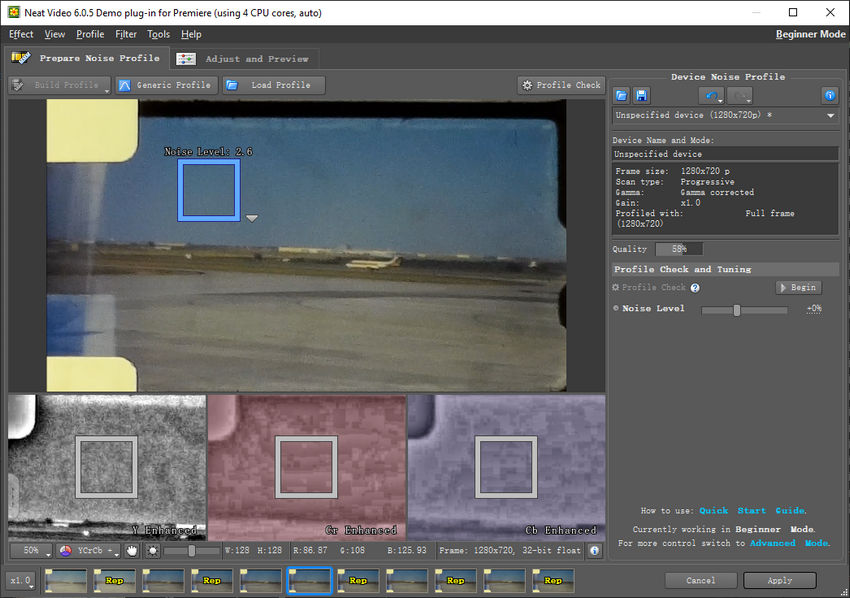
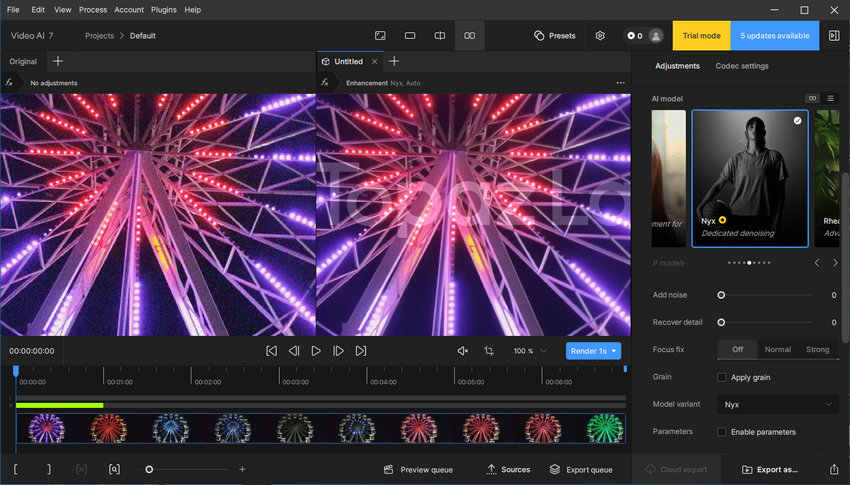
Topaz Video AI goes in the opposite direction. You pick a model, adjust a couple of strength sliders, preview the output, and let the AI do the rest. The goal here is to hide complexity behind automation. This makes Topaz far more approachable for new users or editors who simply want a good result fast, but it also means you have less control when the AI makes a questionable decision.
User Experience and Workflow
Neat Video is a plugin, so it lives inside your NLE—Premiere, DaVinci Resolve, Final Cut, Vegas, and so on. For editors who already spend all their time in these programs, this feels natural. You apply the effect to a clip, adjust settings, and render as part of your normal timeline.
Topaz Video AI, historically, has been a standalone application. While they have recently introduced plugins for Adobe and DaVinci Resolve, the standalone workflow remains the most popular way to use it due to stability and resource management. Using Topaz inside an NLE can often be incredibly taxing on system resources, leading to timeline lags or crashes. Consequently, most users still prefer to export a video, process it in the Topaz standalone app, and import the huge file back into the editor.
Speed and Hardware Requirements
Neat Video is historically CPU-intensive. While newer versions support GPU acceleration to assist with the math, it involves heavy calculation for every single frame. On complex 4K timelines, it is not uncommon for render times to triple or quadruple when Neat Video is applied.
Topaz Video AI operates differently but faces similar bottlenecks. It relies entirely on heavy AI inference, which puts a massive load on your GPU. Despite updates, user forums are filled with complaints about sluggish performance. Even with a high-end NVIDIA RTX 4090, upscaling or denoising a feature-length clip can take hours—sometimes days. If you are running on older hardware or a mid-range laptop, Topaz can feel painfully slow, making it impractical for tight deadlines.
Pricing and Value
Neat Video generally has a lower entry price ($79.90), but the hidden cost lies in its licensing structure. The licenses are host-specific. If you purchase the plugin for Adobe Premiere Pro today, but decide to switch to DaVinci Resolve next month, your license won't transfer—you have to buy it again. For freelancers working across multiple NLEs, these costs stack up quickly.
Topaz Video AI has the highest barrier to entry and the most controversial payment structure. It is now offered primarily as an expensive subscription, costing $299 annually for a personal license. While this fee includes access to all new AI models and updates, the critical drawback is that you are simply renting the tool; you lose access to the software entirely the moment your subscription expires. This high recurring annual cost and the lack of permanent ownership is a significant turn-off for many professionals and hobbyists who prefer to own the tools they rely on.
Which One Should You Choose?
If you prefer precision and manual control—and you don’t mind spending time profiling noise—Neat Video remains one of the most consistent and reliable denoisers available.
If you want automation, modern AI enhancement, and a tool that can do more than just denoise, Topaz Video AI is a much broader solution, especially if you have a strong GPU to support it.
The Reality: No Denoiser is Perfect
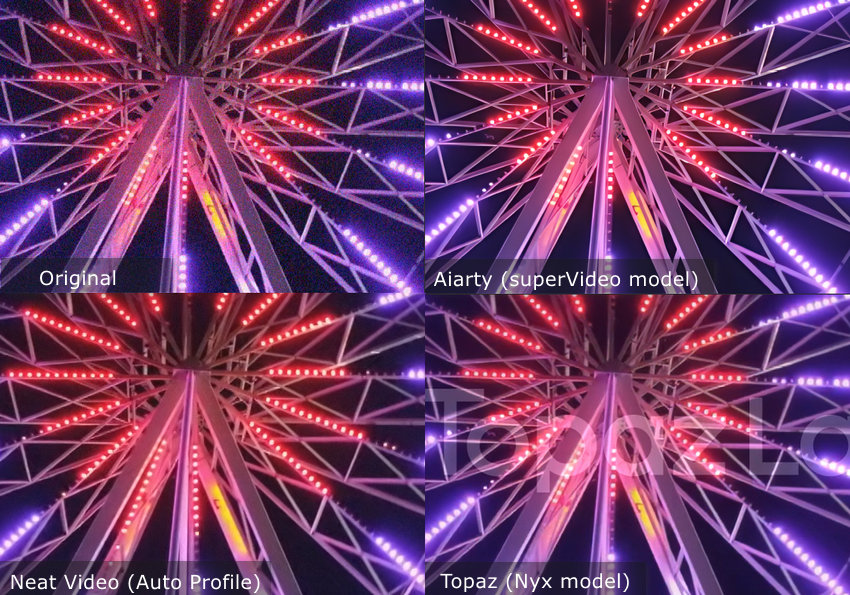
No denoising tool works perfectly on every type of footage. It’s always a good idea to test before you buy. Maybe Neat Video handles Clip A better, while Topaz Video AI excels on Clip B. Or perhaps both struggle with your particular noise pattern.
When Both Options Fall Short
But what if neither of the industry giants delivers a satisfactory result? What if Neat Video is too complicated for the specific noise pattern you have, or Topaz applies that undesirable plastic look?
At this point, you don't need to return to your original noisy footage. You can try something else, such as Aiarty Video Enhancer.
Aiarty works in a way similar to Topaz, with comparable features such as AI-powered denoising, sharpening, deblurring, and upscaling — but at a more affordable price point.
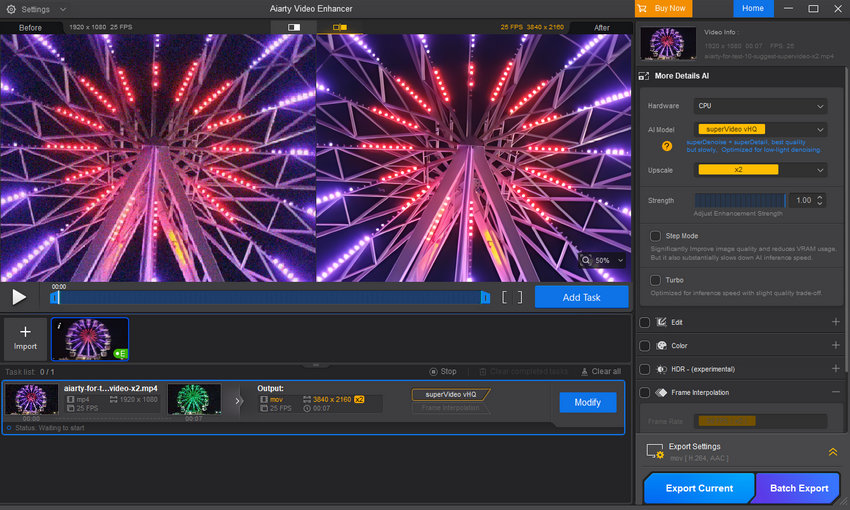
Below, we’ve prepared a comparison table of all three tools, including price and features, so you can quickly see how they stack up.
| Feature | Neat Video | Topaz Video AI | Aiarty Video Enhancer |
|---|---|---|---|
| Software Type | Plugin (NLE Add-on) | Standalone App (Optional Plugin) | Standalone App |
| Pricing Model | Perpetual (Host-Specific) | Subscription ($299/yr) | Subscription ($79/yr) or Perpetual (Lifetime License: $165 for up to 3 devices) |
| Denoising Method | Profile-Based, Algorithmic | AI Model Inference | AI Model Inference |
| Ease of Use | Low (Technical, steep learning curve) | Medium | High (Beginner-friendly workflow) |
| Upscaling | No | Yes | Yes |
| Deblurring | No (Relies on sharpening) | Yes | Yes |
| Frame Interpolation | No | Yes | Yes |
| SDR to HDR | No | Yes | Yes |
| Color Correction/Grading | No | No | Yes |
| Strength Adjustment | Very High (Granular, profile-based) | Medium (Model selection, generic sliders) | Medium (Adjustable enhancement strength slider) |
| Compatibility | Excellent NLE integration (If licensed) | Good (Mainly Windows/Mac Standalone) | Good (Windows/Mac Standalone) |
You May Also Like


This post was written by Brenda Peng who is a seasoned editor at Digiarty Software who loves turning ordinary photos into extraordinary works of art. With AI assistance for brainstorming and drafting, the post is reviewed for accuracy by our expert Abby Poole for her expertise in this field.
