


A comparison between DxO and Topaz can go wrong before a single slider is touched. A photograph that looks too noisy, one that is slightly out of focus, and one that has been cropped down to a few megapixels may all look "soft" on screen, but they are three different problems. The useful question is not which app makes the most dramatic before-and-after image; it is which one addresses the problem without damaging what was captured.
DxO approaches image quality from the RAW file outward. PhotoLab combines RAW development, calibrated lens corrections, selective editing, and DeepPRIME noise reduction; PureRAW performs much of that technical cleanup before the file moves into Lightroom or another editor. Topaz Photo works more like a specialist repair bench. Alongside RAW noise reduction, it offers sharpening, face recovery, and enlargement tools for files where the original detail is compromised or simply too small for the intended output.
That difference shapes the entire review. For a well-focused, high-ISO wildlife RAW, the priorities are clean demosaicing, believable feather texture, and unobtrusive sharpening. For a slightly missed-focus portrait or a small web image headed for print, the question becomes how far reconstruction can go before skin, hair, or fine edges stop looking credible. Those are the distinctions worth examining, along with editing handoffs and the cost of keeping each tool in a working photography setup.
DxO vs Topaz: Quick Verdict
| What Matters Most | Most Relevant Tool |
|---|---|
| RAW noise reduction | DxO |
| Fine detail in focused RAW files | DxO |
| Lens corrections | DxO |
| Complete RAW editing | DxO PhotoLab |
| Lightroom RAW preprocessing | DxO PureRAW |
| Missed-focus recovery | Topaz Photo |
| Blur correction | Topaz Photo |
| Heavy crop recovery | Topaz Photo |
| Upscaling | Topaz Photo |
| Low-resolution restoration | Topaz Photo |
| Perpetual licensing | DxO |
The short version: DxO is the more natural choice when you want to develop a RAW file accurately, especially if noise and lens defects are the main concerns. Topaz Photo becomes more interesting when focus, resolution, or damage is the limiting factor. These are workflow recommendations based on the tools and their constraints, not a claim that either product won a controlled image-quality test across every camera and subject.
DxO PhotoLab, PureRAW, and Topaz Photo: What Are We Comparing?
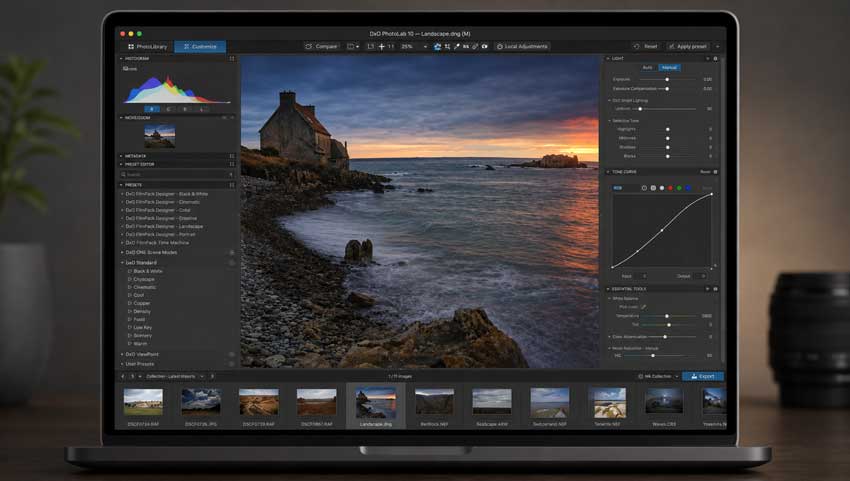
DxO PhotoLab
Think of DxO PhotoLab as a primary RAW editor, not simply a denoising plug-in. It provides exposure and tonal controls, color grading, local masks, optical corrections, and DeepPRIME in the same editing environment, so a photographer can finish most conventional RAW work without leaving the application. Its calibrated camera-and-lens profiles are particularly relevant for architecture, landscape, and product photography, where distortion, edge sharpness, and consistent color matter as much as noise.
PhotoLab can also hand a developed image directly to Affinity as a native .af document, including an optional uncorrected layer for comparison or selective blending. That is useful when RAW development is complete but an image still needs detailed retouching or compositing. The distinction is worth making: this exports the processed result, not a fully editable copy of PhotoLab's RAW settings.
DxO PureRAW
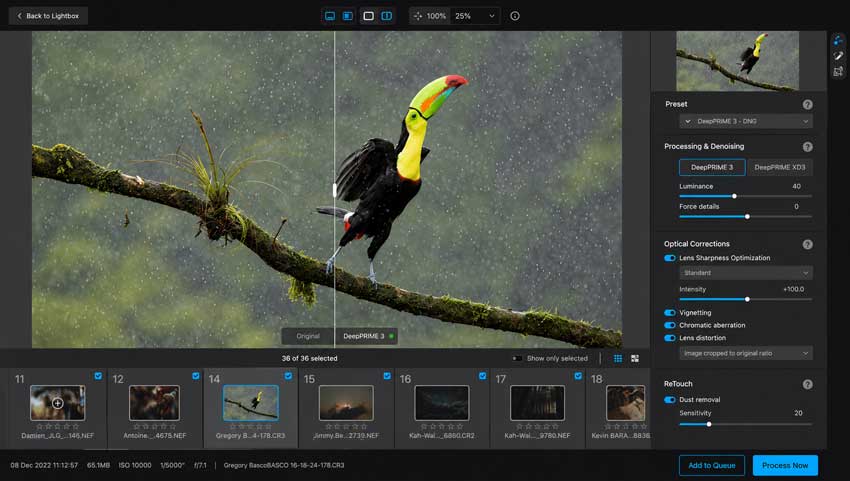
DxO PureRAW makes more sense for photographers who already know where they want to finish their images. It takes the original RAW, applies demosaicing, DeepPRIME noise reduction, and camera-specific optical corrections, and produces a DNG that can be edited in Lightroom Classic. In practice, this avoids introducing a second full editing interface just to improve noisy, high-ISO files. Its strengths are technical consistency and batch preparation, not creative color grading or complex local retouching. Support for particular cameras and sensor types should still be checked before buying, especially when using newer bodies or Fujifilm X-Trans files.
Topaz Photo
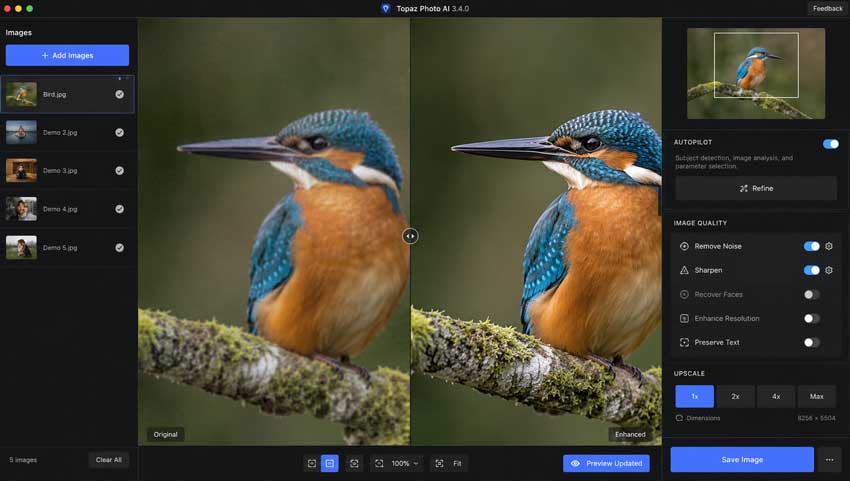
Topaz Photo serves a different part of the workflow. Its tools cover RAW Denoise, noise reduction for rendered images, sharpening, Super Focus, face recovery, and upscaling, with options aimed at both natural-looking enlargement and more substantial AI reconstruction. That flexibility is useful for photographers who receive inconsistent source material: a clean RAW from one job, a heavily compressed JPEG from another, and a small crop that must fill a large layout. It is not, however, a replacement for a full RAW editor's color, lens, and library controls.
A buying distinction: The current Topaz Photo is a subscription product. Older references to Topaz Photo AI may describe a separate legacy application with different licensing and tools. When comparing pricing or following a tutorial, make sure it applies to the product you can actually buy and use today.
DxO vs Topaz Image Quality
Noise Reduction: Preserving Texture Matters More Than Smoothness
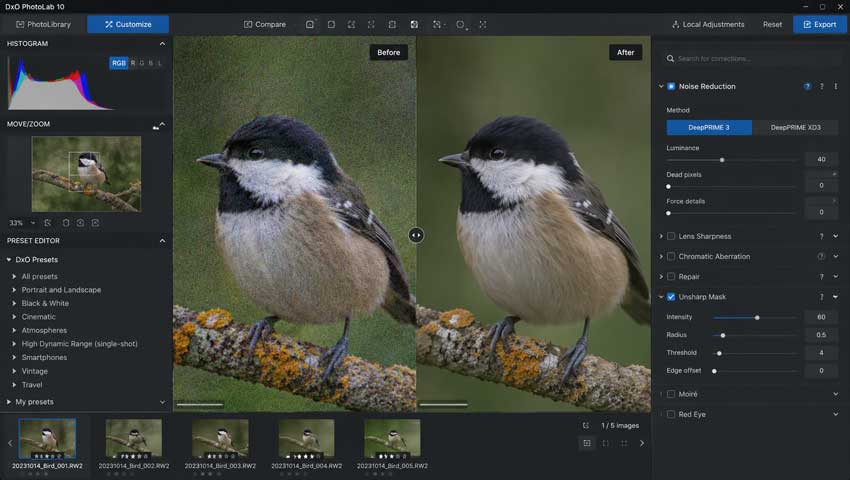
With a noisy RAW, the first test is not whether the background becomes perfectly smooth. It is whether the subject survives the cleanup. A clean sky or dark wall is easy to admire; the real failures tend to show up in the transition from feather to background, the low-contrast texture of skin, or the fine lines of fabric.
The difficult part of noise reduction is separating chroma and luminance noise from genuine detail without making surfaces look painted. DxO's DeepPRIME processing works in close connection with RAW demosaicing, which is a sensible starting point for high-ISO camera files. On a properly focused photograph, that approach prioritizes a coherent original texture rather than a conspicuously sharpened result. Judge it at the intended output size as well as at 100%; removing every last trace of grain is rarely the goal.
Topaz also has a dedicated RAW Denoise workflow for supported Bayer-sensor files, so it would be misleading to describe Topaz as merely denoising an already rendered image. Its broader Denoise tools are useful for low-light files and compressed material, while more aggressive settings can be reserved for genuinely difficult sources. The practical risk is overprocessing: shadow texture may smear, fine edges may become brittle, and color noise can turn into unfamiliar patterns. A restrained pass usually deserves comparison before the strongest available setting.
Sensor compatibility matters. DxO PureRAW supports DeepPRIME processing for compatible Bayer and Fujifilm X-Trans RAW files, but camera support is not universal. Topaz Photo's dedicated RAW Denoise is designed for supported Bayer RAW data; X-Trans photographers use its regular Denoise enhancement instead. Neither workflow should be assumed to support a particular camera simply because the software can open an exported TIFF or JPEG.
If your main problem is noise in an otherwise sharp RAW, DxO is the simpler recommendation: develop the file cleanly, then decide whether it needs any additional sharpening. Topaz is worth considering when the source has more than one problem, but it is still important to inspect a low-contrast area, a fine edge, and an out-of-focus background before accepting the result. Those three checks will reveal more than an exaggerated split-screen preview.
Fine Detail and Texture: Preservation vs Reconstruction
Fine detail is where an enhancement can look impressive at first and questionable a minute later. Feathers, hair, eyelashes, leaves, woven fabric, and lettering are useful inspection points because their structure is recognizable. The issue is not whether an algorithm can produce something sharp-looking; it is whether the pattern remains connected to the photograph. This matters particularly in wildlife, documentary, and product work where convincing but invented texture may be worse than a little residual softness.
DxO generally takes a preservation-oriented route when it develops good RAW data. Topaz offers a larger range of reconstruction tools for images that lack enough resolved detail, which can be valuable for a severe crop or an imperfect source. The cost is judgment: repeated patterns can become too regular, hair can merge into fine strands that were never resolved, and skin can look waxy or engraved. More detail on screen is not automatically more photographic information.
For editorial or archival work, begin with the least intervention that solves the problem and keep the original alongside the processed file. If the image is destined for a thumbnail, poster, or personal print, a stronger reconstruction may be an acceptable trade-off. The right choice depends partly on how faithfully the output must represent the original scene, not just which preview appears cleaner.
Sharpening and Blur Recovery: Different Problems, Different Tools
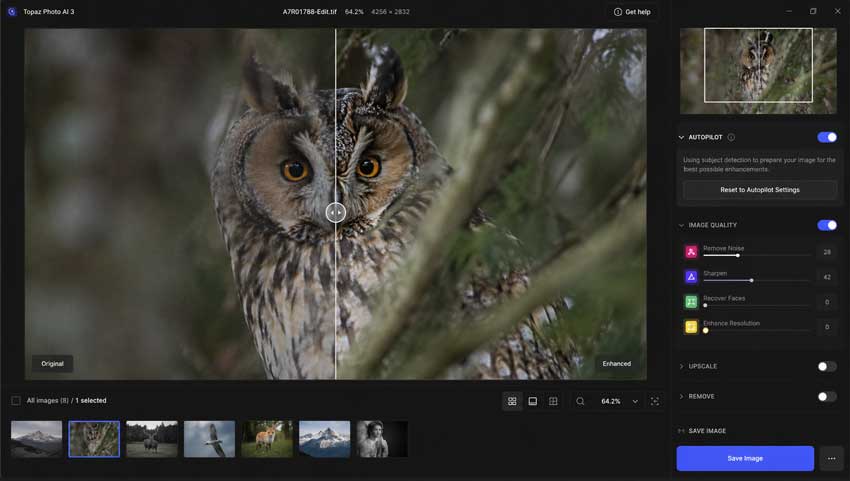
DxO's lens-aware sharpening is most useful when the subject was already reasonably well focused. It can help compensate for optical softness and maintain a consistent look across the frame, particularly when the appropriate camera-and-lens module is available. It does not turn a missed-focus capture into a perfectly focused one, and it should not be judged against a tool designed specifically to synthesize missing edge information.
Topaz gives you more options for a genuinely soft subject, including dedicated sharpening and Super Focus processing. A portrait with slightly soft eyes or a bird whose eye falls just outside the plane of focus is a more realistic candidate than a frame with severe camera shake. Start by checking the eyes, high-contrast boundaries, and small repeating details; if sharpening makes one area more legible but produces halos elsewhere, the apparent rescue may not hold up in print.
There is also an authenticity question. A model can produce a plausible feather, eyelash, or printed character without knowing whether it matches the original subject. That may be acceptable for some creative projects, but it is a serious consideration for identification, documentary, scientific, or archival images. The stronger the reconstruction, the more carefully the result deserves to be labelled and reviewed.
For routine sharpening of a focused RAW photograph, prioritize a controlled RAW-development workflow and avoid stacking multiple sharpening passes. For mild focus errors, Topaz provides the more relevant tools, provided the recovery looks credible at normal viewing size. Neither application is a substitute for correct focus and shutter speed at capture.
RAW Processing, Color, and Lens Corrections
As a RAW editor, PhotoLab covers substantially more ground than Topaz Photo. White balance, highlight and shadow recovery, color grading, local corrections, and optical adjustments are part of the same process as denoising. That makes a difference when an image needs to be delivered as a finished photograph rather than simply made sharper or larger.
The benefit of keeping those adjustments together is control over trade-offs. Recovering deep shadows exposes noise; correcting distortion changes edge framing; local contrast can emphasize texture or reveal defects. PhotoLab lets you revisit those choices without building a chain of intermediate rendered files. PureRAW deliberately does less, handing the corrected RAW-derived file to another editor for the aesthetic decisions.
DxO's measured camera-and-lens profiles are another substantive distinction. Correcting vignetting, distortion, chromatic aberration, and lens softness for a known body-and-lens combination is different from using AI sharpening to make an image appear crisper. Topaz can be excellent for a particular damaged area, but it does not provide the same end-to-end optical correction workflow. For serious color finishing, it is more appropriate to use PhotoLab, Lightroom, Capture One, or Photoshop after any Topaz enhancement.
If you need one program to develop a RAW shoot, DxO PhotoLab is the sensible comparison point. If you already use Lightroom, PureRAW is often a cleaner addition. Topaz fits later in the chain when a selected image needs work that ordinary RAW controls cannot convincingly achieve.
Upscaling and Heavy Crops: When Reconstruction Is Worth It
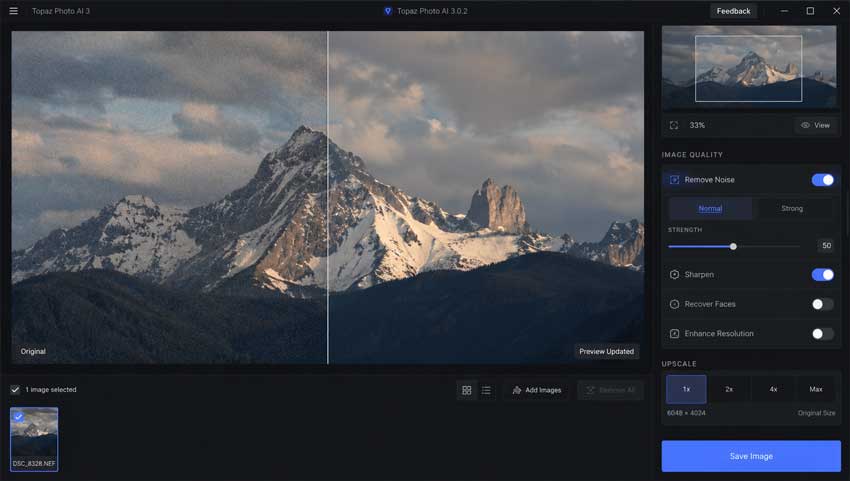
Upscaling changes the question from "How clean is the file?" to "How much information is available for the final output?" A good 24-megapixel capture and a tight crop from that capture are not the same editing problem. The latter may need actual enlargement, not simply more contrast around the remaining edges.
For example, a wildlife photograph may look excellent uncropped yet leave too few pixels after the bird is isolated for a large print. DxO can prepare a cleaner RAW-derived source, but it is not primarily an image enlargement application. Enlarging an already denoised and optically corrected file can be a useful second step, provided the original crop is not pushed beyond what the subject can plausibly support.
Topaz is more purpose-built for this work. High Fidelity-style enlargement aims to preserve the structure already present, while its more generative models may reconstruct detail in low-resolution, compressed, or damaged inputs. Face recovery and focus tools add options when the crop is both small and soft. These are not interchangeable fixes: if an image is already detailed, an aggressive generative model can make it look artificial rather than better.
A practical approach is to export the cleanest available source and compare two Topaz outputs: one conservative and one more reconstructive. Examine texture at 100%, then reduce both to the intended print or screen size. If the bolder result only looks better at extreme zoom, the restrained version may be the stronger photograph.
DxO vs Topaz for Different Types of Photography
Wildlife: For a sharp, noisy RAW, start with DxO and pay attention to feather structure, fine fur, and transitions around the eye. If the bird is slightly soft or occupies a very small part of the frame, Topaz may help with focus recovery or enlargement. The warning sign is detail that becomes too uniform or starts looking drawn on.
Landscape: DxO is usually the more useful primary application because lens profiles, shadow noise, chromatic aberration, and tonal range affect the entire frame. A scene full of leaves, branches, and distant texture also punishes aggressive AI reconstruction. Topaz has a place when a particular output genuinely needs more pixels, but it is rarely the first problem to solve.
Portrait: For a correctly focused RAW, preserving believable pores, hair, and tonal transitions matters more than producing maximum sharpness. DxO suits that starting point. Topaz is more relevant for a small face, slightly soft eyes, or a low-resolution client-supplied image, although any face reconstruction should be checked against the original for likeness.
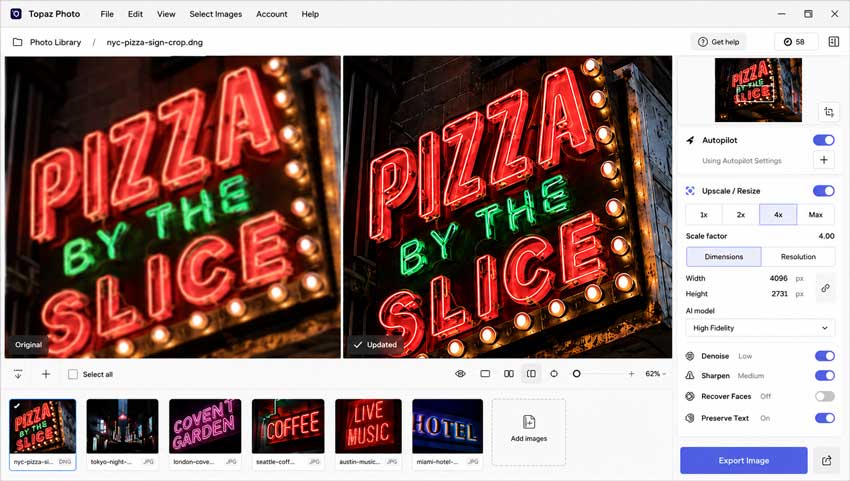
Old photographs and compressed images: This is where Topaz has the clearer role. JPEG artifacts, lost resolution, and scanned damage are not the same as RAW sensor noise or optical aberration. Enhancement and restoration tools can produce a more usable output, but they cannot verify missing historical detail, so keep the untouched original.
DxO vs Topaz Workflow
Lightroom Integration
For Lightroom Classic users, PureRAW has a straightforward place in the pipeline: original RAW > PureRAW > processed DNG > Lightroom Classic. You retain the familiar library, color, masking, and export workflow while moving technical denoising and optical correction to an earlier stage. The result is still an edited derivative of the RAW, not the untouched sensor file, so keeping the original alongside it is good practice.
PhotoLab is the better fit if you want to make tonal and color decisions before handing a file to Lightroom, Photoshop, or Affinity. PureRAW, by contrast, works best when you deliberately want to postpone those decisions. It is a small workflow difference with a large practical effect: fewer duplicate edits and less confusion about which file is the master.
Topaz Photo also works with Lightroom Classic, but the route into the application determines what processing is available. For an original RAW, use File > Plug-in Extras > Process with Topaz Photo to access its RAW-specific workflow. Photo > Edit In > Topaz Photo sends a rendered copy, typically a TIFF, and is appropriate for ordinary non-RAW enhancement rather than RAW Denoise. This distinction is easy to miss and makes a real difference to output options.
Some Topaz lighting and color adjustments also require a rendered TIFF instead of a DNG. If the plan is to continue RAW-oriented tonal work in Lightroom Classic, it makes sense to do the early technical enhancement first and leave creative color decisions to Lightroom. The same principle applies when the final retouching happens in Photoshop.
There is no universally superior integration here. PureRAW is the more streamlined choice for a repeatable RAW-preparation step across an entire shoot; Topaz is more flexible when selected images need sharpening or reconstruction beyond ordinary development. The right plugin path matters more than the marketing label "Lightroom compatible."
Photoshop, Batch Work, and Performance
Once an image reaches Photoshop as a TIFF or another rendered format, Topaz sharpening, face recovery, and enlargement can still be useful. What it cannot do at that point is access the original Bayer RAW data for RAW Denoise. If that capability matters, process the RAW before opening it in Photoshop, then carry the resulting file forward for retouching and compositing.
Batch work is another reason to separate the products by task. PureRAW lends itself to applying consistent technical corrections across a set of compatible RAW files. Topaz supports batches too, but a single strong focus-recovery or face-enhancement setting is unlikely to suit an entire mixed shoot. For professional delivery, batch routine cleanup and review difficult frames individually rather than trusting one aggressive preset everywhere.
Both applications can be demanding, especially on high-resolution files and supported AI models. Processing time depends on GPU, available memory, source dimensions, model selection, and whether rendering happens locally or through a supported cloud workflow. Without comparable source files and hardware, a claim that either is simply "faster" would not be meaningful. A short trial using your actual camera files is far more informative than generic benchmark numbers.
DxO vs Topaz Pricing
Price matters differently depending on whether the software is your primary editor or an occasional rescue tool. DxO sells PhotoLab and PureRAW as perpetual licenses for the purchased release, with optional paid upgrades later. Topaz Photo is subscription-based. That makes DxO easier to budget for if you are comfortable staying with a working edition, while Topaz may be easier to justify when specialized enhancement is part of a regular paid workflow.
Indicative US list prices: The figures below are useful for comparing the initial commitment, but promotions, taxes, licensing terms, and subscription offers can change. Confirm current terms before purchasing.
| Product | US Price | Licensing |
|---|---|---|
| DxO PhotoLab | $249.99 | Perpetual license |
| DxO PureRAW | $139.99 | Perpetual license |
| Topaz Photo Personal | $199/year | Subscription, billed annually |
Topaz Photo also offers monthly billing options, which can make sense for a short project but usually cost more than annual billing over a full year. At a constant $199 annual rate, three years would total $597; that arithmetic does not account for promotions or future price changes. A DxO perpetual license does not automatically include every subsequent major upgrade, but you are not required to buy the next release to keep using the one you own.
For current offers, consult the DxO store and Topaz pricing page. Commercial-use rights, cloud features, and supported processing models may differ by plan, so the cheapest headline price is not always the relevant one for client work.
Which One Should You Choose?
Choose DxO PhotoLab when your priority is a complete photographic RAW workflow: accurate lens corrections, controlled high-ISO cleanup, color work, local adjustments, and finished exports. It makes most sense when the majority of your files are good captures that need careful development rather than rescue.
Choose DxO PureRAW when Lightroom Classic or another editor already handles your organization and creative adjustments. It is a more focused purchase for photographers who want consistent RAW preprocessing without adopting a second editing system.
Choose Topaz Photo when your recurring problem is not just noise but insufficient detail: slight missed focus, demanding crops, undersized images, or faces that need careful recovery. Its additional flexibility brings more decisions and a greater need to check for invented texture or altered likeness.
The files you regularly receive should make the decision. A landscape or event photographer with a library of correctly focused RAW images has a different problem from a wildlife photographer salvaging tight crops or a designer enlarging mixed client assets. There is no reason to pay for an elaborate recovery toolkit if clean RAW development solves most of your work, and no reason to expect a RAW developer to reconstruct a tiny JPEG.
Is There a Better Alternative to DxO and Topaz?
There is also a middle ground between adopting a complete RAW editor and paying for a broad recovery suite. Many photographers already have their preferred catalog and color workflow; the remaining problem is making soft, noisy, or small images usable for delivery. That is where a dedicated enhancement application deserves consideration, provided it is evaluated against the actual source files.
Aiarty Image Enhancer fits that narrower role. It focuses on locally processed AI denoising, deblurring, detail reconstruction, face restoration, and upscaling, including batches drawn from mixed image sources. For photographers who use Lightroom Classic, Aiarty can also be configured as a direct external editor, making it possible to pass selected images through an enhancement step and continue editing within the existing Lightroom workflow. This is more useful than treating it as a substitute for RAW development or photo management.
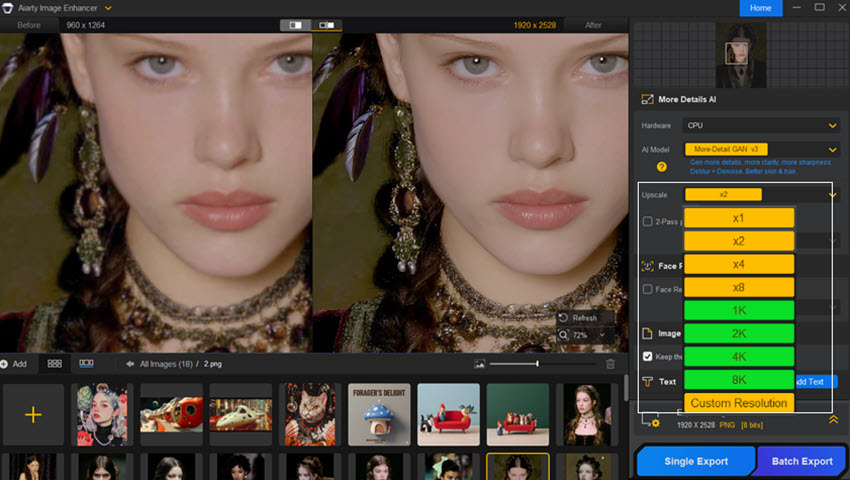
Its lifetime-license option, including future software and AI model updates, may appeal to photographers who prefer predictable ownership over another ongoing subscription. That is a purchasing consideration, not proof of better image quality. The stronger reasons to choose it are a focused interface, local processing, and repeatable enhancement across files that do not require an entire RAW-editing system.
Aiarty does not replace PhotoLab's full RAW pipeline or every specialist Topaz recovery tool, particularly for difficult focus and reconstruction cases. A sensible comparison is to run a handful of representative files through the available trials and examine texture, halos, face fidelity, and final-size output. For a small occasional job, the least complicated application that delivers a believable result is often the right one.
In practical terms: DxO is for developing and correcting RAW captures, Topaz Photo is for selected images that need substantial rescue or enlargement, and Aiarty is a focused option for enhancement and batch processing across mixed sources. Choosing by file condition and delivery requirements is more useful than declaring one universal winner.
>>You may also want to read: Aiarty Image Enhancer vs Topaz Photo AI
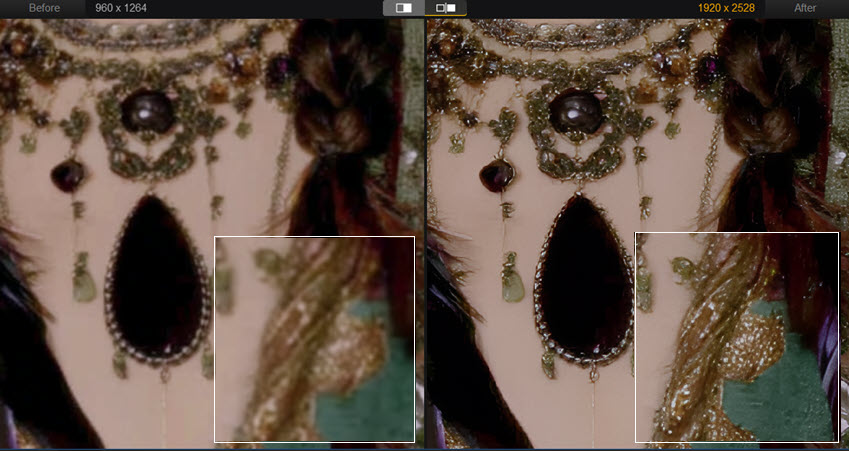
DxO vs Topaz FAQs
Is DxO better than Topaz for high-ISO RAW photos?
DxO is a particularly good fit when the RAW file is in focus and the main task is noise reduction, demosaicing, and optical correction. Topaz also has a RAW-specific denoising path for supported Bayer files, so the choice should be made with your own camera samples rather than a blanket claim of superior output. Compare fine texture, color noise, halos, and print-size results rather than judging only by the smoothest background.
Can Topaz Photo replace DxO PureRAW?
It can cover some of the same noise-reduction work for supported RAW files, but it is not a like-for-like replacement. PureRAW emphasizes consistent demosaicing and measured camera-and-lens corrections before editing in another application. Topaz adds broader sharpening and reconstruction options that are more relevant when the file is soft or undersized.
Should I use DxO and Topaz together?
Sometimes, but not by default. Process the RAW in DxO when it needs technical cleanup, then consider Topaz only for a selected frame that still requires credible focus recovery or enlargement. Avoid repeated denoise and sharpening passes; they can make an otherwise good image look brittle or artificial.
Final Verdict: Choose by the Defect, Not the Brand
If most of your photographs are well captured but need cleaner RAW development, DxO is the more natural investment. If you routinely work with severe crops, soft subjects, or small delivered files, Topaz Photo offers a different kind of value. The overlap is real, but the products are at their strongest at different stages of editing.
Before paying for either, test a focused high-ISO RAW, a slightly soft photograph, and a genuinely low-resolution file. Look at the original and output at 100%, then at the size clients or viewers will actually see. The program that handles your most common difficult file without obvious artifacts is a better choice than the one with the longest feature list.
You May Also Like


This post was written by Brenda Peng, a seasoned editor at Digiarty Software. With AI assistance for brainstorming and drafting, the post is reviewed for accuracy by our expert Abby Poole.
