


Ever taken a selfie or a portrait and noticed that tiny pimple or dark spot ruining an otherwise perfect shot? You’re not alone. In the age of Instagram, TikTok, and professional e-commerce photography, even minor blemishes can make a big difference in how your photos are perceived.
This is where a blemish remover app comes in. These tools can erase pimples, spots, acne, and skin imperfections in seconds, giving your photos a smooth, natural look. Whether you prefer desktop software for high-resolution, realistic edits, online tools for quick fixes, or mobile apps for on-the-go selfies, there’s a solution for everyone.
While free mobile and online apps are convenient for casual edits, AI-powered desktop tools like Aiarty Image Enhancer provide unmatched accuracy, texture preservation, and professional-level results for photographers, content creators, and anyone serious about flawless photos.
What Are Blemishes in Photos?
Blemishes in photos are small imperfections on the skin that can distract from an otherwise great image. They include pimples, acne, dark spots, scars, or minor skin discolorations. Even subtle blemishes can affect the overall appearance of selfies, portraits, or professional product photography, making photos look less polished.
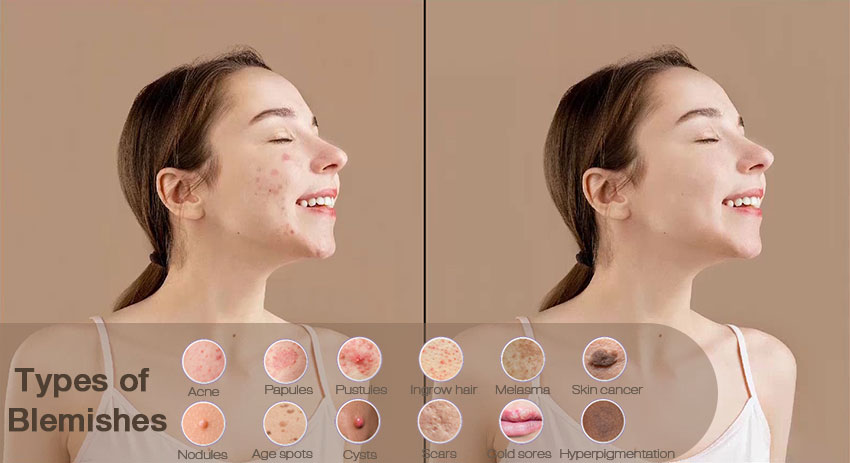
For anyone looking to improve their photos quickly and naturally, a face blemish remover app is the solution. These tools are designed to detect and remove skin imperfections while maintaining the natural texture of the skin, giving your images a smoother and more professional look.
Quick Comparison: Best Free & Paid Blemish Remover Apps (2026)
Whether you’re editing for social media, personal portfolios, or commercial photography, blemish remover apps come in three main forms: desktop software for high-quality results, online tools for quick fixes, and mobile apps for on-the-go edits. Each has its advantages and limitations depending on your needs.
Best Desktop Blemish Remover App for High-Quality Photos
Aiarty Image Enhancer
Aiarty Image Enhancer is a desktop AI-powered tool that excels at removing pimples, acne, and minor skin imperfections while preserving natural skin texture. Unlike many free apps to remove spots from photos, Aiarty avoids over-smoothing, giving your photos a realistic and professional finish. Its batch processing capabilities allow users to edit multiple high-resolution images at once, making it ideal for photographers, content creators, and e-commerce professionals.
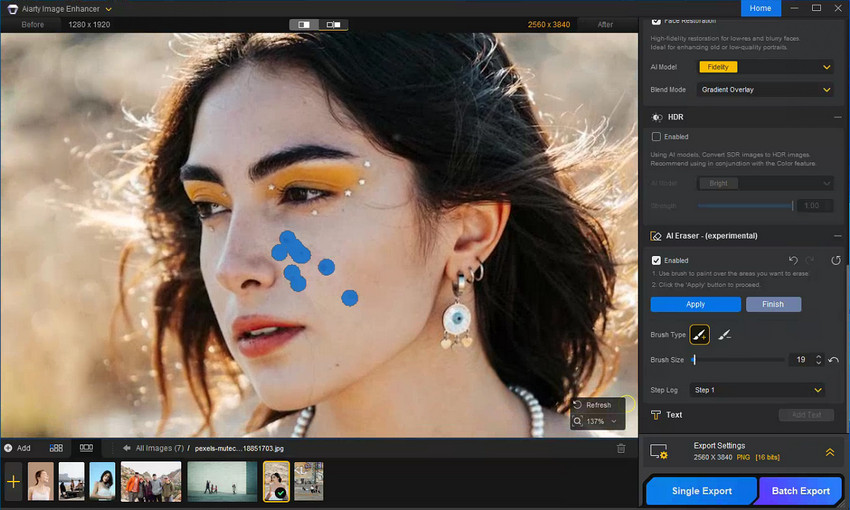
The built-in AI Eraser helps remove blemishes by eliminating visual distractions that make skin imperfections more noticeable. Working alongside Aiarty’s new Face Restoration AI model, it refines facial details while maintaining natural skin texture and realism. The AI Eraser intelligently reconstructs surrounding areas after removal, making it suitable not only for facial blemishes but also for clearing minor background objects such as wires, signs, or photobombers, resulting in cleaner and more balanced images.
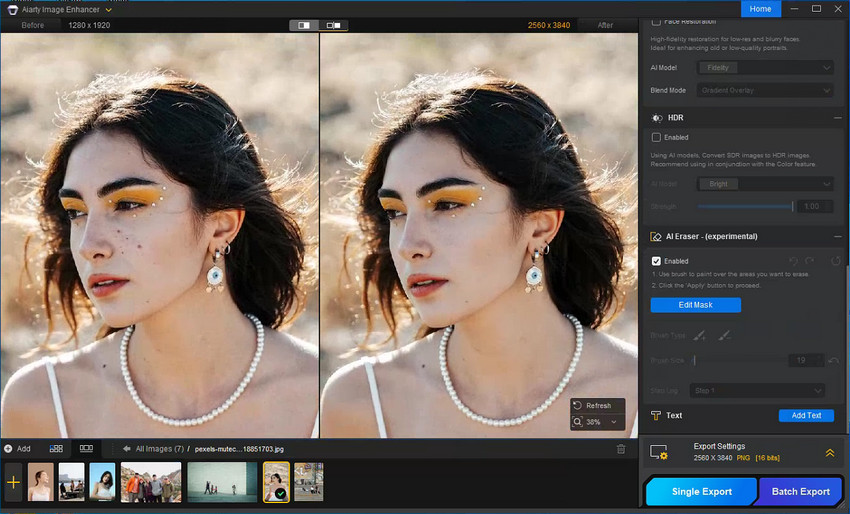
- AI-powered automatic blemish removal
- Retains skin texture for natural results
- Batch processing for multiple images
- High-resolution output suitable for professional use
- Desktop software requires installation
- Free trial available, full version is paid
Compared to mobile or online pimple remover apps that focus on quick fixes, Aiarty provides more controlled and realistic results, making it the top choice for high-quality photo editing.
Adobe Photoshop
Adobe Photoshop remains a manual powerhouse for blemish removal. Using tools like Healing Brush, Spot Healing, and Frequency Separation, users can precisely control every detail of their photos for photo restoration in Photoshop. It's ideal for those who want total control over skin texture and lighting, although the learning curve can be steep.
Also see: How to Remove Blemish in Photoshop Step-by-Step Guide
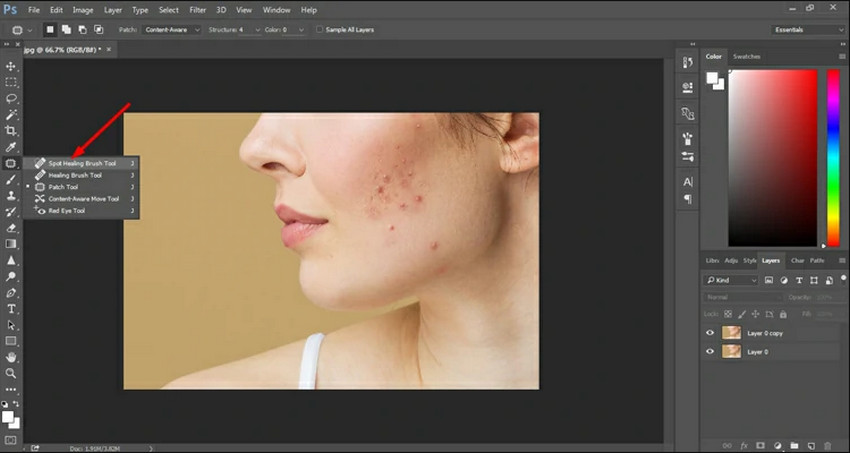
- Highly precise manual editing for blemishes, facial imperfections, and even objects, persons removal.
- Industry-standard software with extensive professional support
- Supports advanced retouching techniques like frequency separation, healing brush, and layer masking
- Flexible workflow allows integration with other Adobe apps for complex edits
- Requires experience and training to achieve professional results
- No automated blemish removal—time-consuming for multiple images
- Optimal results often require combining several tools and manual adjustments
- Less efficient than AI-powered desktop apps for batch processing
Best Online Blemish Remover Tools
Evoto AI
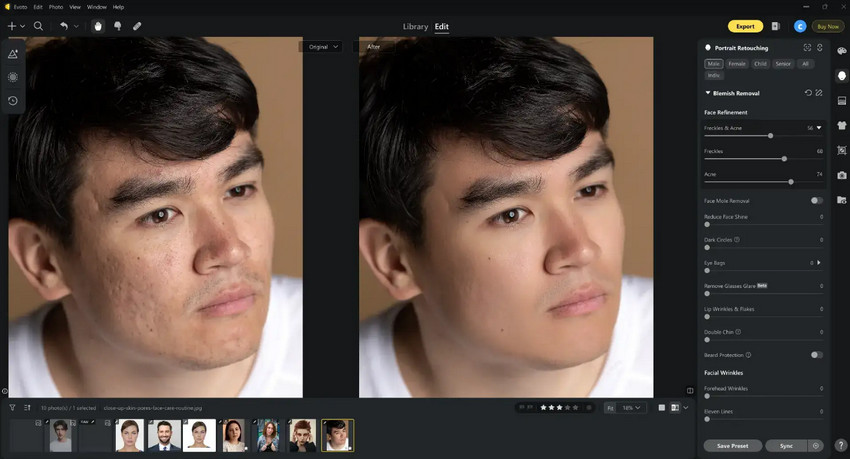
Evoto AI is a web-based blemish remover that allows users to quickly edit skin imperfections without installing any software. It features an intuitive interface designed for fast retouching, making it suitable for social media images and casual photo editing. While Evoto delivers quick results with minimal effort, its control over fine skin details and texture refinement is limited compared to more advanced desktop AI tools.
- No installation, works entirely in the browser
- Quick and easy blemish removal for casual edits
- Intuitive interface suitable for beginners and social media content
- Supports multiple image formats without software setup
- Limited free version, premium features require subscription
- Less precise on fine skin texture or detailed facial features
- No batch processing for multiple images
- Advanced retouching options are restricted compared to desktop AI tools
Pixelbin
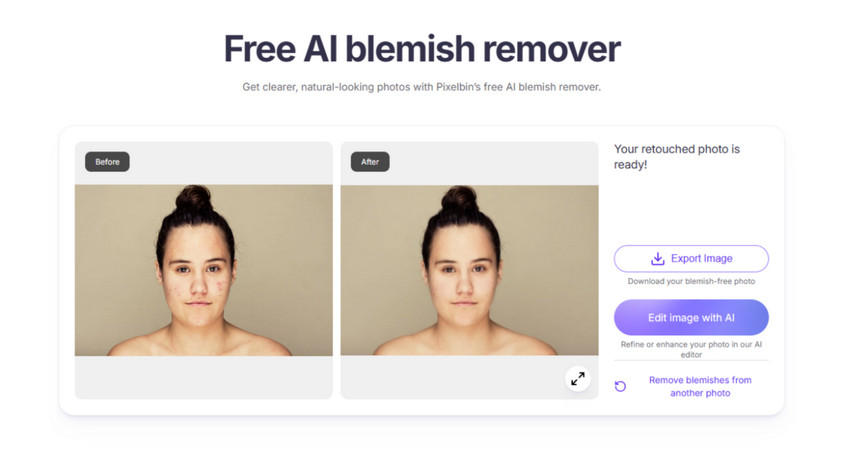
Pixelbin is an online app to remove blemishes and retouch photos in web browsers. It is convenient for users who need to edit photos on the go, but like other online tools, it may not provide the natural texture preservation seen in AI-powered desktop apps.
- Fully web-based, no software installation needed
- Fast blemish removal with AI-powered automatic corrections
- Offers basic adjustment tools for color and brightness
- Accessible on multiple devices via browser
- Free version has limited functionality and output resolution
- Fine skin details may appear slightly smoothed
- No batch editing or advanced retouching features
- Dependent on stable internet connection for smooth performance
Fotor
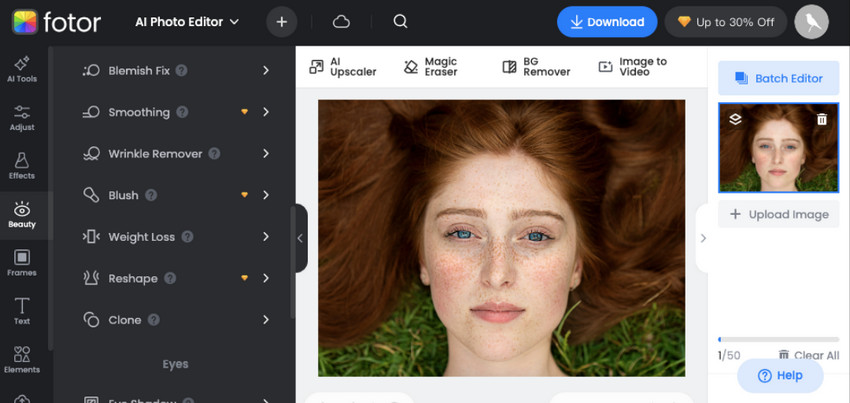
Fotor is an online photo editor that provides basic blemish removal along with a range of general retouching tools. It is well suited for casual edits and social media images, offering an intuitive interface and quick processing without requiring installation. While its blemish removal features are easy to apply, they are best used for light touch-ups rather than detailed or high-precision retouching.
- Online editor, works on any device with a browser
- Provides both blemish removal and general photo retouching tools
- Quick edits suitable for social media posts or casual projects
- Includes filters, frames, and creative enhancements
- Limited free tier, some features require premium subscription
- Precision on subtle skin imperfections is lower than desktop AI tools
- No batch processing, making high-volume edits time-consuming
- Lacks advanced AI-driven adjustments found in dedicated desktop software
Best Free Mobile Pimple Remover Apps
FaceTune
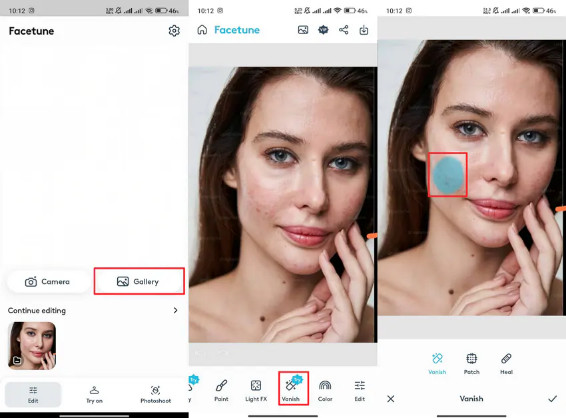
FaceTune is a popular mobile face blemish remover app primarily designed for beauty selfies and social media photos. It allows users to quickly remove pimples, smooth skin, and enhance facial features with minimal effort. The app relies heavily on automatic adjustments, making it fast and accessible, though excessive use may result in an overly polished or artificial appearance.
Also see: Remove Blemishes from Photos in One Click using Retouch4me
- Fast and intuitive blemish removal for selfies and portraits
- Popular among social media users for quick beauty edits
- Automatic skin smoothing and feature enhancement tools
- Provides creative filters and effects alongside blemish removal
- Free version offers limited functionality and export options
- Overuse can lead to artificial or overly polished skin
- Advanced controls and best results require subscription
- Less effective on detailed skin texture compared to desktop AI tools
YouCam Perfect
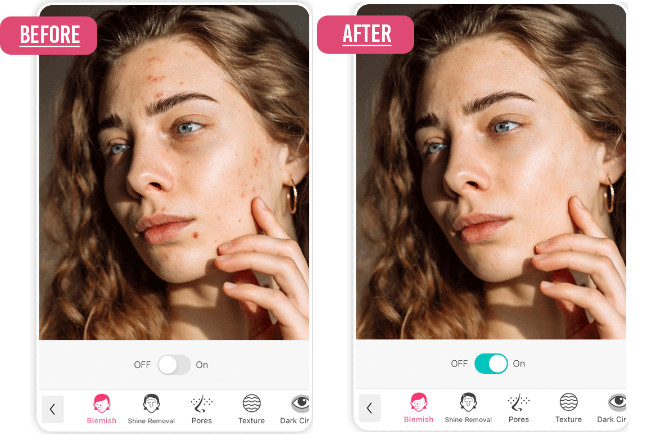
YouCam Perfect is a mobile photo editing app offering automatic blemish removal and beauty enhancement tools. It is well suited for selfies, casual portraits, and social media content, providing one-tap retouching features for quick results. While the free version supports basic edits, advanced controls and more refined output are reserved for premium users.
- Automatic blemish removal and skin smoothing for quick selfies
- Beginner-friendly interface with one-tap beautification
- Includes makeup effects, filters, and facial enhancement tools
- Suitable for social media posts and casual portrait edits
- Free version limits access to premium tools and output quality
- May produce an over-processed look if effects are stacked
- Lacks fine control over detailed blemishes or skin texture
- Not ideal for professional or high-resolution editing
Snapseed
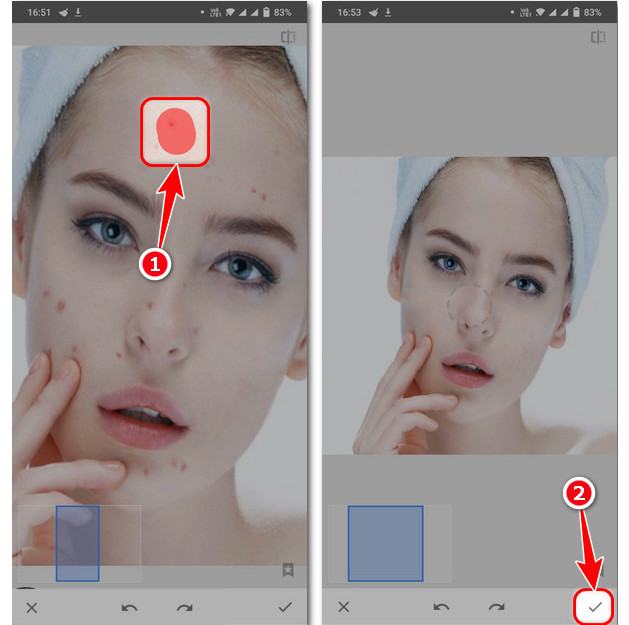
Snapseed, developed by Google, is a free mobile photo editing app to remove blemishes and small imperfections from photos through a manual Healing tool. Unlike AI-driven apps, Snapseed requires users to manually select and retouch areas, offering greater control for simple edits. It is reliable for occasional touch-ups but less efficient for large volumes of images.
- Completely free with no feature restrictions
- Manual Healing tool allows precise blemish removal and touch-ups
- Lightweight and fast, works on most mobile devices
- Supports multiple image formats and detailed edits beyond blemishes
- Manual operation can be time-consuming for multiple blemishes
- No automatic or AI-based skin smoothing
- Lacks batch processing for large numbers of images
- Less suitable for casual users wanting one-tap results
Which Blemish Remover App Is Best for You?
Choosing the right blemish remover depends on your needs:
- Selfies / Social Media: FaceTune or YouCam Perfect provide quick mobile fixes.
- Temporary or quick edits: Online tools like Evoto, Pixelbin, or Fotor are convenient.
- High-quality or professional photos: Desktop AI tools like Aiarty Image Enhancer deliver realistic, natural-looking results.
- Batch processing or commercial use: Aiarty is unmatched in efficiency and quality.
Free apps are excellent for casual editing but come with limitations like lower resolution, watermarks, and over-smoothing. Paid or AI-powered tools, particularly desktop solutions like Aiarty Image Enhancer, offer realistic results, higher resolution output, and the ability to process multiple images efficiently. Investing in a paid AI tool ensures professional-level results while saving time.
Conclusion
Blemish remover apps are not limited to mobile platforms. Depending on your goals, you can choose from mobile apps for quick selfies, online tools for convenient browser-based edits, and desktop AI apps like Aiarty Image Enhancer for realistic, professional results.
For those seeking high-quality, natural-looking photos, especially in bulk or for commercial purposes, AI-powered desktop solutions are the most effective choice.
 FAQ about Blemish Remover Apps
Snapseed offers a completely free option with a manual Healing tool, making it suitable for basic blemish removal and simple touch-ups. While it does not use AI automation, it provides reliable results for occasional edits.
Yes. Apps like Snapseed, YouCam Perfect (with limitations), and some online photo editors provide free blemish removal features. However, advanced tools and higher-quality results often require paid plans.
Online tools can remove visible pimples quickly, but texture preservation is often less natural. Compared to AI-powered desktop software, they may introduce over-smoothing or inconsistent skin detail.
In most cases, yes. Desktop AI blemish remover apps provide greater control, more realistic results, and batch processing capabilities, making them more suitable for high-quality or large-scale editing.
Aiarty Image Enhancer is currently one of the best options for realistic face blemish removal on desktop. Its AI models focus on preserving natural skin texture while reducing imperfections, avoiding the overly smoothed look common in many mobile apps.
You May Also Like


This post was written by Brenda Peng who is a seasoned editor at Digiarty Software who loves turning ordinary photos into extraordinary works of art. With AI assistance for brainstorming and drafting, the post is reviewed for accuracy by our expert Abby Poole for her expertise in this field.
