


5 Best AI Video Enhancers for Mac in 2026: Ranked & Tested



Video content is no longer just about capturing a moment, it's about the visual experience. As a content creator, filmmaker, or someone looking to enhance personal videos, the quality of your footage has never been more important. For Mac users, finding the best video enhancer software can make all the difference when it comes to elevating your videos to professional standards.
AI-driven video enhancers for Mac are quickly becoming the go-to tools for improving video resolution, restoring details, and reducing noise, all with minimal effort. But with a flooded market, "AI-powered" is often just marketing talk. Instead of settling for noisy, pixelated output, you can now harness your Mac's full compute potential to reconstruct every frame with surgical precision and lifelike clarity. We've cut through the noise to find the tools that truly deliver. Here are the best video enhancers for Mac in 2026 that actually justify their storage space.
Aiarty Video Enhancer excels at breathing new life into low-quality footage. It seamlessly integrates upscaling, denoising, and deblurring into a single, automated workflow, allowing you to achieve stunning 4K/8K quality with lifelike details.
How We Test the Best Video Enhancer for Mac
To provide an objective ranking, we subjected each software to a rigorous benchmarking process designed for the modern macOS ecosystem. Our goal was to push these tools beyond simple upscaling and see how they handle real-world challenges like heavy compression, motion blur, and low-light noise.
Our Testing Environment:
We performed all tests natively on Apple Silicon to measure how well each app utilizes the Mac's unique architecture.
- Hardware: Mac Studio (M4 Max) with 64GB Unified Memory and MacBook Air (M2) for baseline efficiency testing.
- OS: macOS Sequoia (15.0) or later.
- API Acceleration: All software was set to utilize Metal and the Apple Neural Engine (ANE) where available.
The 4 Pillars of Our Evaluation:
Instead of relying on marketing claims, we evaluated each video enhancer based on four critical metrics:
- Temporal Stability (Flicker Control): We look for "shimmering" or "crawling" artifacts in detailed areas like grass, hair, or bricks. The best tools maintain a consistent look across every frame without distracting AI "hallucinations."
- Processing Speed (FPS): We timed how long it took to upscale a 60-second 1080p clip to 4K. We specifically looked for software that avoids thermal throttling on MacBook models.
- Artifact Reduction vs. Detail Retention: A common flaw in AI upscaling is the "waxy skin" effect. We prioritized software that intelligently scrubs noise and blur while preserving natural textures like eyelashes and fabric weaves.
- Native Apple Silicon Optimization: We checked if the software is a "Universal" binary. Apps running via Rosetta 2 were penalized for inefficient power consumption and slower render times.
Top AI Video Enhancers for Mac in 2026
Aiarty Video Enhancer
Best for: High-speed 4K upscaling and realistic texture reconstruction on Apple Silicon.
Rating: 4.8 by Macworld
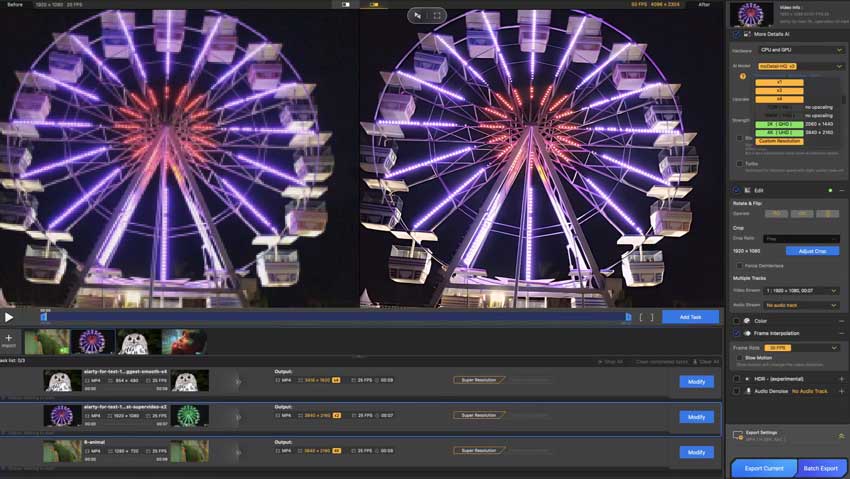
Aiarty Video Enhancer has emerged as a top-tier contender for Mac users who prioritize both speed and visual fidelity. Unlike traditional upscalers that often result in a "plastic" or overly smoothed look, Aiarty utilizes a hybrid model of Diffusion and GAN. This allows the software to intelligently reconstruct lost details, such as skin pores, hair strands, and fabric textures, making it particularly effective for restoring low-quality or highly compressed footage.
Core Strengths
- Generative Detail Recovery: Excels at generating realistic textures where data was previously missing, turning soft clips into sharp, cinematic 4K/8K assets.
- Exceptional Denoising: Trained specifically to eliminate chroma noise and high ISO grain in low-light footage without sacrificing edge sharpness.
- Turbo Speed Processing: Engineered for high-throughput efficiency; benchmarks show "Turbo Mode" is up to 3x faster than rivals during batch processing.
The Mac Experience:
Aiarty features deep Core ML and Metal API optimization. It aggressively utilizes the Apple Neural Engine (ANE) in M2, M3, and M4 chips, ensuring cooler operation on MacBooks and significantly faster render times on desktop models like the Mac Studio.
- Reconstructs natural textures instead of just smoothing pixels.
- Fully leverages the Apple Neural Engine for low power consumption.
- One-click AI models eliminate the need for complex manual tuning.
- Perpetual licensing provides a cost-effective alternative to monthly fees.
- Performance is significantly lower on older Intel-based Macs.
- Generative high-bitrate 8K exports require substantial disk spac
Our Verdict: If you need a streamlined, one-click solution that provides professional-grade results without a steep learning curve, Aiarty is the most efficient choice for the modern macOS workflow
Topaz Video AI
Best for: Professional-grade restoration and granular, multi-model manual control.
Rating: 4.5 by Aiarty
Topaz Video AI remains the industry benchmark for professional video restoration. While other tools focus on speed, Topaz is built for precision, offering a massive library of specialized AI models, such as Iris for face recovery, Nyx for deep denoising, and Aion for frame interpolation. It is the go-to choice for filmmakers who need to stack multiple processes in a single render.
Core Strengths:
- Specialized AI Model Library: Instead of a "one-size-fits-all" approach, you can choose specific models tailored to your footage type, whether it's highly compressed web video or grainy 16mm film.
- Temporal Stability: Topaz excels at maintaining consistency between frames, effectively eliminating the "flicker" often seen in lesser AI upscalers.
- Advanced Interpolation: With the latest Aion model, you can convert standard 24fps footage into buttery-smooth 60fps or create cinematic 16x slow motion without "ghosting" artifacts.
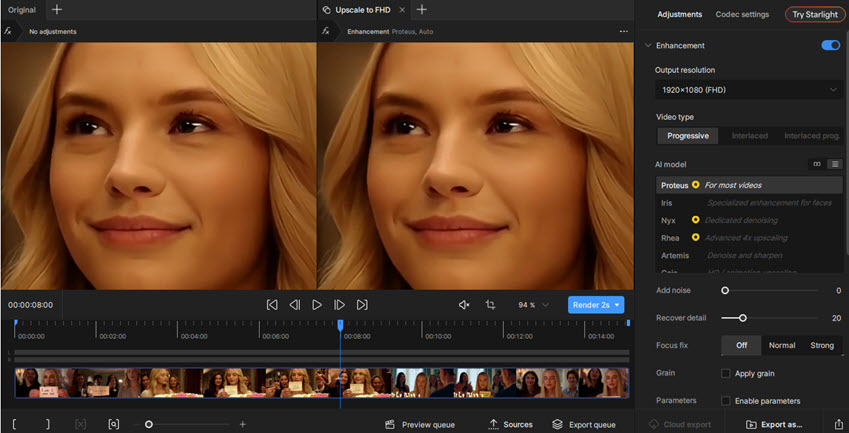
The Mac Experience:
Topaz Video AI is heavily optimized for the Apple Silicon architecture. With the release of the M5 series in early 2026, Topaz has reported up to a 3.5x performance boost compared to M4 models. It natively supports Metal and allows users to allocate specific amounts of Unified Memory for rendering, making it a beast on Mac Studio and high-end MacBook Pro configurations.
- Best-in-class at reconstructing intricate details in faces and textures.
- Includes stabilization, motion deblur, and SDR-to-HDR conversion.
- Integrates with plugins for DaVinci Resolve and Adobe Premiere Pro.
- The shift to subscription models has drawn heavy criticism from users who prefer one-time payments.
- Requires high-end M-series chips for reasonable render speeds; can be very slow on base-model Macs.
- The interface is powerful but can be overwhelming for beginners.
Our Verdict: If your project demands the highest possible visual fidelity and you have the hardware to support it, Topaz Video AI is the gold standard for macOS.
AVCLabs Video Enhancer AI
Best for: Automated face refinement, person-centric restoration, and one-click colorization.
Rating: 4.8 by Reviews.io
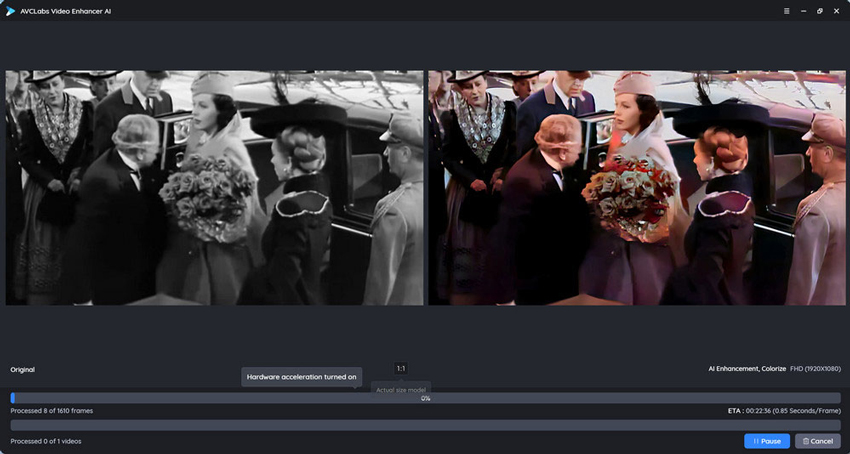
AVCLabs Video Enhancer AI has solidified its reputation as the definitive "set-and-forget" solution for Mac users who need high-quality results without the steep learning curve of professional editing suites. AVCLabs excels at specialized, human-centric automated tasks. Its sophisticated Face Enhancement model is an industry standout, utilizing a deep neural network to map and reconstruct facial features, sharpening eyes, defining skin textures, and restoring expressions in low-resolution clips with remarkable accuracy.
Beyond portraits, it remains one of the most reliable tools for "Auto-Colorizing" black-and-white archival footage. By analyzing frame-by-frame context, the AI applies natural, consistent color palettes to monochrome memories with a single click, effectively bridging the gap between historical records and modern visual standards.
Core Strengths:
- Superior Face Refinement: Uses dedicated facial recognition models to sharpen eyes, skin textures, and features that other upscalers often leave blurry.
- Intelligent Object Blurring: A standout 2026 feature that allows you to automatically detect and blur faces, license plates, or backgrounds for privacy.
- AI Colorizer: Specifically tuned for historical archives, breathing natural-looking life into old monochrome family movies or documentaries.
The Mac Experience:
AVCLabs is fully compatible with macOS 12 and later, providing native support for Apple M1 through M4/M5 chips. It utilizes NVIDIA TensorRT-like acceleration tailored for Mac's Unified Memory, ensuring that high-resolution 8K exports don't crash the system. However, its multi-frame models are resource-heavy and perform best on Macs with at least 16GB of RAM.
- Powerful presets mean you don't need to be a video engineer to get great results.
- Includes stabilization, motion compensation, and object removal in one interface.
- Performs all AI processing locally on your Mac, avoiding cloud security risks.
- Multi-frame and "Ultra" models can be significantly slower than Aiarty or VideoProc.
- While improved, some "Auto-Colorized" outputs can still show occasional flickering in complex scenes.
- Heavily pushes a monthly/yearly billing cycle over its expensive lifetime license.
Our Verdict: If your primary goal is restoring old family archives, AVCLabs offers the best specialized automated tools on the market. It's the perfect middle-ground for those who find Topaz too complex but need more "intelligence" than a basic converter.
Adobe Premiere Pro
Best for: Professional editors who need AI enhancement directly within their existing timeline.
Rating: 4.7 by Capterra
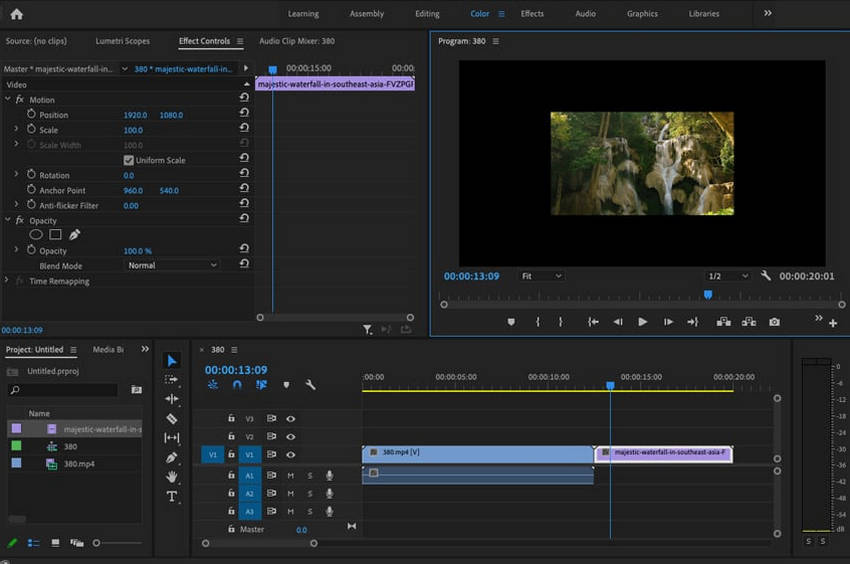
While Adobe Premiere Pro is not a standalone "upscaler" in the traditional sense, it has become an essential mention due to its native integration of Adobe Firefly Video tools. For Mac-based professionals, the ability to repair footage and audio without the friction of exporting to external apps is a massive productivity gain. Rather than just stretching pixels, Premiere now leverages generative AI to "fill in the gaps" of your production, making it a powerful companion to dedicated upscalers.
Core Strengths:
- Generative Extend: A standout 2026 feature that uses Firefly AI to intelligently generate extra frames at the beginning or end of a clip—perfect for fixing a shot that was cut too short.
- Enhance Speech: Still the industry gold standard, this tool uses advanced neural networks to remove echoes and background noise, making dialogue recorded in a coffee shop sound like a professional studio session.
- AI Object Masking & Tracking: Newly refined for 2026, this allows you to select an object or person with one click, then apply enhancements or color grades that follow them perfectly through the shot.
The Mac Experience:
Adobe has solved the GPU utilization issues seen in early 2025. In 2026, Premiere Pro is fully optimized for Apple Silicon (M2-M4), featuring hardware-accelerated decoding for H.264/HEVC and native support for the Apple Neural Engine. This ensures that AI tasks like "Scene Edit Detection" and "Text-Based Editing" run smoothly on MacBooks without heavy thermal throttling.
- No need to switch apps; AI tools live directly on your editing timeline.
- The AI speech enhancement remains more natural-sounding than almost any competitor.
- Unique ability to extend clips and remove objects using the Firefly ecosystem.
- Requires a recurring Creative Cloud payment, which can be costly over time.
- Unlike Aiarty or Topaz, it still lacks a dedicated, one-click 4K/8K AI video upscaler.
- Performs best on Macs with at least 24GB of Unified Memory when running multiple AI effects.
Our Verdict: Premiere Pro is the definitive choice for editors who value workflow efficiency above all else. While you might still need a tool like Aiarty for raw 4K upscaling, Premiere's generative tools and audio AI make it the "brain" of any professional Mac editing suite.
VideoProc Converter AI
Best for: All-in-one efficiency, high-speed stabilization, and processing large 4K batches.
Rating: 4.8 by AppleInsider
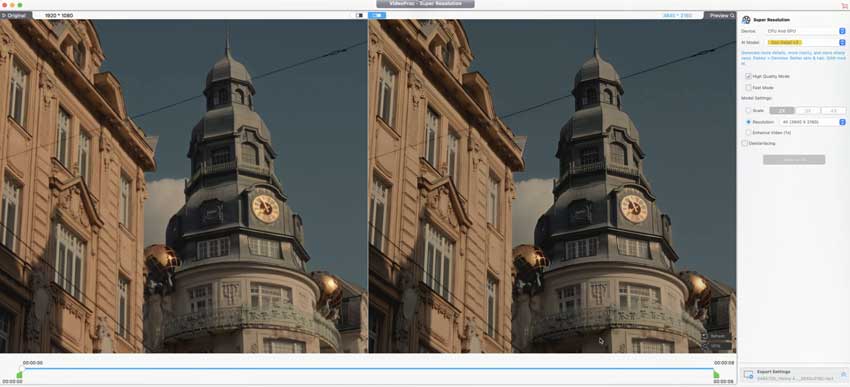
VideoProc Converter AI is the definitive "utility player" in the macOS ecosystem. It remains the fastest option for users who need to enhance, stabilize, and convert footage in a single, streamlined workflow. While it may not offer the extreme generative "hallucinations" of Aiarty, its latest Super Resolution engine provides remarkably clean 4K upscaling that balances sharpness with a natural look. Its standout feature is its Level-3 Hardware Acceleration, which makes it the most stable choice for processing long-form content or massive batches of footage without system crashes.
Core Strengths:
- AI Stabilization & Motion: Exceptional at correcting shaky handheld GoPro or drone footage while simultaneously performing upscaling and frame interpolation.
- Versatile AI Toolbox: Beyond Super Resolution, it includes specialized models for AI Frame Interpolation (up to 480 FPS) and AI Denoising, allowing you to fix multiple issues in one pass.
- Universal Media Hub: Combines AI enhancement with a robust 4K video downloader, a high-quality screen recorder, and a DVD digitizer, making it a complete media toolkit.
The Mac Experience:
VideoProc is famously lightweight and highly optimized for Apple Silicon (M1 through M5). It utilizes a unique hardware-acceleration technology that offloads nearly all processing tasks to the GPU and Neural Engine. This allows even an entry-level MacBook Air to handle heavy 4K/8K transcoding tasks with incredible thermal efficiency, keeping your Mac cool and responsive for other tasks while it renders.
- The industry leader for "render-to-final-file" times, especially when handling long-form video.
- Does not hog system RAM or cause heavy battery drain on MacBooks.
- Offers a budget-friendly lifetime license that includes all future AI model updates.
- Its upscaling is highly realistic but doesn't "recreate" quite as much fine texture as Aiarty or Topaz.
- The design is clean and logical, though it focuses more on utility than a creative "studio" aesthetic.
Our Verdict: If you are looking for a reliable, fast, and affordable "Swiss Army Knife" that can handle stabilization, conversion, and upscaling in one go, VideoProc Converter AI is the most practical choice for everyday Mac users.
Best AI Video Enhancer Mac: A Quick Comparison
To help you choose the right tool at a glance, here is a comprehensive comparison of the best video enhancers for Mac in 2026. This chart evaluates each software based on its AI capabilities, pricing model, and how well it leverages Apple Silicon.
Conclusion
As we move further into 2026, the gap between traditional video editing and AI-driven restoration has all but vanished. For Mac users, the choice of a video enhancer now depends less on "if" it works and more on how it fits into your specific workflow and budget.
If you are looking for the absolute cutting edge of visual fidelity, Aiarty Video Enhancer is the standout choice for its ability to reconstruct lifelike textures without the burden of a subscription. Meanwhile, professionals who require granular control and specialized models will still find Topaz Video to be the industry benchmark, provided they are comfortable with its premium annual cost. For those prioritizing speed and versatility, VideoProc Converter AI offers the most stable "all-in-one" utility. Even if you don't use a standalone enhancer, the AI tools within Adobe Premiere Pro have made fundamental repairs more accessible than ever.
Our Final Recommendation:
- For Content Creators & Photographers: Start with Aiarty for the best balance of detail and value.
- For Professional Archivists: Invest in Topaz or AVCLabs.
- For Casual Users: Stick with VideoProc for quick, high-quality results.
Ultimately, the power of Apple Silicon means you no longer need a room full of servers to achieve cinematic results. Any of these tools will transform your Mac into a professional-grade restoration suite.
 FAQs
FAQs
No, it won't "damage" your hardware, but it is one of the most intensive tasks you can run. In 2026, tools like Aiarty and VideoProc are optimized to use the Apple Neural Engine (ANE), which is much more power-efficient than relying on the CPU alone. However, long renders will generate heat. If you are using a MacBook Air, it is normal for the chassis to get warm; the system will automatically "thermal throttle" (slow down slightly) to protect the components.
While most apps list 8GB as the minimum, 2026 benchmarks show that 16GB or 24GB of Unified Memory is the sweet spot for 4K upscaling. AI models "load" into your memory; if you have only 8GB, your Mac will use "swap memory" on your SSD, which can significantly slow down render times and decrease the lifespan of your drive over several years of heavy use.
Render times vary wildly based on the complexity of the AI model:
- Fast (Aiarty Turbo): A 1-minute 1080p clip to 4K usually takes 1 to 2 minutes on an M3/M4 chip.
- Deep/Generative (Topaz/Aiarty Detail): The same 1-minute clip can take 5 to 10 minutes because the AI is literally "drawing" new textures into every frame.
Technically, yes - most of these tools support 8K export. However, 8K requires 4x the processing power of 4K. Unless you are viewing the footage on a massive 8K television, the visual difference is often negligible, while the file sizes become enormous (often exceeding 50GB for a short video). For most Mac users, 4K is the optimal balance between quality and storage.
This is a common issue called "over-processing." It happens when the AI is forced to upscale a very low-quality source (like a 360p clip) too aggressively. To avoid this, try using a Denoise model before the Upscale model, or reduce the "Sharpness" slider. Aiarty is specifically designed to avoid this "plastic" look by using generative textures instead of simple edge sharpening.
You May Also Like


This post was written by Brenda Peng who is a seasoned editor at Digiarty Software who loves turning ordinary photos into extraordinary works of art. With AI assistance for brainstorming and drafting, the post is reviewed for accuracy by our expert Abby Poole for her expertise in this field.
