


Best Real-Time Video Upscalers in 2026: Streaming, Gaming & AI Export



Low-resolution videos are everywhere- old home recordings, gaming streams, surveillance footage, live broadcasts, and AI-generated videos. Traditionally, improving video quality required exporting footage and waiting hours for processing.
With advances in artificial intelligence and GPU acceleration, realtime video upscaling has become possible. Instead of processing videos after recording, AI-powered systems can enhance frames instantly while the video is playing.
A realtime video upscaler can analyze each frame, restore missing details, reduce noise, sharpen blurry areas, and upscale videos to higher resolutions such as 1080p or 4K with minimal delay.
This technology is now used in gaming, live streaming, video production, broadcasting, and real-time content enhancement workflows.
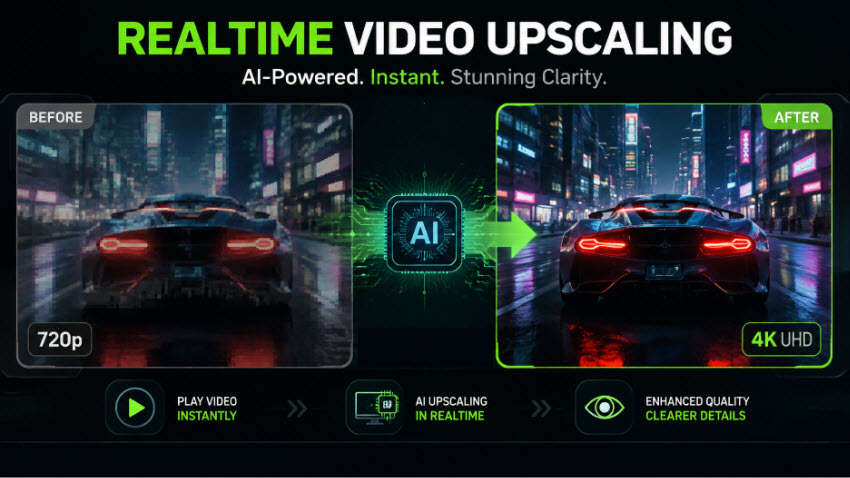
What Is Realtime Video Upscaling?
Traditional video scaling relies on simple geometric interpolation (such as bilinear or bicubic stretching), which often results in blurry edges, pixelation, and artifacts. In contrast, modern realtime video upscaler solutions leverage deep learning models, such as Super-Resolution convolutional networks (SRCNN) and generative adversarial networks (GANs)- to process frames on the fly.
Realtime video upscaling means applying these heavy computational AI models instantaneously (often at 30 to 60 frames per second or higher) using specialized hardware like dedicated Tensor cores or WebGPU architecture.
Key Benefits of Real-Time Processing:
- Bandwidth Efficiency: Transmit lower-resolution video feeds (saving bandwidth) and upscale them locally or at the edge server just before rendering.
- Immersive Live Streaming: Instantly enhance live webinars, gaming streams, and virtual events to crisp 1080p or 4K resolutions.
- Seamless Playback: Eliminate lag and choppy transitions with advanced frame interpolation and detail recovery.
Best Realtime Video Upscalers for Streaming, Gaming, Movies, and More
As 4K and 8K displays become increasingly common, older low-resolution videos can look noticeably soft, blurry, or heavily compressed. Realtime video upscaling solves this problem by improving video quality instantly while you watch, play, or stream content.
Unlike traditional video enhancement software that processes and exports a new file, real-time upscalers work on the fly. They analyze frames as they appear, improve details, reduce compression artifacts, and deliver a sharper image with minimal delay.
However, there is no single "best" realtime video upscaler. The right choice depends on what you are trying to improve.
For Streaming Videos: Automatic Browser-Based Upscaling
Best for: YouTube, Twitch, Bilibili, online courses, live streams
If your goal is simply to upscale every video you watch online to look sharper automatically, then hardware-based real-time video upscalers are the easiest solution.
This is a built-in hardware feature that acts like an invisible, automatic beauty filter for everything you watch inside your web browser. You don't need to install any extra video quality enhancer plugins or fiddle with complicated settings; once enabled, your computer's graphics card upscales supported videos automatically in the background.
It’s browser-based real-time video upscaling uses dedicated AI chips (such as Tensor Cores on modern GPUs) or smart TV processors. The system intercepts compressed video streams in real time and analyzes the frames, fills in missing details, removes compression artifacts (like fuzzy mosquito noise and pixelated blocks), and delivers a crisp image.
Recommended Tool: NVIDIA RTX Video Super Resolution
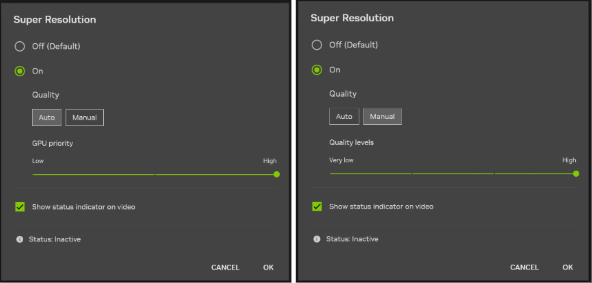
NVIDIA RTX Video Super Resolution (VSR) is one of the most widely used hardware-accelerated real-time video upscaling technologies for web video playback.
Unlike traditional video enhancement software that requires users to process and export a new file, RTX VSR upscale videos instantly during playback. When you watch supported low-resolution videos through compatible browsers or applications, the NVIDIA GPU analyzes each frame in real time, reduces compression artifacts, improves sharpness, and upscales the video to better match high-resolution displays.
Pros
- Works automatically once enabled, with no need to manually process videos
- Enhances videos instantly during playback without creating new files
- Uses dedicated AI acceleration on compatible NVIDIA RTX GPUs
- Helps improve compressed online videos by reducing artifacts and sharpening details
Cons
- Requires a compatible NVIDIA RTX graphics card
- Provides limited control over enhancement settings
- Does not modify or export an improved version of the original video
For Gaming: Real-Time Upscaling and Frame Generation
Best for: PC gaming, handheld gaming PCs, older games
Gaming is one of the most common use cases for real-time video upscaling. Unlike traditional video enhancement, which improves an already recorded video, gaming upscaling works during rendering. The game is often rendered at a lower internal resolution and then intelligently reconstructed into a higher-resolution image in real time.
This approach allows players to achieve better visual quality while reducing the workload on the GPU, making it possible to enjoy smoother gameplay at higher resolutions.
Popular Gaming Upscaling Technologies
Modern games often include built-in real-time upscaling technologies, including:
- NVIDIA DLSS – Uses AI-powered super resolution and frame generation to improve image quality while increasing performance on supported RTX GPUs.
- AMD FSR – A hardware-friendly upscaling solution designed to improve performance across a wider range of GPUs.
- Intel XeSS – Uses AI-assisted upscaling to enhance image quality and boost frame rates on supported hardware.
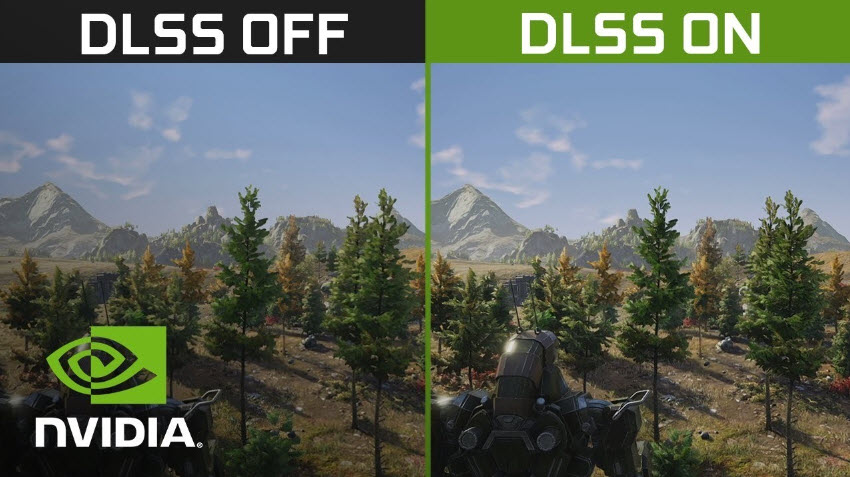
By rendering fewer pixels first and using advanced algorithms to reconstruct details, these technologies can deliver:
- Higher frame rates with reduced GPU workload
- Sharper visuals compared with traditional scaling methods
- Smoother gameplay, especially at 1440p and 4K resolutions
Real-time gaming upscaling is especially useful for players using high-refresh-rate monitors, 4K displays, or handheld gaming devices where balancing performance and image quality is challenging.
For Universal Upscaling: Lossless Scaling
Best for: Games, emulators, older software, unsupported applications
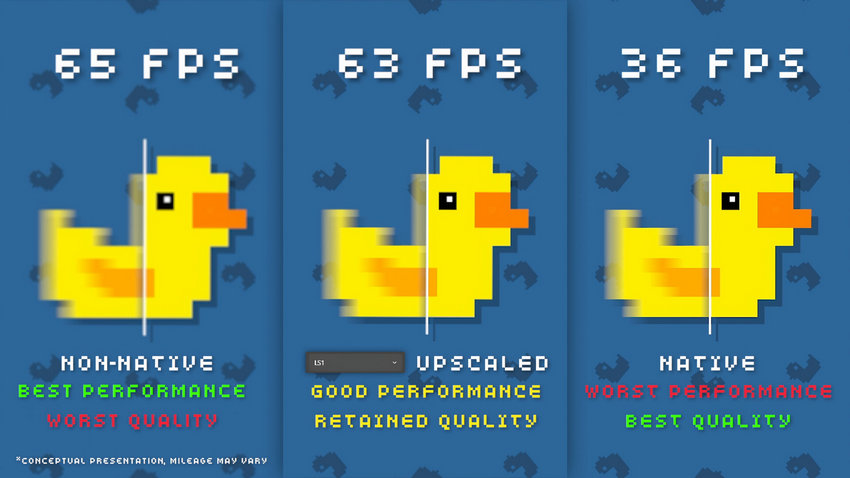
Not every game or application supports built-in upscaling technologies such as NVIDIA DLSS, AMD FSR, or Intel XeSS. For older games, indie titles, emulators, and lightweight applications, a universal real-time video upscaler can provide a practical alternative.
This is where Lossless Scaling comes in. Instead of requiring developers to integrate an upscaling technology into the game engine, Lossless Scaling works externally by capturing the application's output window, applying real-time scaling, and displaying the enhanced result.
By working at the application level, Lossless Scaling can enhance content that does not have built-in support for modern upscaling technologies. Therefore, Lossless Scaling is commonly used for:
- Older PC games that are limited to lower resolutions
- Indie games without DLSS or FSR support
- Retro emulators
- Handheld gaming devices with limited hardware performance
- Applications that cannot properly upscale videos in real-time on modern high-resolution displays
Pros
- Works with a wide range of games and applications
- Does not require developer integration like native upscaling technologies
- Useful for handheld gaming PCs and lower-powered systems
- Supports real-time scaling and frame generation features
Cons
- Mainly designed for games and applications
- Not intended for restoring old movies
- Cannot create a permanently enhanced video file
- Cannot Remove heavy video noise or compression artifacts
For Real-Time Anime Upscaling: Anime4K + MPV
Best for: Anime, cartoons, and other line-based animated content
For anime fans, Anime4K is one of the most popular real-time upscaling solutions. It is designed specifically for animated content and is commonly used together with the open-source media player mpv.
Unlike traditional video upscalers that simply sharpen images, Anime4K uses shader-based processing to enhance edges, preserve clean lines, and improve the appearance of low-resolution animation during playback.

Pros
- 100% free and open source.
- Lightweight enough for real-time playback on modest hardware.
- Unmatched edge preservation specifically for 2D cell-shaded art.
Cons
- Struggles with photorealistic movies containing complex textures.
- Ineffective on heavily damaged or noisy low-bitrate footage.
- Does not permanently export or transcode an upscaled video file (it is real-time playback only).
- Requires initial manual configuration of mpv and shader script files.
For High-Quality Real-Time Video Upscalings: MPV + madVR
Best for: Movie enthusiasts, home theater setups, and high-quality local playback
For live-action feature films and high-bitrate video collections, enthusiasts rely on advanced rendering pipelines like mpv with neural/scaling shaders (such as FSRCNNX) or the legendary Windows video renderer madVR. Unlike Anime4K, which is optimized for animation, these solutions focus on improving realistic video content through advanced scaling algorithms, sharpening, HDR processing, and color management.
Typical features include:
- High-quality GPU-based scaling algorithms (e.g., NNEDI3, NGU).
- Intelligent edge-adaptive sharpening.
- Real-time HDR-to-SDR and HDR tone mapping.
- 3D LUT-based color grading and management.

For Hardware-Assisted Real-Time Video Upscaling: VLC + NVIDIA RTX VSR
Best for: Watch local videos in VLC using automatic GPU-powered AI upscaling
Modern versions of VLC can act as a real-time video upscaler by tapping into NVIDIA RTX Video Super Resolution (VSR). Instead of relying on software-loaded shaders (like MPV), VLC offloads pixel reconstruction directly to the Tensor Cores of compatible NVIDIA graphics cards.
When playing supported video content through VLC with RTX VSR enabled, the NVIDIA GPU analyzes video frames in real time, reconstructs missing details, reduces blocky compression artifacts, and improves clarity before the final image is displayed.
For Upscaling Low-res Videos to HD/4K: Aiarty Video Enhancer
Best for: Creators, restoration, professional output
While real-time video upscalers instantly improve your viewing experience on the fly, they only work during playback and leave the original file completely unchanged.
If you need to upload, edit, archive, or share an improved version of a video, try AI video enhancement tools. Unlike real-time video upscaling, AI video enhancement software can upscale and enhance videos for other usage.
Aiarty Video Enhancer offers more than temporary playback improvements. Based on advanced AI models, it can help reduce noise, recover details from blurry footage, and upscale videos for modern HD, 4K, or higher-resolution displays.
- AI Resolution Upscaling: Transform 720p/1080p footage into crisp 4K/8K without blur or distortion.
- Denoising & Deinterlacing: Clean up grain, low-light clips, old VHS tapes, and broadcast archives.
- Artifact Removal: Eliminate macroblocking, mosquito noise, and web compression flaws.
- Frame Interpolation: Generate intermediate frames to smooth out low-FPS or fast-moving footage.
- Color Enhancement: Fix faded tones, balance contrast, and restore natural color accuracy.
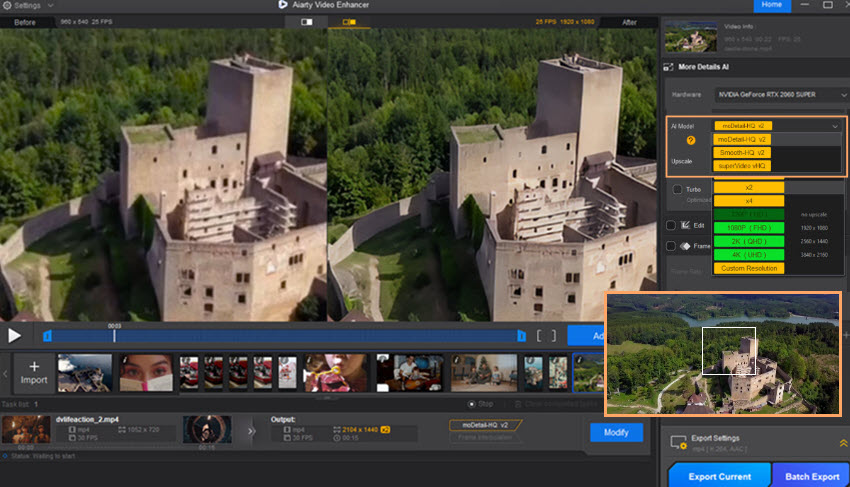
Test 1. AI upscaling enhances low-resolution footage by improving sharpness, details, and overall visual clarity for 4K displays.
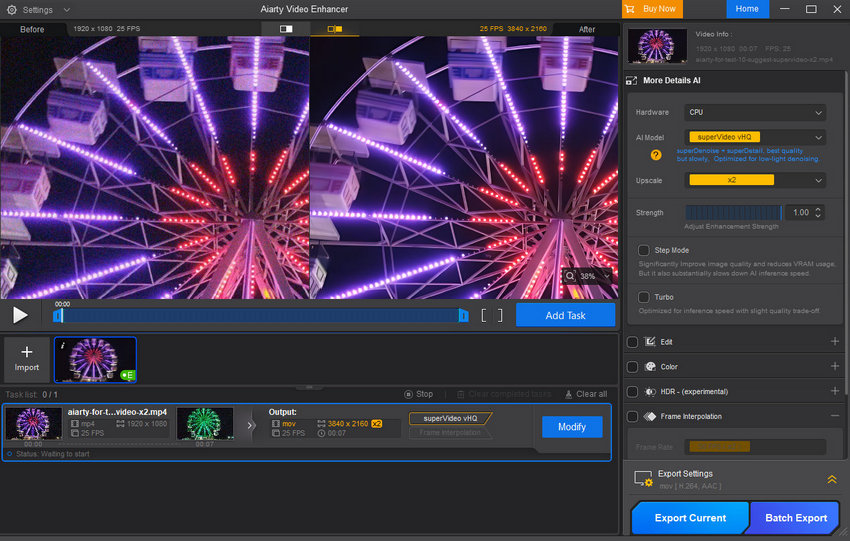
Test 2. The AI model reduces video noise while maintaining natural textures and details, especially in low-light footage.
Test 3. Anime4K enhances anime content in real time during playback, while Aiarty Video Enhancer processes videos offline to create a new enhanced file. The comparison below shows how Aiarty delivers comparable detail improvements while offering a more flexible workflow for restoration, editing, and export.

Final Thoughts
Real-time video upscaling has changed the way we experience low-resolution content. Instead of waiting for hours to process videos, AI-powered technologies can now enhance frames instantly while you watch, stream, or play.
For everyday viewing, solutions like NVIDIA RTX Video Super Resolution provide a simple way to improve online videos automatically. Gamers can benefit from technologies such as NVIDIA DLSS, AMD FSR, and Intel XeSS to achieve higher frame rates with better image quality, while anime enthusiasts can rely on Anime4K and MPV for optimized real-time playback.
However, real-time upscaling is not a replacement for professional video enhancement. Since these solutions only improve the image during playback, they cannot create a permanently enhanced video file. If you need to restore old footage, remove noise, upscale videos for editing, or export high-quality 4K/8K content, an AI video enhancer remains the better choice.
The best real-time video upscaler ultimately depends on your workflow. Choose hardware-based solutions for instant playback improvements, gaming upscalers for better performance, and dedicated AI video enhancement software when you need lasting quality improvements.
 Frequently Asked Questions
Yes, real-time video upscalers can upscale lower-resolution videos such as 720p or 1080p to match a 4K display. However, they do not create true native 4K detail. Instead, AI models analyze frames and estimate missing information to produce a sharper, cleaner image.
For example, NVIDIA RTX Video Super Resolution can upscale supported videos during playback while reducing compression artifacts and improving clarity using RTX GPU acceleration.
It depends on the specific method. Features like NVIDIA RTX Video Super Resolution (VSR) strictly require an NVIDIA RTX GPU (20-series or newer) because they rely on dedicated Tensor Cores.
However, other solutions are much more flexible: Anime4K and MPV shaders run on any GPU that supports modern GLSL/HLSL shaders. Similarly, universal utilities like Lossless Scaling and open-source tools work across a wide variety of hardware configurations.
When using tools like Lossless Scaling for frame generation, a slight increase in input latency can occur because intermediate frames must be computed before being displayed.
However, modern implementations are optimized to keep latency minimal. For the best gaming experience, users generally ensure their base frame rate is already stable before applying generational scaling, or rely on native hardware solutions like NVIDIA DLSS, which are tightly integrated into the game engine to minimize delay.
RTX Video Super Resolution and DLSS use AI-based upscaling but are designed for different purposes.
- RTX Video Super Resolution: Enhances video playback from browsers or media players by improving resolution and reducing compression artifacts.
- DLSS: Improves gaming performance by rendering games at a lower internal resolution and reconstructing frames during gameplay.
RTX VSR is designed for videos, while DLSS is designed for real-time game rendering. NVIDIA states that RTX Video and DLSS use different technologies and training approaches.
No. Most real-time video upscalers only improve the image during playback. They do not modify the original video file or create an enhanced copy.
For example, RTX Video Super Resolution improves supported videos while they are being displayed but does not export a new upgraded video file.
If you need to upload, edit, archive, or share an improved video, you need offline AI video enhancement software.
You May Also Like


This post was written by Brenda Peng who is a seasoned editor at Digiarty Software who loves turning ordinary photos into extraordinary works of art. With AI assistance for brainstorming and drafting, the post is reviewed for accuracy by our expert Abby Poole for her expertise in this field.
