


Accidentally deleted your camera photos or found your SD card write protected or unreadable? Don't format the card or take new photos yet. The right SD card recovery software may help recover your lost RAW files, JPEG photos, and videos. From Canon EOS and Nikon Z cameras to Sony Alpha and Fujifilm systems, photographers rely on SD card recovery tools to restore important images after accidental deletion, formatting, or card errors.
This guide covers the best SD card recovery software, recovery tips for photographers, and how to improve recovered photos after restoration.
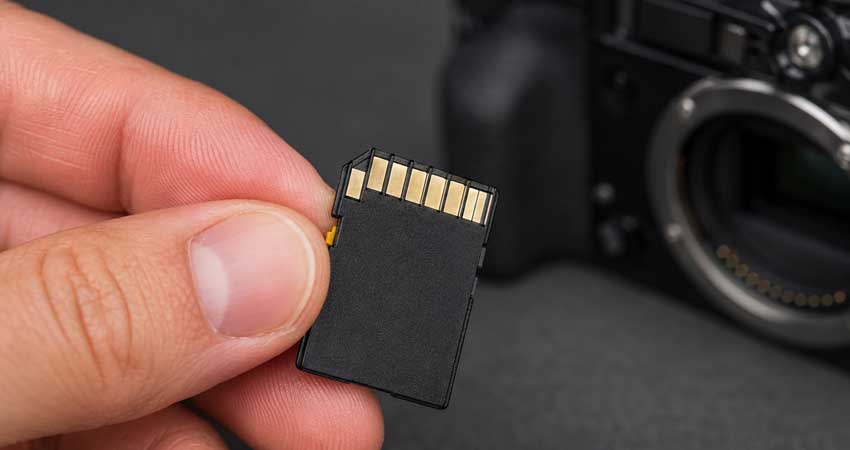
Best SD Card Recovery Software for Photographers
The best recovery software for photographers should do more than recover deleted files. It should support camera-specific formats, work with large-capacity SDXC cards, preview recoverable images, and handle RAW files from modern cameras.
Here are some reliable options for recovering photos from SD cards.
1. Disk Drill – Best Overall SD Card Recovery Software
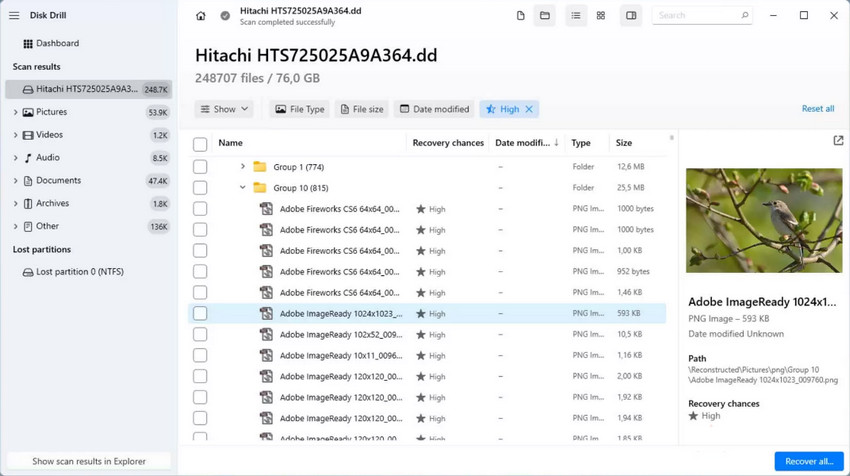
Disk Drill is a user-friendly SD card recovery software for photographers who need to restore deleted or inaccessible camera photos. It supports SD, SDHC, and SDXC cards and can recover common photo formats, including JPEG and RAW files from cameras such as Canon EOS, Nikon Z, and Sony Alpha systems.
With its simple interface and preview function, Disk Drill is suitable for recovering photos after accidental deletion, formatting errors, or situations where a camera memory card becomes unreadable.
- Beginner-friendly interface with simple recovery steps
- Supports RAW photos and common camera file formats
- Allows users to preview recoverable files before restoration
- Works with SD cards, external drives, and other storage devices
- Free version has recovery limitations
- Advanced users may prefer more technical recovery tools
- Recovery success depends on whether deleted data has been overwritten
Many photographers and general users recommend Disk Drill because the recovery process is straightforward, especially when an SD card is still recognized by a computer but photos cannot be opened. Users commonly mention successful recovery after accidental deletion or formatting, while experienced users also point out that no recovery software can guarantee results for severely damaged or overwritten cards.
2. PhotoRec – Best Free SD Card Recovery Software
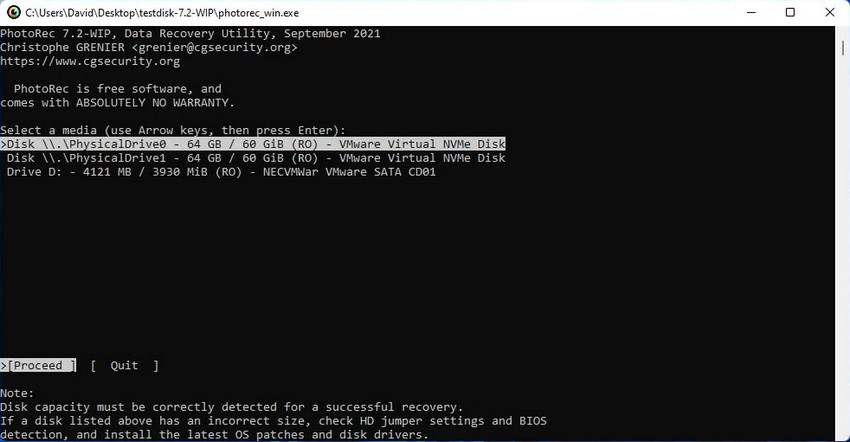
PhotoRec is a free and open-source SD card recovery software that is widely recommended for photographers who need to recover lost photos without paying for a recovery tool. It supports a wide range of file formats and can recover images from SD, SDHC, SDXC, and other storage devices.
Unlike many beginner-focused recovery programs, PhotoRec focuses on powerful file recovery rather than a polished interface. It can recover photos even when the original file system is damaged, making it a useful option for photographers dealing with corrupted or formatted memory cards.
- Completely free and open-source recovery tool
- Supports a wide range of image and video formats
- Can recover files from formatted or damaged file systems
- No recovery limits or paid upgrades required
- Less beginner-friendly compared with commercial recovery software
- Recovered files may lose original file names and folder structures
- Command-line interface can be intimidating for some users
PhotoRec is frequently recommended in photography and data recovery communities because it is free and does not limit the number of files users can recover. However, many users note that the tool requires more technical knowledge, and recovered images may be organized by file type rather than the original camera folders.
3. Recuva – Best Free Memory Card Recovery Software for Beginners
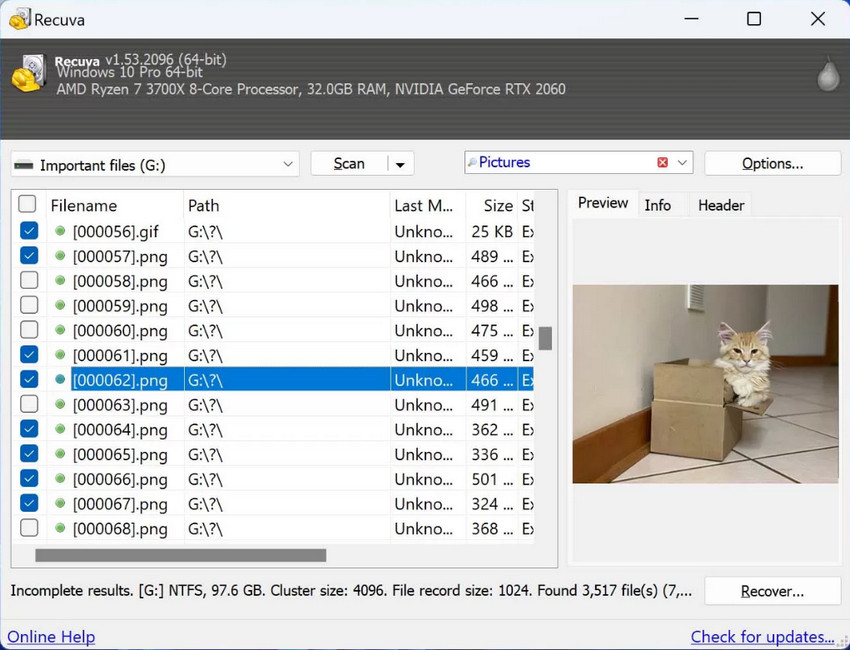
Recuva is a lightweight memory card recovery software free option designed for users who need a simple way to restore recently deleted files. It works with SD cards, USB drives, and other storage devices, making it suitable for basic photo recovery tasks.
For photographers, Recuva can help recover accidentally deleted JPEG photos and some camera files after common mistakes such as deleting images during file management. However, it is better suited for simple recovery cases rather than severely corrupted SD cards or professional RAW recovery workflows.
- Free version available for basic photo recovery
- Simple interface suitable for beginners
- Quick scanning process for recently deleted files
- Works with SD cards and other removable storage devices
- RAW photo recovery support is more limited than professional tools
- Less effective for severely corrupted memory cards
- Available only for Windows users
Many users choose Recuva because it is simple, lightweight, and effective for recovering recently deleted files. However, photographers often report that it is not the first choice for damaged SD cards or large collections of RAW images from professional cameras.
4. EaseUS Data Recovery Wizard – Best for Easy Professional Recovery
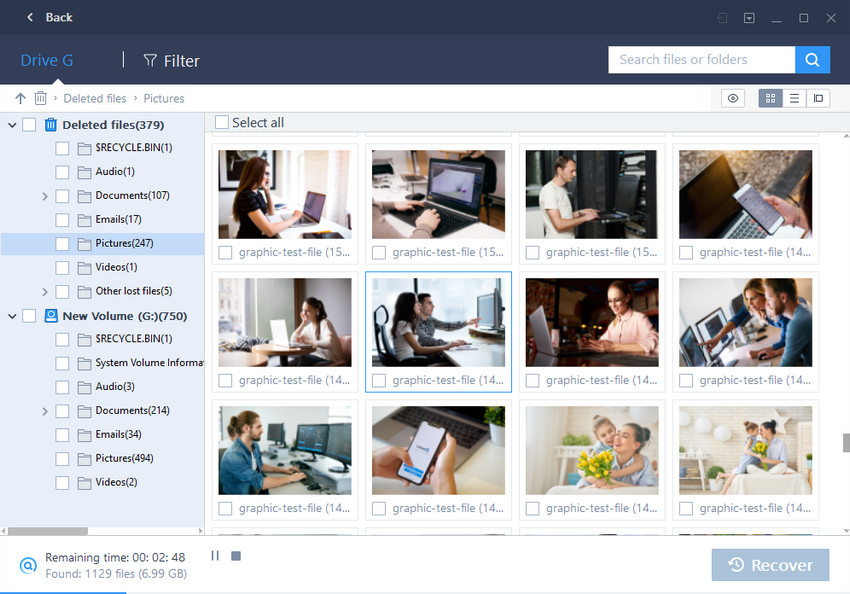
EaseUS Data Recovery Wizard is a popular recovery software for SD card users who want a more polished recovery experience. It supports photos, videos, and other file types from SD cards, including many RAW formats used by DSLR and mirrorless cameras.
With its straightforward interface and deep scanning options, EaseUS is suitable for photographers who need to recover important files after accidental deletion, formatting, or memory card errors. It allows users to preview recoverable files before restoring them, helping identify whether important images are still available.
- User-friendly interface with guided recovery steps
- Supports RAW photos, videos, and common file formats
- Offers deep scan and file preview features
- Works with SD cards, hard drives, and other storage devices
- Free recovery capacity is limited
- Full version is more expensive than some alternatives
- Deep scans can take a long time on large SD cards
Users often appreciate EaseUS for its clean interface and reliable scanning process, especially when recovering photos from accidentally formatted cards. At the same time, some photographers mention that pricing can be a concern, especially if they only need recovery software for occasional emergencies.
5. Stellar Photo Recovery – Best for Professional Camera Files
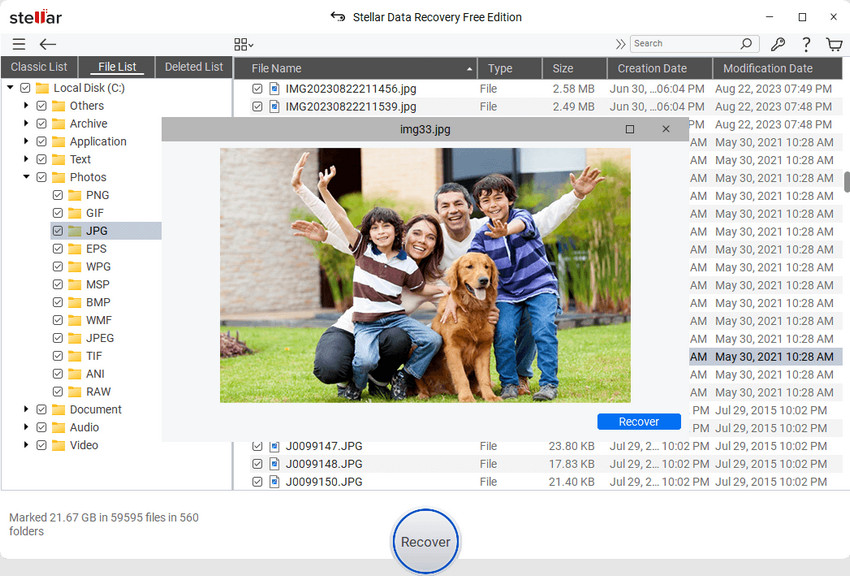
Stellar Photo Recovery is designed specifically for recovering photos, videos, and audio files from digital cameras and storage devices. It supports SD, SDHC, and SDXC cards and is commonly used by photographers who need to restore RAW images and high-resolution media files.
The software supports many camera brands and file formats, making it suitable for DSLR, mirrorless, drone, and action camera workflows. Its preview feature allows photographers to check recoverable files before saving them, which is useful when dealing with important shoots such as weddings or professional assignments.
- Designed specifically for photo and video recovery
- Supports RAW files from many camera brands
- Recovers photos from formatted or corrupted SD cards
- Includes preview before recovery
- Scanning large memory cards can take significant time
- Free trial has limited recovery functionality
- May be more than casual users need
Photographers often choose Stellar Photo Recovery when dealing with camera-specific files and professional photo libraries. Users generally like its format support and recovery options, although some mention that scanning large SDXC cards can be slower compared with simpler recovery tools.
How to Choose SD Card Recovery Software for Camera Photos
Not all recovery tools are equally suitable for photographers. When choosing an SD card recovery software, look for features that match your camera workflow, especially RAW support, memory card compatibility, and recovery reliability.
- Support RAW camera files: Professional photographers should choose tools that can recover formats such as Canon CR3/CR2, Nikon NEF, Sony ARW, Fujifilm RAF, and other RAW files.
- Work with SDXC and large-capacity cards: Modern cameras often use 128GB or 256GB SDXC cards, so the recovery tool should be able to scan large memory cards without issues.
- Preview files before recovery: A preview feature helps confirm whether important wedding photos, travel images, or RAW files are still recoverable before saving them.
- Recover files before they are overwritten: Stop using the SD card immediately after data loss. Taking new photos or formatting the card may permanently replace the lost files.
Can SD Card Recovery Software Recover RAW Photos?
Yes, many SD card recovery software tools can recover RAW photos from DSLR and mirrorless cameras, as long as the files have not been overwritten.
This is especially important for photographers who shoot in RAW formats because these files contain more editing information than JPEG images. Recovery tools may support formats such as Canon CR3/CR2, Nikon NEF, Sony ARW, Fujifilm RAF, and Adobe DNG.
However, RAW recovery is not guaranteed in every situation. If an SD card has been formatted multiple times, heavily used after deletion, or physically damaged, some files may not be recoverable.
For the best chance of recovery, stop using the card immediately after losing photos and choose software that supports your camera's file format.
What Happens After Recovering Photos from an SD Card?
Recovering lost files is a huge relief, but many photographers discover another problem afterward: The recovered images may not look exactly like the originals. This is because SD card recovery software restores files. It does not improve image quality.
After recovery, photographers may find soft details, noise from old camera sensors, low-resolution JPEG files, compression artifacts, slight blur, or images that need preparation for printing. This is especially common with older digital cameras, long-term photo archives, recovered JPEG files and social media compressed images.
For valuable photos such as wedding memories, family portraits, or once-in-a-lifetime travel shots, recovering the file is only the first step. Enhancing the recovered photo can help bring back more visual impact and make valuable memories ready for modern use.
Enhance Recovered Camera Photos with Aiarty Image Enhancer
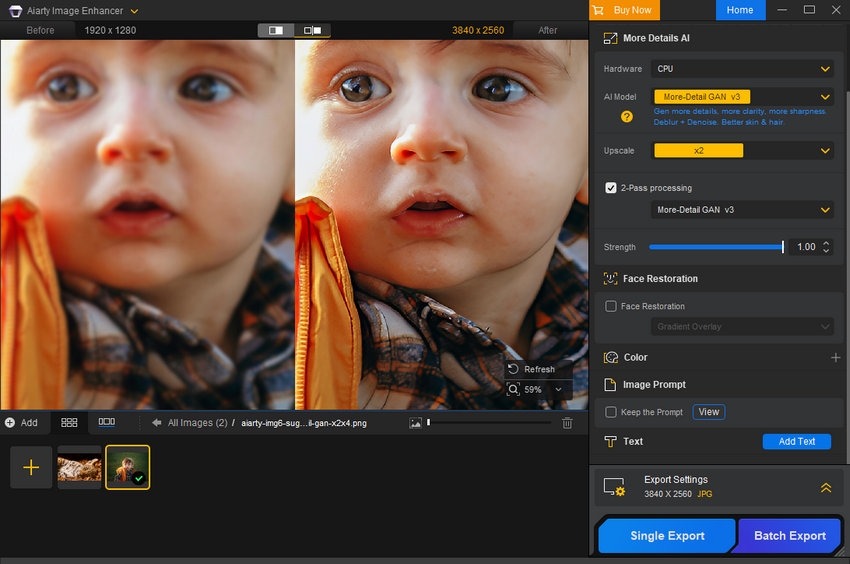
After recovering photos from an SD card, photographers may still want to improve their image quality before editing, printing, or sharing. Aiarty Image Enhancer helps refine recovered images with AI-powered enhancement, making soft, noisy, or low-resolution photos clearer and more detailed.
It is especially useful for older camera files, recovered JPEG images, and photos captured in challenging conditions where details may appear less sharp than expected.
- Enhance soft details: Improve clarity in photos that look slightly blurry after recovery.
- Reduce image noise: Clean up grainy photos from older cameras or high-ISO shooting.
- Upscale for larger displays and prints: Prepare recovered photos for albums, posters, and modern screens.
- Refine old photo archives: Improve the quality of recovered JPEG images and historical camera collections.
Give your recovered camera photos a quality upgrade with Aiarty Image Enhancer and prepare them for editing, printing, or sharing.
How to Prevent SD Card Photo Loss in the Future
The best recovery solution is still prevention. Professional photographers often follow these practices:
1. Use Reliable Memory Cards
Choose reputable SD card brands and avoid extremely cheap cards with unknown reliability.
2. Format Cards in Your Camera
After transferring photos, format the card using the camera instead of a computer. Camera formatting helps maintain compatibility with the device.
3. Backup Photos After Every Important Shoot
For important events such as weddings or commercial shoots, keep multiple copies, for example, original files on computer, external backup drive and cloud backup. >> How to Backup Photos
4. Replace Old SD Cards
Memory cards have limited write cycles. If a card frequently shows errors, disconnects, or slows down, replacing it is safer than risking photo loss.
Final Thoughts: Recover First, Enhance Later
Losing photos from an SD card can be stressful, especially when it contains irreplaceable memories or important professional work. The right SD card recovery software can help photographers retrieve deleted RAW files, JPEG images, and videos from camera memory cards, giving them a chance to recover valuable shots after accidental deletion, formatting, or card errors.
However, recovering files is only part of preserving your photos. After restoring your images, AI-powered enhancement can help improve clarity, refine details, and prepare them for modern displays, prints, and long-term archives. For photographers, a complete workflow is not just about getting photos back — it is about keeping the memories behind them looking their best.
 FAQs
FAQs
The best choice depends on your needs. Disk Drill and EaseUS offer user-friendly recovery experiences, while PhotoRec is a popular free SD card recovery software option. For photographers, prioritize features such as RAW file support, file preview, and compatibility with SDXC cards.
Yes. PhotoRec and Recuva are two commonly used free options for recovering deleted files from SD cards. However, free tools may have limitations in usability, supported features, or customer support compared with paid recovery software.
Yes, many SD card recovery tools can recover RAW photos from cameras, including formats such as Canon CR3/CR2, Nikon NEF, Sony ARW, and other RAW files. However, recovery success depends on whether the deleted data has been overwritten or whether the memory card has physical damage.
Sometimes. If the SD card is still recognized by your computer or camera, recovery software may be able to scan and restore the files. Stop using the card immediately after data loss to avoid overwriting recoverable photos.
No. SD card recovery software is designed to retrieve lost files, not improve image quality or repair blurry images. If recovered photos look soft, noisy, or low-resolution, an AI image enhancement tool such as Aiarty Image Enhancer can help improve their appearance.
You May Also Like


This post was written by Brenda Peng who is a seasoned editor at Digiarty Software who loves turning ordinary photos into extraordinary works of art. With AI assistance for brainstorming and drafting, the post is reviewed for accuracy by our expert Abby Poole for her expertise in this field.
