


Photos hold priceless memories and valuable work, yet many people still keep them in just one place, risking permanent loss from hardware failure, accidental deletion, or theft. Finding the best way to back up photos means building a system that protects your files in every situation, not just storing them on a single device or cloud app. In this guide, we’ll explore the best ways to backup photos and show you clearly how to back up photos using safe, proven methods that work for both everyday users and photographers.
The 3-2-1 Backup Rule: The Gold Standard for Photo Protection
When it comes to protecting your photos, following a proven system is key. The 3-2-1 backup rule is widely recommended by experts as the best way to back up photos securely.
Here’s how it works:
- Keep 3 Copies of Your Photos: Always have one original and at least two backup copies. This ensures that if one copy is lost or damaged, you still have others to rely on.
- Use 2 Different Storage Types: Store your backups on different mediums—such as an external hard drive, cloud storage, or a NAS (Network-Attached Storage) system. Using two types of storage minimizes the risk of simultaneous data loss.
- Store 1 Copy Off-Site or Offline: Keep at least one copy away from your primary location. This could be a cloud backup or an external drive stored at a different location. Having an off-site copy protects your photos from theft, fire, or other local disasters.
By applying the 3-2-1 backup rule, you’re following one of the best ways to backup photos. Not only does it give you peace of mind, but it also ensures that even if your device fails, you’ll never lose those precious memories.
Whether you’re backing up hundreds of family photos or thousands of professional images, this rule provides a simple framework to follow when deciding how to back up photos efficiently and safely.
Best Ways to Back Up Photos
Once you understand the 3-2-1 rule, the next step is choosing the right tools to implement it. There’s no one-size-fits-all solution when it comes to protecting your memories. Depending on your needs, budget, and technical comfort, some methods work better than others. Below are the best ways to backup photos in 2026, along with tips on how to back up photos effectively.
1. Back Up Photos with Cloud Storage - Best for Automatic Backups
Cloud storage services such as Google Photos, Apple iCloud, and Amazon Photos offer an easy and reliable way to back up your photos. Once set up, these services automatically sync your photos from your phone or computer, making it effortless to keep your memories safe. Cloud storage allows you to access your images from multiple devices, whether you’re at home or traveling, and ensures that your photos remain protected even if your device is lost or damaged. For many users, cloud storage is the first step in how to back up photos, providing both convenience and security.

💡 Bonus Step: Enhance Your Photos Before You Back Them Up
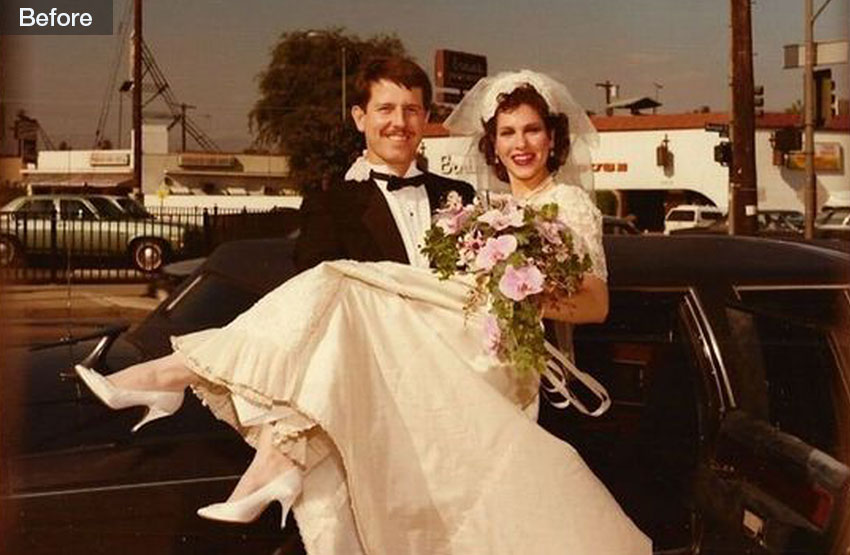
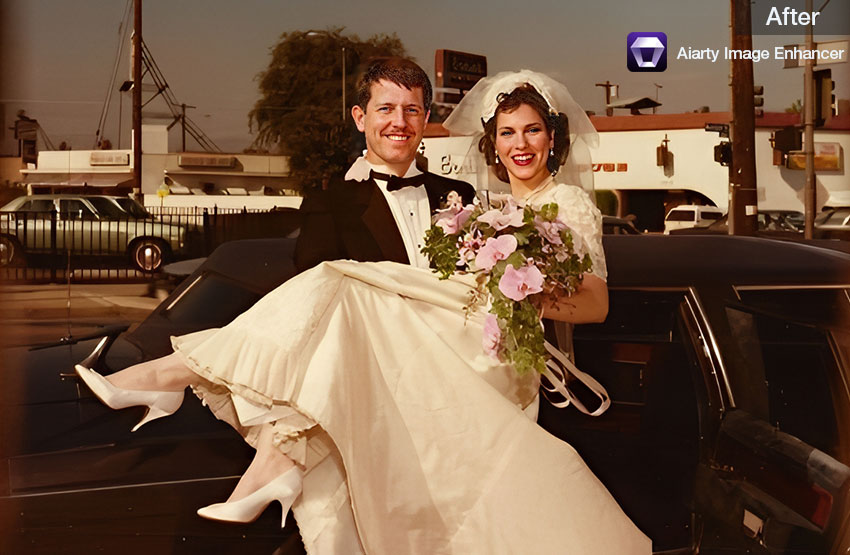
From treasured family photos to travel adventures, creative projects, or professional shoots, every image deserves to look its best. Aiarty Image Enhancer automatically boosts color, clarity, and detail, turning ordinary snapshots into vibrant memories. Whether you’re capturing milestones at home, editing your latest photography portfolio, or preserving large RAW archives, Aiarty ensures your photos are optimized before they’re safely backed up.

2. Back Up Photos with External Hard Drives – Best for Large Storage
For those with large collections of photos, external hard drives are a practical solution. Devices from brands like Western Digital or Seagate provide high-capacity storage, allowing you to keep thousands of images in one place. Unlike cloud storage, external drives are offline, so your photos remain safe from online threats. Many photographers and families use external drives as part of the 3-2-1 backup rule, combining them with cloud storage to ensure they have multiple copies in different locations. This makes external drives one of the best ways to backup photos for those seeking both reliability and control.

3. Back Up Photos with NAS (Network-Attached Storage) – Best for Home or Office Use
A NAS device is essentially a private storage server connected to your home or office network. It allows multiple users to access, store, and organize photos from any device on the network, and some NAS systems even allow secure remote access. NAS devices are ideal for households or small offices with large photo libraries that need centralized management. Implementing a NAS system as part of your photo backup strategy is a professional approach to how to back up photos while maintaining easy accessibility and high storage capacity.

4. Back Up Photos with USB Flash Drives – Best for Quick & Portable Backup
USB drives or thumb drives provide a simple way to back up smaller collections of photos or transfer images between devices. They are portable and easy to use, requiring no internet connection, which makes them a convenient option for travelers or temporary backups. While their storage capacity is limited compared to cloud storage or external drives, they are still useful as a quick backup solution. For anyone wondering how to back up photos on the go, USB drives are one of the most accessible methods and a good complement to other backup strategies.
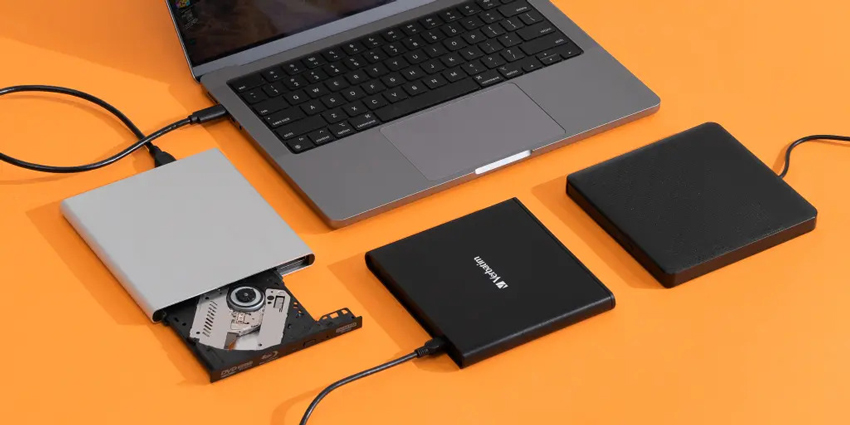
The main considerations for physical media are longevity and obsolescence. Optical discs like Blu-rays can last decades if stored in a cool, dry, and dark environment, while USB drives should be replaced every few years to prevent data degradation. By combining physical media with cloud and external storage, you create a robust multi-layered approach—the cornerstone of the best way to save photos for a lifetime.
5. Back Up Photos with Photo Backup Software – Best for Automation & Advanced Control
For users who want a comprehensive backup solution, specialized software like Backblaze, Acronis, 5KPlayer or EaseUS can automatically back up photos from multiple devices. These tools allow you to schedule backups, maintain version histories, and manage large collections without constant manual effort. Backup software is ideal for professionals or enthusiasts who need to ensure that their photos are always protected, even when dealing with thousands of files. Using such software is one of the most efficient best ways to backup photos, combining automation, safety, and convenience.
Best Way to Back Up Photos for Different Needs
Not all photo libraries are the same, and different users have unique requirements. Whether you're an occasional phone user, an amateur photographer, or a professional with a massive archive, the best way to back up photos will vary. Here's a guide to choosing the right backup solution based on your needs.
1. Best for iPhone & Android Users
For smartphone users, cloud storage is the most convenient option. Services like iCloud for iPhone and Google Photos for Android automatically back up photos and videos in the background, eliminating the need for manual transfers. This makes it one of the best ways to backup photos for anyone who primarily shoots on their phone, ensuring your memories are safe even if your device is lost, stolen, or damaged.
2. Best for Amateur Photographers
Amateur photographers often have growing collections that need reliable yet simple storage. Combining cloud storage with an external hard drive is an excellent approach. Cloud storage provides quick, off-site access, while an external drive keeps a secure offline copy. This combination is an easy-to-implement solution and a practical example of the best way to back up photos for hobbyists who want both safety and convenience.
3. Best for Professional Photographers
Professional photographers need robust solutions to handle large volumes of high-resolution images. A NAS (Network-Attached Storage) system combined with automated photo backup software offers centralized storage, remote access, and automated versioning. These methods ensure that even thousands of photos can be safely managed, making it the go-to strategy for professionals who want to know how to back up photos efficiently and securely.
4. Best for Large RAW Archives (10TB+)
For photographers or studios managing extremely large RAW photo libraries, traditional storage solutions like single external drives are often not enough. This is where RAID (Redundant Array of Independent Disks) comes in. RAID is a system that combines multiple hard drives into a single storage unit, providing both high capacity and data protection. Depending on the configuration, RAID can mirror your files for redundancy or split data across drives for faster performance, making it an ideal solution for massive collections.
Pairing RAID storage with cloud backup ensures compliance with the 3-2-1 backup rule, giving you an off-site copy while keeping your large archive safe and accessible. For archives exceeding 10TB, this combination is one of the best ways to backup photos securely, allowing professional photographers and studios to confidently manage even the largest collections. By using RAID, you can maintain speed, reliability, and safety all at once, which is crucial when deciding how to back up photos at this scale.
Final Thoughts on Backup Solutions
No matter your level of photography, having a clear, reliable backup strategy is key. For casual users, a simple cloud and external hard drive combo might be enough. But for professionals, a more robust system combining NAS, RAID, and offsite storage will ensure your photos are protected against any disaster.
By understanding your specific needs and following the 3-2-1 backup rule, you can find the best way to back up photos that fits your workflow and guarantees that your images remain safe and accessible for years to come.
Best Practices for Photo Backup
- Follow the 3-2-1 Backup Rule: Keep three copies of your photos, store them on two different types of media, and keep one copy off-site or offline. This ensures maximum protection against device failures, accidental deletion, and disasters, making it the best way to back up photos.
- Organize Your Photos: Sort images into clear folders or albums, label files properly, and remove duplicates. Well-organized backups make it easier to find files later and keep your library manageable.
- Automate Your Backups: Use cloud storage or backup software to automatically sync new photos. Automation reduces the risk of forgetting backups and ensures your photos are consistently protected.
- Test Your Backups Regularly: Check that your backups are accessible and functioning properly. Regular testing confirms that you can recover your photos if needed.
- Combine Multiple Methods: For added safety, use a combination of cloud storage, external drives, NAS systems, or backup software. This is one of the best ways to backup photos efficiently, especially for large collections or professional use.
 FAQs
FAQs
The safest approach is to follow the 3-2-1 backup rule: keep three copies of your photos, use two different storage types, and store one copy off-site or offline. Combining cloud storage, external drives, and backup software ensures your images are fully protected, making it the best way to back up photos.
It depends on how frequently you take new photos. For casual users, weekly or monthly backups may be sufficient. Professionals or heavy photographers should back up daily. Automating backups through cloud storage or backup software is one of the best ways to backup photos consistently without forgetting.
Yes. Most cloud services like Google Photos, iCloud, and Dropbox allow multiple devices to back up to the same account. You can also sync your phone and computer to an external drive or NAS. Understanding how to back up photos across all devices ensures your entire library is safely consolidated.
While cloud storage is convenient, relying on it alone is risky. The 3-2-1 backup rule recommends keeping at least one offline copy on an external drive or NAS. This combination is widely considered the best way to back up photos for both safety and accessibility.
You May Also Like


This post was written by Brenda Peng who is a seasoned editor at Digiarty Software who loves turning ordinary photos into extraordinary works of art. With AI assistance for brainstorming and drafting, the post is reviewed for accuracy by our expert Abby Poole for her expertise in this field.
