

Nano Banana Upscaler Review: AI Image Generator or True 4K Upscaler?



Quick Answer: Can Nano Banana Upscale Images?
Yes. Nano Banana Pro can generate higher-resolution versions of images, with up to 4K output depending on your subscription tier. However, it is primarily an AI image generation and editing model rather than a dedicated super-resolution upscaler. If your goal is faithful enlargement without changing composition, a dedicated AI upscaler such as Aiarty Image Enhancer is generally more reliable.
Nano Banana has quickly become one of the most talked-about AI image tools, and with the release of Nano Banana Pro, many users assume it can now replace a dedicated AI image upscaler. While the new version can generate higher-resolution images, resolution alone doesn't tell the whole story. The real question is whether it enlarges images faithfully or recreates them with AI.
In this guide, we'll look at Nano Banana Pro's actual resolution capabilities, image quality, limitations, and the scenarios where a dedicated AI upscaler may deliver more reliable results.
What Resolution Does Nano Banana Pro Support?
One of the most common questions users ask is about Nano Banana Pro's maximum output resolution. The answer depends on which version you're using.
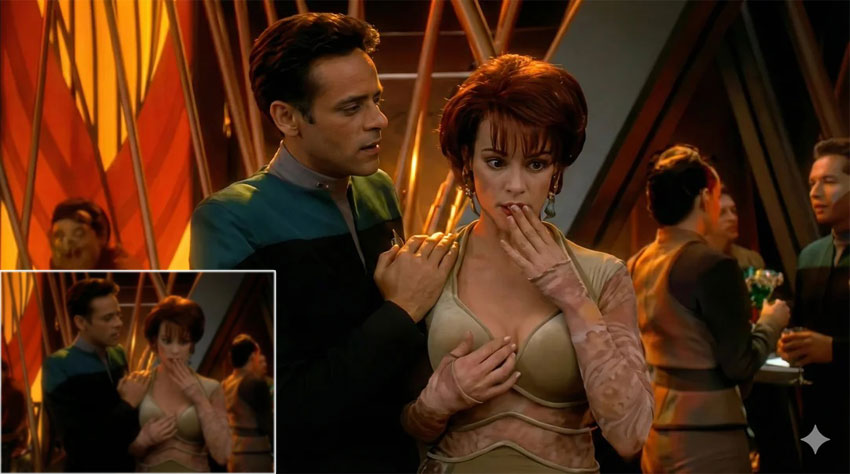
Unlike traditional AI upscalers that enlarge an existing image pixel by pixel, Nano Banana Pro generates a new high-resolution version using AI. It reconstructs textures, edges, lighting, and even small objects to produce a sharper-looking image instead of simply increasing the pixel count.
For social media posts, concept art, illustrations, and casual photo enhancement, the results are often impressive. However, the output may not always preserve every detail of the original image, especially when working with portraits, old photos, product photography, or images that require pixel-level accuracy.
If your priority is faithful enlargement rather than AI reinterpretation, output resolution is only part of the equation. It's equally important to understand how Nano Banana creates those additional details.
Is Nano Banana Pro a Real AI Upscaler or an AI Image Generator?
Technically, Nano Banana Pro can upscale images—but it isn't a dedicated super-resolution tool in the traditional sense. Conventional AI upscalers are designed to preserve the original composition while recovering lost details, reducing noise, sharpening edges, and increasing resolution as faithfully as possible. They're commonly used for photography, scanning old prints, e-commerce product images, and print production, where maintaining the original content is critical.
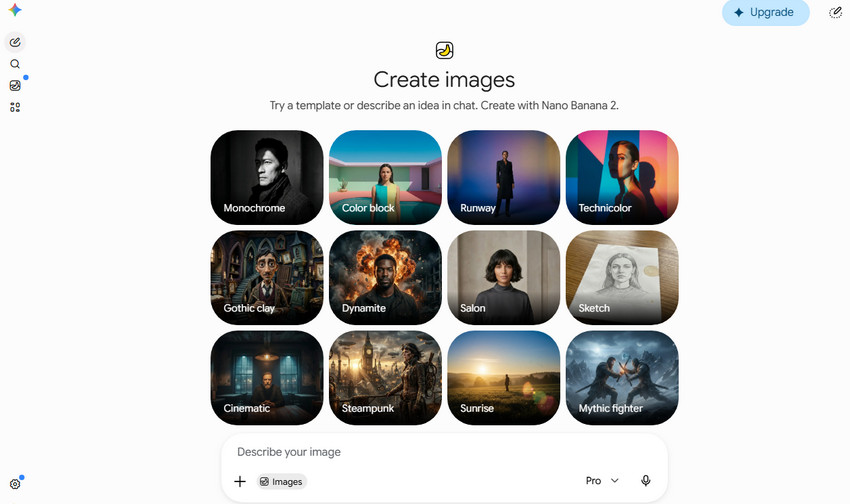
Nano Banana Pro takes a different approach. Built on a multimodal generative AI model, it analyzes both your image and prompt before creating a new, higher-resolution version. During this process, it may reconstruct textures, adjust lighting, expand backgrounds, refine facial features, or even modify small objects if the AI believes doing so improves the final result.
This generative workflow is why Nano Banana often produces visually appealing images. At the same time, it also explains why the output may differ slightly from the source image. Composition changes, regenerated textures, and subtle object alterations are all possible, making it better suited for creative editing than for faithful restoration.
When to Use Nano Banana Pro
Nano Banana Pro is not just a general editing tool—it is mainly designed for creative generation and flexible image manipulation. Depending on your goal, it can work well in certain workflows, but it is not always the right choice for detail-preserving upscaling.
When Nano Banana Pro Works Best
Nano Banana Pro is a great choice for:
- AI-generated artwork and illustrations
- Social media content
- Creative image editing
- Concept design and marketing visuals
When a Dedicated AI Upscaler Is the Better Choice
If your priority is preserving fine details from the original image rather than reinterpreting it, a dedicated AI image enhancer is usually more reliable. These tools are designed to improve resolution while keeping the original structure and texture intact.
- Restoring old family photos
- Product and e-commerce photography
- Wildlife and landscape photography
- Printing large-format images
- Batch processing hundreds of images with consistent results
This is where dedicated AI image upscalers such as Aiarty Image Enhancer offer a different workflow. Instead of regenerating image content, they focus on recovering detail, removing noise and artifacts, and enlarging images while keeping the original composition intact.
How to Upscale Images with Nano Banana Pro
Upscaling an image with Nano Banana Pro only takes a few steps, but the quality of the result depends as much on your prompt as on the source image.
Step 1: Upload your image.
Open Gemini, choose Create Images, and upload a JPG, PNG, or WebP file.
Step 2. Describe the enhancement you want.
Instead of simply writing "Upscale this image to 4K," include the details you want the AI to preserve or improve. For example:
- Upscale this image to 4K while preserving the original composition and facial details.
- Increase resolution, reduce noise, and keep natural textures without changing the background.
- Enhance clarity and sharpness while maintaining realistic colors.
The more specific your prompt is, the less likely the AI is to alter important parts of the image.
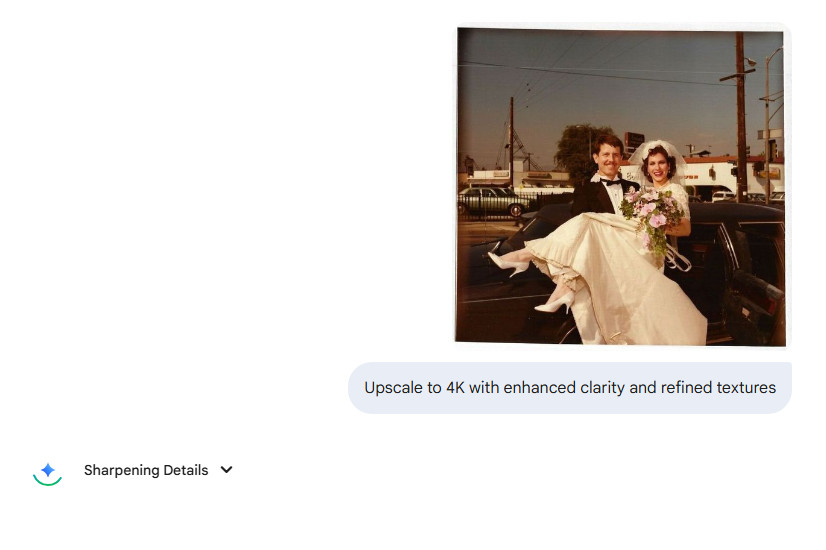
Step 3. Generate and review the result.
Nano Banana may regenerate textures or adjust small details during processing. Compare the output with the original image before downloading, especially if you're working with portraits, products, or historical photos where accuracy matters.
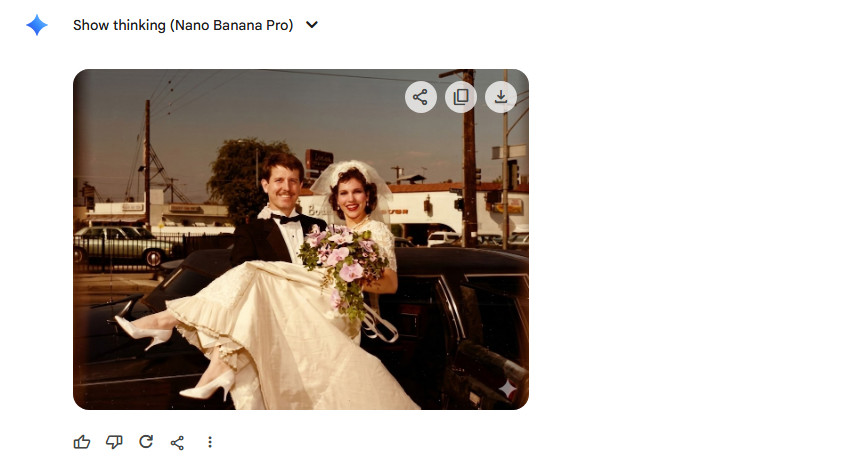
Step 4. Download the image.
Free users are typically limited to lower-resolution exports, while higher-resolution output depends on your subscription tier and supported environments.
Also Learn: How to Use Nano Banana Pro for Free
Real Results from Nano Banana Upscalers
To evaluate how Nano Banana Pro performs in real-world use, two tests were conducted. The first focuses on restoring an old wedding photo, while the second explores a noisy portrait with prompt-based enhancement.
#1 Old Wedding Photo Restoration
This old wedding photo was soft, slightly washed out, and affected by color fading and low contrast. Fine details such as fabric texture, hair strands, and background elements were difficult to see.
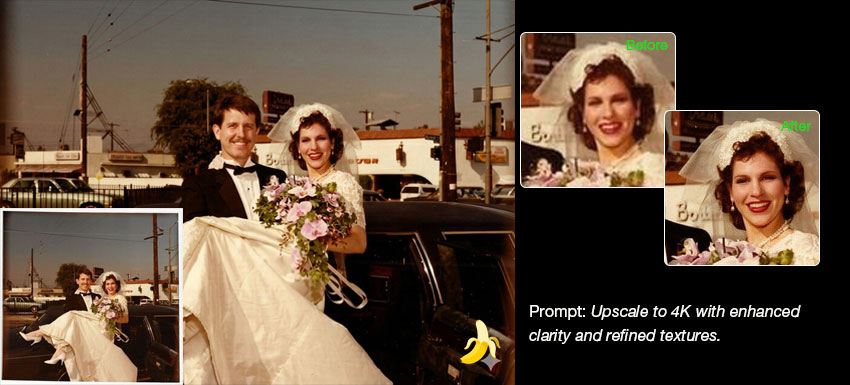
After processing with Nano Banana Pro, the image became noticeably sharper and cleaner. Details in the dress, bouquet, and background were more visible, and overall lighting appeared clearer. However, the image was also slightly reframed during processing, and some fine details were reconstructed rather than strictly preserved.
While the result is visually improved and more suitable for sharing or archiving, it shows that Nano Banana Pro focuses more on reconstruction than exact restoration.
#2 Portrait Upscaling Test (Prompt-Based)
A second test used a low-resolution portrait with visible noise and blur. The goal was to enhance clarity while preserving identity and background consistency.
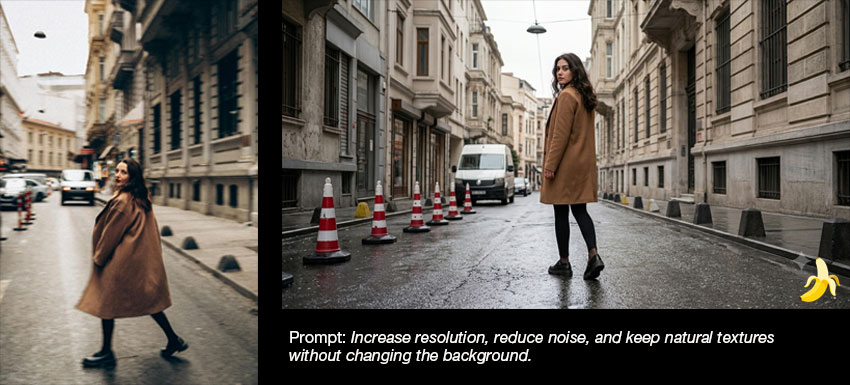
The first prompt: “Increase resolution, reduce noise, and keep natural textures without changing the background.”
Result: the image became sharper, but the subject’s facial features and some background elements were noticeably altered, making it feel like a re-generated image rather than a pure upscale.
The refined prompt added character consistency: “Increase resolution, reduce noise, and keep natural textures without changing the background, and keep the character consistency.”
Result: This improved stability slightly, especially in the background, but subtle changes in facial expression and identity still remained.
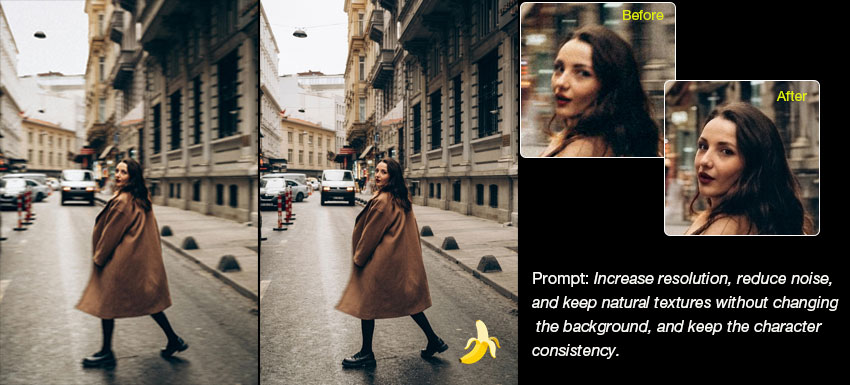
These results indicate that Nano Banana Pro behaves more like a generative editing tool rather than a strict AI upscaler focused on faithful reconstruction.
Learn more: How to use Nano Banana Pro to restore old damaged photos
Upscaling Results and Limitations
While Nano Banana Pro performs well for casual or medium-resolution images, it isn’t always enough for professional workflows. Some notable limitations include:
- May alter the original image through cropping, reframing, expanded backgrounds, or generating elements that weren’t in the source photo.
- No batch processing workflow, which limits efficiency for large projects.
- Paid plans can get expensive if you need frequent or high-resolution output.
- Online processing raises potential privacy concerns for sensitive or client images.
If you need consistent high-resolution output, better detail recovery, or more reliable quality control, a dedicated tool like Aiarty Image Enhancer can deliver more professional-level results.
A Better Choice for Faithful AI Upscaling
Nano Banana Pro is an excellent option for creative image generation and enhancement. However, if you need to enlarge images while preserving the original composition, maintaining consistent quality across multiple photos, or working with sensitive files offline, a dedicated AI image upscaler is a better fit.
Aiarty Image Enhancer is designed specifically for faithful image enhancement rather than AI regeneration. Instead of recreating image content from prompts, it restores details from the original image, making it a better choice for photographers, e-commerce sellers, designers, and anyone who needs accurate, repeatable results.
Compared with Nano Banana Pro, Aiarty Image Enhancer offers several workflow advantages:
- Preserves the original composition. It enhances resolution, sharpness, and textures without reframing the image, expanding backgrounds, or generating new visual elements.
- No prompts required. Simply import your image, choose an AI model, and upscale it. Results are consistent across repeated exports.
- Built for high-volume workflows. Batch process thousands of images in one session, making it practical for product catalogs, event photography, and large restoration projects.
- Offline processing for complete privacy. Images never need to be uploaded to the cloud, which is especially valuable for client work and sensitive photos.
- Higher output flexibility. Upscale images beyond 4K to 8K, 16K, or even 32K while simultaneously reducing noise, sharpening details, and removing compression artifacts.
If your goal is creative AI editing, Nano Banana Pro remains a great choice. But if your priority is producing faithful, high-resolution images with predictable results, Aiarty Image Enhancer is the more suitable tool.
Download Aiarty Image Enhancer and compare the results with Nano Banana Pro using the same photo.
Nano Banana Pro vs Aiarty Image Enhancer: A Side-by-Side Comparison
To see how the two approaches differ, we processed the same image using Nano Banana Pro and Aiarty Image Enhancer. Both produced a sharper, higher-resolution result, but the enhancement process and final output were noticeably different.
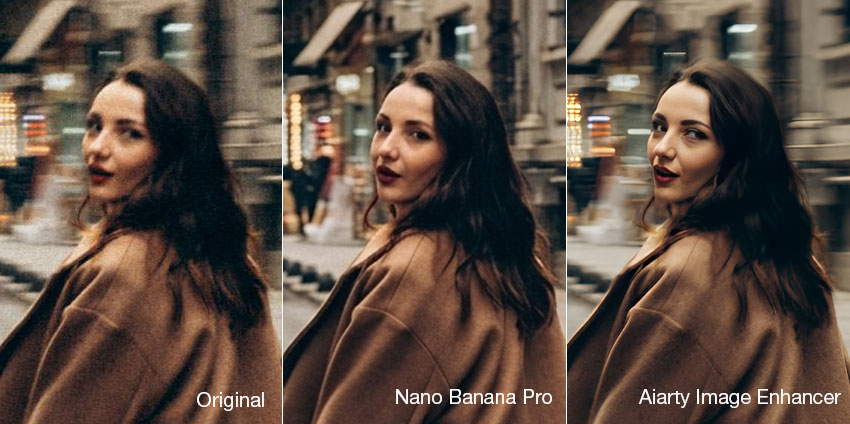
Nano Banana Pro delivered a visually impressive image with cleaner edges and richer textures. However, close inspection revealed that some fine details had been regenerated rather than restored. Subtle facial features, fabric textures, and small background elements were slightly altered, giving the image a more AI-generated appearance.
Aiarty Image Enhancer, on the other hand, focused on improving the existing image instead of recreating it. Facial features, textures, and object shapes remained faithful to the original photo while noise, blur, and compression artifacts were effectively reduced. The result looked more natural and consistent, especially when viewed at 100% or higher magnification.
For creative content, concept art, or social media visuals, Nano Banana Pro can produce eye-catching results. But for photo restoration, product photography, printing, or any workflow where preserving the original image matters, Aiarty Image Enhancer provides more predictable and reliable enhancement.
The best way to decide is to compare both tools using your own photos. If preserving original details, maintaining consistent quality, and producing high-resolution images are important to your workflow, try Aiarty Image Enhancer and see the difference for yourself.
Try Aiarty Image Enhancer now to experience consistent, high-resolution AI image upscaling with exceptional clarity and detail.
 FAQs
FAQs
Nano Banana offers a free version for casual use, but it comes with limitations such as restricted resolution, limited control, and cloud-based processing. Advanced features and higher-quality outputs usually require a paid plan.
Nano Banana does not have a fixed “true maximum resolution” like traditional upscalers. Output resolution depends on the generation model and settings, but results are typically optimized for web use and may range from standard HD to higher resolutions without guaranteeing native 4K quality.
Nano Banana Pro is not primarily a dedicated AI upscaler. While it can generate higher-resolution images, it does not reliably perform true 4K upscaling with detail reconstruction. For consistent 4K or higher upscaling, specialized tools are more suitable.
Nano Banana is a generative AI tool, so it does not strictly preserve the original image in a lossless way. Edits are re-rendered by the model, which may introduce changes in texture, lighting, or fine details depending on the prompt and transformation strength.
Nano Banana and Topaz serve different purposes. Nano Banana focuses on AI image generation and creative editing, while Topaz is designed for professional-grade image upscaling and restoration. For consistent detail recovery and high-resolution enhancement, Topaz is generally more reliable.
Nano Banana is primarily an AI image generation and editing model, not a dedicated upscaler. It can produce high-resolution outputs, but it is optimized for creative generation rather than precise resolution enhancement or detail-preserving upscaling.
You May Also Like


This post was written by Brenda Peng who is a seasoned editor at Digiarty Software who loves turning ordinary photos into extraordinary works of art. With AI assistance for brainstorming and drafting, the post is reviewed for accuracy by our expert Abby Poole for her expertise in this field.
