


If you're looking for an AI tool to resize or enlarge photos, you may come across ON1 Resize AI. But is it actually worth using in 2026?
In this review, we take a closer look at what ON1 Resize AI offers, how it performs when enlarging images, and what to consider before buying or upgrading. We also compare its results with Topaz Gigapixel and Aiarty Image Enhancer to see how these three image upscalers perform in real-world use.
What Is ON1 Resize AI?
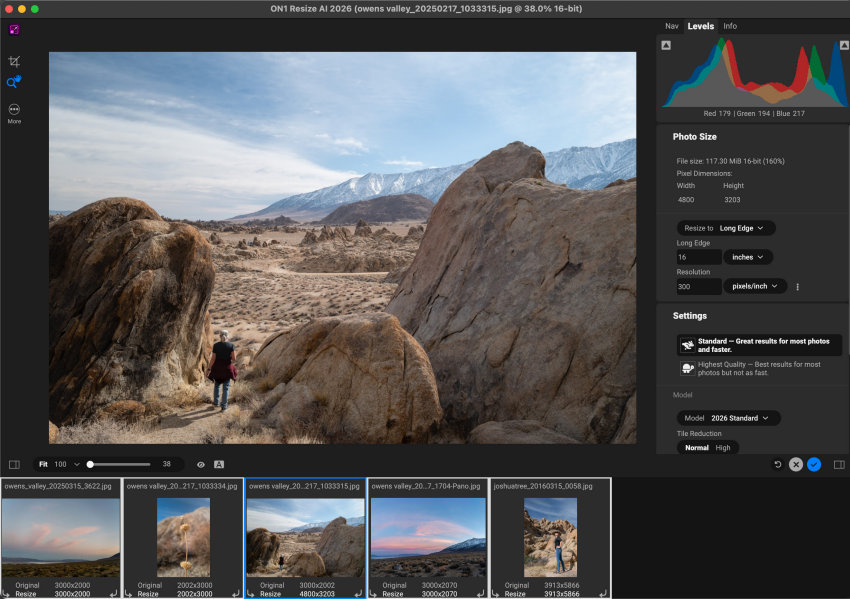
ON1 Resize AI is an image enlargement and resizing tool from ON1 that uses AI to increase image resolution while preserving or reconstructing fine details. It is designed for photographers who need to enlarge photos for printing, recover detail from cropped images, or resize large batches of images more efficiently.
Key Features of ON1 Resize AI
- AI-powered image enlargement: Upscale photos while attempting to retain natural-looking details and textures.
- Multiple AI models: Offers different processing options for balancing image quality and processing speed.
- Batch processing: Resize multiple images at once, which is useful for photographers working with large collections.
- Print preparation: Provides controls for preparing enlarged images for different print sizes and formats.
- Tiling and gallery wrap: Helps prepare oversized images for large-format printing.
- Soft proofing: Lets you preview how an image may look when printed.
- Plugin workflow: Can be used with popular photography workflows, including Photoshop and Lightroom.
ON1 Resize AI System Requirements
Before installing ON1 Resize AI, check whether your computer meets its current system requirements. The 2026 version requires Windows 10 version 22H2 or later / Windows 11 on Windows, or macOS 13 or later on Mac. ON1 recommends 16GB or more of RAM and 8GB of VRAM for better performance, while the minimum requirements are lower.
This is worth checking before purchasing, particularly if you are using an older computer.
How Does ON1 Resize AI Compare with Other AI Image Upscalers?
ON1 Resize AI is not the only option for enlarging photos. To put its capabilities into perspective, we compared it with Topaz Gigapixel and Aiarty Image Enhancer, two other dedicated AI image upscalers. The three tools overlap in their core purpose, but they take somewhat different approaches to image enlargement, workflow, and output.
The table below compares their main upscaling capabilities and practical usability. For image quality, the ratings are based on our hands-on comparisons and are discussed in more detail in the testing section below.
ON1 Resize AI vs Topaz Gigapixel vs Aiarty Image Enhancer
| Comparison | ON1 Resize AI | Topaz Gigapixel | Aiarty Image Enhancer |
|---|---|---|---|
| Pricing | $69.99 for 2 computers Doesn’t include future upgrades |
$29.00 / month No lifetime license |
1-year license: $55 Lifetime license for 3 computers: $109 [free software update for lifetime] |
| Supported platforms | Windows and macOS | Windows and macOS | Windows and macOS |
| Minimum system requirements | Windows: Windows 10 22H2 or later / Windows 11, 8GB RAM, 4GB VRAM. Mac: macOS 13 or later, 8GB RAM. |
Windows: Windows 10, 16GB RAM, 6GB dedicated VRAM. Mac: macOS 13, 16GB RAM. Generative models require higher specifications. |
Windows: Windows 10 x64 1809 or later, 8GB RAM. Mac: macOS 10.15+ on Intel or macOS 11+ on Apple Silicon, 4GB/8GB RAM respectively. |
| Upscaling factor / maximum output | Up to 10x | Up to 6x, or up to 32,000 pixels on the longest side, whichever comes first. | x2, x4, x8, or custom resolution. Maximum output is 32K on Windows and 16K on Mac. |
| Batch processing | Yes | Yes | Yes |
| Print preparation | Excellent. One of its strongest areas, with DPI presets, tiling, gallery wrap, and soft proofing for large-format printing. | Good. Supports large output sizes and professional image enlargement, but has less emphasis on dedicated print-layout tools. | Good. Supports customizable output resolution from 72 to 1000 DPI, making it suitable for high-quality printing. |
| Enhancement strength adjustment | Provides adjustable output sharpening and model-specific controls. | Model settings such as Denoise, Sharpen, and Fix Compression can be adjusted, while some generative models provide their own strength or creativity controls. | The Strengthslider lets users control how strongly AI enhancement, sharpening, and detail generation are applied, making it easier to balance clarity and naturalness. |
| Ease of use | Good | Good | Very easy |
| Image quality | Strong | Very strong | Very strong |
| Face restoration | Limited. | Yes. | Yes. |
| Color adjustment | Basic. | Limited. | Yes. Provides color controls for adjustments such as temperature, tint, exposure, contrast, and saturation. |
| SDR to HDR | No | No | Yes |
| AI Eraser | No | No | Yes |
Real-World Test
For this test, we used a 1740 × 2611 cityscape photo taken with a Nikon D3400 at 95mm, f/4.8, ISO 500. The image contains fine architectural structures, curved lines, small spires, windows, and distant foliage, providing a useful mix of edges and textures for evaluating AI upscaling.
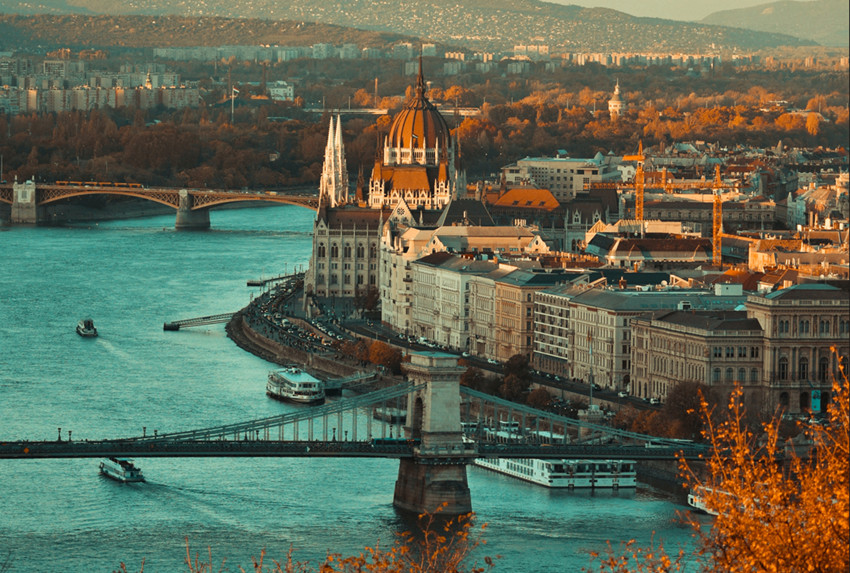
We enlarged the image by 2× to 3480 × 5222 with ON1 Resize AI, Topaz Gigapixel, and Aiarty Image Enhancer, then compared the same crop around the building's dome.
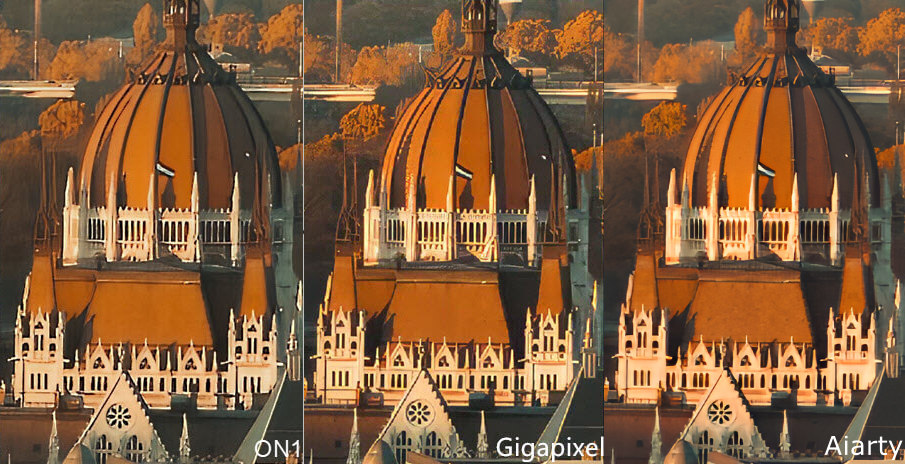
ON1 Resize AI: ON1 preserves the overall character of the original image well. The dome's curved lines and white architectural details remain clean, while the background foliage retains a relatively smooth appearance. The result has a restrained sharpening effect, although some of the smaller architectural details look a little less defined than in the other two results.
Topaz Gigapixel: Gigapixel produces the strongest sharpening effect in this comparison. The dome's structural lines, white spires, and smaller architectural elements appear particularly crisp and pronounced. This gives the image a strong sense of detail, although some high-contrast areas also look more processed, especially around the white architectural structures and fine background textures.
Aiarty Image Enhancer: Aiarty produces a detailed result while keeping the overall rendering relatively natural. The dome's structural lines, white railings, and smaller architectural details are clearly defined, with less aggressive sharpening than Gigapixel. Fine textures in the background remain visible without becoming overly emphasized, giving the image a clean and balanced appearance.
At 2×, the differences are noticeable but not dramatic. Gigapixel favors stronger sharpness and micro-detail, ON1 delivers a more restrained rendering, while Aiarty strikes a balance between visible detail and natural-looking texture. For this particular image, the three tools take noticeably different approaches rather than producing identical-looking results.
 Frequently Asked Questions
Yes. ON1 Resize AI 2026 offers a 30-day free trial with full functionality and no watermark. You don't need to provide a credit card to start the trial. After the trial period, you need to purchase a license to continue using it.
Yes. ON1 Resize AI 2026 is included in ON1 Photo RAW 2026.4, so you don't need to purchase Resize AI separately if you already have the corresponding Photo RAW version. Photo RAW MAX also supports using Resize AI as a plugin with applications such as Photoshop and Lightroom Classic.
It depends on how you use Resize AI. The 2026 version adds a new Highest Quality Model for demanding enlargements, a faster Standard Model for everyday upscaling and batch processing, along with improvements to Face Recovery, batch workflows, and export and print options. These changes make the upgrade more worthwhile if you frequently enlarge small or heavily cropped images or work with large batches.
However, upgrading may be less compelling if you are satisfied with the results and workflow of your current version. Also, users who purchased Resize AI 2023 on or after June 24, 2025 are eligible for the 2026 upgrade at no additional cost.
Neither is simply better for every image. ON1 Resize AI has an advantage if you want AI upscaling combined with print-oriented tools such as DPI settings, tiling, gallery wraps, and soft proofing. Topaz Gigapixel, on the other hand, offers a wider range of specialized AI models for different types of images and upscaling needs.
In our comparison, Gigapixel tends to produce stronger sharpening and more pronounced fine detail, while ON1 generally takes a more restrained approach. The better choice depends on whether you prioritize maximum detail recovery or a more print-focused resizing workflow.
The best alternative depends on what you want to do beyond basic image resizing. Topaz Gigapixel is a strong option for users who primarily want dedicated AI upscaling with a wide selection of specialized models. Aiarty Image Enhancer is a better fit for users who want upscaling as part of a broader AI image enhancement workflow.
Compared with ON1 Resize AI, Aiarty combines image upscaling with denoising, sharpening, face restoration, adjustable enhancement strength, color adjustment, SDR-to-HDR conversion, and AI Eraser. This makes it useful not only for enlarging images, but also for restoring and refining them after enlargement.
For users who want dedicated print-preparation features such as tiling, gallery wraps, and soft proofing, ON1 Resize AI remains a strong choice. For a more comprehensive AI image enhancement tool that goes beyond resizing, Aiarty Image Enhancer is one of the strongest ON1 Resize AI alternatives to consider.
You May Also Like


This post was written by Brenda Peng who is a seasoned editor at Digiarty Software who loves turning ordinary photos into extraordinary works of art. With AI assistance for brainstorming and drafting, the post is reviewed for accuracy by our expert Abby Poole for her expertise in this field.
