


Looking for a powerful tool to bring your creative ideas to life faster and smarter? LTX Studio AI might be exactly what you need. Built for storytellers, filmmakers, and content creators, this all-in-one AI platform promises to streamline the production process - from concept to camera - ready visuals. But does it actually deliver on its bold claims? In this LTX Studio AI review, we’ll dive into what makes it stand out, how it works, and whether it's worth the hype. Read on to discover the real pros, cons, and performance of this next-gen creative tool, and find out if it’s the right fit for your storytelling needs.
💡 Pros Tips: From AI Draft to 4K Polish
After creating your visual draft with LTX Studio AI, elevate it with Aiarty Video Enhancer. This powerful AI tool sharpens your AI-generated videos by upscaling to 4K, removing noise, correcting blur, and enhancing every frame with stunning detail. It’s the ideal finishing touch to give your storyboards and concept visuals a refined, cinematic look—perfect for pitching, presenting, or publishing.



What is LTX Studio AI
LTX Studio AI is a comprehensive AI-powered creative engine designed to unify the entire filmmaking pipeline within a single workspace. Developed by Lightricks, the platform has evolved from a pre-visualization tool into a professional production hub. It allows creators to transform text-based concepts into structured scripts, frame-accurate storyboards, and high-fidelity animated scenes. Unlike basic video generators, LTX Studio focuses on "directed AI," offering precise control over camera movement, character consistency, and performance. In 2026, the platform expanded into a multi-model ecosystem, integrating industry-leading models like Google Veo 3.1 and Kling alongside its proprietary LTX-2.3 engine. With new native Audio-to-Video lip-syncing and advanced editing tools, it enables filmmakers and agencies to move from an initial idea to a final, 4K-ready visual production with unprecedented speed and creative authority.

Features of LTX Studio AI
1. LTX-2.3 Engine: Multi-Model Synergy
In 2026, LTX Studio evolved into a multi-model hub. While it continues to use its proprietary LTX-2.3 DiT (Diffusion Transformer) model for native audio-visual synchronization, it now integrates elite external models for specialized tasks. Users can now toggle between Google Veo 3.1 for cinematic realism and Kling 2.6 for advanced motion control, all within the same project timeline.
- Native Audio-Video Sync: The LTX-2.3 model generates visuals and context-aware sound effects (SFX) simultaneously, ensuring the roar of an engine or a door slam is temporally aligned with the frame.
- ElevenLabs Partnership: A dedicated Audio-to-Video tool allows you to upload voiceovers or dialogue from ElevenLabs to drive perfect lip-syncing and facial performances.
- Cinema-Grade Quality: Support for Native 4K output in both portrait and landscape, minimizing artifacts and flicker for professional delivery.
2. Advanced Script-to-Scene Editor
The script editor is no longer just a text box; it is an intelligent parsing engine. As you write or import a screenplay, the AI automatically extracts "Elements", specific characters, locations, and key props, and builds a structural shot list. It supports industry-standard screenplay formatting and allows for "Global Edits," where changing a character’s description in the script updates their appearance across the entire project.
3. Rebuilt AI Storyboard Generator
Rebuilt in early 2026, the storyboard generator is now 5x faster. It uses models like FLUX.2 Pro or Nano Banana 2 to create high-fidelity visual frames instantly. This "Pre-viz" tool allows directors to see camera angles, character blocking, and lighting setups in seconds, making it an essential tool for securing project approvals and planning complex shoots.

4. Precision Camera & Motion Control
LTX Studio AI has moved beyond simple presets.
- Dual Keyframe Control: When using the Veo 3.1 integration, you can set a starting and ending frame to dictate exact camera paths.
- Cinematic Presets: Instantly apply professional movements like Dolly Zooms, Crane Ups, and Handheld shakes without complex prompting.
- Motion Control by Kling: Use a reference video to "teach" the AI a specific movement or gesture, ensuring your characters move exactly as directed.
5. Retake: The AI Directing Tool
One of the most significant additions for 2026 is the Retake feature. This tool allows you to select a specific 2–16 second segment of a generated video and "redirect" it. You can change a character’s expression or a line of dialogue while the AI preserves the surrounding footage, lighting, and background continuity, eliminating the need to regenerate the entire scene.

6. Unified Timeline & "Gen Space"
The workspace is split between the Gen Space (for iterating on individual shots) and the Timeline (for high-level editing). The timeline allows for non-linear editing, where you can trim, reorder, and layer clips. Changes made in the Gen Space, such as swapping a character’s outfit, can be "pushed" to all instances of that character on the timeline automatically.
7. Visual Continuity & Element Library
The platform’s "Elements" system acts as a digital cast and prop database. Once you "lock" a character or a specific branded product, LTX Studio ensures that visual continuity is maintained across hundreds of shots. In 2026, this includes Brand Kits for enterprise teams, ensuring that specific brand colors and logos remain perfectly consistent in every AI-generated frame.

8. Collaborative Cloud Infrastructure
LTX Studio is a fully cloud-based environment supporting real-time collaboration (on Pro and Enterprise plans). Multiple team members can work on the same storyboard or timeline simultaneously. It features deep version history and integrated "Pitch Deck" generation, allowing you to export your project as a professional presentation for clients or stakeholders with one click.
Pros and Cons of LTX Studio AI
- Combines scriptwriting, storyboarding, 4K video generation, and synchronized audio in one workspace, eliminating tool-switching.
- It offers unique access to a variety of models (LTX-2.3, Google Veo 3.1, and Kling) depending on the project's quality and motion needs.
- The "Elements" and "Trained Actors" system remains industry-leading for keeping characters and styles consistent across multiple scenes.
- Features like the Retake tool and Dual Keyframe Control provide granular control that basic "prompt-to-video" tools lack.
- The rebuilt 2026 engine generates storyboards and drafts up to 5x faster, significantly cutting down pre-production timelines.
- Native integration with ElevenLabs allows for high-fidelity dialogue scenes with automatic facial performance sync.
- High-end models (like Veo 3.1) and Audio-to-Video features consume "Computing Seconds" rapidly, which can be costly for high-volume users.
- The Free and Lite plans are strictly for personal use; a Standard plan ($35/mo) or higher is required for commercial licensing.
- The professional-grade interface and new multi-model settings may be overwhelming for casual creators or beginners.
- While great for storytelling, individual generated shots are still limited to shorter segments (typically 3–20 seconds) before needing manual stitching.
- As a heavy cloud-based AI engine, a high-speed, stable internet connection is mandatory for real-time editing and 4K rendering.
LTX Studio AI Step-by-Step Tutorial
Getting started with LTX Studio AI is a streamlined experience that blends professional directing tools with intuitive AI. Here is the updated workflow for 2026:
1. Project Setup & Model Selection
Create an account and start a new project. Choose your primary aspect ratio (9:16 for Social or 16:9 for Cinema). In 2026, you can now select your Default Generation Model at the start—choose LTX-2.3 for fast iterations or Google Veo 3.1 for high-end cinematic quality.
2. Script Intelligence & "Element" Extraction
Use the built-in script editor to write or import your story. The AI doesn't just read the text; it automatically extracts "Elements", identifying your characters, locations, and key props. This ensures that a character defined in Scene 1 remains visually identical in Scene 10.
3. Accelerated Storyboarding
Trigger the rebuilt Storyboard Generator, which now operates 5x faster than previous versions. It converts your script into a shot-by-shot visual plan. You can choose Nano Banana 2 for quick visual drafts or FLUX.2 Pro for high-fidelity style previews.
4. Audio-to-Video & Lip Syncing
A new essential step for 2026: Audio Integration. Upload a voiceover (powered by the native ElevenLabs integration) or a music track. The AI will generate a performance where the character’s mouth movements and facial expressions are perfectly synchronized to the dialogue.
5. Precision Directing with "Retake"
Review your generated clips. If a shot is almost perfect but the emotion is wrong, use the Retake tool. This allows you to highlight a specific segment and change the character's expression or a specific movement without regenerating the entire background or lighting.
6. Multi-Track Timeline Editing
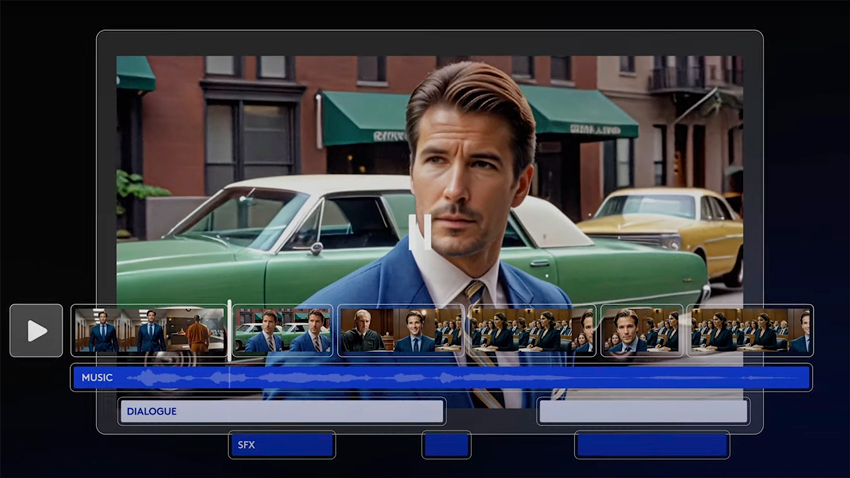
Arrange your finalized clips on the AI Timeline Editor. Here you can trim clips, adjust the pacing, and layer sound effects (SFX) that the LTX-2.3 model generates contextually to match the action on screen.
7. Professional Export & Pitch Decks
Export your final production in 4K MP4 for social media or XML format if you need to finish the project in professional software like Adobe Premiere or DaVinci Resolve. You can also generate a Movie Pitch Deck with one click to present your visual plan to stakeholders.
LTX Studio AI Performance in Practice
In 2026, LTX Studio AI has moved beyond a mere pre-visualization tool to become a high-performance production engine. In real-world testing, the LTX-2.3 model shows a marked improvement in detail and prompt adherence. Storyboard generation, which was already efficient, is now 5x faster, allowing creative teams to move from a raw script to a structured 4K visual draft in under ten minutes. The system's ability to maintain "Element Consistency" across different models—such as swapping between LTX and Google Veo 3.1—is remarkably stable, maintaining character likeness even in complex lighting scenarios.
One of the most praised performance updates in 2026 is the NVIDIA RTX integration, which allows for near-instant 4K upscaling and reduced latency for local workflows. While individual shots are typically 5–10 seconds, the engine now reliably supports extended cinematic shots of up to 20 seconds with minimal "hallucination" or quality degradation. However, users should note that utilizing high-end models like Veo 3.1 for long clips remains credit-intensive and requires a robust high-speed internet connection for real-time cloud collaboration.
Collaboration features have also seen a boost; the platform now supports "Brand Kits" and shared "Element Libraries," making it much easier for agencies to ensure visual brand alignment across global teams. While the learning curve has grown alongside the feature set, the inclusion of Directorial Brush Tools and Motion Control makes it the most precise AI video tool for professional creators who demand more than just "random" results.
Overall, LTX Studio AI delivers a professional-grade experience that successfully bridges the gap between AI experimentation and high-end video production, saving hundreds of hours in the creative pipeline.
Pricing
LTX Studio AI offers a range of pricing plans to cater to different user needs, from individual creators to large teams. Here's a breakdown of the available plans:
Free Plan
- Price: $0/month
- Computing Seconds: 800 (one-time)
- Features: AI image and video generation, advanced camera controls, character casting and animation
- Usage: Personal use only
Lite Plan
- Price: $15/month
- Computing Seconds: 8,640 per month
- Features: Includes all Free Plan features plus video upscales and editing package
- Usage: Personal use
Standard Plan
- Price: $35/month
- Computing Seconds: 28,800 per month
- Features: All Lite Plan features plus Veo 2 video generation model, up to 8 trained actors per month, accelerated rendering, pitch decks, and support for up to 5 collaborators per project
- Usage: Commercial use license included
Pro Plan
- Price: $125/month
- Computing Seconds: 90,000 per month
- Features: All Standard Plan features with unlimited trained actors per month, enhanced data privacy, and support for up to 10 collaborators per project
- Usage: Commercial use license included
Enterprise Plan
- Price: Custom pricing
- Features: Tailored to organizational needs, including unlimited access to all features, enhanced data privacy, high-priority support, and custom LTXV model training options
- Usage: Commercial use license included
Note: "Computing Seconds" are the resources used when generating videos and images on LTX Studio. Different actions consume varying amounts of these resources.
Final Verdict
LTX Studio AI stands out as a forward-thinking tool for storytellers who want to speed up their creative workflow without sacrificing quality. Its ability to turn scripts into visual storyboards, complete with camera plans and character direction, makes it a valuable asset for filmmakers, writers, and content creators alike. While it may not fully replace traditional post-production tools, its strength lies in pre-production efficiency, visual planning, and AI-assisted collaboration. If you're looking to bring your ideas to life faster, more visually, and with fewer production hurdles, LTX Studio AI is well worth exploring—especially for creators aiming to stay ahead in a competitive content landscape.
You May Also Like


This post was written by Brenda Peng who is a seasoned editor at Digiarty Software who loves turning ordinary photos into extraordinary works of art. With AI assistance for brainstorming and drafting, the post is reviewed for accuracy by our expert Abby Poole for her expertise in this field.
