


Video2X vs Topaz: Free vs Professional AI Video Enhancer Compared



If you’ve spent any time diving into the world of AI video enhancement, you’ve likely hit a fork in the road. On one side, there’s Topaz Video AI - the high-profile, $299/year powerhouse that everyone on YouTube raves about. On the other, there’s Video2X - the scrappy, open-source underdog that promises professional-grade results for the grand price of zero dollars.
But as anyone in the video editing world knows, free often comes with a hidden cost in time, and expensive doesn't always guarantee a magic bullet.
The debate usually boils down to a simple question: Is Topaz's proprietary AI truly superior, or are you just paying for a fancy interface that wraps around the same open-source algorithms Video2X uses for free?
In this deep dive, we're putting both to the test. We'll look past the marketing hype to see how they handle real-world footage, from grainy 480p home movies to low-bitrate anime. Whether you’re a hobbyist looking to save a buck or a pro who needs the fastest turnaround possible, this comparison will help you decide where to invest your hardware's horsepower.
User Interface and Learning Curve
When you fire up Topaz Video AI, it feels like stepping into a professional editing suite. The interface is clean, dark-themed, and intuitive. You drag a file in, select a model based on your footage type, and hit export. It's designed for the user who wants to get the job done and go grab a coffee.
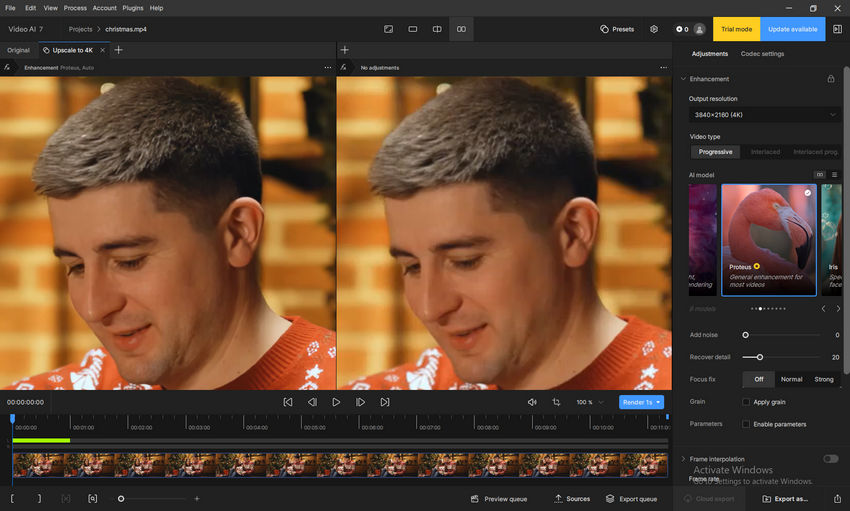
Video2X, however, is a different beast entirely. While it does offer a GUI (Graphic User Interface), its roots as a command-line tool are showing. To get it running optimally, you often need to navigate dependencies, ensure your Python environment is sane, and choose between drivers like Vulkan or Waifu2x-caffe.
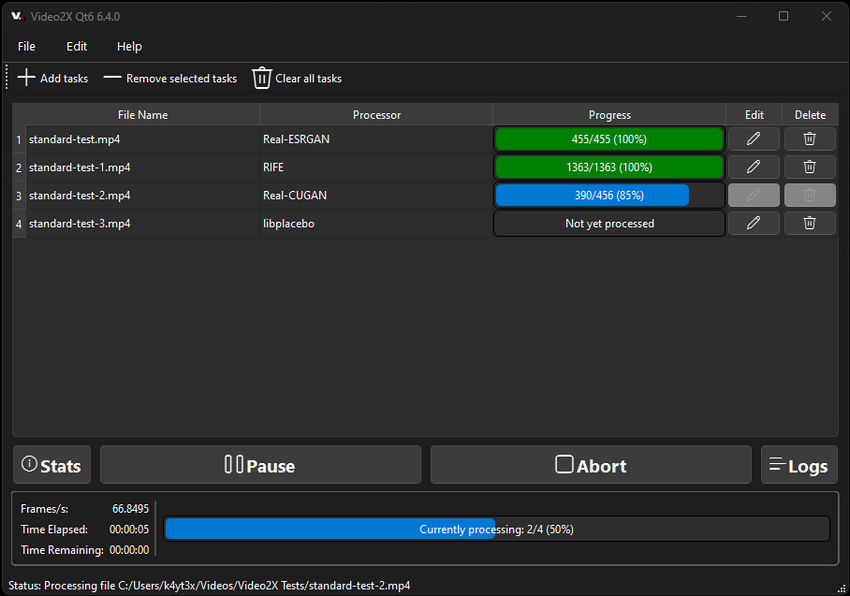
If you enjoy "tinkering under the hood" and don't mind an interface that looks like it’s from 2010, Video2X is rewarding. But for most creators, Topaz’s streamlined workflow is worth the premium alone.
Feature Comparison
When comparing Video2X and Topaz Video AI, the biggest difference is not just output quality - it is the overall workflow philosophy.
Video2X focuses on flexibility and open-source customization, while Topaz Video AI is designed as an all-in-one commercial AI enhancement suite with polished automation and video-aware processing.
Here's a closer look at how their features compare.
AI Upscaling Technology
Both Video2X and Topaz Video AI use AI-based super resolution instead of traditional bicubic scaling. However, the way they approach enhancement is quite different.
Video2X acts more like a framework that integrates multiple open-source engines such as:
- Waifu2x
- Real-ESRGAN
- Real-CUGAN
- SRMD
- Anime4K
- RIFE interpolation
This gives advanced users significant flexibility when choosing different models for anime, retro footage, or live-action content.
Topaz Video AI, meanwhile, relies on proprietary AI models like:
- Proteus
- Iris
- Artemis
- Gaia
- Nyx
- Theia
Check Topaz video upscaling models and settings >>
These models are optimized internally for different restoration tasks such as denoising, face recovery, deblur, and motion stabilization.
Frame Interpolation
Both tools support AI frame interpolation for converting lower frame rate videos into smoother motion.
Video2X typically uses RIFE or DAIN-based interpolation engines. While effective, setup and tuning often require more manual configuration.
Topaz Video AI includes interpolation directly inside the main workflow with dedicated motion estimation models. This generally makes the process easier for beginners and more stable for long video projects.
Video Processing Workflow
This is where the experience starts to differ significantly.
Video2X primarily works through frame extraction:
- Extract frames via FFmpeg
- Process frames individually
- Rebuild the final video
This approach provides flexibility but can dramatically increase render times and storage usage on large projects.
Topaz Video AI uses a more integrated pipeline with temporal video-aware processing. Instead of treating frames completely independently, it analyzes motion and frame continuity to reduce flickering and maintain consistency between adjacent frames.
This is one reason why many users feel Topaz performs noticeably better on:
- Live-action footage
- Human faces
- Camera movement
- Old VHS/DVD restoration
Processing Speed & Hardware Requirements
Neither tool is lightweight.
AI video enhancement is extremely GPU-intensive regardless of platform.
However, public tests and user feedback consistently suggest:
- Video2X can become extremely slow depending on model choice
- Topaz is also heavy, but often better optimized for GPU acceleration
One public benchmark reported that Video2X processed some Real-ESRGAN workloads at only 1–2 FPS on standard hardware.
Users on Reddit similarly describe Topaz as "VRAM hungry" but still more polished for large-scale workflows.
In practice:
- Video2X tends to favor enthusiasts willing to experiment
- Topaz favors users prioritizing convenience and final output quality
Visual Quality
This is where the two tools really diverge in their "philosophy" of what a good video should look like.
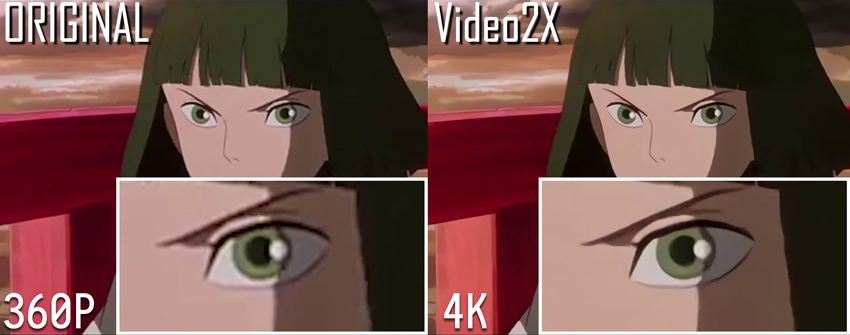
If your library consists of 90s anime or low-res game captures, Video2X is often the superior choice. Models like Waifu2x and Real-CUGAN are legendary for a reason—they handle flat colors and sharp lines with almost zero "haloing" or ringing. In many side-by-side tests, Video2X produces cleaner, more vibrant anime upscales than Topaz’s general-purpose models.
When it comes to human skin, hair, and complex textures (like grass or fabric), Topaz Video AI is in a league of its own. Its Iris model is specifically trained to reconstruct facial features without making them look like "plastic." Where Video2X’s Real-ESRGAN might occasionally over-smooth a face until it looks like a wax figure, Topaz manages to retain (or even intelligently recreate) skin pores and fine wrinkles, making the result look like it was actually shot in higher resolution.
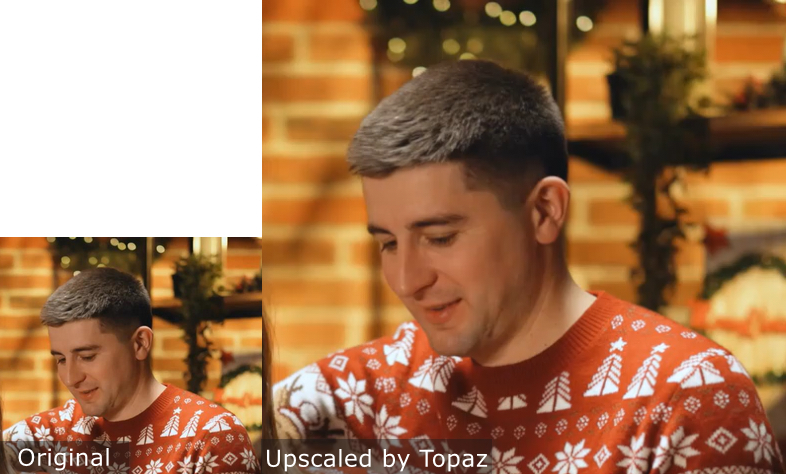
Topaz is much better at "hallucinating" missing information. If a video has heavy compression artifacts (those blocky squares in dark scenes), Topaz’s Proteus model allows you to manually tweak "Dehalo" and "Revert Compression" sliders. Video2X is more of a "what you see is what you get" tool—you choose a model and a noise-reduction level, but you have far less control over the fine-tuning of the output.
Final Verdict: Which Tool Should You Choose?
Deciding between Video2X and Topaz Video AI depends entirely on your technical proficiency, your budget, and the type of content you are processing.
Choose Video2X if:
- You are an anime or 2D animation enthusiast: The integration of Waifu2x and Real-CUGAN makes it exceptionally strong for flat-color content.
- You prefer open-source flexibility: You want access to the latest GitHub models without waiting for a commercial software update.
- Budget is your primary concern: You have a powerful GPU and don't mind spending time configuring drivers to save the $299/year cost of a commercial license.
Choose Topaz Video AI if:
- Workflow efficiency is a priority: You need a stable, all-in-one interface that handles upscaling, stabilization, and motion interpolation in a single queue.
- You work with human subjects: You require advanced facial reconstruction and natural texture retention that standard open-source models often struggle with.
- You need professional support: You want a software that is regularly updated with official hardware optimizations and customer service.
Is There a Middle Ground?
For many users, the gap between Video2X and Topaz is too wide. One is too technical and fragmented, while the other is expensive and heavy on system resources. This is where Aiarty Video Enhancer comes in.
Aiarty is designed to bridge this gap by offering:
- Professional Models without the Complexity: Like Topaz, it features highly trained models for de-blurring, denoising, and upscaling to 4K, but with a much lighter system footprint.
- High-Speed Efficiency: It is optimized for NVIDIA, AMD, Intel, and Apple Silicon GPUs, ensuring that render times remain competitive without the setup hurdles of Video2X.
- Superior Detail Retention: Aiarty's deep learning algorithms focus on reconstructing fine details, like hair, skin textures, and fabric, avoiding the over-smoothed plastic look that some AI tools produce.
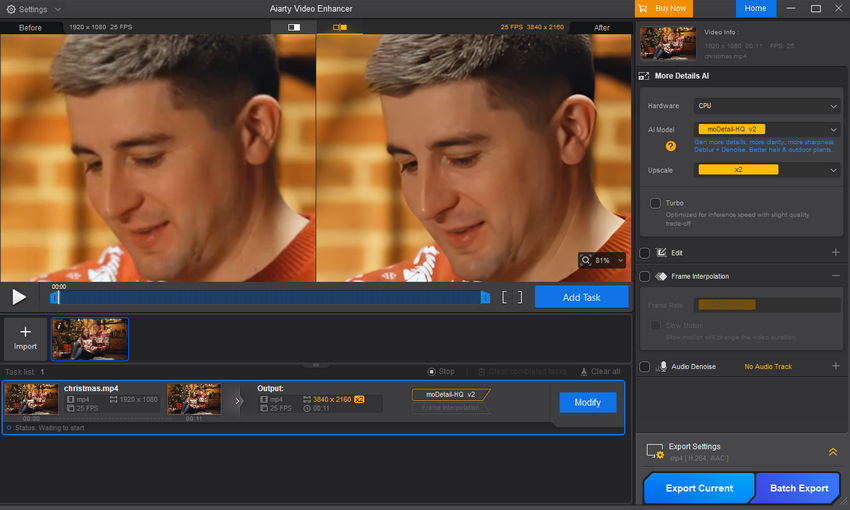
If you find Video2X too difficult to manage and Topaz too heavy for your needs, Aiarty provides a streamlined, high-performance alternative that delivers professional results with a single click.
Conclusion
There is no single best AI video enhancer for every scenario. Video2X remains a solid choice within the open-source community, while Topaz Video AI continues to lead the professional market with its robust feature set. However, for users seeking a balance of top-tier visual quality and effortless operation, Aiarty Video Enhancer is increasingly becoming the preferred choice.
You May Also Like


This post was written by Brenda Peng who is a seasoned editor at Digiarty Software who loves turning ordinary photos into extraordinary works of art. With AI assistance for brainstorming and drafting, the post is reviewed for accuracy by our expert Abby Poole for her expertise in this field.
