


When it comes to enhancing the quality of your videos, choosing the right tool can make all the difference. AVCLabs Video Enhancer AI and Topaz Video AI are two heavyweights in the video editing world, each offering a suite of features designed to improve clarity, reduce noise, and upscale footage. Besides these, Aiarty Video Enhancer is another high-performance alternative, offering 4K upscaling, noise reduction, deblurring, and the ability to improve low-resolution videos. With so many options on the market, which one offers the best balance of performance, price, and overall value?
In this in-depth comparison, we’ll explore the features, pricing, and strengths of AVCLabs Video Enhancer AI and Topaz Video AI, while also highlighting how Aiarty Video Enhancer stacks up as a powerful alternative. By examining each tool’s capabilities, you’ll get a clear picture of which solution offers the best balance of performance, value, and ease of use for your video projects.
Before the full comparison, it's worth noting that AVCLabs and Topaz aren't the only video enhancement tools available. Neither performs perfectly on all footage, and depending on your needs, Aiarty Video Enhancer might be a better fit, offering a cost-effective, all-in-one solution.
Aiarty Video Enhancer adopts advanced AI to enhance video clarity, reduce noise, and upscale resolutions—perfect for both beginners and professionals for effortless video enhancement.
Why Aiarty is Worth Trying
- Automatical AI enhancement to remove blur, noise, and upscale resolution.
- Fast processing powered by full GPU acceleration
- More affordable — One-time payment ($165 for 3 devices) with lifetime updates, no subscription fees.
- Supports 4K processing with a simple interface for all skill levels.
Try Aiarty to see if it solves your footage issues, or keep it as a backup while testing AVCLabs and Topaz.
Review of AVCLabs Video Enhancer AI vs Topaz
AVCLabs Video Enhancer AI Overview
AVCLabs Video Enhancer AI is designed to enhance video quality through AI-driven processes, offering an intuitive and effective solution for both beginners and casual users. It’s particularly recognized for its ease of use and ability to improve footage quality without requiring complex settings.
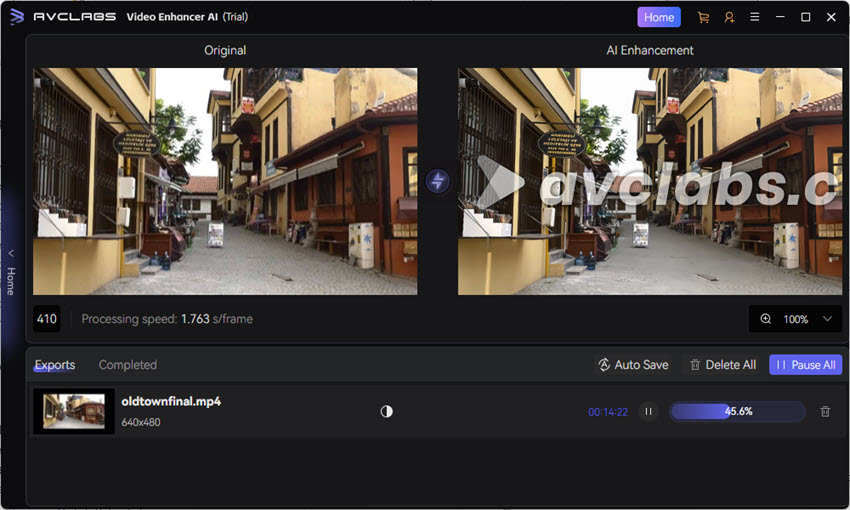
Key Features:
- 8K Video Upscaling: AVCLabs supports upscaling videos to 1080p, 4K, and even 8K with models like Ultra, improving clarity while minimizing distortion.
- Denoising: With models like Denoise, it removes noise and artifacts from low-light footage for clearer, sharper video.
- De-blurring: AI-based de-blurring sharpens blurry footage, making each frame clearer. The Standard and Ultra models help in frame-by-frame enhancement.
- Face Enhancement: AI models like Face Enhancement Level restore and improve faces in older or low-quality videos for better detail.
- Frame Interpolation: Using models such as Standard (Multi-Frame) and Ultra (Multi-Frame), AVCLabs generates additional frames to increase frame rates for smoother playback.
- Motion Compensation: AVCLabs enables slow-motion effects with various speeds (e.g., 2x, 4x, 8x) by generating additional frames with Slow Motion models.
- Colorization: The AI Colorize model transforms black-and-white videos into vibrant color, with options like Soft and Bright modes.
- Ease of Use: AVCLabs has a simple, intuitive interface, perfect for beginners.
- Fast Processing: Quick video processing makes it ideal for users who need fast results.
- Affordable: More budget-friendly compared to other video enhancers, especially for basic to intermediate enhancements.
- Limited Advanced Features: Lacks some advanced capabilities offered by professional tools like Topaz.
- Resolution Limits: While it supports up to 4K, it doesn't offer the same high-end upscaling or detail enhancement for 8K and beyond as Topaz.
- Limited Customization: Advanced users may find it restrictive due to fewer customization options compared to more feature-rich tools.
Topaz Video AI Overview
Topaz Video AI is one of the most advanced tools available for video enhancement, known for its superior AI algorithms that deliver exceptional results, especially when dealing with high-resolution footage. It’s frequently used by professionals in the film, content creation, and media production industries due to its powerful capabilities.
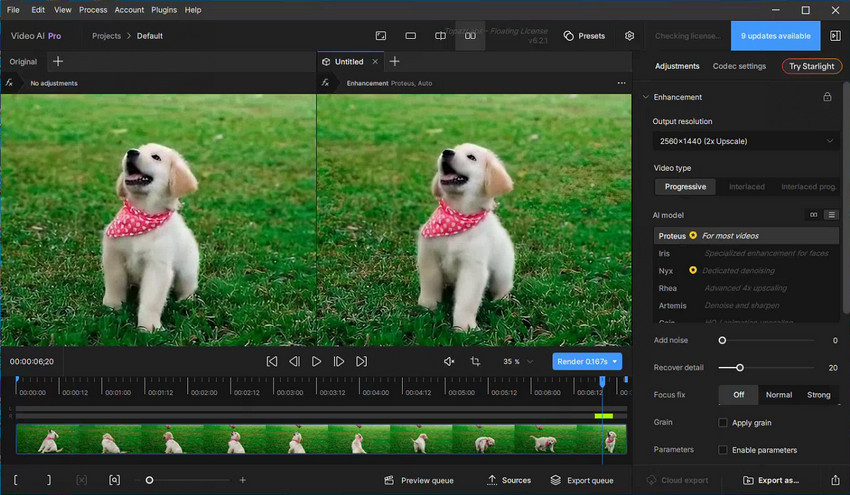
Key Features:
- Video Enhancement: Topaz excels at upscaling videos, offering support for resolutions from 1080P to 4K, 8K, and even 16K. AI models like Proteus and Gaia provide upscale for medium and high-quality footage, while Artemis can upscale all types of videos.
- Noise Reduction: Advanced models like Nyx and Iris work to eliminate noise, producing cleaner footage, even from low-quality videos.
- Frame Interpolation: Generate new frames for smoother playback, with models such as Apollo for non-linear motion and Chronos for linear motion, ideal for slow-mo or FPS conversion.
- Motion Deblur: The Themis model removes motion blur, sharpening footage affected by camera movement.
- Stabilization: Topaz reduces shaky footage with its stabilization tools, improving playback smoothness.
- Face Restoration: Using Iris, Topaz restores degraded faces in old videos for clearer, more realistic visuals.
- Grain Addition: Add natural film grain to your footage, blending pixels and reducing the "over-processed" look, ideal for achieving a more organic feel.
- Deinterlacing: With the Dione model, Topaz deinterlaces old footage, enhancing clarity and making it suitable for modern devices.
Related Search: How to Use Topaz Video (AI) to Enhance and Upscale
- High-End Capabilities: Ideal for professional editors needing top-tier quality and precision.
- Superior Quality: Delivers stunning results, particularly for high-definition and high-resolution footage.
- Advanced Features: Offers powerful tools like fine detail enhancement, perfect for complex video projects.
- Complex for Beginners: Topaz’s advanced tools may require a learning curve for new users.
- Expensive: The high price tag of Topaz Stuidio subscription may not be justifiable for casual users.
- Slower Processing: Due to its high-end algorithms, Topaz can be slower, particularly with large video files.
AVCLabs vs Topaz: Detailed Comparison
In this section, we’ll go in-depth into the differences between AVCLabs Video Enhancer AI and Topaz Video AI to help you decide which tool best suits your needs.
1. 4K Upscaling
AVCLabs upscales low-resolution videos to 4K effectively, improving clarity without much distortion. It’s suitable for standard videos but may lack finer detail for professional-grade quality.
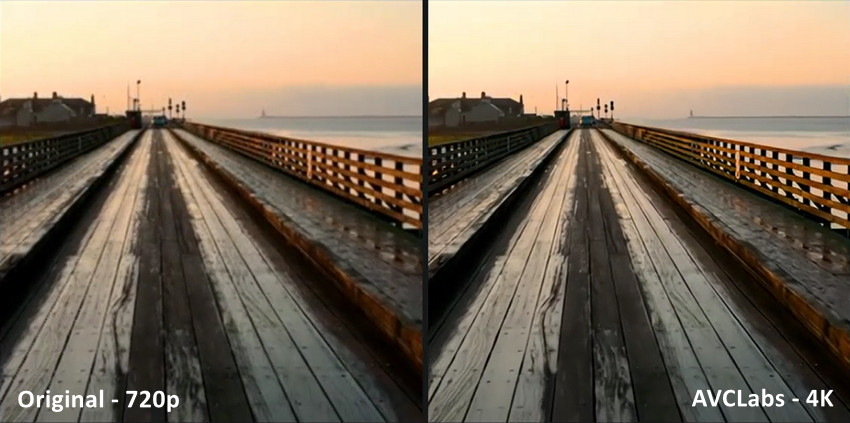
AVCLabs Video Enhancer AI Test Result:
- Clarity: Significant improvement in sharpness (planks, railing) after upscaling to 4K.
- Drawbacks: Can lead to a loss of fine texture, resulting in a "smeared" or "oil-painting" effect (e.g., wood grain).
- Color: Appears deeper/more saturated, sometimes noted as less natural.
Topaz excels in 4K upscaling with superior AI algorithms that preserve fine details, delivering polished results, especially in high-resolution footage.

Topaz Video AI Test Result:.
- Clarity & Detail: Generally superior; high sharpness that successfully retains fine details (sails, water texture) without smearing.
- Detail Preservation: Advanced AI models better at reconstructing genuinely lost detail, preserving original grain for a more cinematic/natural look.
- Color: Often appears more natural and faithful to the source, typically with lower contrast.
2. Noise Reduction
AVCLabs Video Enhancer AI removes noise effectively, especially in low-light or grainy videos. However, it may not retain fine details like skin tones or subtle textures.
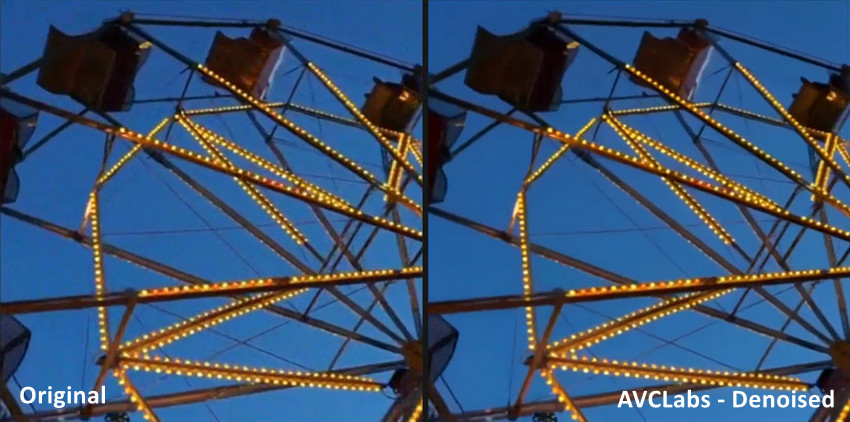
AVCLabs Denoising Test Result:
- Noise Reduction: Successfully reduces background noise and grain, especially in dark sky areas.
- Detail Loss: Often leads to a noticeable trade-off in fine detail, resulting in a "blurry" or "smeared" appearance.
- Quality Assessment: Denoised elements (like the Ferris wheel structure) appear smoother but may lack crisp definition compared to Topaz's result.
Topaz Video AI offers professional-grade noise reduction, preserving fine details while removing noise, making it ideal for high-resolution footage.
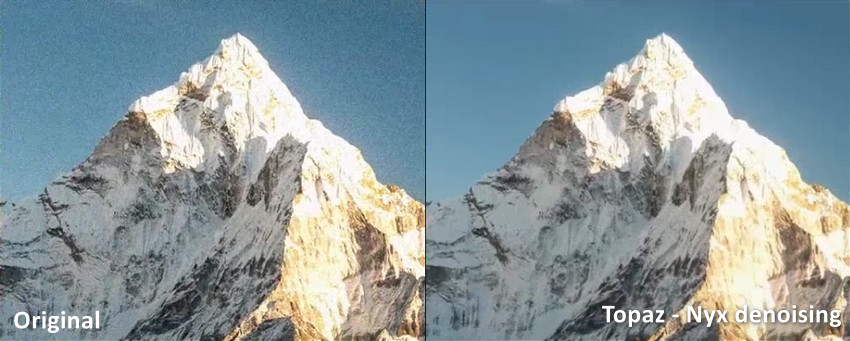
Topaz Video AI Denoising Test Result:
- Noise Reduction: Superior noise elimination, successfully removing almost all original grain from dark and shadowed areas (e.g., blue sky, mountain shadows).
- Detail Preservation: Excellent retention of fine details (rock texture, snow contours) while reconstructing genuinely lost detail.
- Potential Drawback: Dedicated models (like Nyx) can be aggressive; if settings are too high, they may cause a slight "artificial" look or introduce minor artifacts.
3. Face Enhancement
AVCLabs excels at enhancing faces in low-quality or old videos. It uses AI to restore facial details, making them clearer and more defined. However, its face enhancement capabilities are more basic, and it may not perform as well on highly degraded footage or when fine facial features are required.
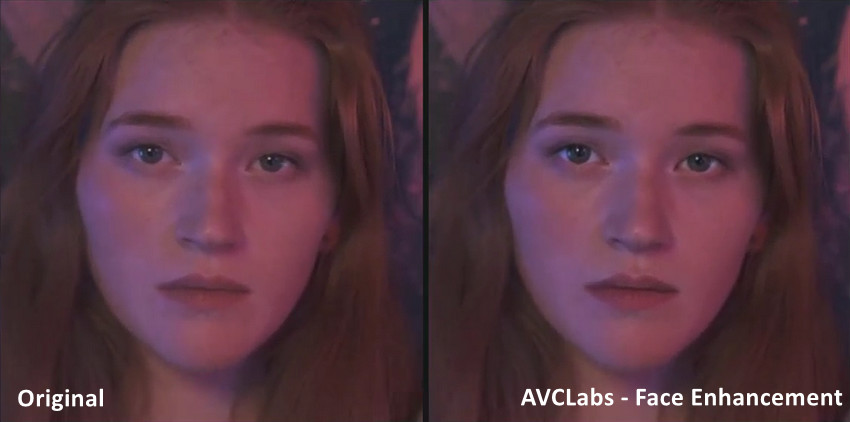
AVCLabs Face Enhancement Test Result:
- Face Restoration: Shows significant improvement in clarity, adding texture and detail to facial features.
- Simplicity: Good for quick, easy, one-click auto-enhancement.
- Drawbacks: Detail restoration is often lacking in areas like hair. The overall result can appear over-sharpened, leading to an "oil-painting effect" or an unnatural, "AI-generated face swap" look.
Topaz Video AI provides advanced face restoration, especially in challenging cases with low-quality or heavily compressed videos. The software's AI-powered face enhancement can recover intricate details, making faces appear more natural and realistic, even in older or blurred footage.

Topaz Video AI Face Enhancement (Iris Model) Test Result:
- Face Restoration: Provides superior clarity and better restoration of fine facial details, including things like wrinkles.
- Natural Look: Better at minimizing flickering and motion inconsistency, resulting in a more natural, smoother skin appearance compared to AVCLabs.
- Performance: The Iris model generally outperforms AVCLabs in both quality and processing speed for face enhancement tasks.
4. Format & Device Compatibility
AVCLabs supports a broad range of common video formats such as MP4, MOV, and AVI, making it versatile for general use. However, its support for higher-end formats, especially 8K video, can be less efficient compared to more advanced software like Topaz. For casual users or those working with standard resolutions, AVCLabs offers great flexibility.
Topaz Video AI supports a wider array of video formats, including more complex and high-end formats like 8K. This makes it a stronger choice for professional filmmakers, content creators, and anyone working with high-resolution or demanding video formats. Its ability to handle larger, more intricate files makes it an ideal option for those requiring high-end output.
5. Speed & Hardware
AVCLabs is optimized for quick processing, even on lower-spec hardware. It delivers solid video enhancement without taxing the system, making it ideal for casual users or those needing fast results with minimal resource consumption. It’s a great choice for everyday video enhancement tasks without long wait times.
Topaz Video AI can be slower due to its resource-intensive algorithms designed for high-quality results. The software requires more powerful hardware for optimal performance, but the enhanced detail and professional-grade output justify the longer processing times. For users working with high-definition or 8K footage, the trade-off in speed is worth the superior video quality.
6. Price & Subscription Plans
AVCLabs offers an affordable one-time purchase, ideal for users seeking a single investment for basic to intermediate video enhancement. In contrast, Topaz Video AI’s $299 annual subscription provides access to updates but requires renewal, with no permanent ownership, which may be off-putting for users who prefer a one-time payment option. Here are the details:
7. Users Experience
The AVCLabs Video Enhancer AI has a user-friendly interface, perfect for beginners or casual users. Its straightforward design minimizes the learning curve. Topaz offers more advanced tools, which may require a learning curve, particularly for new users. However, the results it delivers are on par with professional software.
AVCLabs vs Topaz: Which is Better?
When comparing AVCLabs Video Enhancer AI and Topaz Video AI, the decision largely depends on your needs, budget, and the specific features you're seeking.
- AVCLabs is a more affordable, easy-to-use option, ideal for those looking for basic to intermediate video enhancement without complex features. It's perfect for beginners or casual users who need quick results.
- Topaz Video AI offers cutting-edge technology and advanced features, making it the choice for professionals requiring high-quality video enhancements, especially for high-resolution footage. However, its high price and complexity may be overwhelming for less experienced users.
The Reality: No AI Video Enhancer is Perfect
No AI video enhancer works perfectly on every type of footage. AVCLabs might shine in low-light videos, while Topaz excels at high-resolution upscaling. However, both can struggle with specific noise patterns or fail to meet expectations in certain cases.
When AVCLabs and Topaz Fall Short
So, what if neither AVCLabs nor Topaz gives you the desired results? Perhaps AVCLabs is too basic for your needs, or Topaz creates a plastic-like look on your footage. In this situation, rather than returning to noisy raw footage, you could try Aiarty Video Enhancer.
Aiarty Video Enhancer: A More Affordable Choice with High Quality
Aiarty Video Enhancer offers AI-powered features like denoising, sharpening, and upscaling similar to Topaz but at a more affordable price. It delivers high-quality results without the hefty price tag, making it a great choice for users seeking an effective yet budget-friendly video enhancement solution.
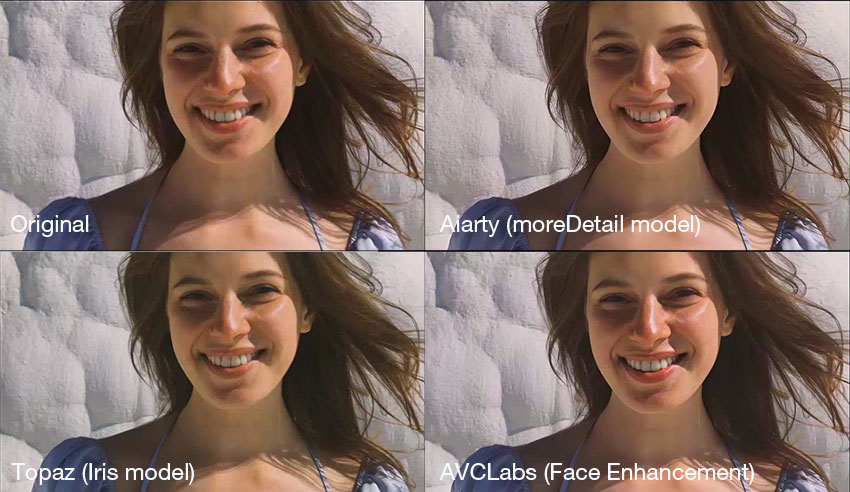
What Makes Aiarty Video Enhancer Superior:
- 4K Upscaling: Upscale videos to 4K resolution, enhancing clarity while maintaining minimal distortion.
- Noise Reduction: SuperVideo HQ model for denoising in low-light and dim scenes (Strength slider for balancing realism and clarity).
- Deblur: Remove slight blurriness like motion blur, out-of-focus shots, and compression artifacts for clearer footage.
- Color Control: Fine-tune color settings to enhance vibrancy and accuracy, giving videos a more professional look.
- SDR to HDR: Convert 8-bits SDR videos to 10-bits HDR, improving contrast and color depth.
- Frame Interpolation: Increase frame rates for smoother playback or slow-motion effects, perfect for low-frame-rate footage.
- Audio Noise Suppression: Reduce background noise and enhance audio clarity, ensuring a cleaner sound in videos.
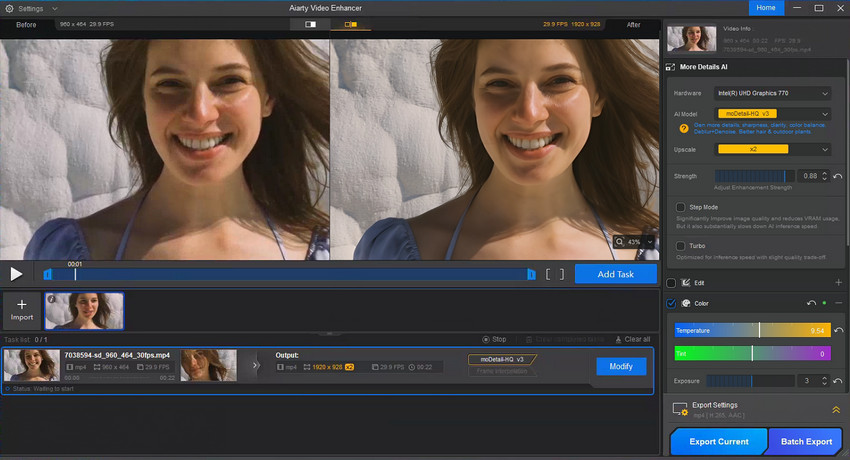
Moreover, if you're someone who also needs to enhance both videos and images as part of your workflow, Aiarty is still worth considering.
Aiarty, like AVCLabs and Topaz, offers both video and image enhancement. However, Aiarty stands out by delivering high-quality results at a more budget-friendly price, offering better cost-performance without compromising on quality. This makes it an ideal choice for users seeking both value and excellence in their media enhancement workflow.
AI Video Enhancers Comparison: AVCLabs vs Topaz vs Aiarty
Also Learn: Side-by-Side Comparison of Topaz Photo AI vs Aiarty Image Enhancer >>
Conclusion
After carefully comparing AVCLabs Video Enhancer AI and Topaz Video AI, it's clear that both tools have their strengths. AVCLabs is ideal for casual users and those seeking a budget-friendly, efficient tool for everyday video enhancement. On the other hand, Topaz provides the best results for professionals who require superior video quality, especially in detail enhancement and upscaling.
However, for those seeking affordable, high-quality video and image enhancement in a single solution, Aiarty Video Enhancer stands out. With smart AI technology, batch processing, and support for both video and image enhancement, Aiarty offers incredible value, making it an excellent choice for both personal and professional use.
 FAQs
FAQs
In addition to AVCLabs Video Enhancer AI, Aiarty Video Enhancer is an excellent alternative. It supports 4K upscaling, low-resolution video enhancement (144p+), noise reduction, and deblurring.
Using tools like Aiarty Video Enhancer, you can upscale 144p videos to HD or 4K while reducing noise and enhancing details automatically, complementing AVCLabs and Topaz workflows.
When it comes to noise reduction and sharpness during upscaling, tools like Aiarty Video Enhancer, Topaz Video AI, and AVCLabs Video Enhancer AI all perform well. Aiarty stands out for its balance of speed, high-quality denoising, and detail preservation across 1080p to 4K upscaling.
While Topaz Video AI is strong at preserving fine details, Aiarty Video Enhancer and AVCLabs Video Enhancer AI offer similar or better results with faster processing and AI-driven automatic enhancements, especially on low-resolution or noisy footage.
You May Also Like


This post was written by Brenda Peng who is a seasoned editor at Digiarty Software who loves turning ordinary photos into extraordinary works of art. With AI assistance for brainstorming and drafting, the post is reviewed for accuracy by our expert Abby Poole for her expertise in this field.
