


Topaz Video Lifetime License: Is It Still Available?



If you're searching for a Topaz Video perpetual license, you're probably looking for a way to use Topaz's video enhancement tools without paying a recurring subscription. It's a common question, especially for users who remember that Topaz Video AI was once available as a one-time purchase.
But does Topaz still offer a perpetual license for its video software? And if you already own an older perpetual license, what does that mean for your access today?
Let's take a closer look at how Topaz's licensing has changed and whether you can still buy Topaz Video with a lifetime license.
Is Topaz Video Perpetual License Still Available?
No. Topaz Video is currently available by subscription only, so new customers cannot purchase a perpetual license for the current version.
The confusion comes from the transition from Topaz Video AI to the newer Topaz Video. Topaz Video AI was sold with a perpetual license, while Topaz Video uses a subscription model. According to Topaz, Video AI 7.1.5 was the final version of the perpetual-license app, and the company is no longer selling licenses for that older application.
That means there are now two different situations depending on when you purchased the software. If you already own a perpetual license for Topaz Video AI, you can continue using the version covered by your license. If you're buying Topaz's video enhancer for the first time today, however, the current Topaz Video requires an active subscription.
So if you've been searching for a Topaz Video lifetime license, one-time purchase, or perpetual license, you won't find a new perpetual option on Topaz's current product lineup. The next question is whether an older perpetual version is still a practical choice, or whether a different video enhancer makes more sense for your needs.
FAQs
Is Topaz Video a one-time purchase?
No. The current Topaz Video is subscription-based and is not available as a one-time purchase or perpetual license. You can choose between monthly and annual billing options, but access to the current app requires an active subscription.
Can I still buy Topaz Video AI 7.1.5?
Not as a new purchase. Topaz Video AI 7.1.5 is the final version of the legacy Video AI application with a perpetual license, and Topaz has discontinued sales of licenses for the older app. Existing users who already own a qualifying perpetual license can continue using the version covered by that license.
Can I use Topaz Video AI without a subscription?
Yes, if you own a perpetual license for Topaz Video AI. The legacy Video AI application does not require an ongoing subscription, so you can continue using the version covered by your license on a compatible system.
However, this does not apply to the newer Topaz Video app. Topaz Video is a separate product with subscription-based licensing, and a perpetual Video AI license does not activate it.
What happens when my Topaz Video subscription expires?
Once your Topaz Video subscription expires or is canceled, you can no longer access the current Topaz Video app, including its models and tools, until you start a new subscription. This is different from the legacy Topaz Video AI perpetual license, which remains usable within the version covered by the license.
What’s the Difference Between Topaz Video and Topaz Video AI?
The main difference is the licensing model and product generation:
Topaz Video is the current application and continues to receive new models and features. Topaz Video AI 7.1.5 is the final perpetual-license version and is now considered legacy software.
Is there a perpetual-license alternative to Topaz Video?
Yes. If you prefer a video enhancer that you can purchase once rather than pay a recurring subscription, there are still perpetual-license alternatives available. One option is Aiarty Video Enhancer, which offers a lifetime license rather than requiring an ongoing subscription.
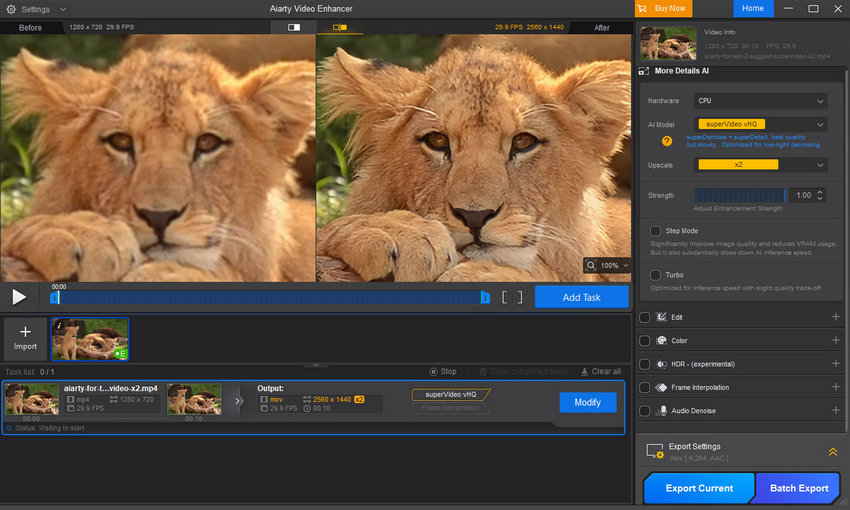
For users specifically searching for a Topaz Video perpetual license, this type of software may be worth considering if long-term ownership and predictable costs are more important than access to Topaz's latest subscription-only models.
I have a perpetual license, but Topaz Video is blocking me without a subscription. Why?
This usually happens because you have installed or opened the new Topaz Video app instead of the legacy Topaz Video AI app.
The two applications use separate licensing systems. A perpetual license for Topaz Video AI does not activate the current Topaz Video app, which requires a subscription. Topaz staff have also confirmed that users with a perpetual Video AI license should use the legacy Video AI application to access the version they own.
If you previously owned Video AI, check your Topaz account for the Legacy section and download the Video AI version associated with your license. If you cannot find the correct installer or your license is not activating properly, Topaz recommends contacting its support team.
Looking for a Video Enhancer With a Perpetual License?
If a recurring subscription isn't what you're looking for, you don't necessarily have to give up AI video enhancement. Some desktop video enhancers still offer a perpetual license, allowing you to make a one-time purchase and continue using the software without an ongoing subscription.
Aiarty Video Enhancer is one option to consider. It offers a lifetime license with a one-time payment, so you can continue using the software without renewing a monthly or annual subscription. The lifetime plan currently costs $149 and can be used on up to 3 computers, with free updates included for the lifetime of the license.
Aiarty Video Enhancer vs. Topaz Video: Pricing and Licensing
If you're comparing Aiarty with the current Topaz Video, the licensing difference is straightforward:
Of course, licensing is only one part of the decision. Video quality, AI models, processing speed, supported formats, and workflow can matter just as much. If you're considering switching from Topaz, it's worth testing the two tools on your own footage rather than choosing based on price alone.
What Can Aiarty Video Enhancer Do?
Aiarty Video Enhancer is designed for common video restoration and enhancement tasks, including:
- Upscale low-resolution footage to HD, 2K, or 4K
- Denoise grainy or low-light videos
- Deblur and sharpen soft footage
- Restore old or compressed videos
- Improve frame rates with AI frame interpolation
- Enhance audio and reduce unwanted noise
- Adjust color and HDR
- Process multiple videos in batches
It also allows you to adjust strength, giving you more control over how aggressively the video is enhanced. The goal isn't simply to make every clip look sharper, but to let you choose a result that fits the original footage.
Real-World Test: Aiarty Video Enhancer vs. Topaz Video
To see how Aiarty Video Enhancer compares with Topaz Video in actual use, we tested both tools on three different types of footage: a low-light landscape video with noticeable noise, a portrait video, and a wildlife video.
All three source videos were processed using the settings described below. We compared the results visually, focusing on detail recovery, sharpness, texture, noise reduction, and how natural the enhanced footage looked.
Test 1: A Low-Light Landscape Video with Noticeable Noise
Source: 2048 × 1080
Aiarty: moDetail-HQ v3, 1×, Strength 1
Topaz: Nyx, Keep Original Resolution
The original footage has visible noise.
In this test, both Topaz and Aiarty effectively reduce the visible noise while retaining a good amount of detail. The difference between the two results is relatively subtle, with both producing a cleaner-looking image without significantly changing the overall appearance of the original footage.

Test 2: A Wildlife Video
Source: 1280 × 720
Aiarty: superVideo vHQ, 2× upscale, Strength 1
Topaz: Proteus, 2× upscale, Recover Detail 20
The tiger footage provides a more demanding test because the subject contains a lot of fine texture, including fur, whiskers, and facial details.
In this test, Aiarty produces a clearer image with more visible fine details. The fur around the tiger's face and ears appears more defined, and the overall result has a stronger sense of sharpness than the original.
That said, this does not necessarily mean that Topaz cannot produce a similar result. Different models and parameter settings may produce different results, and finding the best combination can require some experimentation. Here, we used the settings shown above for both applications and compared the results they produced.

Test 3: A Portrait Video
Source: 1280 × 720
Aiarty: superVideo vHQ, 2× upscale, Strength 1
Topaz: Iris, 2× upscale, Recover Detail 20
The portrait test shows another aspect of AI video enhancement: recovering facial detail without making the skin look unnaturally processed.
Both Topaz and Aiarty improve the clarity of the original 720p footage. Topaz produces a smoother-looking face, with some of the finer facial details remaining soft. Aiarty brings out more definition around the eyebrow, eye, eyelashes, and skin texture.
The Aiarty result is noticeably sharper, but it still retains the overall appearance of the original face rather than creating an obviously artificial reconstruction.

Overall Results
Based on these three tests, Aiarty delivers solid results across different types of footage. It effectively reduces noise in the low-light landscape footage and provides noticeable detail recovery in the wildlife and portrait videos.
Of course, the results of AI video enhancement can vary depending on the source footage, model, and settings used. If you're comparing Aiarty with Topaz, it is worth testing both with your own videos to see which one better fits your footage and preferred look.
For users considering a perpetual-license alternative to Topaz Video, Aiarty is worth testing, especially if you want strong video enhancement capabilities without committing to an ongoing subscription.
You May Also Like


This post was written by Brenda Peng who is a seasoned editor at Digiarty Software who loves turning ordinary photos into extraordinary works of art. With AI assistance for brainstorming and drafting, the post is reviewed for accuracy by our expert Abby Poole for her expertise in this field.
