


Background noise is the ultimate disruptor of great content and clear communication. A sudden clatter of keyboard clicks during a high-stakes Zoom meeting, the constant drone of an air conditioner in a podcast, or wind howling through outdoor video footage can instantly ruin your professionalism.
Thankfully, noise suppression software has advanced far beyond traditional, harsh frequency gating. Today's AI-driven tools can instantly separate human speech from environmental chaos. Today, we will dive deep into how to choose the best software to remove background noise, eliminate mic noise, and deliver pristine audio for any project.
Aiarty Video Enhancer is ideal for those who need to remove background noise from video while enhancing visuals, offering an all-in-one solution for both audio and video quality.
A top noise cancelling software for real-time use, perfect for eliminating mic noise and background distractions during live calls.
Designed for advanced users who need precise control to remove background noise and achieve studio-quality audio.
Great for real-time mic noise suppression in streaming and gaming, ensuring clear communication without latency.
What is Noise Suppression Software?
Noise suppression software (often referred to as noise cancelling software) is an application or plugin designed to identify and isolate unwanted ambient sounds from a primary audio signal. While traditional software relied on manual frequency gating, modern solutions leverage deep learning to instantly distinguish between a human voice and intrusive background sounds like keyboard clicks, traffic, or AC hums.
Common Types of Audio Noise:
- Stationary Noise: Consistent sounds like computer fans, air conditioning, and electrical hum.
- Transient Noise: Sudden, unpredictable sounds like a door slamming, typing, or dogs barking.
- Mic Noise: White noise or hissing caused by low-quality hardware or improper gain staging.
Key Features to Look For in the Best Noise Suppressing Apps
When searching for the best software to clean your audio, keep these crucial factors in mind:
- Real-Time vs. Post-Processing: Real-time tools (like Krisp) work as virtual microphones for live calls, while post-processing software cleans up pre-recorded audio or video files.
- AI-Powered Algorithms: Advanced AI models can remove background noise while preserving natural voice quality, avoiding robotic or “underwater” sound artifacts.
- Multi-Noise Detection: The best noise suppression software handles multiple issues at once, including mic noise, white noise, hum, and ambient sounds, without separate filters.
- Cross-Platform Compatibility: Good noise cancelation software should integrate smoothly with tools like Zoom, Teams, Discord, or your video editor for a seamless workflow.
Top 7 Best Noise Cancelling Software of 2026
To make it easier to evaluate your options, the table below compares the leading noise suppression software. Whether you need to remove background noise from live calls, reduce mic noise in recordings, or enhance video and audio together, this overview will help you quickly identify the best solution for your workflow.
| Software | Best For | Real-Time / Post | Ease of Use | Price | Key Advantage |
|---|---|---|---|---|---|
| Aiarty Video Enhancer | Content creators & video editors | Post-processing | Easy (AI automation) | $165 lifetime license | All-in-one video & audio enhancement |
| Adobe Audition | Professional audio editing | Post-processing | Steep learning curve | ~$275.88/year | Precise spectral noise removal |
| Krisp | Calls & meetings | Real-time | Easy (plug-and-play) | Free trial + ~$96/year Pro | Best for live mic noise removal |
| NVIDIA Broadcast | Streamers & gamers | Real-time | Simple setup | Free (RTX 2060 or newer required) | High-quality real-time noise suppression |
| Audacity | Beginners / free users | Post-processing | Moderate (manual workflow) | Free (open-source) | Reliable free noise reduction |
| RNNoise | Developers / integrations | Real-time | Not end-user friendly (developer tool) | Free (open-source) | Ultra-low latency & CPU usage |
| SteelSeries Sonar | Gamers & streamers | Real-time | Easy (user-friendly UI) | Free | Free real-time noise cancelling + mixer |
1. Aiarty Video Enhancer (Best for Content Creators & Video Editors)
Best for: Content creators, YouTubers, video editors, and marketing teams
Price: $165 one-time lifetime, or $79 per year subscription
For anyone dealing with video footage plagued by environmental distractions, Aiarty Video Enhancer offers an incredibly powerful solution. It integrates AI-driven audio denoise directly into a video enhancement workflow, making it especially useful for creators who need to remove background noise from video without switching tools.
The software uses specialized neural networks trained on vast speech libraries to isolate human dialogue from background clutter. Instead of aggressively stripping out frequencies, which destroys the natural warmth of a voice, Aiarty retains the speaker's original vocal clarity.
Key Noise Suppression Features:
- AI White Noise Removal: Removes hiss and static while keeping voice natural and clear.
- All-in-One Noise Reduction: Eliminates hum, wind, traffic, typing, and other background noise.
- Adaptive Noise Suppression: Automatically adjusts processing based on different audio environments.
- Noise Suppression Settings: Includes AI model selection, noise attenuation limit, and post-filter threshold for fine control.
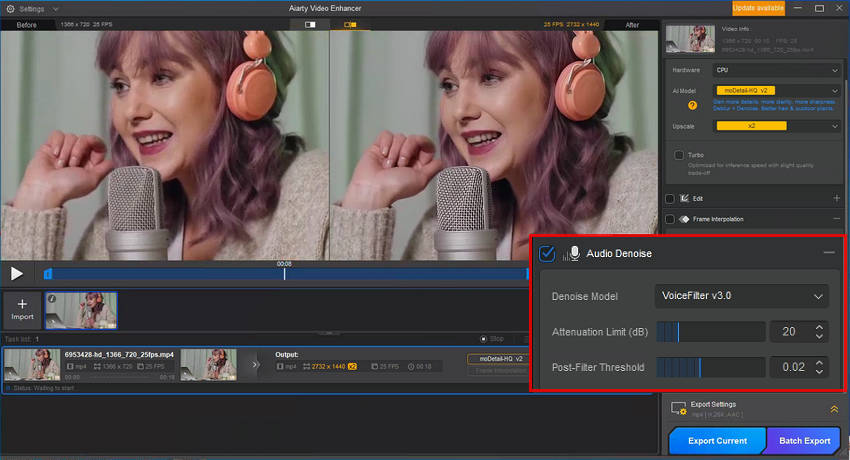
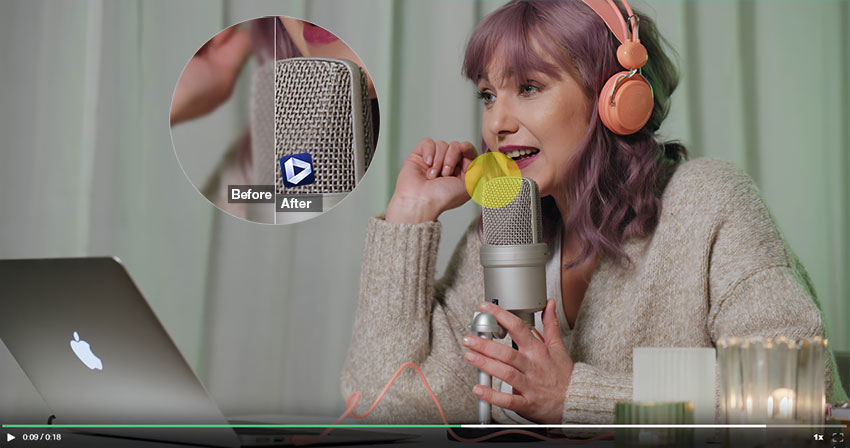
Beyond audio cleanup, Aiarty Video Enhancer also works as a noise suppression app for video, helping remove visual noise and grain while fixing blur and compression artifacts. It further enhances overall video quality by upscaling footage to 4K and restoring lost details.
2. Adobe Audition (Best for Professional Audio Editing)
Best for: Professional audio engineers, podcasters, and advanced users
Price: Starts at ~$275.88/year (Adobe Creative Cloud subscription)
Adobe Audition is a professional-grade noise suppression software widely used in post-production for precise audio cleanup. It provides advanced tools to remove background noise, especially in complex recordings that contain layered sound, persistent hiss, or inconsistent environmental interference.
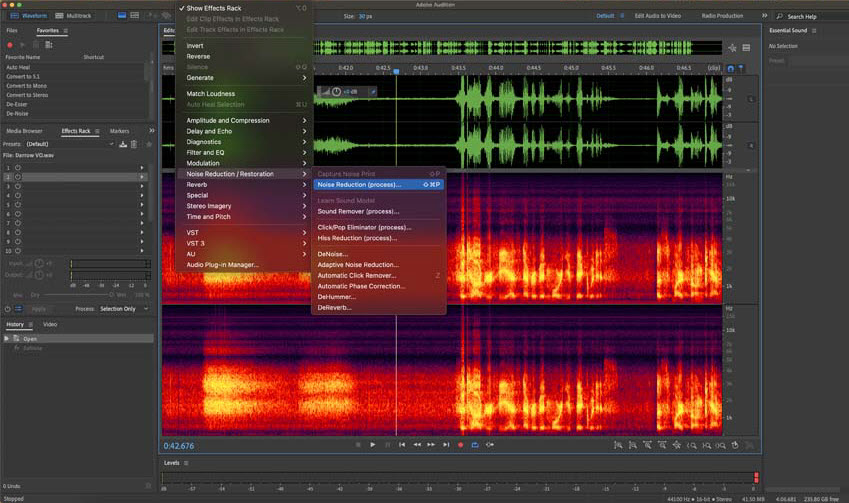
Its spectral frequency display allows users to visually identify and manually remove unwanted noise, making it highly effective for removing background noise without damaging voice quality. In addition to its powerful noise suppression capabilities, Adobe Audition is often used in podcast production, film audio editing, and broadcast workflows where detailed manual control is required. However, due to its advanced feature set, it has a steeper learning curve compared to simpler noise cancelling software tools.
Key Features:
- Advanced spectral editing for precise noise removal
- Adaptive noise reduction and noise print sampling
- Multi-track editing for complex projects
- High-quality audio restoration tools
3. Krisp (Best for Real-Time Noise Cancelling Software)
Best for: Remote workers, online meetings, and live communication
Price: 7-day free trial available; Pro starts at ~$96/month
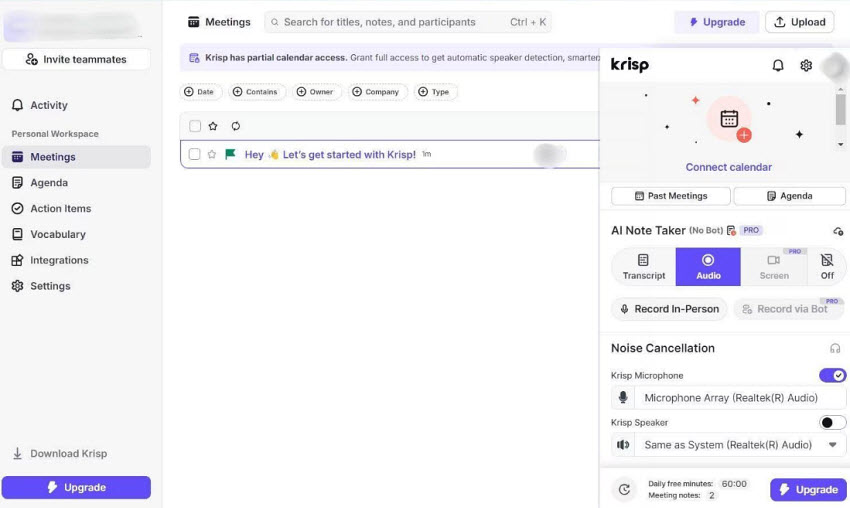
Krisp is a leading real-time noise cancelling software designed to remove unwanted background noise during live voice communication. It works as a virtual microphone and speaker, using AI to filter out distractions before your voice reaches the other side of the call.
It excels at removing mic noise, keyboard typing, and environmental distractions instantly, making it perfect for Zoom, Teams, and Discord users. While it’s not designed for post-production editing, it’s one of the best tools for live noise suppression.
Unlike post-production noise suppression software, Krisp focuses entirely on live audio processing, meaning there is no need for editing or manual cleanup after recording.
Key Features:
- Real-time AI noise suppression for calls
- Removes voices, background chatter, and ambient noise
- Works with major communication apps
- Lightweight and easy to use
4. NVIDIA Broadcast (Best for GPU-Powered Mic Noise Removal)
Best for: Streamers, gamers, and creators with NVIDIA RTX GPUs
Price: Free but requires an NVIDIA RTX GPU (RTX 2060 or newer)
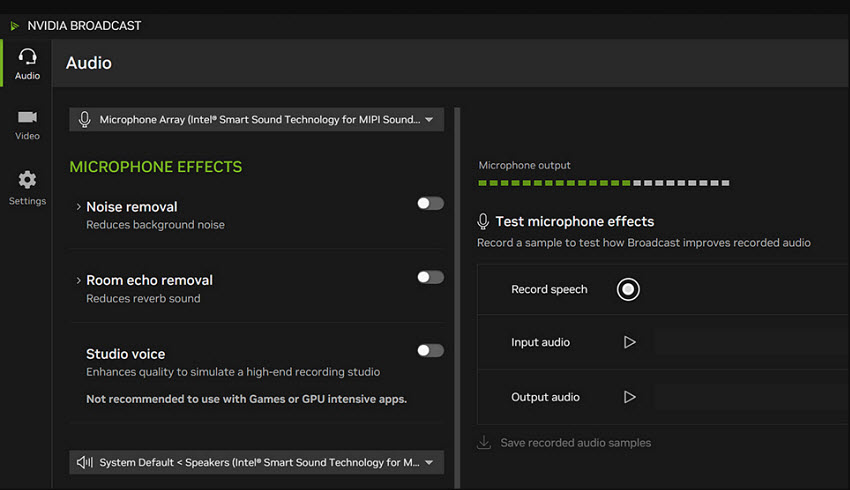
NVIDIA Broadcast is a powerful GPU-accelerated noise suppression software free for real-time audio and video enhancement. It uses AI models running on RTX GPUs to deliver high-quality mic noise removal without requiring post-processing, making it especially popular among streamers and content creators.
It effectively reduces background noise, including keyboard typing, fan hum, room echo, and other environmental sounds, while preserving natural voice clarity. In addition to noise suppression, it also helps reduce room reverb and echo, improving overall voice presence during live streaming or recording.
Because it processes audio in real time, NVIDIA Broadcast is ideal for use with platforms like OBS, Twitch, Zoom, and Discord. However, its main limitation is that it requires an NVIDIA RTX GPU, which makes it less accessible compared to software-based noise cancelling apps that run on any system.
Key Features:
- AI-powered real-time mic noise removal
- Echo and room noise reduction
- GPU-accelerated performance
- Integration with OBS and streaming tools
5. Audacity (Best Free Noise Suppression Software)
Best for: Beginners and budget users
Price: Free (open-source)
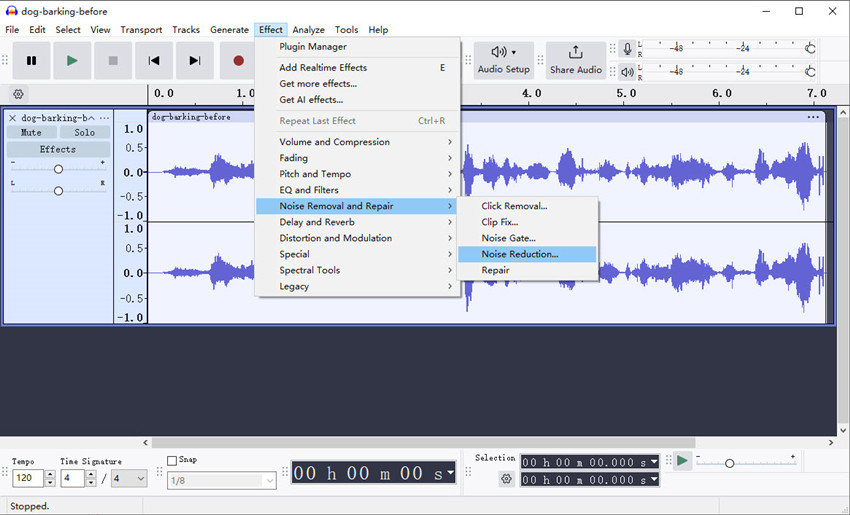
Audacity is one of the most widely used free noise suppression software tools for removing background noise from audio recordings. It uses a traditional noise profile method, where users select a sample of unwanted sound (such as hiss or hum) and apply it across the entire track to reduce consistent background noise.
This makes it especially effective for dealing with steady issues like mic noise, electrical hum, or constant static, though it is less effective for complex or highly dynamic noise environments compared to AI-based tools.
While Audacity does not include advanced AI-driven noise cancellation software features, it remains a reliable entry-level noise suppression app thanks to its simplicity, flexibility, and strong editing capabilities.
Key Features:
- Noise profile-based reduction
- Multi-track editing
- Free and open-source
- Cross-platform support
6. RNNoise (Best Lightweight AI Noise Suppression Library)
Best for: Developers, low-latency applications, and lightweight integrations
Price: Free (open-source)
RNNoise is a lightweight, open-source, and free AI noise suppression engine designed for real-time speech enhancement. It uses a recurrent neural network (RNN) model to effectively reduce background noise, mic noise, and ambient sound while maintaining extremely low CPU usage.
Unlike consumer noise suppression software, RNNoise does not provide a standalone interface. Instead, it is designed as an AI noise suppression engine that can be integrated into different systems, including: Discord and other VoIP communication tools , live streaming software, audio processing systems and DAWs, and developer applications.
Because of this flexibility, RNNoise is widely used in real-time communication environments where efficient noise suppression is required without heavy system load. However, since it is a developer-focused engine, it does not include a graphical interface, presets, or user controls, and must be implemented within other software environments.
Key Features:
- Real-time AI noise suppression with low CPU usage
- Effective removal of mic noise and background hiss
- Open-source and highly customizable for developers
- Widely used in VoIP and communication apps
7. SteelSeries Sonar (Best Free Noise Cancelling Software for Gamers)
Best for: Gamers, streamers, and Discord users
Price: Free (included in SteelSeries GG software)
SteelSeries Sonar is a powerful free noise cancelling software built into the SteelSeries GG ecosystem. It provides real-time AI-powered noise suppression for both microphone input and system audio, making it especially useful for gaming, streaming, and voice communication.
Sonar effectively reduces common background noise such as keyboard typing, fan hum, room echo, and other environmental distractions. This ensures clearer voice transmission and significantly improves mic noise reduction during fast-paced gaming or Discord conversations.
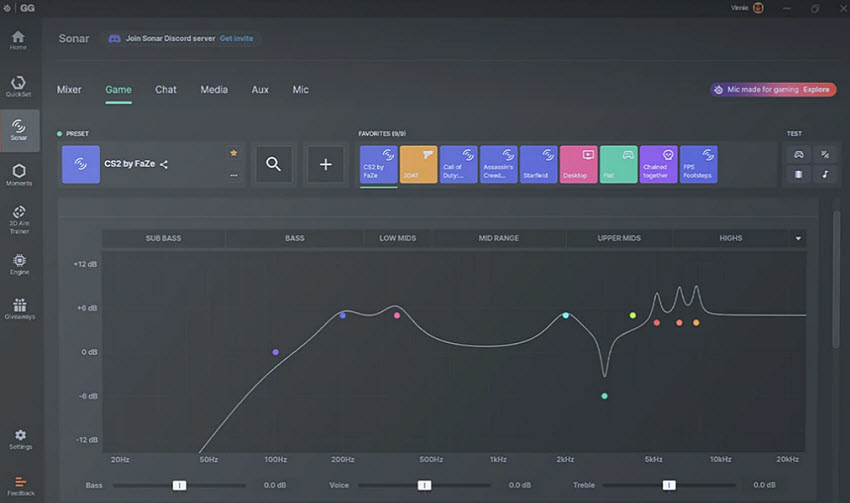
Beyond noise suppression, Sonar also includes a built-in audio mixer and routing system, allowing users to fine-tune different audio channels. This makes it one of the most beginner-friendly yet powerful noise suppression apps for gamers who want clean, professional-sounding voice chat without complex setup.
Key Features:
- AI-powered mic noise and background noise removal
- Real-time noise suppression for gaming and voice chat
- Built-in audio mixer with advanced controls
- Works seamlessly with Discord, OBS, and streaming tools
Final Word: Choosing the Right Noise Suppression Software
At the end of the day, the best noise suppression software depends entirely on your workflow—not just its features. Some tools are built for real-time communication, while others focus on deep post-production cleanup or all-in-one media enhancement.
If you need instant results during meetings or calls, a real-time noise cancelling software like Krisp or NVIDIA Broadcast is the most efficient choice. For professional editing and detailed control, Adobe Audition remains the industry standard. Gamers and streamers benefit more from lightweight, low-latency solutions like SteelSeries Sonar. And if you're a content creator looking for an all-in-one solution that combines background noise removal, video enhancement, and AI-powered processing, Aiarty Video Enhancer offers a more integrated workflow.
How to Choose the Right Tool?
To make the decision easier, think in terms of your primary use case:
- Live communication (Zoom, Teams, Discord): choose real-time noise suppression tools
- Audio production & editing: choose post-processing software with precise control
- Streaming & gaming: prioritize low-latency, GPU-accelerated noise reduction
- Content creation (video + audio): choose hybrid AI tools that handle both visual and audio noise
Ultimately, the most effective solution is the one that balances noise reduction strength, voice clarity, and workflow convenience without over-processing your audio. A good tool should remove unwanted noise—but still keep your voice natural, clear, and professional.
 FAQs
FAQs
No tool can remove 100% of background noise in every situation. According to real-world user feedback, most noise cancelling software works best on consistent sounds like fan hum, air conditioning, and keyboard typing. Sudden or overlapping sounds—such as shouting or door slams—are more difficult to eliminate completely without affecting voice quality.
In software tools, the terms are often used interchangeably. Technically, noise suppression refers to AI-based filtering of unwanted audio, while noise cancellation is more commonly associated with hardware using anti-phase sound waves. In practice, modern noise suppression software uses deep learning models to separate speech from background noise, making both terms functionally similar for users.
It depends on your workflow. Real-time tools like Krisp or NVIDIA Broadcast are ideal for live calls, streaming, and gaming because they remove mic noise instantly. However, post-processing tools such as Adobe Audition or Aiarty Video Enhancer offer more precise control and better results for recorded content where background noise removal quality is critical.
Yes, if overused. Reddit users and audio engineers often note that aggressive settings can make voices sound “robotic” or “underwater.” The best noise suppression apps use AI models that balance noise removal with natural voice preservation, allowing you to reduce background noise and mic noise without damaging speech clarity.
Most noise cancelling software works on standard laptops and desktops. However, some tools require specific hardware. For example, NVIDIA Broadcast requires an RTX GPU for AI acceleration, while most other tools like Krisp, Audacity, and SteelSeries Sonar work without special equipment.
You May Also Like


This post was written by Brenda Peng who is a seasoned editor at Digiarty Software who loves turning ordinary photos into extraordinary works of art. With AI assistance for brainstorming and drafting, the post is reviewed for accuracy by our expert Abby Poole for her expertise in this field.
