


If you have a small, blurry, or low-resolution image that needs to be enlarged, an AI image upscaler can do more than traditional resizing. Instead of simply stretching existing pixels, AI upscaling analyzes the image and attempts to reconstruct sharper edges, textures, and other missing details.
VanceAI Image Upscaler is one of the popular tools built for this purpose. Also known as VanceAI Image Enlarger, it can enlarge photos, illustrations, anime, and other images by 2x, 4x, or 8x online. VanceAI also offers a desktop version with local processing and larger enlargement options.
But how well does VanceAI actually upscale images? Is VanceAI image upscaler free, and more importantly, how does VanceAI compare with desktop AI image enhancers if you need to process many images or want more control over the final result?
What is VanceAI Image Upscaler?
VanceAI Image Upscaler is an AI-powered image enlargement tool designed to increase image resolution while improving perceived image quality. Rather than using conventional interpolation alone, it uses AI models to analyze the source image and reconstruct details as the image is enlarged.
The online VanceAI Image Enlarger supports 2x, 4x, and 8x enlargement. According to VanceAI, its web tool can process photos, illustrations, anime, and text, while VanceAI for PC supports enlargement of up to 40x.
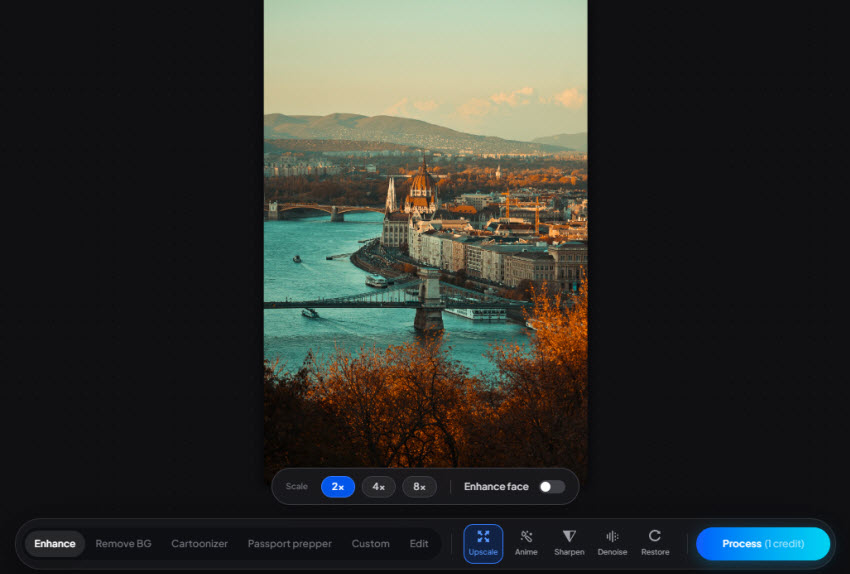
VanceAI Image Upscaler Features:
- AI Image Upscaling – Upscale images by 2x, 4x, or 8x.
- Multiple AI Models – Models for photos, portraits, anime, text, and other image types.
- Face Enhancement – Improve facial details in low-resolution portraits.
- Image Sharpening – Enhance blurry and soft images.
- Noise Reduction – Reduce noise and grain while preserving details.
- Batch Processing – Process multiple images more efficiently.
- Online & Desktop Processing – Use the web-based VanceAI Image Enlarger or desktop software for local processing.
- High-Resolution Output – Enlarge images for printing, e-commerce, and other high-resolution uses.
How Good Is VanceAI Image Upscaler?
VanceAI Image Enlarger offers several AI models to enlarge different types of images, so the results can vary depending on the source and model selected. We tested its main models with old photos, low-resolution images, anime artwork, and other challenging sources to see how well VanceAI can actually upscale and enhance them.
Magic Enlarge
Magic Enlarge is designed for challenging low-resolution images, using AI to reconstruct details while enlarging the image. It is particularly useful when the original photo is blurry or lacks fine details.
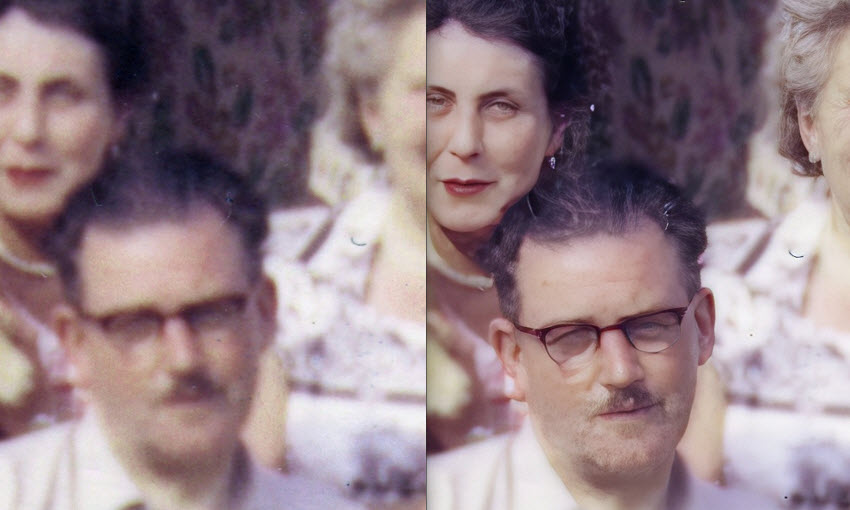
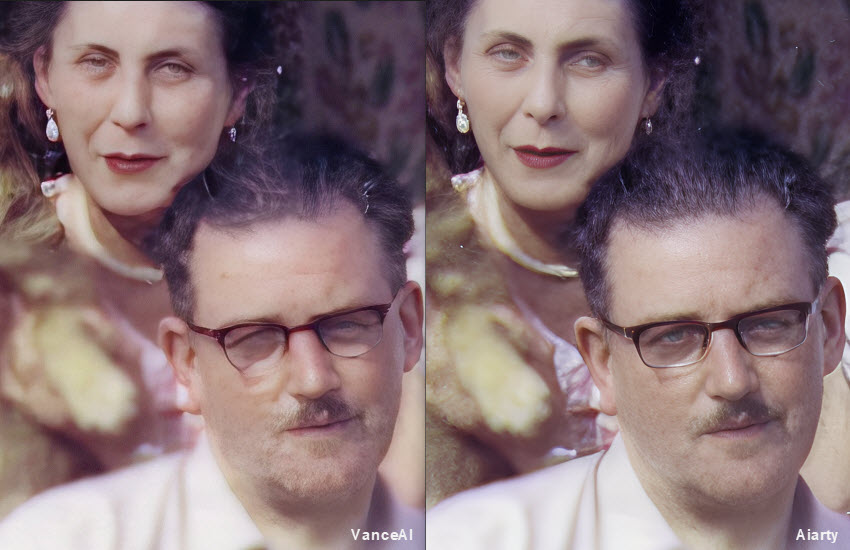
In our first test, the original old photo was 5,200 × 3,336 pixels, but the people and facial features were noticeably blurry. After 2x enlargement and Face Enhance, VanceAI Image Upscaler restored facial details surprisingly well, producing a much clearer result than many other image upscalers we tested.
In another test, a 1,740 × 2,611-pixel image was enlarged 2x to 3,480 × 5,222 pixels. VanceAI recovered a noticeable amount of missing detail while keeping the overall image natural.
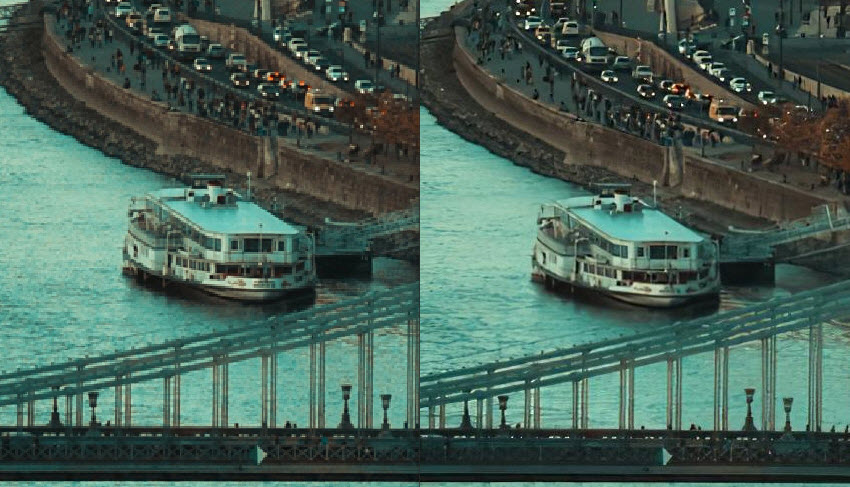
Photo Model
The Photo Model in VanceAI Image Enlarger is designed for everyday photographs, including portraits, landscapes, and product images. It enhances resolution, sharpens details, and works well as a general-purpose image upscaler.
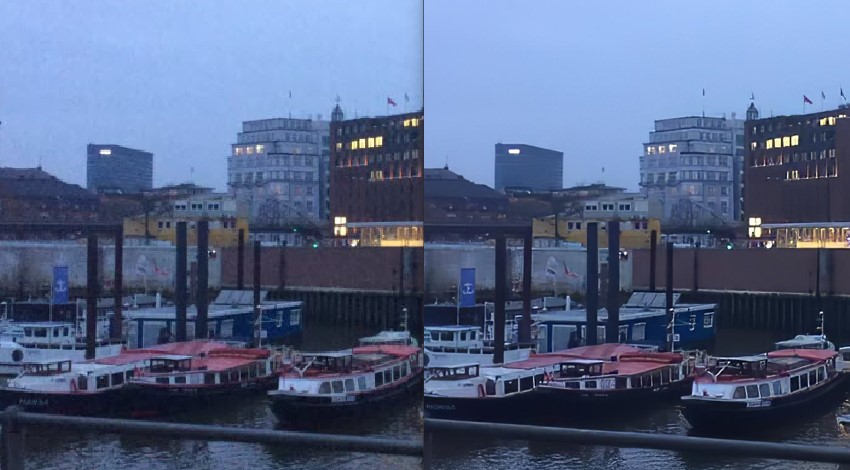
We tested it on a 778 × 454-pixel low-light photo with noticeable noise. After using Reduce Noise and 2x upscale, VanceAI removed most of the visible noise and produced a much cleaner image. However, the result looked slightly over-processed, with some details appearing a little too smooth or artificial.
Anime Model
The Anime Model is optimized for anime, manga, cartoons, and other artwork with strong outlines and flat colors. It focuses on keeping lines clean while reducing jagged edges and artifacts during enlargement.
For a 259 × 194-pixel anime image, VanceAI's Anime Model successfully enlarged it by 2x while making the lines noticeably clearer. Jagged edges and visible artifacts were also effectively reduced.

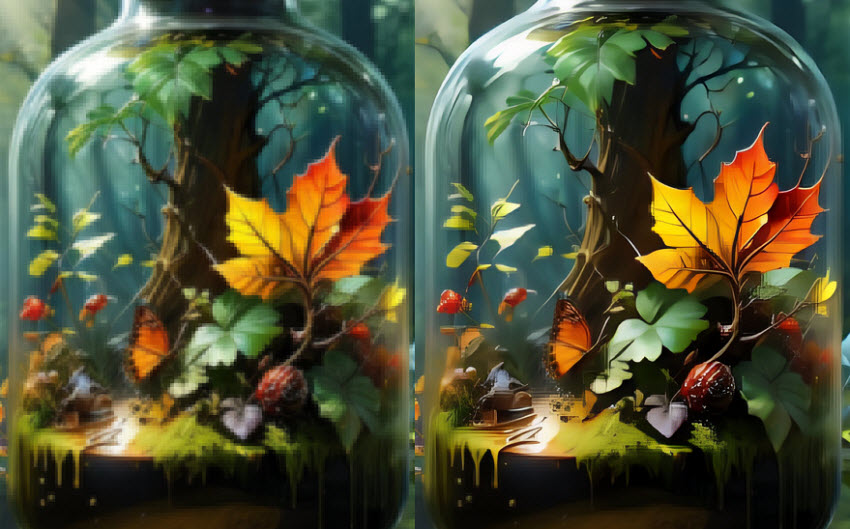
Art & CG Model
VanceAI's Art & CG Model is designed for digital art, drawings, paintings, and CG images. It helps preserve fine lines and textures while reducing pixelation during upscaling.
We tested it with a 534 × 602-pixel image containing obvious pixelated blocks. After using Sharpen and 2x upscale, the overall image became much clearer and most of the large pixelated blocks were removed. Some smaller blocks, however, remained in fine details.
Text Model
The Text Model is designed for images containing text, such as screenshots, scanned documents, and other text-heavy images. It focuses on improving character edges and readability when enlarging low-resolution text.
In general, this model is better suited to text-heavy images than a standard photo upscaler, especially when small characters become difficult to read after enlargement.
VanceAI Image Upscaler Pros and Cons
Based on our tests, VanceAI Image Upscaler performs well across different image types, especially when the appropriate AI model is selected. Its face enhancement and noise reduction are particularly useful for difficult photos.
- Targeted AI Models: Specialized models for portraits, anime, art, and text deliver better tailored results than one-size-fits-all tools.
- Beginner-Friendly: A simple drag-and-drop web interface requires zero photo-editing skills.
- Strong Face Recovery: Effectively restores recognizable features and details from heavily blurred portraits.
- Flexible Access: Offers both a convenient web version and a local desktop app for different workflow needs.
- Costly Credit System: Web credits deplete fast at higher magnifications (4x/8x), making long-term use expensive.
- Over-Smoothing: Tough, noisy images can sometimes look artificial or "plastic" due to aggressive AI hallucination.
- Cloud Privacy Concerns: Uploading sensitive files to the cloud can be a hurdle for private or confidential work.
- Split Licensing: Web credits and desktop software require separate purchases, lacking a unified cross-platform subscription.
VanceAI Image Upscaler Pricing: Is It Free?
VanceAI Image Enlarger has both credit-based web plans and desktop plans with unlimited local processing. The pricing model is quite different between the two.
VanceAI Web App: Credit-Based Pricing
VanceAI Image Upscaler offers several pricing options, including subscription plans and pay-as-you-go credits, depending on how often you need to upscale images.
Note: For AI Image Upscaler, 2x costs 1 credit, 4x costs 2 credits, and 8x costs 3 credits. So the Popular plan would cover up to 500 2x enlargements, 250 4x enlargements, or roughly 166 8x enlargements per month.
The web version is free to try with 10 credits, allowing users to test the AI Image Upscaler before paying.
VanceAI Desktop: Pay Once for Unlimited Local Processing
VanceAI also offers a Windows desktop version that processes images locally without consuming credits. Its current plans are:
Note: The desktop version does not offer the same 10-credit free trial as the web app, so users who want to evaluate the desktop experience need to purchase a license first.
VanceAI vs. Other AI Image Upscaler: Is It the Best Choice?
To see how VanceAI Image Upscaler compares with other AI image upscalers, we chose Aiarty Image Enhancer as a reference. Both tools have a similar focus: enlarging low-resolution images while improving blur, noise, sharpness, and facial details. Their overlapping use cases make it easier to compare their actual image enhancement results under similar conditions.
Want to see how Aiarty performs on your own images? You can download it and test its AI upscaling and enhancement features for free.
VanceAI vs. Aiarty with Real Images
We tested VanceAI Image Upscaler and Aiarty Image Enhancer on the same images to compare how they perform in different image upscaling scenarios.
Test 1. Old Blurry Photo
Both tools successfully restored clarity to the heavily blurred faces. When using VanceAI to enlarge images, the Face Enhance option helped improve facial clarity. Aiarty also provides a dedicated Face Restoration feature and recovered more facial details while upscaling the image.
Test 2. Low-Resolution Photo
Both VanceAI and Aiarty improved the original low-resolution image. However, when we used VanceAI to upscale images, the result was slightly less clear than Aiarty, which retained more visible details after 2x enlargement.

Test 3. Noisy Low-Light Photo
Both tools removed the visible noise effectively. Compared with the VanceAI image enlarger result, Aiarty produced somewhat cleaner lines while retaining more fine details, such as the structural details on the buildings.

Test 4. Anime Image
Both VanceAI and Aiarty improved the low-resolution anime image. The Aiarty result appeared cleaner and sharper, with fewer visible artifacts around the lines and edges compared with VanceAI Image Upscaler.

Test 5. Pixelated Art/CG
VanceAI Image Upscaler improved the overall image after 2x upscaling, but some pixelated blocks remained in fine details. Aiarty produced cleaner details in these areas without the same visible pixelation.

VanceAI Image Enlarger vs. Aiarty: Quick Comparison
VanceAI Image Upscaler FAQs
1. Is VanceAI Image Upscaler free?
No, VanceAI is not free. It offers 10 free credits for trying its online image upscaling service, while more extensive use requires paid credits or a subscription. Its desktop version also offers paid plans with unlimited local processing.
2. Can VanceAI upscale images to 4K?
Yes. VanceAI can enlarge images to higher resolutions, including 4K, depending on the original image size and the selected upscaling settings.
3. How much does VanceAI Image Upscaler cost?
VanceAI's pricing is split into web and desktop plans. Online credit subscriptions start around $4.95/month, while pay-as-you-go bundles are also available. The desktop version (VanceAI for PC) offers a monthly plan ($39.90), an annual plan ($99.90), and a lifetime license ($129.90) for unlimited local processing.
4. Does VanceAI require credits?
The online processing mode uses credits. On the desktop version, local GPU processing does not require credits, while online processing through VanceAI's cloud service does.
5. Can VanceAI improve blurry faces?
Yes. VanceAI includes Face Enhance features that can improve facial clarity when enlarging blurry or low-resolution photos. Our tests showed that it can recover a noticeable amount of facial detail from heavily blurred images.
6. Is VanceAI better than other AI image upscalers?
VanceAI delivers solid results for quick online fixes, but it isn’t always the best choice depending on your needs. While VanceAI relies on a credit system and cloud processing for web tasks, alternatives like Aiarty Image Enhancer offer a more cost-effective, dedicated desktop solution. In our tests, Aiarty frequently retained finer details, avoided artificial plastic smoothing, and handled heavy batch-processing much more efficiently without credit anxiety.
7. Does VanceAI have a desktop version?
Yes. VanceAI offers a desktop application with local GPU processing as well as an online processing option.
Final Verdict: Is VanceAI Image Upscaler Worth It?
VanceAI Image Upscaler is a capable option for enlarging and enhancing images, especially when you need different AI models for photos, anime, artwork, or text. In our tests, it handled blurry faces, low-resolution images, noise, and pixelated artwork reasonably well, although some results showed slightly over-processed details or remaining artifacts.
The main consideration is how you plan to use it. The web version is convenient for occasional image upscaling, but its credit-based pricing can become relatively expensive for frequent users. The desktop version offers unlimited local processing, making it a more practical choice for users who regularly upscale images and have suitable hardware.
If you want a similar desktop-focused alternative, Aiarty Image Enhancer is worth considering. In our side-by-side tests, both tools produced usable results, while Aiarty showed some advantages in detail retention, facial restoration, and artifact reduction on several test images. Ultimately, the better choice depends on your preferred workflow, processing method, and budget.
You May Also Like


This post was written by Brenda Peng who is a seasoned editor at Digiarty Software who loves turning ordinary photos into extraordinary works of art. With AI assistance for brainstorming and drafting, the post is reviewed for accuracy by our expert Abby Poole for her expertise in this field.
