



Best Real-ESRGAN Image Upscaler GUIs: Review & Comparison



Real-ESRGAN is a popular open-source solution for AI image upscaling, helping enlarge low-resolution images while improving textures and details. However, its command-line interface (CLI) can be challenging for users who aren't familiar with running commands or setting up the required files and dependencies. That's why many users look for a Real-ESRGAN image upscaler with a GUI that makes image upscaling easier. In this guide, we'll explore the best Real-ESRGAN GUI image upscalers and look at Real-ESRGAN alternatives for users who want a simpler workflow or different enhancement features.
Looking for More Than Real-ESRGAN Upscaling?
While open-source Real-ESRGAN GUIs offer a great free starting point, Aiarty Image Enhancer steps in when you need production-ready quality. It will upscale, denoise, deblur, and enhance without steep learning curve.
- Zero Setup: No Python or command-line knowledge required. Just drag, drop, and enhance.
- Detais Enhancement: Improve details like skin texture, hair strands, and fabric patterns without simply smoothing everything out.
- Beyond Basic Upscaling: Enlarge images by 2×, 4×, or 8× while enhancing visible details in photos.
- Local & Offline: Enhance images on your own computer without uploading photos to a cloud server.
What Is Real-ESRGAN Upscaling?
Real-ESRGAN upscaling is an AI-based image super-resolution technique that enlarges low-resolution images while reconstructing plausible textures, edges, and fine details. It is based on Real-ESRGAN (Real-World Enhanced Super-Resolution Generative Adversarial Network), an open-source project designed to improve image restoration in real-world conditions, including common degradation such as noise and compression artifacts.
Unlike traditional image resizing methods that interpolate existing pixels, Real-ESRGAN uses deep learning to generate a higher-resolution image based on patterns learned during training. It is commonly used to upscale photos, anime, illustrations, and other digital images. Depending on the model and implementation, it can support 4× upscaling and other output scaling options.
However, AI upscaling does not guarantee recovery of the original details. When an image has severe blur or very little source information, the model may generate plausible-looking textures that differ from the original. The results also vary by image type and model selection, so choosing the right Real-ESRGAN upscaler matters.
Best Real Esrgan Image Upscaler GUI Tools
If you want to use Real-ESRGAN image upscaling without running commands manually, several desktop applications and AI workflow interfaces can make image upscaling easier. Some offer a simple, ready-to-use interface, while others let you combine Real-ESRGAN with additional AI image-processing tools. Here are four best Real-ESRGAN image upscalers worth considering.
1. Upscayl
Best for: Beginners and users who want a straightforward Real-ESRGAN image upscaler.
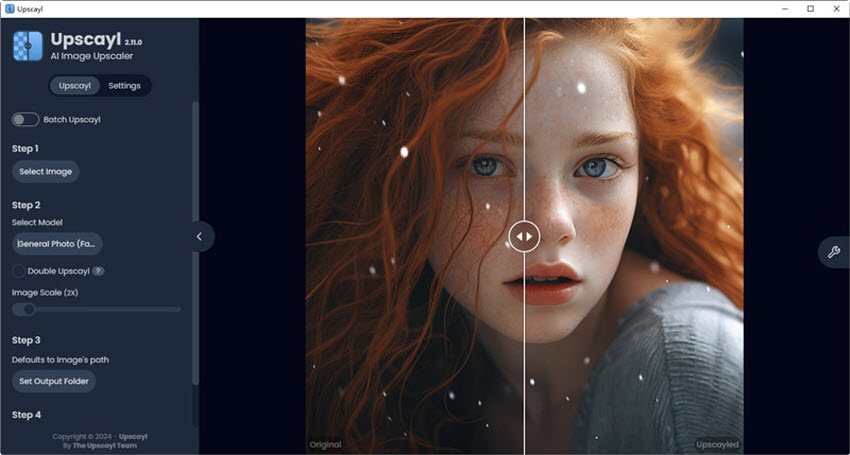
Upscayl is a free, open-source desktop application for AI image upscaling on Windows, macOS, and Linux. It uses Real-ESRGAN-based models through a Vulkan-powered backend, making it an accessible way to enlarge images using Real-ESRGAN without setting up a Python environment or entering command-line instructions.
As a Real-ESRGAN GUI alternative to command-line workflows, the image upscaling is simple: select an image, choose an upscaling model, set the output location, and start processing. Upscayl also supports batch processing and provides a before-and-after comparison slider, so you can inspect the result before deciding whether it meets your needs. Different models can produce different results, making model selection important for photographs, illustrations, and other image types.
- Free and open-source, with a graphical interface for everyday use
- Supports batch upscaling and before-and-after comparison
- Offers Real-ESRGAN and multiple models for different image types
- Runs locally using Vulkan-based GPU acceleration
- Requires compatible Vulkan graphics support for its normal GPU workflow
- Not every model supports every scaling factor natively
- AI upscaling cannot reliably restore details lost through severe blur or missed focus
Verdict: Upscayl is a good starting point if you want to try Real-ESRGAN image upscaling without dealing with command-line tools. It offers a simpler workflow than a full AI image-generation interface, while still giving you some control over model selection.
2. Waifu2x-Extension-GUI
Best for: Windows users who want to compare AI models and process images, GIFs, and videos.
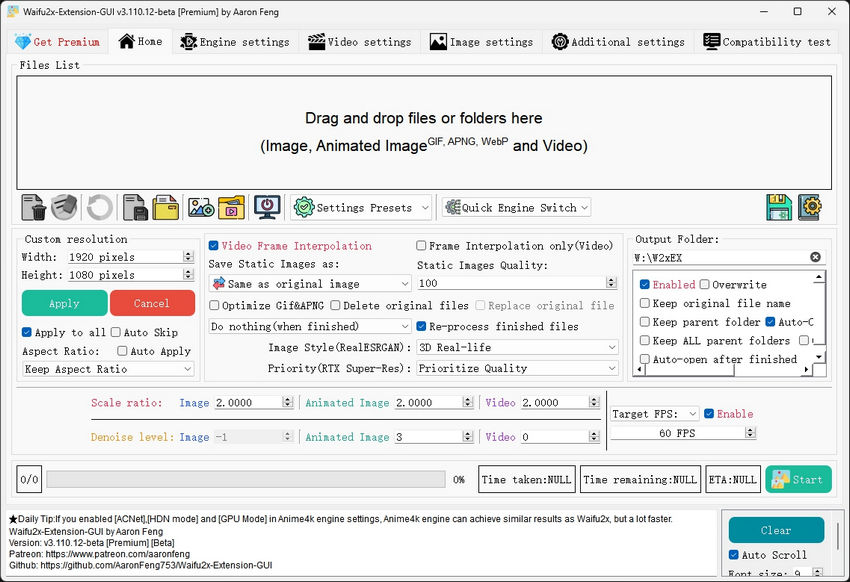
Waifu2x-Extension-GUI is a multi-engine image and video enhancement application rather than a GUI dedicated exclusively to Real-ESRGAN. Alongside Waifu2x, it supports Real-ESRGAN, Real-CUGAN, Anime4K, and other super-resolution methods. It also includes tools for animated images, video upscaling, and video frame interpolation.
This flexibility is useful when one model does not produce the result you want. For example, you can compare Real-ESRGAN with another supported model on a photograph or illustration instead of relying on a single upscaling method. The application also provides presets and configurable processing options.
The trade-off is complexity. With several engines and settings available, the interface can take longer to learn than a dedicated image upscaler. The project is designed for Windows, and its current licensing terms should be reviewed before commercial use: the project states that the free version is for personal use, with commercial use requiring the premium version.
- Supports Real-ESRGAN alongside several alternative upscaling engines
- Handles images, animated images, and video
- Offers presets and detailed processing controls
- Useful for comparing different models on the same source
- Windows-focused rather than a cross-platform desktop option
- More settings and engine choices can overwhelm beginners
- Commercial use requires checking the applicable license and premium terms
Verdict: Choose Waifu2x-Extension-GUI if you want more than a basic image upscaler. Its multiple engines are useful for experimentation, especially when your workload includes both still images and video. If you only need to enlarge photos occasionally, a simpler tool may be easier to manage.
3. ComfyUI and AUTOMATIC1111 Stable Diffusion WebUI
Best for: Users who already work with Stable Diffusion or want to integrate upscaling into a larger AI workflow.
ComfyUI and AUTOMATIC1111 Stable Diffusion WebUI are two different interfaces for working with AI image-generation and image-processing tools. Both can be used in workflows involving compatible upscaling models, but they are not dedicated Real-ESRGAN applications.
ComfyUI uses a node-based interface. You connect image inputs, upscaling models, and other processing steps into a workflow. This makes it useful when you want to combine Real-ESRGAN upscaling with additional operations or save a reusable workflow for repeated tasks.
AUTOMATIC1111 Stable Diffusion WebUI uses a more traditional interface with tabs and settings. Its Extras tab supports compatible ESRGAN-family upscaling models, while other workflows can combine upscaling with Stable Diffusion processing. You need to ensure that the specific model you install is supported; not every ESRGAN-family model is interchangeable.
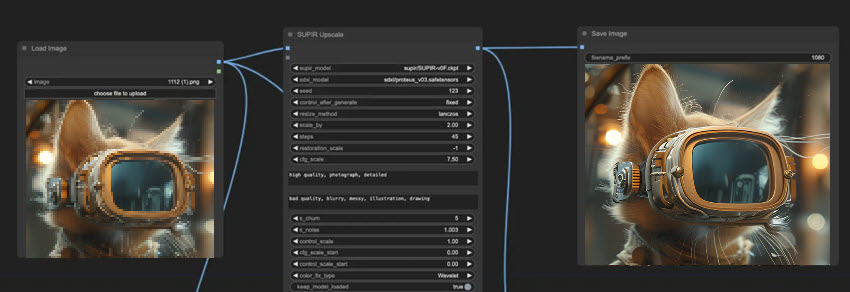
- Can incorporate upscaling into broader AI image workflows
- Offers flexibility beyond standalone image enlargement
- ComfyUI supports visual, reusable node-based workflows
- AUTOMATIC1111 provides a more conventional interface with an Extras tab
- Requires more setup than a dedicated image upscaler
- Model files, extensions, nodes, and workflow compatibility may need attention
- Can be unnecessarily complicated if your only goal is to enlarge a few images
Verdict: These tools are best for users who already have an AI image-processing setup. Choose ComfyUI for customizable node-based workflows or AUTOMATIC1111 if you prefer a traditional interface with a dedicated upscaling panel. If you simply want a quick Real-ESRGAN upscale, Upscayl or a dedicated GUI is usually a more direct starting point.
4. Real-ESRGAN GUI by TransparentLC
Best for: Users who want a lightweight and dedicated Real-ESRGAN GUI.
Real-ESRGAN GUI by TransparentLC is a graphical interface built around the Real-ESRGAN-ncnn-vulkan executable. It is designed to make the underlying upscaling program easier to use without requiring you to enter command-line parameters for each job. The project provides builds for Windows, Ubuntu, and macOS, although installation steps vary by platform.
The interface adds several practical features, including drag-and-drop input, directory processing, custom output dimensions, and animated GIF upscaling. For example, if the model produces a fixed 4× output but you need a different final size, the GUI can upscale and then downsample the image to your target dimensions.
One limitation is that the Real-ESRGAN image upscaler GUI depends on a separate upscaling executable and model files. Some release packages do not include these components, so you may need to download them separately. The project also notes that the original Real-ESRGAN-ncnn-vulkan executable has not been updated since April 2022 and suggests using a compatible maintained fork when appropriate. Check the release instructions before installing.
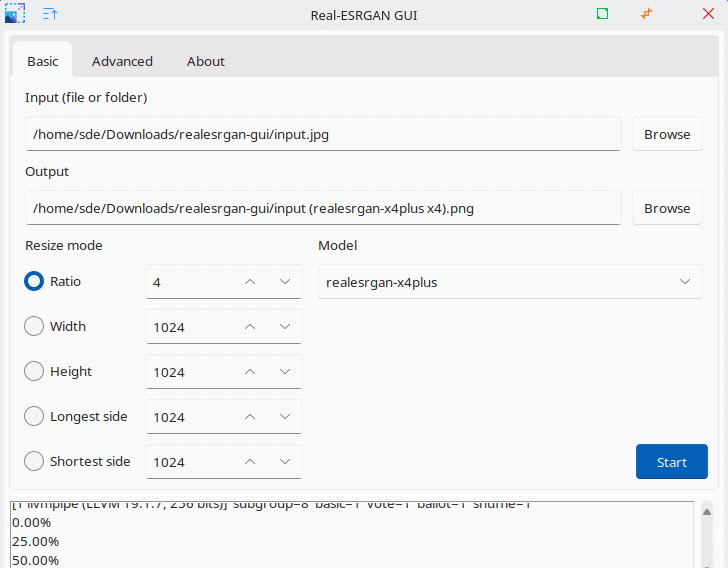
- Built specifically for Real-ESRGAN-based image upscaling
- Supports drag-and-drop and directory input
- Offers custom output dimensions and GIF upscaling
- Available for Windows, Ubuntu, and macOS
- Some packages require separate executable and model downloads
- Installation is less straightforward than a fully bundled desktop app
- The original NCNN-Vulkan executable is no longer actively updated
Verdict: Real-ESRGAN GUI by TransparentLC is worth considering if you want a dedicated interface while staying close to the Real-ESRGAN-ncnn-vulkan implementation. It provides more convenience than using the executable directly, but you should check package contents and compatibility before choosing it.
Looking for an Easier Real-ESRGAN Alternative Image Upscaler?
Real-ESRGAN is a useful option for AI image upscaling, but not everyone wants to configure models, manage dependencies, or experiment with different workflows.
Aiarty Image Enhancer is a desktop alternative that uses its own AI models to upscale images and improve image quality. It intelligently enhances lifelike skin pores, fine hair strands, and complex fabric textures while upscaling images to 4K, 8K, or even 32K resolutions. This eliminates the waxy, unnatural artifacts common in open-source outputs.
Unlike a typical Real-ESRGAN GUI, Aiarty delivers a streamlined desktop user interface equipped with an interactive before-and-after slider, dedicated facial restoration, AI object removal, and color/light adjustment controls. Optimized for local processing across mainstream NVIDIA, AMD, and Intel GPUs, it maintains exceptional stability and speed during heavy batch-processing workloads.
Choose Aiarty Image Enhancer if you want an all-in-one desktop tool for upscaling without complex Real-ESRGAN image upscaling workflow.
Aiarty Image Enhancer vs Real-ESRGAN Upscaling Tests
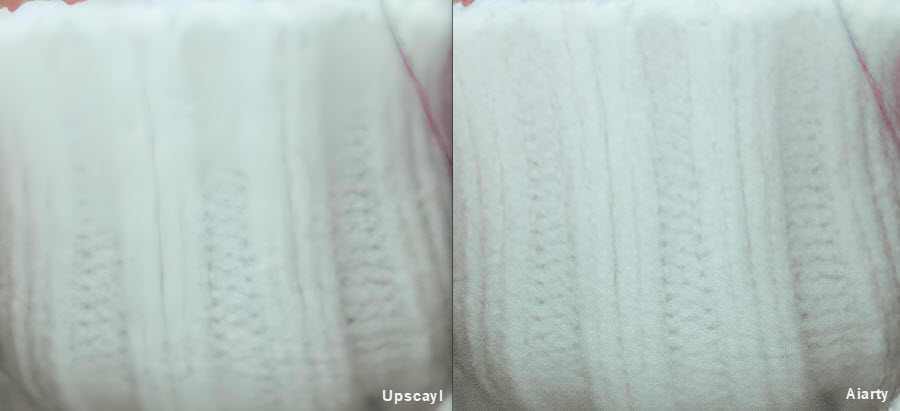
For this comparison, we used the Real-ESRGAN GUI - Upscayl and set it to 2× upscaling. We processed the same source images with Aiarty Image Enhancer and compared the results at the same viewing scale, focusing on sharpness, noise reduction, and fine-detail retention.
Example 1: Restoring an Old, Blurry Photo
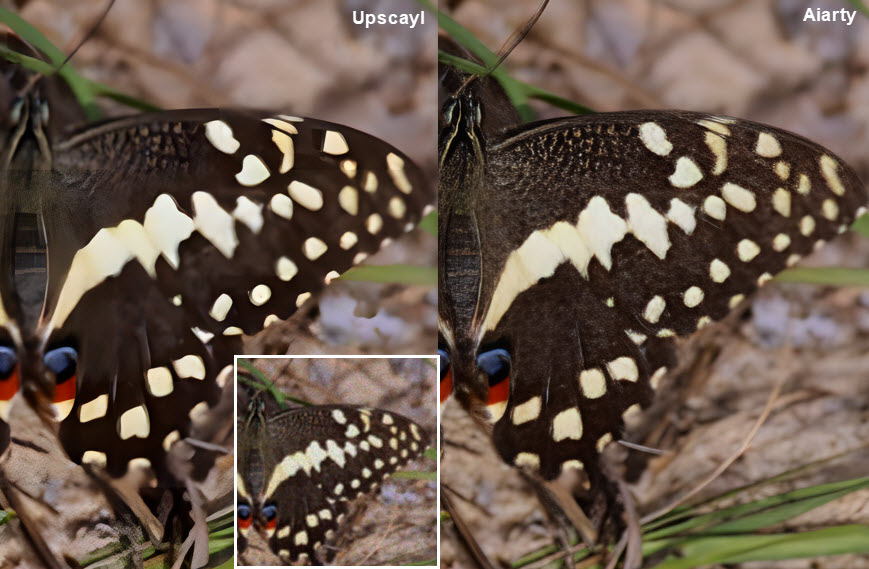
In this test, the original photo has noticeable blur and lacks clear definition. After 2× upscaling with Upscayl's Real-ESRGAN model, the image shows little visible improvement in sharpness. Some enlargement is achieved, but many details remain soft.
Aiarty Image Enhancer produces a noticeably clearer result in this example. Edges and visible features appear more defined, making the photo easier to inspect at a larger size. This suggests that, for this particular image, Aiarty's enhancement model does a better job of improving perceived detail than the Real-ESRGAN image upscaler. The result will still depend on the source image and the settings used.
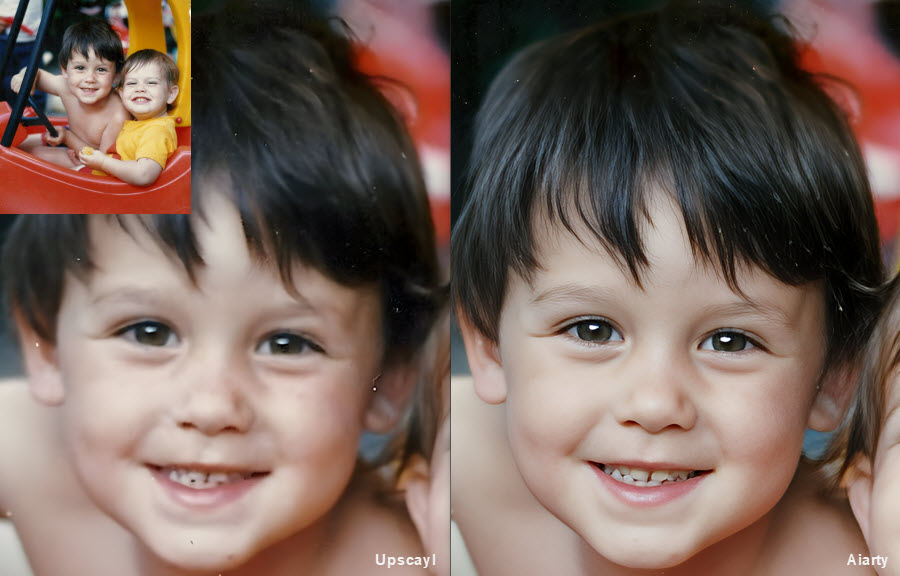
Example 2: Removing Noise While Preserving Fine Details
The second image contains noticeable noise, especially around the face and hair. Both Upscayl's Real-ESRGAN image upscaler and Aiarty reduce much of the visible noise after upscaling. However, the results differ in how well they retain fine textures.
With Real-ESRGAN upscaling, the skin texture and individual strands of hair appear less distinct, with some details blending into smoother areas. Aiarty also reduces noise, but preserves more visible definition in the skin and hair in this comparison. The difference is not simply which result looks smoother; it is whether noise reduction comes at the expense of natural-looking texture.
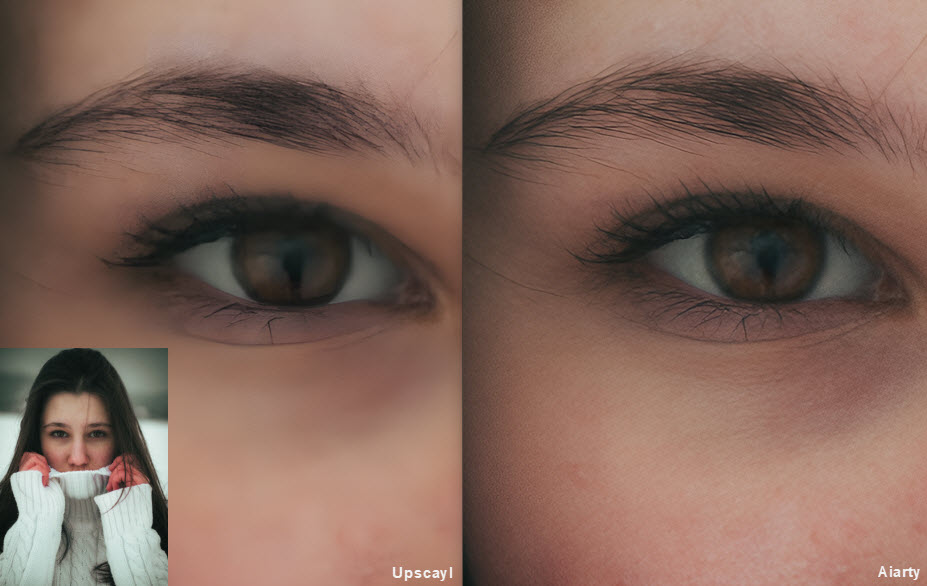
A closer look at another area of the same image reveals a similar difference. In the Real-ESRGAN upscaling result, the sweater's knit pattern becomes difficult to distinguish, with individual fibers and stitches blending into a relatively uniform patch. Aiarty retains more of the visible fabric texture, making the knit pattern easier to recognize.
Conclusion: Is Real-ESRGAN Worth Using?
Real-ESRGAN is a useful option for upscaling low-resolution images, especially if you want a free, open-source solution and don't mind choosing a model or setting up a compatible interface. The easiest route is a GUI such as Upscayl or a dedicated Real-ESRGAN image upscaling GUI, while ComfyUI and AUTOMATIC1111 offer more control for users who already work with AI image-generation tools.
The best results depend on the source image, model, and settings. Real-ESRGAN image upscalers can improve apparent sharpness and reduce some image artifacts, but it cannot guarantee recovery of details that were never captured. Faces, fine textures, and heavily compressed images may still look unnatural or lose important features.
If you need more than upscaling, such as reducing noise, refining soft details, or processing large batches of photos, compare the results with a dedicated image enhancement tool such as Aiarty Image Enhancer. Test both tools on the same original image and inspect the results at 100% before deciding which workflow fits your needs.
 FAQs
FAQs
Yes, the core Real-ESRGAN algorithm is an open-source project released under the BSD 3-Clause License, making it free for personal use. However, the license terms of a Real-ESRGAN image upscaler GUI, third-party package, or bundled model may differ. Most community-developed GUI wrappers like Upscayl and TransparentLC's GUI are also free and process images locally on your computer, meaning your personal photos are never uploaded to an external server.
It depends on how much control you need. Upscayl is a good starting point for users who want a straightforward desktop interface. Waifu2x-Extension-GUI supports multiple upscaling engines, including Real-ESRGAN, while TransparentLC's Real-ESRGAN image upscaler GUI is more directly focused on the Real-ESRGAN workflow. Check each project's current model support, system requirements, and maintenance status before installing.
Not necessarily. The original Python implementation commonly uses PyTorch and CUDA for NVIDIA GPU acceleration, but other implementations have different hardware requirements. Real-ESRGAN-ncnn-vulkan uses the Vulkan graphics API and can work with compatible GPUs from different vendors. Performance and compatibility depend on your graphics hardware, drivers, and the version you use.
Upscaling very high-resolution photos (like 4K or above) requires a large amount of VRAM (Video RAM). Open-source NCNN-Vulkan executions often crash when VRAM is insufficient. To prevent this, lower the batch size, enable image tiling (which breaks the image into smaller chunks during processing), or switch to an optimized desktop software like Aiarty, which handles GPU memory allocation much more efficiently during heavy batch tasks.
You May Also Like


This post was written by Brenda Peng who is a seasoned editor at Digiarty Software who loves turning ordinary photos into extraordinary works of art. With AI assistance for brainstorming and drafting, the post is reviewed for accuracy by our expert Abby Poole for her expertise in this field.
