


Topaz Labs has carved out a commanding position in the field of AI image enhancement, traditionally focusing on maximum fidelity for photography. With the launch of Bloom, Topaz has pivoted to address the exploding market of AI-Generated Content (AIGC), introducing a groundbreaking, web-first application built around the concept of Creative Upscaling.
Topaz Bloom is designed not just to enlarge an image, but to intelligently reconstruct it by adding new, contextually relevant detail and texture, making it the definitive post-processing tool for digital artists. So what is Topaz Bloom? How does it work different with Gagepixel, Magnific AI, or other upscalers? Check this Topaz Bloom review.
Topaz Bloom is a creative AI image upscaler, not a traditional upscaling tool like Gigapixel AI. It uses diffusion-based AI models to generate new textures and details instead of simply enlarging pixels.
- Best suited for AI-generated art, Midjourney images, CG renders, and digital illustrations.
- It is not ideal for photography restoration, as it may alter faces and fine details.
- Bloom offers 5 creativity levels (Subtle → Max) with up to 8x creative upscale.
For a more faithful, detail-preserving upscaling for real photos, Aiarty Image Enhancer is a solid alternative focused on natural detail preservation and realistic enhancement without changing the original image.
 Free download Aiarty Image Enhancer for Windows
Free download Aiarty Image Enhancer for macOS
What Is Topaz Bloom?
Topaz Bloom is a web-based creative upscaling tool developed by Topaz Labs. The core distinction of Bloom is its proprietary use of Creative Upscaling, an advanced AI technique built upon diffusion models. Traditional upscalers (like Topaz's own Gigapixel) prioritize strict fidelity to the original pixel structure. Topaz Bloom’s Creative Upscaling, by contrast, analyzes the image content and reimagines an image’s details and textures relevant to the original prompt, dramatically improving detail density and immersive quality.
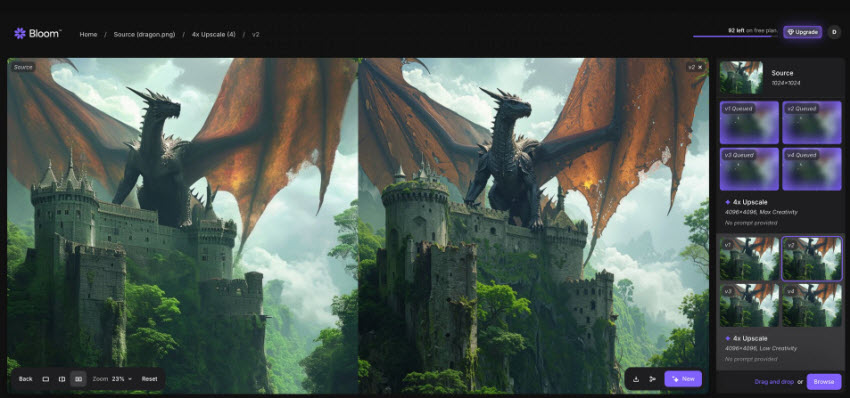
What is Topaz Bloom Best for?
Bloom is optimized for content that typically lacks detail density inherent in photographs. It is the best choice for:
- AI-generated images (from Midjourney, Flux, DALL·E, ChatGPT images, etc.)
- Digital paintings and concept art
- CG renders and 3D illustrations
- Character designs and stylized artwork
- Abstract digital compositions
Because Topaz Bloom is explicitly targeted at AI-gen and CG/illustrative imagery, it occupies a niche distinct from classic photographic upscalers like Gigapixel or Topaz Photo AI.
Topaz Bloom Main Features
Below are the features of Topaz Bloom that make it different to other AI upscalers.
1. Creative Upscaling
Bloom uses diffusion models (the same tech behind AI image generators) to go beyond pixel enlargement. It intelligently upscale images by up to 8x (with maximum output resolutions like 64 MP) while adding plausible, context-aware details.
2. Adjustable Creativity Levels
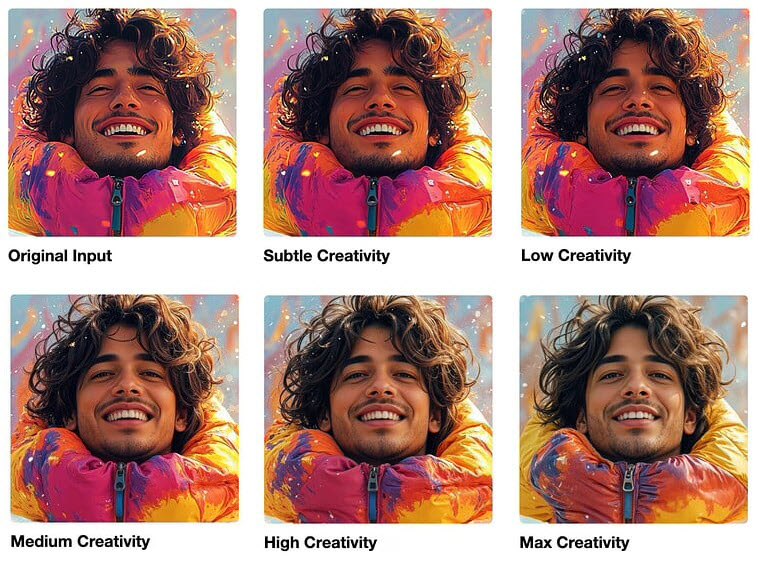
You can fine-tune the AI’s creative “freedom” with five levels:
- Subtle – Minimal structural change; ideal for realism
- Low – Adds fine texture and detail conservatively
- Medium – Balanced creative interpretation
- High – Noticeable creative shifts in texture and lighting
- Max – Fully reimagines the image; bold and transformative
Each level lets artists control whether they want gentle enhancement or radical reinterpretation.
3. Prompt-Based Control
You can optionally add a text prompt to guide Bloom’s output — e.g., “A sci-fi warrior monk in a neon-lit temple”. This allows the AI to refine or enhance the image in a direction aligned with your creative vision.
4. Multiple Render Variations
Bloom lets you generate up to 4 output variations per image — perfect for testing different creativity levels, prompts, or detail intensities.
5. Cloud-Based Performance
All rendering happens on powerful cloud GPUs. You can upscale large images, queue multiple renders, and preview results quickly — no need for a high-end PC.
Pricing and Plans
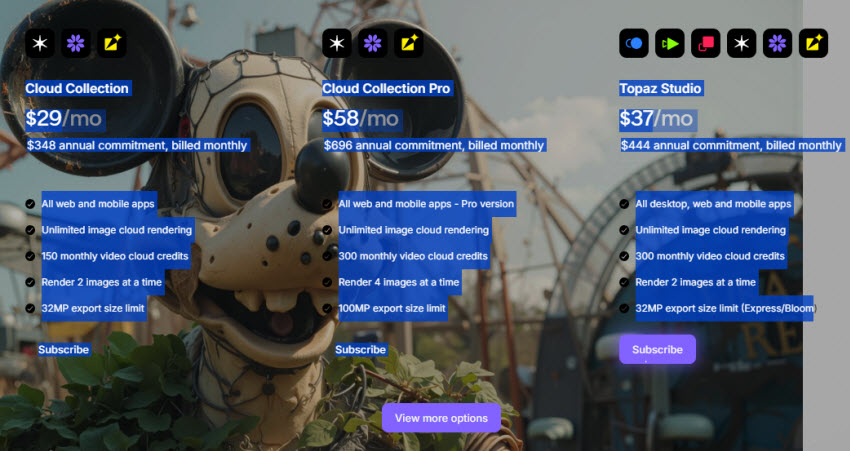
Topaz Bloom is priced through a subscription model, and users can get it in Topaz Studio or combine it with other Topaz products through various bundle options. The most affordable bundle currently available includes Topaz Bloom along with selected Topaz web tools (like Topaz Astra, Express).
- Paid: $348 annual commitment, billed monthly; unlimited rendering
- Free: 10 free credits per month, allowing upscaling 10 images
Pros and Cons
✅ Pros
- It delivers incredible detail generation for AI and CG content.
- It uses cutting-edge, in-house diffusion models designed specifically for AI art enhancement.
- It allows up to four simultaneous variations per render.
- All paid plans offer unlimited usage and includle access to other Topaz web tools.
❌ Cons
- It requires internet connection (cloud-only).
- It's focused on AI-generated images only, not suitable for pure photography or restoration.
- Sometimes the creative level may alter structure too much.
How to Use Topaz Bloom Creative Upscaling?
Step 1. Go to Topaz Bloom and create an account. You can begin with the Free Plan, which offers 10 free image outputs per month. Paid plans feature absolutely unlimited renders and come with a 7-day free trial.
Step 2. Drag and drop the source AI-generated image to the interface. Bloom currently works with PNG and JPG formats.
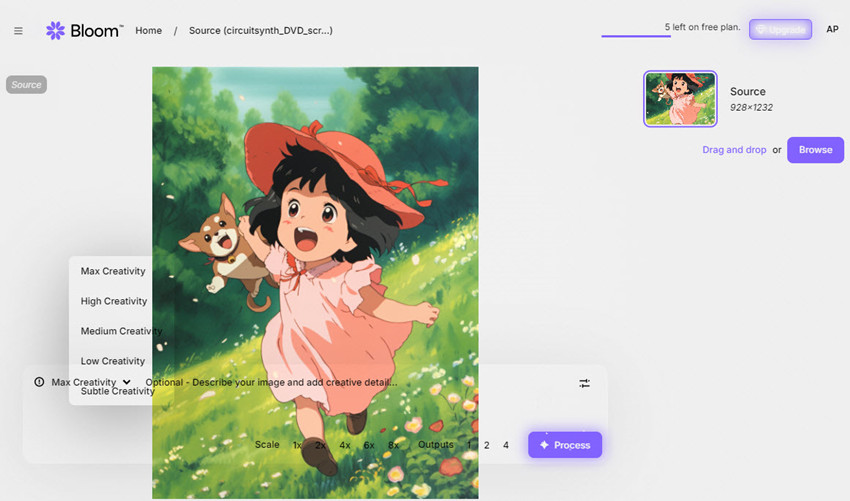
Step 3. Now you need to choose a creativity level from Subtle to Max and the upscale factor (2x, 4x, 6x, or 8x). You can also add a prompt in the text section to customize the upscaling. Don’t forget to set the output variations (Topaz Bloom can generate up to 4 outputs). Note: Each variation generated on the free plan will count as one of your monthly image outputs.
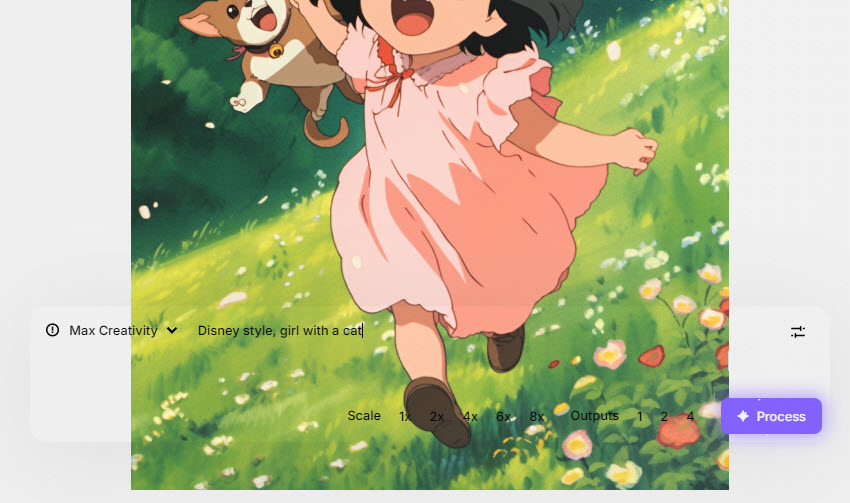
Step 4. After the settings, click process and wait. In my experience, the higher creativity level and upscaling factor you choose, the longer process time it will take. Once finished, click the download button to save the upscaled image from Bloom.
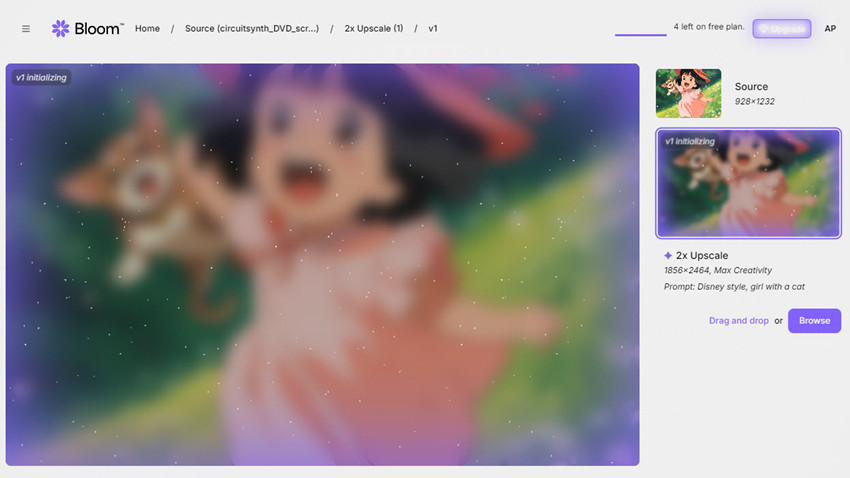
Here's my result when I tried using Topaz Bloom to upscale and transform a Ghibli-style image with the prompt “Disney style, girl with a cat.” However, instead of achieving a Disney-like look, the output turned out to be more realistic in style.
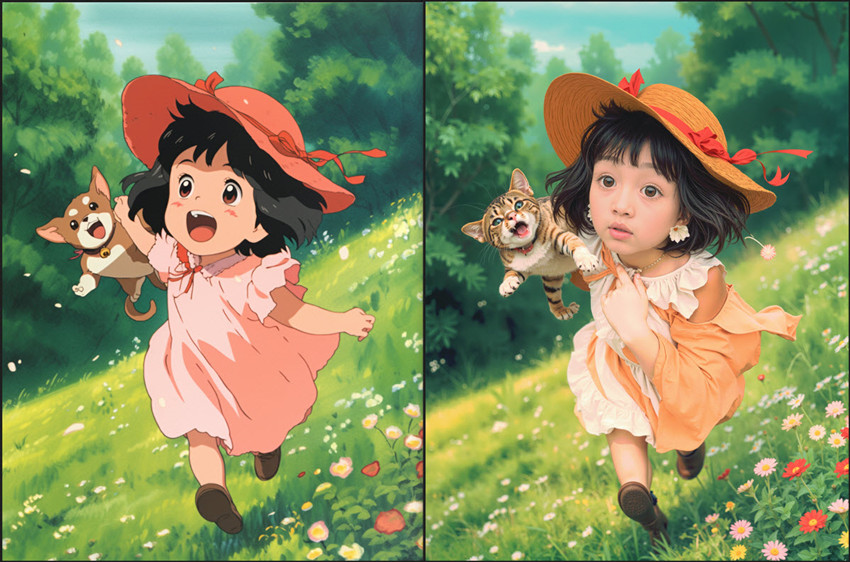
Topaz Bloom Image Upscaling Test
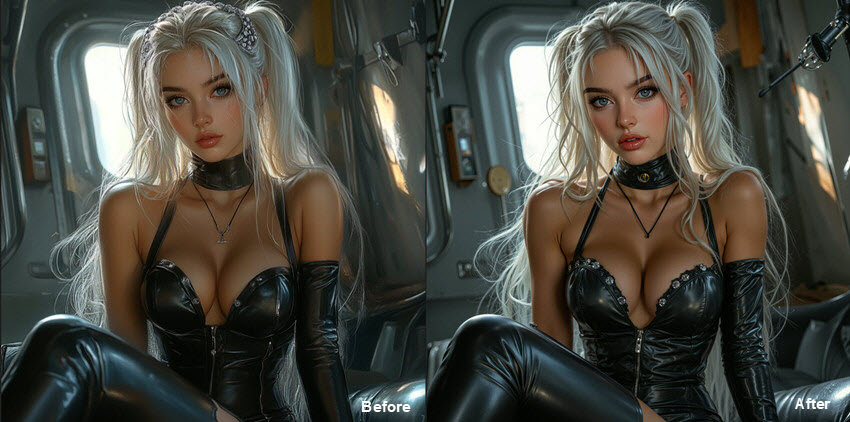
To better understand how Topaz Bloom upscales images and handles style transformation, here I ran a few tests using different settings. All the source images are generated by Midjourney.
Topaz Bloom Low Creativity (2x Upscale)
With Low Creativity, Bloom stays very faithful to the original image. The main composition and style are preserved, while subtle enhancements appear in accessories, textures, and background details. This setting is ideal for users who want a gentle, realistic improvement without altering the overall character of the image.
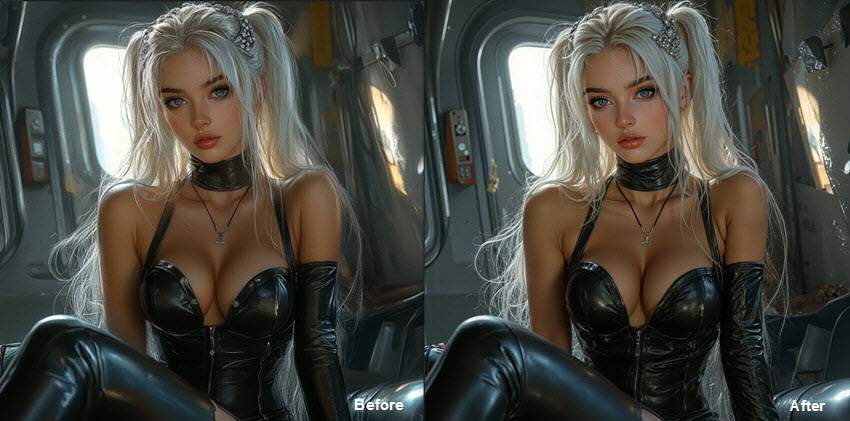
Topaz Bloom Max Creativity (2x Upscale)
At Max Creativity, Bloom takes a more transformative approach. The image shows clear stylistic shifts, richer textures, and more pronounced details, adding greater realism. Interestingly, when a prompt suggesting “turn into a real photo” is added, the resulting image looks very similar to the Max Creativity output without the prompt, indicating that Bloom’s Max mode already introduces substantial realism even without text guidance.
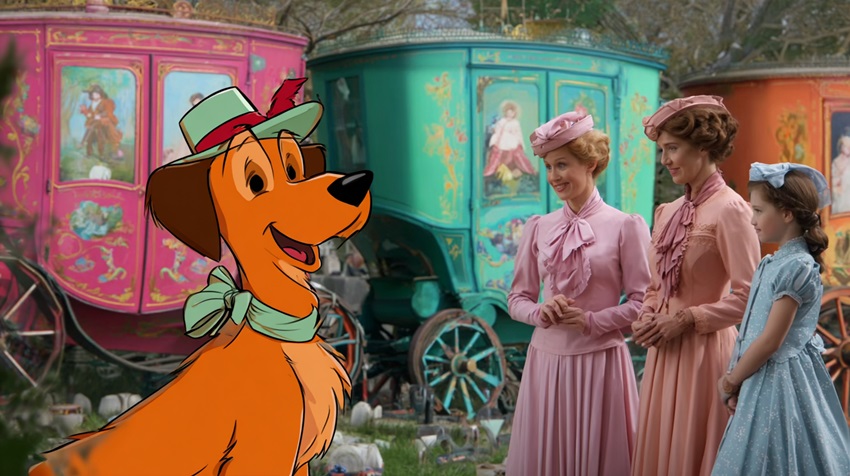
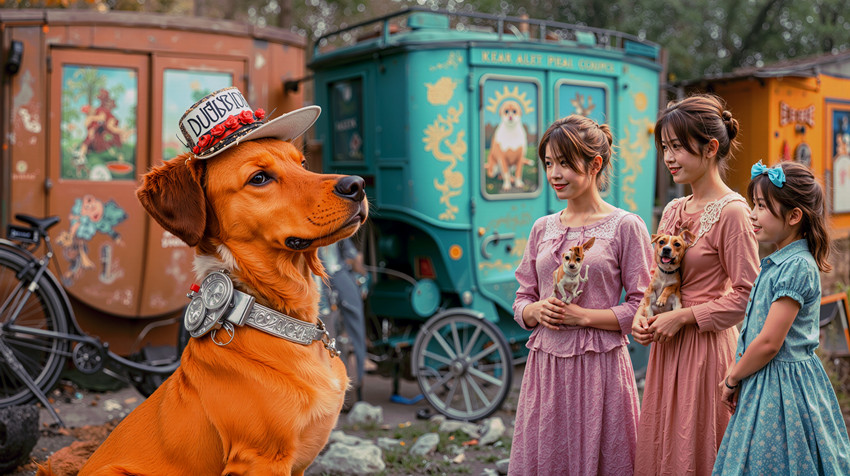
Topaz Bloom Upscale with Prompt (2x Upscale, Max Creativity)
After adding the prompt “turn a dog into real”, the dog in the image transforms into a realistic golden retriever. Interestingly, the human subjects also undergo significant changes—their faces and outfits are completely altered.
Notably, Topaz Bloom seems to favor Asian facial features, as all three women in the scene are rendered with the same Asian-looking face. This test highlights how Bloom’s creative upscaling, combined with text prompts, can dramatically reinterpret both subjects and style in an image.

Speed Alert
When upscaling images using Topaz Bloom, it seems slower compared to other online upscalers. For example, when I uploaded a high-resolution image (1768×2500) with low creativity, 1x upscaling, and requested two variations, it took about 15 minutes to complete.
How does Topaz Bloom Compare with Magnific AI and Krea AI?
When talking about creative upscaling, we must inevitably mention the other major competitors: Magnific AI and Krea AI. At first glance, Topaz Bloom, Magnific AI, and Krea AI seem to target the same audience, both promise to “reimagine” your AI images with extra detail and texture.
Features at a Glance
Topaz Bloom vs Magnific vs Krea AI Test
For a fair comparison among Topaz Bloom vs Magnific vs Krea AI, the three tools were tested on the same AI-generated image using 2× upscale and Medium Creativity/Detail/AI Strength settings. The conclusions are based on my personal impressions, and the results may vary depending on the image and settings used.
The source image: 1344x896 AI image
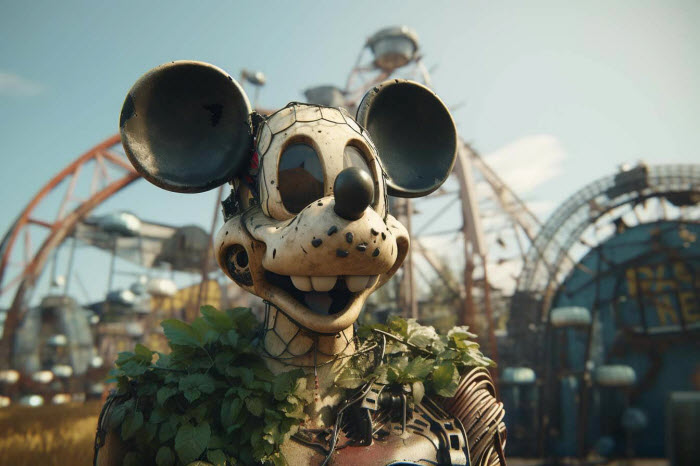
Topoaz Bloom, Magnific, and Krea AI all produce highly detailed, visually appealing results — but they emphasize different aspects of creativity.
- Topaz Bloom tends to favor cohesive realism: skin tones remain smooth, lighting transitions are soft, and small features appear naturally integrated into the scene.
- Magnific AI, by contrast, takes a more aggressive enhancement approach. It amplifies local contrast, boosts textures, and sometimes “hallucinates” additional decorative details. In some cases, this adds an impressive painterly richness.
- Krea AI stays closer to the original composition. Its AI modifications are more restrained, focusing on refinement rather than reinvention. Compared to Bloom and Magnific, Krea’s adjustments are subtler, preserving authentic texture and tone while gently enhancing clarity and definition.
Summary: Based on comparisons using their standard/default settings (since each tool offers multiple presets, modes, and customization options that can significantly affect results), here’s the general difference:
If you want realistic AI upscaling, Topaz Bloom is better. If you prefer highly stylized detail, Magnific AI is more aggressive. Krea AI is better for prompt control and speed, while Topaz Bloom focuses more on high-quality final output.

Topaz Bloom vs Gigapixel vs Photo AI
With the launch of Topaz Bloom, many creators are wondering how it fits alongside Gigapixel AI and Photo AI — two of Topaz Labs’ most established image enhancement tools. While all three share the same DNA of AI-powered upscaling, their goals, design philosophy, and results differ greatly. If you’re trying to decide which one best fits your workflow, here’s a quick side-by-side comparison.
Summary
While all three tools upscale images, their approaches are completely different:
- Topaz Bloom is designed for creative expansion. It doesn’t just enlarge an image — it adds new artistic textures, lighting, and fine details that weren’t there before. It’s the go-to option for AI artists, illustrators, and designers who want to bring Midjourney or Flux-generated art to life.
- Gigapixel AI is all about photographic accuracy. It upscales photos with a focus on realism, clarity, and edge definition, making it ideal for photographers who need to print large, preserve textures, or recover old photos.
- Photo AI takes a smart automation approach — a one-stop solution for denoising, sharpening, and upscaling. It’s perfect for users who want quick, consistent improvements without fine-tuning settings.
Best Affordable Alternative to Topaz Bloom for Faithful Upscaling
If you’re looking for a more affordable alternative to Topaz Bloom that still delivers high-quality, faithful upscaling, Aiarty Image Enhancer is an excellent choice. This Topaz Bloom alternative uses advanced AI models to enhance resolution to up to 32K, texture, and sharpness without altering the subject’s style or composition. It delivers faithful upscaling and detail recovery for all kinds of visuals, such as AI-generated artwork, real-world photography, or old and low-quality images.
Free download Aiarty Image Enhancer for Windows
Free download Aiarty Image Enhancer for macOS
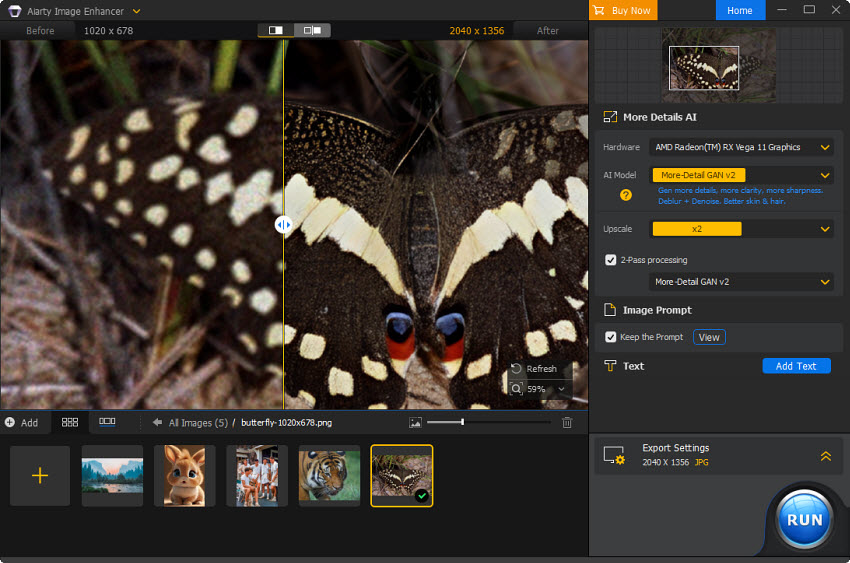
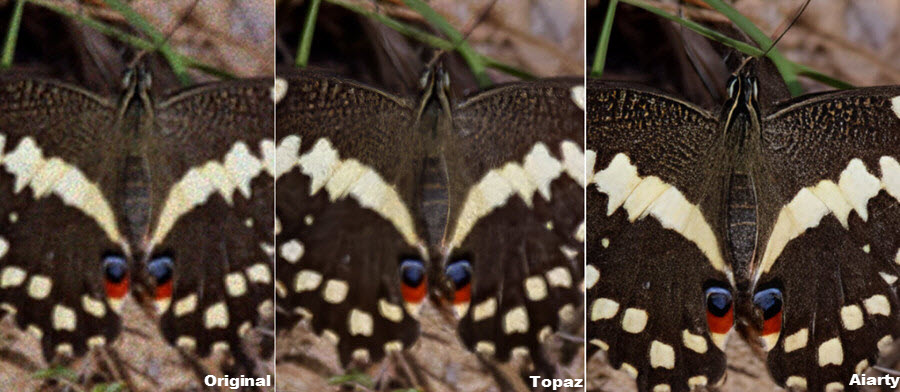
Unlike other Topaz products such as Gigapixel or Photo AI, Aiarty focuses on maintaining natural texture and color balance without over-sharpening or creating artificial artifacts. Despite its lower price point, it often matches or even surpasses these tools in clarity, realism, and consistency, making it a smart, high-value alternative for creators who want professional-quality image enhancement without the premium cost.
Is Topaz Bloom Worth It?
Topaz Bloom is a powerful tool for artists and creators looking to add creative flair to AI-generated images. Its ability to enhance details and textures can result in striking visuals. However, for users prioritizing fidelity to the original image, Bloom's enhancements may be too transformative. It's essential to consider your specific needs and the nature of your projects when deciding if Bloom is the right tool for you.
 FAQ
FAQ
Topaz Bloom is a cloud-based creative AI upscaler designed for AI-generated images and digital art. It doesn’t just increase resolution—it uses diffusion AI to generate new textures, lighting, and details while reinterpreting the image.
Topaz Bloom is subscription-based. Pricing typically starts around $19–$49/month depending on the plan, with higher tiers offering unlimited rendering and higher-resolution exports.
Not directly better, Topaz Bloom and Magnific AI are just different. Bloom produces more balanced and natural-looking results, while Magnific AI tends to create more aggressive, highly stylized detail enhancements.
Yes, Topaz Bloom will alter the original image. Especially at higher creativity levels, Bloom can modify facial features, textures, lighting, and composition because it re-generates details instead of strictly preserving pixels.
It can be used, but it is not ideal. For real photos, Bloom may alter identity and introduce AI-generated details, so Topaz recommends tools like Photo AI or Gigapixel for faithful photo enhancement.
You May Also Like


This post was written by Brenda Peng who is a seasoned editor at Digiarty Software who loves turning ordinary photos into extraordinary works of art. With AI assistance for brainstorming and drafting, the post is reviewed for accuracy by our expert Abby Poole for her expertise in this field.
