



How to Send Photos Without Losing Quality with Best Ways



Sending photos online is easy, but many people notice their images become blurry, pixelated, or less detailed after sharing them. This happens because many apps automatically compress images to reduce file size, which lowers the resolution and image quality.
If you're searching for how to send photos without losing quality, this guide explains:
- why photos lose quality when sharing
- the best way to send photos without losing quality
- how to share photos without losing quality on different platforms
- the best way to send photos to clients without losing quality
Whether you're a photographer, designer, or just sharing memories, the methods below help ensure your photos stay sharp, clear, and full-resolution when shared online.
Why Photos Lose Quality When You Send Them
Most messaging platforms compress images automatically. This compression reduces file size so photos load faster and use less data.
However, compression can change several aspects of an image:
- Resolution reduction: Large images may be resized from something like 6000×4000 pixels to 1600×1200 pixels.
- JPEG recompression: Even if a photo is already compressed, apps may recompress it again, causing visible quality loss.
- Metadata removal: EXIF data such as camera settings, GPS information, and color profiles may be removed.
- Color degradation: Gradients and fine color transitions can become banded or less accurate.
For example, a 5MB DSLR photo can shrink to under 300KB when sent through some messaging apps. Because of this, learning how to share photos without losing quality is important for both personal and professional use
Before sharing important photos, it’s worth making sure the image quality is already optimized. Enhancing the photo before sending ensures the final file looks as sharp as possible. Aiarty Image Enhancer, an AI-powered image enhancement tool, can help you share photos without losing quality.
It can upscale photos to 4K, 8K, higher resolutions, restore details in compressed images, sharpen blurry photos, and improve textures, edges, and clarity. This is especially useful when sending client deliverables, product photos, scanned old images, or any photos downloaded from social media. By enhancing images first, you ensure every photo maintains professional-level quality when shared online or delivered to clients.

Best Ways to Send Photos Without Losing Quality
Here are the most reliable ways to share photos while preserving their original quality.
Also see: How to send videos without losing quality
1. Use Cloud Storage (Best Overall Method)
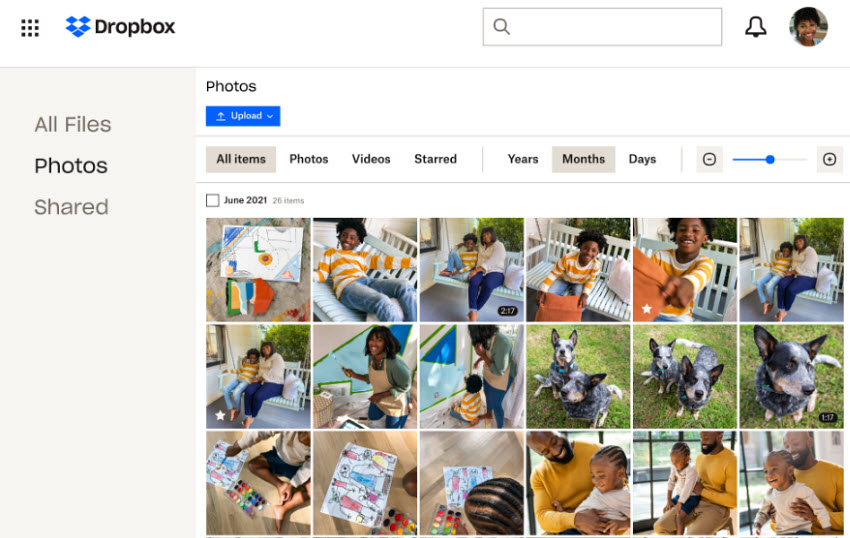
Uploading photos to cloud storage and sharing a link is often the best way to send photos without losing quality. These platforms store files exactly as uploaded, meaning recipients can download the original full-resolution images without any compression. They also support very large files, make it easy to share photos with multiple people through a single link, and work seamlessly across different devices including phones and computers.
Because of these advantages, cloud storage is widely used by photographers, designers, and businesses as a reliable way to share photos without losing quality, especially when delivering high-resolution files to clients
Popular services include: Google Drive, Dropbox, OneDrive, and iCloud.
How to send pics without losing quality via cloud services:
- Upload your photos to the cloud service.
- Generate a shareable link.
- Send the link via email or messaging apps.
- The recipient downloads the original files.
2. Send Photos as Documents Instead of Images
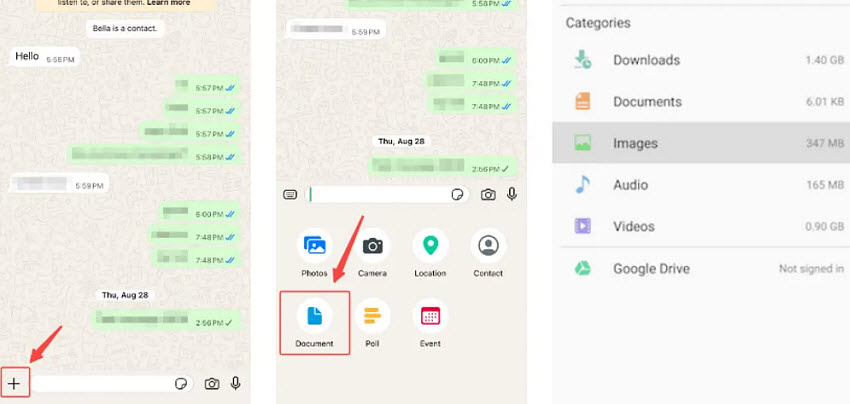
Sending photos as documents instead of images is one of the easiest ways to send photos without losing quality using messaging apps. Most apps automatically compress images when sent normally, but when you attach them as files, they are delivered in their original full resolution without any compression.
This method allows you to send high quality photos while keeping the original file size, image details, and metadata intact. It works well across most messaging platforms and is especially useful when you need a quick solution for how to send pics without losing quality without using cloud storage.
Because of its simplicity and effectiveness, this approach is widely used as a practical way to share photos without losing quality, particularly for everyday use or quick file transfers.
Most messaging apps support sending files as documents, including: WhatsApp, Telegram, Facebook Messenger, Email apps
How to send photos without losing quality as a document:
- Open the chat in your messaging app.
- Tap Attach / File / Document instead of Photo.
- Select the image file you want to send.
- Send it as a document.
- The recipient receives the photo in full resolution and original quality.
3. Compress Photos into a ZIP File
Compressing photos into a ZIP file is another effective way to send photos without losing quality, especially when sharing multiple images at once. By packaging images into a ZIP archive, messaging apps treat the file as a document rather than an image, which helps avoid automatic compression.
This method ensures that all photos are delivered in their original resolution and full quality, making it a practical solution for users looking for how to send pics without losing quality in bulk.
Because ZIP files preserve file structure and integrity, this approach is commonly used for sending photo collections, event albums, or project files.
How to send photos without losing quality using a ZIP file:
- Select the photos you want to send.
- Right-click and choose Compress / Create ZIP file.
- Attach and send the ZIP file via messaging apps or email.
- The recipient downloads and extracts the images in full resolution.
4. Use Direct Transfer (AirDrop, Nearby Share)
Using direct transfer is one of the fastest ways to send high quality photos without losing quality, especially when both devices are nearby. These methods transfer files directly between devices, ensuring there is no compression, no resizing, and no quality loss.
Because the transfer happens locally (without uploading to the internet), this method guarantees that photos remain in their original full resolution. This method is ideal for users who want a quick solution for how to send a picture without losing quality without relying on internet speed or cloud services. It is also commonly used by professionals when transferring large, high-resolution files between devices.
How to share photos without losing quality via direct transfer:
- Enable the transfer feature (AirDrop or Nearby Share).
- Select the photos you want to send.
- Choose the nearby device.
5. Email Attachments
Email attachments are another simple and reliable way to send photos without losing quality, as long as images are attached as files rather than embedded in the email body.
When sent correctly, email preserves the original file size and resolution, making it a useful option for small batches of images.
How to send photos without losing quality via email:
- Attach photos as files (not inline images).
- Avoid automatic image resizing options.
- Send the email with original file attachments.
- The recipient downloads the images in full resolution.
Best Way to Send Photos to Clients Without Losing Quality
For photographers, designers, and creative professionals, delivering images in full resolution is essential. The best way to send photos to clients without losing quality is to use methods that avoid compression and preserve original files, while also providing a smooth download experience.
Here are the three most common professional workflows:
1. Cloud Gallery Delivery
Use cloud-based galleries to share photos through a link. Clients can preview images online and download high-resolution files when needed. This method is widely considered the best way to send photos to clients without losing quality because it combines convenience with full-quality delivery.
2. Downloadable ZIP Packages
Send photos as a ZIP archive to keep files organized and intact. This ensures all images retain their original resolution, accurate colors, and metadata, making it ideal for delivering complete photo sets.
3. High-Resolution Preview + Download Links
Provide a preview gallery with watermarked images, along with an option to download the full-resolution versions. This allows clients to review and select photos before downloading final files.
Quick Comparison of Photo Sharing Methods
Choosing the right method is key if you want to send photos without losing quality. Different options vary in file size limits, compression behavior, and ease of use, so the best choice depends on your specific needs, whether you're trying to send high quality photos, share large batches, or deliver images to clients.
The comparison below breaks down the best ways to send photos without losing quality, including cloud storage, messaging apps, ZIP files, and direct transfer methods. It highlights how each option performs in terms of image quality, file size limits, compression, and real-world use cases, helping you quickly decide how to share photos without losing quality in any situation.
Final Words
Understanding how to send photos without losing quality is essential if you want your images to remain sharp, detailed, and professional when shared online.
In most cases, the best way to send photos without losing quality is to avoid platforms that automatically compress images. Instead, use methods like cloud storage, sending photos as documents, ZIP files, or direct transfer tools to preserve full resolution and file integrity.
For everyday use, sending photos as files or using email works well for small batches. For larger collections or professional delivery, cloud storage and ZIP packages are more reliable. If you're working with clients, using a cloud gallery or downloadable high-resolution files is often the best way to send photos to clients without losing quality.
If your photos are already compressed or blurry, enhancing them first with an AI tool like Aiarty Image Enhancer can help restore detail and ensure you’re sharing high quality photos.
By choosing the right method, you can confidently share photos without losing quality, no matter the platform or device.
 FAQ
FAQ
The best way to send photos without losing quality is to use methods that avoid compression, such as: cloud storage links (Google Drive, Dropbox), sending photos as documents,ZIP file archives, AirDrop or Nearby Share. These options preserve the original resolution and file size.
To send photos on iPhone without losing quality, avoid sending images directly through iMessage or social apps. Instead, use AirDrop for direct transfer (no compression), iCloud or Google Drive links to share original files, send photos as files/documents instead of images. These methods ensure you can send high quality photos in full resolution.
Usually no. When photos are attached as files, email preserves their original quality. However, some email services may automatically compress very large images or limit attachment size.
Choosing between PNG and JPG depends on your needs. If you want to share photos without losing quality, you may choose PNG. It's large in size but no compression loss. PNG is better for graphics, text, or detailed images. If you just need to share photos with smaller sizes, then choose JPG. It's good for to general photography and sharing but may lose some quality due to compression. For most cases, JPG is better for easy sharing, while PNG is better when maximum quality is required..
Yes. AirDrop transfers photos directly between Apple devices without compression. It will keep original resolution, color, and metadata. It's ideal for sending high quality photos quickly and securely.
You May Also Like


This post was written by Brenda Peng who is a seasoned editor at Digiarty Software who loves turning ordinary photos into extraordinary works of art. With AI assistance for brainstorming and drafting, the post is reviewed for accuracy by our expert Abby Poole for her expertise in this field.
