


Bird's-eye view photography shows a scene from above, giving the viewer a perspective that is higher and more distant than a typical eye-level shot. Instead of viewing a subject from the side, you look down on it to reveal shapes, patterns, spatial relationships, and details that may not be visible from the ground.
This perspective works across many types of photography, from landscapes and city scenes to portraits, food, products, and abstract compositions. With the right shooting position, camera settings, and composition, a bird's-eye view can turn an ordinary scene into a more graphic and visually engaging image.
What Is Bird's-Eye View Photography?
Bird's-eye view photography is a perspective that captures a subject or scene from above, looking downward rather than across it. The camera may be positioned directly above the subject or at a higher viewpoint with a noticeable downward angle.
The goal is not simply to photograph from a higher position. Shooting from above changes how the elements in a scene relate to one another. People may become part of a larger pattern, roads and buildings can form geometric shapes, and objects that look ordinary at eye level can take on a completely different appearance.
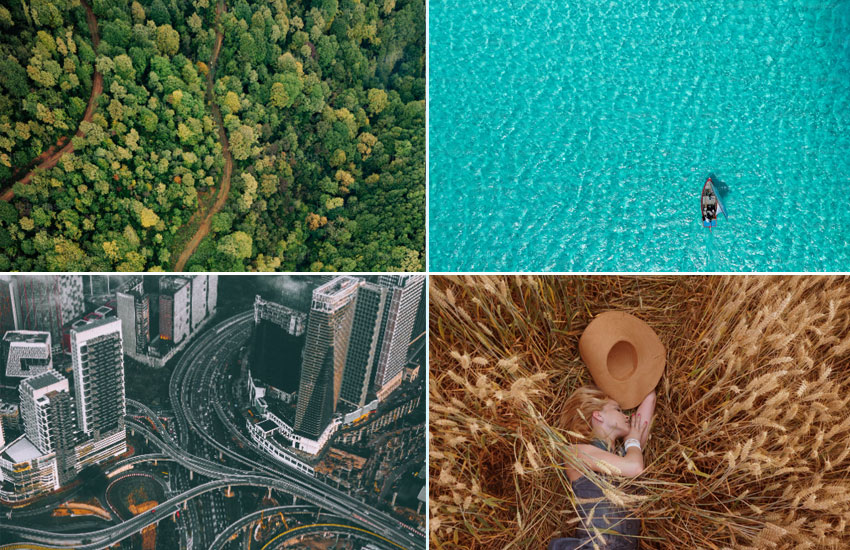
Bird's-Eye View vs. Aerial Photography
Bird's-eye view and aerial photography are closely related, but they are not exactly the same. Aerial photography is a broad term for photographs taken from an elevated position, often from a drone, aircraft, helicopter, or other airborne platform.
Bird's-eye view describes the perspective rather than the equipment used. You can create a bird's-eye view from a drone, rooftop, balcony, elevated platform, or even directly above a subject with a handheld camera. An aerial photo, meanwhile, does not necessarily use a bird's-eye perspective. A photo taken from a helicopter at a low angle across a landscape, for example, is aerial but not a typical bird's-eye view.
Bird's-Eye View vs. Overhead or Top-Down Photography
Overhead and top-down photography usually describe a more specific type of bird's-eye view in which the camera points almost straight down at the subject. This approach is common in food photography, flat lays, product photography, and portraits.
Bird's-eye view is a broader concept. The camera can be positioned above the subject without pointing directly downward. As the shooting height and camera angle change, the perspective can range from a slightly elevated view to an almost straight-down composition.
In practice, the terms can overlap, but bird's-eye view focuses on the elevated perspective, while overhead or top-down photography usually emphasizes the camera's downward angle.
How to Take Bird's-Eye View Photos
A bird's-eye view can be created with anything from a smartphone to a dedicated camera or drone. The equipment matters, but your shooting position has an even greater effect on the final perspective. Start by deciding how much of the scene you want to show, then choose a suitable height, angle, and lens.
1. Choose the Right Shooting Position
There are several ways to get above your subject, depending on the scene and the equipment available.
- Drone: Useful for landscapes, city scenes, architecture, and other subjects that need to be viewed from a greater height.
- Rooftops and elevated viewpoints: A balcony, observation deck, staircase, or other safe elevated position can provide a higher perspective without specialized equipment.
- Tripod or monopod: A camera mounted on a tall support can work well for controlled overhead shots, especially when photographing products, food, or flat lays.
- Directly above the subject: For smaller subjects, you may only need to position the camera above them. This works well for portraits, food, products, and still-life photography.
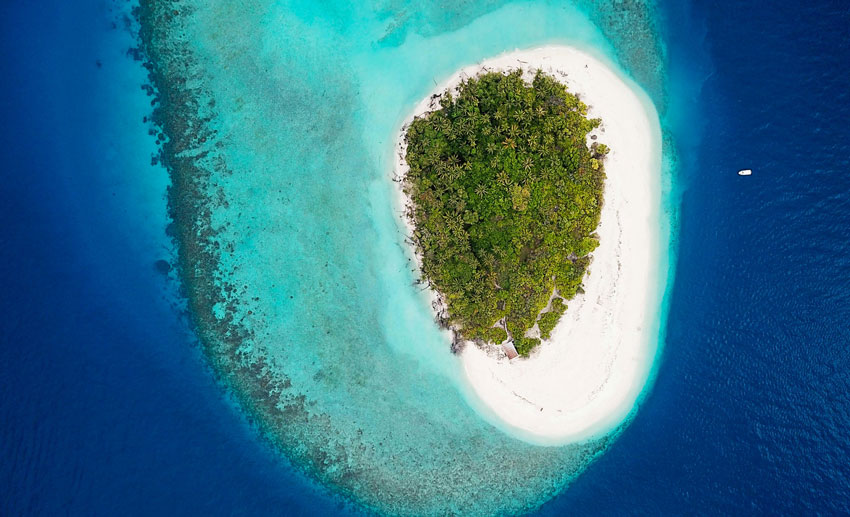
Always make safety a priority when working from an elevated position. Do not climb onto unstable surfaces or place yourself or your equipment somewhere that could cause a fall.
2. Find the Right Height and Angle
Higher is not always better. The shooting height determines how large your subject appears and how much of the surrounding scene enters the frame.
For a close overhead shot, stay relatively close to the subject to emphasize details and shapes. Raise the camera higher when you want to show relationships between multiple subjects or reveal a larger pattern.
You can also adjust the camera angle instead of shooting straight down. A slight downward angle can retain more visual depth, while a near-vertical angle creates a flatter, more graphic composition. Try several heights and angles to see which one best suits the subject.
3. Choose a Suitable Lens
Your focal length affects how much of the scene you can include and how the subjects are rendered.
A wide-angle lens works well when you need to capture a large area, such as a landscape, street, or architectural scene. A standard or short telephoto lens can be useful when you want to isolate a smaller area or subject without including as much surrounding space.
For overhead shots of food, products, or other smaller subjects, choose a focal length that lets you frame the subject comfortably without excessive distortion. If possible, take a few test shots at different focal lengths before settling on the composition.
4. Keep the Camera Stable
Camera movement can soften fine details, particularly when shooting from a tall platform, using a long lens, or working in windy conditions.
Use a tripod or other stable support when practical. For handheld shooting, choose a shutter speed fast enough to minimize camera shake. A remote shutter or self-timer can also help reduce movement when the camera is mounted on a support.
If you are shooting from a drone, allow the drone to settle before taking the photo and watch for wind or other movement that could affect sharpness.
5. Take Multiple Shots
Small changes in height, camera angle, or framing can make a significant difference in a bird's-eye view. Take several versions rather than relying on a single composition.
Review the images for unwanted objects around the edges, distracting shadows, uneven spacing, and areas where the main subject gets lost in the surrounding scene. Once you find a promising composition, make a few variations with different framing or exposure settings.
This gives you more options when you move on to editing and helps you identify which perspective works best for the scene.
Bird's-Eye View Camera Settings
There is no single set of camera settings that works for every bird's-eye view photo. The right settings depend on your subject, shooting height, movement, available light, and whether you are shooting handheld, from a tripod, or with a drone.
As a starting point, pay particular attention to shutter speed, aperture, and ISO. If your camera supports it, shoot in RAW to retain more information for later adjustments.
Shutter Speed
Use a shutter speed fast enough to prevent camera shake and freeze any movement in the scene.
For handheld shooting or scenes with moving subjects, 1/500s or faster can be a useful starting point. You may need a faster shutter speed when shooting from a drone, working in windy conditions, or photographing fast-moving subjects.
If the camera is securely mounted on a tripod and the subject is still, you can use a slower shutter speed when lighting conditions require it.
Aperture
A mid-range aperture such as f/5.6 to f/8 is a practical starting point for many bird's-eye view scenes. It can provide a good balance between sharpness and depth of field without requiring unnecessarily high ISO.
For flat lays, landscapes, or scenes where you want several elements to remain sharp, a smaller aperture may be useful. When the subject is isolated and you want to control the depth of field, you can adjust the aperture accordingly.
ISO
Keep ISO as low as practical while still maintaining a sufficiently fast shutter speed and appropriate aperture. Lower ISO generally produces cleaner images with more detail, which is particularly useful when your composition contains fine textures, patterns, or small subjects.
In low light, raising ISO may be preferable to using a shutter speed that is too slow for the shooting conditions.
Focus
For static scenes, single-point or single-shot autofocus can give you precise control over the main subject. For moving people, vehicles, or other subjects, continuous autofocus can help maintain focus as the scene changes.
When photographing a flat subject directly from above, make sure the focus point is placed on an important area of the composition rather than simply relying on the center of the frame.
Shoot in RAW
RAW files preserve more image information than JPEG files and give you greater flexibility when adjusting exposure, highlights, shadows, white balance, and detail in post-processing.
This can be particularly useful for bird's-eye view photos with strong contrast between sunlit areas and shadows. It also gives you more flexibility if you need to crop the image significantly or make additional adjustments later.
Quick Starting Settings
| Setting | Starting Point | Adjust When |
| Shutter speed | 1/500s or faster | The camera or subject is moving |
| Aperture | f/5.6–f/8 | You need more or less depth of field |
| ISO | As low as practical | You need more shutter speed in low light |
| Focus | Single AF for static subjects; continuous AF for moving subjects | Subject movement changes |
| File format | RAW | You want more flexibility in post-processing |
These settings are starting points, not fixed rules. Check your images as you shoot and adjust them according to the subject, light, movement, and shooting platform.
Composition Tips for Bird's-Eye View Photography
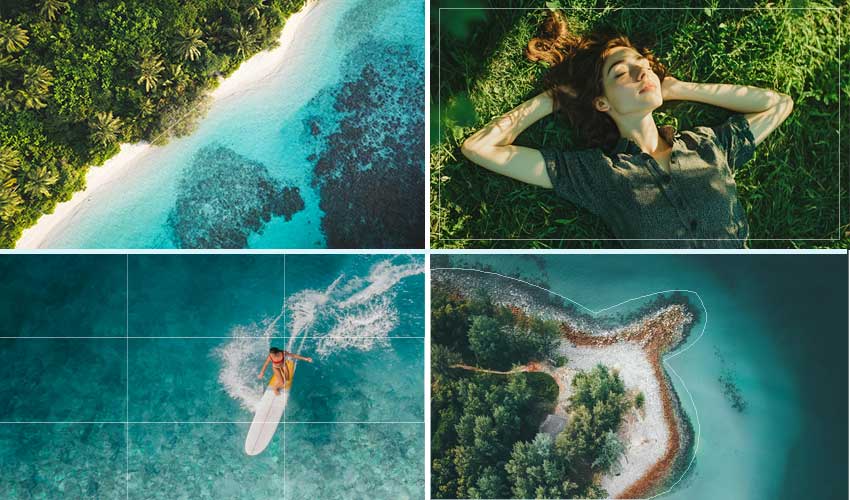
Shooting from above changes the way shapes, lines, colors, and spaces appear in the frame. Instead of relying mainly on depth and perspective, look for relationships between elements and use the overhead viewpoint to simplify the scene.
Look for Symmetry and Patterns
A bird's-eye view can reveal patterns that are difficult to notice from ground level. Repeated objects, architectural structures, rows of trees, umbrellas, or people can create strong visual rhythm.
Look for symmetry, repetition, and regular spacing, then position the camera so these elements become a clear part of the composition.
Use Lines and Geometric Shapes
Roads, buildings, paths, pools, fences, and shorelines often form interesting lines and shapes when viewed from above. Use these elements to guide the viewer through the frame or create a more graphic composition.
Try changing your position slightly to align important lines or emphasize circles, squares, triangles, and other geometric forms.
Make Use of Negative Space
The large areas visible from above can provide opportunities for negative space. Open water, sand, grass, floors, or empty pavement can separate the main subject from its surroundings.
Instead of filling every part of the frame, leave enough empty space to make the subject stand out. This can also create a cleaner, more minimalist image.
Show Scale and Spatial Relationships
A small person, car, boat, or other recognizable object can provide a sense of scale when photographed within a much larger environment.
Rather than making the subject fill the frame, include enough of the surrounding scene to show its size and position within the space. This works particularly well for landscapes, architecture, and urban photography.
Pay Attention to Color and Contrast
Looking down can turn a familiar scene into a collection of colors and shapes. Look for contrasting colors, complementary tones, or a single strong color surrounded by a more neutral environment.
You can also use differences in brightness and texture to separate the main subject from the background.
Keep the Frame Clean
Because a bird's-eye view often includes a large area, small distractions can become surprisingly noticeable. Check the edges and corners of the frame for unwanted objects, people, shadows, or clutter.
Before taking the final shot, adjust your position or framing to remove distractions whenever possible. A simpler composition often makes the overhead perspective more effective.
How to Improve Bird's-Eye View Photos After Shooting
Even with careful shooting, bird's-eye view photos may need some adjustments before they are ready to share or print. Cropping, exposure and color correction can refine the composition, while noise reduction, sharpening, or upscaling can help when the original image has technical limitations.
Crop and Straighten the Composition
Start by removing distracting elements around the edges and adjusting the framing. A bird's-eye view can make small changes in alignment noticeable, so check that important lines and geometric shapes look balanced.
If you photographed from a slight angle, straightening or correcting perspective may also help keep buildings, tables, or other structured elements looking natural.
Adjust Exposure, Color, and Contrast
Fine-tune exposure and white balance first, especially when the image contains both bright areas and deep shadows. Adjust contrast and highlights or shadows as needed to bring out patterns and details without making the image look overly processed.
For scenes with strong colors or distinct shapes, moderate color adjustments can also help separate the main subject from its surroundings.
Reduce Noise and Restore Detail
Noise can become more noticeable in photos taken in low light or at higher ISO settings. Distant subjects and fine patterns may also lose clarity because of atmospheric haze, camera movement, or lens limitations.
After basic photo adjustments, use noise reduction and sharpening carefully to improve clarity without creating artificial-looking textures or edges.
Upscale When You Need a Larger Image
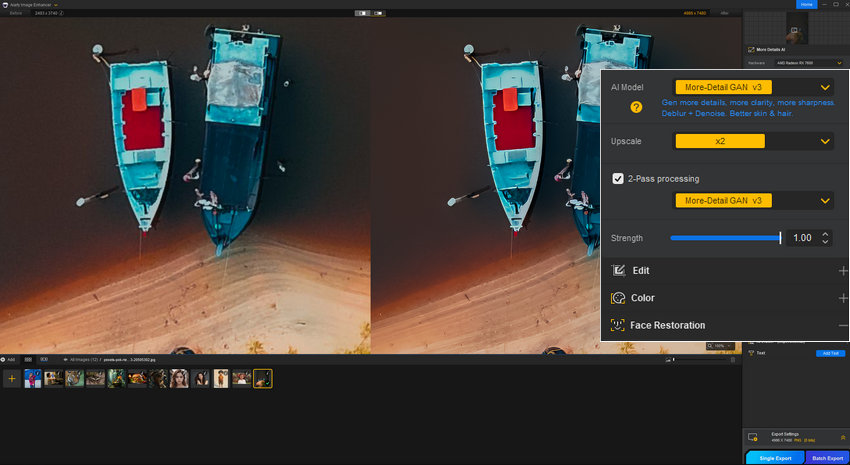
Significant cropping can leave you with a smaller usable image, particularly when the original subject occupied only a small part of the frame. If you need to enlarge the cropped photo for printing, a presentation, website, or other larger output, upscaling can increase its working resolution.
For photos that need additional denoising, sharpening, or upscaling, Aiarty Image Enhancer can be used as a separate enhancement step after your regular photo editing workflow. It is particularly useful when you want to improve a photo without replacing your existing editing process.
The key is to enhance only as much as the image needs. Detail recovery and upscaling work best when the original photo already contains enough visual information to build on.
Free download Aiarty Image Enhancer to have a try!
Conclusion
Bird's-eye view photography is less about shooting from the highest possible position and more about finding a viewpoint that changes how the scene is seen. Choose a suitable shooting position and height, use camera settings that match the movement and light, and look for patterns, symmetry, lines, negative space, and scale when composing the frame.
Take multiple shots and leave enough room for cropping and other adjustments. After shooting, refine the composition and exposure, then address noise, softness, or resolution issues if needed. With practice, an overhead perspective can turn familiar subjects into images with a completely different sense of shape, space, and scale.
You May Also Like


This post was written by Brenda Peng who is a seasoned editor at Digiarty Software who loves turning ordinary photos into extraordinary works of art. With AI assistance for brainstorming and drafting, the post is reviewed for accuracy by our expert Abby Poole for her expertise in this field.
