


Posting videos on Reddit can be surprisingly confusing, especially if you’re new to the platform or trying to upload something beyond a short clip. Depending on the subreddit, you may encounter video size limits, format restrictions, missing sound, or even find that direct video uploads aren’t allowed at all.
Whether you’re wondering how to post videos on Reddit, how to upload videos using the Reddit app on mobile, or how to post video without it being a link, this guide walks you through every scenario step by step.
We’ll also cover Reddit’s video upload limits and explain what to do if your video is too large, blurry, or won’t upload properly, so you can make sure your video looks right before hitting "Post".
One common reason Reddit videos look blurry after uploading is that the platform applies aggressive compression. Low-quality source videos can appear noticeably fuzzy.
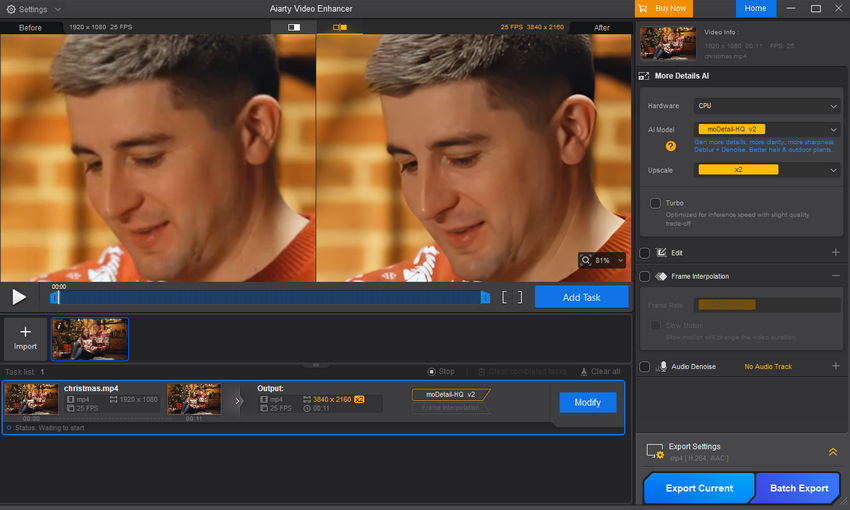
To make sure your videos look sharp and clear on Reddit, consider enhancing them before uploading. Tools like Aiarty Video Enhancer can help you upscale, sharpen, and denoise videos with ease. By improving the quality of your original content, you reduce the impact of Reddit’s compression and ensure your posts stand out in feeds.
What You Need to Know Before Posting Videos on Reddit
Before posting a video on Reddit, it’s important to understand the platform’s upload limits and technical requirements. While Reddit does support native video uploads, these limits can vary depending on the device you’re using and the subreddit you’re posting in.
In general, Reddit allows videos up to 1GB in file size and 15 minutes in length. Supported formats are MP4 and MOV, and videos should be encoded using the H.264 (AVC) codec for the best compatibility. Videos that don’t meet these requirements may fail to upload, lose audio, or appear heavily compressed after posting.
However, not all users experience the same limits. Some mobile uploads—especially on older apps or certain Android devices—may be restricted to much smaller file sizes, sometimes around 100MB. In addition, individual subreddits can impose their own rules, such as disabling native video uploads entirely or limiting video length. Always check the subreddit’s sidebar or wiki before posting.
Another thing to keep in mind is Reddit’s internal transcoding process. Even if your video is under the size limit, Reddit will reprocess it after upload. If the video doesn’t meet Reddit’s internal standards, it may be aggressively compressed or rejected altogether.
What to Do If Your Video Fails to Upload
If your video won’t upload or keeps failing, try the following:
- Compress the video to reduce the file size below 1GB.
- Convert the format to MP4 or MOV using the H.264 codec.
- Trim the length to stay under the 15-minute limit.
- Use an external host like YouTube or Streamable and share the link if the video is too long or large for native upload.
Understanding these limitations ahead of time can help you avoid upload errors and ensure your video posts smoothly on Reddit.
How to Post Videos on Reddit (Desktop Step-by-Step)
Posting a video on Reddit from a desktop browser is usually the easiest and most reliable method, especially if your video file is large or has sound. Follow the steps below to upload a video directly to Reddit on a PC or Mac.
Step 1: Log in to Reddit
Open your browser and go to Reddit.com. Make sure you’re logged in to your account. If you’re not signed in, you won’t be able to create a post.
Step 2: Go to the Subreddit Where You Want to Post
Navigate to the subreddit where you want to share your video. Before posting, quickly check the subreddit’s rules to confirm that native video uploads are allowed.
Step 3: Click "Create Post"
At the top of the subreddit page, click the Create Post button. You’ll see several post options, such as Text, Images & Video, and Link.
Step 4: Select the "Images & Video" Post Type
Choose Images & Video as the post type. This allows you to upload a video file directly from your computer rather than posting an external link.
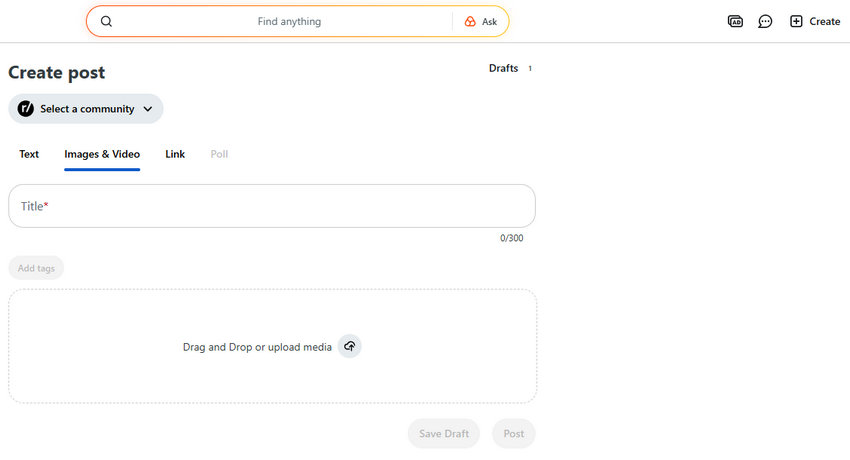
Tips: If the Images & Video option is greyed out, the subreddit may not allow native video uploads. In that case, you’ll need to upload your video to an external platform (such as YouTube, Imgur, or RedGIFs) and share the link instead.
Step 5: Upload Your Video File
Click the upload area or drag and drop your video file into the window. Then, wait for uploading.
Step 6: Add a Title and Optional Flair
Enter a clear and descriptive title for your post. Some subreddits require post flairs, so select one if needed. A good title can significantly improve your post’s visibility and engagement.
Step 7: Review and Post
Before clicking Post, double-check that:
- The video preview plays correctly
- Audio is working
- The correct subreddit is selected
Once everything looks good, click Post to publish your video.
How to Post Videos on Reddit Mobile / App
Posting videos using the Reddit mobile app is convenient, but it comes with more limitations than posting from a desktop browser. While the file size and length limits (1 GB and 15 minutes) are the same across both platforms, the mobile app often experiences more frequent upload failures and processing errors, especially with longer or higher-quality videos. The desktop experience provides a more stable upload process and access to more advanced post-management features.
Step 1: Open the Reddit App and Sign In
Launch the Reddit app on your iOS or Android device and make sure you’re logged in to your account.
Step 2: Tap the "+" (Create) Button
Tap the plus (+) button at the bottom of the screen to create a new post. You’ll then be asked to choose where to post your content.

Step 3: Select a Subreddit
Choose the subreddit where you want to upload your video. As with desktop posting, always check the community rules to confirm that native video uploads are allowed.
Step 4: Choose "Video" or Record a New One
Select Video as the post type. You can either:
- Upload an existing video from your phone’s gallery, or
- Record a new video directly within the app
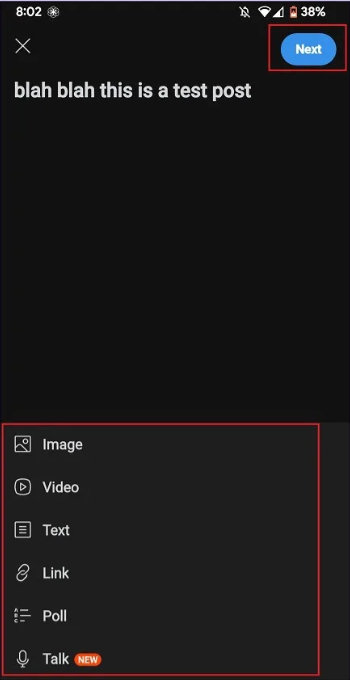
Step 5: Add a Title and Required Flair
Enter a title for your post. Some subreddits require a flair, so select one if prompted before continuing.
Step 6: Review and Post
Before posting, preview your video to make sure it plays correctly and includes sound. When everything looks good, tap Post to upload the video.
If you frequently run into upload issues on mobile, uploading from a desktop browser or preparing the video in advance can significantly improve your success rate.
Why Your Video Looks Blurry After Uploading to Reddit (and How to Fix It)
Many Reddit users notice that videos often look blurry or low-quality after uploading. This is primarily due to Reddit’s aggressive server-side compression, which reduces file size but also decreases sharpness and detail. Even high-resolution videos can appear fuzzy, especially if the original quality isn’t optimal.
Common Causes of Blurry Reddit Videos
- Reddit’s Compression: To save space and bandwidth, Reddit automatically compresses uploaded videos, which can noticeably reduce clarity.
- Low Source Quality: Videos recorded or exported in low resolution (e.g., 720p or below) cannot look sharper after compression.
- Incorrect Export Settings: Using the wrong format, codec, or bitrate—such as ProRes or very low resolutions—can make videos worse after upload.
- Playback Settings: Reddit sometimes defaults to "Auto" resolution, which may not use the highest quality available.
- File Size vs. Bitrate: Very large files may need bitrate or frame rate adjustment, but lowering too much can further reduce quality.
How to Improve Video Quality on Reddit
- Check Playback Settings: Click the gear icon on the video player and select HD or the highest resolution available.
- Use the Right Export Settings:
- Format: MP4 or MOV
- Codec: H.264 or HEVC (H.265)
- Resolution: Export at the highest possible (1080p, 4K, or preset like "YouTube 1080p Full HD")
- Adjust video bitrate/frame rate carefully to balance file size and clarity
- Enhance Your Video Before Uploading: If your source video isn’t sharp enough, tools like Aiarty Video Enhancer can upscale, sharpen, and denoise your videos. Enhancing videos before posting can significantly reduce blur caused by Reddit compression.
- Use a Third-Party Host: For NSFW, very long, or extremely high-resolution videos, consider uploading to YouTube or Vimeo and sharing the link on Reddit. This bypasses Reddit’s compression entirely.
- Upload Original Quality: Make sure your recording device or editing software isn’t downscaling the video before upload.
 FAQs
FAQs
To post a video directly on Reddit without it being a link, use the "Images & Video" tab when creating a new post, select your video file (MP4, MOV, etc., under 15 mins/1GB), upload it, add a title, and post, ensuring the subreddit allows direct video uploads; if it doesn't, the post defaults to a link.
To post videos with sound on Reddit, use the app’s “Video” post type and upload your video in MP4 or MOV format. Make sure your device volume is up and the in-app speaker icon (bottom-right) is unmuted. If the video still has no sound, check Profile > Settings to disable “Mute videos by default” or Quiet Mode, and ensure your app is updated. Note that NSFW videos or long videos may be muted on mobile—use a desktop browser or upload to YouTube/Imgur and share the link to preserve audio.
You can’t upload videos directly in comments. Instead, share a video link, post a GIF (if allowed), or upload the video as a new post and link to it in your comment.
Upload your video to RedGifs, copy the shareable link, then create a “Link Post” on Reddit and paste the URL.
Upload your video to Imgur and get the direct link (ending in .mp4 or .gifv). On Reddit, create a “Link Post”, paste the link, add a title, and post. Make sure the subreddit allows link posts and consider using .gifv for smoother playback.
You May Also Like


This post was written by Brenda Peng who is a seasoned editor at Digiarty Software who loves turning ordinary photos into extraordinary works of art. With AI assistance for brainstorming and drafting, the post is reviewed for accuracy by our expert Abby Poole for her expertise in this field.
