


High-volume real estate photography is a race against the clock. In an industry where "time is money" isn't just a cliché—it's the difference between winning a new listing and losing it—you need magazine-quality results, and you usually need them by tomorrow morning.
To hit those deadlines without burning out, you can't rely on manual clicks alone. You need a specialized "software stack" that handles the heavy lifting for you. After testing the top contenders for speed, quality, and AI-driven features, these are the 5 editors I recommend to streamline your workflow and get your nights back.
1. Adobe Lightroom Classic: The Architectural Command Center
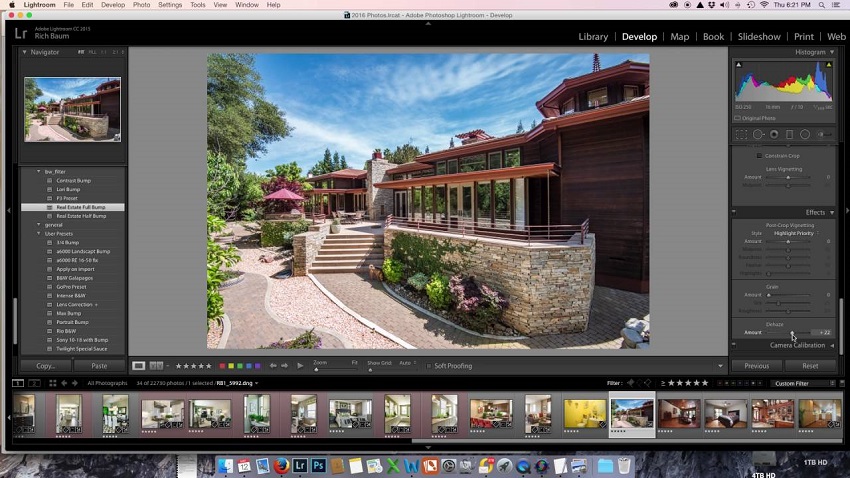
Adobe Lightroom Classic remains the undisputed "home base" for the real estate industry, primarily because it functions as both a high-end darkroom and a massive filing cabinet. For the professional photographer, the value lies in the catalog system. When you are managing thousands of images across dozens of properties, the ability to find a specific shot from three years ago in seconds is a massive operational win. For the real estate agent, Lightroom's value is found in its technical precision—specifically its ability to handle "white balance" and "verticals," which are the two pillars of a clean listing.
The Strengths of a Standardized Workflow
The most significant advantage of Lightroom is its "Transform" engine. In real estate, vertical lines are non-negotiable; if a house looks like it is tilting backward or the walls are bowing, the property feels structurally "off" to a potential buyer. Lightroom's "Guided Upright" tool allows you to manually snap these lines into perfect alignment, ensuring the architecture looks stable and professional.
Beyond structural fixes, the software excels at High Dynamic Range (HDR) processing. Real estate photography almost always involves "bracketing"—taking multiple shots at different exposures to capture both a dark window view and a bright interior corner. Lightroom merges these files into a 32-bit DNG, which gives you an incredible amount of "data overhead." You can pull back the highlights of a sun-drenched patio and lift the shadows of a dark hallway simultaneously without the image falling apart or looking "crunchy."
Furthermore, the recent integration of AI-powered masking allows you to select just the sky or just the windows with a single click, enabling you to add punch to the exterior view without turning the interior walls an unnatural color.
Also learn: Step-by-step Guide on How to Edit Real Estate Photos
The Compromises of a Professional Tool
However, this level of power comes with a specific set of hurdles, the most obvious being the subscription-based model. Unlike "buy-it-once" software, Adobe requires a monthly commitment. For a high-volume photographer, this is just the cost of doing business, but for an agent who only handles a few listings a month, it can feel like a "subscription tax" that never ends.
There is also a significant learning curve to consider. Lightroom is not an "open-and-click" app; it requires a foundational understanding of histograms, tone curves, and color temperature. A novice can easily over-edit a photo, leading to the dreaded "HDR look" where colors look radioactive and shadows look flat.
Finally, the software has become increasingly demanding on hardware. As Adobe adds more Generative AI features, such as "Generative Remove" for deleting unwanted objects, the processing power required has spiked. If you are working on an older office laptop, you may find the software sluggish, which ironically eats into the very time you were trying to save.
2. Aiarty Image Enhancer: The Specialist for Detail Recovery
While Lightroom is where you build the overall look of a home, Aiarty Image Enhancer is where you save it from technical flaws. In real estate photography, you are often at the mercy of difficult environments: dim basements, gloomy weather, or high-contrast scenes that force your camera to its limits. This is where Aiarty steps in. It doesn't just "edit" the pixels you already have; it uses generative AI to reconstruct missing information, making it an essential specialized tool for both the professional photographer needing to deliver 4K "hero" shots and the agent trying to clean up a grainy smartphone photo.
The Strength of Generative Detail
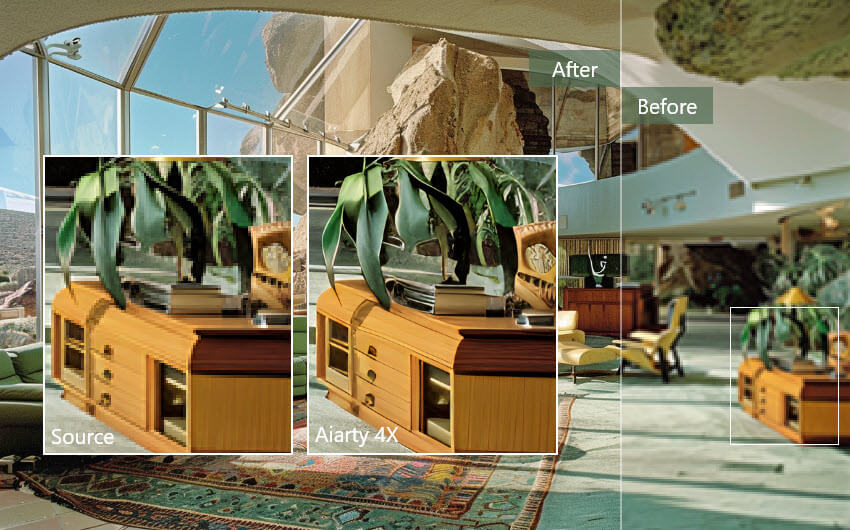
The standout feature of Aiarty is its More-Detail GAN model. Unlike traditional sharpening tools that often create "halos" or an artificial "crunchy" look, this model is designed to recognize and enhance real-world textures. In a listing, this means that hardwood grains look deep and polished, marble countertops look sharp and clean, and exterior brickwork retains its natural grit. It's particularly effective at "de-noising"—removing the digital grain found in low-light shots—without turning the walls into a blurry, plastic-looking mess.
Another massive workflow advantage is its upscaling capability. In 2026, high-resolution displays are the norm, and a small, cropped photo of a luxury bathroom or a designer faucet can look pixelated on a buyer's 4K screen. Aiarty can take that small crop and upscale it to 4K, 8K, or even 32K resolution, generating new, realistic pixels to fill in the gaps. Furthermore, because the software runs entirely offline on your computer's local hardware, it offers a level of privacy and speed that cloud-based competitors can't match. You aren't waiting for an upload or a download; you're getting professional results directly on your machine.
The Trade-offs of a Dedicated Tool
However, users should understand that Aiarty is a specialized instrument, not a complete photo management suite. You won't use it to organize your entire library or to perform the complex "flambient" blending that professionals do in Photoshop. It is a dedicated step in the workflow—usually the final touch for the most important "hero" images in a listing.
Additionally, because the software is performing heavy AI inference, it can be demanding on your system's GPU. While it's highly optimized, processing a batch of 50 images at maximum upscaling will take significantly longer than a standard export in Lightroom. There is also the "authenticity" factor to keep in mind; the AI is so good at reconstructing details that if the "Strength" slider is pushed too high, a room can start to look too perfect, bordering on a 3D render. For real estate, the goal is always "enhanced reality," so users must exercise a bit of restraint to ensure the home still looks like a place that actually exists.
3. Luminar Neo: The Master of Atmosphere and Lighting
Luminar Neo has carved out a unique space in the real estate world by focusing on "generative atmosphere." While professional editors once spent hours meticulously masking out gray skies or manually painting light into dark corners, Luminar Neo uses a 3D depth-mapping engine to automate these tasks. For the agent, it offers a way to produce "magazine-quality" vibes without a photography degree. For the professional, it serves as a high-speed engine for external corrections, particularly when a shoot scheduled weeks in advance happens to fall on a day with flat, uninspiring weather.
The Power of AI-Driven Environmental Control
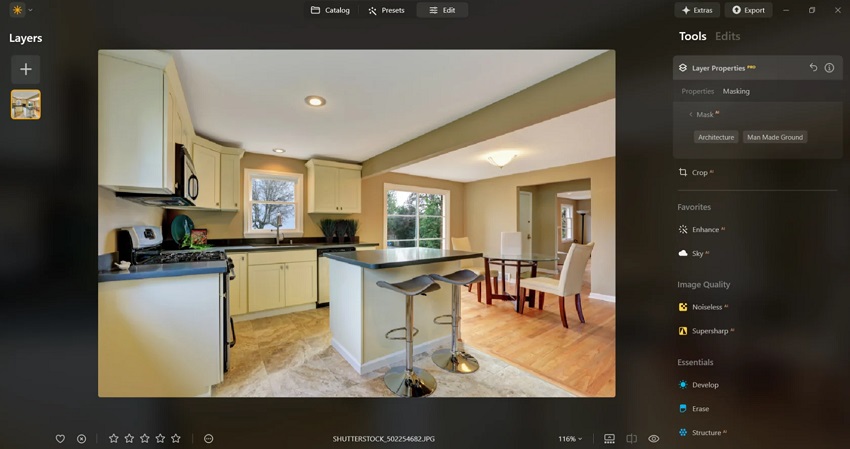
The software's most famous contribution to the field is its Sky AI. Unlike simple filters, this tool identifies the horizon line, wraps around complex architectural silhouettes like chimneys and gables, and replaces a blown-out white sky with a vibrant blue one. Crucially, it also "relights" the entire scene; if you swap in a sunset sky, the AI intelligently shifts the color temperature of the house itself to match the warm, golden glow. This creates a cohesive, believable image that avoids the "pasted-on" look of lesser editors.
Beyond the sky, Luminar's "Relight AI" is a specific lifesaver for interior photography. By building a virtual 3D map of the room, it allows you to brighten the far end of a deep living room without overexposing the furniture closest to the lens. This solves the age-old problem of "light fall-off" in large spaces. Additionally, its generative tools, such as GenErase, allow you to "scrub out" distracting elements—like a neighbor's trash cans or a stray garden hose—with a level of speed and context-awareness that makes traditional cloning and healing tools feel prehistoric.
The Limitations of Creative Automation
The primary drawback of Luminar Neo is its demand on system resources. Because it is constantly calculating 3D depth and generative fills, it can be quite taxing on a computer's RAM and processor. Users on older hardware may experience a "lag" between moving a slider and seeing the result, which can hinder the flow of a long editing session. Furthermore, the software's greatest strength is also its potential pitfall: it is incredibly easy to over-edit. A sky that is too dramatic or a lawn that is too green can trigger a "too good to be true" response in savvy buyers, potentially damaging the credibility of the listing.
Finally, while Luminar Neo is a brilliant creative tool, it lacks the robust file management and batch-processing capabilities of Lightroom. Most professionals use it as a surgical "plugin"—they do their bulk work in a catalog manager and then send their "Hero" shots over to Luminar for the final atmospheric touches. It's an additive tool rather than a replacement for a core workflow, meaning it's another piece of software to learn and maintain in your digital toolkit.
4. Imagen AI: The Architect of Scalable Workflow
In the high-pressure world of 2026 real estate, speed is no longer just a luxury; it is the baseline requirement. Real estate agents often expect a 24-hour turnaround to get a listing live while the market is hot, and for a photographer shooting three to five homes a day, manual editing becomes a physical impossibility.
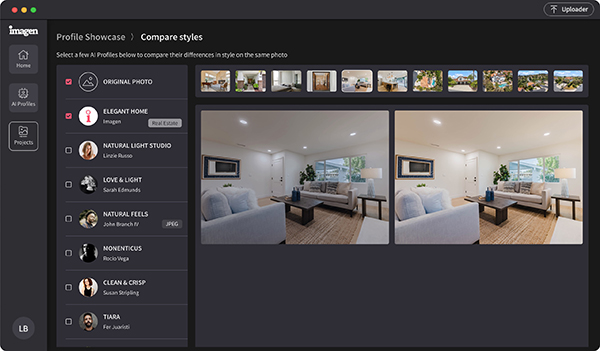
Imagen AI solves this bottleneck by acting as a "digital clone" of the editor. It is a desktop-first application that integrates directly with Adobe Lightroom, using cloud-based artificial intelligence to process thousands of images in minutes based on highly specific, learned behaviors.
The Strength of Personalized Automation
The true innovation of Imagen AI lies in its "Personal AI Profiles." Unlike a static preset that applies the same blanket settings to every photo regardless of the lighting, Imagen analyzes each image individually. It "learns" your specific style by analyzing your past work—understanding exactly how you prefer to balance white walls against warm floor lamps. When you upload a new shoot, the AI applies these preferences with surgical precision, adjusting exposure, temperature, and contrast for every unique room.
For real estate specifically, Imagen has evolved into a "full-stack" solution. It doesn't just color-grade; it handles the most tedious technical chores of the genre. Its AI HDR Merge automatically identifies and blends bracketed exposures to recover window views, while its Perspective Correction identifies architectural lines to ensure every wall is perfectly vertical. It even features a "Window Pull" tool that masks and balances interior and exterior light levels across a hundred photos in the time it would take a human to do one. Because it only transfers metadata (small instructions) to the cloud rather than giant raw files, the speed is staggering—often clocking in at less than half a second per image.
The Trade-offs of a Cloud-Volume Model
Despite its efficiency, Imagen AI introduces a "pay-per-edit" financial model that requires a shift in mindset. You aren't buying the software; you are paying a small fee (usually around $0.05 per photo) for the service of editing. While this is significantly cheaper than human outsourcing, it means your overhead scales directly with your volume. There is also a small "minimum monthly commitment," making it less ideal for the occasional hobbyist than for the active pro or busy agency.
Furthermore, while the AI handles 95% of the work, it is not a "set it and forget it" solution. Real estate lighting is notoriously messy—mixed bulbs, weird window tints, and reflective surfaces can occasionally confuse even the best AI. This means a "sanity check" is still required before delivery. You are still the creative director; the AI is simply your incredibly fast assistant. Finally, because the "brain" of the tool lives in the cloud, a stable internet connection is mandatory to send and receive your edit instructions, which could be a hurdle for those working in remote areas or on the road.
5. BoxBrownie: The "Done-For-You" Powerhouse
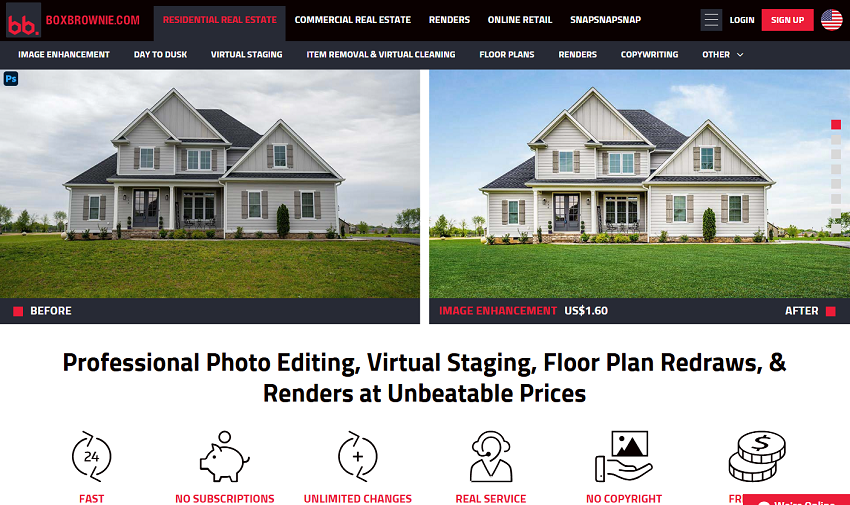
BoxBrownie is unique on this list because it isn't a single piece of software you install; it is a global, 24/7 editing ecosystem. For the professional photographer, it is a way to outsource the most time-consuming, specialized tasks—like virtual renovations or complex item removal—without hiring a full-time employee. For the real estate agent, it acts as a complete "one-stop-shop" marketing department. Whether you need a blurry sketch turned into a 3D floor plan or a cluttered garage digitally cleaned, BoxBrownie provides a human-verified result that AI tools in 2026 still struggle to match in terms of "common sense" and design logic.
The Strength of Professional Human Oversight
The true value of BoxBrownie lies in its versatility and its "no-subscription" model. Unlike the recurring costs of Lightroom or the credit-based systems of some AI tools, BoxBrownie operates on a transparent, à la carte pricing structure. This makes it incredibly attractive for agents who only need high-end work for a few premium listings a year. Their Virtual Staging remains a gold standard; because human editors oversee the placement of furniture, the scaling and "flow" of the room feel natural, avoiding the awkward "floating chair" syndrome sometimes seen in fully automated AI staging.
Furthermore, BoxBrownie excels at the "dirty work" of real estate. Their Item Removal and Virtual Cleaning service is legendary for taking a home that was lived-in and messy and presenting it as a pristine, move-in-ready sanctuary. They don't just "blur" out clutter; they realistically reconstruct the flooring and walls behind the removed objects. They also offer a massive range of peripheral services that software alone can't provide, such as redraws of 2D/3D floor plans and full architectural renders for new construction. If you have a problem that a slider can't fix—like a tenant who refused to move their car out of the driveway—BoxBrownie is the solution.
The Trade-offs of a Service-Based Model
The most significant hurdle with BoxBrownie is the "time-lag." Even with their impressive 24-hour guarantee (and 48 hours for virtual staging), it is still a lifetime away compared to the near-instant results of Aiarty or Imagen AI. In the fast-paced real estate world, a 24-hour wait can feel like a bottleneck if you're trying to get a listing live on a Friday afternoon. Additionally, because you are dealing with a human service, there is a "back-and-forth" factor. If the staging style isn't exactly what you envisioned, you have to request a revision and wait for the turnaround again, which can be a significant workflow killer.
Cost is also a factor that scales linearly. While a $1.60 image enhancement or a $24 virtual staging is affordable for one photo, those costs add up quickly for a professional shooting hundreds of homes a year. For high-volume users, the "pay-per-photo" model eventually becomes more expensive than mastering the software themselves. Finally, because you are outsourcing the work, you lose a degree of creative control over the "soul" of the edit. You are trusting an anonymous editor to interpret your brand's look, which is why most top-tier professionals use BoxBrownie only for specialized "exception" cases rather than their entire daily workflow.
Comparison Table of 5 Best Real Estate Photo Editors
Summary: The "Smart Stack" Strategy
Efficiency in real estate photography isn't about finding one "magic button" tool; it's about building a stack where each piece of software solves a specific bottleneck.
By starting your journey in Lightroom for organization, using Imagen AI to handle the heavy lifting of batch color correction, and keeping Luminar Neo on standby for sky replacements, you eliminate 80% of the manual labor. But the true professional edge comes from those final, high-impact fixes. Integrating a tool like Aiarty Image Enhancer ensures that even your most "difficult" shots—the ones plagued by low-light grain or soft focus—meet the 4K standards of modern listing portals.
In 2026, the most successful photographers aren't the ones who spend the most time behind a monitor; they're the ones who have mastered the art of "editing by exception." By automating the routine and using specialized AI for the refinements, you can deliver a premium gallery in half the time it took just a few years ago.
You May Also Like


This post was written by Brenda Peng who is a seasoned editor at Digiarty Software who loves turning ordinary photos into extraordinary works of art. With AI assistance for brainstorming and drafting, the post is reviewed for accuracy by our expert Abby Poole for her expertise in this field.
