


Narrative Select Quick Verdict
To get the best results, the solution depends on the source of the blur. Here is the Official Recommended Workflow for 2026:
- Rating: 4.6/5
- Best for: Wedding and event photographers handling large photo batches
- Key strength: Fast AI culling with highly accurate eye and focus detection
- Main drawback: Subscription pricing and no built-in editing tools
Narrative Select is one of the fastest and most reliable AI photo culling tools available right now. It excels at quickly identifying sharp images, detecting closed eyes, and grouping similar shots - making it ideal for high-volume workflows. However, if you're looking for a full editing solution or a budget-friendly option, there are better alternatives.
Culling thousands of photos manually in Adobe Lightroom can easily take hours, especially for wedding and event photographers. That's where AI-powered tools like Narrative Select come in.
Narrative Select is designed to speed up the most time-consuming part of a photographer's workflow: selecting the best shots from large batches. Instead of reviewing every image one by one, the software uses AI to analyze focus, eye status, and composition, helping you narrow down your keepers in a fraction of the time. But how well does it actually perform in real-world use? And more importantly, is it worth the price compared to other AI culling tools like AfterShoot or FilterPixel?
In this review, I tested Narrative Select on a large photo set to evaluate its speed, accuracy, and overall workflow impact, so you can decide if it's the right tool for your needs.
What Is Narrative Select
Narrative Select is basically a tool built for one thing: helping you get through photo culling way faster.
If you've ever tried to go through a few thousand RAW files in Adobe Lightroom, you already know how painful that process can be. Narrative Select tries to cut that down by using AI to pre-analyze your images, things like sharpness, whether someone blinked, and which shots are almost identical.
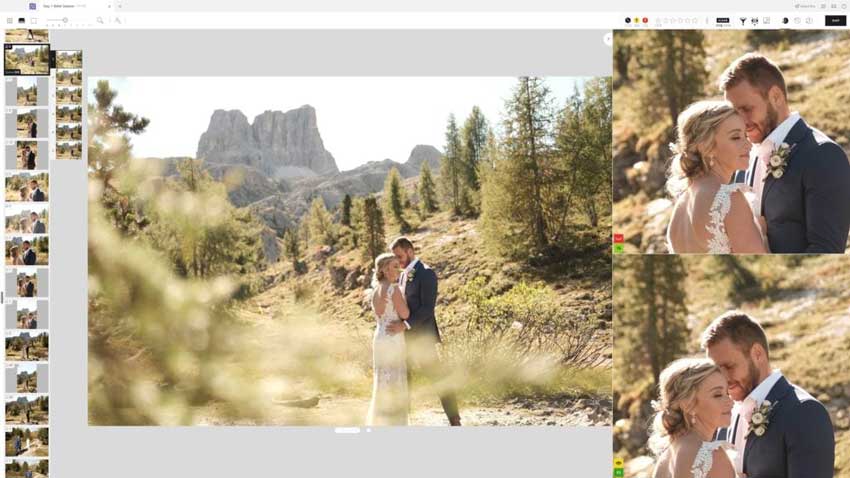
Instead of checking every photo manually, you're mostly reviewing groups and picking the best one. It doesn't completely replace your judgment, but it removes a lot of the repetitive work. From what I've seen, it's mainly aimed at photographers who deal with volume, weddings, events, portraits, not someone editing a handful of casual shots.
Key Features of Narrative Select
AI Culling
The core idea is simple: you import your photos, and it starts grouping similar shots automatically. In practice, this means you're not scrolling endlessly anymore. You'll see clusters of near-duplicates, and usually one or two images are clearly better. Most of the time, the AI gets you pretty close to the right pick, not perfect, but good enough to speed things up.
Eye & Focus Detection
This is one feature that sounds minor, but ends up saving a lot of time.
You can quickly spot things like:
- Someone blinking
- Slightly out-of-focus shots
- Frames that just aren't usable
Instead of zooming into every image, you already have a rough signal of what's worth checking.
Face Grouping
When you're working with portraits or events, the face grouping helps keep things organized. Photos of the same person tend to stay together, which makes the review process feel more structured. That said, it's not flawlessm, occasionally it mixes things up, especially in crowded scenes. Still, it's better than having everything completely unorganized.
Speed
The biggest difference compared to traditional tools is just how fast everything feels. You're not waiting for full RAW previews to load every time. Scrolling is smooth, switching between images is instant, and that alone makes a noticeable difference when you're going through hundreds or thousands of photos.
The Professional's Bridge: From Culling to High-Fidelity Output
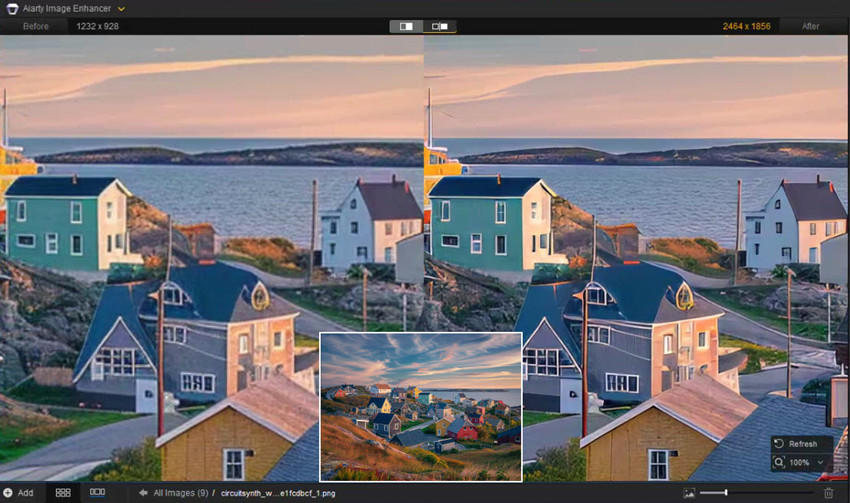
Speed is nothing without quality. While Narrative Select gets you through 2,000 RAWs in record time, what happens when your "keeper" has a slight focus miss or heavy ISO noise?
This is where I integrate Aiarty Image Enhancer into my stack. Unlike many AI tools that create a "waxy" or plastic look, Aiarty's More-Detail GAN model is specifically trained to reconstruct natural textures—think skin pores, fabric fibers, and individual hair strands. It's the perfect "safety net" for those emotionally perfect but technically soft shots you just can't bring yourself to delete.
My Hands-On Experience Using Narrative Select
Using Narrative Select is actually pretty straightforward, and that's part of why it works well. Here's what it looked like for me:
- Step 1. Import a full shoot into Narrative Select.
- Step 2. Let the AI scan and group similar images.
- Step 3.Go through each group and pick the best shot.
- Step 4.Export the selected images to Adobe Lightroom for editing.
That's it. No complicated setup, no training phase.
What changed wasn't the steps - it was how much time each step took. Instead of going image by image, I was mostly making decisions at the group level.
To get a realistic sense of how it performs, I tested Narrative Select on a larger batch instead of a small sample.
- Dataset: Around 1,200 RAW images (portrait + event mix).
- Device: Desktop (GPU enabled).
- Goal: Reduce culling time without missing key shots.
What actually felt faster
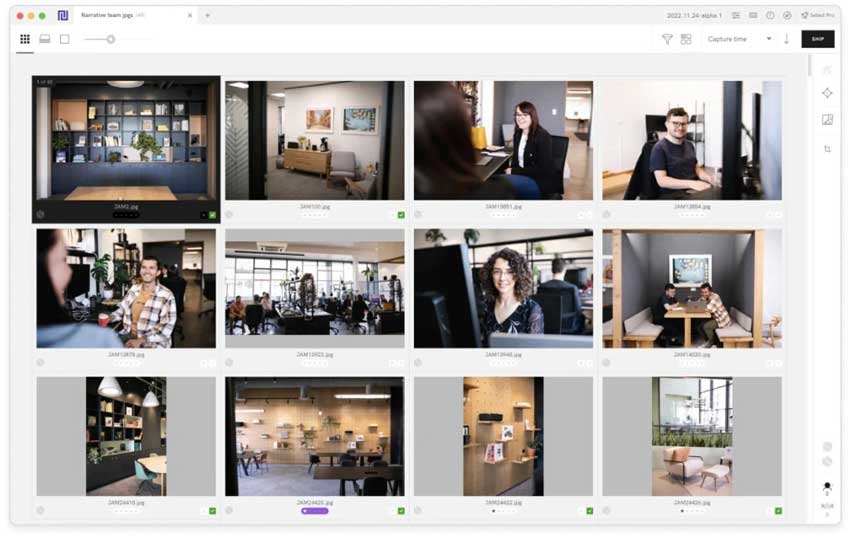
The biggest difference showed up in the first pass. Normally, this is where most of the time goes - checking similar shots, zooming in, second-guessing. With Narrative Select, a lot of that friction is gone.
- Similar images were already grouped
- The "best" shots were usually easy to spot
- I didn't need to zoom in nearly as often
The first culling pass felt significantly faster, probably 50–70% less time compared to doing it manually in Adobe Lightroom.
Where the AI worked well
There were a few areas where the AI was consistently helpful:
- Eye detection → caught most blinking shots correctly
- Sharpness signals → good enough to filter out obvious misses
- Grouping → reduced a lot of repetitive comparisons
It's not making decisions for you, but it narrows things down so you're not starting from zero.
Where it still needs manual review
This is important - it's not a "set it and forget it" tool.
I still had to step in for:
- Subtle differences (expression, emotion, composition)
- Situations where multiple shots were technically "good"
- Occasional misgrouping in busy scenes
In other words, the AI handles the technical filtering, but the creative selection is still on you.
What surprised me
One thing I didn't expect was how much the speed alone changes the experience. Even outside of AI decisions, just being able to scroll instantly/switch images without lag/avoid RAW loading delays makes the whole process feel less exhausting. That part is honestly underrated.
Bottom line from testing
Narrative Select doesn't completely replace manual culling, but it removes a large chunk of the repetitive work. If you're dealing with hundreds or thousands of images regularly, the time savings are very noticeable. If you're only working with small batches, the difference is much less dramatic.
Narrative Select Pricing
As of 2026, Narrative Select offers a subscription-based pricing model. Here's the breakdown:
Is it worth the price?
In my opinion, if you're working on a high-volume workflow (like weddings, events, or portraits), the time saved using Narrative Select easily justifies the subscription cost. If you only shoot small batches, however, the price might feel steep for what you get.
Pros and Cons of Narrative Select
✅ What I Like about Narrative Select
- Time-saving: AI significantly reduces culling time by grouping and filtering similar images.
- Accuracy: Eye and focus detection are often spot-on, saving you time reviewing blurry or closed-eye shots.
- Smooth workflow: The software integrates well with popular photo editing tools like Lightroom and Capture One, allowing for a seamless process.
- Speed: The RAW preview performance is smooth, and browsing through large sets of images feels fast and responsive.
❌ What I Don't Like about Narrative Select
- Subscription-based pricing: No one-time payment option, which may not suit all budgets.
- Limited editing features: While the culling is impressive, it's not an all-in-one tool for editing. You'll still need other software like Lightroom for final edits.
- Not always perfect AI: While the AI is accurate in many cases, it's still far from flawless and requires some manual review, especially with more complex shots or crowded scenes.
Is It Right for You?
If you're a photographer who regularly deals with large batches of images, Narrative Select can absolutely save you hours of work each time you cull photos. The AI's ability to group similar shots and flag unusable ones (like closed eyes or blurry images) allows you to focus more on the creative side of things, rather than the technical. The time-saving benefits are undeniable, especially for weddings, portraits, or event photography. However, if you're someone who only shoots a handful of photos per session or works on a tight budget, the subscription model might feel unnecessary. For occasional photographers, free alternatives like Lightroom or even manual selection may be more appropriate.
Final Verdict: Is Narrative Select Worth It?
Verdict: Yes, but with conditions
After testing and reviewing Narrative Select, here's my final take:
Narrative Select is an incredibly efficient tool for high-volume photographers who need to cull large batches of photos quickly. Its AI-powered culling is a huge time-saver, particularly with its features like eye detection, focus assessment, and grouping similar images. If you're working on weddings, events, or any shoot where speed is essential, this tool can save you hours of manual work. However, it's not perfect. For those who only shoot small batches or need more customization in how the AI works, tools like AfterShoot or FilterPixel might be better alternatives. Additionally, the subscription-based pricing might feel like a downside for photographers on a tight budget or those who don't need AI for every shoot.
 FAQs
FAQs
The short answer is no. Narrative Select operates on a subscription-only model. As of 2026, plans range from the Lite ($10/mo) tier for basic culling to the Ultra ($60/mo) tier for advanced AI editing. While there is no "one-time payment" option, the subscription ensures your AI models for face and focus assessment stay updated with the latest 2026 machine learning improvements.
It depends on your workflow philosophy: "Co-pilot" vs. "Autopilot."
Narrative Select is best for photographers who want to remain the final decision-maker. Its Close-ups Panel allows you to manually verify expressions at lightning speed.
Aftershoot is superior for those who want the AI to handle the entire selection process automatically. If you care about preserving natural skin textures and intent, Narrative's "AI-assisted" approach is generally preferred by high-end portrait and wedding photographers.
Yes. Narrative Select features a high-performance local RAW engine that renders previews almost instantly (under 3 seconds for thousands of images). It supports all major formats including CR3, ARW, and NEF. Because it handles rendering locally, you don't experience the lag typical of cloud-based culling tools.
Absolutely. One of Narrative's core SEO "hooks" is its offline capability. While you need an internet connection for the initial app activation and syncing AI Editing presets, the core AI Culling and Image Assessments happen on your local GPU. This makes it the ideal tool for travel photographers or those working in remote locations.
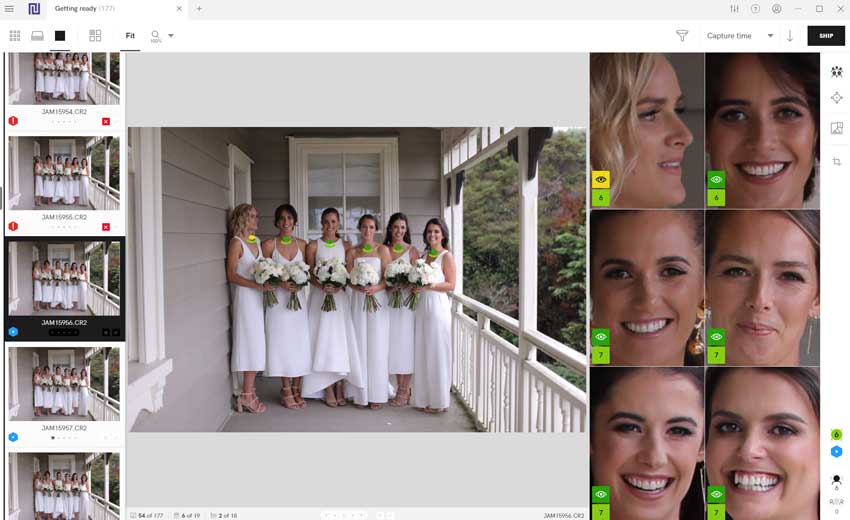
Narrative uses AI Assessment Indicators (colored icons) to categorize eyes and focus:
- Green: Eyes open and tack-sharp focus.
- Yellow: Squinting, looking down, or "soft" focus.
- Red: Closed eyes or unusable blur. You can use the Global Filters to instantly hide all "Red" flagged images, effectively removing 40-60% of your "trash" shots in a single click.
You May Also Like


This post was written by Brenda Peng who is a seasoned editor at Digiarty Software who loves turning ordinary photos into extraordinary works of art. With AI assistance for brainstorming and drafting, the post is reviewed for accuracy by our expert Abby Poole for her expertise in this field.
